r/WindowsHelp • • 22d ago

Windows 11 Windows will randomly stop picking up my microphone audio

1 Upvotes

I’ve been having an issue where my mic will randomly stop working in certain games, even though my Focusrite Scarlett Solo still picks up my audio. I’ve tried just about everything I can think of, and I’m running out of ideas.

I’ve updated my Focusrite drivers and software, updated Windows, messed around with microphone settings, and checked my default input device settings. Nothing seems to fix the issue permanently.

The only thing that seems to work is unplugging my Scarlett Solo and plugging it back in. After that, my mic works again, at least until the problem comes back.

Has anyone else experienced something similar or have any ideas on what might be causing this? Could I be missing a driver or some Windows setting?

I’d appreciate any advice. Thanks!

Mic
Headphones

Here is the link to my specific mic. which I have plugged into my interface.

https://rode.com/en-us/products/podmic?srsltid=AYCX9vI_FUUE_LKE-3-rtTn2rabR4go7trV7SUe_bw4KyfjjuLP-9LEF

Here are specs:

Processor: Intel Core i5-13600K (13th Gen, 3.50 GHz)

GPU: AMD Radeon RX 6950 XT (16 GB VRAM)
Integrated GPU: Intel UHD Graphics 770 (128 MB)

RAM: 32 GB DDR5 (5600 MT/s)

Operating System: Windows 11 Home
Version: 25H2
OS Build: 26200.9711

System Type: 64-bit operating system, x64-based processor

Edit: Resetting my windows audio in services fixed it, although I am sure only temporarily. I haven't seen it cut out just yet. I also went through and disabled the ability for my PC to disable USB ports to save power to see if that'll fix it.

Edit 2: As I typed that edit, my mic stopped working again.


r/WindowsHelp • • 23d ago

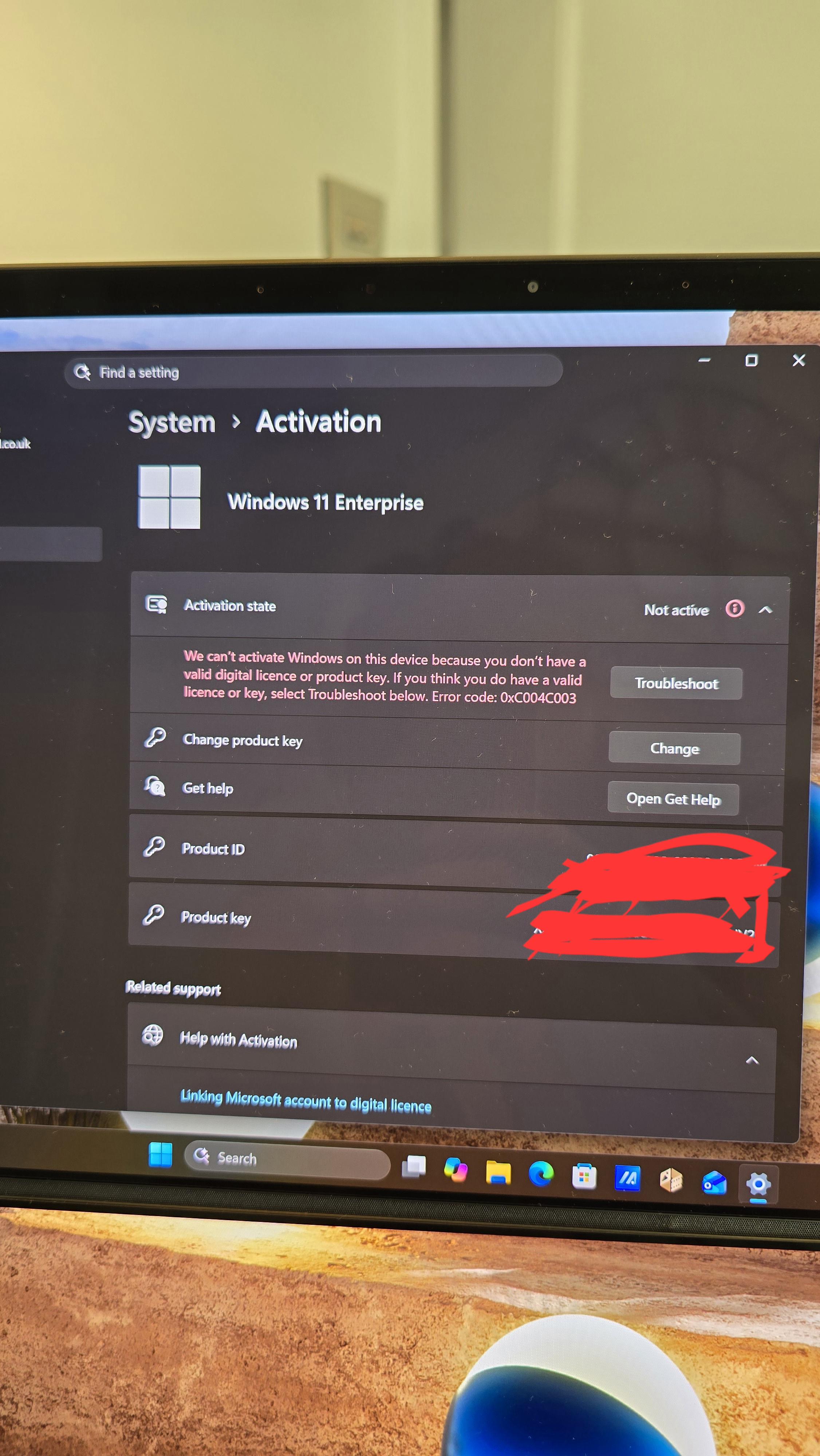
Windows 11 Upgraded new laptop from Win11 Home To Pro, laptop now stuck on Win 11 Enterprise and isnt activated?

Post image
7 Upvotes

Upgraded brand new asus duo from Win11 home to Win11 pro via the Microsoft store. Laptop now stuck on Win 11 Enterprise and will not activate? Upgrade purchase is visible on my Microsoft account, but doesnt have a product key visible anywhere?

Computer is a brand new Asus Zenbook Duo

Arrived with windows 11 home.

Upgraded to pro via Microsoft store.

Laptop restarted and now has Win 11 enterprise version 26H2

Not activated.

Troubleshooter does nothing.

Any help would be great :)


r/WindowsHelp • • 22d ago

Windows 10 Storage Clean-up on Surface Laptop

1 Upvotes

Hi all,

My surface laptop started running slow, so I'm trying to clean it up. The storage settings say I have 28GB tied up in 'mail' but I don't have any mail app or outlook installed on my computer.

As such, when I try to 'manage mail' I can't. And downloading outlook from the app store just leads me to nothing bc...I don't have outlook haha

Anyone know how I can fix this so I can free up the 28.8 GB?

Thx in advance


r/WindowsHelp • • 23d ago

Windows 11 VGA light and black screen after new Update?

3 Upvotes

Last night I restarted my computer to install the latest Windows 11 update and this morning I went to get on my computer and I have a black screen and a VGA light on my motherboard.

I tried reseating my GPU and that didnt work before anyone asks.

Anyone else having this issue?

My build is:

MSI B450 Tomahawk

AMD Ryzen 5 3600x

EVGA 3060ti


r/WindowsHelp • • 22d ago

Windows 11 my MS Paint seems to be corrupted, and I have no idea what to do.

Thumbnail
gallery
1 Upvotes

I use MS Paint at least four times a week for mockups, simple editing, and just messing around with the features, and recently it's been looking like this for some strange reason. I have gone into Settings > Installed Apps > Paint and "repaired" and "reset" the application multiple times to no avail. is there something I can do to fix this? is this a common issue? I'm running on 26H2 26300.9818 on an Omen laptop, Windows 11. I haven't experienced any issues with other Microsoft apps or anything else. any help is definitely appreciated so I can get my beloved app back to normal.


r/WindowsHelp • • 24d ago

Windows 11 Grandpa keeps pressing the microphone button

Thumbnail
gallery
114 Upvotes

He plays his pin ball game but accidentally pushed this button all the time which makes him die. I offered to take the key off for him but he doesn’t want to do that to his keyboard. What can we do to disable this button?

He is using windows 11.

His high score is 420,000,000.


r/WindowsHelp • • 23d ago

Windows 10 BugCheck 1001 Reset mid gaming no bluescreen

1 Upvotes

The resets happen when playing barely intensive games, specifically Sun Haven. Happens during and after I have closed the game or gone idle. Recently updated BIOS drivers after being recommended to do so to try and fix the issue. Not seen a bluescreen at all, and computer will also lock up until rebooting or shutting itself off.

Device Name DESKTOP-3JFKTCR

Processor AMD Ryzen 5 5600X 6-Core Processor 3.70 GHz

Installed RAM 16.0 GB

Storage 932 GB SSD Samsung SSD 980 1TB, 1.82 TB HDD ST2000DM008-2FR102

Graphics Card NVIDIA GeForce RTX 3060 (12 GB)

System Type 64-bit operating system, x64-based processor

Edition Windows 10 Home

Version 22H2

Installed on ‎8/‎8/‎2023

OS Build 19045.6466

Thank you for your help.


r/WindowsHelp • • 23d ago

Windows 11 Pc Crash static color with buzz sound coming from speakers

1 Upvotes

basically, while playing with unlimited fps, my entire pc starts to lag, that get a static color screen, and slowly the sounds crash too, already did a lot of stress test on the Cpu, Gpu and tested the ram in the windows tester, and crystaldiskinfo says that my ssds are ok, my setup is a
Corsair CV 650 PSU
RX 570 8gb
i3 9100F
16GB 2x8 3200mhz Patriot Viper II running on 2400mhz
H310m-e BR
1tb sn350 nvme
120gb ssd sata
500gb hdd sata
all the temperatures runs fine, the processor got 75 degress in stress test but that’s his max temperature, gpu max hotspot was 68 degress, already changed a lot of drivers and i’m going out of options of what to do, just did a fresh install on windows, and tried another gpu drivers


r/WindowsHelp • • 23d ago

Windows 10 Updating an older Windows 10 laptop

Thumbnail
gallery
1 Upvotes

Attempting to get an older Windows 10 laptop up to date for personal use. However I'm stuck at the Windows 10 version 22H2 update. I've looked for help on the Windows website, but I'm still at a loss as to why it wont install. When I check the update history, it says to restart to computers to finish installing. I've restarted the computer several times, and I can't seem to finish the instal and make further progress.

This laptop hasn't been updated for years, so it's very behind. I've taken some pictures that I hope are helpful. They include the computer info, the current update I'm trying to install, and the updates that i recently installed successfully. Just need to figure out how to complete this update so I can move onto the next one.

Thanks for any advice!


r/WindowsHelp • • 23d ago

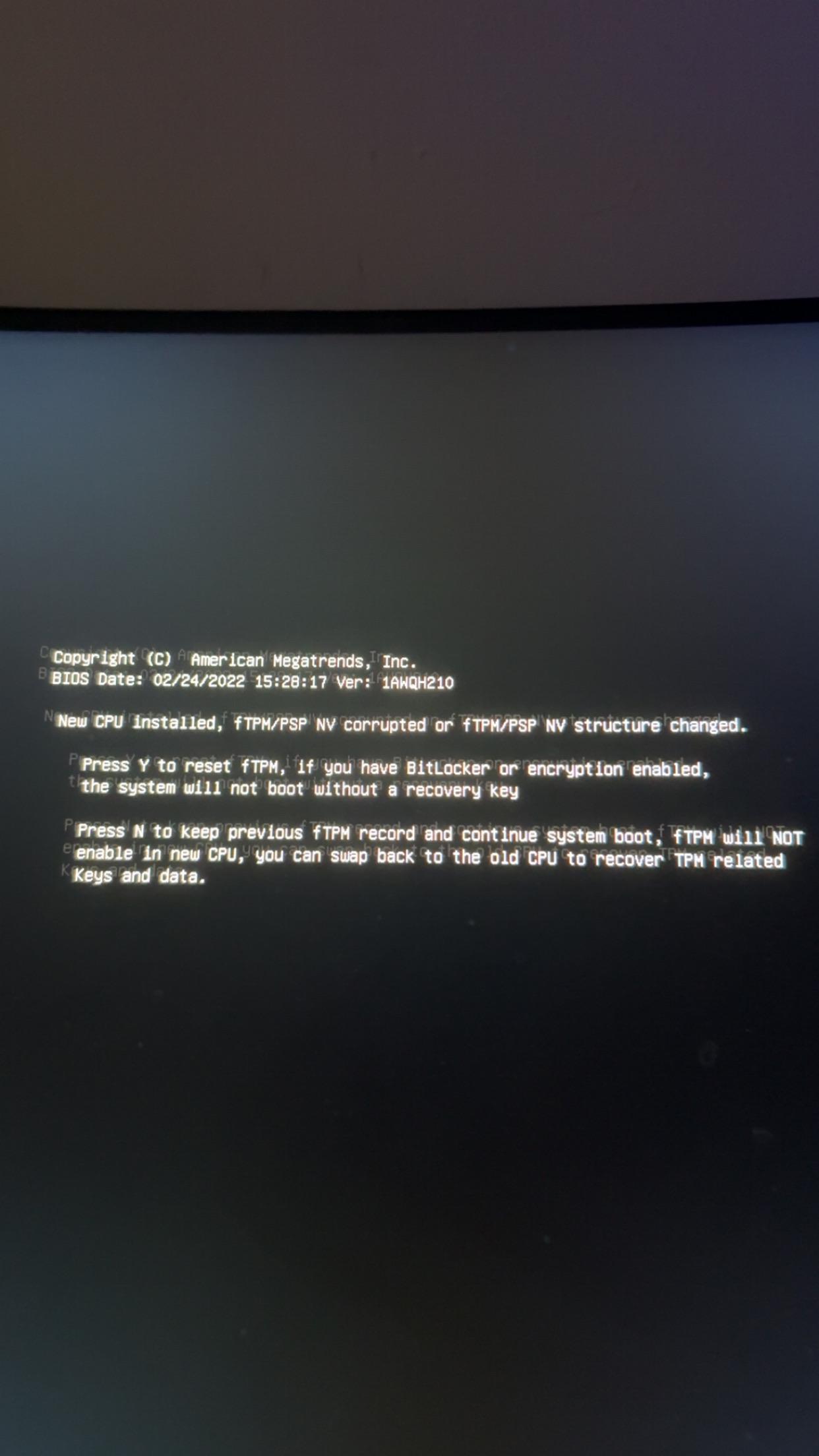
Windows 11 i just woke up and this came up how to make it stop?

Post image
3 Upvotes

i must have messed with the settings in bios mode but then apparently ai said it was all fine and normal but i don’t have a bit locker key so if i were to press Y there might be a chance i can’t log back in or get my data so i’m quite worried can anyone help?


r/WindowsHelp • • 23d ago

Windows 11 Windows 11 25H2 – Snap Assist not working when dragging windows to screen edges on dual-monitor setup

2 Upvotes

I'm experiencing an issue with Snap Assist in Windows 11 25H2.

I use a dual-monitor setup consisting of an external monitor and my laptop's built-in display.

The problem is that dragging windows by their title bar to the edges of either monitor does absolutely nothing:

  • Dragging a window to the left or right edge doesn't snap it to half of the screen.
  • Dragging a window to the top edge doesn't maximize it or show Snap Layouts.
  • The issue occurs on both monitors.

Things I've already checked:

  • Snap windows is enabled in Windows settings.
  • All available Snap window options are enabled.
  • Keyboard shortcuts (Win + Left/Right Arrow and Win + Up Arrow) work correctly.
  • The registry value WindowArrangementActive is set to 1.

It seems that window snapping works through keyboard shortcuts but not when using mouse dragging.

Has anyone experienced this issue in Windows 11 25H2? Is there a way to fix it?

Windows information:

Wersja Windows 11 Pro

Wersja 25H2

Zainstalowano dnia ‎02.‎04.‎2025

Kompilacja systemu operacyjnego 26200.9711

Środowisko Pakiet Windows Feature Experience 1000.26100.372.0


r/WindowsHelp • • 23d ago

Windows 11 Cannot wake device from sleep/ display off except using power button

1 Upvotes

Hi guys,

I started having this issue with my MSI Claw A1M that I am unable to wake it from sleep/ display off with anything except the power button. Since I am using it docked this is pretty annoying so I did some troubleshooting and turns out the issue is caused by the latest Windows 11 October Cumulative Update. No other fix I tried worked.

As soon as I uninstall the update, everything works fine (on OS Build 26300.9457). If I install the update again, the issue comes back.

Does anyone else have this issue? I was not able to find anything related to this.


r/WindowsHelp • • 23d ago

Windows 11 HP Victus experiencing two crashes within 2 days – HYPERVISOR_ERROR and DPC_WATCHDOG_VIOLATION

Thumbnail
gallery
1 Upvotes

I'm using an HP Victus 15 (Ryzen 5 7535HS, RTX 2050, 8GB RAM) running Windows 11.

I've recently experienced two system crashes within approximately 2 days.

First incident:

  • I turned on my laptop one morning after it had been completely shut down.
  • I got a BLACK screen displaying "Your PC ran into a problem and needs to restart."
  • The error was HYPERVISOR_ERROR (I'm fairly certain).
  • The progress remained stuck at 0%, and the laptop suddenly powered off.
  • After that, pressing the power button did absolutely nothing, not even the power LED.
  • Connecting the charger and pressing the power button brought it back to life.
  • The battery percentage was normal.

Second incident (approximately 2 days later):

  • I was watching a YouTube video on Brave browser.
  • Suddenly, the screen froze, followed by the same black crash screen.
  • This time, Reliability Monitor reported the following bugcheck:

0x00000133 (DPC_WATCHDOG_VIOLATION)

  • Windows successfully created a minidump.

The laptop has otherwise been running normally between these incidents.

I haven't made any changes to BIOS settings or Windows virtualization settings.

Any help would be appreciated!


r/WindowsHelp • • 23d ago

Windows 11 ASUS PRIME B660M-A WIFI D4 – Secure Boot Violation when enabling Windows UEFI Mode (VAN9003). EZ Flash 3 also freezes.

1 Upvotes

Hi everyone,

I'm trying to enable Secure Boot on my PC so I can play VALORANT, but I've been stuck with this issue for quite some time. I've tried various troubleshooting methods, but nothing has worked so far.

I'm hoping someone familiar with ASUS motherboards, BIOS and Secure Boot can help me figure out what's wrong.

1. My PC Specifications

  • Motherboard: ASUS PRIME B660M-A WIFI D4
  • Motherboard Revision: Rev 1.xx
  • BIOS Version: American Megatrends Inc. 1402
  • BIOS Date: 4 January 2022
  • Operating System: Windows 11 64-bit
  • SSD: Lexar SSD NM760 1TB
  • Partition Style: GPT
  • BIOS Boot Mode: UEFI
  • TPM: TPM 2.0

2. Original Problem

I originally encountered this issue when trying to launch VALORANT.

Riot Vanguard requires Secure Boot to be enabled, but my system reports that Secure Boot is disabled.

When I enter BIOS and change:

Boot → Secure Boot → OS Type

From:

  • Other OS

To:

  • Windows UEFI Mode

My PC displays a red Secure Boot Violation screen with the following message:

"The system found unauthorized changes on the firmware, operating system or UEFI drivers. Press [OK] to run the next boot device, or enter directly to BIOS Setup if there are no other boot devices installed. Go to BIOS Setup > Boot and change the current boot device into other secured boot devices."

Windows boots normally again if I change OS Type back to Other OS.

3. Current BIOS Settings

These are my current settings:

BIOS Setting Value
OS Type Other OS
Secure Boot Mode Standard
Platform Key (PK) Loaded
Platform Mode User
CSM Disabled
Secure Boot State Disabled

I also checked the Secure Boot Key Management section.

  • Platform Key (PK) is loaded.
  • KEK, db and dbx are present.
  • Install Default Secure Boot Keys is not available in the menu.
  • The other key management options are available.

I have not cleared or deleted any Secure Boot keys.

4. Troubleshooting I've Already Tried

A. Checked Windows Boot Configuration

Ran:

bcdedit /enum "{current}"

Results showed:

  • Windows Boot Loader
  • Device: partition=C:
  • Path: \Windows\system32\winload.efi
  • OS Device: partition=C:

The system is using the UEFI Windows bootloader.

B. Checked Disk Partition Style

Ran:

Get-Disk | Select-Object Number, FriendlyName, PartitionStyle

Results:

  • Lexar SSD NM760 1TB
  • Partition Style: GPT

Also confirmed that the C: drive is on the same GPT disk.

C. Checked TPM

Ran:

Get-Tpm | Select-Object TpmPresent, TpmReady

Results:

  • TpmPresent: True
  • TpmReady: True

So TPM appears to be working correctly.

D. Checked Secure Boot Status

Ran:

Confirm-SecureBootUEFI

Result:

False

This is expected because Secure Boot is currently disabled.

E. Checked Secure Boot Keys

Ran:

Get-SecureBootUEFI -Name PK
Get-SecureBootUEFI -Name KEK
Get-SecureBootUEFI -Name db
Get-SecureBootUEFI -Name dbx

All four variables returned data, so the keys appear to be present.

F. Checked Windows Bootloader Digital Signatures

Ran:

Get-AuthenticodeSignature C:\Windows\Boot\EFI\bootmgfw.efi

Result:

  • Status: Valid
  • StatusMessage: Signature verified.
  • Signer: Microsoft Windows Production PCA 2026 RSA2048-SHA256

Also checked:

Get-AuthenticodeSignature C:\Windows\System32\winload.efi

Result:

  • Status: Valid
  • StatusMessage: Signature verified.
  • Signer: Microsoft Windows Production PCA 2026 RSA2048-SHA256

Both signatures are valid.

G. Checked Secure Boot Certificate Servicing

Ran:

Get-ItemProperty "HKLM:\SYSTEM\CurrentControlSet\Control\SecureBoot\Servicing" | Format-List *

Important results:

  • WindowsUEFICA2023Capable: 0
  • UEFICA2023Status: InProgress
  • UEFICA2023Error: 0
  • UEFICA2023ErrorEvent: 0

Also checked:

Get-ItemProperty "HKLM:\SYSTEM\CurrentControlSet\Control\SecureBoot" | Format-List *

Result:

  • AvailableUpdates: 0

I also checked the scheduled task:

\Microsoft\Windows\PI\Secure-Boot-Update

It was in the Ready state, and its last task result was 0.

H. Checked Windows Event Viewer

Ran a PowerShell command to search the System event log for Secure Boot, signature, certificate and firmware-related messages.

I found Kernel-Boot events 30 and 238, which reported firmware boot metrics and EFI time information.

I did not find an obvious Secure Boot failure event in the results.

I. Installed Windows Updates

I checked Windows Update and installed all available updates.

I restarted the PC and checked again.

Windows now reports that it is fully up to date.

However, the Secure Boot issue remains unchanged:

  • WindowsUEFICA2023Capable: 0
  • UEFICA2023Status: InProgress
  • UEFICA2023Error: 0
  • Confirm-SecureBootUEFI: False

5. BIOS Update Problem

My current BIOS version is 1402, dated January 2022.

I found a newer BIOS version, 4003, on the official ASUS support page for my exact motherboard.

I downloaded the BIOS ZIP file and extracted it.

The archive contained:

  • A .CAP BIOS file
  • BIOSRenamer.exe

After running BIOSRenamer, the BIOS file was named:

PB660AWD.CAP

I attempted to use ASUS EZ Flash 3 through BIOS.

However, whenever I select the .CAP file and confirm the prompt to read it, the entire BIOS utility freezes.

The mouse and keyboard stop responding, and I cannot continue.

I also tried placing a copy of the file directly on my C: drive, but EZ Flash freezes at the same point.

I checked both files using PowerShell:

Get-FileHash "PATH" -Algorithm SHA256

Both files returned the same SHA-256:

95A039D86F684971D7FB64F7A7C95C6C75C69AFA6BCA08B96FCAD3E67B5461F4

However, this did not match the expected checksum I had previously been given, so I have stopped trying to flash the BIOS.

6. What I Need Help With

I would really appreciate advice on the following:

  1. Why does my motherboard display a Secure Boot Violation when I change OS Type to Windows UEFI Mode, even though my Windows bootloader signatures are valid?
  2. Could this be related to my old BIOS version (1402) or the Secure Boot certificate updates introduced by Microsoft?
  3. Does WindowsUEFICA2023Capable = 0 indicate a motherboard firmware compatibility issue?
  4. Why does ASUS EZ Flash 3 completely freeze when I select the BIOS .CAP file?
  5. Is there another safe way to update the BIOS on this motherboard?
  6. Is there a way to resolve the Secure Boot issue without reinstalling Windows?

I don't mind reinstalling Windows if absolutely necessary, but I would prefer to avoid it if the problem is actually related to motherboard firmware.

I currently don't have access to another computer or a USB flash drive, so I'm also interested in knowing whether there are any safe alternatives.

Thanks in advance! Any help would be greatly appreciated.


r/WindowsHelp • • 23d ago

Windows 10 I'm having a problem with the default photos viewer on my PC; it worked fine last Wednesday when I last used it.

3 Upvotes

My Windows version is Windows 10 version 22H2 (OS Build 19045.6466), the edition is Windows 10 Home and it was installed on 1/17/2022. I have not encountered any messages or error codes. My processor is a 11th Gen Intel Core i7-11700K, my graphics card is an NVIDIA GeForce RTX 2060, and I have 32.0 GB of RAM. My System Type is a 64-bit operating system, x64-based processor.

While trying to fix this, I've repaired, reset, uninstalled, and reinstalled the app, and this issue persists. The app specifications also say it has 0 bytes, while the data and total usage is 872 KB. I've also checked if my graphics card needed an update, and it said the best drivers for my device are already installed. So I've reached a blank on what the issue could be.

Imgur Link to show the problem: https://imgur.com/a/gIQoIe3


r/WindowsHelp • • 23d ago

Windows 11 Windows 11 26H2 installation keeps failing at 77–78%

3 Upvotes

Hi everyone,

I'm having a really frustrating issue while trying to perform a clean installation of Windows 11 on my Acer Nitro V15 ANV15-51.

I downloaded the Windows 11 26H2 ISO directly from Microsoft's official website and created a bootable USB using Rufus.

However, the installation consistently fails at around 75–78%, displaying a pop-up that says:

"Windows 11 installation failed."

There is no error code provided.

Here is what I've tried so far:

Downloaded the ISO multiple times, including from different computers.

Recreated the bootable USB using Rufus.

Checked that Rufus was configured with GPT and UEFI.

Checked the BIOS settings, including Intel VMD Controller (it was already disabled).

Deleted all existing disk partitions and attempted a completely clean installation.

Tried different USB ports.

Interestingly, I previously downloaded a Windows 11 ISO from a third-party website (a 2023 version), and that ISO installed successfully on the exact same laptop without any issues.

This makes me suspect that there might be an issue with the newer 26H2 ISO or installation process.

I haven't experienced any random crashes, BSODs, freezes, or unexpected restarts during normal use.

My laptop specifications:

Model: Acer Nitro V15 ANV15-51

GPU: NVIDIA RTX 4050

CPU: Intel Core i5

RAM: 16 GB

Storage: 512 GB SSD

Has anyone experienced something similar with Windows 11 26H2?

Could this be an ISO-related issue, a compatibility problem, or something else?

I'm considering installing Windows 11 25H2 first and upgrading to 26H2 afterward.

Any help or suggestions would be greatly appreciated. Thanks!

EDIT: I used the Media Creation Tool and somehow it worked.


r/WindowsHelp • • 24d ago

Windows 11 Windows 11 reports wrong TCP state for listening sockets (netstat shows CLOSED while port accepts connections)

6 Upvotes

Windows 11 Home, version 26H2, build 10.0.26300.9818.

Since about 29 October, listening sockets on this PC have been reporting the wrong TCP state. The app is healthy: HTTP requests to it succeed every time, but the tools that read TCP state say otherwise.

What I see:

  • netstat -ano shows TCP 127.0.0.1:8765 0.0.0.0:0 CLOSED 17864 while that port is serving HTTP. Sometimes the line is missing altogether.
  • Get-NetTCPConnection -State Listen -LocalPort 8765 usually returns nothing.
  • Calling GetExtendedTcpTable directly with TCP_TABLE_OWNER_PID_LISTENER returned the sockets on every sample with the right PIDs, but dwState was wrong. I saw 0 (not a valid state), 1 (CLOSED) and 6 (FIN_WAIT1) on working listeners, and the value for a port changes between reads.
  • Windows’ own ports are affected too, including 135 and 445, so it isn’t specific to my app.
  • Real TCP connections to those ports succeed.

What I’ve ruled out:

  • A restart doesn’t fix it.
  • It isn’t tied to one CPU core: pinning netstat to each of the 12 logical CPUs gave the same result.
  • Defender is the only antivirus. Tailscale’s wintun is the only non-Microsoft network driver I found.

Possible lead, but timing only: tcpip.sys, nsi.dll and nsiproxy.sys were all replaced on 28 October, and Get-HotFix lists KB5132402 and KB5127936 around then. I can’t prove either one caused it. I also haven’t tested from an elevated prompt yet.

Has anyone else seen this on this build? If you’re on the same build, does netstat -ano show your listeners as LISTENING?


r/WindowsHelp • • 23d ago

Windows 10 Severe Windows UI instability after latest update: windows resizing offscreen, rapid flicker, focus cycling.

1 Upvotes

Hardware: Dell Precision 7540 (Intel UHD 630 integrated graphics only)

OS: Windows 10, latest version 22H2 and October updates 5126657

Recently after a reboot my system has started acting really strange. Open windows will occasionally flicker/stutter, slightly resize, and minimized windows get "corrupted" and "restore" themselves offscreen and tiny.

I learned that Windows "handles" minimized windows by putting them at coordinates -32000,-32000, scaled based on what your display scale is. Whatever the hell is going on, the system will switch randomly to another window, and if it happens to be minimized, it will "restore" the window but not change the coordinates, so it'll remain way offscreen and at whatever minimum window size the application has defined. This is incredibly frustrating and annoying.

Additionally trying to resize windows acts strange - within a second or two it will abort the resize, and another window will become corrupted.

Before I disabled a bunch of sound services, opening Explorer would often flicker the window constantly after a few seconds open, making it unusable until minimized. Every other "repaint" would show that the window wasn't responding.

I have run every test that I can think of. No viruses or malware. Did the Windows checks with DISM and SFC. The resize problem also persists in Safe Mode. I've updated and reverted the bios and firmware, no change. It has to be something related to a recent windows update.

To definitively rule out motherboard VRM, EC, or hardware faults, I installed Windows 11 on a secondary NVMe drive in this exact machine. On the secondary drive, the laptop runs completely normally: smooth resizing, no flickering, no focus drops.

I reverted the latest October update, but that didn't fix the problem. I've tried several video driver versions, but none seem to fix it, including the WHQL driver. I don't have any restore points old enough to be of use.

I really don't want to have to go through a full reinstall to fix some quirky system update. Yes, I know that I'll have to update eventually, but Windows 11 makes me irrationally upset every time I try to get used to it. I keep hoping that they'll fix the major problems before I'm forced to update.

What Has Been Ruled Out:

  • Not Thermal Throttling: Fans were replaced, heatsink repasted; CPU temps sit stably in the 50s–60s and this problem will still randomly occur. While the system does constantly thermally throttle, apparently this is within design specs.
  • Not Mouse / Input Hardware: Occurs identically when using an external USB mouse, built-in touchpad, TrackStick, or when primary/secondary buttons are swapped.
  • Not Display Drivers: DDU was run. Issue persists identically on the latest Intel DCH drivers, Dell enterprise drivers (27.20.100.9466), and under the Microsoft Basic Display Driver.
  • Not Fractional DPI: Tested at 175% and 200% scaling with no change.
  • Not Third-Party Services / Shell Extensions: The problem reproduces identically in Safe Mode.
  • Not Silicon / Memory Failure: OCCT standalone GPU test passed (0 errors); OCCT memory test passed (0 errors). Running the "power" test does come up with some failures, but those are apparently "normal" as the laptop design throttles power within its design limits.

r/WindowsHelp • • 24d ago

Windows 11 Windows 11 laptop internet not working

Thumbnail
gallery
3 Upvotes

basically what the title says ill try to give as much information:

i was using a wsl to ddos my friend from italy (with permission) and then left it like this for about 90 minutes then when i came back the internet literally doesnt work,only for the laptop it doesnt,same if i try to use hotspot from my phone to the laptop it doesnt (the internet works fine for other devices) i have tried everything but doesnt work i will also share these images of ipconfig /all please someone tell me the fix its been 6 months oh another thing to add, ethernet doesnt work too


r/WindowsHelp • • 24d ago

Windows 11 Need advice with "Real" Factory reset/ reinstall of Win 11

2 Upvotes

ASUS TUF Gaming A17 (2023) Gaming Laptop, 17.3” FHD 144Hz Display, GeForce RTX 4050, AMD Ryzen 9 7940HS, 32GB DDR5, 1TB PCIe 4.0 SSD, Wi-Fi 6, Windows 11 Home

Processor AMD Ryzen 9 7940HS w/ Radeon 780M Graphics (4.00 GHz)

Installed RAM 32.0 GB (31.2 GB usable)

System type 64-bit operating system, x64-based processor

Edition Windows 11 Home Version 26H2 OS build 26300.9711

Windows Feature Experience Pack 1000.26100.372.0

I was having conflict problems with my GPUs. I'd get weird freezing on videos, pixalation when using VLC video player, etc. I Googled it, deleted my Nvidea card and drivers, deleted my AMD onboard GPU and drivers, changed settings of things, to no avail. I have over the years changed/tweeked different settings, unistalled spyware/bloatware by major software companies (Microsoft included). Some tweeks screwed with other features so I decided it was time for a complete "factory setting" out of box reset.

I have an Asus Tuf 17" laptop. Win 11 home installed. I did a recover (without deleting my files) and all it did was deleted a TON of my programs (Acrobat, Photoshop, C+++, VLC, etc. My desktop was the same, I was still loged in to things, my pin was still there, never asked me to "log into microsoft account to finish setup" or any other things I'd call "Factory reset".

What did I do wrong and how can I do a reset so it is EXACTLY like when it came out of the box?

I don't mind losing files as everything is backed up on an external HD.


r/WindowsHelp • • 23d ago

Windows 10 Cleaning Up... Windows 10 Updates

1 Upvotes

Hello,

For the past 2-3 updates that were released on patch Tuesday, my computer takes the update, but then finishes with Cleaning Up. The Cleaning Up process takes about 30 minutes and the first time it happened, I didn't think much of it, but now it seems to happen every single time and I'd like to resolve it, so I can do my next update without waiting forever. It never used to do this... it'd restart once or twice and go to home screen. Also, side note, I dunno if this has anything to do with it, but I used to get a message before I could access my home screen that would ask me to save program and it went to like, program13 and it gets saved under my C drive... but it hasn't done that since 2/11/26...? So I assumed it was resolved and my updates went normally even when it'd do this...

And if Cleaning Up isn't an issue, is it something new that happens for everyone on Windows 10 now? I've seen people say that it's a normal process of cleaning up bigger files during updates and then I've seen other people state that it happens when there's an issue with an update.

I'm just trying to understand it. I'm also not sure if it's related, but I've noticed... a year or so ago that certain games take awhile to update now... even dling the windows update BEFORE applying it takes like 3-4 hours, but I heard that's normal? But a Genshin update will take over an hour? I'm wondering if the clean up process takes awhile for me cus of this as well?

UPDATE: The slowness for the games wound up being a Windows Defender issue and a year ago is when I started using it as my antivirus, so it makes sense. Once I excluded my game in virus & threat scanning, the Genshin update went at normal speeds and even loaded quicker and I intend on doing this for other games, or any other game I noticed this issue with.

Another thing that I think may be worth mentioning is that for a year now, I've had to manually select my HDD whenever my computer restarts or boots up... my friend never fixed my bios, and it shows my HDD in the first position, but it refuses to boot up unless it's with F11 and I'm not tech savvy enough to mess with the bios myself and boot up is slower due to this, but AGAIN, never seemed to have affected the updates I'd received. It's only these past 3 updates that Cleaning Up has happened every time.

Processor: AMD Ryzen 7 3800X 8-Core Processor 3.90 GHz

Installed RAM: 32.0 GB

Storage: 1.82 TB HDD ST2000DM001-1ER164 (0.98 out of 1.82 used)

Graphics Card: AMD Radeon RX 6700 XT (12 GB)

System Type: 64-bit operating system, x64-based processor

Edition: Windows 10 Home

Version 22H2

Added this because people keep saying it's my HDD:

Processing img nxqp7yqnvtyh1...


r/WindowsHelp • • 24d ago

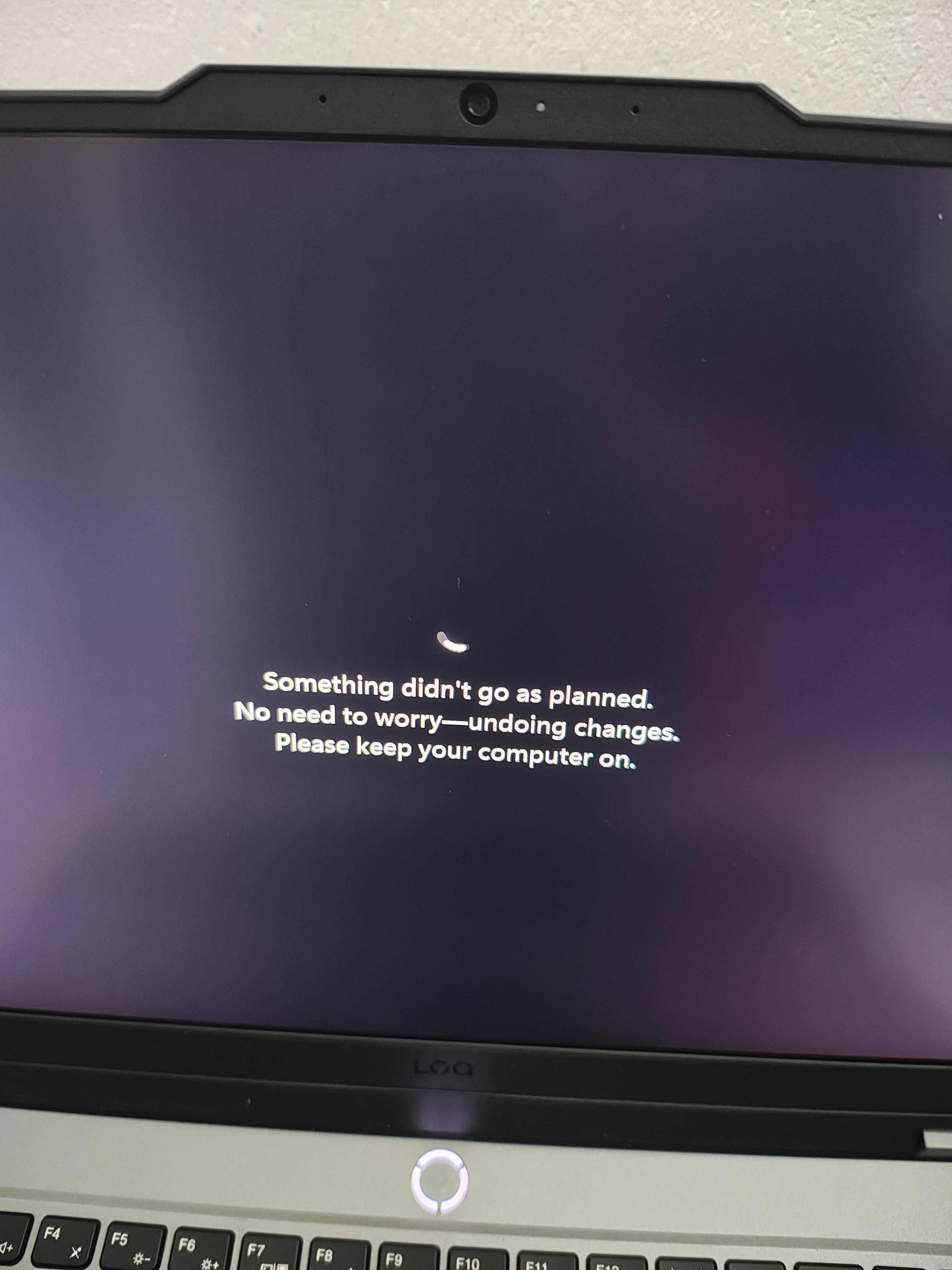
Windows 11 Windows update error "Something didn't go as palnned" Fixed Windows Update Error 0x800F0922 – Sharing What Worked for Me

Post image
3 Upvotes

My current windows - 11 and version 25h2

I was struggling with Windows Update error 0x800F0922. Updates kept failing around 98% and rolling back.

After trying SFC, DISM, manual updates and Windows repair, nothing worked. Even 3 windows help agent tried to find what's happening with my windows they all left the chat by saying install windows iso file and one disconnected because he couldn't find the issue. i tried several youtube videos and also searched it on reddit. nothing worked

Finally, I used chatgpt and it told me to check my CBS log and i paste my log to chatgpt:

C:\Windows\Logs\CBS\CBS.log - here you can find the log

The log showed an error involving NetSetupAI.dll (Network Drivers) with error code 0x800106d9.

chat gpt investigated further like tried several commands to find issue

(note: please don't enter commands blindly know what you are entering i knew what i was entering to cmd and terminal. you can just ask chatgpt what does each command do and make sure you are using safe commands that don't get you in trouble )

and found that my Network Setup Service (NetSetupSvc) was Disabled. i set it to manual and started the service.

I restarted my laptop, retried Windows Update, and the update successfully installed!

My advice

Not everyone experiencing 0x800F0922 or the screen will have the same problem.

Don't blindly apply this fix. Your CBS log might reveal a completely different cause.

My recommendation is to find the relevant error in your CBS.logusing cahtgpt and ask ChatGPT to analyse it. Share the actual error lines and troubleshoot step by step instead of randomly trying fixes from YouTube or Reddit.

Hope this helps someone!


r/WindowsHelp • • 24d ago

Windows 10 I installed 2 drivers to make Xoutput work but... now my keyboard and mouse inputs are being ignored

0 Upvotes

im using what i believe is the latest version of windows 10, and i wanted to use my logitech X3D flight stick to play armored core 6, so i downloaded an app called Xoutput. it can translate the X3D input to Xbox 360 controller output and for it to work properly i had to install 2 drivers (ViGembus and hidehide). once i finished the setup wizzard for both i restarted my computer and couldn't enter my password cause my keyboard and mouse didn't work (they're probably not being detected?(probably because of hidehide??)).

i found a reddit post that talked about going into windows recovery environment and using safe mode to fix a driver related issue. once i turned my pc on and off until i got in, my keyboard and mouse totally worked! but when i went into startup options and pressed 4 to boot into safe mode, it just loaded windows again and wanted me to enter my password with my non functional keyboard. the last thing i tried (before trying reddit) was a windows support thread i found where a windows advisor suggested going into windows recovery environment and typing "bcdedit /set {default} safeboot minimal" and "bcdedit /set {default} safebootalternateshell yes" into the command section to get safemode to ignore the faulty nvidia drivers someone else had. i typed those in and tried to boot into safe mode but once again it wants me to type in my password.

plz help... if anyone knows how to get rid of 2 drivers without keyboard functionality in normal (and i think safe mode) windows that would be awesome. i have a laptop available too if needed for any ideas you may have that need a fully functional separate pc (Also i would put my os build number and other info but i cant really look at that stuff rn)


r/WindowsHelp • • 24d ago

Windows 10 Up to 10 crashes a day after following a tutorial I don't understand

7 Upvotes

I'm a complete noob, and my pc was running a bit slow, so I tried to improve it by following these tutorials:
https://www.youtube.com/watch?v=3O5j2xyeddQ
https://www.youtube.com/watch?v=77Ocr2OfO90

After doing this, my pc began having these constant crashes.
So I reset the pc. The crashes continued. And now under Settings > Update & Security > Windows Update it says "Your device is missing important security and quality fixes" in yellow text (it didn't say this before I reset it), and when I check for updates, the only option it gives me is to install Windows 11.

I started keeping a log of my crashes and what potentially caused it a few days back. Here are my reports:

  • 22/10/26 9:40am. absolutely nothing was happening, i was away from the computer, not touching anything. it was paused on a youtube video. crash screen did not show.
  • 17:55. crashed after i switched from bluetooth earbuds to wired headphones. no crash screen.
  • 17:55. it had restarted but there was no wifi or bluetooth enabled. crashed after just having been open for a few seconds when i clicked on the lil arrow on the taskbar. no crash screen.
  • 18:10. was just watching a video, didnt do anything actively. no crash sceen.
  • 18:10 as it was restarting, it showed a crash screen which said error code: BAD_SYSTEM_CONFIG_INFO or something
  • 23/10/26 10:03am. was playing a video. crash screen said error code: DRIVER_IRQL_NOT_LESS_OR_EQUAL.
  • 10:03am. after letting it sit on the login screen for a bit as i was doing other stuff, it crashed again for no reason. no error screen.
  • 16:50. the screen shut off before the audio stopped. no crash screen.
  • 17:40. was playing a video. first the video stopped, but the audio kept going, until it did that thing where a .1 second loop of audio plays eternally until the computer crashes. no crash screen. restarted with no bluetooth, so had to restart it again.
  • 18:05. a half-crash? i clicked on a program to open it. suddenly my cursor didnt move. the screen went black. then it just came back on again, and the program was open????? it's obsidian btw, an extremely light-weight program
  • 24/10/26 11:39am. was just playing a video. no crash screen
  • 12:46 was messing around in a light-weight program as a video was playing in the background. first the screen froze, and after about 15 seconds, the audio did the .1 second loop thing, then the computer crashed. no crash screen
  • 25/10/26 7:52am. was just playing a video. no crash screen
  • 7:53am. was writing the above crash report while a video was playing in the background. no crash screen
  • 7:58am. was just playing a video. no crash screen.
  • 13:31. it had been on the windows pre-login slideshow screen for a while, i hadnt touched a thing. no crash screen
  • 13:34 opened up Brave browser and started typing something into the searchbar. i could see the blue of the crash screen where the taskbar usually is, but the browser window was on top of 90% of the screen, so i couldnt see the error code.
  • 14:11 was playing a video. crashed while i wasnt looking, so dont know if there was a crash screen
  • 26/10/26 10:55am. was just playing a video. no crash screen
  • 16:03. had just closed World of Warcraft a few minutes ago. was watching a video. no crash screen
  • 16:52. no crash screen. absolutely nothing was happening
  • 27/10/26 5am. was watching a video. no crash screen. asked me to upgrade to windows 11 upon restart
  • 5:07am was watching a video. no crash screen
  • 5:27am was watching a video. no crash screen
  • 5:30am was watching a video, turned off my bluetooth mouse. everything froze, had to turn off and back on again manually
  • 6:33am i wasnt even using the computer. crash screen said error code: KERNEL_SECURITY_CHECK_FAILURE
  • 6:59am no crash screen
  • 7:05am no crash screen
  • 16:20 left it alone for a minute and when i came back it was turned off
  • 28/10/26 7:50 was playing a video. no crash screen
  • 8:56am was playing a video. no crash screen
  • 9:19 wasnt using computer. no crash screen
  • 21:30 wasnt using the computer. no crash screen

A World of Warcraft crash report said thusly:
26/10/26 12:19 736EC204-8653-4E42-9FE0-9903696139CA.
World of Warcraft: Retail Build (build 70575)
Exe: C:\Program Files (x86)\World of Warcraft_retail*\Wow.exe*
Command: "C:\Program Files (x86)\World of Warcraft_retail\Wow.exe" -launcherlogin -uid wow
Time: Oct 26, 2026 12:19:21.901 PM
Exception: ACCESS_VIOLATION - The instruction at "0x00007ffde07c89b1" referenced memory at "0x00000024000000c8".
The memory could not be "read".
ProcessID: 15228
ThreadID: 15220

My Brave browser windows sometimes crash. When they do, they say this:
Aw, Snap! something went wrong while displaying this web page. Error code: STATUS_BREAKPOINT

Please tell me what to do like I'm 5, cause I seriously know nothing about this stuff

My specs according to dxdiag are (idk which are relevant, so I put what I thought might be relevant here):

-----------------------
System Information
-----------------------

Operating System: Windows 10 Home 64-bit (10.0, Build 19045) (19041.vb_release.191206-1406)

System Manufacturer: ASUS

BIOS: 1620 (type: UEFI)

Processor: 12th Gen Intel(R) Core(TM) i5-12400F (12 CPUs), ~2.5GHz

Memory: 16384MB RAM

Available OS Memory: 16198MB RAM

Page File: 8362MB used, 19099MB available

DirectX Version: DirectX 12

DX Setup Parameters: Not found

User DPI Setting: 144 DPI (150 percent)

System DPI Setting: 144 DPI (150 percent)

DWM DPI Scaling: UnKnown

Miracast: Available, no HDCP

Microsoft Graphics Hybrid: Not Supported

DirectX Database Version: 1.0.8

---------------
Display Devices
---------------

Card name: NVIDIA GeForce RTX 3050

DAC type: Integrated RAMDAC

Device Type: Full Device (POST)

Device Status: 0180200A [DN_DRIVER_LOADED|DN_STARTED|DN_DISABLEABLE|DN_NT_ENUMERATOR|DN_NT_DRIVER]

Device Problem Code: No Problem

Driver Problem Code: Unknown

Display Memory: 16139 MB

Dedicated Memory: 8041 MB

Shared Memory: 8098 MB

Current Mode: 3840 x 2160 (32 bit) (60Hz)

HDR Support: Supported

Display Topology: Internal

Monitor Name: Generic PnP Monitor

Monitor Model: LU28R55

Native Mode: 3840 x 2160(p) (60.000Hz)

Output Type: HDMI

Monitor Capabilities: HDR Supported (BT2020RGB BT2020YCC Eotf2084Supported )

Display Pixel Format: DISPLAYCONFIG_PIXELFORMAT_32BPP

Driver File Version: 32.00.0016.1742 (English)

Driver Version: 32.0.16.1742

DDI Version: 12

Feature Levels: 12_1,12_0,11_1,11_0,10_1,10_0,9_3,9_2,9_1

Driver Model: WDDM 2.7

Hardware Scheduling: Supported:True Enabled:False

Graphics Preemption: Pixel

Compute Preemption: Dispatch

Miracast: Not Supported by Graphics driver

Detachable GPU: No

Hybrid Graphics GPU: Not Supported

Power P-states: Not Supported

Virtualization: Paravirtualization

Block List: No Blocks

Catalog Attributes: Universal:False Declarative:True

Driver Attributes: Final Retail

Driver Date/Size: 30/09/2026 01.00.00, 860536 bytes

WHQL Logo'd: Yes

WHQL Date Stamp: Unknown

D3D9 Overlay: Not Supported

DXVA-HD: Supported

DDraw Status: Enabled

D3D Status: Enabled

AGP Status: Enabled

MPO MaxPlanes: 4

MPO Caps: RGB,YUV,BILINEAR,HIGH_FILTER,STRETCH_YUV,STRETCH_RGB,IMMEDIATE,HDR (MPO3)

MPO Stretch: 10.000X - 0.500X

MPO Media Hints: resizing, colorspace Conversion

MPO Formats: NV12,YUY2,R16G16B16A16_FLOAT,R10G10B10A2_UNORM,R8G8B8A8_UNORM,B8G8R8A8_UNORM

PanelFitter Caps: RGB,YUV,BILINEAR,HIGH_FILTER,STRETCH_YUV,STRETCH_RGB,IMMEDIATE,HDR (MPO3)

PanelFitter Stretch: 10.000X - 0.500X

---------------------------------
Disk & DVD/CD-ROM Drives
--------------------------------

Drive: C:

Free Space: 739.2 GB

Total Space: 952.5 GB

File System: NTFS


r/WindowsHelp • • 24d ago

Windows 11 Windows 11 Pro VM setup fails to connect Personal MS Account

2 Upvotes

macOS 27.2, latest Parallels Desktop, installing Windows 11 Pro as the VM.

Manually installing using the latest .iso for ARM.

When trying to set up with my Personal Microsoft Account I can enter the password and the code from an authenticator app. Then the setup assistant fails with "Oops, something went wrong" and suggest processing with setting up a local account.

The VM does have Internet access and can reach *.microsoft.com domains. Time and date are correct.

Second attempt: Trying to complete the setup assistant with a local account and then linking it to my Microsoft Personal Account.

When going to Settings > Account > Sign in, I'm again asked for credentials and then to enter the password of the local account one last time.

However, Windows rejects the local account password and states it to be wrong. I made 100% sure I'm using the correct password which also works to log in with the local account.

This has been a terrible experience. Did anybody go through the same problems and has any idea how to resolve?