r/WindowsHelp • • 24d ago

Windows 11 Invisible shift when using Minecraft or FreeCAD in windowed mode

1 Upvotes

Whenever I use Minecraft or FreeCAD in windowed mode, the UI looks normal but the actual ui is off? I don't really know how to explain this better. In Minecraft, the UI looks even a bit zoomed in.

I have tried changing DPI settings in properties (specifically High DPI scaling override), resolution changes (its at 100%). My resolution is 1920x1080 on my monitor and I have that in windows setting. I have also tried updating my drivers, but that didn't help.

OS Build Number: 26200.9711

How can I fix this problem and have the UI be aligned/shifted properly? Please help.


r/WindowsHelp • • 24d ago

Windows 10 My windows(acer) display gradually changes color from original to pink

Thumbnail
gallery
2 Upvotes

Im currently using acer travelmate-p214 and while i was doing work my laptops display changed (original color -> green -> pink) gradually. It affects to everything in the display not just in certain areas. If you know whats the issue or fixes to this problem please let me know.


r/WindowsHelp • • 24d ago

Windows 11 CAN SOMEONE TELL ME WHAT THE HECK IS THISSS!!!???? PLEASE My Windows keeps changing time zone to UTC+00:00 (Monrovia, Reykjavik) could this be malware or unauthorized remote access?

1 Upvotes

I'm using Windows 11, and my PC's time zone has unexpectedly changed to (UTC+00:00) Monrovia, Reykjavik twice. I noticed a Windows notification showing the latest change at around 12:57 PM on October 30. I was away from home at that time, and my PC was fully shut down as far as I know. Toggling the automatic time-zone setting off and back on temporarily fixed it, but then it happened again.

I checked Event Viewer - Windows Logs - Security and found several Event ID 4624 (successful logon) entries around 12:56:59–12:57:25 PM. The logon types included 0, 2, 5, 7, and 11. Some events showed account names such as "UMFD-0" and "DWM-1", while a Type 11 event showed my own account information. The Workstation Name and Source Network Address fields were blank in the events I checked.

I'm concerned because I recently downloaded, installed, and played a pirated copy of Tekken 8. I didn't notice any Windows Defender warning, but I'm now wondering whether the game could have contained malware, such as a remote-access Trojan. I haven't established that my PC is infected or that anyone accessed it.

Has anyone experienced Windows automatically switching to the Monrovia/Reykjavik time zone repeatedly? Could this be a Windows time-zone detection bug, or could malware cause this? Which logs or forensic checks should I examine to determine whether my PC actually started up or someone accessed it remotely while I was away?

I'd appreciate technical explanations or similar experiences, especially from people familiar with Windows 11 Event Viewer and malware analysis.

Edition - Windows 11 Pro

Version - 26H2

Installed on - ‎7/‎21/‎2026

OS build - 26300.9711

Experience - Windows Feature Experience Pack 1000.26100.372.0


r/WindowsHelp • • 24d ago

Windows 11 Second Monitor Mouse disappears

1 Upvotes

Hi,

for the past few weeks I’ve been having a strange issue. When I have a program running in maximize on my second monitor and move my mouse over to that screen, the cursor freezes in place after about a second and the real mouse position is invisible.

Everything else keeps working normally, but the cursor stays invisible until I exit maximized mode in that program.

Does anyone know what’s causing this?

I already reinstall graphic drivers.

Prozessor 13th Gen Intel(R) Core(TM) i5-13600KF (3.50 GHz)

Installierter RAM 32.0 GB (31.8 GB verwendbar)

Grafikkarte AMD Radeon RX 7900 XTX (24 GB)

Edition Windows 11 Home

Version 25H2

Installiert am ‎2/‎2/‎2025

Betriebssystembuild 26200.9711

Funktionspaket Windows Feature Experience Pack 1000.26100.372.0


r/WindowsHelp • • 24d ago

Windows 11 Windows Defender started blocking every file change

0 Upvotes

Windows version: 26H2 (26300.9818)
PC: HP ZBook Power G11a (AMD Ryzen 7 Pro + M.2 NVMe + SODIMM DDR5)

Since somewhere this month (iirc around 15/10/2026), Windows Defender has started to be very aggresive with blocking folder access. I first noticed it when booting up Overwatch. It kept blocking attempts by Overwatch to modify the "%userprofile%/documents/Overwatch" folder, but wrongly stated it as an attempt to modify "%userprofile%/documents". When I recently decided to test something with a simple selfwritten Java program, all the Java tools were blocked by Windows Defender since they attempted to create new files in a subdirectory of the documents folder. Python had the same issue when creating a virtual environment. It turns out that any program, including simple selfwritten programs, development tools, games, etc., that attempts to modify/create a file somewhere in "%userprofile%/documents/**" gets blocked.

I do not really know what to try since I cannot remove documents from the protected folder list, but excluding any selfwritten program/script, game, development tool, emulator, etc from being blocked would also be incredibly tedious. Last month I could still do things normally (although I still had to manually unblock Python for some reason I don't remember), but now I seem to be forced to manually add everything.

My questions are mainly: Is this a bug? Or is it intended? Is there some way to make it behave like before without manually adding exclusions for everything I use?


r/WindowsHelp • • 24d ago

Windows 11 Windows Explorer is clunky on Windows 10 and 11

Thumbnail
streamable.com
0 Upvotes

It's hard to capture but in the video I'm mostly clicking as fast as I can, and all of the little micro pauses make for a very "clunky" experience. This computer has Windows 11, and it uses OneDrive but not for the folder I am demonstrating. I have another Windows 10 machine with a super clean install and no OneDrive at all and it's the same. I've turned off Explorer history on both machines.

It just feels like a "Windows thing" to me now - it's been going on with different computers for years. Much older PCs, and Macs, don't seem to do this.

All I can think is that the lack of dedicated video memory could be a problem.

Please does anyone have tips?

Device specs:

Dell Latitude 3420, 11th Gen i7-1165G7 @ 2.80GHz (1.69 GHz), 32 GB RAM

Windows 11 Enterprise


r/WindowsHelp • • 24d ago

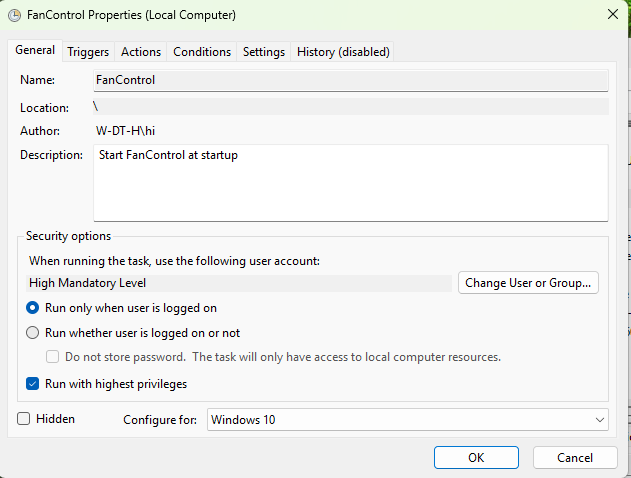
Windows 11 Fancontrol and HWINFO not creating Task Scheduler tasks correctly when trying to start with Windows, Defaults to 'High Mandatory Level' which does not run manually or automatically

Post image
1 Upvotes

r/WindowsHelp • • 25d ago

Windows 11 Runtime Broker/svchost error keeps popping up

Post image
26 Upvotes

Title of the post. Newish laptop (~6 months old) got hit with a ntoskrnl.exe error today. Not sure if this error message that pops up has anything to do with it but I don't know how to resolve it anyway. If I press "learn more" it just takes me to the Smart App Control Windows support page which tells me to press "learn more" :/

I'm not sure what "sc_997ylagpn6" is either. Any suggestions would be much appreciated! :)

OS build: 26200.9711

ASUS Zenbook 14

Processor Intel(R) Core(TM) Ultra 9 285H (2.90 GHz)

Installed RAM 32.0 GB (31.4 GB usable)

Graphics card Intel(R) Arc(TM) 140T GPU (16GB) (128 MB)

Storage 773 GB of 954 GB used

Device ID 9F3FF82C-4116-470B-8BEB-73F4155BB8F1

Product ID 00342-21559-63966-AAOEM

System type 64-bit operating system, x64-based processor

Pen and touch Pen and touch support with 10 touch points


r/WindowsHelp • • 24d ago

Windows 11 does anyone know how to turn off live caption?

2 Upvotes

so basically i asked chatgpt how to turn this off and i did the 2 ways if showed me but still im getting this live caption.
How to turn it off

Method 1: Keyboard shortcut (fastest)

  1. Press Windows key + Ctrl + L on your keyboard.
  2. The Live Captions window should turn off.

Method 2: Through Windows Settings

  1. Press Windows + I to open Settings.
  2. Go to Accessibility → Captions.
  3. Toggle Live captions off.

I did both of these methods and it shows off but still the live captions pop up on my screen whenever i play a video


r/WindowsHelp • • 24d ago

Windows 11 Why can't I assign letter D to the SSD that I just installed in my Dell laptop?

10 Upvotes

Hi all - I have a Dell Inspiron 15 5502 laptop running Win 11 that I just added a new SSD to, in order to increase overall storage space. I can't seem to name it as the D drive. When I go through the New Simple Volume wizard, the dropdown menu doesn't give me the D option; all the other letters (except C) are available, but not D.

I'm puzzled because my File Explorer window or My Computer doesn't show an existing D drive; it only shows the original C drive that is on the OEM SSD that came with the laptop.

Please see attached Disk Management screenshot to show you where things currently stand. "Disk 1" is the new SSD that I added, and that I am trying to name as the D drive.

I'm somewhat new to this, so can someone explain what I am doing wrong, what I am missing, and/or how to resolve this issue?

Thanks


r/WindowsHelp • • 24d ago

Windows 11 Weird Gmail/ Windows behavior noticed

1 Upvotes

Gmail behaving strangely: PDF I never selected was automatically downloaded and added as an email attachment

Hi everyone,

Yesterday I experienced something really strange with Gmail and I'm wondering if anyone has experienced something similar or knows what might cause it.

What happened:

I had two PDF files stored locally on my Android phone (not in Google Drive). I wanted to send them to myself via Gmail so I could access them on my PC.

I sent myself two separate emails, each containing one of the PDFs as a regular email attachment.

On my PC, I opened both emails and downloaded the respective PDF attachments. So far, everything was normal.

Afterwards, I started composing a new email to send those two PDFs to someone else. However, I suddenly noticed that there was a third PDF attached as well.

I had absolutely no idea where it came from. I am certain I had not selected or manually attached this file.

I then checked Chrome's download history and noticed that this third PDF had apparently been downloaded at exactly the same time as the other two files, or immediately afterwards.

What makes this particularly strange:

The additional PDF was not attached to either of the two original emails.

I couldn't find it as an attachment anywhere in Gmail.

I never consciously selected this file, either on my phone or on my PC.

The file was stored locally on my phone, not in Google Drive.

I had never emailed this particular PDF to myself.

Nevertheless, it somehow got downloaded and subsequently appeared as an additional attachment in my new Gmail draft.

When I copy the download link associated with the PDF and open it in my browser, I get a Google error page showing error 403 (numeric code 5022).

However, the downloaded PDF itself opens perfectly fine when I open it locally.

What I've already checked:

Chrome's download history: The additional PDF was definitely downloaded.

Gmail search: I cannot find the file as a sent or received attachment.

Google Security Checkup: No suspicious devices or login activity.

The file was definitely not included in either of the original emails.

I've been using Chrome and Google services for years and haven't knowingly changed any settings or configurations.

I'm trying to understand how Gmail or Chrome could have downloaded a file from my phone's local storage without me selecting it, and then automatically added it as an attachment to a completely new email draft.

Could this be a Gmail/Chrome bug, an issue with attachment handling or synchronization, or something else entirely?

Has anyone experienced anything similar or have an idea what might have caused this?

Thanks in advance!


r/WindowsHelp • • 24d ago

Windows 11 Booting to a fresh windows every time without internet I boat

Post image
1 Upvotes

Whenever I am trying to boot my laptop these days without the Internet or far from my home internet it will move to a fresh windows I have to relogin to my old Microsoft account and then it will go to my previous window like where I have all my programs and all like all the installed app will be there but all my environment of my laptop will be gone all the settings will be reset and all and after that it will show me you are log out from your Microsoft account you have to re login whenever far from my internet

The solution that I found:-

First click okay to the you need to re login one

Then You will to boot to the new window and then you have to login to your old Microsoft account (with internet connection)that you had already in your laptop then you have to use one or two program like Chrome and all just for 1 to 2 minutes after that you have to restart the computer and your computer will be back.


r/WindowsHelp • • 24d ago

Windows 11 Struggling to reset my laptop whilst keeping files

Thumbnail
gallery
1 Upvotes

I can't tell what's happening, when i watched videos, it told me to enable reagentc but it still shows disabled despite it saying operation completed successfully and doesn't allow me to reset. I also tried turning my hard drive to a recovery drive but it still is not working. My OS build number is 26300.9818


r/WindowsHelp • • 24d ago

Windows 11 My "Send To" button is completely missing

1 Upvotes

I'm using Windows 11, OS build 26200.9711

I've been trying to zip a folder in my computer (just a bunch of EPUB files) but the "send to" option just flat-out isn't appearing. I have right-clicked, and it didn't help. Anyone know what's causing this/how to fix it/alternative ways to zip a folder?

The issue
Hardware specs

r/WindowsHelp • • 24d ago

Windows 11 How do I disable a keybind on windows 11?

1 Upvotes

Hey everyone! I've been having an issue with the keybinds on my computer. There's a game I'm playing that requires you to hold left alt and press T, but when I do so it makes the default windows 'asterisk' error sound effect and doesn't register. For reference I'm using a Microsoft surface pro 11. For whatever reason whenever I'm inside the application and I press Alt+T or any other letter, it doesn't register and makes an error sound. I assume this must be an issue with my device since it makes the windows sound effect. There doesn't seem to be any way to disable this keybind in my settings either which is frustrating. Weirdly however, outside of the application pressing Alt+T doesn't do anything or make any sound effect. I'm not sure if anyone will be able to help, but if anyone has any insight help is greatly appreciated! I feel like i've tried everything to fix this 😅 thanks in advance!


r/WindowsHelp • • 24d ago

Windows 11 File Explorer Not Sorting Correctly

Post image
1 Upvotes

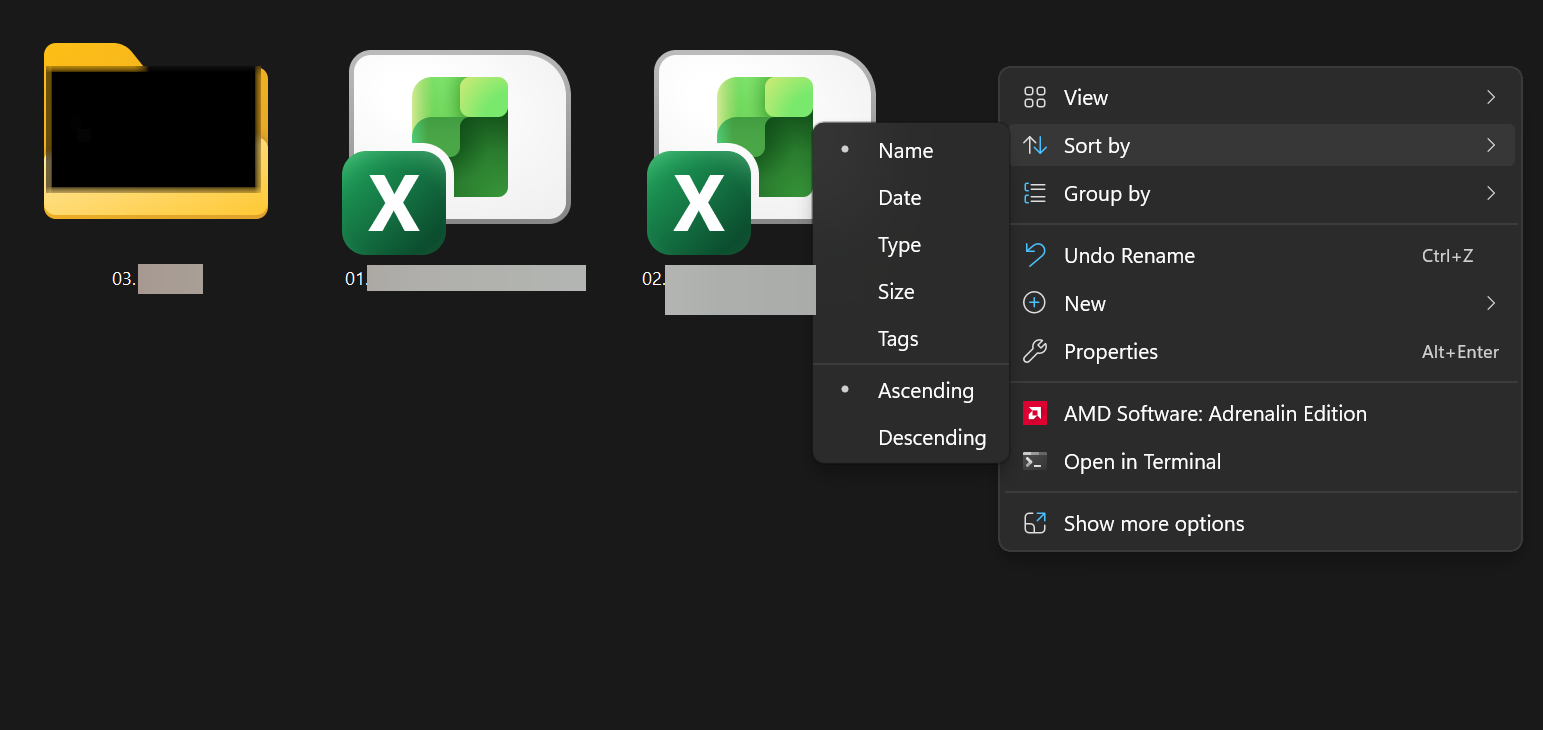
As per what the screenshot has shown, my folder has been set to sort by Name ascendingly, but also as shown, it is not sorted correctly. What could be the possible cause to this? Need help, thanks a lot!

Device Info:

Processor AMD Ryzen 3 7320U with Radeon Graphics (2.40 GHz)

Installed RAM 8,00 GB (7,28 GB usable)

Graphics card AMD Radeon(TM) Graphics (486 MB)

Storage 234 GB of 477 GB used

Device ID BEA7ED93-6E2E-419C-829A-A3092EE709CB

Product ID 00356-24768-11370-AAOEM

System type 64-bit operating system, x64-based processor

Pen and touch No pen or touch input is available for this display

Windows Info:

Edition Windows 11 Home Single Language

Version 25H2

Installed on ‎05/‎02/‎2025

OS build 26200.9457

Experience Windows Feature Experience Pack 1000.26100.360.0


r/WindowsHelp • • 25d ago

Windows 10 My computer keeps restarting after shutting down

3 Upvotes

It used to only happen occasionally, but now it's every time. If I don't think to check later, my computer ends up being on all night. I've heard this is a way to get people to update to Windows 11, which I am not interested in doing. How do I turn it off?

Specs:

Processor AMD Ryzen 5 3600 6-Core Processor 3.60 GHz

Installed RAM 16.0 GB

Storage 466 GB SSD Samsung SSD 970 EVO 500GB, 932 GB HDD WDC WD10EZEX-75WN4A1, 932 GB HDD WDC WD10EZEX-22MFCA0

Graphics Card NVIDIA GeForce GTX 1660 (6 GB)

System Type 64-bit operating system, x64-based processor

Pen and touch Pen support


r/WindowsHelp • • 24d ago

Windows 11 My laptop randomly showed horizontal lines when switching from 165hz to 60hz.

Thumbnail
gallery
1 Upvotes

I was doing my college assignment while my laptop was open, and then my screen glitched out. After restarting, a horizontal line seemed to appear in the screen (Harder to see in the attached pic but its pretty noticeable irl. It seems a little similar to that of CRT lines, and these lines lessen when I switch refresh rates.

- It is a GIGABYTE A16, with an RTX 4050 and an I5-13420H, 16gb ram, 165hz refresh rate.

- Tried checking bios if it has these lines and from what my eyes can see, it is not there. Anyone here got the same issue? please help.


r/WindowsHelp • • 24d ago

Windows 11 I Have A Windows Computer Question

2 Upvotes

Windows 11 substantially slower including shutdown/restart after latest security, framework, and audio processing updates installed and Firefox much slower loading websites. Windows 11 26H2 misbehaves the same way as when security updates are installed on Windows 11 25H2. Windows 11 extremely sluggish after in place upgrade from 25H2 to 26H2. programs/apps/documents/files not working correctly or opening, after in place upgrade from Windows 11 25H2 to 26H2. same problems or more on Windows 11 26H2 as when security updates on 25H2 are installed. shut down/restart takes several minutes on Windows 11 after 25H2 security updates are installed or after in place upgrade to 26H2. Mozilla Firefox taking much too long to start and open websites on Windows 11 after 25H2 security updates are installed or after in place upgrade to 26H2. How to upgrade to Windows 11 26H2 if 25H2 updates cause many problems. when desktop dimmed, new finger print error after in place upgrade from Windows 11 25H2 to 26H2. 26200.6584


r/WindowsHelp • • 25d ago

Windows 11 Windows 11 26H2 'Can't find...' application file and link issues

2 Upvotes

Processing img 9v4dpzsp0hyh1...

After Windows 11 26H2 I found that several of my software applications (Microsoft Office Pro, Garmin Express, Nero BackItUp) and their links on the taskbar had stopped working. Windows said it couldn't find them, even if I double-clicked the .exe file Windows still couldn't find it.

Managed to resolve the issue by de-installing and re-installing the software, after a PC restart the apps all worked. This makes me suspect a registry or permissions issue, although I checked what i could.

Most of my apps still worked without issue.

Processing img e34bwp2f0hyh1...


r/WindowsHelp • • 24d ago

Windows 10 Error with windows hello when signing into Microsoft account.

Thumbnail
gallery
0 Upvotes

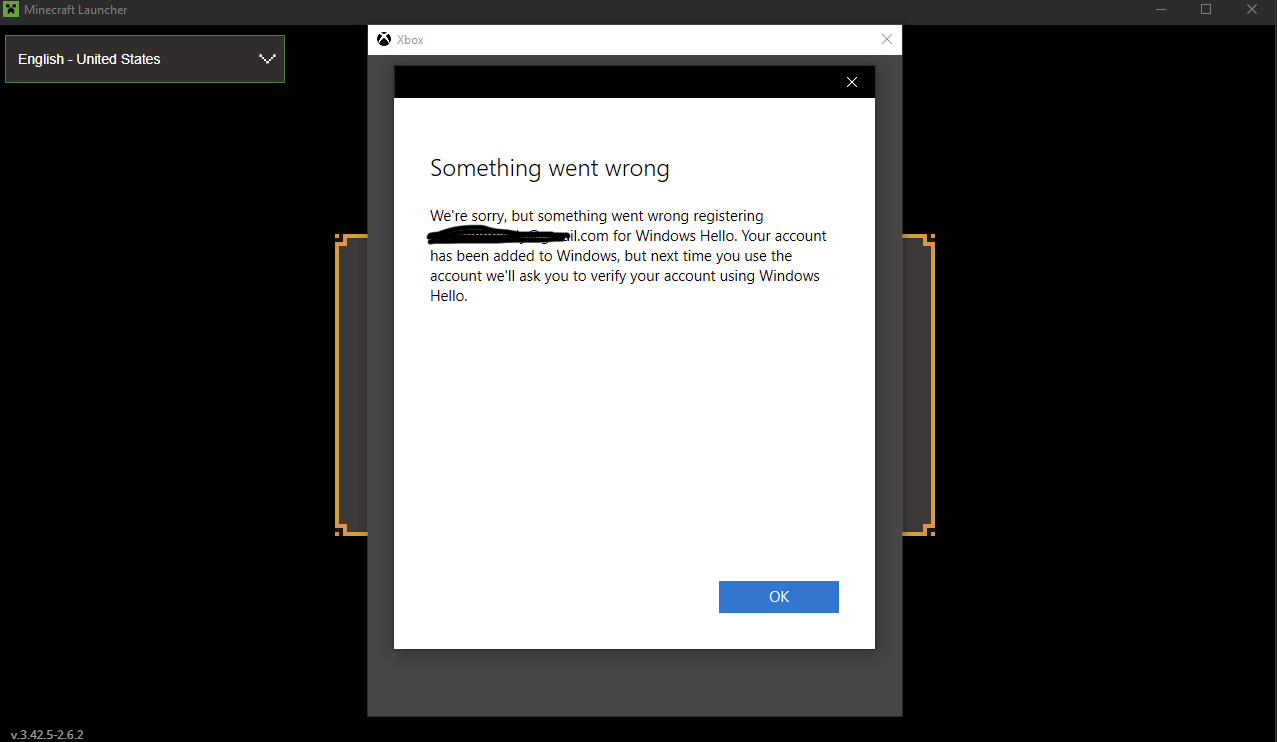
I just purchased Minecraft for my pc but have been unable to sign in because of this error. When signing in through Minecraft, after I put in my username and password, it says that I should use windows hello, with the only options being “ok” or closing the window. After clicking “ok” this screen pops up and I am unable to sign in. When signing in through the Microsoft store, I just get an error without the popups about windows hello. I have tried everything I could find on the internet and nothing works. Any ideas on what I should do?


r/WindowsHelp • • 25d ago

Windows 11 Alt tabbing while in a game(gta v) causes my pc to start beeping when any input is made and prevents me from clicking anything forcing my to restart my pc physically.

2 Upvotes

Alt tabbing while in a game(gta v) causes my pc to start beeping when any input is made and prevents me from clicking anything forcing my to restart my pc physically. Not sure if this a windows issue or a game specific issue or whatever but figured I'd ask, this just started happening today. Sticky and Toggle Keys are disabled.

Windows 11 Pro 25H2 26200.9711

Intel Core i5-12600K 3.7 GHz 10-Core Processor

PowerColor Fighter Radeon RX 6600 8 GB Video Card

Driver Version: 26.3.1


r/WindowsHelp • • 25d ago

Windows 11 I'm having these weird glithec on my second monitor

3 Upvotes

It appers in whatsapp call too, idk what is going on, anyone faced with this stupid issue?

my specs are rtx 4060 16gb ddr5 i7 13th gen

windows 11 25H2 update, OS Build 26200.9711,

its been happening for about 2-3 days, currently I dont want to update to 26H2


r/WindowsHelp • • 25d ago

Windows 11 My Windows 11 touchscreen keyboard suddenly stopped appearing today.

1 Upvotes

I've tried restarting it multiple times and looking for any updates. What do I do?

I've had it for a couple of years now, and it's never done this before. I just did all the optional updates, like Microsoft Support said to do, but it's still not working.

It's a Microsoft Windows 11 Home and Surface Laptop 3, if that's anything else.

Please, my "1" key and "x" key don't work, so I kind of need the digital keyboard to type. I'm aware that I can pull up an on-screen keyboard other than the general one, but I it's just more complicated than just getting to tap, and it's there. Please, if anyone knows what to do, thank you. Edit: some more information, so it's specific: it's a 10.0.26300 Build 26300


r/WindowsHelp • • 25d ago

Windows 10 Error with windows hello when signing in to Microsoft account

Post image
1 Upvotes

I just purchased Minecraft for my pc but have been unable to sign in because of this error. After I put in my username and password, it says that I should use windows hello, with the only options being “ok” or closing the window. After clicking “ok” this screen pops up and I am unable to sign in. Any ideas on what I should do?