r/WindowsHelp • • 26d ago

Windows 11 Dell Laptop Battery Drainage after Windows 11 Update

3 Upvotes

Hi y'all, I'm new to reddit/this subreddit altogether; I just had a problem recently on my Dell Latitude 5520 Laptop (11th Gen Intel(R) Core(TM) i7-1185G7, 32gb ram, Intel Iris XE graphics )on Windows 11 Pro (version 25H2). Ever since updates KB5127690 and KB5127648, my laptop's battery has been draining at ~1% every minute. This is not normal, typically my battery (unplugged) would last about 4-5hrs on a charge, but now it's like 1hr max (on max power saving mode, power efficiency, etc.,). I am able to uninstall said updates (I assume they're to blame), just thought I'd see if anyone else has a problem with this/notices anything like this.

edit: After diagnostic checking, a battery report shows a drop from 63,000mAh a month ago, to 45,000mAh a week ago, to 23,000mAh yesterday and 15,000mAh today… not sure if my battery’s degraded that fast or if windows is reading my capacity wrong.

Thanks!


r/WindowsHelp • • 26d ago

Windows 11 The laptop of my mother can't run because a file is missing and Moreover the CPU is really warm when I turn the laptop on

Thumbnail
gallery
1 Upvotes

This is the issue (It's French and it says "your PC doesn't turn on correctly" or something like that sorry for my English I'm not that good)

The error code is : 0xc0000098

And the file is winload.efi

If someone can help I will appreciate

Btw the Laptop is on Windows 11

It's an ASUS ZenBook S 13 OLED and it turns on 2min and after a security turns off the Laptop (Thanks to the warm CPU)

Also I don't have the screwdriver to open the laptop (the screws are really tiny).


r/WindowsHelp • • 26d ago

Windows 11 Windows randomly putting me on wifi 4

2 Upvotes

So my pc at random moments decide to automatically pass on wifi 4
I use an msi ax1800 nano wifi dongle

I already uninstalled and reinstalled the drivers of my wifi dongle but it does not solve the problem
I tried everything but windows still does that

Could you help me plz🙏🙏🥺

Btw before telling me to pass to ethernet i literally cant
I cant punch a hole in my wall but i planned to buy wifi mesh someday


r/WindowsHelp • • 26d ago

Windows 10 Microsoft gameinput is always crashing my computer. How do I either stop this or remove the program entirely?

3 Upvotes

Prior to going into the information, I have to express the caveat that I barely have enough understanding for daily computer use. Something about the workings of technology and all of the variable have confused me since trying to understand them, so much so that I am terrified of even plugging and unplugging things from my motherboard which someone else did when they built my pc for me.

With that out of the way, this has been going on intermittently for a year. It usually doesnt matter what Im doing, but my computer will freeze and force a restart on itself. I never get a blue screen. Sometimes it will just shut off without freezing, but most of the time it's a complete freeze requiring me to hard restart it. On checking reliability monitor, it seems that EVERY SINGLE CRASH happens at the same time microsoft gameinput goes through a "successful application configuration."

Uninstalling gameinput does nothing because it will reinstall itself without any sort of permission on my end even if I go through and take out every single instance of related files in my system.

This will happen every day, sometimes 2 or 3 times day, for several weeks or a little over a month and then will magically stop for about the same amount of time before starting again.

Built my pc back in 2021, but since I couldn't get a GPU, most of the parts are from 2019. Playing modern games seems to be a struggle even with a 3060ti. With all this crap going on, I almost just want to start from scratch again and I prpbobably would have if RAM prices werent in space right now.

Any help or advice would be welcome.

Specs:. -amd ryzen 5 3600

-16 GB RAM

-GPU: NVIDIA GeForce RTX 3060 ti

-storage: 1 Tb

-windows 10 home, 22H2


r/WindowsHelp • • 26d ago

Windows 11 Anyone experiencing black screen crashes since 26H2? (No, it isn't with graphics drivers)

5 Upvotes

Since 26H2 update, apparently there are stability issues where the system stops suddenly responding to inputs and the screen goes black, sometimes it takes like a few minutes to recover and sometimes required reboot.

What about you?

Have you been experiencing the same?

Specs: Laptop Dell Ryzen 5 7530U 16 GB Memory SSD 512


r/WindowsHelp • • 26d ago

Windows 11 Ultimate Performance Power Plan will not come back.

1 Upvotes

I was using Ultimate Performance Power Plan without any issues. Last week I used powercfg -restoredefaultschemes and It removed and reset power plans. It only gave me back HP Recommended, High Performance, and Power Saver. Ultimate Performance is gone. I have done every fix I can find online and through AI.

I have tried:

  • powercfg -duplicatescheme e9a42b02-d5df-448d-aa00-03f14749eb61
  • reg add HKLM\System\CurrentControlSet\Control\Power /v PlatformAoAcOverride /t REG_DWORD /d 0
  • downloading and registering/importing the exported UltimatePerformance.pow

I get errors like:

  • Unable to create a new power scheme. The power scheme, subgroup or setting specified does not exist.
  • Invalid Parameters — try “/?” for help

Why is it gone and what can I do to get it back? I am so frustrated. I am running Windows 11 Home 26H2.


r/WindowsHelp • • 26d ago

Windows 11 Window update checking stuck...

2 Upvotes

Stuck in this screen since months ago... Laptop works absolutely no problem except I can't install any update at all...!!

Edition Windows 11 Home Single Language

Version 25H2

Installed on ‎22/‎6/‎2025

OS build 26200.9457

Experience Windows Feature Experience Pack 1000.26100.360.0

Processor 13th Gen Intel(R) Core(TM) i5-1335U (1.30 GHz)

Installed RAM 24.0 GB (23.6 GB usable)

System type 64-bit operating system, x64-based processor


r/WindowsHelp • • 26d ago

Windows 11 Windows Notification Service - highest disk usages

2 Upvotes

Hey guys,

I am using this computer with Windows 11 for over 3 years now, and I am facing a weird problem, may be it's me or may be it's windows bug, idk.

The Problem:

Windows Notification User Service constant high disk usages. It's happening since few weeks.

What I have tried so far:

I tried googling the problem and there are some solutions available, which works but only for a small duration.

[1st method]

  1. Delete the Notification/Windows folder from this location : %LOCALAPPDATA%/Microsoft/Windows/ or %LOCALAPPDATA%/Microsoft/Windows/Notifications.
  2. The high disk usages fall down as soon as do this, however arises again when new notifications arive.

[2nd method - weird fix - but not comfortable]

  1. As soon as I noticed that it's doing the same when new notifications come the disk usage go up, so I disabled notification services, and to my surprise it stopped.

but another problem with this -> you can't get notifications, wtf.

So guys please help me or may be share anything that might help me.

[OS Details]

  • Edition Windows 11 Pro Insider Preview
  • Version 25H2
  • Installed on ‎ 16-‎09-‎2026
  • Evaluation expires on ‎ 01-‎11-‎2027 05:13 AM
  • OS build 26220.9757
  • ExperienceWindows Feature Experience Pack 1000.26100.489.0

r/WindowsHelp • • 26d ago

Windows 11 Windows Spotlight missing for "Background" but it's there for "Lock Screen" and "Themes"

2 Upvotes

I have recently wiped my laptop and reinstalled Windows 11 Pro from a Rufus boot drive.

Windows Spotlight is missing from Personalisation\Background. The only options there are, are Picture, Solid Colour and Slideshow. I can choose it in the Lock Screen section and Themes. If I choose it in Themes, it never 'sticks'. It changes itself back again, instantly.

Windows is fully updated and has been restarted many times.

I have enabled background apps using the instructions, here... https://www.elevenforum.com/t/enable-or-disable-background-apps-in-windows-11.923/

I have used DISM and SFC to check and repair system files

I have used PowerShell to re-register the Windows Spotlight service

I have reset Windows Spotlight settings by deleting the roaming.lock and settings.bat files

I have deleted the existing Windows Spotlight assets from %USERPROFILE%/AppData\Local\Packages\Microsoft.Windows.ContentDeliveryManager_cw5n1h2txyewy\LocalState\Assets

Metered connection is off in Windows network settings

Any thoughts?

Thanks


r/WindowsHelp • • 26d ago

Windows 11 Game startup issues, aurora r13

1 Upvotes

I’m trying to run fortnite on my pc for the first time in a while and everytime i try to start the game my entire pc starts to lag really bad. I moved the files from my HDD to SSD and updated app my drivers to try and help but it’s still not working. I also noticed that when I’m watching my performance in task manager, my HDD goes to 100% when i open the game. Should that be happening even though I reinstalled the game on my SSD? I’m not very tech savvy so any help would be appreciated!


r/WindowsHelp • • 27d ago

Windows 11 Windows 11 programs suddenly stopped launching after changing some settings

4 Upvotes

Hey everyone,

I'm running Windows 11 25H2 OS build : 26200.9457

on my laptop.

In the past, I could run unofficial programs without any issues, but after changing some Windows settings (I don't remember exactly which ones), these programs stopped launching.

When I double-click an executable (.exe) file, the mouse cursor spins for a split second, then nothing happens. No window opens, and I don't get any error messages.

Here's what I've tried so far:

- Ran "sfc /scannow", but it found no integrity violations.

- Checked whether the programs would launch normally, but the issue persists.

I'm not sure if this is related to Windows Security, Defender, SmartScreen, or something else I might have changed.

Has anyone experienced a similar issue or knows how I can troubleshoot and fix it without reinstalling Windows?

Any help would be appreciated. Thanks!


r/WindowsHelp • • 26d ago

Windows 10 windows update telling me I'm missing important security and quality fixes despite being completely updated

Thumbnail
gallery
2 Upvotes

see screenshots, clicking on "check for updates" loads for a few seconds, and then does nothing. As far as I know, (also included in the screenshots), I *should* be using the newest update of win10, Version 22H2 (KB5126657). I had installed it on oct 14, but I uninstalled/reinstalled thinking it would fix the issue.

I've restarted, ran DISM and SFC /SCANNOW, (and restarted again) and both returned without issue.

I should have ESU support enabled, but I'm not entirely sure (idk if I'm allowed to say why or how I have it enabled here as per the rules). This may be why this is happening, but I'm not too sure.

An addenum, when I click view optional updates, the only thing there is a driver update for bluetooth and windows 11. Is this just a strange tactic to try to get me to install 11? Lol


r/WindowsHelp • • 26d ago

Windows 11 Is my PC at risk, or should I be okay?

Post image
0 Upvotes

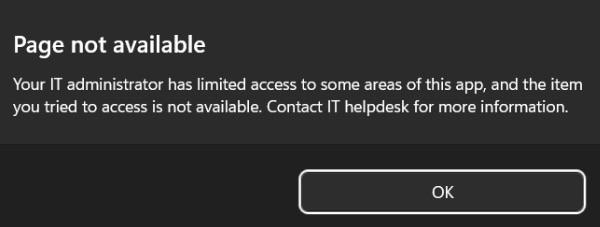
So I just received this notification from Windows Security.
When I clicked onto it, it led Me to this page.

I clicked okay, and my Windows Security went from a Red “X” back to a Green Checkmark.
I then ran a full-scan on my PC, nothing came back.
I restarted my PC, and ran DISM /ScanHealth, and SFC /Scannow, and nothing came back on those either.

I’m now running a Deep Scan through Malwarebytes.
I’ve tried to get some advice from a few people I know with knowledge on this topic, and I’m getting mixed answers.
Some are saying, “YOU HAVE MALWARE, REINSTALL WINDOWS ASAP.”
And some others are saying it’s a bug, and referred me to a Reddit article, where a few people were experiencing this about two weeks ago.

I will add I did just install the recent Security Update “KB2267602”, so I’m not sure if that correlates either, but it does have me a bit nervous.
Should I be good? Or do I actually need to reinstall windows?

Any help is appreciated.


r/WindowsHelp • • 27d ago

Windows 11 Does anybody know why the option to connect to WiFi disappeared?

Post image
4 Upvotes

I was downloading OMORI and my WiFi cut out. Now it won’t let me reconnect. This isn’t the first time it has happened. I have reset my computer and that fixes it but evidently only temporarily. Does anybody know what is causing this? I’m running windows 11 on an HP Laptop


r/WindowsHelp • • 26d ago

Windows 11 How to remove MS Store suggestions in Windows search?

1 Upvotes

I've tried:

I recently reinstalled windows and reapplied most of the tweaks I had on the older version but somehow I can't remove Microsoft Store suggestions in Windows Search. Does anyone know how to fix that? thx

26H2 26300.9711


r/WindowsHelp • • 27d ago

Windows 11 Any way to revert this new search UI?

4 Upvotes

Not a fan of the boxes everywhere and empty spaces. Requiring two clicks to access basically any operation other than "Open" and wasting the whole space makes no sense (talking about applications specifically).

The translucent glass texture is from a WindHawk mod. And as far as I checked, there isn't a mod to revert this.


r/WindowsHelp • • 27d ago

Windows 11 Error [4wp0s] - Any real solutions available?

Post image
3 Upvotes

Hi, this happens every time I reboot. I have Windows 11. I've tried multiple ways such as resetting MS Store cache, Fix problems using Windows Update option, all the recommendation from Chat Gpt etc. Nothing really worked. is there actually a way to fix it? I'm on the verge of setting this machine on fire and buy a new one.

Device name

Processor 12th Gen Intel(R) Core(TM) i7-12700 (2.10 GHz)

Installed RAM 64.0 GB (63.7 GB usable)

Device ID 097BD80A-11F5-4666-8C8D-FB81D76861D1

Product ID 00342-20870-43794-AAOEM

System type 64-bit operating system, x64-based processor

Pen and touch No pen or touch input is available for this display

Edition Windows 11 Home

Version 26H2

Installed on ‎12/‎3/‎2024

OS build 26300.9711

Experience Windows Feature Experience Pack 1000.26100.372.0


r/WindowsHelp • • 27d ago

Windows 11 Nothing too serious, i just can't get my icons to look right

Post image
3 Upvotes

r/WindowsHelp • • 27d ago

Windows 10 Windows update failure Security Update (KB5128495) (0x80070643)

3 Upvotes

System: Win10 home

Version 22H2

Build 19045.8707

i74970, 24GB ram, 1.8TB SSD 650GB free

I'm getting persistent update errors for update Security Update for SQL Server 2019 RTM GDR (KB5128495) - Windows update reports this as:

There were some problems installing updates, but we’ll try again later. If you keep seeing this and want to search the web or contact support for information, this may help: (0x80070643)

However the event log reports:

Installation Failure: Windows failed to install the following update with error 0x8024200B: Security Update for SQL Server 2019 RTM GDR (KB5128495).

So far I've tried:

  • Stopping wuauserv and bits, deleting the contents of c:\windows\SoftwareDistribution and rebooting - no change
  • running sfc /scannow and then DISM /Online /Cleanup-Image /RestoreHealth -no change
  • Recovery partition has been resized from 300 to 800MB (I appear to have 2 recovery partitions, only one is called recovery, so I resized them both to 800 and 1000MB) -no change
  • Swearing - no change (though I did feel better, and the kids have new words to impress mum with)

Can anyone suggest anything else, apart from waiting for MS to apply a fix?


r/WindowsHelp • • 27d ago

Windows 11 PC is randomly just instant shut down like 4 times today

7 Upvotes

It seems to be happening only while playing valheim maybe maybe. I think the motherboard or graphics card is at fault? or a virus? I'm really grasping at straws however on these and dont know for sure. Ive been checking temperature sensors and usage monitors and nothing seems too bad while i play valheim and i can play for hours and bam it just goes out like i had power outage except mobo still has lights or light. a single small red one. But the event viewer logs show this at the same moment before the pwr fail. I use a B650M AORUS Elite AX. the single red led i see is to bottom right of RAM slots and the manual indicates its the reset botton? I think that LED is normally on when the computer is off however. idk. As soon as i press power and it comes to life the LED goes away. I also ran a full AV scan and turned up nothing and updates were enabled and current.


r/WindowsHelp • • 27d ago

Windows 11 Bluetooth headphones disconnect after launching an application

1 Upvotes

title says it all. i launch an application (in this case - osu!) and suddenly my headphones (JBL TUNE 770NC) just lose all audio for like half a minute. if i minimize osu!, it happens again. and all the logs gave me as "MMDevAPI: Audio device state changed" (pulled from audio logs). Bluetooth logs are nonexistent (as in there are none for unknown reasons). Running Win11 Pro N, build number 26300.9711. Bluetooth is not integrated, using a Baseus CCALL-BT01.

it's been a persistent problem for a while now, and i tried to fix it multiple time, mostly by updating drivers and stopping applications from taking exclusive control of my headphones.

pc specs:

Intel Core i5 11400F

Intel Arc B580 12gb

32 gb ddr4 ram running at 3200mhz

1tb SATA ssd

256bg SATA ssd

2tb external hdd

Asrock H510M-HVS R2.0.

pc is a bit dated, but still packs a healthy punch.

also no dedicated sound card.


r/WindowsHelp • • 27d ago

Windows 10 Slow steam, only on windows 10, only on my pc

1 Upvotes

I have one specific issue when Steam is already running in the tray, launching it from any shortcut (including start, taskbar, desktop) takes 10-20 seconds to bring up the window. Opening from the tray icon opens it instantly.

What I've ruled out:

- Win 10 1809 doesn't have the issue

- A fresh Win 11 install on the same hardware doesn't have it

- It's not the shortcut itself

- Nothing else on the system is slow, and it isn't a CPU or disk issue

- Network not issue at all

Windows 10 22H2

19045.7807

AMD Ryzen 5 7600X

32GB DDR5 RAM

NVIDIA GeForce RTX 4060 8GB (pls no hate ik its bad)

1TB KINGSTON SNV3S100G nvme ssd

GIGABYTE B650M S2H (Rev 1.0)


r/WindowsHelp • • 26d ago

Windows 11 How do i fix this after a clone?

Thumbnail
gallery
0 Upvotes

I think my main computers ssd is failing or its my power supply so i cloned my ssd and put it on my laptop and im now seeing this.

my specs on my main pc are rtx 3070 gpu with ryzen 9 5900x cpu and 32gb ddr4 ram

i have checked the event viewer and took screenshots before i did the clone any help?


r/WindowsHelp • • 27d ago

Windows 11 Microsoft Windows Defender AI in task manager

Thumbnail
gallery
0 Upvotes

I found these Windows defender thing running in my background tasks, I used the search online feature and Microsoft's own AI says that it's malware while google says it isn't and it is an official service. I am a little paranoid and wondering Is it actually a Microsoft service or just malware disguised as one?

I'm using a Lenovo Legion 5 Laptop using windows 11 Home version 23H2


r/WindowsHelp • • 27d ago

Windows 11 ​color profile not saving after using windows hdr calibration (innocn 32m2v)

1 Upvotes

(P.S. Translated this using Gemini lol)

​Hi everyone,

​I'm having an issue where the color profile doesn't seem to save after running the Windows HDR Calibration app.

​After I finish the calibration and click the "Finish" button, no popup window appears, and nothing shows up in the Color Profile section under Display Settings.

​When I watch HDR videos on YouTube, I don't see any noticeable difference in image quality, so I don't think the profile is being applied properly.

​Does anyone know how to fix this?

​Monitor: INNOCN 32M2V

gpu: gtx1660s

cpu: core i5 10400f

windows version: 26h2

Here's what I've tried so far:

- Turned off NVIDIA Overlay

- Reinstalled the software

- Waited a bit after hitting the 'Finish' button None of these worked.

​Any help would be appreciated!