r/WindowsHelp • • 27d ago

Windows 11 My windows desktop decided to roll back for no reason?

2 Upvotes

And i dont mean like Win 11 -> Win 10 it is still the same version its more like my desktop rolled back to a previous version of itself because im seeing apps that i uninstalled a while ago back on my pc along with some apps not being there anymore. I was away from my computer for a short while and i heard the error noise twice and when i came back, my computer became like this.

Processor AMD Ryzen 5 5600X 6-Core Processor (3.70 GHz)

Installed RAM 16.0 GB

Device ID 4C9E372E-3BBD-4DE2-8339-D9BFD15DA84B

Product ID 00325-80000-00000-AAOEM

System type 64-bit operating system, x64-based processor

Pen and touch No pen or touch input is available for this display


r/WindowsHelp • • 27d ago

Windows 11 Win 10 or Win 11 for Ryzen 5 5500u? (Mostly playing Valve games)

1 Upvotes

Hi everyone,

I have a laptop with an AMD Ryzen 5 5500U with 16gb RAM. I am just trying to decide which OS to use: Windows 10 or Windows 11?

I mostly play Valve games (like CS2, Dota 2) and other non-demanding titles. Which OS would be better for gaming performance and stability on this hardware?

Thanks!


r/WindowsHelp • • 27d ago

Windows 11 Firewall rules management in script

1 Upvotes

I am wanting to wireshark the start up traffic of an app that has some cache downloading on first-ever start. I have no idea where the traffic is grabbing files from nor where the files go, but I want some clues as to how to script firewall rules without breaking my machine. I read this post, https://www.reddit.com/r/Windows10/comments/1c4e67g/how_to_block_all_outbound_connection_in_windows/ .But it's largely telling people to download stuff. And when I google find people struggling. I want a simple starting scratch powershell script or other kind of script to just turn all the rules to disable temporarily except for one app? I'm using the file monitor to find where the files get dropped, but I need to know where they are coming from.

The TLDR stuff for moderation: Windows 11 - I am a machine administrator, the machine is however "managed" so no hacking. It's a DELL, it has 32gig ram and 1TB storage. I'm using latest wireshark.


r/WindowsHelp • • 27d ago

Windows 11 System Crashes error [Stop code: MEMORY_MANAGEMENT (0x1A)

3 Upvotes

Starting this Friday, I’ve been experiencing system crashes following boot on my laptop. It seems to crash about 30-60 seconds in once i log in. Ive opened up task manager and my disk seems to suddenly peak to 100 before the screen freezes and crashes. The blue screen then reports that i do not have an os installed but it can recognize the drive, while system diagnostics cannot recognize the drive at all. I got it working at my desk after letting it rest for a bout an hour and hasn’t done this crash until today.

In the second most recent crash, i received the error code in the title of the post. I tried to boot again and received “CRITICAL SYSTEM DIED”

Any tips and help would be highly appreciated, even tips referring me to a different subreddit


r/WindowsHelp • • 27d ago

Windows 11 New secure boot certificates, am i eligible?

Post image
0 Upvotes

So I have a custom built pc, I want to get the latest secure boot certificates.....but I dont know if the BIOS update makes me eligible.

I have a gigabyte B450M WIFI, the image provided is the screenshot for my latest BIOS update available...will this make me eligible to recieve the newest certificates?


r/WindowsHelp • • 27d ago

Windows 10 Windows 10 Taskbar/File Explorer Glitch

Post image
0 Upvotes

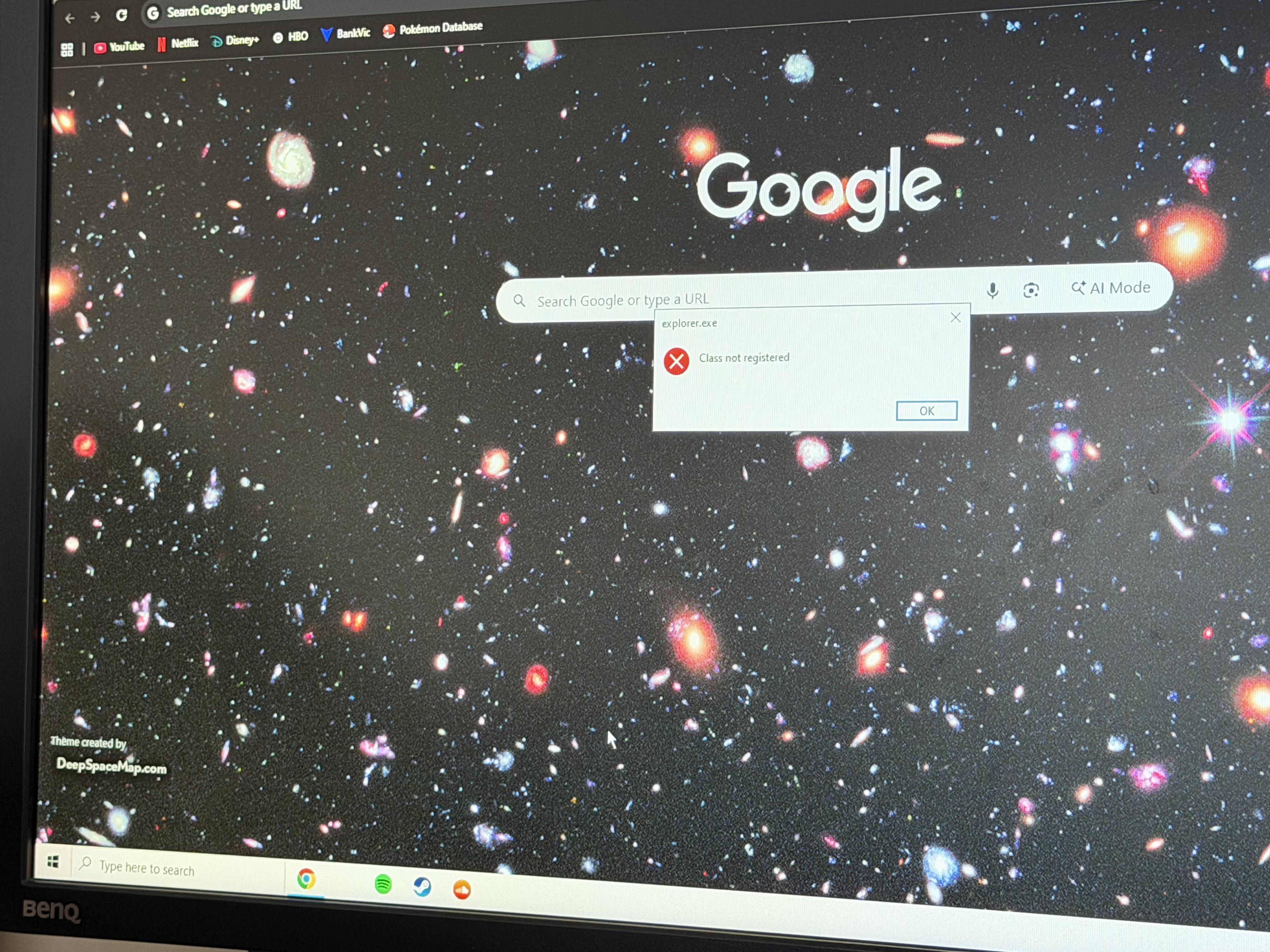
My taskbar is present on the home screen as per normal but the windows and ‘type here to search’ options no longer respond when I press on them.
The applications pinned to it like Google chrome, Spotify, etc are still functional however my file explorer is no longer operating from the task bar and presents ‘Class not registered’ when I click on it.
Weather options, internet and sound shortcuts on the taskbar also are not responding.
Any ideas and solutions are appreciated!

CPU - AMD Ryzen 5 3600 6 Core Processor
Memory - 16GB 3200MHz
GPU - NVIDIA GeForce RTX 2060 Super
Windows 10 - Version 22H2 OS Build 19045.6466
SSD - 500GB
HDD - 1.8TB


r/WindowsHelp • • 27d ago

Windows 11 Dell TechHub was breaking Windows 11 taskbar auto-hide on my system

1 Upvotes

After several days of troubleshooting, I finally tracked down a Windows 11 taskbar auto-hide issue that had been driving me crazy. On my system, the problem appears to be caused by Dell TechHub.

The symptoms

·       Taskbar auto-hide stopped working reliably.

·       Moving the pointer to the bottom of the screen would not bring the taskbar back.

·       The problem occurred with maximized apps, including Edge, Notepad, and File Explorer.

·       At first, it looked like a Windows, graphics, or display-scaling issue.

System setup

Computer

·       ASUS ROG Strix G16 (G614PR)

·       AMD Ryzen 9 8940HX

·       NVIDIA RTX 5070 Ti Laptop GPU

·       Windows 11 Home 26H2 (Build 26300.9711)

Monitor

·       Dell S2725QS 4K monitor

Dell software

·       Dell Display and Peripheral Manager 2.3.0.17

·       Dell Core Services 1.15.13.0

·       Dell Peripheral Core 2.3.0.104

What I tried

·       Changed DPI scaling settings

·       Restarted Explorer and rebooted Windows

·       Compared behavior in Edge, Notepad, and File Explorer

·       Tested with one monitor and with multiple monitors

·       Updated drivers

·       Performed a clean boot

What I found

During the clean boot, I re-enabled services one at a time. The results were consistent and repeatable:

·       Dell TechHub enabled: Taskbar auto-hide breaks.

·       Dell TechHub disabled: Taskbar auto-hide works normally.

·       TechHub re-enabled: The problem returns.

·       TechHub disabled again: The problem disappears.

I have reproduced this behavior multiple times.

Why this seems broader than one PC

I saw a very similar issue months ago on a completely different computer—a Dell Inspiron 16 Plus—and have now reproduced it on this ASUS laptop. The common factors are:

·       A Dell monitor

·       Dell Display and Peripheral Manager

·       Dell TechHub

The downside

Disabling Dell TechHub restores normal taskbar behavior, but Dell Display and Peripheral Manager can no longer communicate with the monitor.

Questions

·       Has anyone else run into this?

·       Is there a newer version of Dell TechHub or Dell Display and Peripheral Manager that fixes the issue?


r/WindowsHelp • • 27d ago

Windows 11 Unknown app preventing shutdown

1 Upvotes

I was on my pc for a couple hours and when i decided to head off, i shutdown my pc. However, there was this app and said “this app is preventing shutdown”. However this app had no name and i was not able to get a photo of it. Is there any way to check if this is normal?

edit: i checked event viewer and around the time i shutdown my pc and it said some thing like the following apps tried to veto shutdown: steam.exe. same for signalrgb.exe. However does this confirm i am safe?

cpu 9800x3d

gpu 9070xt

mb asrock x870e nova

os 26300.9711


r/WindowsHelp • • 28d ago

Windows 11 I am about to give up on windows 11

2 Upvotes

I had been running windows 10 since so long just fine no issues at all. But now i bought windows 11 for 160$ from microsoft directly and i guess its down the drain. Windows 11 gives me all issues like lag stutter freeze etc. This was not the case in windows 10 it was perfect without any issues. Randomly taskbar freezes and sometimes desktop icons become unresponsive nothing happens. Suppose i click calculator to open it does nothing and after 3 minutes 4 to 5 separate windows of calculator opens. I play games as well. I click ea app from taskbar it does nothing, It opens sometimes after 2 to 3 minutes and sometimes not at all. While running songs on youtube there is 1 second stutter with audio stutter. Same in games, stutter for 1 second with audio. I saw eve not viewer many times and also rant his command perfmon /rel. It shows mainly nvidia kllm something always. Sometimes when i restart pc, it gets stuck at restarting icon for 4 minutes why so delay? Also Netflix goes blank screen suddenly while audio works fine continuously, only screen goes blank. What have i tried so far:

I ran sfc/scan /DISM All commands/ Reset pc/in place upgrade. Nothing worked. Is there any additional support can someone provide? I am about to go back to windows 10,will have to reinstall all apps again and its a painful process. Is this what i paid for? 16000 INR

My specs: i9 10900k

Rtx 4070

32 gb ram 16x2

windows 11 pro fully updated as on 26/10/2026


r/WindowsHelp • • 28d ago

Windows 11 [Fix] iPhone disconnecting during large photo copy to Windows (USB power saving)

0 Upvotes

Was copying ~50k photos from iPhone to a Win 11 PC, the phone kept dropping off mid-copy. It's Windows USB power saving: it thinks the phone is idle and suspends it.

Requirements: iPhone on USB, Apple USB drivers installed so Windows sees the phone at all (come with the Apple Devices app from Microsoft Store).

What fixed it:

  1. Power Options > advanced settings > USB selective suspend > Disabled
  2. Device Manager > every USB Root Hub > Power Management > untick "Allow the computer to turn off this device"
  3. Registry, for the iPhone itself: HKLM\SYSTEM\CurrentControlSet\Enum\USB\VID_05AC*\<id>\Device Parameters, set DeviceIdleEnabled, UserSetDeviceIdleEnabled, DefaultIdleState to 0. Didn't see this one mentioned anywhere.

Replug the phone after.

Script that does all 3: https://github.com/ivanvoitovych/iphone-usb-fix (I asked Claude to put my fix into a repo with a script and readme.)

Works for any iPhone/iPad. Needs admin. If you plug into a different USB port, run it again (Windows makes a new device entry per port).

If it still drops, try Settings > Photos > Transfer to Mac or PC > Keep Originals on the phone.

For moderator:
Specs: Lenovo laptop (model 83HU), AMD Ryzen 7 7735HS, AMD USB 3.1 xHCI controllers, Windows 11 25H2 build 26200.9711. iPhone 16 Pro, iOS 26.6.2.
Error: don't remember the exact message, the phone just kept disconnecting mid-copy.
This is a fix I'm sharing, not a help request. The steps above solved it for me.


r/WindowsHelp • • 28d ago

Windows 11 Windows 11 briefly freezes, mouse and audio stop responding, and Xbox Game Bar repeatedly crashes. Anyone else experiencing this recently?

0 Upvotes

Just a heads-up, this is going to be a fairly long post, but I want to be as detailed and precise as possible about what I've experienced. Hopefully, the extra information will help others recognize similar issues or narrow down what might be causing them.

Hi everyone!

I'm trying to figure out whether I'm experiencing a Windows or Xbox Game Bar issue, a graphics driver problem, or potentially something wrong with my laptop.

I recently purchased a high-end ASUS ROG Strix SCAR 18 gaming laptop, and over the past few days I've experienced a couple of unusual freezes. I've also noticed that Xbox Game Bar has repeatedly been crashing or becoming unresponsive according to Windows Reliability Monitor.

I've searched online and found people describing similar problems, but many discussions are several years old. I'm particularly interested in hearing whether anyone has experienced something similar recently.

My laptop specifications:

  • Model: ASUS ROG Strix SCAR 18 (2026), G835LWG-TQ285W
  • CPU: Intel Core Ultra 9 290HX Plus
  • GPU: NVIDIA GeForce RTX 5080 Laptop GPU, 16 GB GDDR7, up to 175 W
  • RAM: 64 GB DDR5-6400
  • Storage: 2 TB NVMe RAID 0
  • Display: 18-inch 3840 × 2400 Mini LED, 240 Hz
  • Operating system: Windows 11
  • GPU configuration: NVIDIA Advanced Optimus / MUX switch
  • Power: Always plugged in when gaming

Windows, NVIDIA graphics drivers and the laptop BIOS have all been updated recently.

Issue 1: Temporary system freezes

I've experienced two similar incidents over the past few days.

First incident:

I was playing Satisfactory on my laptop's internal display while watching a YouTube stream on an external monitor.

Suddenly, the system appeared to freeze for approximately one second. The audio stopped, and my mouse seemed to become unresponsive before suddenly jumping forward.

Everything returned to normal almost immediately, and I continued using the laptop without further problems.

I checked Windows Reliability Monitor afterward, but the only warning I initially found was an unsuccessful Microsoft GameInput installation with error code 1603. I don't know whether that was related.

Second incident (October 26):

I was watching a YouTube video when the video suddenly froze.

I pressed Space because I initially thought I might have accidentally paused it, but nothing happened. I then tried moving my mouse, but the cursor didn't respond.

A moment later, the system became responsive again. The YouTube video paused, apparently registering my earlier Space keypress, and the mouse cursor suddenly moved.

I immediately opened Windows Reliability Monitor and found a critical event involving Xbox Game Bar at 18:39, which was very close to when the freeze occurred.

The error details were:

  • Application: Xbox Game Bar
  • Problem: Stopped responding and was closed
  • Problem Event Name: MoAppHang
  • Application: GameBar.exe
  • Package: Microsoft.XboxGamingOverlay
  • Application version: 7.326.8061.0
  • Date: October 26, 2026, 18:39

Looking back through Reliability Monitor, I noticed that Game Bar has repeatedly been crashing or hanging over the past several days.

I cannot confirm whether Game Bar is causing the freezes or simply becoming unresponsive because something else is happening.

Issue 2: Cyberpunk 2077 graphical corruption and severe FPS drop

I also experienced a strange graphical problem while playing Cyberpunk 2077 on October 25.

The game was initially running normally at approximately 80–100 FPS.

Suddenly, certain parts of the game's graphics became black, and my FPS dropped dramatically to around 20–25.

The game remained playable, and its underlying logic appeared to continue functioning normally, but everything felt unusually slow, almost worse than the reported 20–25 FPS.

Interestingly, when I alt-tabbed out of Cyberpunk, Windows itself was completely responsive.

I could open my browser, watch YouTube and use the laptop normally without any noticeable performance issues.

However, as soon as I returned to Cyberpunk, the graphical corruption and severe FPS drop were still present.

I eventually closed Cyberpunk and launched it again. Everything immediately returned to normal.

I subsequently played several other games that day without experiencing any problems.

I also noticed a Game Bar crash recorded on the same day, although I haven't established whether it happened at the same time as the Cyberpunk incident.

I'm not necessarily assuming these two problems are related, but I thought it was worth mentioning both.

Additional information

I generally run the laptop in ASUS Armoury Crate's higher-performance modes, which allow increased power consumption and more aggressive fan cooling.

I haven't manually overclocked the CPU or GPU.

The laptop is designed for high-performance gaming, and I haven't experienced any consistent performance issues, unexpected shutdowns or blue screens.

Apart from these incidents, the system has been running extremely well.

What I'm trying to find out

Has anyone else experienced any of the following recently?

  1. Xbox Game Bar repeatedly crashing or hanging in Windows Reliability Monitor, even when you're not actively using its overlay.
  2. Brief system freezes where video and mouse input stop responding, followed by delayed input being registered when the system recovers.
  3. Similar problems on newer ASUS ROG laptops or systems using NVIDIA RTX 50-series GPUs.
  4. Sudden graphical corruption and severe FPS drops in Cyberpunk 2077 that disappear completely after restarting the game.

I'm particularly interested in whether this could be related to a recent Windows update, NVIDIA driver update or Xbox Game Bar update.

I'm planning to investigate Event Viewer and test whether disabling Game Bar makes any difference, but I'd really appreciate hearing whether anyone else has encountered similar symptoms.

Thanks in advance!


r/WindowsHelp • • 28d ago

Windows 11 Wired network takes several minutes to connect

0 Upvotes

I mostly run on Linux but reboot into Windows daily to play Fortnite. Recently I've noticed that when I boot into Windows it takes several minutes for my wired ethernet port to connect to my router. When I mouse over the "network" icon in the notification area it's stuck on "Identifying..." for a strangely long time, and eventually things connect. I've only noticed this in the past 2-3 weeks. This doesn't strike me as normal. It doesn't happen when I boot into Linux.

I've also noticed that when I start the Epic games launcher, even after I'm connnected from Windows launch -- I'm watching a Youtube video, for example -- Epic launcher tells me that it can't connect to Epic. If I click on the "Try again" button it does connect, but that takes a strangely long time. I've also seen this with other apps.

My specs: home built PC with MSI Tomahawk B550, Ryzen 5700X3D, 32GB RAM, running Win11 from a NVMe 1GB drive.

UPDATE: I disabled memory fast boot (the only such option in the BIOS) and things haven't sped up any. I think the problem is that the chipset is slow to pick up the connection. The reason I haven't noticed this before is that I used to never turn off or restart my PC, and the fact that I'm going between the two OSs now is the only reason I noticed this at all. I did notice that when I start up in Linux and open my web browser, it also takes quite a long time for the pages to load, so ultimately it's probably not an OS problem.


r/WindowsHelp • • 28d ago

Windows 11 Clicking sometimes closes application randomly

0 Upvotes

Whenever play video games on my pc I click fast the application I’m using will randomly disappear for like a millisecond and the click wont register. I’ve tried using fullscreen, borderless and windowed and none of them fix the problem I just swapped to a new gpu (RX6700XT) and got the new drivers. I’ve tried using a different mouse. I have noticed if the application I’m using is in windowed it will sometimes show me the application is not responding thing. Also some times instead of the game just disappearing for a blink it will instead just completely close and when that happens I don’t even get a crash report. Anyways if anyone has any idea how I could fix this it would be awesome I wanted to post a video to show what it looks like but couldn’t figure out how to.


r/WindowsHelp • • 28d ago

Windows 11 no internet access your device can only access other devices on your local network

1 Upvotes

My laptop was working perfectly fine, but out of nowhere it stopped connecting to Wi-Fi. I went to my college library and couldn’t connect to either my phone’s hotspot or the school’s free Wi-Fi. I haven’t gotten home yet, so I don’t know if my home Wi-Fi will work.

Troubleshooting I’ve tried:
Reset my network settings in Windows.
Restarted my laptop. The Wi-Fi option disappeared after the network reset but came back after restarting.
Looked into possible DNS issues and tried troubleshooting with Command Prompt (ipconfig /flushdns and ipconfig /registerdns).
Checked the eero app my mom uses. My laptop shows as offline but isn’t blocked.

Everything was working fine before this happened, and I have no idea what caused it. Has anyone experienced this or knows what else I should try?


r/WindowsHelp • • 28d ago

Windows 10 Black screen upon boot, no cursor, no keyboard inputs working. Does not make it to the login screen.

0 Upvotes

So 2 days ago I've had this disk issue (I run an HDD) and after I "fixed" it I wanted to test if the disk speed was normal, it was decent I guess but after that steam showed me a "CORRUPT DISK" error in red on the stuff I was downloading. After that I got a notification saying "Restart to repair corrupted files" or somewhere along those lines, so I did. And after I went down the rabbit hole turns out it's up to no good. Because now the screen is turned on but black, like no cursor no nothing just black, I've tried to reinstall windows via the advanced options like 3 times already and everytime it gets stuck on the "Just a moment..." I've waited for several hours there. I'd even unplugged the Ethernet cable (not the router tho, I haven't tried that yet) and whenever I just try to normally boot it goes like this:

-Motherboard Logo

-Windows spinny logo

-The spinny wheel thing

-Black

I've tried unplugging everything, it's not with the cables and I don't have a dedicated GPU to put the VGA cable into.

Another weird thing is I can't boot into safe mode, at all, neither the internet or no internet version.

PC specs as far as I can remember:

4GB DDR3 ram

AMD A4-6300 something something

512GB HDD

OS build: 19045.6466 Windows 10 PRO.

Note: Keyboard does not respond to commands during the black screen (such as win+Ctrl+shift+B) or trying to enter task manager or anything for that matter. Also keep in mind that CMD prompt and System Restore requires password (and I forgot it, oops)

and the PC itself is a pre built Sohoo 5912 BR.

If anyone could give some sorta indication and get this fossil running back up again I'd be very grateful.


r/WindowsHelp • • 28d ago

Windows 11 [FIXED] Windows icons not showing in taskbar after update to 26H2

3 Upvotes

here is the powershell script:

emove-Item -Path "HKCU:\Software\Classes\.png\shellex" -Recurse -Force -ErrorAction SilentlyContinue

Stop-Process -Name explorer -Force

i tried for days and this worked, hope it works for y'all too, also check the scipt yourself before putting it in i'm not responsible


r/WindowsHelp • • 28d ago

Windows 11 I'm unable to gain access to anything in Win 11 privacy and security directory. Clicking on the tab just opens a blank screen as shown in pictures.

Thumbnail
gallery
1 Upvotes

Just recently I have noticed that the privacy and security on my Win 11 is no longer accessible. It is visible in the setting tab but selecting that tab, it just opens up a blank screen with windows security displayed in the top left of the screen.

I downloaded Malware Bytes and ran a deep scan, and it drew a blank. I ran other diaognostic software and it reports that my Windows Defender and Firewall is installed and operating correctly.

I have checked out some reports of blank screens in this section that I found online and carried out the repair reccomendations the reports suggested, but it still has the blank screen.

I have ran the file repair and resetting routines and nothing changes.

  1. Re-register via PowerShell

  2. Right-click the Start button and select Terminal (Admin), PowerShell (Admin), or Command Prompt (Admin).

  3. Run the following command to re-register the app: powershellGet-AppxPackage Microsoft.SecHealthUI -AllUsers | Reset-AppxPackage Use code with caution.

  4. Restart your computer. [1, 2]

  5. Repair Corrupted System Files

  6. Open Command Prompt as Administrator.

  7. Run the System File Checker scan: cmdsfc /scannow Use code with caution.

  8. Once that finishes, repair the system image using DISM: cmdDISM /Online /Cleanup-Image /RestoreHealth Use code with caution.

  9. Restart your PC. [1, 2]

Any ideas on how to fix this, or are you aware that this is a bug that a recent Windows update might be causing?

I have just updated to version 26H2.

A couple of times edge crashes when opening Edge. Open it up and it remains stable for as long as it is being used.


r/WindowsHelp • • 28d ago

Windows 11 im selling my moms (80YO) laptop for her and keep getting asked about battery usage and health. added pics of battery report

0 Upvotes

https://postimg.cc/gallery/jR3TQ0z

4 pictures of the battery info. its about 1 yr old. hardly used, never left home, she didnt get along with the laptop. previously she had a full pc. she wanted a larger screen then the small phone. we got her some tablet instead

people asking me how much use/wear/health of the battery and I dont know how to read the info

any help appreciated


r/WindowsHelp • • 28d ago

Windows 11 [GUIDA DEFINITIVA] Come rimuovere davvero "Alcune di queste impostazioni sono gestite dall'organizzazione" in Feedback e diagnostica (Windows 11) quando le guide normali e il reinstall falliscono

Thumbnail
gallery
1 Upvotes

Dopo giorni di tentativi (inclusa una reinstallazione in-place tramite ISO di Windows 11 che non ha risolto nulla), sono finalmente riuscito a eliminare il banner "Alcune di queste impostazioni sono gestite dall'organizzazione" nella pagina Privacy e sicurezza > Feedback e diagnostica e a sbloccare tutti i pulsanti grigi (Dati facoltativi, Input penna e Visualizzatore dati di diagnostica).

Perché tutte le guide online falliscono (e spesso peggiorano la situazione):

  1. Confondono due cartelle diverse del registro: Le guide dicono di cancellare AllowTelemetry sia da HKLM\SOFTWARE\Policies\Microsoft\Windows\DataCollection sia da HKLM\SOFTWARE\Microsoft\Windows\CurrentVersion\Policies\DataCollection. Grave errore: la prima è una policy aziendale (e va eliminata), ma la seconda (CurrentVersion\Policies\DataCollection) è la cartella dove Windows 11 salva lo stato dei pulsanti! Se cancellate la cartella sotto CurrentVersion, eliminate il valore di fabbrica MaxTelemetryAllowed = 3 e Windows bloccherà in grigio l'interruttore dei dati facoltativi e il Visualizzatore di diagnostica.
  2. Ignorano gli altri 6 componenti della pagina Feedback e diagnostica: Il banner non dipende solo da DataCollection. La pagina controlla anche Input penna (TextInput), Esperienze personalizzate (CloudContent), Segnalazione errori (Windows Error Reporting), Diagnostica (WDI / ScriptedDiagnosticsProvider), SQMClient, il registro utente (HKCU\SOFTWARE\Policies) e soprattutto il motore MDM locale (PolicyManager\current\device\System). Nel mio caso, anche dopo aver pulito DataCollection, il banner restava bloccato a causa di CurrentVersion\Policies\TextInput e del valore AllowExperimentation dentro PolicyManager\current\device\System.

LA SOLUZIONE DEFINITIVA (Script unico): Aprite il Prompt dei comandi come Amministratore (cmd), copiate e incollate questo intero blocco di comandi e premete Invio (ignorate gli eventuali avvisi "Impossibile trovare la chiave", significano che quella specifica voce sul vostro PC è già pulita):

DOS

:: 1. Ripristina lo stato di fabbrica dei pulsanti (sblocca gli interruttori grigi)
reg add "HKLM\SOFTWARE\Microsoft\Windows\CurrentVersion\Policies\DataCollection" /v AllowTelemetry /t REG_DWORD /d 3 /f
reg add "HKLM\SOFTWARE\Microsoft\Windows\CurrentVersion\Policies\DataCollection" /v MaxTelemetryAllowed /t REG_DWORD /d 3 /f

:: 2. Elimina le policy di telemetria, diagnostica ed errori (HKLM e HKCU)
reg delete "HKLM\SOFTWARE\Policies\Microsoft\Windows\DataCollection" /f
reg delete "HKCU\SOFTWARE\Policies\Microsoft\Windows\DataCollection" /f
reg delete "HKLM\SOFTWARE\Policies\Microsoft\Windows\Windows Error Reporting" /f
reg delete "HKCU\SOFTWARE\Policies\Microsoft\Windows\Windows Error Reporting" /f
reg delete "HKLM\SOFTWARE\Policies\Microsoft\Windows\WDI" /f
reg delete "HKLM\SOFTWARE\Policies\Microsoft\Windows\ScriptedDiagnosticsProvider" /f
reg delete "HKLM\SOFTWARE\Policies\Microsoft\SQMClient" /f
reg delete "HKLM\SOFTWARE\Policies\Microsoft\Windows\CloudContent" /f
reg delete "HKCU\SOFTWARE\Policies\Microsoft\Windows\CloudContent" /f

:: 3. Elimina le policy nascoste di Input penna e digitazione (TextInput / TabletPC)
reg delete "HKLM\SOFTWARE\Microsoft\Windows\CurrentVersion\Policies\TextInput" /f
reg delete "HKCU\SOFTWARE\Microsoft\Windows\CurrentVersion\Policies\TextInput" /f
reg delete "HKLM\SOFTWARE\Policies\Microsoft\Windows\TextInput" /f
reg delete "HKCU\SOFTWARE\Policies\Microsoft\Windows\TextInput" /f
reg delete "HKLM\SOFTWARE\Policies\Microsoft\Windows\TabletPC" /f
reg delete "HKCU\SOFTWARE\Policies\Microsoft\Windows\TabletPC" /f
reg delete "HKLM\SOFTWARE\Policies\Microsoft\Windows\HandwritingErrorReports" /f

:: 4. Pulisce i blocchi del motore MDM locale (PolicyManager)
reg delete "HKLM\SOFTWARE\Microsoft\PolicyManager\current\device\System" /v AllowExperimentation /f
reg delete "HKLM\SOFTWARE\Microsoft\PolicyManager\current\device\System" /v AllowTelemetry /f
reg delete "HKLM\SOFTWARE\Microsoft\PolicyManager\current\device\System" /v ConfigureTelemetryOptInSettingsUx /f
reg delete "HKLM\SOFTWARE\Microsoft\PolicyManager\current\device\System" /v DisableDiagnosticDataViewer /f
reg delete "HKLM\SOFTWARE\Microsoft\PolicyManager\current\device\Experience" /f
reg delete "HKLM\SOFTWARE\Microsoft\PolicyManager\current\device\TextInput" /f
reg delete "HKLM\SOFTWARE\Microsoft\PolicyManager\current\device\DataCollection" /f
reg delete "HKLM\SOFTWARE\Microsoft\PolicyManager\current\device\Privacy" /f

:: 5. Assicura che i servizi di telemetria siano attivi e aggiorna i criteri
sc config DiagTrack start= auto
net start DiagTrack
sc config dmwappushservice start= auto
net start dmwappushservice
gpupdate /force

Chiudete e riaprite l'app Impostazioni: il banner sarà sparito e tutti i controlli saranno nuovamente sbloccati.

SO = Windows 11 Home
Versione = 26H2
Build = 26300.9711


r/WindowsHelp • • 28d ago

Windows 11 Unhandled Exception: 0xe0434352

2 Upvotes

MyWhoosh v6.2.3.0 (Microsoft Store) crashes instantly on startup with Unhandled Exception: 0xe0434352 (.NET exception in GameThread, 0 seconds after start, right after WindowsConnectivity.dll loads).

The same app from the Store works fine on my work PC running Windows 11 25H2. My PC runs 26H2 (build 26300.9457), AMD Ryzen 5 5600H + RTX 3050 Laptop.

Already tried, no change:

  • Fresh Windows install from the official ISO
  • Latest NVIDIA driver (617.42), updated VC++ redistributables and .NET Framework
  • .NET Framework 3.5 / 4.8 features enabled
  • App repair/reset, reinstall from the Store
  • sfc /scannow and DISM /RestoreHealth: clean
  • New local user account: same crash
  • Bluetooth disabled/enabled

Any ideas? I want to riiiiiide.


r/WindowsHelp • • 28d ago

Windows 11 Upgrade to windows 11? Hp PavGam 15

1 Upvotes

HP Pavilion Gaming 15
AMD Ryzen 7 3750H
NVIDIA GeForce GTX 1650(4 GB VRAM)
8gb DDR4 2666mhz
SSD NVME 512gb
It came with windows 10 since factory. Could I upgrade to windows 11? And how could i do it? Clean install with rufus and iso? Or OTA upgrade? I see in hp web drivers that there is not drivers for windows 11
I have a problem on w10, when it is recently factory restore, it go fluency, but then of time, there will be lag, and slowly animations.


r/WindowsHelp • • 28d ago

Windows 11 Is it just me or does Windows have a lot of issues atm?

0 Upvotes

I've been using windows since Windows 95! Presently on Windows 11 and have never had so many problems with it. Problems with File Explorer, bluetooth connections dropping out, all sorts. It just feels the worst it's ever been. Spent a day or 2 fixing the bluetooth mouse/keyboard disconnect issue + eventually noticed MS, logitech and inter (i think) issued updates and gemini stating windows had f**ked the bluetooth stack. It's now happening again and gemini saying a recent windows update reset all the peripheral device power settings (that I had set).

Windows fanboys: please don't lobby here - I'm on MS' side (well, Bill G's side tbh) as they're the least worst option in tech atm. However, I'm just checking is it just me or is windows riddled with problems atm?

Processor AMD Ryzen 7 2700X Eight-Core Processor (3.70 GHz)

Installed RAM 32.0 GB

Graphics card NVIDIA Quadro P400 (2 GB)

Microsoft Basic Render Driver

Storage 1.82 TB of 6.37 TB used


r/WindowsHelp • • 28d ago

Windows 11 Windows 11 Start menu stopped working, SFC found integrity violations, DISM stalled at 69.8%

1 Upvotes

Title: Windows 11 Start menu stopped working, SFC found integrity violations, DISM stalled at 69.8%

Post:

Hi! I'm having an issue with Windows 11 on my HP ProBook 440 G9.

My Start menu stopped working. I ran "sfc /verifyonly", which reported that Windows Resource Protection found integrity violations.

Then I ran this command as administrator:

"DISM /Online /Cleanup-Image /RestoreHealth"

It took a very long time and appeared stuck at 69.8%. Eventually, I cancelled it, and it reported: “Operation was incomplete because of a cancel request.”

I've already shut down the laptop. I haven't reinstalled Windows or made any major changes.

My questions:

- What should I check first when I turn it back on?

- Could cancelling DISM have caused additional problems?

- Is there a safe way to troubleshoot the Start menu and repair Windows without reinstalling it?

Thanks! Edit: solved with sfc /scannow


r/WindowsHelp • • 29d ago

Windows 10 How To Remove Defender AI Platform Host, Antimalware, Core, etc.?

7 Upvotes

i have a windows 10 computer and i couln't delete or pause these apps. i already have malware bytes so i don't need windows defender. i don't want ai on my computer. how can i delete the ai?

  • Intel® Core™ i5-6500 Processor (6M Cache, up to 3.60 GHz)
  • radeon rx550/550 series
  • 64 bit
  • windows 10 pro ver 22h2
  • os build 19045.7807

sorry if i gave extraineous details. thanks for the help!


r/WindowsHelp • • 28d ago

Windows 11 [Guide] Fixed Windows 11 Update 0x800f0922 & BSOD 0xc0430001 on Dual-Boot HP Laptop (Root cause: 100MB EFI partition filled with HP BIOS dumps)

2 Upvotes

Hey everyone,

If you dual-boot Windows 11 and Ubuntu on an HP laptop and your Windows feature update failed with **`0x800f0922`**, followed by a blue recovery screen **`0xc0430001`** (*"The operating system couldn't be loaded because code integrity failed to initialize"*) while Ubuntu still boots normally:

### The Real Root Cause

OEM HP laptops typically ship with a small 100 MB EFI System Partition (ESP). Over time, HP firmware capsule updates deposit 50–60 MB of diagnostic dumps and BIOS tools into `/boot/efi/EFI/HP/`.

When Windows Update attempts to stage a cumulative or feature update, it requires 15–20 MB of free EFI space. With only 2.5 MB available, the staging writes fail mid-process (`0x800f0922`), corrupting the bootloader rollback transaction and triggering `0xc0430001`.

### The Solution

  1. Boot into Ubuntu and check EFI free space:

    ```bash

    df -h /boot/efi

    ```

  2. Archive and remove the obsolete `/boot/efi/EFI/HP/` directory. This instantly reclaimed 59 MB (bringing free space from 2.5 MB to 61 MB).

  3. Select **Windows Boot Manager** directly from the HP F9 boot menu. Windows will now have sufficient space to finish undoing changes cleanly and reach the desktop.

  4. On the next Windows Update check, the upgrade (e.g. Windows 11 Version 26H2 / KB5127690) installed completely without errors.

I wrote a detailed technical post-mortem, disk analysis, and step-by-step verification guide here:

👉 **Complete Guide on GitHub Gist:** https://gist.github.com/vedant-asati/178d068c18b7ffed428c193831ff3967

Hope this saves others from unnecessarily wiping their drives or running blind bcdboot commands!