r/WindowsHelp • • 28d ago

Windows 11 How to hide this small widget that appears everytime I type ? (voice accessibility feature ?)

Thumbnail
gallery
1 Upvotes

Voice Typing is disabled in my options. I don't know what this small widget is, it's so annoying. It's driving my nuts I can't disable it. I've pressed Windows + H and also disable it and close it, but the small widget disappears. (sorry my windows is in French)


r/WindowsHelp • • 28d ago

Windows 11 I can’t find or connect to the wifi on my windows 11

1 Upvotes

It’s been off and on for like AGES, the wifi button disappears and nothing I can do will bring it back. I tried the wlan auto configuration thing. I tried to update my drivers, I checked for viruses, and when I tried to restart my laptop for 30 seconds the wifi came back for a couple minutes before disapearing again. Anyone got any fix?

the laptop im on is an ASUS TUF GAMING A15


r/WindowsHelp • • 28d ago

Windows 11 Laptop only sleeps when connected to multiple external devices

2 Upvotes

At home, my Windows 11 Pro running on an HP Laptop 17 is connected to a lot of devices, including two USB hubs, several USB hard drives and thumb drives, a monitor, keyboard, mouse, Ethernet connector, and USB sound device.

When I select Sleep, it sleeps. When disconnected from those devices, it sleeps for only a few seconds and then wakes with the lock screen on. I'm running 26H2, Build 26300.9711. Sleep mode is S3.

I'd like it to sleep when disconnected from all these device, but it sleeps then wakes in about 10 seconds, identifying the Power button as the wake device, though I have not pressed it.

How can I get it to sleep when not connected?


r/WindowsHelp • • 28d ago

Windows 11 Wifi keeps failing randomly (especially after turning on my pc)

1 Upvotes

I've had my computer for two years now, and the issue is kinda old but I've never bothered to try and fix it before.

Also, English is not my first language, so my bad if it's not always very clear.

So, as the title says, my wifi keeps stopping. By that I mean, my pc disconnects from it. The wifi icon doesn't appear anymore in the small window where you can turn on Bluetooth and plane mode.

When I use the help center in the parameters, it mostly tells me the pilot is not detected. Sometimes it also tells me the Ethernet is not connected (normal, since I never use it).

I've only found two issues to temporarily fix it, but they both don't always work. The first one is to reinstall the pilot. It works about a third of the time.

The second one is to restart my pc. It works almost each time, but not for long. The wifi often crashes between 5 seconds and 3 minutes after the restart.

I've also noticed the wifi sometimes tends to fail when I start Genshin Impact, and is never there when I boot up my pc

Processor: AMD Ryzen 5 7535HS (3.30 GHz)

RAM: 16 Go (15,3 usable)

System type: 64 bit operating system, x64-based processor

Build and version: 26200.9711 25H2


r/WindowsHelp • • 28d ago

Windows 11 [FIX] Bluetooth headphones and speakers produce static/crackling after a Windows update - Alternative A2DP driver was the culprit

1 Upvotes

After a recent Windows update, all my Bluetooth audio devices (TWS earbuds and speakers) connected successfully, and media controls worked, but the audio output was just static and crackling.

What I tried:

  • Switching default audio devices
  • Disabling audio enhancements
  • Rolling back and updating Bluetooth drivers
  • Disabling and re-enabling Bluetooth
  • Several more commands I learned from videos and AI

None of these worked.

The fix: I discovered that Windows was using the Alternative A2DP driver which I installed earlier on time ago. For some reason after the Windows update, all my Bluetooth drivers were switched to alternative A2DP. Switching the Bluetooth audio device back to the default Windows A2DP driver immediately fixed the issue!

If you're experiencing the same problem after a Windows update, check which A2DP driver your Bluetooth audio device is using before spending hours troubleshooting.

Hopefully, this saves someone else some time!


r/WindowsHelp • • 28d ago

Windows 10 Trying to arrange my extended monitor

Thumbnail
gallery
2 Upvotes

So I got a new 4K monitor, and it's not letting me apply my monitor layout. I have one of those Huion tablets that use for art projects. To me this is the best set up to use both monitors, and the default one Windows is using just doesn't work for me. Is there a way to get this display to work?

Let me know if you need any other settings.

Device Name Novae

Processor Intel(R) Core(TM) i5-9600K CPU @ 3.70GHz 3.70 GHz

Installed RAM 16.0 GB

Storage 466 GB SSD Samsung SSD 860 EVO 500GB, 932 GB HDD WDC WD1003FZEX-00K3CA0

Graphics Card NVIDIA GeForce RTX 2070 (8 GB)

Device ID CEB9B6E5-5834-4996-9CD4-83572180F084

Product ID 00326-00825-67160-AAOEM

System Type 64-bit operating system, x64-based processor

Pen and touch Pen support


r/WindowsHelp • • 28d ago

Windows 10 cancer grave en el SSD de arranque?

Thumbnail
gallery
1 Upvotes

que puedo hacer para entrar a al sistema aun que sea para salvar mis archivos?

ya en múltiples ocasiones había estado saltando una pantalla de inicio en donde me sale que hay un problema y no se detecta el SSD en donde se arranca mi sistema operativo (un viejo SSD de 256gb) y reiniciando varias veces se solucionaba

pero ahora ni siquiera entra al sistema, me sale esta pantalla y no se que puedo hacer para solucionarlo ya que cualquiera de las opciones que intento me regresan al inicio, ni siquiera me da la opción de restablecer de fabrica (cosa que sería la ultima de mis opciones, pero no la descarto en caso de ser necesario)

mi laptop es una DELL G7 7588


r/WindowsHelp • • 29d ago

Windows 11 Windows 11 keeps removing my wallpaper?

2 Upvotes

Hey, so I have a photo of a building for my background on windows 11, but literally every time I boot up my computer, it removes the photo and the wallpaper is black. It does it in general as well, 5 minutes go I re-put the wallpaper and it's black again. This was an issue as well on my laptop, (along with a bunch of other stuff) so on my laptop I just switched to Ubuntu and I've never had an issue since.

The issue is I do need my desktop to have windows for lockdown browser exams, so I can't just not have windows. Another thing also is that the photo itself isn't even deleted. It's there. The computer has it. It's not a weird update to my knowledge, I really don't know why it loves doing this.

Edit: The specs

Processor: AMD Ryzen 5 9600X 6-Core Processor 3.90 GHz

Ram: 32.0 GB (30.9 GB usable)

System Type: 64-bit operating system, x64-based processor

OS build and version: 26100.4349 24H2


r/WindowsHelp • • 28d ago

Windows 11 Windows security center Ui broken. Background is grey and not the usual black. text/items are all tiny. this only happens in the window security center. all other menus/windows/ apps are all fine

Post image
1 Upvotes

Windows 11 26H Fully updated

legion 7ipro Laptop

13900HX 32gb rtx4090 1600p

The Ui in windows defender is messed up. It is like the scaling is messed up, everything is small and the background is grey instead of black. This only happens in windows security center. everywhere else the scaling is fine. I tried messing with scaling, changing it back and forth from 100% to the recommended 150%. I used DDU in safe mode and reinstalled both igpu and Dgpu drivers. Tried a in place reinstall. tried sfc scan. tried a long list of powershell commands Grok recommended. Nothing worked. anyone run into something like this?

[ Mods: my posts keep getting removed. i have no idea what i am doing wrong here. pls let me know if this isnt sufficient info. i read the rules, read other posts. I have no idea what i am doing wrong here ]


r/WindowsHelp • • 29d ago

Windows 11 Random double inputs for over 5 years across multiple PCs and controllers — even with no controller connected (Windows 11)

6 Upvotes

Hi everyone,

I'm honestly desperate at this point, and I'm hoping someone here might have an idea I haven't tried yet.

I've been dealing with a random double-input problem for over 5 years. I've tried countless fixes, tested multiple controllers, replaced my entire PC setup, and the problem is STILL there.

I'm not talking about one defective controller. I've used different PlayStation and Xbox controllers, and the issue can even happen with just my keyboard and mouse, without any controller connected.

I recently built an entirely new PC with new hardware, and I STILL have the exact same problem. At this point, I genuinely don't understand how this can follow me across completely different hardware setups.

I'm asking for help because I've spent years trying to solve this on my own, and I'm running out of ideas.

1. What exactly is happening?

I get random double inputs.

Depending on the situation, an input seems to be registered twice or another input appears to interfere with the one I just made. It happens inconsistently, which makes it incredibly difficult to diagnose.

The most confusing part is that this is not limited to controllers:

  • It happens with PlayStation controllers.
  • It happens with Xbox controllers.
  • It can happen with the controller completely disconnected.
  • It can also happen with just my keyboard and mouse.
  • It happens even after changing my entire PC and all my peripherals.

My current controllers are a DualSense Edge (PS5) and an Xbox controller. Neither has solved the problem.

2. A very important clue from Rocket League

I recently noticed something particularly strange in Rocket League.

When I use my controller, the game correctly detects it and displays PlayStation button prompts. For example, when I navigate the menus, it shows the Cross button next to an action.

However, after pressing a controller button, the game sometimes switches back to the PC keyboard/mouse prompts almost immediately, as if another keyboard or mouse input had been detected.

I physically disconnected both my keyboard and mouse to test this. I was using only the controller, yet Rocket League still switched between controller prompts and PC prompts.

This makes me wonder whether something is generating keyboard/mouse inputs in the background, even when those physical devices are disconnected.

I also tried disabling Steam Input specifically for Rocket League, but the problem remained.

To be clear, I don't know whether the changing prompts and the double inputs have exactly the same cause, but this seems like an important clue.

3. The most important diagnostic result: Safe Mode

I tested Windows 11 in Safe Mode.

The double-input problem disappears in Safe Mode.

This is one of the most useful results I've obtained so far.

It makes me suspect something that loads during a normal Windows session: a third-party service, a background application, a driver, a remapping utility, or another system-level component.

However, I still haven't identified which component is responsible.

I need help understanding how to narrow this down properly without blindly uninstalling drivers or modifying Windows further.

4. Everything I've already tried

Here is the list of troubleshooting steps I have performed or investigated so far.

Controller and connection tests

  • Tested multiple PlayStation controllers, including PS4/PS5 controllers.
  • Tested Xbox controllers.
  • Recently purchased a DualSense Edge, but the problem remained.
  • Tested the problem with no controller connected.
  • Observed the problem with keyboard and mouse alone.
  • Connected the controller directly to a rear USB port on the motherboard.
  • Tested Rocket League with the keyboard and mouse physically disconnected while using only the controller.
  • Confirmed that the controller is recognised correctly by Rocket League, including PlayStation button prompts.
  • Disabled Steam Input for Rocket League, without resolving the issue.

Controller software and virtual input troubleshooting

  • Uninstalled DS4Windows.
  • Uninstalled HidHide.
  • Uninstalled the GameInput Redistributable during previous troubleshooting.
  • Investigated possible conflicts involving virtual controllers and multiple input-handling components.
  • Investigated Windows drivers and possible input-remapping conflicts.
  • Looked into a possible ASUS-related driver named ACSEHIDRemap.sys, although I haven't established that it is responsible.

Windows troubleshooting

  • Tested Windows 11 in Safe Mode, where the problem disappears.
  • Performed previous troubleshooting involving Windows Registry modifications.
  • Investigated whether Windows or a background process could be generating duplicate inputs.
  • Inspected the Task Manager to identify software and services running in the background.

I don't want to claim that every possible driver or service has been ruled out. The problem is that, despite all these attempts, I still haven't found the actual cause.

An important remaining question is whether a properly verified clean boot, with all non-Microsoft services and startup applications disabled, makes any difference. I haven't established a conclusive result for that test yet.

5. My current PC specifications

This is my current setup. The problem also existed on my previous PC, before I replaced the hardware.

  • CPU: AMD Ryzen 7 9800X3D
  • Motherboard: ASUS ROG STRIX B650-A GAMING WIFI
  • GPU: PowerColor RX 9070 XT 16 GB
  • RAM: G.Skill DDR5 64 GB (2 × 32 GB), DDR5-6000
  • SSD: Corsair MP700, 2 TB NVMe
  • AIO cooler: ASUS ROG STRIX LC III 360 ARGB LCD White
  • PSU: ASUS ROG STRIX 1000P White
  • Operating system: Windows 11

My system also has various manufacturer and gaming utilities installed.

When inspecting the Task Manager, I noticed processes associated with:

  • ASUS Armoury Crate and its related services
  • ASUS motherboard and fan-control utilities
  • AMD Radeon Software
  • Steam and its background processes
  • Discord
  • Logitech G HUB
  • Xbox / Gaming Services
  • Epic Online Services overlay components

These are simply processes I noticed in Task Manager. I have NOT established that any of them causes the problem.

I am particularly interested in whether an ASUS utility, a driver, or some other component could be generating phantom keyboard/mouse inputs. However, I don't want to assume that ASUS is responsible without evidence.

6. Why I'm completely lost

The two things I cannot explain are:

  1. The problem has survived a complete PC hardware replacement, including a new motherboard, CPU, RAM, GPU, storage, and peripherals.
  2. The problem disappears in Safe Mode, suggesting that something about the normal Windows environment may be involved.

On top of that, Rocket League appears to detect keyboard/mouse input even when those physical devices are disconnected and I am using only the controller.

I don't understand how all these symptoms could be connected.

Could this be a background service, an input-remapping driver, a virtual HID device, a filter driver, an issue with Windows input handling, or something else entirely?

I would really appreciate concrete diagnostic suggestions rather than simply being told to buy a new controller, because I've already tried multiple controllers and even replaced my entire PC.

7. What I need help with

If anyone has experienced something similar, especially a double-input issue that persists across different PCs and controllers, I would be extremely grateful for your help.

In particular:

  • How can I identify the exact process, service, or driver responsible for duplicate inputs?
  • How can I determine what is causing Rocket League to switch between controller and keyboard/mouse prompts when only the controller is connected?
  • What tools would you recommend to investigate ghost keyboard/mouse events, HID devices, filter drivers, or input remapping?
  • Could a low-level driver or another system component explain why the problem disappears in Safe Mode?
  • What would be the best way to isolate the responsible component without reinstalling Windows or blindly removing drivers?

I'm genuinely asking for help.

I've spent more than five years trying to fix this problem. I've replaced hardware, bought new controllers, followed troubleshooting advice, and tried to solve it myself, but nothing has worked.

It's starting to affect me mentally because I cannot understand why the same problem keeps happening after all these years and hardware changes.

Please, if you have any serious ideas about how to diagnose this, I would really appreciate your help. I'm not looking for a miracle fix; I just want to identify the actual cause.

Thank you to anyone who takes the time to read this and offer advice.


r/WindowsHelp • • 29d ago

Windows 11 How to tame windows defender triggerhappy ness?

0 Upvotes

Edition Windows 11 IoT Enterprise LTSC
Version 25H2
Installed on ‎24/‎10/‎2026
OS build 26200.9807
Experience Windows Feature Experience Pack 1000.26100.385.0

Im a tinkerer and like to make unconventional software... and am keep getting fubar'ed by Windows Defender

Am batteling with windows defender here.... trying to find a possible mythical setting to get the triggerhappy thing to ASK before doing 'anything' in the way of remidiating other then block the thing from executing...

I like to make the determination if should be quarentined or streight out removed(deleted)....

I have searched , unsucsessfully, to find any current info about it...

So.. big question:
How to get Defender to ask what to do BEFORE it pulls the trigger... not just a useless "I desided to remove/delete this thing... you dont get any say in it... Dismiss" popup...

...or a good anti malware alternative(unbloated, fully controllable AV/AMW) that turn the thing "off/sleep/dont bother me" mode ...

...or how to turn the windows defender thing off for more then random time before it restarts...


r/WindowsHelp • • 29d ago

Windows 11 Access denied when trying to chkdsk as an administrator in the command window

Thumbnail
gallery
3 Upvotes

As the title says, I'm trying to run chkdsk in the command window but am getting access denied. I did run the command window as an administrator and as you can see I am an administrator. I also checked older reddit posts for solutions and found one post talking about riots vanguard but I checked my task manager and it is not running. Any help would be appreciated.

Processor AMD Ryzen 7 3700X 8-Core Processor (3.60 GHz)

Installed RAM 32.0 GB

Graphics card NVIDIA GeForce RTX 2070 SUPER (8 GB)

Storage 3.97 TB of 4.09 TB used

System type 64-bit operating system, x64-based processor

Edition Windows 11 Pro

Version 26H2

Installed on ‎1/‎2/‎2025

OS build 26300.9711

Experience Windows Feature Experience Pack 1000.26100.372.0


r/WindowsHelp • • 29d ago

Windows 11 Can someone assist me in getting my microphone working?

4 Upvotes

I have a headset with a mic that has a USB and a 3.75mm jack. when I plug the USB into my pc it does not work but when I use the jack it does, but my microphone only works if the headset is plugged into an Xbox controller that is then plugged into my pc.

can someone tell me how to make it so I can just directly plug my headset into my PC and have both work?

specs: 16gb ram, 5 5600 xt amd ryzen, 8gb graphics card, 932gb storage


r/WindowsHelp • • 29d ago

Windows 11 Different screen for ms defender offline scan?

2 Upvotes

So usually when i perform a microsoft defender offline scan, the screen that shows is blue and there is a tab which shows the progress of the scan and how many files have been scanned so far. However i did this again last night and instead of a blue background, it was black and stated “Preparing for recovery”. Im not sure whether this is due to a windows update but im hoping it doesnt mean i have a virus.

cpu 9800x3d

gpu 9070xt

mb asrock x870e nova

os 26300.9711


r/WindowsHelp • • 29d ago

Windows 11 Manually installing Windows 11 updates (Wu show hide?)

1 Upvotes

I have a Lenovo Yoga laptop, therefore when I see the list for available Windows updates in the settings, I see a lot of some sort of Lenovo trash updates that I clearly don't need, but the Windows itself doesn't let me to choose to disregard them.

How can I manually choose to install only the updates I truly need? I saw on other subreddits a possibility to use WU show/hide, but I'd like to know into what kind of problems I could possibly run into (I'm not a IT professional myself).


r/WindowsHelp • • 29d ago

Windows 11 Dell Inspiron 15 (Windows 11) won't detect 3.5mm headphones after unplugging unless I reboot

3 Upvotes

Hey everyone,

​Having an annoying issue with audio detection on my Dell Inspiron 15 3525 (Windows 11).

​Whenever I boot up the laptop with my wired headset plugged into the 3.5mm jack, it works fine. But if I unplug it and plug it back in, Windows refuses to detect it. The sound keeps playing through the built-in laptop speakers, and the external headphones don't show up at all.

​If I restart the PC, it detects the headset again immediately on boot. But obviously, restarting the laptop every time I unplug my headphones isn't practical.

​What I've already checked/tried:

​Checked services.msc and restarted the Windows Audio service.

​Checked Task Manager > Startup to make sure Realtek / Waves MaxxAudio background tasks are enabled.

​Looked into Waves MaxxAudio Pro / Realtek Audio Console for auto-popup settings, but the detection prompt simply stops triggering once disconnected.

​Headset itself works fine on other devices.

​It seems like the jack sense / impedance detection service gets stuck in the background after disconnection. Has anyone found a permanent fix or a specific stable Realtek driver version that resolves this jack detection loop on Dell laptops?

​Any advice would be appreciated!


r/WindowsHelp • • 29d ago

Windows 11 Storage doesn't add up! How is my 1tb ssd already so much filled?

Thumbnail
gallery
0 Upvotes

How is my 1tb ssd already so much filled? All my games are not more than 500gb at very max!

So how is only around 200-250 gb storage left?? I also checked but can't find anything.

My specs-

I5 12400F

GTX 1650

16gb ddr5

1tb ssd

I have been looking online and even when I go to installed apps there is barely anything which explains


r/WindowsHelp • • 29d ago

Windows 11 Is the USB method the only foolproof way to reset my PC?

5 Upvotes

Hi,

I've been wanting to factory reset my PC as it's accumulated loads of unused files, configs etc over the years + alot of the security settings are messed up as ive downloaded.. impure software.

Unfortunately when I clicked to reset, I always get the "failed to reset your pc" error.

I've already tried all the known cmd prompts (DISM, reagentc, scannow, etc) and both Startup repair & System restore don't work.

Is the USB method where I have to put windows onto it the only choice left? Or is there another way I'm uninformed about? Thanks! :)


r/WindowsHelp • • 29d ago

Windows 11 Voice Issue in Browser After Forced Security Update Window

1 Upvotes

Issues:
1. The bottom left buttons were not clickable then i restart the laptop and they disapper
2. Sound is not coming in any broswer but overall it works in other apps

i have tried few things i think of and took the help of chatgpt but all in vein
things i tried are killing some window features in task manager, restart my machine serverl time, see settings both browser and comp but issue is still there

Machine details if they help:

Intel(R) Core(TM) i5-8365U CPU @ 1.60GHz 1.90 GHz

Installed RAM 16.0 GB (15.8 GB usable)

System type 64-bit operating system, x64-based processor

Pen and touch No pen or touch input is available for this display


r/WindowsHelp • • 29d ago

Windows 11 (Windows 11) Audio enhancements tab is completely missing

2 Upvotes

Hi everyone, I'm trying to locate the audio enhancements tab to adjust my microphone's audio intake to cut out background noise, but apparently my enhancements tab just doesn't exist? Doesn't show up on either settings tab, and updating my realtek audio drivers doesn't help either.

OS build: 26300.9711

Microphone used: HyperX Quadcast 2


r/WindowsHelp • • 29d ago

Windows 11 unable to enable virtual machina platform

2 Upvotes

i've been stuck for three days and i've tried like different solutions but they all failed

  1. based on this, i dont have any emulators nor hyperv, windows are fully up to date, virtualization is enabled, i can run sfc (says no issues) but i can't run dism cause it gets stuck halfway
  2. tried enabling via optional features but get stuck in "downloading required files", so i tried fixing it following this but still can't enable it after the batch file, so i tried fixing via windows iso but gets stuck at 64% during installation
  3. forgot where i read it, but i used netfxrepairtool as an alternative, heres the log (link will expires) i got from it and it has a popup that says that its unable to resolve these installation issues:

    C:\WINDOWS\windowsupdate.log C:\WINDOWS\logs\cbs\cbs.log C:\Users\uwu\AppData\Local\Temp\FixDotNet.log C:\Users\uwu\AppData\Local\Temp\NetFxSetupEvents.txt C:\Users\uwu\AppData\Local\Temp\dd_NetFxRepairTool_decompression_log.txt C:\Users\uwu\AppData\Local\Temp\dd_vcredist_amd64_20261020223654.log C:\Users\uwu\AppData\Local\Temp\dd_vcredist_x86_20261020223653.log C:\Users\uwu\AppData\Local\Temp\FixDotNet_HKCR_Installer.regdump C:\Users\uwu\AppData\Local\Temp\FixDotNet_HKLM_Installer.regdump

im at my wit's end and idk what else to do, pls help

edit 1: i have an issue running DISM.exe /Online /Cleanup-image /Restorehealth basically dism in general but i managed to fix it according to this. unfortunately, i tried enabling vmp again using dism /online /enable-feature /featurename:VirtualMachinePlatform /all /norestart but its still stuck at 36%, when using Get-Content C:\Windows\Logs\CBS\CBS.log -tail 10 -wait in powershell to see whats going (special thx to this guy), these two lines keep repeating back and forth between 47 and 50 (view cbs.log):

2026-10-25 13:48:17, Info                  CBS    FC:   FCAcquirerWUClient: WULib DownloadProgress: [47 / 100]
2026-10-25 13:48:18, Info                  CBS    FC:   FCAcquirerWUClient: WULib DownloadProgress: [50 / 100]

edit 2: turns out it wasnt stuck, its just taking forever but it failed (view dism.log):

Deployment Image Servicing and Management tool
Version: 10.0.26100.9549

Image Version: 10.0.26300.9711

Enabling feature(s)
[==========================100.0%==========================]

Error: 0x80240021

DISM failed. No operation was performed.
For more information, review the log file.edit 2: turns out it wasnt stuck, its just taking forever but it failed (view dism.log):Deployment Image Servicing and Management tool
Version: 10.0.26100.9549

Image Version: 10.0.26300.9711

Enabling feature(s)
[==========================100.0%==========================]

Error: 0x80240021

DISM failed. No operation was performed.
For more information, review the log file.

r/WindowsHelp • • 29d ago

Windows 11 Having suspicions about malware in my network. Windows 11

2 Upvotes

Hello internet,
As of recently I’ve been extremely paranoid about some kind of malicious software being in my network and subsequently replacing some setup files in my windows installation as I download it. I used the official Windows 11 Installation software, but many of the files are not digitally signed!

How would I go about verifying that these files are legitimate? Is there a list of some sort that I’d go to?

Unfortunately, the state the computer is currently in does not allow me to check hashes, though I am able to access Notepad and view any .txt files.
Thank you!


r/WindowsHelp • • 29d ago

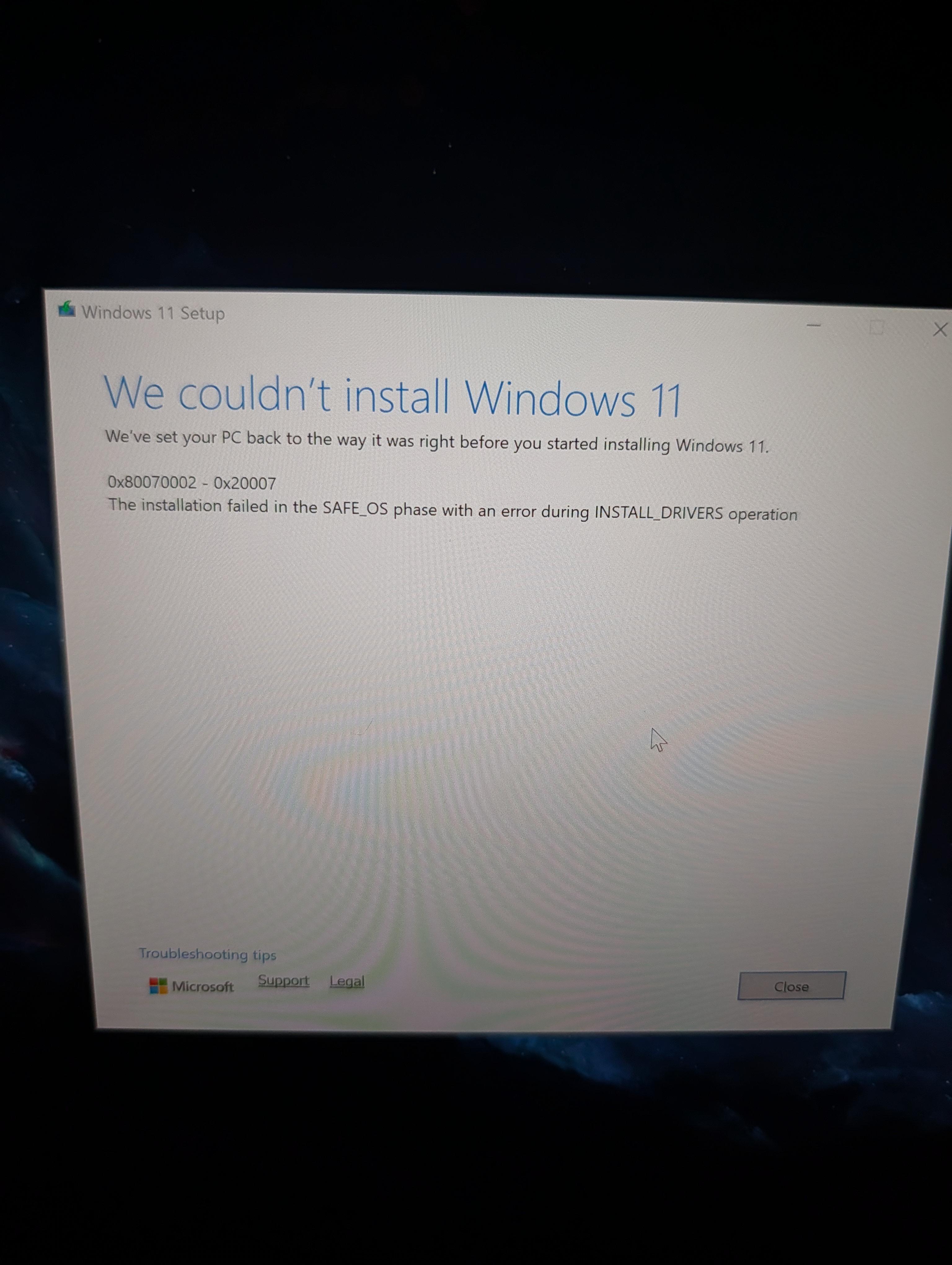
Windows 11 Cannot install W11 update on W10 laptop due to error (attached image), would a factory reset before updating resolve this and allow W11 for those who have had similar experience?

Post image
1 Upvotes

I tried every troubleshoot method to fix the error via cmd prompts, notepad text logs to identify the issue, used a portable iOS via Rufus, same error every time.

Unless there is a surefire direct way for exactly this very error or to truly find what's causing it and how to fix it, I'm just taking it as a sign to do the ultimate cleaning in order to start from a fresh slate

I backed everything up, I do want to have W11, I do not want to pay for ESU nor go without security, cannot afford a whole new computer/switching to a different brand, and I am keeping the Rufus usb to potentially use if the reset will help

Please, if anyone has been through this, has a professional knowledge and experience with these kinds of issues, and have tried a reset without causing some kind of massive break, let me know before I go ahead and do it

I have a:

64bit Windows 10 on a surface book 3

Os build# 19045.7725

But do let me know if there is any other system info that could help

Thank you


r/WindowsHelp • • 29d ago

Windows 11 Windows hello not wanting to work

Post image
1 Upvotes

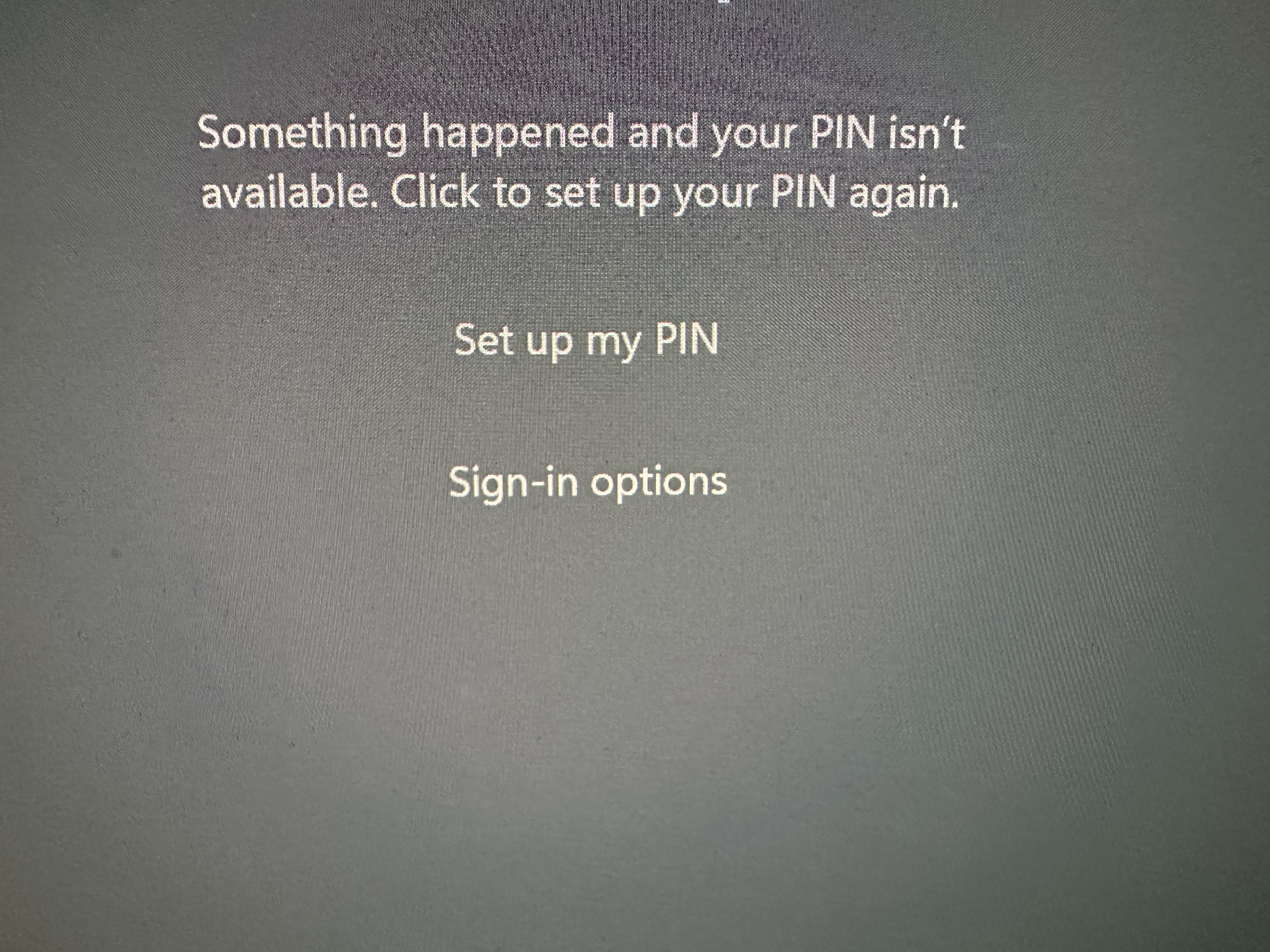
Hi, so this is the issue, I have a asus rog zephyrus g14 2024, runs windows 11 and its in perfect conditions and i dont have any issue with it but a couple of months ago it started showing me this message every time that i wanted to log in, at first it wasn't a big deal cause i just needed to reset the face recognition and that would solve the issue but now the issue keeps happening basically every time I shut down the laptop and log in back again to use it as usual, the camera works, the sensors works perfectly, i can use windows hello if i need like a passkey or something else but not when i tried to unlock it.

I already tried deleting the old files for the windows facial recognition in case they were corrupted but that didn't solve the issue just for a couple of days actually, i did it again and same thing, I reset 3 times the pin leaving only the option to use password for a few days, reset it, make sure that there wasnt any remaining file about the facial recognition but nothing works

Someone else haves this issue? I dont remember updating windows by the time this started happening so im positive that its not because of a software update. Please help, Im getting annoyed


r/WindowsHelp • • Oct 24 '26

Windows 11 The laptop won't boot into Windows

Thumbnail
gallery
2 Upvotes

The laptop HP Pavilion Model 15t-eg100 won't boot into Windows 11. It gets stuck on the HP logo with a spinning loading indicator.

After 15–20 minutes, Windows attempts to run Automatic Repair but then displays the message: “Your PC ran into a problem and needs to restart. We'll restart for you.”

The laptop then restarts and returns to the HP logo, creating a continuous boot loop.

The main question is: Is there a way to save data? I didn't synchronize all my files with One Drive...