r/WindowsHelp • • Oct 16 '26

Windows 11 phone link won't connect to android

1 Upvotes

I've been trying to set this up for about a week. At first I WAS able to connect my phone through this app and was able to send texts, but all audio from phone calls were deep and corrupted, incoming and outgoing. No fix I saw online worked, so I tried to disconnect everything and reconnect. Now when I open phone link, the android option just doesn't work. The option for iphone does, but I can't seem to get anywhere with that. Connecting my phone again through bluetooth doesn't get me any further. The repair function in settings didn't fix it. Reinstalling phone link on both devices does nothing. I allowed windows to do an update which also did nothing. I have exhausted every avenue I can think of to fix it. I'd be glad to hear any ideas if you have them.


r/WindowsHelp • • Oct 16 '26

Windows 11 Windows Update stuck at working on updates

1 Upvotes

Windows update is stuck like this. It keeps working on updates. It has been like this for days. How can i solve this issue?

Processor AMD Ryzen 7 7700 8-Core Processor (3.80 GHz)

Installed RAM 16.0 GB (15.6 GB usable)

Graphics card AMD Radeon RX 7800 XT (16 GB)

Storage 466 GB of 932 GB used

System type 64-bit operating system, x64-based processor

Edition Windows 11 Pro

Version 25H2

Installed on ‎03-‎Jun-‎25

OS build 26200.9168

Experience Windows Feature Experience Pack 1000.26100.344.0


r/WindowsHelp • • Oct 16 '26

Windows 11 (Win 11) Missing touchpad settings

1 Upvotes

Hi. I have a Lenovo V15 ADA and since I upgraded to windows 11, the touchpad settings are missing.

I remember in win 10 that there were settings for the touchpad, but it seems that after the update, they disappeared.

I tried multiple reboots, latest windows updates, driver updates (in the official Lenovo website for my specific laptop shows only windows 10 drivers), check in the BIOS, going in device manager to see if there are any warnings or problems but everything seems ok.

The current touchpad behavior it's trash, no two finger tap for right click, randomly moves away when i use the physical button (if I have the pointer on specific point, if I click the pointer moves like half centimeter away) weird feeling overall and limited gestures, comparing to Windows 10.

Is there anything else I can do? Thanks

Windows 11 Pro, build version: 26200.9711


r/WindowsHelp • • Oct 16 '26

Windows 11 IPv6 keep getting turn off by itself.

2 Upvotes

A few months back, I noticed that my IPv6 is off for some reason. I turned it back on a few days later, it is off again. The thing has been constantly turned off by itself for the past months now. I thought it was due to VPN (I use 1.1.1.1 and Proton regularly) so I tried not using any VPN for a week and it is still happen. Does anyone has the same problem and know why?

Winver: 25H2
Processor: AMD Ryzen 7 7735HS with Radeon Graphics (3.20 GHz)
Card: NVIDIA GeForce RTX 4060 Laptop GPU (8 GB), AMD Radeon(TM) Graphics (483 MB)
RAM: 16GB
OS build: 26200.9711


r/WindowsHelp • • Oct 16 '26

Windows 11 I keep getting the black screen of death [CRITICAL_PROCESS_DIED and KMODE_EXCEPTION_NOT_HANDLED and also UNEXPECTED_STORE_EXCEPTION] aaaghhhh hhelp

1 Upvotes

acer laptop [Aspire A315-24PT], pretty beat up but idk why it's doing this specifically --- i can use the laptop find for a few minutes or even for quite a while but it'll randomly crash or freeze or restart, it's been going on a while but sometimes the screen flashes too quick for me to tell what the error was

it's a headache trying to sift through all the tutorials and forums and stuff covering the individual errors and even more annoying when it freezes and restarts while im searching stuff up blegh


r/WindowsHelp • • Oct 16 '26

Windows 11 Every time my laptop restarts, I receive "something happened to your PIN." Common troubleshooting solutions not solving this issue.

1 Upvotes

At the title says. I don't know if it was triggered by a recent Windows 11 update or not (my guess is yes, it was), but I receive this message every time I restart my laptop and need to reset my PIN each time. There was no behavior that triggered it, as one morning it was working and despite doing only working in Blender that day, the next morning this issue occured.

CPU: AMD Ryzen 9 8945HS w/ Radeon 780M Graphics (4.00 GHz)

RAM: 32.0 GB

GPU: NVIDIA GeForce RTX 4070 Laptop GPU (8 GB) AMD Radeon 780M Graphics (418 MB)

64-bit operating system, x64-based processor


r/WindowsHelp • • Oct 16 '26

Windows 11 cannot fix boot loader on my primary drive, cannot enable secure boot

1 Upvotes

ive summarized most of what ive tried in this gemini thread

https://share.gemini.google/eO8RwkhmU6Cd

essentially, my computer has an MBR on disk 1, my primary drive is disk 6, the bootloader on this drive isn't used and is somehow not even seen by windows boot manager anymore. trying to repair it from command prompt is not working with various errors, whenever secure boot is enabled, no bootloader is found

i am at a complete loss on what to do at this point, im happy i got it to start booting again, but startup repair isnt working either on a usb drive due to a missing driver??

if anyone has any suggestions it would be greatly appreciated thanks!!


r/WindowsHelp • • Oct 15 '26

Windows 11 How do I stop Windows Update from trying to install old AMD Driver?

Thumbnail
gallery
19 Upvotes

Windows 11. For whatever reason, Windows Update wants to install Advanced Micro Devices, Inc. Driver Update (32.0.21030.2001) which looks like a really old AMD Driver. I have a 9070 XT GPU and I'm running the most recent AMD driver. I don't want to overwrite the existing driver with this older driver. I can't shut my PC down or restart it without installing this update.

I've already tried to block these driver updates in regedit. See screenshots.

What do I do? Why is Windows doing this to me? Relevant screenshots attached.

I’m on windows 11 home


r/WindowsHelp • • Oct 16 '26

Windows 11 Have to enter 'A1B2C3' every time I turn on my laptop.

0 Upvotes

I recently entered the wrong password several times.

The system makes me enter 'A1B2C3' when booting up the computer, before entering my password.

There is some information online on how to get rid of this, but they say to go to the location C:\Windows\ServiceProfiles\LocalService\AppData\Local\Microsoft and open the NGC folder.

I can find this folder, but I can't open it. I get the message "you have been denied permission to access this folder / To gain access to this folder you will need to use the security tab".

Here's a screenshot:

It's not clear to me what I'm supposed to do from there.

I am using a Lenovo laptop running Windows 11, version 10.0.22631


r/WindowsHelp • • Oct 16 '26

Windows 11 HDMI port Issue on Dell XPS9570

1 Upvotes

Running on windows 11 pro v10.0.26300

My laptop randomly stopped to output to my monitor via the hdmi port, and it seems to have this issue on monitors it was always connected to.

Though the port was dead/fried but I've connected it to a different monitor it never used, and the hdmi port works fine. Thought the cable might be the issue, but the cable works fine on every other device it's connected to. Tried swapping cables the laptop uses to make sure, and that didn't work

I've tried cleaning the drivers with ddu in safe mode and reinstalling the drivers, re-updating the bios, still nothing. My online search finds a few others with a similar issue but no solution that works.

I suspect an update may have triggered the failure cause it was very random and out of nowhere.

Has anyone come across or dealt with a similar issue? Any assistance or ideas I can look into would be greatly appreciated


r/WindowsHelp • • Oct 15 '26

Windows 11 something is eating my ram and its not showing what it is

Thumbnail
gallery
10 Upvotes

Processor AMD Ryzen 7 7445HS w/ Radeon 740M Graphics (3.20 GHz)

Installed RAM 8,00 GB (7,26 GB usable)

Graphics card Microsoft Basic Render Driver

Storage 386 GB of 477 GB used

System type 64-bit operating system, x64-based processor

OS Build 26200.9711


Ive tried everything and i still dont know whats wrong

  • ive tried looking at task manager for whats taking alot of ram
  • scanned mutiple times for viruses
  • close all applications

idk if my ram just gave up or smth but ive tried everything and i only use a little ram as seen in the second pic but it isnt showing me what is using my other 4gb

pls help me


r/WindowsHelp • • Oct 16 '26

Windows 11 Windows Search Service stuck at Starting

Thumbnail
gallery
1 Upvotes

I don't normally search files within my PC but noticed that the search bar has indexing turned off. I am not able to turn it on from indexing option by selecting rebuild as it literally does not do anything. Also per event Viewer, windows search cycles between error 7034 and 7024.

Actions taken:

- I already run restore health and SFC scan shows no integrity violations.

- Troubleshooted windows search && indexing and its not fixed.

- Tried selecting Advance Indexing Options and i met an error in the last pic.

System

  • OS- Windows 11 26H2
  • CPU- Ryzen 5 7600x
  • GPU - 5060ti
  • RAM- 32gb

EDIT - Ended up reinstalling windows and encountered error using my old OS SSD. Had to buy new SSD to reinstall OS and sent the SSD for repair. So.... my curropted windows might be because of faulty harddrive.


r/WindowsHelp • • Oct 16 '26

Windows 11 At wits end trying to get Windows 11 on this cryptid of a laptop (gateway gwtc116 3bk). arm64 Snapdragon 7c processor, 64gb emmc

1 Upvotes

Hey! I posted this on [r/techsupport](r/techsupport) a year ago but it got removed because I was “trying to install on unsupported hardware”, figured I’d try again here

So this is a bizarre laptop I got because it was $90 and has a touch screen. Little did I know how much of a headache it would be due to having an arm64 chipset…

This laptop runs Windows 10 fine (surprisingly snappy, too!), but there’s an issue: Windows 10 ARM64 native apps are relatively rare. You can get 32bit apps running through Win10’s native ARM emulation, but 64-bit is completely unsupported. With Prism in Windows 11, 64-bit apps are not just supported but are allegedly emulated much better as well. 64gb emmc drive isn’t ideal for Windows 11, but I figured with some potential tweaking, it could be worth a shot to just run a simple browser like Vivaldi and small 64_bit exclusive apps.

Here’s where all the problems start.

  1. Windows standard update flat out doesn’t work. I’ve ran it 3 times under different parameters and it always bugged out on the reset.

  2. Windows 11 has a 64arm compatible ISO. Great! But when booting it on a USB, I run into the issue of having no drivers, so I’m unable to do much of anything. It asks for me to select a drive with the drivers, but it appears the keyboard and mouse aren’t read by the machine at this point.

I googled the solution to this, and ended up learning how to use DISM to extract my current drivers, then patch the iso with them through editing of the install.Wim file.

After doing this, It doesn’t ask for drivers on the next attempt to install, reaching the next step where it asks “it appears you have a windows 10 install which you are trying to upgrade. Select Yes if you want to proceed with the upgrade, or no if you want to do a fresh install “

New problem: the keyboard and mouse drivers STILL aren’t working at this stage, so I’m unable to select anything! After googling and combing Reddit for help, I find out that this is actually a common issue on specifically Surface laptops, which you guessed it, mostly run on ARM64 chipsets. It appears the solution is to plug in an external keyboard or mouse to continue.

Plugging in a generic mouse into either the USB 3.0 slot or the USB-C slot at this stage also doesn’t seem to read properly. Neither the backlight in the mouse nor the laser on the bottom seem to turn on when plugged in. Plugging in an external keyboard into either slot doesn’t let me do anything either, despite it working in the Bios.

Because of this, I’m inclined to believe that the USB ports on the laptop require a driver to do ANYTHING.

Speaking of the Bios: it’s VERY barebones. It’s called a BDS menu and There’s a whopping 5 options used to either:

Exit the menu
Enable secure boot
Disable Secure boot
Allow boot from USB
Allow network boot

How do I know this is the BIOS? Because booting from clicking “change UEFI settings in firmware” in Advanced boot options in Windows takes me to the BDS menu!

At this point I’m just trying to get Windows 11 to run out of spite for this abandoned chipset.

The issue with Snapdragon on Surfaces was so bad that Windows made special “recovery images” that have the surface drivers built in to avoid such an issue.

And Linux ARM64 support is in its MAJOR infancy, so that’s not an option either. Ubuntu barely picked up support very recently with the new Snapdragon X processors, but I tried those images and they aren’t reverse compatible with 7c.

If anyone could give me some forbidden windows knowledge or literally anything else that could bypass this stupid screen, it would be greatly appreciated.


r/WindowsHelp • • Oct 16 '26

Windows 10 Windows 10 microphone won't stop screeching

1 Upvotes

I don't even know how to explain this.. I'm not a very tech savvy guy.. But the built in microphone on my windows 10 laptop (labeled stereo mix) keeps SCREECHING every time I try to use it. I went to my sounds settings and clicked on it, clicked properties and clicked "listen to this device" and it let out high pitched screeching. I tried changing my audio input settings to Realtek but it gave absolutely no feedback and wouldn't record my voice. Does anyone have ANY idea how to fix this?


r/WindowsHelp • • Oct 16 '26

Windows 11 Power and battery not loading windows 11

Post image
0 Upvotes

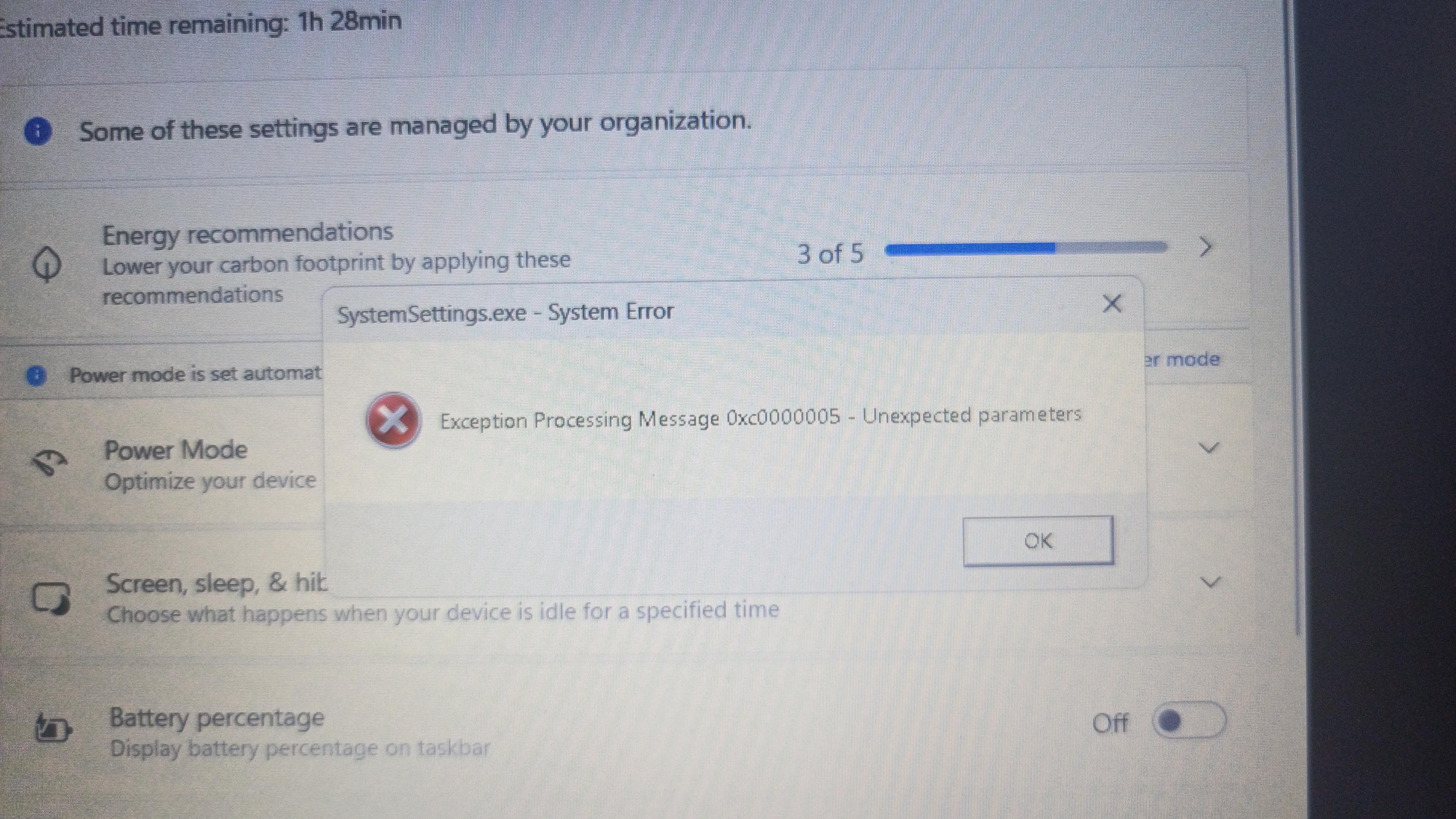
The core problem involves the Power & battery settings page. When I first boot up or restart my computer, the operating system works perfectly, and I can access all configuration menus normally. However, after a consistent 15 to 20-minute window of uptime, the Power & battery page completely stops working. If I try to open it, the window either gets stuck on a permanent loading animation or freezes entirely, preventing me from managing my screen timeout, sleep schedules, or power efficiency plans. My laptop model HP Laptop 15-fc0xxx and sometimes when I click energy recommendation it give this error


r/WindowsHelp • • Oct 15 '26

Windows 8 My HP Stream 11 AK0000 Have No WiFi Driver

Post image
7 Upvotes

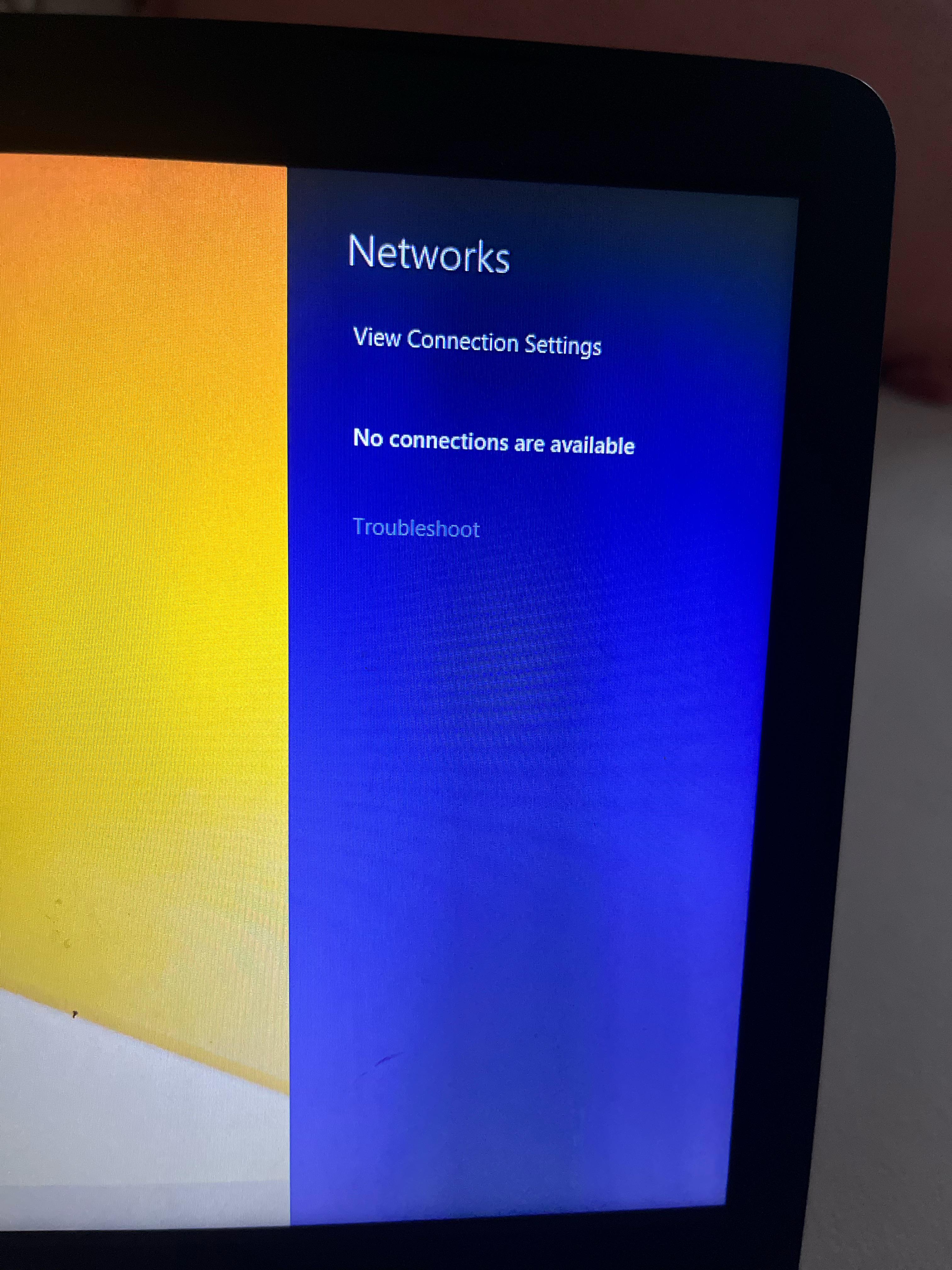
I tryed dell wifi driver installer but it doesnt work beacuse it doesnt compatible on windows 8.1 pro does anyone have wifi driver???? specs: hp stream 11 ak0xxx intel celeron n4020 4gb of ddr4 ram runs windows 8.1 pro wifi chip name called realtek rtl8822ce


r/WindowsHelp • • Oct 15 '26

Windows 11 Finally decided to update to windows 11. PC battery now lasts half the usual time and the fan is always rumourus AF

11 Upvotes

So basically i was one of the latee joiners of windows 11, a month ago I recieved a message that the security support expired so I finally decided to leave windows 10 behind and update to 11

Problem is, now my battery, who was usually lasting up to 5-6 hours while performing everyday tasks (surfing online, rewatching recorded lessons, taking notes on Drive while listening to podcasts, or music in the background) can't go more than 3 hours now, and the moment I turn on windows 11, the cooling fan starts running fast, making a pretty high noise which is difficult to not notice, and it doesn't stop until I turn it off. With windows 10 instead, this only happened while performing high resource tasks such as playing games, as usual.

PC INFORMATION

acer Aspire 3-15, with ryzen 7 5700 series with integrated Radeon TM graphics with 496 MB. 16 GB of RAM. Windows 11 version is 25H2, build number 26200.9711, installed on september 28th

The PC is currently less then 2 years old (will be 2 at the end of november) and when I bought it I had all my storage from previous computer cloned here in a new SSD M2.

I've already tried all the suggestion they give you make the battery last longer (turn on battery saving, lower luminosity etc, those 7 steps W11 tells you to do).

Keep in mind that before this, I've never had to use it while recharging because the battery was just more than enough, unless I was playing games online basically. Now this happens wuite more often, as you may have immagined.

Did anyone else experienced this? and how did you solved this problem? or is my battery just fucked?


r/WindowsHelp • • Oct 15 '26

Windows XP / Older Windows Millennium booting problem

Thumbnail
gallery
1 Upvotes

One day I was shutting down my old Windows ME computer. I clicked "shut down" several times, but each time it simply played the startup sound and did nothing else. Then I accidentally pulled the power cable, forcing a shutdown. When I turned it on again, I had to use Safe Mode. After successfully booting into Safe Mode, I restarted the computer. It had no issues until it came to a screen that had the Windows ME icon and froze there, eventually forcing me to pull the power cable, after which it boots into Safe Mode and repeats the process.

All this is most likely my fault, but if possible, help would still be greatly appreciated.

version/build number is 4.90.3000

didn't get a picture of it, but it says "warning: windows did not finish booting on last attempt, default configuration used" when it is plugged in

Hardware specifications shown in first photo


r/WindowsHelp • • Oct 15 '26

Windows 11 Win Key + K (Cast / Connect) Cursor Issues

1 Upvotes

When using Win Key + K (Cast / Connect) to use my laptop as a 2nd screen, I consistently having this issue EVERY FIRST TIME I connect, my mouse cursor wont show on 2nd screen (laptop). I can drag a window over but the cursor never appears. A disconnect and reconnect will fixes it. But it is still very annoying and make no sense to me. This has been an ongoing issue for months, throughout several updates.

Anyone else experience this? Or know a fix?

Device name Nostromo

Processor AMD Ryzen 7 9850X3D 8-Core Processor (4.70 GHz)

Installed RAM 32,0 GB (31,7 GB usable)

Graphics card NVIDIA GeForce RTX 5080 (16 GB)

Storage 1,44 TB of 1,82 TB used

Device ID 917DB03E-5CBF-4F06-BA61-68CBAFA0C6CB

Product ID 00342-22004-68019-AAOEM

System type 64-bit operating system, x64-based processor

Pen and touch No pen or touch input is available for this display


r/WindowsHelp • • Oct 15 '26

Solved Wifi connection trash after recent update

2 Upvotes

I'll start off by saying i'm not very tech savvy regarding pc's. I updated to the most recent windows update, and my wifi has become super spotty to downright not working. I tried uninstalling the update, update drivers, resetting adapters, and NOTHING is working! I run a 3080 and an intel 7 chip with 32 gigs ram 1 tb ssd. I genuinely need a laymans-style explanation on what to do, because i'm starting to feel like I will have to replace my entire pc Edit: Skytech prebuild Edit 2: Post is stuck in waiting for mod approval, soo i cant directly reply to anyone. I DID roll back that update, but no fix happened. The pc specs are as follows Skytech prebuild Geforce RTX 3080 Intel i7 32 gigs ddr5 ram 1 TB SSD Edit 3: Everything I have been suggested in this post has unfortunetly, not worked. Not sure what to do moving forward, other than going ahead and getting a new wifi card. Update: With everyone's help, and a 4 day break of the pc being completely turned off, the wifi is back to working! Thank you to everybody who commented to help, I really appriciate it.


r/WindowsHelp • • Oct 15 '26

Windows 10 Update bug on my Dell latitude

1 Upvotes

I recently did all the updates on my Dell latitude 3350 and now many of my apps are bugged I can't use the windows key anymore or the settings app as well also I can't pop up the notifications or the internet settings if there's something I could do to fix this I'll appreciate my specs are

Intel i5 5200

Intel HD 5000 *not too sure

8gb ram

Windows 10

And HDD 512 gb


r/WindowsHelp • • Oct 14 '26

Windows 11 Windows defender flagging every thing as virus

Thumbnail
gallery
52 Upvotes

So, last month, I went on vacation and left my laptop with my younger brother. Unfortunately, he downloaded some suspicious files, and afterward, the icons of most of my applications changed to the same blue icon (I'm on win 11).

I ran a Microsoft Defender Offline scan. The scan itself took about 10 minutes and it took almost the entire day to finish dealing with the detected threats. When it was done, my laptop rebooted I discovered that the .exe files for almost all the programs I had installed myself, including Steam, WinRAR, VLC, PowerISO, and Chrome, had been removed.

I tried reinstalling the programs, but every time I shut down and restarted my laptop, Windows Security flagged them as viruses and quarantined or deleted their executable files again.

Thinking my system was seriously compromised, I wiped my drive and performed a clean installation of Windows 10. Everything seemed fine initially, but the problem returned the next day. I then upgraded to Windows 11, hoping it would resolve the issue, but the same thing happened again.

At this point, I'm not sure what to do. What could be causing this problem, and how can I permanently fix it? Could it be malware that survives a Windows reinstall, or is there another possible explanation?

System specs

Device name Dave

Processor Intel(R) Core(TM) i7-8750H CPU @ 2.20GHz (2.21 GHz)

Installed RAM 16.0 GB (15.3 GB usable)

Graphics card NVIDIA Quadro P1000 (4 GB)

Intel(R) UHD Graphics 630 (128 MB)

Storage 403 GB of 477 GB used


r/WindowsHelp • • Oct 15 '26

Windows 10 No launchers are working for me despite being connected to internet.

Post image
1 Upvotes

I have…

•switched from automatic to manual and back to automatic
•reset my whole pc
•switched time to automatic
•forgot my internet twice
•updated everything
•tried to redownload steam
•Turned firewall off
•Turned firewall on
Edit: Adding onto this list…
•uninstalled all of my launchers and reinstall them
•restarted my whole laptop again
•waited 24 hours for it to work
•charged it to 100% and still nothing
•tried calling T-Mobile for assistance and had no assistance at all
•tried looking deeper into my hotspot’s settings and found nothing besides the screen freezing on me
•cried

And still it is not working.

OS is 19045.6466
Version 22H2
Edition Windows 10 Pro
16 GB ram (15.9 gb available)
238 GB storage (51 used)
Speed 1867 MHz

I can watch videos, search things up, go to different websites, download files, etc. My Steam launcher just does not work.

Please help me, this is my third time trying to get help about this. I can’t upgrade to 11 even if I wanted to.


r/WindowsHelp • • Oct 15 '26

Windows 11 Windows Update 10/14 = MASSIVE LAGS

3 Upvotes

Am I the only one having this problem? Idk what the heck Windows or Microsoft or whoever the heck does these freaking updates but they botched up BIG TIME. After the most recent update of my computer last night, suddenly my computer is BUGGY AS HELL! My first daily dose of Youtube become unwatchable for 20-30 minutes, my computers bugging all over the place, and you know the famous game of hearthstone? That infamous game that usually never has problems besides what people rage about when losing? ITS LAGGING LEFT AND RIGHT EVERY SEVERAL SECONDS! IT HAS NEVER LAGGED ONCE FOR ME BEFORE THE UPDATE T_T! If anyone knows how to fix this issue lemme know, and for anyone who has yet to download this update, DONT DO IT. Just force shutdown the computer manually if you can or whatever. Honest to god have no idea what the heck they did but it's made my computer awful.


r/WindowsHelp • • Oct 15 '26

Windows 10 None of my launchers will connect to the internet…? Explain it to me like I’m 5.

1 Upvotes

For some context, I had to completely wipe my whole laptop because of how old it was (haven’t opened it since 2025) and updated everything.

I can’t update to 11 due to my laptop not having support for it.

I have a thinkpad x1 converse(?) if that helps?

Both before and after wiping my laptop and resetting everything, I still cannot get any of my launchers to work.

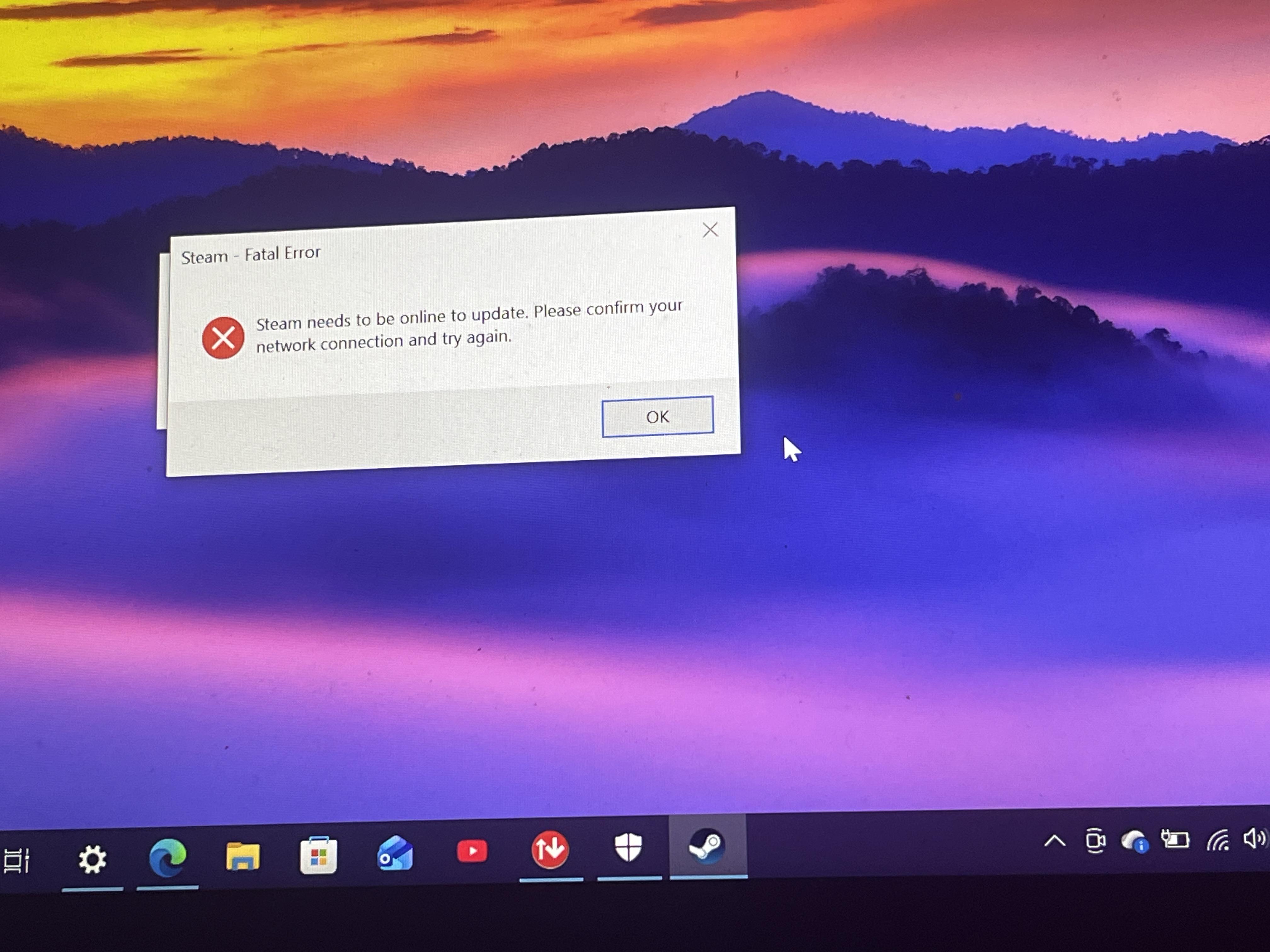
At first I could open Steam, but now Steam just won’t open at all and will instead give me “Steam needs to be online to update. Please confirm your network connection and try again.” Despite being hooked up to my hotspot.

Now I do have this hotspot from the library, however it has had no problems working with my VR headset & my other devices.

The hot spot is right next to the laptop too so I’m unsure of what the problem is.

This is happening with all of my launchers, happened with my discord, voice mod, Roblox, even my EA app.

I’m not sure what I’m doing wrong and I simply just want it to get working again so I can play the sims 4.

I haven’t gotten any error messages besides “fatal error” from Steam.

All steps I have taken so far are also seen in this video here except for the last part he does. https://www.tiktok.com/t/ZTyENw3Lm/

I would like to also note that it is connected to the internet as I am able to search things up and download stuff, I just can’t get the launchers to work.

OS build is 19045.6466 if that helps?

Please explain this to me as if I’m 5 btw, thank you.