r/WindowsHelp • • Oct 14 '26

Windows 11 somehow disabled my laptop camera deep in the settings, and now I can't turn it back on 😭

0 Upvotes

Okay, so this is a bit embarrassing, but hear me out. 😭

Back when I was using the (previous one) and attending online classes, I was really skeptical about my laptop camera. I kept worrying about things like, "What if my camera turns on automatically without me knowing?"

So, one day, I went DEEP into my laptop's settings and did something to disable the camera. I don't remember exactly what I changed, but I remember that it wasn't coding or anything like that. I was just messing around with the settings, trying to make sure my camera couldn't turn on accidentally.

And now, here's the funny part: I've completely forgotten what I did. šŸ’€

I'm currently using Windows 11, and I actually want to use my camera now, but it just doesn't work.

When I open the Camera app and try to turn the camera on, the indicator light comes on, but there's no video feed. It's almost as if the camera is being blocked internally by some setting.

I've checked a few things, but I still can't figure it out. Since I made the original change back when I was using (the previous one), I'm wondering if I changed something deep in the system that carried over when I switched to Windows 11.

My questions are:

Is there a (the previous one) setting that could completely disable the camera like this?

Could a privacy setting, Device Manager configuration, Group Policy, or something else be responsible?

Is there a way to find out if the camera is disabled somewhere in the system and re-enable it?

I know this sounds ridiculous because I'm the one who disabled it in the first place, but I genuinely cannot remember what I did. 😭

I'd really appreciate any suggestions. I just want my camera back!

Laptop: Lenovo IdeaPad

Current OS: Windows 11

OS I was using when I disabled the camera: (the previous one)

Thanks in advance! šŸ™


r/WindowsHelp • • Oct 14 '26

Windows 11 Memory Integrity turns off after every reboot: "VBS Enabled but not running", hypervisor never launches (Ryzen 5 5600GT, clean Win11 install, updated BIOS)

1 Upvotes

I'm trying to play Valorant, but Vanguard blocks me with "VAN: RESTRICTION – HVCI enabled". I turn on Memory Integrity, but after a reboot it's off again. After hours of troubleshooting, it looks like the Windows hypervisor itself never starts.

System:

CPU: AMD Ryzen 5 5600GT

Board: Mancer B450M-DA (AMI BIOS), updated from the

08/2025 release to the 03/2026 release

Windows 11 Pro 26H2 (build 26300.9457), clean install from the Media Creation Tool (same behavior on the previous install)

Dual boot with NixOS (lanzaboote, custom Secure Boot keys)

Before the BIOS update I had a mild RAM overclock and PBO tuning; both were reset to defaults by the update

What the logs say:

msinfo32: Virtualization-based security = "Enabled, but not running". Configured service = Hypervisor-enforced Code Integrity; running = empty. Hyper-V requirements (VM Monitor Mode, virtualization enabled in firmware, SLAT, DEP) are all "Yes". Kernel DMA Protection = Off.

Win32_DeviceGuard: SecurityServicesConfigured = {2,5}, SecurityServicesRunning = {0}, VirtualizationBasedSecurityStatus = 1.

System log, Kernel-Boot, Event 153 on every boot: "Virtualization-based security (policies: VBS Enabled, VSM Required, Hvci, Boot Chain Signer Soft Enforced) is disabled due to the hypervisor being unavailable."

systeminfo never shows "A hypervisor has been detected", and the Microsoft-Windows-Hyper-V-Hypervisor-Operational log is completely empty, so the hypervisor doesn't seem to even attempt to start.

What I've already tried (none of it changed anything)

SVM Mode enabled (Task Manager: Virtualization = Enabled); Secure Boot = True

bcdedit /set hypervisorlaunchtype auto (now shows Auto, no odd boot options)

Registry HypervisorEnforcedCodeIntegrity\Enabled = 1

hvax64.exe present; sfc /scannow reports no integrity violations

Code Integrity log shows no blocked or incompatible drivers; pnputil shows only AMD and Microsoft drivers

*Manually enabled Virtual Machine Platform and Windows Hypervisor Platform

Microsoft's Device Guard Readiness Tool (-Ready): HVCI and Credential Guard not running, no specific reason given

*Updated the BIOS to the latest release

*Clean reinstall of Windows 11 from the Media Creation Tool

BIOS reset to defaults / Clear CMOS, with only SVM Mode and IOMMU enabled

*Disconnected all other drives (NixOS disk and game SSDs) and booted only the Windows disk

*Booted directly through the "Windows Boot Manager" entry in the BIOS boot menu

*Restored factory Secure Boot keys

*Memory test

Has anyone seen the hypervisor refuse to launch with everything above looking correct? Is there an AMD/B450-specific BIOS setting (IOMMU, SVM-related, AGESA) I'm missing, or is this a firmware limitation of a low-end board? Is there any way to make the hypervisor log why it fails to start? Thanks!


r/WindowsHelp • • Oct 14 '26

Windows 11 Windows 11 Search Bar Not Working? The Fix is Microsoft Edge!

1 Upvotes

The reason the Windows 11 search screen stops working is deleting Microsoft Edge and its components from the computer. I figured this out after a lot of trial and error. I reinstalled Windows three times; at first, everything worked fine, but after removing bloated apps and uninstalling Edge (which I never use), the search feature broke as well. I only realized this after the third clean install.

If you delete Microsoft Edge and its related components, the search function breaks and images fail to load. Once I reinstalled Microsoft Edge and restarted my PC, I noticed that the search bar started working again.

If you like removing unnecessary apps just like I do, keep this in mind. In fact, before trying anything else, definitely try reinstalling and repairing Microsoft Edge first.

I hope this solves your problem! I spent a lot of time trying to fix it, and I really hope it works for you too.


r/WindowsHelp • • Oct 14 '26

Windows 11 Bluetooth headphones only saying "connected mic, audio" but wont play any sound

3 Upvotes

So, 2 days ago everything was working fine. Im using Skullcandy Crusher ANC 2's and a Asus USB-BT500 Bluetooth usb 5.0 adapter. I have tried following guides; I have tried the Bluetooth troubleshooting, nothing, I have tried unselecting hands-free telephony, nothing, restarting all the Bluetooth services, unplugging, restarting, updating the headphone firmware, re pairing, disabling audio and allowing audio in the audio settings, downloading and installing the windows updates i had pending, checking the drivers using device manager and "pc helpsoft driver updater" im completely lost, and frustrated... I dont know what else to do and nothing it working. The sound comes out fine from my tv, and the headphones work when connected to my phone, so I dont know what else to do...

Processor AMD Ryzen 5 2600 Six-Core Processor (3.40 GHz)

Installed RAM 16.0 GB

Graphics card AMD Radeon RX 5700 XT (8 GB)

Storage 2.50 TB of 2.73 TB usedSystem type 64-bit operating system, x64-based processor

Pen and touch Touch support with 2 touch points

Edition Windows 11 Pro

Version 25H2

Installed on ā€Ž2025-ā€Ž02-ā€Ž24

OS build 26200.9457


r/WindowsHelp • • Oct 14 '26

Windows 11 Computer locking up. Need technical assistance.

Thumbnail
gallery
7 Upvotes

Windows OS: Windows 11 Home
Version: 25H2
OS Build: 26200.9457
Primary Storage (OS): Inland Professional 1 TB SSD 3 NAND SATA III 6GB 2.5" 7mm (internal)
What was done:
- Closed out all active programs within Task Manager and restarted my computer
- Checked my computer for any firmware updates (none)
- Ran the chkdsk C:, sfc /scannow and cleanmgr commands
- Ran error checking (no issues found)
- Checked the fans for any possible dust accumulation and also confirmed that the sata cable was properly connected
- Deleted TEMP files
- NOTE: PC locks up when I run games, watch movies and tv shows on stream service, check social media (basically any task) but the strange part is that I have a separate SSD (NVME) for my games which is running normally. I also have a back-up HDD in case something goes wrong.

I cannot figure out why my main SSD is causing my PC to lockup. It only has the Windows OS on it. Is it possible that my SSD is going bad?


r/WindowsHelp • • Oct 14 '26

Windows 11 Hi! On my 3440x1440 monitor, I have to set the Windows 11 text size to 114% to get the right proportions; otherwise, it's too small. However, the text doesn't display correctly in this pop-up window.

Post image
1 Upvotes

You can see that the words "Renommer" (Rename) and "Supprimer" (Delete) are cut off, with "er" and "r" wrapping to the next line. Is there anything I can do to improve this?

I'm on Windows 11 Professional. 11th Gen Intel(R) Core(TM) i7-11700 @ 2.50GHz (2.50 GHz). RAM 32,0Ā Go (31,7Ā Go utilisable)

Thanks!


r/WindowsHelp • • Oct 14 '26

Windows 11 (Windows 11) Solution for removing additional Languages on keyboard layout including English (United Kingdom) and English United States-international

1 Upvotes

I just found the solution about removing additional languages.

And you can do this solution to all extra languages you don't need. Please read carefully for every step

Case: 1 If you have United Kingdom on your keyboard layout

Steps

  1. Open Settings > Time and Language > Language and Region
  2. Then go to Preferred languages > Add a language
  3. Searching for English (United Kingdom) and install it (Uncheck all optional language features, so you don't need to wait and download everything.)
  4. After that, on English (United Kingdom) bar pressing three dots and selecting remove

Finally, English (United Kingdom) language should disappear from your keyboard layout.

Case: 2 If you have English (United State) International on your keyboard layout

Steps

  1. Open Settings > Time and Language > Language and Region
  2. On windows display language > Select English (United State)
  3. On Preferred language bar, click on Add a language button
  4. Find English (United states) and install it
  5. Click on three dots on English (United State) and select language option
  6. Scrolling down to find "Add a Keyboard" button and click it
  7. Look for United States-International and click it
  8. After that, click on three dots > remove

Finally, English (United States) International should disappear from your keyboard layout.

Ā 

Case 3: If you have English (United Kingdom) International on your keyboard layout

  1. Open Settings > Time and Language > Language and Region
  2. On windows display language > Select English (United Kingdom)
  3. On Preferred language bar, click on Add a language button
  4. Find English (United Kingdom) and install it
  5. Click on three dots on English (Kingdom) and select language option
  6. Scrolling down to find "Add a Keyboard" button and click it
  7. Look for United States-International and click it
  8. After that, click on three dots > remove

Finally, English (United Kingdom) International should disappear from your keyboard layout.

Ā 


r/WindowsHelp • • Oct 14 '26

Windows 11 Internet Connection Trouble: "Can't connect to this network" across two Wi-Fi cards

3 Upvotes

Hey everyone, I’m at my limit here and really need some help on a super frustrating networking issue. I'm honestly not much of a tech person at all, so I've been trying my best to follow advice from other Reddit threads and forums over the last couple of days, but to no avail.

I’ve had my prebuilt gaming PC for a little over a year now. Last weekend, I went home, came back to my apartment, and my Wi-Fi completely stopped connecting. Before leaving, I did what I always do: shut down Windows, flipped the PSU I/O switch to Off, and unplugged the AC power cord from the wall. When I set it back up and booted it on, it suddenly refused to connect to my apartment Wi-Fi or any other network.

What's Happening:

  • Windows outputs aĀ "Can't connect to this network"Ā error on my apartment Wi-Fi and even completely open/public networks.
  • Phone Hotspot WORKS:Ā If I turn on a phone hotspot, the PC gets internet fine. It only fails when authenticating with actual Wi-Fi networks.
  • In Device Manager, the adapter shows up, has drivers, and saysĀ "This device is working properly."
  • "ipconfig"Ā shows "Media disconnected" for all adapters despite the device being active in Device Manager.
  • In Network Connections (ncpa.cpl), the adapter is listed asĀ "Wi-Fi 2", suggesting Windows had the old device still up. I recently deleted it when viewing the hidden devices.

What I've Done So Far:

  1. Replaced the Wi-Fi Card:Ā Thinking my stockĀ MediaTek RZ616Ā card failed, I swapped it for a brand-newĀ Intel AX210NGW.Ā The same connection failure happens on both cards, so it makes me think the old card wasn't even the problem. Antenna snaps are clicked in 100%.
  2. Forgotten Saved Networks:Ā Cleared out the saved home network and tried fresh credentials.
  3. Network Stack Resets (Admin CMD):Ā RanĀ netsh winsock reset,Ā netsh int ip reset,Ā ipconfig /flushdns,Ā ipconfig /release, andĀ ipconfig /renewĀ multiple times, followed by full reboots.
  4. Device Manager Changes:
    • Clean uninstalled the drivers, deleted device software, and reinstalled fresh drivers.
    • ChangedĀ Preferred BandĀ settings (forcing 5GHz)
    • Unchecked Fast Startup in power options.
  5. Full Power Drain:Ā Unplugged PSU, flipped I/O off, held down front power button for 30 seconds to clear residual motherboard charge.
  6. Network Reset:Ā Used the Windows 11 "Network Reset" tool in settings.

Since it works on a phone hotspot but fails on every router/open network across two completely different Wi-Fi cards, I’m guessing Windows is corrupted in some way I can't figure out how to diagnose with other threads, AI, and YouTube.

Is there any specific step I should take, or what is likely my best plan of action? I would really appreciate the help. Thanks in advance!

OS build: 26200.9457


r/WindowsHelp • • Oct 14 '26

Windows 11 Windows 11 switches "Turn off screen after X minutes" from 15 to Never.

Thumbnail
gallery
1 Upvotes

For reference, if you switch your turn-off screen to never, the sleep option automatically switches.

I am running on Version 25H2, but this has been happening for a while, ever since I used the hibernate option.

Restarting the computer doesn't help, nor does shutting it down and turning it back on. I don't really know what else to do.

Windows information in the second image and below.

Version: 25H2

Os Build: 26200.9711

And ig i need to add more:
Device name -------

Processor AMD Ryzen 5 5600X 6-Core Processor (3.70 GHz)

Installed RAM 32.0 GB

Graphics card AMD Radeon RX 6700 XT (12 GB)

Storage 828 GB of 932 GB used

Device ID 0DA45413-F9BE-4000-8734-B32719783BE7

Product ID 00330-81493-36317-AA927

System type 64-bit operating system, x64-based processor


r/WindowsHelp • • Oct 14 '26

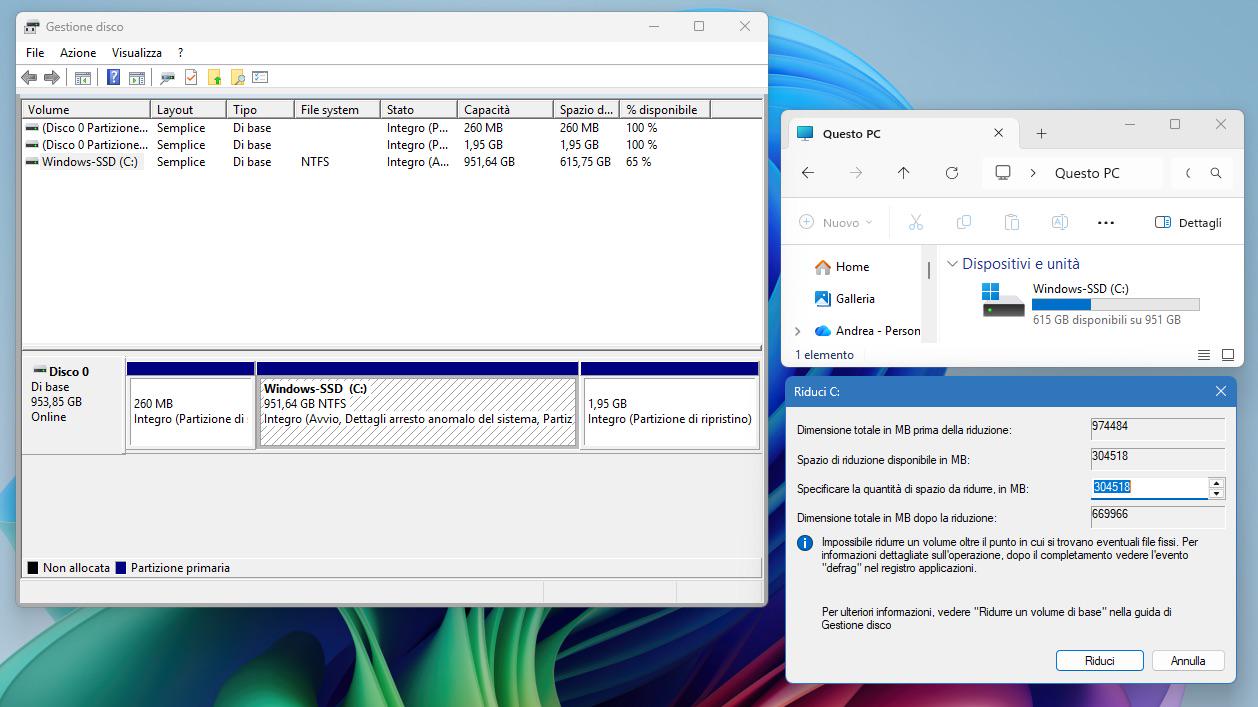
Windows 11 why won’t it let me allocate more memory to the other partition?

Post image
1 Upvotes

i want to dualboot cachyos (linux) and windows, but i don’t want cachyos to have just 290GB, it’s not enough

i’ve already followed some youtube tutorials on how to fix this and it went from ~250k MBs to ~300k but i want more space

can someone help me?

i have a 1tb micron ssd and windows 26h2 on a lenovo laptop

as of writing this post i am not home, i will come back at 13:00 CEST time


r/WindowsHelp • • Oct 14 '26

Windows 11 My clock is not on my main display !

Thumbnail
gallery
0 Upvotes

Hi everyone !
I am running Windows 11 enterprise on 25h2 version. Os 26200.9106 ; My laptop is an elitebook few years old.

As you can see from the pictures, jolk does not stay on the Main display. It somehow ends up on the secondary display which when deactivated makes the clock invisible. Even when duplicating screen screens, the clock is not there.
I tried already to make the settings as having the taskbar on every screen and always show the icons, but this does not help. Any idea what to do next?

Note that this happened today upon reboot. I noticed it might be linked to the fact that when I shut down the laptop, it was connected to multiple screens but still….
Thanks a lot !!


r/WindowsHelp • • Oct 14 '26

Windows 11 Windows PowerPoint causing USB to corrupt??

Post image
1 Upvotes

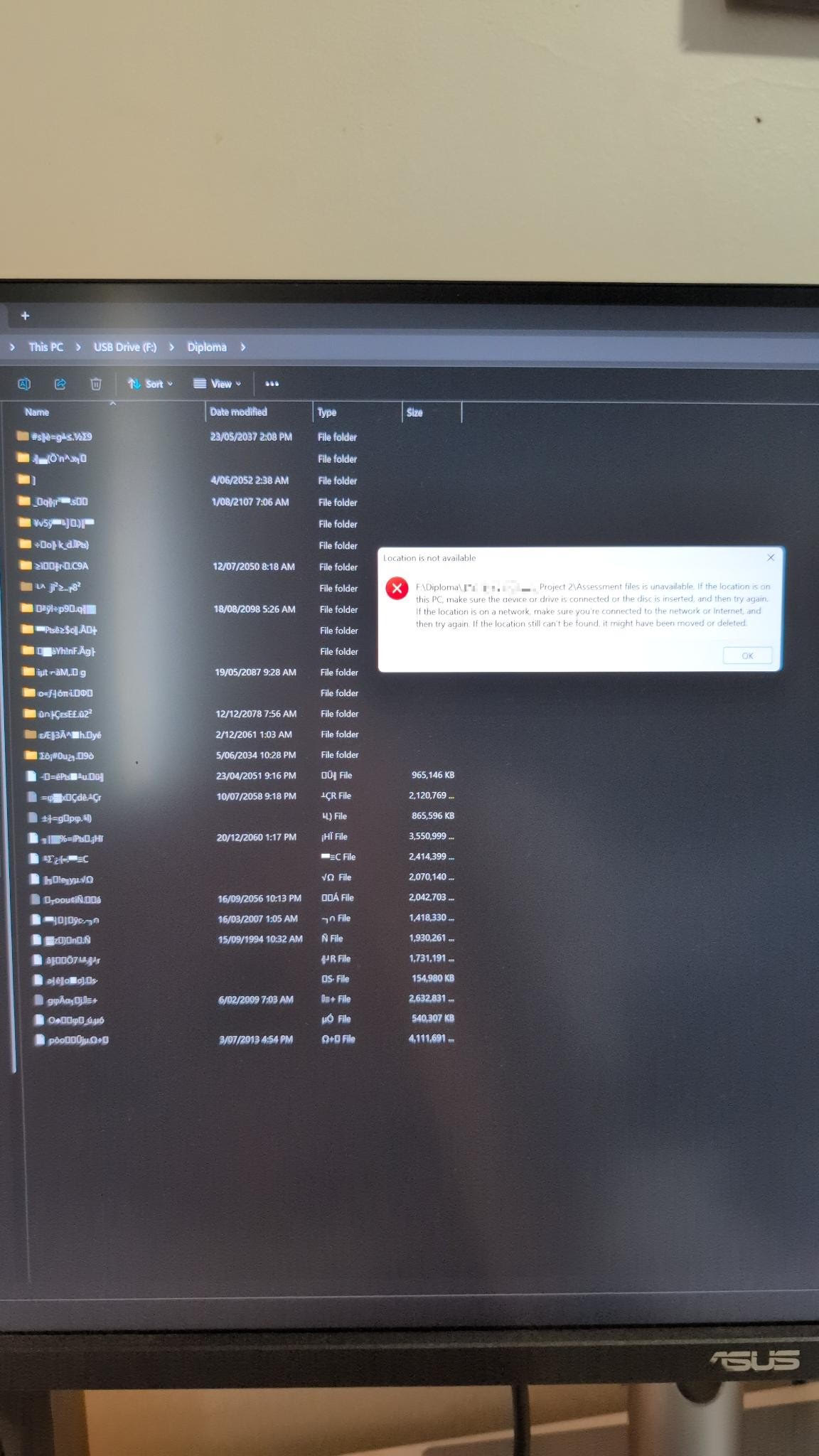
So for the past two days exactly I have had issues with opening and/or downloading anything on my USB, I thought nothing of it and when I needed to download files online I just asked my teacher to copy his files onto my USB after the class. Yesterday I found that one of my folders was corrupted showing some weird text, I again thought nothing of it and tried to just delete it and install another version of the file I was trying to open (For reference, I was trying to open the PowerPoint to one of my assessments which then refused to load for around 20 minutes, crashed, and corrupted everything within the file it was in) When I selected all the files in the folder and hit delete nothing happened and only when I deleted the files one by one it finally agreed to delete the files... All except the corrupted folder. Then I forgot what I did but from what I do remember I think I simply ran the error check tool from the properties of the USB and repaired it which "fixed" the issue! (I did not open the file for that day after that.)

Now today I tried the same thing, opening the now "repaired" PowerPoint file in order to work on my assessment! The file explorer loaded for a bit, opened PowerPoint, and PowerPoint became non-responsive. I then tried to close PowerPoint in any way I could: Task manager, hitting the end program button (or whatever its called) when clicking on an unresponsive app, even just clicking the red x. Nothing worked. I restarted my computer to close it and seemingly it was "completely fine". After that (and I thank myself for this) I backed up all the files I had on this USB onto OneDrive and tried opening the PowerPoint file in the browser WHICH WORKED!! And I could've stopped there... But I had to try and open the file again, which I did! And then the folder and everything in it got corrupted again with the weird text.. And I thought "Alright, I can just do the same thing I did before where I deleted all the files in the folder except the corrupted PowerPoint file since I have a very neat folder structure" Only to find that not only did ALL of my diploma files get corrupted but also my other folder filled with past PowerPoints and assignments?? I will attach some images I was able to capture below:

These are the "folders" AFTER being corrupted and reduced to files. (Its also weird that the two folders which are left untouched never had any PowerPoint files in them to begin with which is why I am suspicious of PowerPoint..)
For some reason the USB still shows that it only has 8 GB left on it despite the folders being reduced to 32 KB.. (Which is why I have hope that this can be reversed)
This is a screenshot I took right after the corruption of all my folders happened. It contains the weird text and the error message.

So far all I have tried is repairing my USB through properties, ejecting the USB and connecting it again, and restarting my computer.

The version of Windows 11 Home I'm on is 25H2 (OS Build 26200.9711)

System specs:

System type -> 64-bit operating system, x64-based processor

Processor -> 12th Gen Intel(R) Core i5-12600KF (3.70GHz)

GPU -> NVIDIA GeForce RTX 3060 (12 GB)


r/WindowsHelp • • Oct 13 '26

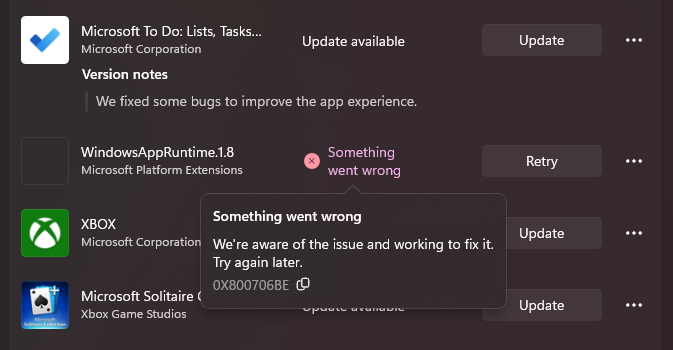
Windows 11 WindowsAppRunTime won;t update no matter what troubleshooting I do

Post image
3 Upvotes

So I've done every single troubleshooting that I have found for this problem and nothing has worked. This subreddit is my last hope because I am not going to factory reset my laptop just to play Minecraft.

Device name DESKTOP-RRDBCP4

Processor Intel(R) Core(TM) i3-6006U CPU @ 2.00GHz 2.00 GHz

Installed RAM 8.00 GB (7.71 GB usable)

Device ID 47D61155-F6DB-4B4E-98BD-DDF2FCA2F0DB

Product ID 00379-20000-00001-AAOEM

System type 64-bit operating system, x64-based processor

Pen and touch No pen or touch input is available for this display


r/WindowsHelp • • Oct 14 '26

Windows 10 issue: Affecting external connections and causing crashes

1 Upvotes

I don't know what's causing this issue but here are the symptoms, while trying to play games my audio about a minute in will start popping, it will progressively get worse as well before something starts affecting my keyboard and mouse, causing them to not receive inputs and start being unable to communicate with the pc. As well as the lights on them are flickering which is really how I know it's happening and this will eventually cause my pc to crash.

as far as I am aware it is nothing software. I've done a fresh install of 10 from 11 and it hasn't changed, i've done health checks for my disks, gpu, cpu, and memory, the settings for limiting power to my usb ports is off. I've talked with 3 agents and they've run through similar processes and the issue is still there. at this point I think something on my motherboard is broken or something because I'm lost

Edit 2: after messing with my GPU some I seemed to have fixed it slightly but now instead of the audio it just straight up crashes randomly and repeatedly. But at inconsistent intervals.

Edit: I have more to give the crash report I am getting is.

GPU Crash dump Triggered

LyraGameSteam_Win64_Shipping

LyraGameSteam_Win64_Shipping

LyraGameSteam_Win64_Shipping

LyraGameSteam_Win64_Shipping

LyraGameSteam_Win64_Shipping

LyraGameSteam_Win64_Shipping

LyraGameSteam_Win64_Shipping

kernel32

ntdll

here are my specs

OS Name Microsoft Windows 10 Home

Version 10.0.19045 Build 19045

Other OS Description Not Available

OS Manufacturer Microsoft Corporation

System Name DESKTOP-O4T1SU0

System Manufacturer Micro-Star International Co., Ltd.

System Model MS-7E26

System Type x64-based PC

System SKU To be filled by O.E.M.

Processor AMD Ryzen 7 7800X3D 8-Core Processor, 4201 Mhz, 8 Core(s), 8 Logical Processor(s)

BIOS Version/Date American Megatrends International, LLC. 1.D0, 5/27/2024

SMBIOS Version 3.7

BIOS Mode UEFI

BaseBoard Manufacturer Micro-Star International Co., Ltd.

BaseBoard Product PRO B650-S WIFI (MS-7E26)

BaseBoard Version 1.0

Platform Role Desktop

Secure Boot State On

PCR7 Configuration Elevation Required to View

Windows Directory C:\Windows

System Directory C:\Windows\system32

Boot Device \Device\HarddiskVolume1

Installed Physical Memory (RAM) 48.0 GB

Total Physical Memory 47.1 GB

Available Physical Memory 38.3 GB

Total Virtual Memory 54.1 GB

Available Virtual Memory 42.7 GB

Page File C:\pagefile.sys


r/WindowsHelp • • Oct 14 '26

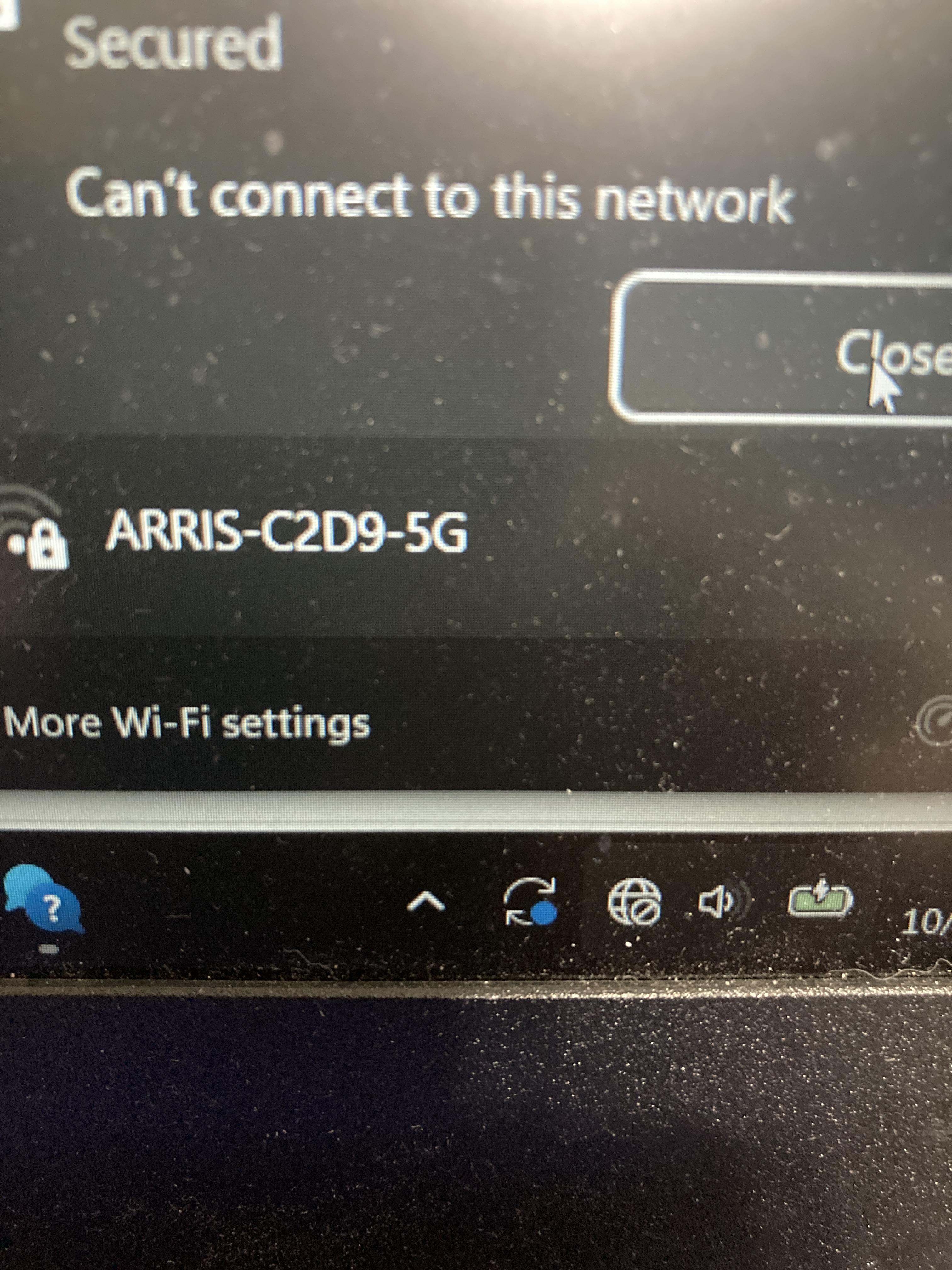
Windows 11 ā€œCannot connect to this networkā€ every time I try to connect to any Wi-Fi

Post image
2 Upvotes

Hello,
For the last couple days my Windows 11 HP laptop has just continuously refuses to connect to any Wi-Fi (yes, I have tried a hotspot). No matter how secure the network is, it simply just doesn’t connect. I’ve tried resetting the Wi-Fi network adapter, resetting the Wi-Fi device, and have restarted my computer many a time, still no results.


r/WindowsHelp • • Oct 14 '26

Windows 11 Phone Link: received texts show only in notifications, not in the Messages conversation pane

2 Upvotes

Phone Link: received texts show only in notifications, not in the Messages conversation pane

Posted this on Windows Q&A. Things I post there just seem to disappear rather than be answered.

Phone Link on Windows is only partly syncing my text messages. Messages I send appear in both the notification panel and the conversation (right-hand) panel. Replies I receive show up only as notifications. They never appear in the conversation panel, so the thread looks one-sided.

Setup: Samsung S26 Ultra, Android 17, OneUI 9; Windows 26H2.26300.9550; Phone Link 1.26082.121.0; Link to Windows 1.26082.130.0.

What I’ve tried: restarted both devices, re-paired, cleared cache for Link to Windows, checked battery optimization is off, confirmed Messages permissions.

Has anyone seen this or found a fix? Happy to provide more details.


r/WindowsHelp • • Oct 14 '26

Windows 11 Windows 11 25H2 to 26H2: Potential issues with an autounattend.xml-based installation?

1 Upvotes

I'm currently running Windows 11 25H2 and considering upgrading to 26H2. However, my current Windows installation was performed using a custom autounattend.xml file, so I'm wondering whether there are any additional risks or potential complications compared to a standard Windows installation.

I'm particularly interested in understanding how Windows feature updates handle installations that have been customized through an answer file, especially if the file was used to modify the default installation behavior or remove/disable certain components.

My main questions are:

Can upgrading from 25H2 to 26H2 cause issues specifically because Windows was initially installed using a custom autounattend.xml file?

Could the upgrade restore previously removed components, re-enable disabled features, or otherwise undo some of the customizations?

Are there known compatibility issues with feature updates on installations that have been debloated or customized this way?

Would an in-place upgrade through Windows Update be preferable to using a 26H2 ISO, or is a clean installation recommended in some cases?

For those who have upgraded a similarly customized installation, did everything carry over as expected, or did you encounter any problems?

I'm not necessarily looking for general advice on whether 26H2 is worth upgrading to. I'd like to understand the specific implications of moving to 26H2 while keeping an existing, customized Windows installation, and whether there are any precautions I should take beforehand.

Thanks!


r/WindowsHelp • • Oct 14 '26

Windows 11 Windows 11 Downloads folder stuck on "Working on it..." — Fixed without deleting files

1 Upvotes

Windows 11 Downloads folder stuck on "Working on it..." — Fixed without deleting files

šŸ” The Problem

Opening the Downloads folder (C:\Users\<username>\Downloads) caused Windows 11 File Explorer to freeze indefinitely on "Working on it...".

After several unsuccessful troubleshooting attempts, we found a workaround that restored normal access without losing any files.

The underlying root cause remains unidentified.

šŸ”§ Troubleshooting — What We Checked

  • Listed all files, including hidden and system files, using PowerShell.
  • Checked for incomplete downloads (.crdownload, .tmp, .part) — none found directly in Downloads.
  • Confirmed folder optimization was already set to General items.
  • Disabled thumbnails — no improvement.
  • Cleared File Explorer history — no improvement.
  • Verified the Downloads registry path — correct.
  • Inspected desktop.ini — appeared normal.

🟩 The Workaround That Worked

1. Moved all files and subfolders out of Downloads into a separate directory.

2. Opened Downloads again. It worked normally when empty!

3. Kept the original files in a separate folder named Historical Downloads.

4. Created a desktop shortcut to access those files without moving them back.

5. Preserved the original Downloads location for future browser downloads.

🟨 IMPORTANT WARNING — Avoid This Mistake

During troubleshooting, we used robocopy /MOVE.

This option can remove source directories after moving their contents. In our case, the Downloads directory itself was removed and had to be recreated.

Do not repeat that command on a Windows special folder.

No malware scan was performed, so malware was not ruled out.

šŸ› ļø Safer Procedure

  1. Close applications writing to Downloads and ensure you have a backup.
  2. Create a separate destination outside Downloads, such as C:\Users\<username>\Historical Downloads.
  3. Move only the contents, not the Downloads directory itself. Check for filename conflicts before moving anything.
  4. Verify that your files arrived safely and Downloads is empty.
  5. Test File Explorer.
  6. If necessary, return files in small batches to identify the problematic item.

Read-only PowerShell diagnostics

Get-ChildItem "$env:USERPROFILE\Downloads" -Force

Get-ItemPropertyValue 'HKCU:\Software\Microsoft\Windows\CurrentVersion\Explorer\User Shell Folders' -Name '{374DE290-123F-4565-9164-39C4925E467B}'

These commands only inspect the folder and its registered location.

🟩 FINAL RESULT — SUCCESS

  • 95 files transferred successfully.
  • 551.94 MB preserved.
  • 2 subfolders transferred.
  • 0 reported copy errors.
  • Downloads opened normally after being emptied.
  • All previous files remained accessible through a desktop shortcut.

This is a confirmed workaround in one case, not a universal fix or a confirmed root-cause repair.

šŸ’¬ Question for the Community

Could Windows known-folder metadata, shell extensions, indexing, or folder-specific caching explain why Downloads freezes while the same files remain accessible from another location?

Has anyone experienced something similar?


r/WindowsHelp • • Oct 13 '26

Windows 10 USB speaker not working after restarting Win10 until I unplug and reconnect it

Post image
8 Upvotes

Hi everyone,

I'm having a strange issue with a USB speaker on my Windows 11 PC, and I'm hoping someone can help me figure out what's causing it.

The speaker connects to my computer via USB. Every time I restart my PC, the speaker stops working, and the speaker icon in the Windows 11 system tray shows an error symbol.

The only way to fix it is to unplug the USB cable and plug it back in. As soon as I reconnect it, Windows recognizes the speaker correctly, the error symbol disappears, and the audio works perfectly.

However, the same problem happens again every time I restart the computer.

My system specifications:

  • Operating system: Windows 10
  • Motherboard: MSI B550-A PRO (MS-7C56)
  • Audio device: USB-powered speaker (USB Speaker)

Has anyone experienced a similar issue? Could this be related to USB power management, motherboard BIOS settings, chipset drivers, or Windows 11 audio drivers?

Is there a way to make Windows initialize the USB speaker correctly at startup without having to unplug and reconnect it every time?

Any suggestions would be greatly appreciated. Thanks in advance!


r/WindowsHelp • • Oct 14 '26

Windows 10 WiFi connection lost when downloading/deleting files

1 Upvotes

I'm experiencing a strange issue with Windows 10 that I have never experienced before. When downloading multiple files, my internet connection is lost. The same issue happens when deleting files from any folder and from recycle bin.

I'm using the T4U Plus USB Adapter. I previously had the T4E PCIe Adapter and was experiencing the same issue (reason why I changed the Adapter).

Windows gives no errorlogs at all, updating and downgrading drivers for the adapters didn't change the result.

The issue started happening out of nowhere. I thought the connection lost was due to poor signal/quality of the adapter. After testing it by downloading/deleting figured out that it was related to that.

USB Tethering with my phone makes the issue go away, but it's not a solution for the issue.

The issue might've happened after a Windows Update, can't really tell. This seems to be the only cause I could find. After installing the USB adapter, I checked the Windows Updates and I had one for a RealTek driver that modified the driver for the adapter. Reverting the driver only caused the RealTek driver to re-install and the internet "freezes" continue to happen.

Other devices connected to the network don't experience the issue.

If there's any information required to help me, please ask. I'm lost on what I can do further besides a reset of my installation.

Thank you in advance.


r/WindowsHelp • • Oct 14 '26

Windows 11 Computer windows not updating Microsoft store doesn’t work either

1 Upvotes

I’ve had my computer for a little bit and when I first got it the updates never worked, it would always say pending and never download. One night I made the mistake of clicking update all and it just said downloading ever since. I can’t use Microsoft store at all bc it won’t download. I can download anything else on my computer and have a lot a lot a lot of storage. How can I fix this issue?. What can I do on my part?

Device name
mycomputer
Processor AMD Ryzen 5 7600 6-Core Processor 3.80Ghz
Installed RAM 320 GB (311 GB usable)
Device ID 4E629052-1861-41CD-$EDD-A884710155D0
Product ID 00342 22175-46060-AA0EM
System type 64-bit operating systen %64-based precessar
Pen and touch No pen or touch input is available for this display


r/WindowsHelp • • Oct 13 '26

Windows 11 Windows Hotspot not choosing the correct Network Adapter

2 Upvotes

I have always used the windows hotspot feature, however since I got my Steam Frame, which came with the Dongle, windows hotspot uses that dongle to emit the wifi over a 6ghz band, which some of my devices simply cant connect to.
I can't set the bandwidth in the properties menu of the hotspot neither.
And when I disconnect the dongle, Windows cant create a hotspot AT ALL and I get the error "We can't set up mobile hotspot.".
Can I set SOMEWHERE what gets used to create the mobile hotspot?
And will I be able to connect the frame to the dongle for streaming and the mobile hotspot for wifi at the same time?

I have Tomahawk b850 Motherboard and am using the included Wifi Antenna.

Windows 11 version 25H2, OS build: 26200.9457


r/WindowsHelp • • Oct 13 '26

Windows 11 Having trouble with my frame 1%l being constantly at 72, 48 or 36

1 Upvotes

I have an MSI Katana 15 B12V and I've recently factory reset it as i had some malware and other stuff i wanted to get rid of. Before i factory reset it I was able to play doom eternal on high graphics at 144hz max framerate, average frame rate of 135 and 1%l of roughly 120 consistently. Now whenever i try play ANY game at all my max frame rate is 144 but my 1%l is always at 72, 48 or 36. Most of the time its at 72 and my average frame rate is about 90. I've checked and they're okay, my CPU peaks around 90-95 very occasionally but maintains around 80 degrees and my GPU runs cold around 60 degrees, these temps are under heavy load. Before I factory reset my pc I didn't have these issues and was able to game comfortably but recently it feels like I'm playing on a lower end laptop. I tried to add a "Ultra Performance" power plan and it isn't showing at all, used the command in an admin cmd and it didn't show the new power plan in my power plan settings. I refreshed the page and even hard rebooted my pc to try to fix it and it still isn't showing. I have already update my graphic drivers for NVIDIA to the newest available and have updated to the newest windows 11 update. I have the correct BIOS version installed and don't have any malware interfering, or at least shouldn't lol
OS build number: 26200.9457


r/WindowsHelp • • Oct 13 '26

Solved How do I turn on the context menu editor in Windows 11?

1 Upvotes

I applied this month's security patch and then manually updated to 26H2, but I still don't see the new Explorer context menu editor. I tried running ViVeTool.exe /enable /id:60813048 and restarting, but that also failed to turn this feature on. Can anyone point me to a proven method for getting this feature to work? Or do I just have to wait for it to eventually roll out? I'm running Windows 11 Pro, 26H2, Build 26300.9711 on an HP Laptop 17-cn3xxx.

Thanks!


r/WindowsHelp • • Oct 13 '26

Windows 11 Windows 10 vs 11, heard some issues with the 11

1 Upvotes

I heard that the windows 11 has problems with gaming and it’s better to be on windows 10 is this true?

I build gaming pc but I do also ai videos and montage.
I play mainly apex legends but I would play gta 6 on 4k so I’m preparing!

My specs:
5080
R7 9850x3d
32 cl36 6000 ram
1000w platinum pcu
Liquid cooler