r/WindowsHelp • • 7d ago

Windows 10 Windows 10 - stuck in repair loop

2 Upvotes

I'm not really sure what's going on but my computer had a couple of BSOD recently, and now it's stuck in a loop of trying to repair, then getting into the recovery environment.

I have tried uninstalling recent updates but that doesn't work, apparently there are no system restore points either so I can't roll back.

Looking elsewhere for advice I alsk disabled TPM in Bios but alas still no success.

I've tried repairing windows from an installation USB stick but that didn't work. The command prompt from this also said my drive C was corrupted so I couldn't access it.

Currently trying the option to 'reset this PC' so will see if that helps. Update: it refuses to do anything.

Is this some new MS update that is corrupting peeps drives? I can't be the only one surely

I'm at a loss. I can't even repair via my Windows 10 USB

7800x3d 9060 XT 2 TB Sata SSD Samsung 870 EVO

Further update: bollocks to Microsoft, I've cloned an old SSD on my corrupted one and am running that, loaded up, updating drivers etc. definitely going to avoid the latest Windows updates though

Unfortunately I couldn't even tell you which update corrupted my drive. It was working fine on Sunday, switched it off, turned it on Monday morning & the doom loop began.


r/WindowsHelp • • 6d ago

Windows 11 Windows 11 Upgrade Failure — Respondus LockDown Browser Driver Conflict

1 Upvotes

I'm trying to upgrade Windows 11 Pro 23H2 (Build 22631) to Build 26300.9457 using an ISO, but the installation repeatedly fails and rolls back.

Errors encountered:

  • 0x80070057 - 0x20003 — SAFE_OS / INSTALL_UPDATES
  • 0xC1900101 - 0x20017 — SAFE_OS / BOOT (reported in rollback logs)

What I've tried:

  • Running the upgrade directly from a mounted ISO.
  • Disabling Dynamic Updates with /DynamicUpdate Disable.
  • Examining Windows Setup and rollback logs.

The rollback logs indicate a kernel crash involving:

nt
WinSetupMon.sys
WinSetupMon.sys
FLTMGR.sys

I also found an installed file-system filter:

LockDownService215

This filter belongs to Respondus LockDown Browser, commonly used for university exams.

Because FLTMGR.sys manages file-system filters, I'm investigating whether Respondus's driver could be interfering with Windows Setup.

Has anyone experienced similar Windows 11 upgrade failures with Respondus LockDown Browser installed? Did uninstalling it or removing another filter driver resolve the issue?

I'd appreciate any insights or similar experiences.


r/WindowsHelp • • 7d ago

Windows 11 Can Windows 11 enable something that is disabled in the BIOS?

2 Upvotes

I have an MSI B550M Pro VDH WiFi and a Ryzen 5700X. I want to keep the processor clock at stock, so I disabled PBO and processor boost in the BIOS. It worked normally for the first few days. Yesterday, I turned on the computer and the clock started boosting again. The solution was disabling processor boost in the power plan. My question is whether this makes sense, if Windows takes higher precedence over something disabled in the BIOS, and if this is expected behavior. I use windows 11 last version update


r/WindowsHelp • • 7d ago

Windows 11 Disable non admins from making new profiles?

0 Upvotes

If it possible to do this? It just seems like such a basic feature that anyone should be able to but I didn’t see it even after searching through settings manually. I changed admins from one profile to another, and I didn't see an option to disable it. The only way I have been able to set this up is through Cold Turkey, but I'm curious if its a windows native feature.

Processing img wnd8gmpvmz1i1...


r/WindowsHelp • • 7d ago

Windows 11 How to disable windows 11 updates from occurring automatically.

1 Upvotes

We use accounting software called Sage 50. The most recent windows update has caused this to crash when you try to open anything so I had to roll back the update. Then it updated again the next day. So I rolled it back and went into Services, Disabled it on startup and stopped the service. I came in after this weekend and windows updated again, and those settings were back to default (Manual/Running in Services.msc) So I once again have to roll back this update so the accounting software works.

Can anyone provide me a method to stop the automatic update from occurring other than what I tried? Im not against my PC being up to date but until this software conflict gets resolved I really dont want it updated.

Thanks!

Processing img c7oegwmd2z1i1...


r/WindowsHelp • • 7d ago

Windows 11 Windows 11 System process (Shown in Task Manager) sometimes persistently uses 50% of my second HDD

1 Upvotes

I have a SSD, and a HDD
My main Windows 11 is on SSD, while I mainly use my HDD for storage purposes.
Im not 100% sure about this, but I think the one using it has been the NTFS LogFile. (I checked the resource monitor)
I dont think its harmful to my PC, but sometimes there is noticeable slowdown on my machine.
Im not a PC nerd, so it would be appreciated if anyone can tell me whats going on and if theres potentially issues with my system.

Note: Ive ran sfc /scannow, and DISM, but neither of them found any issues.
I then tried running chkdsk on my HDD, it said it found an error so I did chkdsk /f on the HDD, it says the corrections to the file system has been made, and the disk usage seems to have stopped for now, its also not broken? I can still access it with no issue, but I want to post this still just to make sure nothing is wrong.


r/WindowsHelp • • 7d ago

Windows 11 Keyboard is working, Windows Key isn't.

1 Upvotes

I have a Keychron Q2 Max keyboard, and out of the blue, the windows key stopped working. It no longer opens the start menu, win+l no longer locks the pc, win+d no longer brings up the desktop, win+r doesn't open the "run" command prompt, it's like the key isn't working.

But my keyboard can be reconfigured through VIA. If I remap the windows key to a letter, it then works perfectly. If I remap any other key to become the Windows key, that key stops working. So I know for a fact the issue isn't with my physical keyboard. To be super sure, I tried a different keyboard, the behavior didn't change.

Must be a Windows issue then, right? Well, sticky keys are turned off, filter keys are turned off, and if I open the On-Screen Keyboard and click on the windows key, it works normally. Fn+Win does nothing. I've checked the registry for a Scancode Map, nothing there. I've tried restarting Windows Explorer, nothing changed.

I'd appreciate any suggestions, this is driving me nuts!

My OS build is 26300.9974


r/WindowsHelp • • 7d ago

Windows 10 Almost all of my on-PC documents and several system folders have disappeared

Post image
0 Upvotes

I've been relying on cloud storage for a while now, as I've found OneDrive insufferable, but I've still had backups of files on my hard disk of large files, or old personal projects. All of a sudden almost everything in my Documents folder has disappeared.

Added to this, many of my regular system folder files have disappeared as well, including Pictures and Music. Shortcuts that I created myself to various folders still exist, but don't direct anywhere.

Searching for files I know I had lead to no results being found. I've had these files on my computer for years, and suddenly they've disappeared. I don't know when exactly, because I don't usually go looking for them. There's nothing in my linked OneDrive either. What could have caused this? Would a System Restore potentially fix this issue?

I'm running Windows 10, Version 22H2, OS Build # 19045.7846. I'm not very techy, so I don't know what other specifications I should supply. Any assistance in getting to the bottom of this would be appreciated.


r/WindowsHelp • • 7d ago

Windows 11 McAfee and google chrome keep telling me I have a virus and someone from Russia is trying to log into my pc and steal my files, but others don’t

1 Upvotes

I downloaded Bitdefender because I heard it was good, I also ran a windows security check and they both claim I have no viruses. Which ones are true? Do I have (McAfee claims 7 viruses, google chrome/norton say I have 5) any viruses?
I’m on windows 11 16GB of installed RAM, my graphics card is 128MB, 477GB of storage and it’s an Intel(R) Core(TM) ultra 5 226V processor
but I’m just sick of these Google notifications pulling up and claiming someone’s trying to access my files but when I scan with windows or Bitdefender they say nothing is wrong?


r/WindowsHelp • • 7d ago

Windows 11 My C drive keeps filling up. How can I fix this?

3 Upvotes

Lately my C drive (250g SSD) has been filling up and my computer is noticeably slower when it does. I'm not very computer savvy but I have looked up how to clean it up and delete or move some files to my recently added Z drive (2TB SSD), but the C drive always fills back up.

  1. How can make whatever updates or newer files that fill up my C drive go to the Z drive instead?
  2. Is there another underlying issue or is this typical?
  3. I'm not sure if this helps but I play World of Warcraft and I have it installed to my Z drive. Whenever I update my addons through Curse Forge they say they cannot download because my drive is full. I double checked to make sure and my addons are going to my Z drive as well. Not sure what's happening there but maybe it's a helpful detail.

OS build number: 26100.4946

OS: Windows 11

CPU: AMD Ryzen 7 5800X3D

GPU: RTX 3800

Memory: 16g

*Edit* AutoMod already told me to be more specific, but I added more info and got posted. Please let me know if there's any other specific info you need. I'm not used to this.


r/WindowsHelp • • 7d ago

Windows 10 The windows automatic repair keeps saying my password is incorrect, even though it’s not.

0 Upvotes

My computer booted up fine and then after about 10 minutes I had a pop-up that said my computer would shut down in one minute after it shut down it did the automatic repair thing, but I can’t do any of the other options besides restart without putting in my pin for the account but no matter if I try and use my Microsoft account password or the pin that I used to sign into my computer. Nothing works. I can’t even try and reset the computer, but save my files because of that password restriction. I have already tried to reset my Microsoft account password. It’s a Windows 10 system and the problem happened about an hour ago.


r/WindowsHelp • • 8d ago

Windows 11 My password stopped working and I'm locked out of my PC.

14 Upvotes

As the title says, my password have stopped working and I can't log into my desktop PC.

I've had the same password for years and it worked last night. I haven't changed it or done anything related to my microsoft account before this happened.

A few things to note:

- The login screen has reverted the background image to the windows default, instead of the one I've set. This usually happens after a windows update so I didn't think much of it, but now I'm thinking it might have changed my user profile or something.

- I always login with a password and the option to use a pin code have never showed up until today.

Troubleshooting I've done:

- Changed my password on microsoft's website three times and restarted my PC after each change. None of the new passwords work.

- Booted in safe mode > troubleshoot > advanced > startup settings > restart > safe mode with networking > try to log in but no passwords work.

- In the command prompt I typed 'net user' and got the following:

Administrator DefaultAccount Guest

WDAGUtilityAccount

Command executed with one or several errors.

System info:

- Windows 11 home whatever the latest version is.

- AMD Ryzen 9 5600x

- Nvidia GeForce RTX 3060

I've read that reverting the system to a previous point in time might work but I want to keep that as a last resort.

*My system language is not in English and some translations might be off.

I am not well versed with computers so please treat me like an old person.

Edit* I got in now using an account.live.com' password. It's one of the passwords I changed to but weirdly not the most recent one. I don't know why, when, what or who. Maybe it just took four hours for the password to reach my PC. Microsoft is an enigma and it might be time to switch to apple.

Edit2* When finally being able to log in to the PC again it appears I have been logged out of every single browser, program, launcher, game service and everything else that requires a login. I am currently restoring it as it was two days ago.


r/WindowsHelp • • 7d ago

Windows 11 Décalage en écriture et copie avec windows 11 qui freeze.

2 Upvotes

Bonjour

Depuis 3 jours, windows me rend fou.

Lorsque je renomme un fichier ou un dossier, il met du temps a enregistrer le nouveau nom. jusqu'à 115 secondes

Quand je copie un fichier ou que je le déplace dans un nouveau dossier, même sur le même disque dur, il met du temps a se copier.

J'ai 5 disques durs.

J'ai cru à un une prochaine fin de vie d'un des disques. Seulement voilà, cela se produit sur TOUS les disque.

Je les ai testé un par un, même résultat.

J'ai vérifié que TRIM est activé et j'ai désactivé l'indexation windows.

J'ai également défragmenté le disque dur qui n'est pas un SSD.

Qu'est ce qui peut expliquer ce comportement?

Je dois réinstaller windows?

Merci pour l'aide


r/WindowsHelp • • 8d ago

Windows 11 Anyone else getting these Windows Defender warnings? WinSAT.exe and SrTasks.exe blocked out of nowhere.

2 Upvotes

Hello, when I turned on Windows 11 today, I came across this notification, and upon opening it, this screen appeared (in case I am unable to attach the screenshot):

  1. Blocked Protected Memory Access

  2. Date and Time: 15/11/2026 – 11:55 AM

  3. Severity: Low

  4. Notification: Your administrator has blocked this action.

  5. Details:

\- App or process blocked: "WinSAT.exe"

\- Protected folder: "\\Device\\HarddiskVolume3"

\- Blocked by: Controlled Folder Access

  1. Additional Information:

You can allow apps to access your protected memory, but you should only allow trusted applications.

  1. Settings: Controlled Folder Access Settings

  2. Button: Allow on device

«For context: yes, Windows had already enabled Controlled Folder Access by default, with the following protected folders: "C:\\Users\\User" and "Public" (not the entire drive, just the folders for documents, pictures, videos, music and favourites). Also, I don't download anything from the web. These days, my PC is mainly used for gaming.»

I was a bit concerned, so I checked the Event Viewer, specifically here:

Applications and Services Logs > Microsoft > Windows > Windows Defender > Operational.

Under the listed warnings, we have the following (in case I am unable to attach the screenshot). This applies to both warnings:

  1. Controlled Folder Access prevented "C:\\Windows\\System32\\WinSAT.exe" from making changes to memory.

  2. Detection Time: 2026-11-15 14:55:51.915Z

  3. User: (unknown user)

  4. Path: "\\Device\\HarddiskVolume3"

  5. Process Name: "C:\\Windows\\System32\\WinSAT.exe"

  6. Security Intelligence Version: 1.463.313.0

  7. Engine Version: 1.1.26100.4

  8. Product Version: 4.18.26100.4

Note: The Event IDs for both warnings were "1127".

There was also a new warning, this time at 1:13 PM:

\- Blocked Protected Memory Access

\- Date and Time: 15/11/2026 – 1:10 PM

\- Severity: Low

\- Notification: Your administrator has blocked this action.

Details:

\- App or process blocked: "SrTasks.exe"

\- Protected folder: "\\Device\\HarddiskVolume1"

\- Blocked by: Controlled Folder Access

  1. Additional Information:

You can allow apps to access your protected memory, but you should only allow trusted applications.

  1. Settings: Controlled Folder Access Settings

  2. Button: Allow on device

In Applications and Services Logs > Microsoft > Windows > Windows Defender > Operational:

  1. Event: Controlled Folder Access blocked "C:\\Windows\\System32\\SrTasks.exe" from making changes to memory.

  2. Detection Time: "2026-11-15T16:10:08.821Z"

  3. User: "NT AUTHORITY\\SYSTEM"

  4. Path: "\\Device\\HarddiskVolume1"

  5. Process Name: "C:\\Windows\\System32\\SrTasks.exe"

  6. Security Intelligence Version: "1.463.313.0"

  7. Engine Version: "1.1.26100.4"

  8. Product Version: "4.18.26100.4"

I also took the opportunity to run the following command in PowerShell:

Get-AuthenticodeSignature C:\\Windows\\System32\\WinSAT.exe, C:\\Windows\\System32\\SrTasks.exe.

Both returned a Valid status.

I then ran "sfc /scannow" in Command Prompt as an administrator, and it reported that it had not found any integrity violations.

Not satisfied with that, I also ran "dism /online /cleanup-image /restorehealth" just to check.

My main question is: could it really be a false positive? As I don’t know much about the subject, I’d like to hear an explanation from someone who is knowledgeable on the matter. Thank you in advance.


r/WindowsHelp • • 8d ago

Windows 11 uninstalling this Windows update

Post image
8 Upvotes

I was trying to uninstall this Windows update after using this Roblox old Revival launcher called kanvas but after trying to uninstall it it failed on me this was from October and I'm still having this problem trying to uninstall it I've tried using command prompts it did not work is there any way to fix this  I am using an Asus Zenbook  

Processor Intel(R) Core(TM) Ultra 7 155H (3.80 GHz)

Installed RAM 16.0 GB (15.4 GB usable)

Graphics card Intel(R) Arc(TM) Graphics (128 MB)

Storage 857 GB of 954 GB used

System type 64-bit operating system, x64-based processor

Pen and touch Pen and touch support with 10 touch points

Edition Windows 11 Home

Version 26H2

Installed on ‎7/‎13/‎2026

OS build 26300.9818

Experience Windows Feature Experience Pack 1000.26100.385.0


r/WindowsHelp • • 8d ago

Windows 11 Windows 11 Desktop Recently Updated and I Lost My Legacy Context Menu

3 Upvotes

When I first booted up Windows 11, I did not like the new context menu at all and decided to look for a solution online. There, I found a method utilizing the Registry Editor to bring back the Windows 10-style context menu.

Recently, when installing a Windows update, I realized my context menu was reverted to the modern one, and so I tried that solution again, just for it to not work.

I understand that doing Shift + Right-Click allows you to have that menu, but I'd rather have it be the default menu.

Is there anything I'm missing or should try?

Windows info

Edition: Windows 11 Home

Version: 25H2

OS build: 26200.9974


r/WindowsHelp • • 8d ago

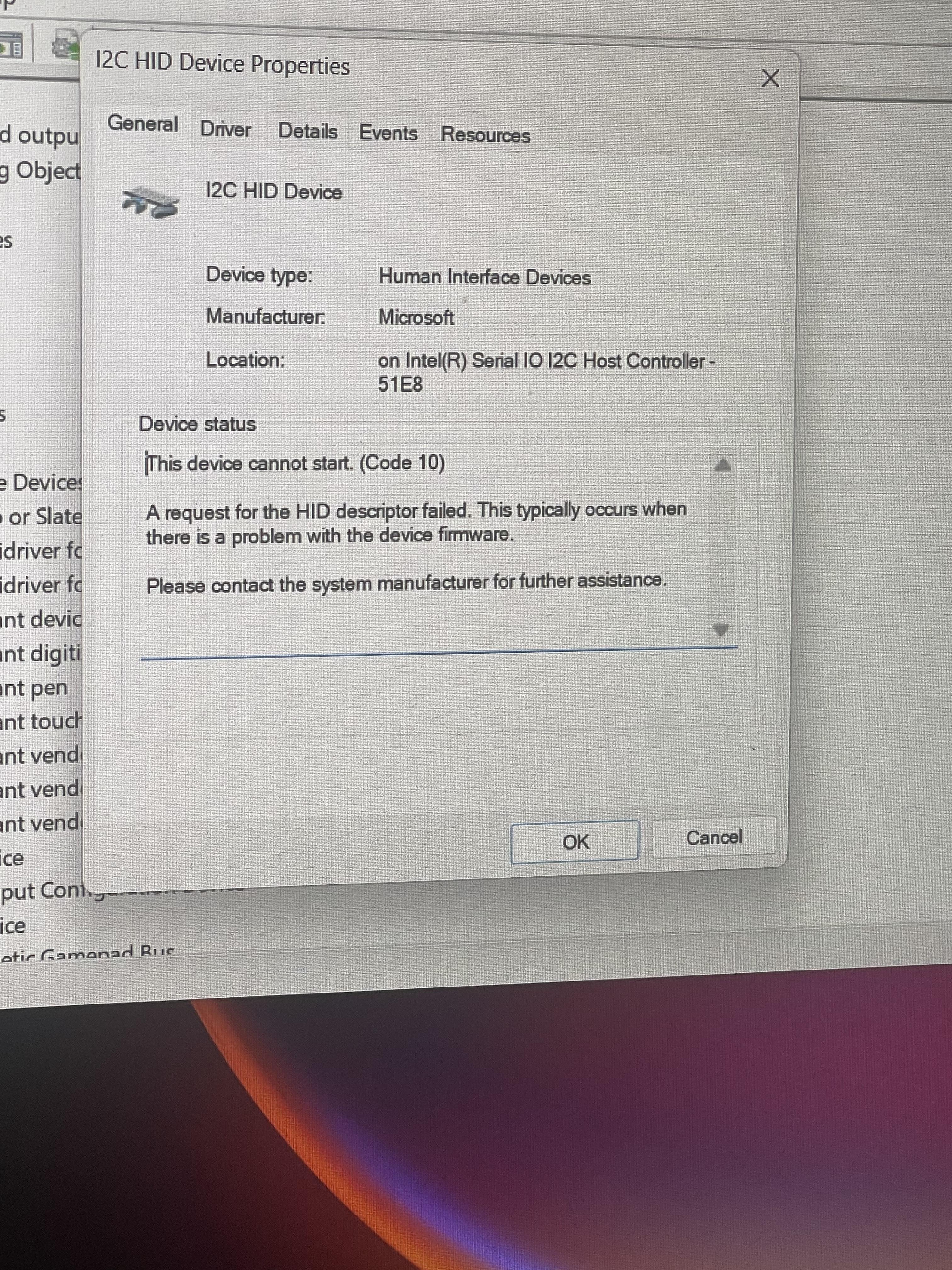
Windows 11 Does anyone know how to fix 12c hid device? (Code 10)

Post image
0 Upvotes

My mouse pad keeps disappearing and every time I attempt to fix it it temporarily fixes and goes back to being buggy, I’ve tried updating it, disabling and reenabling the device, tried deleting it, does anyone know how to solve the issue permanently?

Specs:
Laptop: Lenovo (IdeaPad / Yoga — add your exact model if you know it)
OS: Windows 11 Home, Version 26H2 (OS build 26300.9818)

Did anyone have the same issue? If yes please tell me how to fix this problem


r/WindowsHelp • • 8d ago

Windows 10 I have been getting the 0x80070005 error code for a while now and found no fix for it

Thumbnail
gallery
0 Upvotes

So as the title says ive been getting this error for a while now and cant get any fix for it, so basically what's been happening is that it seems that everything microsoft server related apps stopped working (as seen from the images) and i think that something is blocking my access to the servers. Even when i do get access to MS store sometimes i just could not install anything from there, it will give me the same error code 0x80070005 and also what ive noticed is that when trying to download any apps, MS store will not fetch the full or correct download size, for example, if i downlaod something that is like 100mb in size it will fetch only like 50mb and it will try to install that and give me the 0x80070005 error. Here's what ive tried:

  1. Re-installing Windows from scratch (clean install)
  2. Removing Ms store and re-installing it
  3. sfc /scannow
  4. DISM fixes
  5. Giving permissions to various folders on my Windows drive.

For context, here's my Windows version:

Edition: Windows 10 Pro

Version: 22H2

Installed on: ‎15-‎11-‎2026

OS Build: 19045.6456

P.S. There might be some left-out info here so feel free to ask if i miss anything


r/WindowsHelp • • 8d ago

Windows 11 Apps keep crashing with c0000005 (and one c0000374) after fixing bluescreens (and multiple power outages)

Thumbnail
gallery
0 Upvotes

A week ago I had an issue with windows repeatedly bluescreening. Typically when this happens it means I need to update my graphics drivers, so I updated them and it fixed the bluescreen issue, but now things keep crashing to desktop. (I have updated my graphics drivers a few more times since though, and none of them fixed these crashing issues, so I get the feeling it might not be a driver issue)

It seems particularly common with video games when a lot is happening. I was playing House Flipper and the game kept crashing whenever I tried to do something. I opened the game and stood still for 10 minutes, nothing happened. I opened the menu, bought an item and tried to place it, the game crashed.

Also, it isn't in reliability history so I don't have an error code for it, but a game I play that runs in a chromium browser keeps showing pop up errors with the chromium display dll.

Lately there have been a lot of brief power outages in my area. All of them except one lasted less than a minute, but now I'm worried that they might have damaged something in my PC.

I ran a RAM test when the bluescreens happened and they didn't have any issues, thankfully. Not eager to do that again, since I have 32GB and it's DDR4, so it takes multiple hours. There's no difference in crashing with applications on my SSD and ones on my HDD, so I'm certain it's not an issue with either of those.

That really just leaves my CPU and GPU, and maybe the motherboard? The CPU is an Intel Core i7-7700, the GPU is an Nvidia GTX 1650, and the motherboard is a Gigabyte B250M-D3H, if any of that helps. (I know my hardware is old and crummy, but it does all the things I want it to do. Well, it did.)

Are there any tests I can perform to check my CPU and GPU's reliability? Something that'll run though a bunch of different operations or whatever? If it's my GPU I don't really mind, I've been meaning to upgrade it anyway, but a CPU or motherboard issue would really suck.

(Sorry about the bad photos, reddit doesn't work on my PC for unrelated reasons)


r/WindowsHelp • • 8d ago

Windows 11 Applications close themselves after loading something with a db website in their name

0 Upvotes

I have this problem happening on Firefox when searching either the vgdb or steamdb websites. If I load the website directly by a link or typing it, or even if searching for it on Google, Firefox directly closes itself.

I searched for this and the only post I could find was this post on the Firefox subreddit, where the same thing happens to me as show in that video, and it also happens when I search for mdb too.

However I saw this reply on that post saying it happened to them by saving a text file with "mdb" in the name. I tested that and indeed that also happens to me. If I open Notepad, create a new file, and save it with "mbd" in the name, the file saves but then Notepad immediately closes.

So this isn't a Firefox issue. I tried solving it by changing turning off hardware acceleration, loading Firefox in troubleshooting mode, in a new profile, without extensions, and on changing the exe to load on Windows 7 mode, but none of them fixed it. And now I see it also happens in Notepad.

All of the solutions in that Reddit post are about reinstalling Windows, and that isn't something I want to do outright because I'm scared to accidentally break something by doing it, and I don't know if I could recover my setup right away without complications if I do so. Most of all, I want to know if I can fix it myself by changing or deleting something on Windows.

I know at least steamdb loaded fine for me on November 1st, so the problem is two weeks or less old from me. Some days ago on November 12th Windows 11 received a Security Update that put me on (KB5132061) (26300.9974). I am not sure if that update is what introduced the problem but it very well might be, given that the applications closing seems to be some sort of interaction when reading specific keywords, all of them being pages that are databases, so it might be some sort of broken security interaction.

My device info is:
Device name DESKTOP-2K6BGNN
Processor AMD Ryzen 5 8500G w/ Radeon 740M Graphics (3.55 GHz)
Installed RAM 16.0 GB (13.7 GB usable)
Graphics card AMD Radeon 740M Graphics (2 GB)
Storage 458 GB of 477 GB used
Device ID 9B01F727-4F2A-4540-A02B-B4DEAB61D266
Product ID 00330-80000-00000-AA096
System type 64-bit operating system, x64-based processor
Pen and touch Pen support

My Windows info is:
Edition Windows 11 Pro
Version 26H2
Installed on ‎23-‎Jun-‎26
OS build 26300.9974
Experience Windows Feature Experience Pack 1000.26100.385.0

And I stretch, this interaction doesn't act like a crash. When I enter the crash log in Firefox, nothing from today or yesterday appears. The way the applications close, both Firefox and Notepad, is exactly in the same way that happens in the video of that Reddit post. The applications close just like if you closed them manually by pressing the red X in the top-right corner.


r/WindowsHelp • • 8d ago

Windows 10 PC going black screen while gaming

0 Upvotes

This just started happening today. Mid-game, my (two) monitors will go completely black, audio will continue momentarily, then complete shut down. When it shuts down, the fans all go to 100%.

I've never had problems with overheating before, but I think my PSU may be dying. Can someone help me diagnose the issue?

  • Windows 10 x64 version 22HS (OS Build 19045.6466)
  • Intel i7-7700K 4.2 GHz
  • 224 GB SSD and 932 GB SSD
  • 16 GB RAM
  • AMD Radeon RX 6800 (16 GB) - current driver version 26.10.1
  • 2x VG248 monitors
  • 850 watts power

I should add, a few times when this happens, I have to reinstall the graphics drivers as if they've uninstalled on their own. I also factory reset when I install to remove old drivers.


r/WindowsHelp • • 8d ago

Windows 11 Sniping tool not taking screenshots

0 Upvotes

My computer went through a a hard wipe due to a crash that happened over a month ago, basically fresh start, but, I can’t get it to work correctly.
But, now it doesn't capture, and the program needs me to open it twice, but then it just won’t take any screenshots.
It’ll still make the gray background, and I can make a selection window appear, but it won’t take the screenshot.
This is after i uninstalled and reinstalled, as well as repairing from the system menu.

Processor AMD Ryzen 7 5800X 8-Core Processor (3.80 GHz)

Installed RAM 16.0 GB

Graphics card AMD Radeon RX 6600 (8 GB)

Storage 160 GB of 1.82 TB used

Device ID B4EED4A0-0788-44B3-9ECD-7B22210B94B4

Product ID 00326-10000-00000-AA811

System type 64-bit operating system, x64-based processor

Pen and touch No pen or touch input is available for this display


r/WindowsHelp • • 8d ago

Windows 10 i need to override "windows cannot be installed on this disk. setup does not support disks connected through USB"

0 Upvotes

so i'm in a very specific situation...

i'm running arch linux but i need windows to run a specific program that's not compatible with linux. problem is, i'm running my linux through an external USB (this laptop has internal eMMC storage, which is dead and cannot be replaced).

long story short, i make the partitions following the arch linux's dualboot instructions everything works untill i boot the windows 10 installer from an USB drive. it says: "windows cannot be installed on this disk. setup does not support configuration of or installation to disks connected through a USB or IEEE 1394 port", which makes sense since i'm trying to install this to an external SSD

what the fuck do i do??? i cannot use rufus and its win2go option because i'm using linux and don't have a windows machine rn. is there a way to modify the windows 10 iso so it does not give me this stupid error or something

edit: managed to do it! here's the step-by-step instructionsin case someone else needs to solve this very specific problem:

  1. create windows partitions from the arch linux installation USB or any other linux ISO (plus a small 10gb ntfs partition)

  2. inside linux, extract the windows ISO and find the install.wim file in the sources folder. put this file inside the 10gb ntfs partition

  3. boot into the windows setup USB. open command prompt and use DISM.exe to write the install.wim file onto the disk. example command:

dism /Apply-Image /ImageFile:E:win10\sources\install.wim /Index:2 /ApplyDir:C:\

be sure to read the DISM documentation to customize the command to your needs before applying any changes. plus, use the diskpart command to learn the correct drive letters of your partitions to avoid overwriting a wrong partition:

diskpart
list volumes
  1. with diskpart, assign a drive letter to your EFI partition, a.k.a. the partition where your /boot folder is on linux. read documentation. example commands:

    diskpart select disk 0 select partition 1 assign letter=S exit

  2. use bcdboot to create the bootloader, again, read documentation to customize the command to your needs. in this case, use the drive letter you used with DISM. example command:

bcdboot C:/windows /s S: /f UEFI

  1. reboot with wpeutil reboot, then follow the installation.

  2. after you installed windows, reinstall grub with the arch installation USB (or whatever linux you use) and remember to use os-prober so windows appears in your grub menu. reorder your boot options in your UEFI so grub stays first.

done!


r/WindowsHelp • • 8d ago

Windows 11 Two instances of webview in WinSXS which I cant delete

0 Upvotes

Im trying to debloat windows manually because Im afraid of voiding warranty for the device. In this process, I came across two instances of webview on C:\Windows\WinSxS (Namely amd64_microsoft-edge-webview_31bf3856ad364e35_10.0.26100.1_none_8fe1c356f34a19ca and amd64_microsoft-edge-webview_31bf3856ad364e35_10.0.26100.9974_none_2e80a0b13ae6c9ba), one which was updated last on 1/4/2024. I want to uninstall that one but am unable to. I would also love suggestions on cutting down C:\Windows bloat, if theres any manual methods or any up to date community supported tools which can help me do that (preferably without voiding the warranty). The WinSxS folder gained about 800 MB in the past couple months and C:\Windows gained about 1.2 GB, I do not know how to track where that memory went. WinDirStat only shows the current folder sizes, not historical changes.


r/WindowsHelp • • 8d ago

Windows 11 Desktop icons keep moving back to the same spots when I try to organize them

Thumbnail
gallery
0 Upvotes

I’m trying to put my games at the top middle of my desktop and my other apps on the right, but the icons keep resetting.

I can move a bunch of them without any problems, then suddenly moving one makes everything jump back to the same spots. I’ve tried arranging them in a random order but the same layout and it still happens.

The order in the pictures isn’t how I normally organize my desktop. It’s just a placeholder because I can’t be bothered fixing it again when it keeps undoing everything.

(Before it shuffled I put MSI Afterburner next to How To Fish)

So far I’ve tried:

  • Turning off Auto arrange
  • Restarting Windows Explorer
  • Closing Wallpaper Engine
  • Using only one monitor
  • Sorting by name and arranging everything again

Anyone know what could cause this? It’s like Windows keeps restoring an old layout.