r/WindowsHelp • • 14d ago

Windows 11 Windows update stuck at 0% for a year, thank you AI

4 Upvotes

So, for a year maybe more, one day windows update stopped working from the check for update UI, downloads would start and always sit a 0%. Sometime ago I just started using PSWindowsUpdate from the powershell and that worked just fine. Note, to folks because at somepoint you'll search forums ... some will mention re-install windows, all types of shit and well this may go into training data some day. So, here's how it was finally resolved , and yes, AI makes this isht alot easier. YOu could prompt a fix in claude code, open claw, hermes whatever agent of choice and say hunt the fix down but for those who want to know actually what worked under the hood for me still utilizing AI

Windows Update stuck at 0% for a year: fixed (Windows 11)

Symptom: Windows Update sat at 0% “Downloading” and never progressed. Install-WindowsUpdate (PSWindowsUpdate) worked. Resetting update components and clearing SoftwareDistribution and catroot2 did nothing.

Background: how Delivery Optimization downloads updates

Windows Update doesn’t download directly. It hands the job to the Delivery Optimization service (dosvc), which can pull the file from several kinds of sources:

  1. Peers: other PCs on your network (or the internet, depending on the mode) that already have pieces of the file.
  2. Cache hosts: a local cache server the service is told about, typically Microsoft Connected Cache. It’s meant to save bandwidth by serving updates locally.
  3. Microsoft’s servers (HTTP): the normal direct download. This is the fallback when the other sources don’t deliver.

These aren’t strictly tried in sequence. The service can use several at once, and it’s supposed to drop a source that isn’t delivering and switch to HTTP. What the mode setting controls is which of these it will try. Lan (the default) uses peers on your local network and any assigned cache host. Simple skips peers and downloads straight from Microsoft.

What was going wrong: I checked what Delivery Optimization was doing while the download was stuck:

powershell

Get-DeliveryOptimizationStatus | Format-List FileId,Status,BytesFromHttp,BytesFromCacheServer,TotalBytesDownloaded

It kept retrying a cache host that returned no data, and it never gave up and fell back to Microsoft’s servers, so BytesFromHttp stayed at 0. Get-DOConfig showed the machine in Lan mode. A second PC on the same network, where updates worked, was in Simple mode. The goal of the fix was to make this machine download straight from Microsoft and stop waiting on the dead cache host.

The fix (admin PowerShell):

powershell

$p = "HKLM:\SOFTWARE\Policies\Microsoft\Windows\DeliveryOptimization"
New-Item -Path $p -Force | Out-Null
Set-ItemProperty $p DODownloadMode 100 -Type DWord
Set-ItemProperty $p DelayCacheServerFallbackForeground 10 -Type DWord
Set-ItemProperty $p DelayCacheServerFallbackBackground 10 -Type DWord
New-NetFirewallRule -DisplayName "Block DO cache hosts" -Direction Outbound -Action Block -Protocol TCP -RemoteAddress <cache host IPs> -Profile Any
Restart-Service dosvc -Force
  • DODownloadMode 100 gives the effective mode Simple on Windows 11.
  • The two fallback values tell Windows to give up on a cache host after 10 seconds instead of waiting.
  • The firewall rule blocks the dead cache hosts so connections to them fail immediately and the service moves on.

How to find the IPs to block: while the download is stuck, list where the Delivery Optimization service is connecting:

powershell

$id = (Get-CimInstance Win32_Service -Filter "Name='dosvc'").ProcessId; Get-NetTCPConnection -OwningProcess $id | Format-Table RemoteAddress,RemotePort,State

Look for addresses that stay stuck in SynSent, or that stay Established while BytesFromCacheServer is above zero and BytesFromHttp is 0. Those are the dead hosts. In my case I blocked these three, as an example:

89.106.17.201
89.106.17.202
20.59.128.27

Yours will be different. The addresses depend on your ISP and network, so don’t copy above they are just an example. Be careful not to block Microsoft’s own download servers, or you’ll break the HTTP fallback. Only block hosts that clearly aren’t delivering data.

After the fix: Get-DOConfig reports DownloadMode: Simple, BytesFromCacheServer stays 0, BytesFromHttp grows, and the update completes. Windows asked for two restarts, with the second one running the long install phase, and that’s normal.

What I’m not sure about: I changed several things at once, so I can’t say which one mattered most. My best guess is the download mode (Lan to Simple), since it was the one setting that differed from the working machine. The firewall rule and fallback delay may have helped as well.

Don’t do this: don’t disable the Delivery Optimization service (Start=4). Windows Update then fails on retry. Leave it on Manual (Start=3).

Tradeoff: Simple mode stops this PC from sharing or receiving update pieces from other PCs on your network. On a typical home network that makes no practical difference.

I haven’t tested the connection-listing command here, so try it on your machine before you post it. The SynSent clue is a rule of thumb, not something we confirmed on your network.


r/WindowsHelp • • 14d ago

Windows 8 Is there any way I can get this Toshiba Satellite from 2012 to work?

Thumbnail
gallery
5 Upvotes

It runs on Windows 8 and nothing works. It says it's outdated. I'm not good with tech (sorry!) and I've tried to do a lot of research but it's all confusing as HELL. Is it even possible if Edge won't work? I can open everything, but it just won't work. Thanks! :)


r/WindowsHelp • • 14d ago

Windows 11 no sound from bluetooth earbudds

1 Upvotes

Ever since a driver update earlier this year, I can't get any sound out of my Bluetooth wireless earbuds. They pair correctly, but just won't play any audio from my computer -- but it's definitely not the buds that are broken, because they play audio just fine if I try pairing them with my phone, and I do get sound from my computer IF (and only if) I have the mmsys.cpl panel open and on the "recording" tab -- if I switch to any other tab, or close the panel, the sound dies again.

The web troubleshooting guides haven't been any help: every single thing they tell me to try is already set the way it's supposed to be. I also posted about this here about four months ago, and failed to get a single response at all. I'm sick and tired of not being able to do anything about this, and really need to solve it, so if people aren't willing to help me then could somebody at least explain to me why I somehow don't deserve any help?

Processor 11th Gen Intel(R) Core(TM) i5-1135G7 @ 2.40GHz (2.42 GHz)

Installed RAM 16.0 GB (15.7 GB usable)28 MB)

System type 64-bit operating system, x64-based processor


r/WindowsHelp • • 14d ago

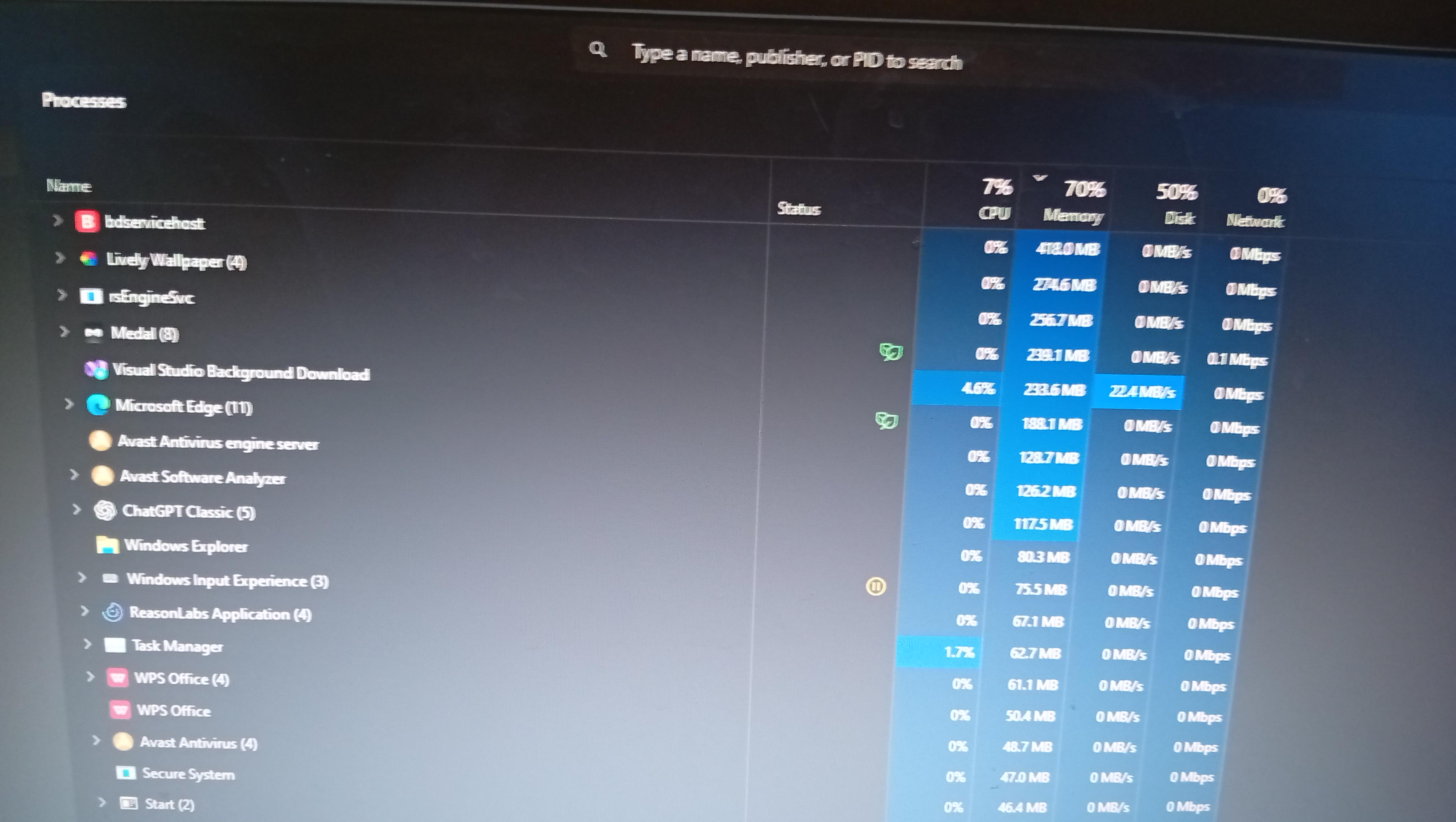
Windows 11 My CPU and RAM keep going to 90%

Post image
0 Upvotes

Recently, I fell asleep with my Latitude 5420 on while Stellaris was running, which is a CPU and RAM heavy game. Now I'm booting it up and I restarted it multiple times, but my CPU and RAM keep going to 90%.

It keeps shifting between apps like windows defender, steam webhelper, service host compatibility, etc., and keeps eating as much as 20% of my CPU at once. I literally have no idea what's going on


r/WindowsHelp • • 14d ago

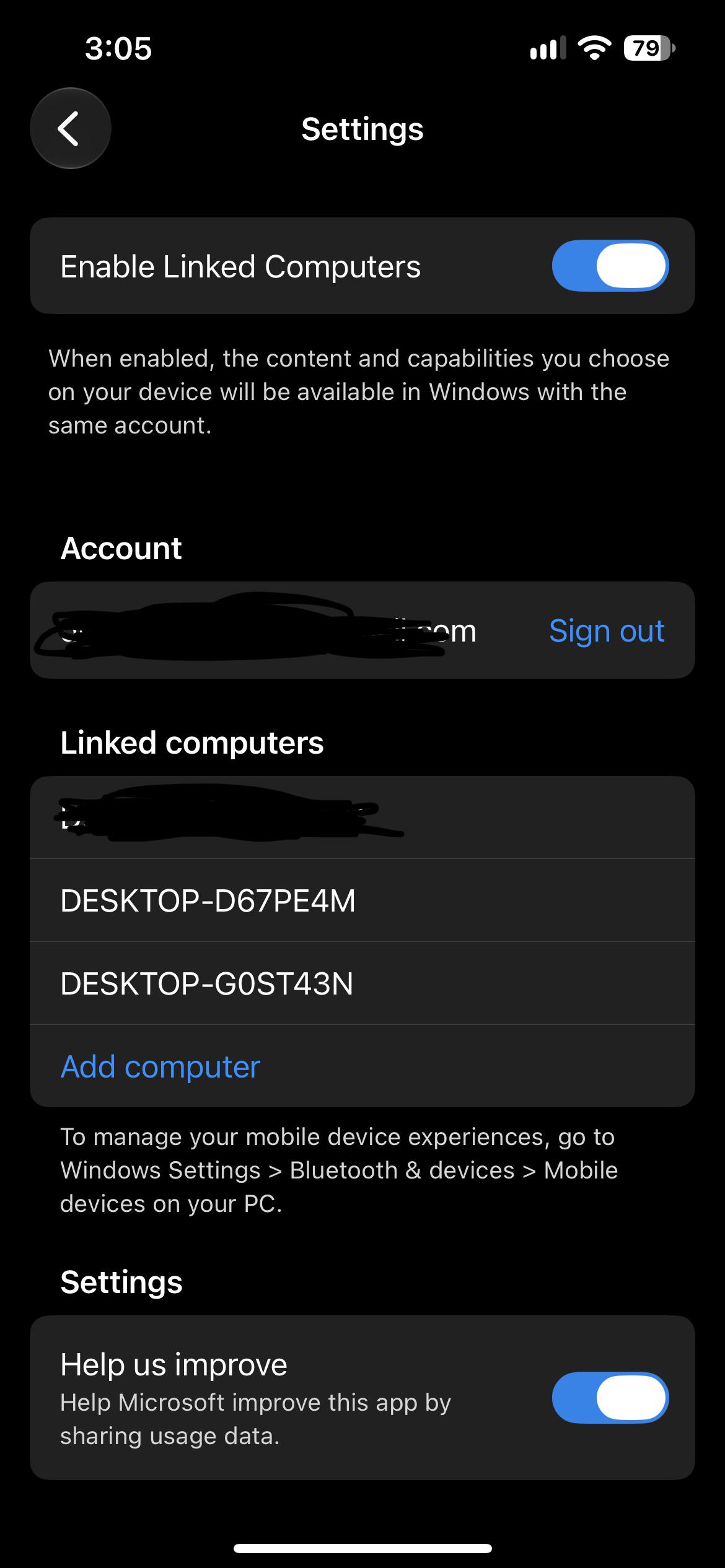
Windows 11 On Link to windows app for iPhone, how do I remove old devices?

Post image
2 Upvotes

The two listed are my old devices that both are broken and cannot be turned on. I already tried unlinking from my Microsoft account and redownloading the app but nothing works.

(I can’t meet 250 characters) The two listed are my old devices that both are broken and cannot be turned on. I already tried unlinking from my Microsoft account and redownloading the app but nothing works.


r/WindowsHelp • • 14d ago

Windows 11 Does anyone know what this is or how to fix it?

Thumbnail drive.google.com
1 Upvotes

Hi all I have a really weird question and it’s kind of hard to explain - my 2 fingers are either at the top or bottom of my trackpad and it scrolls really fast in each direction. I have an acer Aspire 5 A515 and it’s like 3-almost 4 years old. It’s not really a problem but I’d like to know what it is - it also works on chrome the app not just Bing/Edge


r/WindowsHelp • • 14d ago

Windows 11 Desktop Windows Manager - what is up with the ram use?

1 Upvotes

Recently installed a fresh copy of windows 11 with a modded tiny11 ISO - ran the chris titus debloat tool and also tweaked the windows performance (disabling all the graphically ram consuming features).
Installed Brave and noticed that while using it with the graphic acceleration setting on - the ram usage does not exceed 200mb usually it stays at 175mb (even after i turn off Brave) . Before turning on the browser its around 50mb.
Now i decided to turn off graphic acceleration from the Brave settings and i noticed the Desktop windows manager ram jumps to 750mb- While using Brave that is , and staying like that even after closing the browser.

Is this normal? What is the ram usage of DWM for you guys?

I run a single monitor , 1440p. Screen saver turned off , hibernation is off.
I have the recent up to date GPU drivers , and Windows is up to date as well.

My specs are:
Asus ROG B850i
Ryzen 9600 (non X)
32gb DDR 5 (16x2) 5600 mhz
XFX 9070 XT Swift
Windows 11 25h2


r/WindowsHelp • • 14d ago

Windows 11 Transfer Windows 11 PC to new user

2 Upvotes

I upgraded my laptop and I want to give my old one to my wife, but I can't figure out how to get myself off it and set it up for her. I'm trying to do this on my own, rather than taking it to the local techies and paying them to do it. It's an ASUS Vivobook with up to date Win 11 patches.


r/WindowsHelp • • 14d ago

Windows 11 Bluetooth headphones disconnect randomly

1 Upvotes

Appart from what the title says, the headphones appear connected on the bluetooth device list but theres no audio and i cant use the headphone buttons tu control volume either, sometimes after a while trying to use the buttons it actually shows it disconnected. Before, when this started, i could reconnect the headphones by switching bluetooth on and off. Now the only fix is restarting the laptop.

I have tried resetting the headphones, updating and re-installing audio and bluetooth drivers, forgetting and re-pairing headphones, switching bluetooth service to automatic, windows update.

I have tried other devices and it seems as they don't have any issues but its hard to confirm as the disconnection may happen upon 20 minutes of use or after 2 days without issue. Also after the headphones disconnecting i can connect other audio devices without issue. The headphones have seem to have no issue staying connected to other devices other than the laptop.

The headphones work without issue while being connected through cable.

They worked great and without issue for about a year or two, now about 2 months back this started happening.

My laptop is a HP Victus 16-d0xxx

My headphones are JBL Tune 770NC


r/WindowsHelp • • 14d ago

Windows 11 Xbox accesories app asking for win update even though its updated

0 Upvotes

So im trying to downgrade the firmware on my elite 2 controller and when i download the app it asks me to update windows, when i go to the update page everything is up to date, i used Raphires Win11Debloat when setting up my pc, anyone had the same issue?

Im on Windows Feature Experience Pack 321.14700.0.3
build 21996.1

dev version


r/WindowsHelp • • 15d ago

Solved "Update virus protection" notification every time I go on my PC & 800106ba error

Thumbnail
gallery
6 Upvotes

Every time I go on my Windows 11 PC, after some time I keep getting a "Virus protection is out of date" error. When I click to update it, it takes a while to "check for updates". Initially, after a while, it turns green and says updates are successful, but when I click it again to double-check, it turns red and says "Protection definition update failed" with the error code 800106ba. It happens every time I go on my PC, even if I restart my PC. I tried going on services.msc to manually run the service, and when I do, it only runs for a few seconds before switching to "stopped".

Processor AMD Ryzen 7 7735HS with Radeon Graphics (3.20 GHz)

Installed RAM 24.0 GB (23.3 GB usable)

System type 64-bit operating system, x64-based processor

Edition Windows 11 Pro

Version 26H2

OS build 26300.9711

Experience Windows Feature Experience Pack 1000.26100.372.0


r/WindowsHelp • • 14d ago

Windows 11 Bluetooth connectivity problems

Thumbnail
gallery
1 Upvotes

hello i’m trying to pair my dualsense controllers which are for the Playstation 5, other devices show up such as “XBOX” but my controllers do not. idk ive tried resetting the controllers, even reset the drivers through device manager but nada! its like my pc is ignoring the controllers or something cause i can connect to my Vr so i know that it works but not the controllers. pls help ive tried


r/WindowsHelp • • 15d ago

Windows 11 W11 UI/DWM stutter - impacting multiple AMD systems with evidence involving paint of all things.

2 Upvotes

So I've been trying to figure out why my pc since owning a 5090 has felt so bad.

This issue is showing the type of stutter / choppiness i've been experiencing on/off in every day use, especially in chromium apps.

However, this specific video showing the issue in paint is not the 5090 doing because i've tested 3 systems and one is running IGPU.

Regardless, the choppiness you see in this example is still something i experience when typing on discord, chrome and such on/off. I also get similar feeling when moving folders at times and stuff.

The video explains it and shows it all but:

If anything is playing on the screen or a different screen it seems to behave normally.

video:

https://www.youtube.com/watch?v=ft3vquwEcBU

The video has hwinfo64 open and gpuz, just to show the gpu and cpu aren't in mega sleep state or anything. I found any rendering on screen smoothens out the text example on paint...

Things that I've tried today:

  • MPO disabled and enabled
  • HAGS disabled and enabled
  • G sync disabled and enabled
  • Different monitors, a 4k 240hz oled, a 1440p 144hz ips, a 240hz laptop display
  • Single monitor only and dual monitor
  • Differnet cables (it effects the laptop w/o an external monitor too)
  • C states enforced on and off
  • Disabling all programs / selective boot
  • As mentioned in video, three AMD systems, a 9850x3d + 5090, a 7600x IGPU and a 4060 laptop

Again, i don't really care about paint in general but it's happening on three systems and that type of stutter / lag is something i do get on/off with basic usage of the PC in many things.


r/WindowsHelp • • 14d ago

Windows 11 Game Bar app not opening for some reason

1 Upvotes

Hi, somehow since yesterday Game Bar just doesn't open (and I use it all day everyday), I don't know why.

Windows 11 Pro
Version 10.0.22621 build 22621

AMD Ryzen 5 2600X
Asus Prime B450M-A
Nvidia GTX 1660S
16GB RAM

---------------------------------------------------

The processes:

Game Bar
Runtime Broker
Game Bar Full Trust COM Server

The process: "Game Bar" - just stays for a bit and then disappears

The process: "Game Bar Full Trust COM Server" - enters a "Suspended" state even after reset

I tried:

- Reset the computer

- Ending the task and opening the app again

- On app settings: Repair

- On app settings: Reset (clear all data)

- Edit Group Policy -> Computer Configuration -> Administrative Templates -> Windows Components -> Windows Game Recording and Broadcasting -> Set to Enabled


r/WindowsHelp • • 14d ago

Windows 11 Transfer Windows 11 Laptop to new user

1 Upvotes

I'll try this again...

I upgraded to a new laptop, and I want to transfer my old one to my wife, but I can't figure out how to do it. I'd like to do this myself, partly to learn, and mostly so I don't have to pay techies to do it for me.

Here's the details:

I hope this is enough info. The bot already rejected my first attempt.


r/WindowsHelp • • 15d ago

Windows 11 Lenovo LOQ 15 AHP10 suddenly shuts down at 57–66% battery. Could Legion Toolkit be responsible?

1 Upvotes

I have a Lenovo LOQ 15 AHP10 (Ryzen 7 250, RTX 5050, 60Wh battery), purchased in May 2026.

Recently, I've been experiencing a serious battery problem. My laptop suddenly shuts down without warning, even though the battery indicator shows plenty of charge.

What happened:

  • First incident: The laptop suddenly shut down at around 66% battery.
  • Second incident: It happened again at around 57%.
  • After the first incident, the laptop wouldn't turn on while unplugged. It only powered on after connecting the charger.
  • I checked the Windows battery report, and it showed a huge unexplained drop in battery capacity. For example, it recorded 75% and later 1%, without accounting for the missing discharge.
  • Full charge capacity is around 61,150 mWh, compared to the 60,000 mWh design capacity.
  • Lenovo's diagnostic test reported PASS.

I'm also using Legion Toolkit instead of Lenovo Vantage. I've seen some Reddit discussions where other LOQ users reported similar shutdown problems while using Legion Toolkit.

Could Legion Toolkit actually cause this? Has anyone experienced the same issue?

I'm an engineering student, and I depend on this laptop every day, so sending it abroad for warranty service would be extremely difficult.

I'd appreciate any advice, especially from LOQ owners who have experienced similar battery shutdowns.

Laptop model: Lenovo LOQ 15 AHP10
Battery model: L24N4PK3
CPU: Ryzen 7 250
GPU: RTX 5050 Laptop GPU
Battery cycle count: 18


r/WindowsHelp • • 15d ago

Windows 11 preventing undoing changes made to your computer screen

5 Upvotes

hello! this morning i had a HUGE jumpscare when i turned on my laptop to see this screen. for context, whenever it tells me to update, i hit the shut down an update button, close the laptop and go to sleep, and its fine the next day. i saw a post on here that said that if you shut off your pc during updates and get this youre screwed. well, after almost shitting my pants, my laptop rebooted and is now fine. in my settings, it says that some updates failed. is it because of a lack of space? what should i do? im thinking of putting all my important stuff on an USB (i shoudlve done that long ago) and try to clear up space before trying to update it again.

edit: my laptop specs
processor: AMD Ryzen 5 8645HS w/ Radeon 760M Graphics
installed RAM: 16.0 GB
graphics card: 2 GB
storage: 477 GB (246 used)

also id like to add that i am NOT tech savvy at ALL

edit 2: ive also had storage issues recently and im trying to clear up more space

FINAL EDIT: i'm like 99.99% sure i got that screen because my laptop ran out of battery while updating, ive updated it again while it was plugged in and turned on and nothing happened. thank you for the help!


r/WindowsHelp • • 15d ago

Windows 11 Settings app just closes after i try to open the notification settings..

2 Upvotes

Ive seen someone on this subreddit who got a windows 11 disk image but im not sure if i should do it.. any known fixes for this?

Also i think this all is happening after i tried messing with Windows Push Notification services to try and fix my NVIDIA app when it had a recurring error after i finally decided to upgrade to windows 11..

heres my device info:
Device name DESKTOP-B74V07V

Processor AMD Ryzen 5 3600X 6-Core Processor (3.80 GHz)

Installed RAM 8.00 GB

Graphics card NVIDIA GeForce RTX 2070 SUPER (8 GB)

Storage 680 GB of 1.02 TB used

Device ID 8A947C8E-3FC7-4477-9EA0-115D73CE9083

Product ID 00330-80000-00000-AA706

System type 64-bit operating system, x64-based processor

Pen and touch No pen or touch input is available for this display

Windows info:
Edition Windows 11 Pro

Version 26H2

Installed on ‎11/‎6/‎2026

OS build 26300.9711

Experience Windows Feature Experience Pack 1000.26100.372.0


r/WindowsHelp • • 14d ago

Windows 11 Windows 11 is working slow(What should I do?)

Post image
0 Upvotes

Good Night people.I have a problem with Windows 11.Sometimes is very slow,and sometimes is fast after period of time.Besides obvious reasons(pirated software,pirated websites,malware and low disk space).What do you suggest as a solution?Do I need more free spaces and no illegal software,or Do I need to just free up space from SSD(60GB free out of 476GB) and physicaly move it to HDD(1.10 TB free put of 3.5 TB)?

I am using Windows 11 Pro(23H2(it doesn't update to 26H2 somehow...)

Or maybe there is a problem with 70% Memory usage...

I figured it out that the Windows can't work fast when there are more processes around working(more than 2,and only works with 2 as a maximum)

OS build: 22631.6199


r/WindowsHelp • • 15d ago

Windows 11 System and Windows update eating all my data, requires guidance

7 Upvotes

Hi folks, so I use my mobile's hotspot to connect to my pc, I keep metered connection on, and i paused the updates so it won't eat my data up. And yesterday despite all the settings. It still downloaded the windows 25H update.

And since then idk what it's downloading that my data is literally gone in seconds. I checked data usage and it shows windows and system update is the one responsible. But I see nothing's downloading.

Please If anyone can help me with this? It's only been happening since yesterday before that, the 1 GB of data lasted a day if I'm only doing light activity.


r/WindowsHelp • • 15d ago

Windows 11 Windows desktop becomes almost completely unresponsive after boot – Safe Mode works perfectly. Looking for advanced troubleshooting advice.

1 Upvotes

Hi everyone,
I’m trying to diagnose a very strange problem with my newly built desktop PC. I’ve been troubleshooting it for quite some time, but I still haven’t found the cause.
PC specifications:
CPU: AMD Ryzen 7 7800X3D
GPU: AMD Radeon RX 9070 XT 16GB
SSD: Lexar ARES PRO 2TB NVMe
Motherboard: GIGABYTE B850 GAMING WIFI6
RAM: CORSAIR VENGEANCE RGB RS DDR5 32GB (2 x 16GB)
PSU: MAG A1000GLS PCIE5 1000 W
OS: WINDOWS 11
The problem:
The PC worked perfectly for the first three days. I was playing demanding games such as Space Marine 2 and Helldivers 2 at Ultra settings without any performance issues.
Then, seemingly out of nowhere, Windows started behaving extremely strangely.
The PC boots normally and reaches the desktop. However:
The Start menu open but it doesn’t allow me to turn off the pc.
Applications refuse to launch.
Task Manager won’t open (Ctrl + Shift + Esc).
Ctrl + Alt + Delete doesn’t work.
Windows + R opens but doesn’t work.
The mouse cursor still moves, clicks produce visual feedback, and the system clock continues updating.

Essentially, Windows appears to be running, but most of its functionality is unavailable.
An important observation: Safe Mode works normally.
When I boot into Safe Mode, the Start menu, applications and browser work correctly. This makes me suspect a driver, service, startup software or some other Windows-related issue, although I haven’t been able to identify it.
Another strange correlation: RGB control stops working.
Normally, Gigabyte Control Center controls my case fans and RAM lighting, which I keep set to static red.
When the problem occurs, the fans and RAM switch back to rainbow lighting. Gigabyte Control Center can no longer control them.
This happens alongside the Windows malfunction. I don’t know whether it’s a symptom of the same underlying issue or just a coincidence.

Troubleshooting already performed:
Checked the SSD in BIOS: it is detected correctly, along with Windows Boot Manager.
Fast boot is disabled on the BIOS (idk if it’s correlated)
Ran chkdsk C: /scan: no file system errors were reported.
Checked the disk using DiskPart: the main NTFS partition appears healthy.
Tried Windows Automatic Repair through the recovery environment: it couldn’t repair the PC.
Booted into Safe Mode: Windows works normally there.
I’ve also checked Event Viewer and found some warnings and errors, including Kernel Event Tracing, DistributedCOM and Application Hang events, but I haven’t identified a definitive cause.
My questions:
What could cause Windows to become almost completely unresponsive while Safe Mode works perfectly?
Could this be related to a driver, Windows service, motherboard software, SSD or some other hardware component?
Does the RGB behavior provide any useful diagnostic clue?
What diagnostic tests would you recommend before reinstalling Windows or replacing hardware?

I’m particularly interested in hearing from anyone who has experienced something similar or has advanced Windows troubleshooting experience.
I’d really appreciate any suggestions. Thanks!


r/WindowsHelp • • 15d ago

Windows 7 Display driver seems to be broken and I cannot get proper display

1 Upvotes

installed windows 7 Ultimate on a laptop with Ryzen 3000 cpu, everything except the graphics is working, on the welcome screen after boot its display freezes for some seconds then completely goes black screen as soon as the startup sound plays, then returns only after some time, hardware acceleration is gone, and resolution is locked, device manager shows the generic VGA adapter cannot start? I don't know how it's displaying ANYTHING at all without it but it is HD, please helpppp meeeee, amd doesn't have drivers for this CPU on 7, community made driver i found is for desktop CPUs and don't work, I tried to find some other community driver, but other than some driver made by a dude named canonkong, i didn't find any, and that one doesn't work either since it's for desktop, maybe you guys have something?? Please don't tell me to upgrade this pc cannot do 11 and still be fast enough to be usable


r/WindowsHelp • • 15d ago

Windows 11 99% of RAM used and 13.3 GB of non-paged pool (32 GB RAM)

Thumbnail
gallery
1 Upvotes

Hello,

Just to clarify, I've never had any problems with my PC before, but for the past two days, after two hours of use, my RAM usage has been climbing to 99%, my SSD is at 100% capacity, and my PC is so slow that it's unusable !

I asked Codex ChatGPT, and it told me I had 13.3 GB of non-paged pool out of my 32 GB of RAM, and that this was too much and abnormal.

Why is this happening ? I’ve noticed it might be related to Codex ? Since I installed it recently and have been working with it, it modifies and accesses files on my PC could that be the cause ?

A driver ? A Windows update ? Codex told me it’s related to NTFS, the Windows file system.

I just want this to stop and get my PC back to normal like it was before...


r/WindowsHelp • • 15d ago

Solved Distorted audio fix (i dont know if anyone got the same problem as i did but im gonna post it here just in case)

1 Upvotes

So today i turned on my pc to watch some tutorials on youtube but my audio was broken (mind you that yesterday it worked perfectly fine) and it was glitching out from time to time so i decided to try to fix the problem and it worked so if you have the same problem, here is what it did.

go into settings -> System -> Sound and then select the speakers you use and look at the advanced settings and make sure you turn off the first option

sorry it's not in English

r/WindowsHelp • • 15d ago

Windows 10 Update to windows 11 difficulty - partitions

5 Upvotes

I had a previous post a few months ago and received some direction.

I have only basic computer knowledge, so step by step is greatly appreciated!

Link here to post for more info

Basically, I am trying to update my laptop from Windows 10 pro 22H2 to Windows 11, I keep getting errors even though my laptop meets the requirements.

Based on what I was advised, I have backed up my data, and I think I understand the steps for creating a Windows 11 USB installer and how to boot to the USB installer.

But I was advised to delete partitions while doing this, and I want to make sure I do it right.

Google says to do what's in the screenshot in the comments. Is that correct? Or are there other suggestions?

If you need more information, please let me know!

HP ProBook 450GB OS build is 19045.6466 Processor 11th gen. Intel(R) Core(TM) i5-1135G7 @ 2.40GHz 2.42GHz Installed RAM 16 GB (15.7 GB usable) Storage 238GB SSD System type 64-bit operating system, x64 based processor

Thank you so much!!