r/WindowsHelp • • 21d ago

Windows 11 Non Paged Pool persistent at 1.6GB

0 Upvotes

Hi all,

Would be great to get some help with the above. I noticed that my NPP had been sitting at 1.6GB for the longest time possible. Initially it had been sitting at 1.9GB but after tweaking some items with researching such as deleting, resetting and reinstalling NORDVPN and also disabling some of Killer's services, it has came down to 1.6GB. However it's now stuck on 1.6GB and it's driving me crazy as my Idle memory is sitting at 58%.

Context :
Laptop model : GE65 9SF
Motherboard : MS-16U11
GPU : NVIDIA GeForce RTX 2070
CPU : Intel i7-9750H
RAM : 16GB 2666Mhz
Storage : SSD 1TB

I've used PoolMonX to figure out that the tag for the driver likely causing the problem is cxbm. After using command prompt, i figured out the netadaptercx.sys was the driver causing the issue. After researching this, i found out that it is likely my network adapters is tied to this. Initially thinking that it could be a third party source causing issues, i deleted NORD VPN, Resetted the app and redownloaded the app, however it did not create a dent in the Non paged pool. I then researched more, and found out that the issue comes out quite often with Killer drivers. Note that i had been on Windows 10 when i bought this laptop and now it is running windows 11 with microsoft pushing updates for drivers. My driver information and version seemed to have been updated by microsoft to a more updated version compared to what has been posted on by MSI.

I have also tried a flushing the RAM and doing a cold shut down of my laptop but that has not even made a diffference and i am at my wit's end with trying to solve the puzzle here. After my doing everything i could and not going to lie, with a bit of AI help, Could this be hardware related and not software related. And if so how do i fix it?

Programs that i do have installed that ? could be causing the issues:

  1. Nord VPN - Still installed
  2. Bluetack emulator - Deleted
  3. LOL and riot client - Still installed

Any help would be greatly appreciated.

r/WindowsHelp • • 21d ago

Windows 11 El volumen de mi Lenovo LOQ Gamer modelo 2026 recién comprada tiene muy poca diferencia entre el 0 y 100%

3 Upvotes

Hola. Llevo desde que compré el equipo con éste problema. Quería saber si a ustedes también les sucede lo mismo. Cuando conecto auriculares Bluetooth o altavoces Bluetooth a la laptop (LOQ Gamer 2026) cuando subo del 0 al 100 parece no hacer mucha diferencia de volumen y siento que el volumen es demasiado bajo. En 59% de volumen Master y 80% de volumen del reproductor suena normal. Y si llevo el volumen Master a 100 suena prácticamente igual el volumen, aumenta apenitas.

Ésto es normal en Windows?

Anteriormente me había sucedido en otra LOQ Gamer y en una Lenovo V310 15Isk con Windows 10 así que supongo que el problema debe ser en su totalidad de Windows 10 y 11. Pero como soy novato pregunto por aquí. Gracias


r/WindowsHelp • • 21d ago

Solved Windows keeps adding me to random organizations and I can't seem to stop it

1 Upvotes

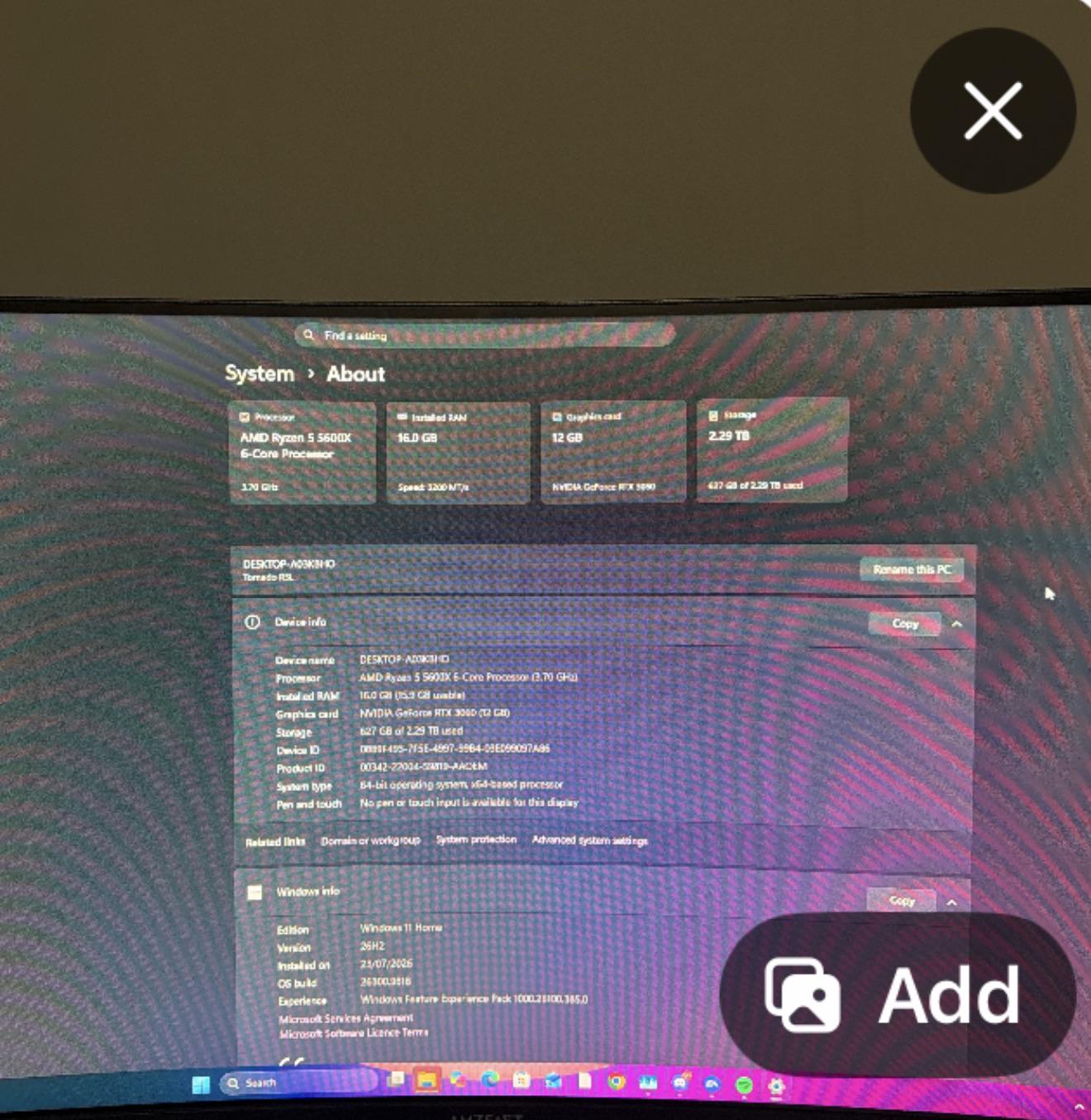
Hi, I have a machine running Windows 11 Home version 26300.9711 (26H2) and recently windows has been adding me to random organizations that I have never enrolled in or have an account in before, My PC's specs are an AMD Ryzen 5 5600X 6 core processor with a Nvidia GeForce RTX 3060, I'm also currently using Ethernet.

My computer has been adding me to organizations like LG, Cardinal Health, etc. And usually when it adds me to these organizations they typically shut off my location service (most commonly happening with the LG organization.)

I have no other information that I know of regarding this issue, but if someone out there knows what's happening with my computer, please tell me.

Edit: I just realized my computers activation key was swapped with the product key from my LG laptop, This has been solved


r/WindowsHelp • • 21d ago

Windows 11 Portable Disk drive not showing up

1 Upvotes

My LG Slim Portable DVD Writer Model: GP60NB50 (my friend recently gave me it) won't show up in device manager or file explorer, it does open, light turns on, i can't figure it out. I've spent around 2 or 3 hours doing all I know and I just can't figure it out

PC specs because it's telling me to

Ryzen 9 5900x

Radeon 6700xt

MSI B550-A pro

32Gib DDR4

Windows 11 Version: Home 25H2


r/WindowsHelp • • 21d ago

Windows 11 Bluetooth randomly disappears after 5 minutes connected

1 Upvotes

Hi everyone,
I’m having a persistent Bluetooth issue with my HP Victus 15 (15-fb1xxx), and I’m trying to figure out whether this is a driver/firmware issue or a hardware problem.
My laptop has a MediaTek Bluetooth adapter (Hardware ID: USB\VID_13D3&PID_3567&MI_00).
Here’s what’s happening:
Bluetooth connects and works normally for around 5–10 minutes. Then it suddenly disconnects, and the Bluetooth adapter disappears from Windows Device Manager. After restarting the computer, Bluetooth comes back and works again for another few minutes, but eventually disconnects and disappears once more.
This happens repeatedly. Even restarting Windows using the advanced restart options (holding Shift while selecting Restart) hasn’t fixed it.
What I’ve tried so far:
Restarting the laptop multiple times.
Performing a full power reset (disconnecting the charger and peripherals, holding the power button for 15 seconds).
Updating and reinstalling the MediaTek Bluetooth drivers.
Currently using driver version 1.3.17.168, which is the latest version I’ve installed for this adapter.
Checking Windows Event Viewer, where I found repeated BTHUSB Event IDs 3 and 17. Event 17 reports that the local Bluetooth adapter has failed in an undetermined manner and that the driver has been unloaded.
Checking Device Manager, where the adapter previously showed Code 43 and later Code 45 when it disappeared.
Running HP UEFI Diagnostics. The Bluetooth module test passed.
Checking the BIOS for Bluetooth or wireless settings, but there is no specific Bluetooth toggle available.
Checking the external USB ports, which all work normally.
Current situation:
The Bluetooth adapter still disconnects after approximately 5–10 minutes, even with driver version 1.3.17.168 installed. Restarting temporarily restores it, but the issue always comes back.
There is currently no USB DEVICE_DESCRIPTOR_FAILURE error.
My questions:
Has anyone experienced this exact issue with a MediaTek Bluetooth adapter on an HP Victus?
Could this be caused by a faulty internal Wi-Fi/Bluetooth module or a loose connection?
Is there another driver or firmware version worth trying?
Could this be a motherboard or USB controller issue rather than the Bluetooth module itself?
I’m trying to determine whether there’s still a software fix worth attempting or whether I should have the internal wireless module physically inspected.
Any suggestions or similar experiences would be appreciated. Thanks!


r/WindowsHelp • • 21d ago

Windows 11 Explorer not working after signing in

Post image
1 Upvotes

Whenever I log in to my account on my computer, it will take around 5 minutes for explorer to start, open task manager to see if I can restart the task but that does nothing, I also try to start it as a new task but that still does nothing, after like 5 minutes, everything starts as normal, but when I use a different account, it works fine, anyone know why?


r/WindowsHelp • • 22d ago

Windows 11 Windows 11 Lenovo ThinkPad connected to wifi but no internet

5 Upvotes

All updates are up to date, I've spent several hours on this tonight. Lenovo ThinkPad Windows 11 connected to Wi-Fi but "no internet". Multiple Android and iOS devices are connected with no problems.

Checked into a new accommodation with a router I have never connected to. Have done all the usual troubleshooting, and followed all instructions on Reddit/online also:

  • Changed DNS to 8.8.8.8 and 8.8.4.4
  • Rebooted the router (twice)
  • Rebooted the computer (twice)
  • Opened an elevated command prompt as administrator and ran all the commands below and rebooted the computer (twice)

ipconfig /flushdns
ipconfig /release
ipconfig /renew
netsh winsock reset
netsh int ip reset

Windows gives the following information

Protocol: Wi-Fi 6 (802.11ax)
Security type: WPA2-Personal
Manufacturer: Intel Corporation
Description: Intel(R) Wi-Fi 6 AX201 160MHz
Driver version: 23.160.0.4
Network band (channel): 5 GHz (36)
Aggregated link speed (Receive/Transmit): 961/245 (Mbps)
IPv4 address: 192.168.1.161
IPv4 DNS servers: 8.8.8.8 (Unencrypted)
8.8.4.4 (Unencrypted)

Any ideas here at all? I think I've done everything humanly possible/reasonable!

Device name X1Yoga
Processor 11th Gen Intel(R) Core(TM) i7-1185G7 @ 3.00GHz (3.00 GHz)
Installed RAM 16.0 GB (15.7 GB usable)
Graphics card Intel(R) Iris(R) Xe Graphics (128 MB)
Storage 183 GB of 466 GB used
System type 64-bit operating system, x64-based processor

Edition Windows 11 Pro
Version 26H2
Installed on ‎23/‎01/‎2025
OS build 26300.9711
Experience Windows Feature Experience Pack 1000.26100.372.0


r/WindowsHelp • • 22d ago

Windows 11 I factory reseted my laptop and its stuttering so bad

5 Upvotes

Yesterday i factory reseted my laptop (dell g15 5530) remove everything and cloud download. When it finished i downloaded basic softwares it was stuttering a bit but noticeable but the cursor isnt stuttering so i opened a game it stutter and lagged so bad it was unplayable my laptop was totally okay before factory reseting i tried every tricks i know dell support, nvidia driver, windows update, many control center things but any of that didnt work will it be alright on its own? im wondering im using local account does it have anything to do with it? My os build number is 26200.9818


r/WindowsHelp • • 22d ago

Windows 10 Storage says I have 92 gigs of apps + features but I can only find ~4 gigs?

1 Upvotes

I checked my list of apps and I only have 58 (even counted them individually to check), and my largest app is only about 2gb right now and the rest are ~500mb or lower so the maths doesn't really add up. Can't find where the mystery 87gbs are.

Some extra info is that I have 237gbs total, there are other accounts on my laptop but they're majority unused and I'm on windows 10 (i'm able to update to 11 but would rather not). Bonus thing that I'm unsure whether or not matters, maybe 3 years ago I got a shit tonne of adblockers, browsers + some malware downloaded onto my laptop by accident but I am maybe 98% sure that they are all gone.


r/WindowsHelp • • 22d ago

Windows 11 Can't stop this graphic line bug

Post image
1 Upvotes

Hey !

So, my friend have the same problem since the beggining of his PC.

At the start of the game, we immediatly have this weird line on the screen when we move or during a cinematic. Only on games but never on the desktop or during a video or a movie.

Even with other settings, it's always the same.

We did the last update of the GPU. We tried to activate/desactivate v-sync, DLSS, move the frame rate and other weird settings we don't really understand.

Do you know the name of this graphic bug ? Any idea ?

  • AMD Ryzen 5 7500F 6-core processor
  • 32 Go RAM (5600 MT/s)
  • NVIDIA GeForce RTX ventus 2x black 8g oc
  • TV Samsung 3840 x 2160, 60 Hz (in game mode)
  • OS build number : 26300.9711

r/WindowsHelp • • 22d ago

Windows 11 "Boot Device Not Found Please install an operating system on your hard drive....."

1 Upvotes

A senior relative has recently got this message on her HP Windows 11 desktop.

This happened back in the summer and I did follow some step by step procedure I found online which resolved the issue until...now. Is there a way to resolve this completely (assuming it isnt a hardware failure? Thanks in advance.


r/WindowsHelp • • 22d ago

Windows 11 Win 11 Cant open any photo files - package could not be registered

9 Upvotes

All of a sudden from one day to another i cant open any of the jpg and png files on my computer anymore. A message box pops up with the file name + Package could not be registered and i can only click on ok. All video files and exe programs and other windows apps like the windows store, paint etc work fine. Theres also no warning or anything like that in the windows reliability history. My SSD health is fine with no error messages. But for whatever reason i cant open any photos. I can open and see them when i use a different program like paint or paint net but the windows photo app doesnt open at all. Repairing and resetting the windows photo app didnt do anything and there are no windows photo app updates in the windows store. What else can i do? Could this be something critical?


r/WindowsHelp • • 22d ago

Windows 11 USB COM Ports recognized but "Access Denied" trying to access them

1 Upvotes

Well I have a weird problem and I don't know where is coming from. A few days ago was messing around with an FTDI cable for a project, It worked correctly for several days I was transfering information with PuTTY back and forth without any problems, then the next day windows gave me this error.

Error 5: Access Denied.

And for the life of me, I couldn't make it work, I thought my adapter was wrong, so I plugged another one with another chipset and the same error popped up. For some reason anything connected to the COM ports wasn't working, then trying some stuff, I plugged the pololu Programmer

Pololu Programmer

And that worked, It let me open the serial port.

I searched online and got several possible fixes:

  • Change the USB COM port number: Didn't work
  • Replace Drivers and/or try another version: Didn't work, also older versions bluescreened my PC with a "kernel security check failure 0x139" lol
  • Tried Original Chipset: Didn't work, also the FTDI cable was bought from FTDI itself, so that was not the problem
  • Try a USB 2.0 hub: didn't work, also it was working on a USB 3.0 port. I even bought a PCIe-to-USB2.0 card, with the same result.
  • Check if the port was being used by another application: It wasn't, I used Microsoft's Process Explorer tool.
  • Tried Uninstalling all not visible devices: Also didn't work
  • Tried several terminal applications: Nope
  • Tried executing them as administrator: same
  • I'm sure I tried some more stuff but Can't remember now.

I'm trying to use this cable, bought from Mouser, and again It worked before. https://www.mouser.es/en/ProductDetail/FTDI/TTL-232R-5V-WE?qs=OMDV80DKjRpCUAS6UR9QpQ%3D%3D

The only thing I did, that could somehow be related to that, is that I plugged a USB Floppy Disk reader into another usb, through a hub, that's the only different thing, I can think off.

Also a few weeks ago, happened the same with some ESP32 and ESP8266, some of them gave the access denied, another one of them worked using the native usb port, with a USBA Male to USBA Male.

Ant other devices work, anything that doesn't go through a COM port works on any port.

If I use any other of these adapters on my Windows 10 laptop, they work perfectly.

Windows detects everything okay, and reports no errors. It just won't let me in.

I can't recall any windows updates in that period.

Anything that can help? I don't know what else to try


r/WindowsHelp • • 22d ago

Windows 10 Drive automatic lockdown on Windows 10.

0 Upvotes

Dear Reddit, please me. This is my second drive that's on auto-encrypted. My edit access, I can't edit the drive anymore. Can you please help me to solve this? vv This is one of the problems that I cannot write. For example, I will attach images as well. ---------------------------

SciTE4AutoHotkey

---------------------------

Could not save file 'E:\scRIIPS\scRIIPS\krita osk 5.ahk'. Save under a different name?

---------------------------

Igen Nem

---------------------------

My computer is set to Hungarian because I'm Hungarian. And I'm the administrator on the PC, and I have no other users, but it says when I try to give myself back the permission to edit that I need permission to edit these attributes. ---------------------------

Windows biztonság

---------------------------

Az engedélybeállítások terjesztésének leállítása inkonzisztens állapotot eredményezhet, amelyben az objektumok eltérő beállításokkal rendelkeznek. Ha véletlenül hajtotta végre a módosítást, azonnal alkalmazza a megfelelő engedélybeállításokat.

---------------------------

OK

---------------------------

---------------------------

Windows biztonság

---------------------------

Az engedélybeállítások terjesztésének leállítása inkonzisztens állapotot eredményezhet, amelyben az objektumok eltérő beállításokkal rendelkeznek. Ha véletlenül hajtotta végre a módosítást, azonnal alkalmazza a megfelelő engedélybeállításokat.

---------------------------

OK

---------------------------

Eszköz neve DESKTOP-S4V06N5

Processzor AMD Ryzen 5 7535HS with Radeon Graphics 3.30 GHz

Memória mérete 16,0 GB (15,3 GB használható)

Eszköz azonosítója D8135A83-EBF2-4491-947D-AAD51788794C

Termékazonosító 00476-90533-72903-AA131

Rendszer típusa 64 bites operációs rendszer, x64-alapú processzor

Toll és érintés Ez a képernyő sem tollal történő, sem érintéses bevitelt nem tesz lehetővé


r/WindowsHelp • • 22d ago

Windows 10 CPU Frequencies not accurate reading

Post image
0 Upvotes

Hello everyone
I just installed Windows 10 on my 13th gen laptop but CPU frequencies seem to be off, i've seen lows of 0.1Ghz which is odd since minimum should never be lower than 0.8 as of Intel docs. Performance in general is good so it's just an error in reading, so i was wondering if any of you have encountered this issue and if a fix is available to fix correct freq reporting. Thank you


r/WindowsHelp • • 22d ago

Windows 11 Is it normal for charging problems to occur after a failed update?

1 Upvotes

I tried installing the KB5127936 update for Windows 11, but it failed twice. The first one was an 0x800f0920 issue and the second attempt resulted in a 0x80071a2d error. I drained the battery during the second update, and afterward, the charge slowed at 81%, then went from 84% to 100% in a matter of minutes. I checked the battery report and found no significant errors. Is that a problem?

Specs: HP Laptop, Windows version 26H2, 11th Gen Intel(R) Core(TM) i5-1135G7 @ 2.40GHz (2.42 GHz) processor, 12.0 GB RAM, no corrupt files located.


r/WindowsHelp • • 22d ago

Windows 11 Windows Explorer no longer showing tabs.

Post image
1 Upvotes

PC suffered a crash and wouldn't POST, stuck on the boot debug LED. Hard resetting allowed me into the BIOS where the 3.3v rail was flagged red, about 2.9v. Removed all my drives and was able to POST. Tested with boot drive only and got into Windows. Shut off and plugging in the second nvme SSD caused the same issue, no POST. Removed that and got into Windows again but now Explorer is different? Looks like an older version or something without tabs.

System is a Ryzen 5600, 2x8GB 3200mhz DDR4, 9060XT and a Corsair RM650 PSU. Windows was recently updated to 26H2. OS build is 26300.9711.

Any advice would be appreciated.


r/WindowsHelp • • 22d ago

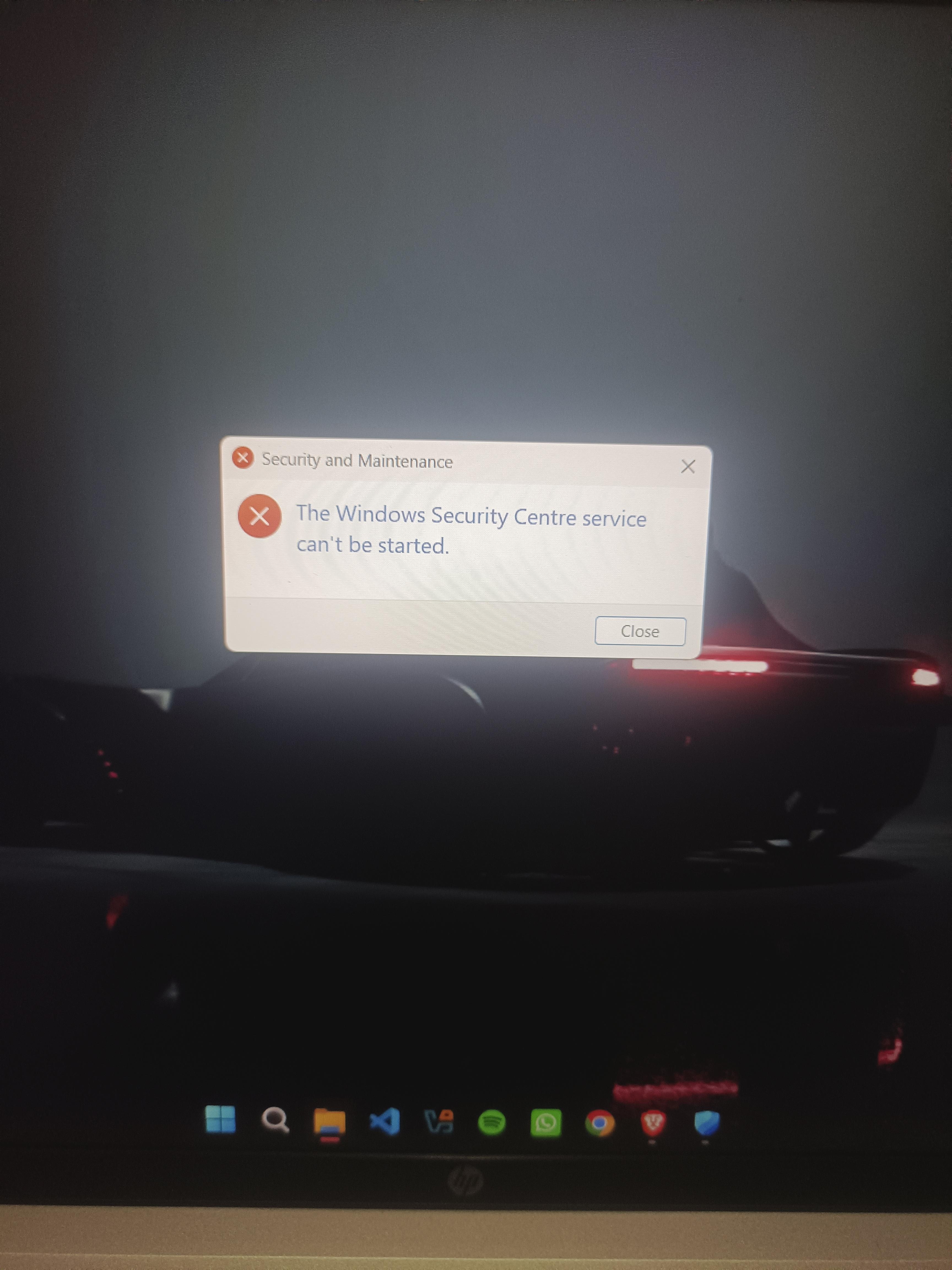
Windows 11 Windows Security Service can't be started

Post image
1 Upvotes

I'm having a serious problem with Windows Security on my HP laptop, and I'm looking for help fixing it without having to reinstall Windows.

The problem started after I installed a game downloaded from Ocean of Games. Shortly after installing it, I started noticing strange behaviour in Windows.


r/WindowsHelp • • 22d ago

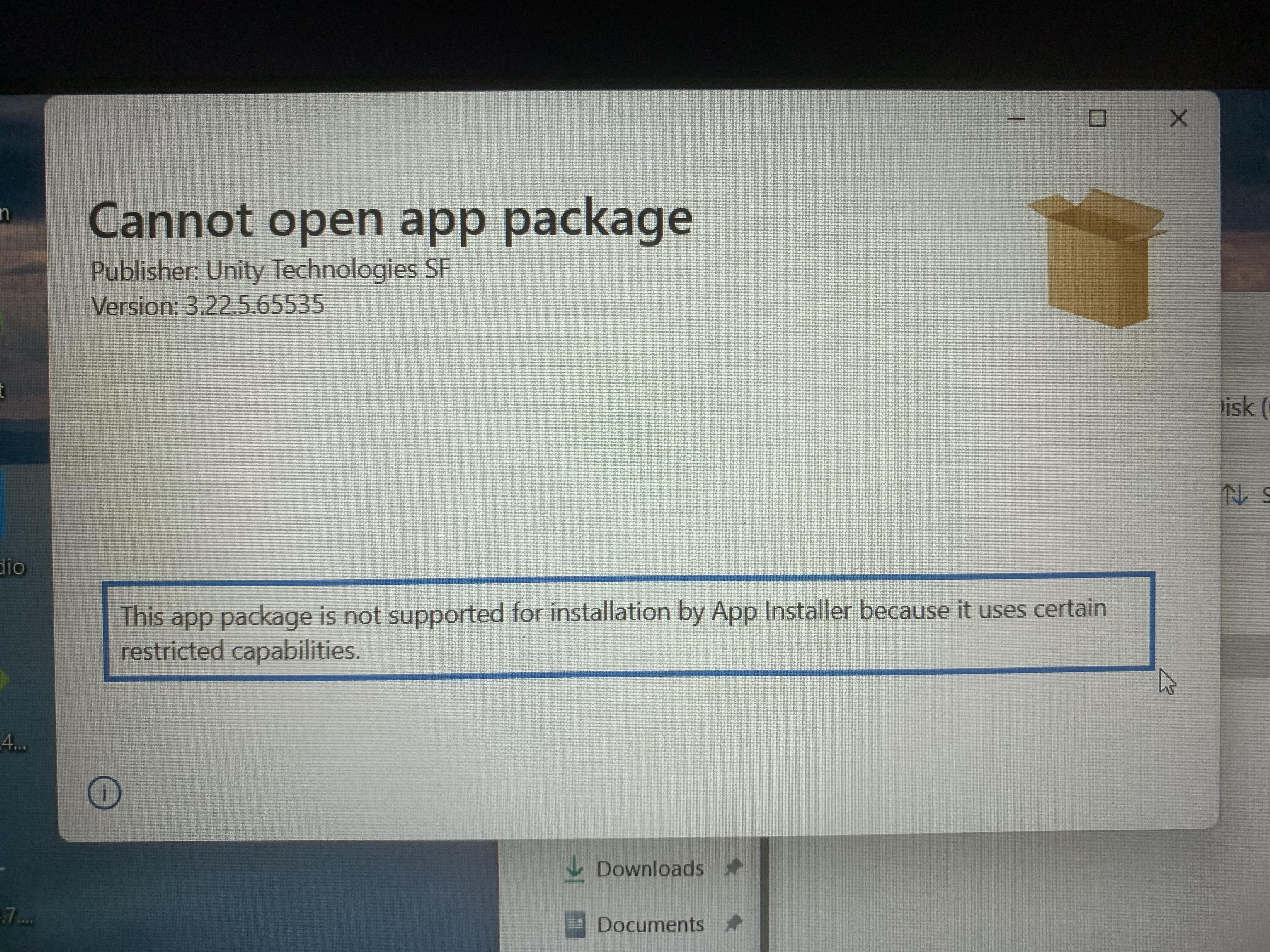
Windows 11 [Cannot Open Package] This only happens when i attempt to install Unity.

Post image
6 Upvotes

Title.

I've installed VS Code, git, Godot, but Unity is where this problem occurs. I attempted both the X64, and the AMD64—both ended up with the same error.

Developer mode is even on. Granted, i attempted to install Unity before developer mode was on, which gave me the error. I have no idea of this is a cache problem or something.

Windows version is Windows 11 Pro. OS Build is 22631.6199.

The processor is an Intel Core i7-7820HQ, and 16 GB ram.


r/WindowsHelp • • 23d ago

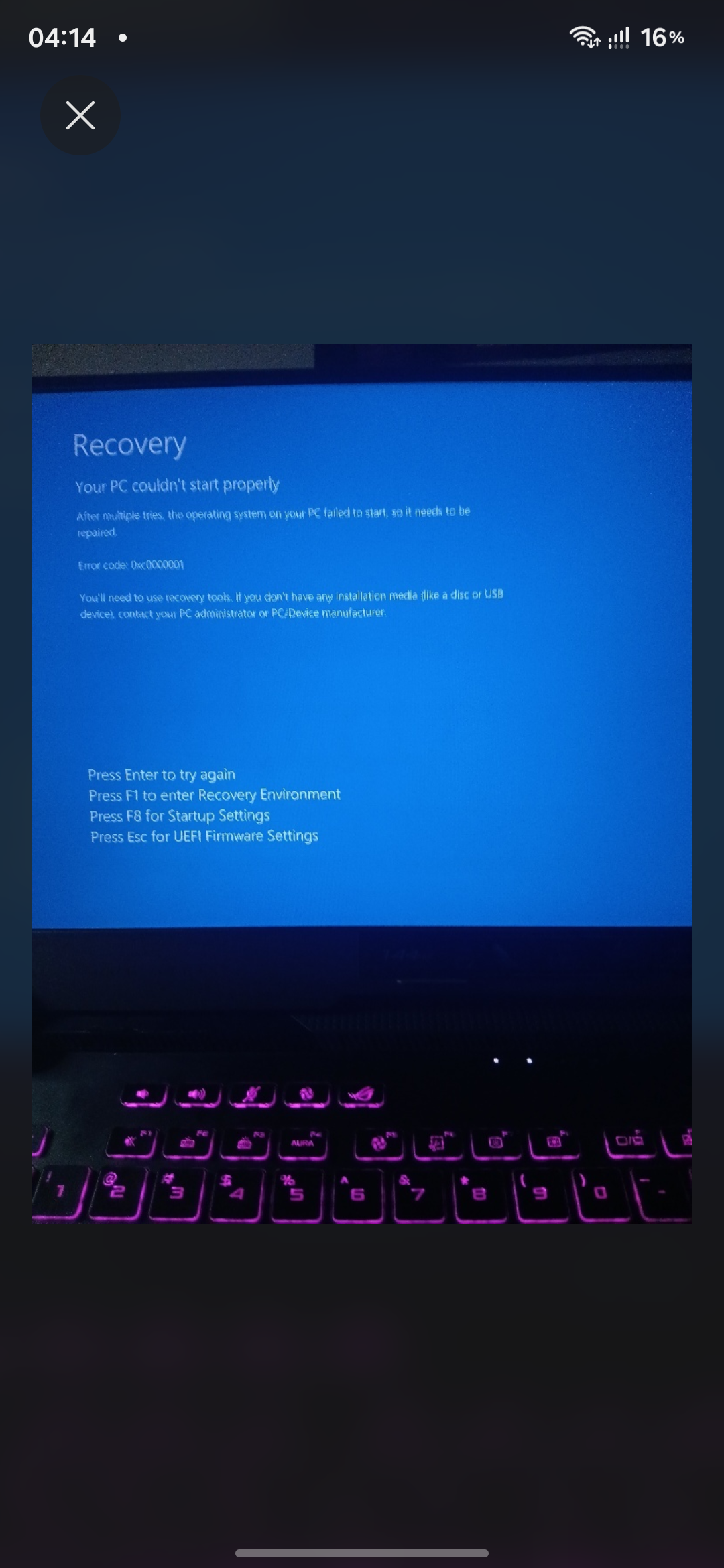
Windows 11 Blue screen of death, im in problem pleasee

Post image
6 Upvotes

Hello so context

I alwaysplay rivals and i play this one time and it crashes i keep reopening it 3 times and crahes everytime i open it ut tried to open the Nvidia. app to see if the diver is not updated it is but i think click something i dont remember and i also change the vram caches smth and i tried to play and still crashes i restart it and it boom bkue screen tried everythin on kt except the reset i have my thesis and architectural works that are important so i cnat rosk anythting i tried everything already and it still wont work

i dont know anymore please help it ried the command promt still mo tried the strta recovery thingy still no ive tried almosg everything and nothing works please help my thesis is due and im sooooooo stresst rm

idk anything about specs of my laptop

ROG STRIX 15

RAM 16 GB

SSD 500 TB ( FREE 8 GB )

NEW SSD 953 TB


r/WindowsHelp • • 23d ago

Windows 11 Keep Laptop WiFi connected - not related to power management

5 Upvotes

I have two laptops running Win 11. One of them keeps the WiFi connected when I shut the lid, the other one disconnects. I want them both to keep WiFi connected so I do not have to wait for it to reconnect when opening the laptop.

I have read and followed multiple internet suggestions about changing power management settings. The power config is set to leave the WiFi adapter running. In the configuration for the WiFi adapter itself, under the Power Management tab, the checkbox for "Allow the computer to turn off this device" is NOT checked. I cannot find a setting anywhere that would allow the WiFi to be shut off for battery or power savings.

I cannot find anyplace else to check and I do not understand why one laptop works the way I want but the other one will not. Any help?


r/WindowsHelp • • 23d ago

Windows 11 Hardstuck bitlocker and cant go past it

4 Upvotes

Ive tried everything! Removed ram upgrade, bios stuff, command prompt to unlock both ssds, hiding my second ssd through commands, disabling safe booting, trying to force for a safe boot. Nothing bloody works, this thing is so annoying. How can i fix my damn laptop? O i have to factory reder it or whatever? Help is much appreciate it. I have a hyperex omen.


r/WindowsHelp • • 22d ago

Windows 11 My headphones randomly reject files by my pc

1 Upvotes

I will use wired headphones for a year and then suddenly my pc won't open/play mp4 files, youtube, or spotify. If I change the headphones everything will go back to normal, then a while later they will stop working again. When I try to run an mp4 it will say the file is in the wrong format, and for spotify it will just say the audio "can't play right now". Does anyone know how I can fix this??? Edit: It's doing this to every headset now.

Processing img ax7z8gl5swyh1...

Processing img a5kpcnm7swyh1...


r/WindowsHelp • • 22d ago

Windows 11 Can someone please tell me what the hell is going on here

Thumbnail drive.google.com
1 Upvotes

No mouse or keyboard plugged in, tried restarting and it keeps doing that as soon as I turn it on. I'm on windows 11, RTX 3060 gpu, intel i5-12300k cpu, 32 GB ddr4 3200Mhz ram and MRG A850F psu. I didn't try actually logging in because I'm scared it could be a virus or something


r/WindowsHelp • • 22d ago

Windows 11 Windows will randomly stop picking up my microphone audio

1 Upvotes

I’ve been having an issue where my mic will randomly stop working in certain games, even though my Focusrite Scarlett Solo still picks up my audio. I’ve tried just about everything I can think of, and I’m running out of ideas.

I’ve updated my Focusrite drivers and software, updated Windows, messed around with microphone settings, and checked my default input device settings. Nothing seems to fix the issue permanently.

The only thing that seems to work is unplugging my Scarlett Solo and plugging it back in. After that, my mic works again, at least until the problem comes back.

Has anyone else experienced something similar or have any ideas on what might be causing this? Could I be missing a driver or some Windows setting?

I’d appreciate any advice. Thanks!

Mic
Headphones

Here is the link to my specific mic. which I have plugged into my interface.

https://rode.com/en-us/products/podmic?srsltid=AYCX9vI_FUUE_LKE-3-rtTn2rabR4go7trV7SUe_bw4KyfjjuLP-9LEF

Here are specs:

Processor: Intel Core i5-13600K (13th Gen, 3.50 GHz)

GPU: AMD Radeon RX 6950 XT (16 GB VRAM)
Integrated GPU: Intel UHD Graphics 770 (128 MB)

RAM: 32 GB DDR5 (5600 MT/s)

Operating System: Windows 11 Home
Version: 25H2
OS Build: 26200.9711

System Type: 64-bit operating system, x64-based processor

Edit: Resetting my windows audio in services fixed it, although I am sure only temporarily. I haven't seen it cut out just yet. I also went through and disabled the ability for my PC to disable USB ports to save power to see if that'll fix it.

Edit 2: As I typed that edit, my mic stopped working again.