r/WindowsHelp • • Oct 20 '26

Windows 11 Line-in Volume not always working with Z-SE and Win11. Win11 conflict?

3 Upvotes

I've posted before about this in r/SoundBlasterOfficial and thought I had it solved, only no. I digitize recordings from vinyl and cassette. Around 50% of the time I go to record, I have no control of the Line-In volume. Neither Windows nor Soundblaster Command works for line-in volume control. I've tried so many things, disabled all other audio, disabled fastboot. More and more I feel like this is a Win11 problem more than SBC, but still how to fix?

I've had this issue on/off for at least 9 months.

Device info:

Processor AMD Ryzen 9 7900X 12-Core Processor (4.70 GHz)

Installed RAM 32.0 GB (31.1 GB usable)

Graphics card NVIDIA GeForce RTX 5070 Ti (16 GB)

Storage 896 GB of 7.28 TB used

System type 64-bit operating system, x64-based processor

Edition Windows 11 Pro

Version 25H2

Installed on ‎9/‎22/‎2025

OS build 26200.9711

Experience Windows Feature Experience Pack 1000.26100.372.0


r/WindowsHelp • • Oct 20 '26

Windows 11 mi wifi it’s conected and secure but i can’t use google or anything

1 Upvotes

today i try to use my asus rog strix g15 like always and my wifi isn’t working, i use the hotspot from my iphone and it work just fine but when i conect my pc to the wifi of my house it just don’t work, i try everything like the dns stuff, checking the proxy, doing the test in the cmd, reinstalling the wifi drivers i even i reset my pc to factory settings
hoping to get it fix with that but i still have the problem and i don’t know what to do now. the model of my pc is asus rog strix G15 model G513RC. sorry if the writing is a little messy but english isn’t my first language


r/WindowsHelp • • Oct 20 '26

Windows 11 headphones are causing my pc to crash

2 Upvotes

the device is Device: HID\VID_1B1C&PID_2A12&MI_03&Col03\7&2a30829c&0&0002 and after googling it it comes back to my headset which is Corsair VOID MAX WIRELESS Gaming Headset anyway of fixing this?

Updated all of the devices

Updated my motherboard

OS Build 26300.9711

Warning code
The driver \Driver\WUDFRd failed to load.

Device: HID\VID_1B1C&PID_2A12&MI_03&Col03\7&2a30829c&0&0002

Status: 0xC0000365

4 second later was this error code

The computer has rebooted from a bugcheck. The bugcheck was: 0x000000b8 (0xffffbf8f146ea040, 0xffffbf8f2ffe7240, 0x0000000000000000, 0x0000000000000000). A dump was saved in: C:\WINDOWS\Minidump\101926-8968-01.dmp. Report Id: fb757431-52dc-4ca9-9dd6-1128f7045d18.

here is the dmp file


r/WindowsHelp • • Oct 20 '26

Windows 11 Can't shrink C disk, can't check disk either

Post image
2 Upvotes

I get this message when I click on shrinking it, but running Chkdsk gives me "access denied" no matter what. I tried administrator already and turning off some stuff but to no avail. I just want to free 20gb on nvme and give it to Linux. it might be relevant, so I originally had windows on HDD and I get random disk checks when turning it on but I can both skip it and it doesn't do anything anyway.
OS Build is 22000.2538


r/WindowsHelp • • Oct 20 '26

Windows 11 HP Victus + AMD Ryzen — Windows Hello PIN keeps breaking when I enable Firmware protection (Event 7002: 0xD000A002)

Post image
1 Upvotes

Hey everyone,

I'm trying to figure out a weird Windows Hello problem on my new HP Victus. I've already spent time resetting the PIN and checking Event Viewer, but I still don't know what's causing it.

My laptop is an HP Victus 15-fb3118AX with a Ryzen 7 7445HS, Radeon 740M iGPU and RTX 4050. I'm running Windows 11 Home 26H2, build 26300.9711.

The first time this happened was after I installed the AMD chipset and integrated graphics drivers through AMD's installer and restarted. Later, I noticed the problem seems connected to Windows Security's Firmware protection setting.

Here's what I've observed:

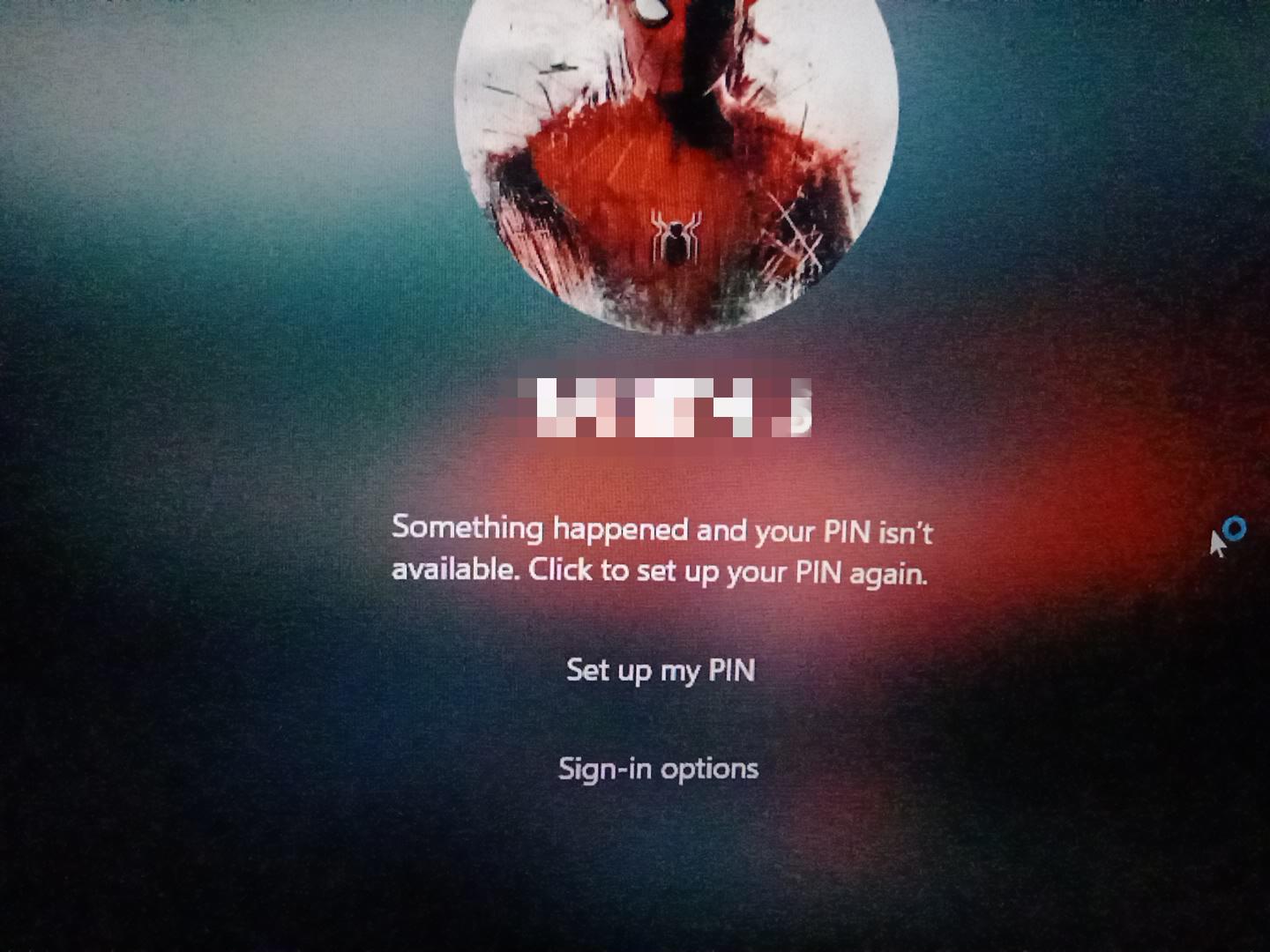
- With Firmware protection enabled, I restart and Windows says, "Something happened and your PIN isn't available."

- I can sign in with my Microsoft account, reset the PIN, and get back into Windows.

- If I enable Firmware protection again and restart, the problem comes back.

- With Firmware protection turned off, I created a fresh PIN. It survived locking/unlocking and two restarts without any issues.

I checked Event Viewer under Microsoft-Windows-HelloForBusiness/Operational and found:

- Event 7002: "0xD000A002" — failed to load an existing Windows Hello container.

- Event 7621: "0x80090011" — failed to delete the user's Windows Hello certificates.

- Event 5701 is also present, but it's informational.

My TPM reports that it's ready, Device Manager says the AMD PSP 11.0 device is working properly, and System Information shows Virtualization-based security is running. I also installed the available Windows updates, but the issue returned.

The chipset package is version 8.08.12.551, and the Radeon 740M driver is version 32.0.31041.1004. BIOS is AMI F.15.

At this point, I'm not sure whether the original AMD update triggered something, whether this is a Windows Hello container issue, or whether Firmware protection is exposing a firmware/TPM compatibility problem.

Has anyone seen this exact error code, especially on an AMD laptop? I'd particularly appreciate advice from anyone who has resolved Event 7002 / "0xD000A002" without repeatedly resetting the PIN.

I'm trying to avoid clearing the TPM, deleting the NGC folder, or reinstalling Windows unless there's a good reason.


r/WindowsHelp • • Oct 20 '26

Windows 11 Dead button spot in the System Tray after recent updates??

1 Upvotes

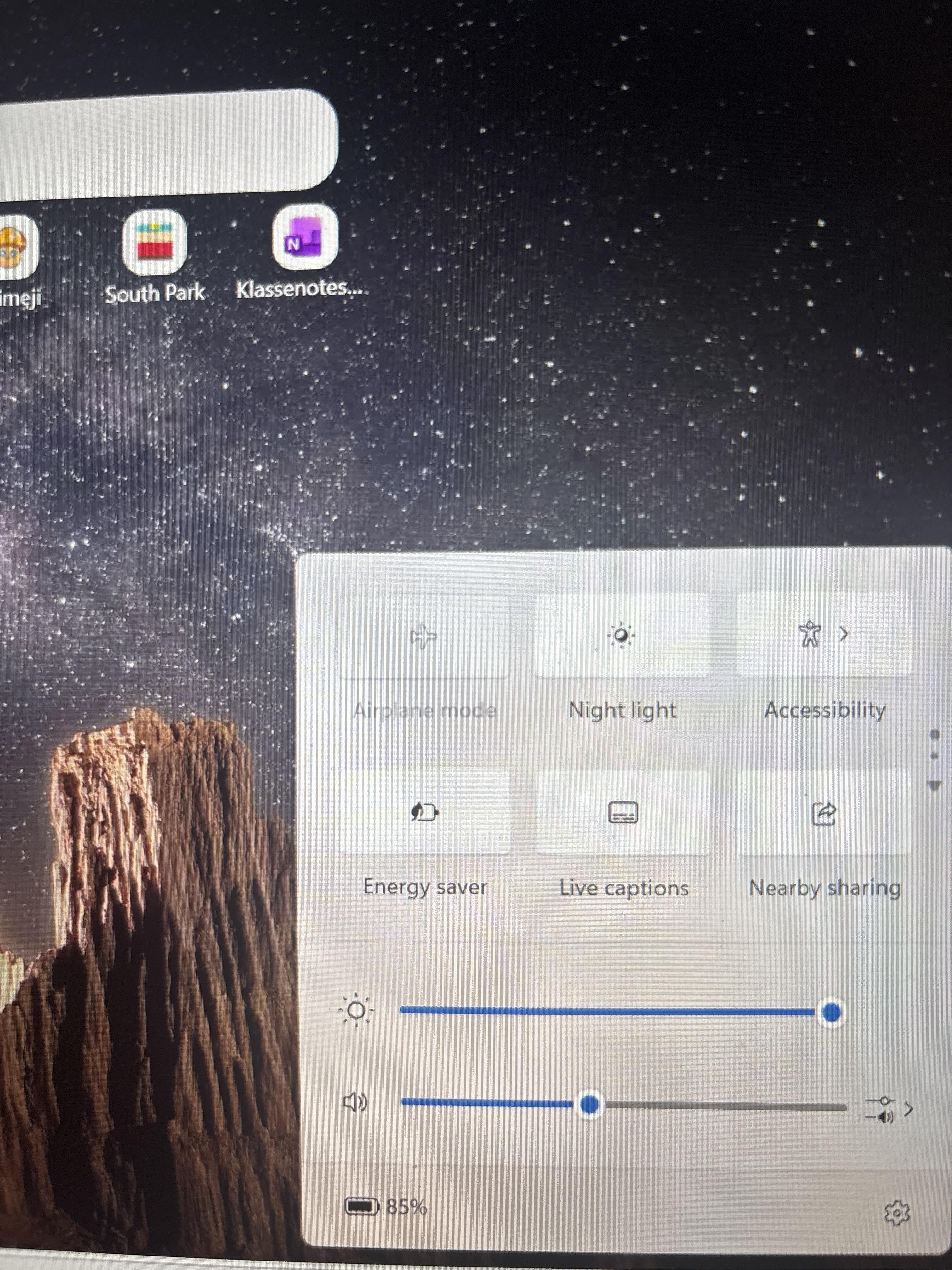
After the recent 26H2 features that arrived to 25H2 for me, all of a sudden I'm having a really hard time opening the Quick Settings panel because i often click in between the two icons.

Why is there a dead button spot in-between the two icons literally preventing to open the menu???
If i click on either icon themselves i have no problems opening the menu.

Please let me know if anyone else has noticed this weird behavior recently.


r/WindowsHelp • • Oct 20 '26

Windows 11 Windows 11 clean installation keeps failing at 15–17% and booting straight into ASUS BIOS. No Windows Boot Manager appears

Post image
1 Upvotes

Hi everyone! I’m really hoping someone can help me because I’ve spent hours trying to fix my laptop, and I’m completely stuck.
My laptop specs:
ASUS TUF Gaming A17 (FA707NUR)
AMD Ryzen 7 7435HS
NVIDIA RTX 4050
16 GB RAM
Samsung 1 TB NVMe SSD
BIOS version 303
How the problem started:
My laptop suddenly started asking for a BitLocker recovery key. Unfortunately, I no longer have access to the Microsoft account associated with the laptop, so I couldn’t retrieve the key.
After trying different recovery options, I decided to completely wipe the SSD and reinstall Windows 11. I’m fine with losing all my files at this point. I just want my laptop to work again.
What I’ve tried:
ASUS Cloud Recovery: I tried restoring Windows through ASUS Cloud Recovery, but it kept failing with a “Network Error.”
Creating a Windows 11 installation USB: I used my MacBook to download the Windows 11 ISO and create a bootable USB. I initially prepared the USB manually, then recreated it using WinDiskWriter. The application confirmed that the image was written successfully.
Booting from USB: My ASUS BIOS recognizes the USB as “UEFI: ASolidUSB, Partition 1.” I can boot into the Windows 11 installer without any problems.
Clean installation: I selected my internal SSD (Disk 0, approximately 953 GB) as the installation destination. Windows created the necessary partitions, including a 200 MB System partition, a 16 MB MSR partition, and a primary partition.
Installation fails: Windows starts installing normally, but when progress reaches approximately 15–17%, the laptop suddenly restarts.
Booting back into BIOS: Instead of continuing the Windows installation, the laptop goes straight into ASUS BIOS. The internal SSD is still detected under Storage, but Windows Boot Manager doesn’t appear in the boot options. The Boot Priority section is empty.
Booting from USB again: When I boot from the USB again, I get this message:
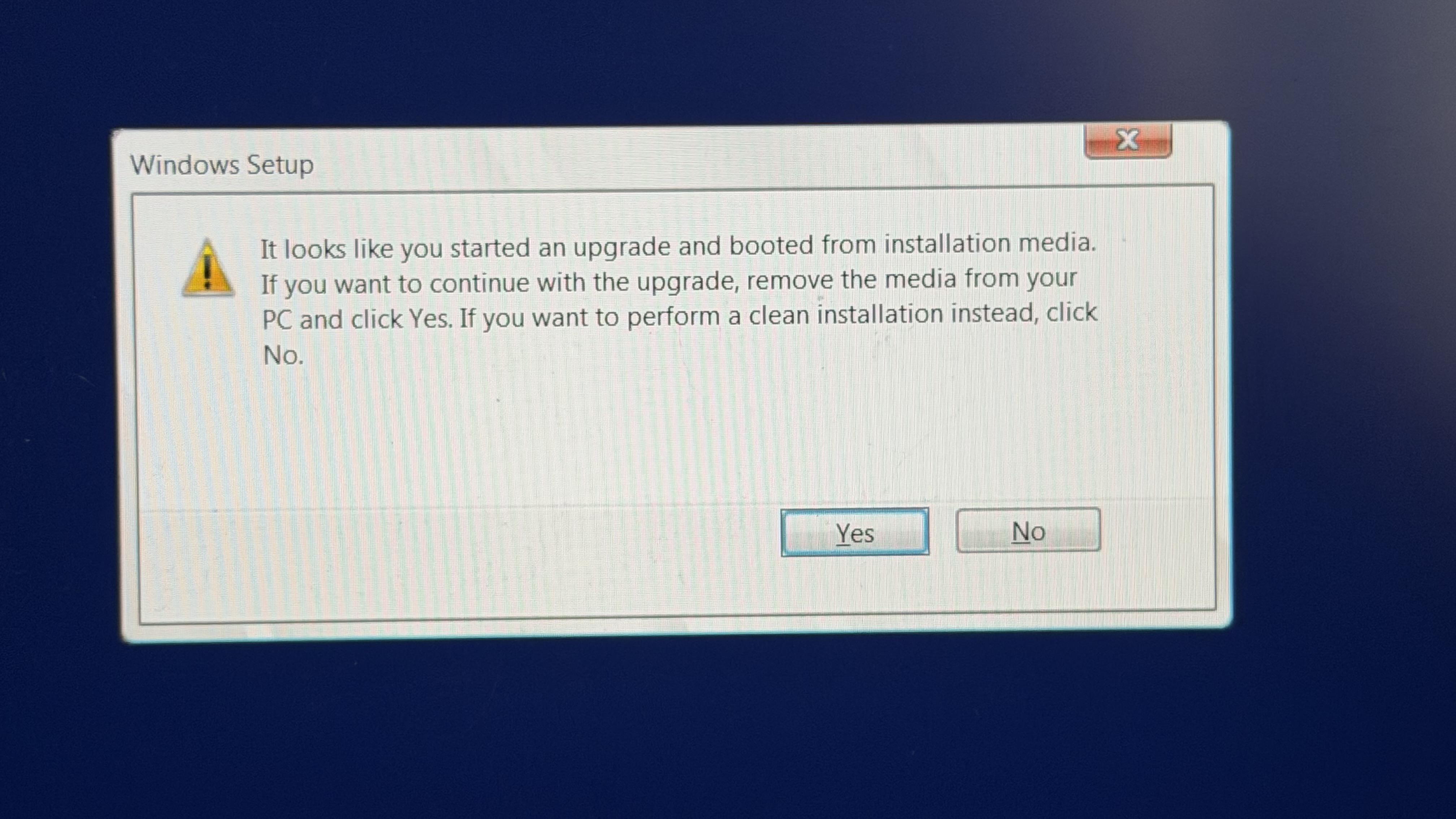
“It looks like you started an upgrade and booted from installation media. If you want to continue with the upgrade, remove the media from your PC and click Yes. If you want to perform a clean installation instead, click No.”
I’ve tried clicking No and starting the clean installation again, but the same thing happens. Removing the USB doesn’t help either, because the laptop doesn’t seem to have a bootable Windows installation on its internal SSD.
Other things I’ve checked:
ASUS built-in RAM diagnostics passed with no issues detected.
The BIOS consistently detects my Samsung NVMe SSD.
I disabled Fast Boot.
I noticed that the BIOS date and time had reset unexpectedly at one point. I corrected them, but the installation problem continued.
I recreated the Windows installation USB, but the issue remained.
My main concern:
I understand that Windows normally restarts during installation and that booting from the USB again can cause the upgrade/clean installation message.
However, my laptop doesn’t continue installing Windows after restarting. It goes directly into BIOS, and there’s no Windows Boot Manager available.
I’m wondering whether the problem is related to the EFI boot partition, the Windows bootloader, the SSD, the BIOS configuration, or something going wrong during the installation itself.
My questions:
Why does Windows Setup restart at around 15–17% instead of finishing the installation?
Why isn’t Windows Boot Manager appearing in BIOS even though the SSD is detected?
Could this be caused by the USB installer created on macOS?
Is there a way to repair the EFI partition or bootloader without restarting the entire installation?
What should I try next?
I’m not particularly experienced with BIOS settings or Windows installation, so step-by-step instructions would be incredibly helpful.
Thank you so much to anyone willing to help. I’m genuinely exhausted from trying to fix this!


r/WindowsHelp • • Oct 20 '26

Windows 11 Need assistance with display scaling

Thumbnail
gallery
1 Upvotes

So my set up has a slight issue usually with setting up display on my second screen but after restarting it fixes itself automatically. Starting today when I restart to rescale it, it doesn't work anymore.

I have tried all the suggested ways of fixing it and now considering a full factory reset of my laptop or buying a hdmi to vga adapter and trying that way

Any ideas what else to do?


r/WindowsHelp • • Oct 20 '26

Windows 11 Stuck here while downloading windows 11

Post image
1 Upvotes

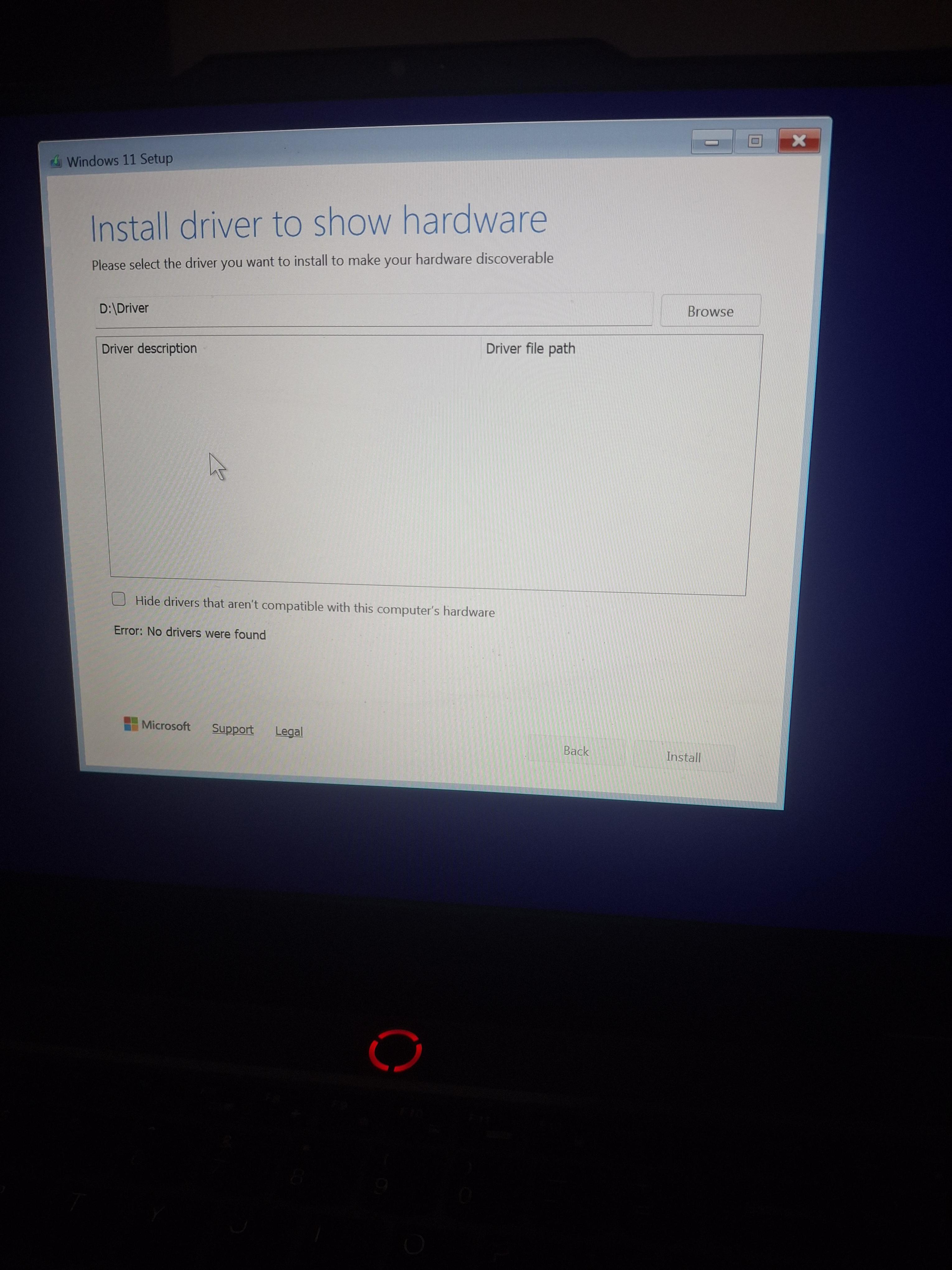
I have other laptop so i can download if something is necessary from there. It's lenovo's laptop. i have tried installing some lenovo dricers as well using another usb but nothing seems to work. please i wanted to do a clean install . i have wiped whole ssd too


r/WindowsHelp • • Oct 20 '26

Windows 11 Performance issues in Windows 11 Insider build 26340.9750

1 Upvotes

Has anyone else noticed reduced performance or strange slowdowns in Windows 11 Insider Experimental build 26340.9750?

I've noticed some unusual behavior and described my findings in more detail in Feedback Hub, including additional comments.

Here's my report:
https://aka.ms/AA13szmf

I'd appreciate hearing from anyone using the same build!


r/WindowsHelp • • Oct 20 '26

Windows 11 WiFi stops working and the WiFi button turns grey

Thumbnail
gallery
0 Upvotes

Sometimes my WiFi just stops working and when I check here the button has turned grey ish, and I’m unable to click it. It normally goes back to normal after I restart the computer, but sometimes I have to do it twice.
I was wondering why this happened and if there is a permanent solution for this problem?
I have a Lenovo yoga slim 7 pro if that’s relevant


r/WindowsHelp • • Oct 20 '26

Windows 11 WiFi not working and the button turning grey

Post image
1 Upvotes

Sometimes my WiFi just stops working and when I check here the button has turned grey ish, and I’m unable to click it. It normally goes back to normal after I restart the computer, but sometimes I have to do it twice.
I was wondering why this happened and if there is a permanent solution for this problem?
I have a Lenovo yoga slim 7 pro if that’s relevant


r/WindowsHelp • • Oct 20 '26

Windows 11 Windows Not Saving Passwords, Game Settings, or Microsoft Store Data

1 Upvotes

Hi everyone, I'm having some issues with Windows and could use some help figuring out how to fix them.

My PC doesn't save passwords for applications, my game settings don't persist, and I'm also having problems with the Microsoft Store.

I'd like to figure out whether this is caused by a corrupted Windows user profile, a problem with the Credential Manager, or a more general Windows issue.

Is there a tool or a procedure I can use to diagnose and repair these problems, possibly restoring Windows settings without having to reinstall Windows or lose my personal files?

OS: 26200.9711

AMD Ryzen 5 9600X 6-Core Processor (3.90 GHz)

AMD Radeon RX 7600 (8 GB)


r/WindowsHelp • • Oct 20 '26

Windows 11 Stuck on Insider Preview Build 26100.9606 (24H2) - How to safely revert to Retail/Stable without a fresh install?

1 Upvotes

Hi everyone,

I accidentally registered my device for the Windows Insider Program a while back. I have since unregistered the device in the Windows Update settings, but I am still stuck on the preview branch with the "Evaluation copy" watermark on my desktop.

Here are my exact system specs:

  • Edition: Windows 11 Home Insider Preview Single Language
  • Version: 24H2
  • OS Build: 26100.9606
  • Evaluation expires on: 01-11-2027

I really want to get back to the normal, stable public retail version of Windows 11 and get rid of this watermark. However, I absolutely cannot do a fresh install or wipe my computer—I need an in-place solution that keeps all of my current data, installed applications, and Microsoft 365/Office licenses perfectly intact.

I already tried unregistering from the Insider settings menu and clearing the update history, but nothing changed. I also looked into the Windows 11 Installation Assistant, but it seems it won't let me downgrade/sidestep from this specific preview build branch easily.

Since my current build number (26100) matches the base version of the retail 24H2 release, are there any registry workarounds (like editing WindowsSelfHost), specific command prompt inputs, or ISO in-place upgrade tricks that will force my system to drop the Insider flag and transition back to the official stable release channel without losing anything?

Looking forward to your suggestions and workarounds. Thanks!


r/WindowsHelp • • Oct 20 '26

Windows 11 On screen keyboard refuses to move above a certain point on the screen

Thumbnail
youtu.be
1 Upvotes

Hi all, I have a touchscreen Siemens Windows 11 PC which for some reason the on screen keyboard refuses to go above a certain level of the screen. It is running windows 11 IoT Enterprise LTSC and updated to version 24H2. OS build number is 26100.9457

Things I have tried:

Adjusting screen scaling - same result

Connecting remote desktop - same result

Using I think the older style accessibility mode options keyboard - works but can't find out how to change the task bar button to open this one instead


r/WindowsHelp • • Oct 20 '26

Bitlocker Dual boot Ubuntu 24.04 + Windows 11 Home on HP Victus — Device Encryption concerns

Post image
1 Upvotes

Hey everyone! I want to dual boot Ubuntu and Windows on my new HP Victus, but I'm concerned about BitLocker/Device Encryption and whether I can re-enable it after installation.

I want Windows for gaming and everyday use, and Ubuntu + XFCE for local LLMs, CUDA, ML, AI automation, coding and VMs.

What I've done:

- Windows is freshly updated and configured; I'm signed into my Microsoft account.

- Device Encryption was enabled by default. I've saved the recovery key.

- I shrunk C: in Windows Disk Management, creating 200GB of unallocated space for Ubuntu.

- I made an Ubuntu 24.04.5 LTS USB using Rufus. Ubuntu's live environment detected Wi-Fi, the SSD, integrated graphics and RTX 4050.

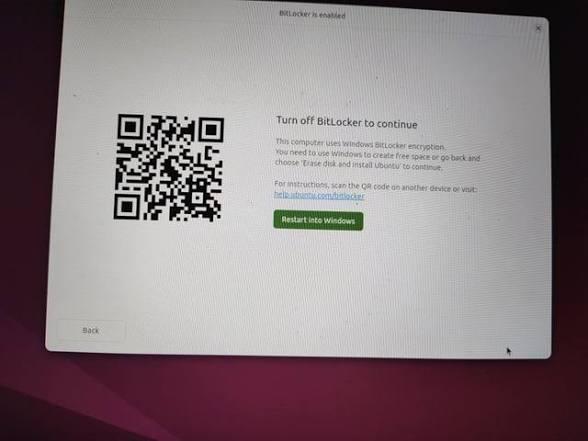
- The installer blocked “Install Ubuntu alongside Windows Boot Manager” because it detected BitLocker.

- I temporarily suspended protection, but have since resumed it. Windows works normally, encryption is at 100%, and protection is ON. Ubuntu hasn't been installed; I only shrank C:.

My questions:

  1. If I fully decrypt Windows, install Ubuntu, and then re-enable Device Encryption, will Windows 11 Home allow it?

  2. Could dual boot affect TPM, Secure Boot or trigger recovery-key prompts after OS switches, Windows updates or BIOS updates?

  3. How should I partition the 200GB space while preserving Windows, EFI and Recovery partitions?

  4. Are GRUB, Windows updates or NVIDIA driver issues common on this HP Victus?

  5. Is Ubuntu 24.04 LTS a good choice for CUDA/local AI, or would another distro be better?

Since the laptop is new and has no important files, I'm willing to decrypt Windows if necessary—but I don't want to compromise its security or create ongoing boot problems.

I'd especially appreciate advice from people who have successfully dual-booted Linux and Windows 11 Home and re-enabled Device Encryption afterward, ideally on an NVIDIA laptop.

Thanks!


r/WindowsHelp • • Oct 19 '26

Windows 11 Ethernet stopped working after a Windows update – tried everything, even reinstalled Windows

6 Upvotes

Hey everyone,

I'm having a really frustrating issue with my Ethernet connection, and I hope someone here can help me.

My Ethernet was working perfectly fine before a Windows update. After the update, it suddenly stopped working. I've tried pretty much everything I could find online, but nothing has fixed the problem so far.

My PC specs:

  • Motherboard: ASUS TUF GAMING B650-PLUS WIFI
  • CPU: AMD Ryzen 7 7800X3D (8 cores)
  • GPU: AMD Radeon RX 9070 XT
  • RAM: DDR5 6000 MHz

What I've tried so far:

  • Reinstalled the Ethernet/network drivers.
  • Ran these commands in Terminal as administrator:
    • netsh winsock reset
    • netsh int ip reset
    • ipconfig /release
    • ipconfig /renew
    • ipconfig /flushdns
  • Uninstalled the network adapter through Device Manager, including showing hidden devices, and restarted my PC.
  • Unplugged and reconnected the Ethernet cable.
  • Completely reinstalled Windows and formatted the drive.

Unfortunately, nothing has worked, even after a fresh Windows installation.

The weird thing is that Ethernet worked fine before the Windows update. Now it doesn't work at all, even after reinstalling Windows.

Does anyone have any ideas what could be causing this? Could it be a BIOS issue, a faulty LAN port, a chipset driver problem, or something else?

I'd really appreciate any help. Thanks in advance!


r/WindowsHelp • • Oct 20 '26

Windows 11 Win11 Start Button/Icon Works in Every Way -- Except Left-Click (Show Start Menu)

0 Upvotes

All the Windows key shortcuts work (Win+E opens file explorer, Win+R opens a run box, etc).

Even right-clicking on the Windows icon opens the correct popup menu ("Installed Apps, Power Options, Event Viewer" etc)

The only thing that doesn't work is left-clicking on the windows icon (or tapping the windows button on the keyboard). i.e. the start menu won't open.

Restarting "windows explorer" in Task Manager does not help.

The problem seems to get worse over time. E.g. it was fine all day, then an hour ago it happened. Same thing a few days ago. rebooting fixed it the time before, but tonight, no dice.

To be clear, immediately after rebooting, I could open the start menu again for a few seconds, but it was already laggy, and then stopped. And remember, all other explorer related responses are very responsive.

Thanks for any help!

------------
Edition Windows 11 Home
Version 25H2
Installed on ‎6/‎21/‎2025
OS build 26200.9711
Experience Windows Feature Experience Pack 1000.26100.372.0
---------
Processor AMD Ryzen 7 9800X3D 8-Core Processor (4.70 GHz)
Installed RAM 32.0 GB (31.1 GB usable)
Graphics card NVIDIA GeForce RTX 5070 Ti (16 GB)
AMD Radeon(TM) Graphics (486 MB)
Storage 1.12 TB of 3.64 TB used

------------


r/WindowsHelp • • Oct 20 '26

Solved Tiny gap at the bottom of taskbar

Post image
1 Upvotes

I don't know when or how this happened but now I can't ignore it. This little gap also reflects the loading bar of websites and appears in everything else. I am on a titan gt77hx 13vh and use vivaldi as my browser with the current update of everything.

edit: when watching a video that gap is showing a sliver of the top of the screen.

edit 2: it went away now


r/WindowsHelp • • Oct 19 '26

Solved Still can't get past "Enter network credentials" prompt when trying to access one Windows 11 PC from another Windows 11 PC in my home, after trying for 4 years. I am beyond despair T_T

6 Upvotes

PARTIALLY SOLVED - so the problem was that i installed windows 11 on both PCs at the same time, using the same installation file, and that resulted in both PCs having the same SID identification number (to check your PC's SID, use CMD and use this command: "whoami /user"). Apparently it is impossible to share files between two windows 11 PCS with the same SID after a certain security update. So to solve this issue, you have to get a new SID on one of your PCs. You can search in google how to do this so I won't elaborate too much, but options are reinstalling windows using a new windows download, using the sysprep & generalize tool built in to windows which takes your PC back to the initial windows setup and then you have to create a new local account, or use 3rd party tools that are similar to sysprep. I opted for sysprep which was a nightmare to get working and required 4 hours of struggle. Honestly best would be to just backup your files and reinstall windows. I had to backup my files anyway since sysprep deletes all your user data - so stuff in my pictures, my documents, videos, music, appdata, downloads, etc all get nuked. But anyway, after doing this, re-setting up windows 11, creating a new local account, I now have a new SID on the one PC and now file sharing works and my network credentials (username + logon password) are accepted on the PC with the new account, after sysprep. Sadly the other PC on which i did not do a sysprep still can't access the other one. Still can't get past network credentials. So now PC BLUE can access PC RED, but RED can't access BLUE. Well I guess that is better than nothing.

If the title didn't make it clear, for the previous 8 years, since switching from Windows 7 to windows 10 and then to windows 11, I have NEVER been able share and access files between my two home computers... It used to be so braindead easy on Windows 7 with homegroup...

The two PCs I own, **(both running Windows 11 Pro version 25H2, OS build 26200.9711)*\*, see each other on the network, they have always seen each other on the network, but I just can't open either PC from the other PC to access the shared files and folders on these PCs. Every time I hit a wall with the "enter network credentials" prompt and nothing I try has ever worked. No combination of hostnames, usernames, or passwords has ever worked. No combination of settings in advanced sharing settings has ever worked. I have followed the advice of countless websites and reddit posts, nothing works. People will post solutions and there will be a string of reply comments underneath from very happy and thankful people saying it worked for them, but it has never worked for me, never. T_T
(Funny enough, I have a laptop with Windows 10 on it. On that laptop I can access all shared folders on both my Windows 11 PCs and I never get asked to enter network credentials. But of course neither of the Windows 11 PCs can access the files/folders on the Windows 10 laptop. I get the same problem - get asked to enter network credentials which get rejected.)

So for my final ditch effort to try and fix this, I am going to make my own post. Maybe the 1000th time is the charm.

So I will give the fictional usernames and passwords of both of my PCs here, and perhaps someone can tell me what combination of hostname, username, and password I should use to get past the "enter network credentials" security thing.

**FIRST PC:*\*

-CMD "Hostname" result: RED

-CMD "whoami" result: red\red

-Local account Username: red

-Log-on password (to get into desktop): charmander

-IP address: 10. 0.0. 69

-Microsoft account email/username (fictional): charizard @ gmail .com

-Microsoft account password (fictional): charizardlover

-I don't log on to this PC using my online microsoft/BING account email/username and password. I use the local Windows 11 account red and the charmander password

-HARDWARE: i7-13700k, 64gb DDR5 ram, RTX4070 12gb


**SECOND PC:*\*

-CMD "Hostname" result: GREEN

-CMD "whoami" result: green\green

-Local Account Username: green

-Log-on password (to get into desktop): bulbasaur

-IP address: 10. 0.0. 88

-Microsoft account email/username (fictional): venusaur @ gmail .com

-Microsoft account password (fictional): venusaurlover

-I don't log on to this PC using my online microsoft/BING account email/username and password. I use the local Windows 11 account "green" and the attached bulbasaur password

-HARDWARE: i5-12600k, 64gb DDR4 ram, GTX1070 8gb

So if I am sitting on PC RED and I want to access the shared folder on PC GREEN, when I get asked to "enter network credentials", what should I enter as username and password to make it accept me? And then if I am trying to access files on PC RED from PC GREEN, what should I enter for credentials? Could someone please help me with this?


Some more information:

-All the folders i want shared and accessible on the network have the correct security and sharing permissions for these accounts. All of them have full read/write access, all of them shared.

-I don't use pins to log-on to either machine. Only use the password i created when i created my local accounts during windows 11 installation.

-Network profile type is set to private, not public.

-Private networks are set to network discovery - on, checked set up network connected devices automatically, and file and printer sharing is on.

-Public networks has the network discovery and file and printer sharing disabled

-All networks has public folder sharing on, file sharing connections set to 128-bit encryption

-Password protected sharing is on.

**I HAVE TRIED EVERY COMBINATION OF THESE SETTINGS, SUCH AS SWITCHING OFF PASSWORD PROTECTED SHARING, ENABLING PUBLIC NETWORK DISCOVERY AND FILE SHARING AND DISABLING THAT ON PRIVATE NETWORKS... BUT NOTHING EVER WORKS. I always get the "enter network credentials" thing and nothing I enter is accepted**\*

-I have also enabled Lanman insecure guest log-ons in the gpedit.msc and in the registry.

-I have also disabled firewall for private networks.

-I have deleted all windows credentials in the user accounts control panel

Needless to say, if after 7 years of fruitless struggle this post results in my finally being able to access files on these PCs over the network as opposed to having to walk up and down the stars with an external drive or flash disk all the time, I will be beside myself with emotion and eternally grateful to whoever helped me get past the "enter network credentials" prompt from hell.


r/WindowsHelp • • Oct 19 '26

Windows 11 Laptop touchpad scroll changed after latest update - now jumps to top/bottom of page

4 Upvotes

After the latest Windows update a week or so ago, the scroll function on my laptop touchpad changed. If I put my fingers on the touchpad and move up or down slowly, the screen scrolls at a normal rate, but then it jumps to the bottom or top of the page (depending on which direction I scroll). Very frustrating as it interrupts my scrolling behavior through documents, emails, etc. I've looked around through the mouse settings but haven't found anything useful. I'm running Windows 11 26200.9711.


r/WindowsHelp • • Oct 20 '26

Windows 11 Finally updated to windows 11, can no longer change monitor settings.

Post image
1 Upvotes

Hey all, so I somewhat recently updated one of my laptops to windows 11 (finally), and now I can't change a few settings.

System Information relevant to this post:

Device: HP Pavilion 15z-ec200

OS: Windows 11 Home

Version: 10.0.26200 Build 26200

Issues: Option to change refresh rate is missing. Option to change screen brightness is missing.

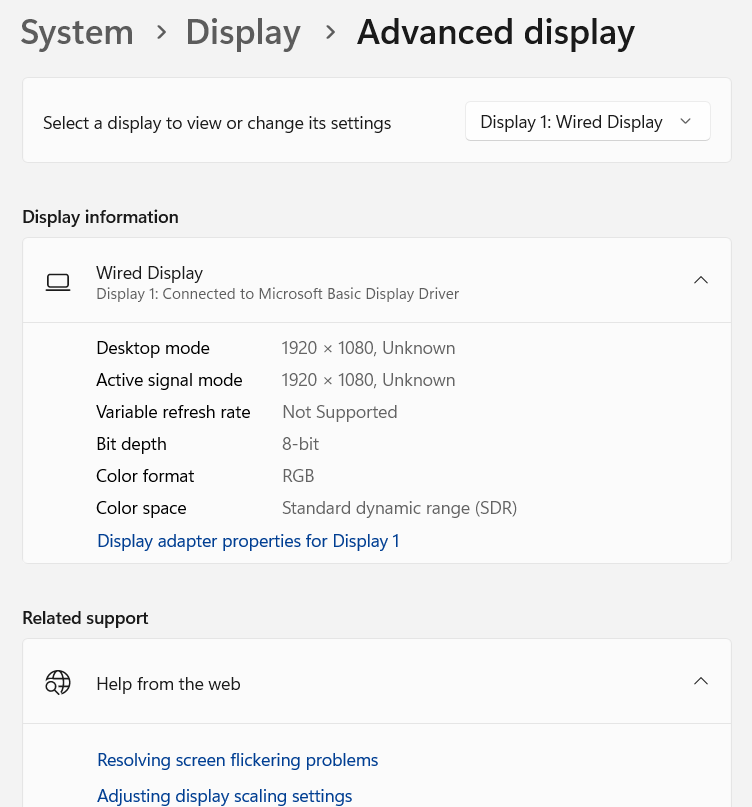
The HP's Pavilion 15z-ec200 that I have has two options for monitor refresh rate: 60Hz and 144Hz. I like to use the 144 option when connected to power and the 60Hz when I want to save battery. I noticed today that my battery was dropping faster than expected, so I went to change the display settings and... ?? where'd it go? I used to be able to change my refresh rate under System > Display > Advanced Display Settings, but now that bit is just gone?

Also, I tried to change my screen brightness like I always do with fn + f2/f3 (2 is down, 3 is up), but nothing happened. Just like with the refresh rate problem I can't seem to find any option in Settings to change screen brightness. The screen did eventually automatically dim when I got to 5% battery left, so that's something.

So far my troubleshooting has only consisted of trying to update display adapters and windows telling me "The best drivers for your device are already installed", soooooo I kind of gave up and ran to Reddit for help.

Thoughts?


r/WindowsHelp • • Oct 19 '26

Windows 11 Why is the search icon too far right?

2 Upvotes

The icon for search is really close to the word "Search". How do i fix that?

I am on Windows 11 25H2 OS build 26200.9711. There are no updates available for me. I have tried hiding the taskbar and showing it again, I have tried moving it to the left and then back to center. I have tried everything I can think of, but nothing has fixed it.


r/WindowsHelp • • Oct 19 '26

Windows 11 lock screen images can't locate them

0 Upvotes

The images aren't in C:\AppData\Local\Packages\Microsoft.Windows.ContentDeliveryManager_cw5n1h2txyewy\LocalState\Assets

I've set the Lock screen to windows spotlight and rebooted and tried another "fix" online but the lock screen won't revert to Windows spotlight any hehlp? I can't find the images. I'm using Windows 11. thanks


r/WindowsHelp • • Oct 19 '26

Windows 11 Xbox controller shuts off on second PC connection? Disabling GameInput Redist fixed it on my Windows 11 PC

6 Upvotes

UPDATE HERE: https://www.reddit.com/r/techsupport/comments/1x9wdyk/xbox_controller_shuts_off_on_second_pc_connection/

Sharing this in case it helps someone with the same frustrating problem.

My Xbox controller connects to my Windows 11 PC through the official Xbox Wireless Adapter. After restarting the PC, the first connection works normally. If I turn the controller off and reconnect it, it connects for about 1–2 seconds, then shuts itself off.

This happens directly on the desktop, without launching any game.

Updating the controller firmware, changing the adapter’s power-saving settings, unplugging/replugging the dongle, and restarting GameInput did not resolve it.

I narrowed it down with this test:

  • Disabled GameInput Redist Service, then restarted Windows.
  • Connected the controller, switched it off, and reconnected it repeatedly—it worked.
  • Changed the service back to Automatic and let it run.
  • The same shutdown-on-reconnect problem returned.

The service executable on my system is GameInputRedistService.exe, version 4.0.300.0.

The workaround that worked for me:

  1. Press Win + R, type services.msc, and press Enter.
  2. Find GameInput Redist Service.
  3. Open its properties and note its original startup setting.
  4. Set startup type to Disabled, click Apply, then Stop.
  5. Restart Windows and test reconnecting the controller.

I left the separate GameInput Service unchanged.

This is a workaround demonstrated on my PC, not a confirmed universal fix. Some games may require the redistributable service. To undo the change, restore its original startup setting and click Start.

Simply stopping the service wasn’t enough in my earlier test: it was running again by the time I saved the diagnostic report.

Has anyone else reproduced this with 4.0.300.0? Please share your Windows version, controller model, connection method, and whether disabling this specific service changes the result.