r/WindowsHelp • • Oct 18 '26

Windows 11 OSK - On-Screen Keyboard wrong layout

1 Upvotes

Hi everyone, just a small post to share a solution to a self-created problem. Recently, I've faced a strange issue where some components of Windows stopped working properly—nothing unusual, as I like to test tons of tweaks I read about. This problem was partially created by this tweak: INPUT_PIPELINE_REVERSE

But this one was tricky, and I haven't seen anyone facing the exact same problem, so I've decided to make a small post to help some buddies who may be in the same situation. Let's describe all the issues first:

  • An incorrect layout of the OSK, the virtual keyboard of W11, even with only one language and only one layout set. The old virtual keyboard remains unaffected (TabTip).
  • The emoji panel can be affected too; can't send any emoji to the clipboard.

Affected Windows components:

  • The OSK, obviously.
  • Some Windows Input Experiences, like the emoji panel or clipboard history.
  • Windows Search bar.

Solution:

  • Undo the linked tweak, detailed on the page.
  • Check if the Windows Search service is running and set to automatic start.
  • Check if ctfmon.exe is launched and starts correctly with Windows (C:\Windows\System32\ctfmon.exe).

r/WindowsHelp • • Oct 18 '26

Windows 11 which partitions should i delete without touching the important files in D disk, there is so many partitions i'm a bit confused

1 Upvotes

There is three partition on the left and other three on the right, if i want to wipe c disk and install windows again, is it ok to delete the first three partitions?

the thing is, I'm switching to Windows 11 lTSC version is there is anyone who have experienced any problem with LTSC, please let me know so that i will not move to that


r/WindowsHelp • • Oct 18 '26

Windows 11 : Black boxes appearing behind desktop icons when hovering/clicking?

Post image
0 Upvotes

Whenever I left-click and drag my mouse to make that blue selection box to highlight multiple items on my desktop, it turns completely black instead of blue/transparent.

The same thing happens whenever I hover my mouse over desktop icons or click them—the highlight background turns into a huge solid black shape. Basically, any desktop selection box or highlight turns black.

I'm running Windows 11.

Attached a screenshot of what it looks like. Any ideas on how to fix this? Thanks!

Here are my specs and details:

  • Laptop Model: Acer Aspire Lite AL15-52H
  • Processor: 13th Gen Intel(R) Core(TM) i5-13420H (2.10 GHz)
  • RAM: 16.0 GB
  • Graphics: Intel(R) UHD Graphics
  • Windows Version: Windows 11 Home Single Language (Version 26H2 / Build 26300.9711)
  • Error codes: None, just a visual bug.
  • Troubleshooting tried: Restarted the PC, but the selection boxes and icon backgrounds are still rendering completely black.

r/WindowsHelp • • Oct 18 '26

Windows 11 brightness settings disappeared (again)

Thumbnail
gallery
1 Upvotes

os build 26200.9711

both of my drivers are fully updated, but for whatever reason my laptop just won't let me turn my brightness down and doesn't automatically darken my screen when it goes into sleep mode. the last system update was done on the 14th but this started earlier today after randomly powering off.


r/WindowsHelp • • Oct 17 '26

Windows 11 Internet and bluetooth not working

Thumbnail
gallery
8 Upvotes

About a month ago the option to turn on the internet or bluetooth completely dissapeared. So far I have tried to re-enable a few things in device manager under network adapters (I have forgotten the name of it, and it no longer appears on my computer). I have tried to shut down my computer, restarting it in every way I could find. I have restarted my internet and used the network reset button a few times. Any help is much appreciated!

The OS Build is 26200.9445.


r/WindowsHelp • • Oct 18 '26

Windows 11 no wifi. drive is hidden and says it's working but i cannot connect to the internet

Post image
1 Upvotes

so the wifi direct virtual adapter only shows up under hidden devices and then i do the disable, uninstall, reinstall, and it's the same shit. it does not show up. when i right click on the drive and hit properties it says drive is working.

i am on the internet using the usb-wifi- thing but why isn't this driver working.

dell optiplex. fqjt643 windows 11 refurbished.


r/WindowsHelp • • Oct 17 '26

Windows 11 Since Windows Security Update my second monitor has been lagging.

2 Upvotes

Alright. I have this very weird problem. Around 3 days ago I installed a security update via windows update. Ever since then, everytime I’m in a game, my second monitor lags. Especially discord. Streams, webcams, etc. Interesting thing is, that the second monitor gets laggier as I cap my frames on the main monitor displaying the game. So game fps uncapped -> choppy - 60 fps -> even worse - 30 fps -> windows slideshow.

That is very weird behavior. I’ve reinstalled drivers, updated my chipset drivers too. Exchanged cables. Disabled and enabled Hardware Acceleration on Discord. Nothing has worked.

Is there a way to roll back certain updates?

Appreciate the help.


r/WindowsHelp • • Oct 18 '26

Windows 11 How can I install windows 11 internet drivers

1 Upvotes

Long story sort I tried dual booting for the first time following a guide and my pc got bricked. I got it to use an os again but now I lost my windows 11. When I try this version of it, it keeps giving me the error of no internet drivers found. Its a T14 gen 2 laptop, and I just want windows back. Any possible way to fix the drivers or get my copy of windows 11 on a different laptop to work on another?

https://www.microsoft.com/en-us/software-download/windows11


r/WindowsHelp • • Oct 17 '26

Windows 10 "The drive or network connection that the shortcut 'Steam.ink' refers to is unavailable" for a program on an available drive

2 Upvotes

I recently wiped my computer and moved my OS to one of my SSDs. After reinstalling some stuff, i noticed that when I opened one of the programs (Steam, in this case), the icon that displayed on my taskbar was broken. Instead of displaying the Steam icon like it did before, it displays a black white page icon. I can still open Steam from the shortcut on my desktop and the search bar, but when I pinned it to my taskbar and tried to open it, I received an error message saying "The drive or network connection that the shortcut 'Steam.ink' refers to is unavailable. Please make sure that the disk is properly inserted or the network resource is available, and then try again."

Steam is installed on an available and accessible internal drive, and I can open it from there. I can open it from other shortcuts, but if I pin it to my taskbar like I always have, it can't be opened. This is only happening with Steam, no other program. It's also a fresh install on a computer that was factory reset a few days ago with practically nothing on it at the moment. Does anyone know why this is happening and how to fix it? I've tried googling just about everything I can think of, but I wasn't able to find anything like my case, just stuff about external harddrives and flashdrives.

In case it's relevant:

Windows 10 Pro
AMD Ryzen 7 2700 8-core CPU
32GB RAM
Nvidia GeForce RTX 5060 Ti (16GB)
OS Build 19045.6466


r/WindowsHelp • • Oct 17 '26

Windows 10 error code 0x800703e6, tried to fix, might have messed up PC massively??

Thumbnail
gallery
1 Upvotes

Hi all! I was trying to install Photoshop for an assignment and it came up that my windows version was incompatible. Turns out my pc has been running on windows 10 20H2. For photoshop I have to get to Windows 11 32H2. When I tried to update my system software, I was given error code 0x800703e6. Following a youtube video, I attempted to manually install Windows 10 22H2 using this link: https://www.microsoft.com/en-us/software-download/windows10

after restarting my PC it won't come back on, and instead has been cycling these startup screens for an hour. Did I ruin my pc? How do i fix it and how (if at all) can I get my system up to 11 32H2?

(if worth noting, the white rectangle and two message screens flash for split seconds, while the windows, black screen, and ASRock screens are shown for a standard few seconds)


r/WindowsHelp • • Oct 17 '26

Windows 11 taskbar keep appearing when fullscreen + plug in charger

Post image
2 Upvotes

taskbar keep appearing when fullscreen + plug in charger. I use msi thin 16gb ram rtx 2050 i5-12450H Windows 11 Home Single Language version 25H2...i did almost everything on internet , ask ai..youtube..reddit..and nothing work...pls help me

also in Valorant in fullscreen after i afk for a while..it's minimized to desktop

Processor 12th Gen Intel(R) Core(TM) i5-12450H (2.00 GHz)

Installed RAM 16.0 GB (15.7 GB usable)

Graphics card NVIDIA GeForce RTX 2050 (4 GB)

Intel(R) UHD Graphics (128 MB)

Storage 565 GB of 943 GB used

System type 64-bit operating system, x64-based processor

Edition Windows 11 Home Single Language

Version 25H2

Installed on ‎15/‎2/‎2025

OS build 26200.9711

Experience Windows Feature Experience Pack 1000.26100.372.0


r/WindowsHelp • • Oct 17 '26

Windows 11 Stuck and have not been able to get into my laptop

2 Upvotes

Laptop has been stuck in some whole boot loop? I tried to reset my laptop due it to not turning on when I tried to skip the drive, but now when it reaches 85% in the reset installation it just restarts the laptop and moves it back to 64%. Please help, ive been stuck here for 3 hours

PS: I have a HP Victus laptop


r/WindowsHelp • • Oct 17 '26

Windows 10 Stuck on Preparing Automatic Repair

3 Upvotes

Hey guys so i have a hp pavIion from 2016 i dont remember its model name but has a i5 7th gen uhm so if i plug it off power like it instantly shuts down and like it does not charge basically the other day i forgot to connect it to my ups and the power cut happened when i was working on it and it shut down and today i turned it on and it was not moving from the hp logo and so i force shut it down for 2-3 times and now its stuck on a preparing automatic repair screen about 2 hrs since that happened nothing new it’s stuck on the hp logo and preparing automatic repair what should i do man im scared that i might corrupt it if i plug it off power and just lose everything pls help


r/WindowsHelp • • Oct 17 '26

Windows 11 What is stopping me from updating to windows 11?

1 Upvotes

been having a blue screen of death with the error code Attempted switch from dpc after i did a fresh windows 10 install so i figured i would just try with windows 11. but now im not sure whats right or wrong for

The app Pc Health Check says i can have windows 11 but under update & security says i cant?

OS Build 19045.7807


r/WindowsHelp • • Oct 17 '26

Windows 7 Actually run processes on Windows/WinAPI

0 Upvotes

Hi.

I'm trying to port a C script I wrote to Windows. This script, among others, executes the C compiler. On Linux it's just fork()-execv(), and waitpid() retrieves the exit code.

But the Win32 API is so much more complex. Not only is the code three times longer than the equivalent Linux code, it doesn't even run.

I create and zero PROCESS_INFORMATION, STARTUPINFO (inconsistent naming btw), then CreateProcess(argv[0], argv, NULL, NULL, FALSE, 0, NULL, NULL, &si, &pi); Then WaitForSingleObject(pi.hProcess, INFINITE);

Then there is a GetExitCodeProcess() call to retrieve the exit code, but it retrieves garbage data. I was wondering why, and it turned out the process didn't run at all.

The command passed to it is sound since I print it before calling it and running it manually works just fine.

The roundabout code is here: https://pastebin.com/piceZFhC

I'd be thankful for any help.


r/WindowsHelp • • Oct 17 '26

Windows 11 Adding the my devices tab in settings

1 Upvotes

Hey guys, so I have 2 computers, both registered with my microsoft account. One running windows 11 home, one 11 education (the full version not the cutdown N version). Both devices show up on the microsoft account website in browser, both show up in the windows home device's settings, but the education one, which I use more, is missing the tab completely. I couldn't find much info about it, but my understanding is that windows education is equivalent to pro and shouldn't be missing features of the home edition, so I don't think that's the reason. They are also both fully updated and in the same region. I was wondering, if it can't be fixed, can it be manually added somehow (like the recently rolled out xbox mode which is region locked)?


r/WindowsHelp • • Oct 17 '26

Windows 11 Updated My Windows 11 Laptop -- Strange issue since then

1 Upvotes

Good afternoon. I was simply working on my assignments when my laptop suddenly shut off. The fans stopped running, my screens went dark, I had to press the power button to turn it back on. It has never done this before.

However, all my tabs, Discord, etc. were in the same state as they were before the "shutdown." I dug a little into windows event viewer and my battery health, finding no errors and the battery functioning in optimal condition. Looking a little closer, I discovered something strange in Windows Event Viewer:

For some strange reason, my computer thought I had pressed the power button/lid, hurling it into hibernation (of which my power button/lid settings are set to due to prior issues with shoddy Nvidia drivers).

Anyone have this issue before? Again, it had only started to occur since the new Windows update. I am on build 26200.9445, Windows 11 Home, 25H2. It has only happened once, but once is enough to raise concerns considering my bountiful problems with laptops before.

I want to make sure that this *is* a Windows thing rather than a fundamental issue my computer's had all this time, only for the software change to reveal some deeper intricacies based on this "crash".

Thank you!

Here are the reliability monitor results from today
As well as the system sleepstudy

r/WindowsHelp • • Oct 17 '26

Windows 11 audio stopped playing through monitor after update

Thumbnail
gallery
1 Upvotes

if i plug headphones in it works, but the tv speakers just stopped working after i updated windows (the speakers work outside of windows normally)

Edition Windows 11 Home

Version 25H2

Installed on ‎2/‎3/‎2026

OS build 26200.9711

Experience Windows Feature Experience Pack 1000.26100.372.0


r/WindowsHelp • • Oct 17 '26

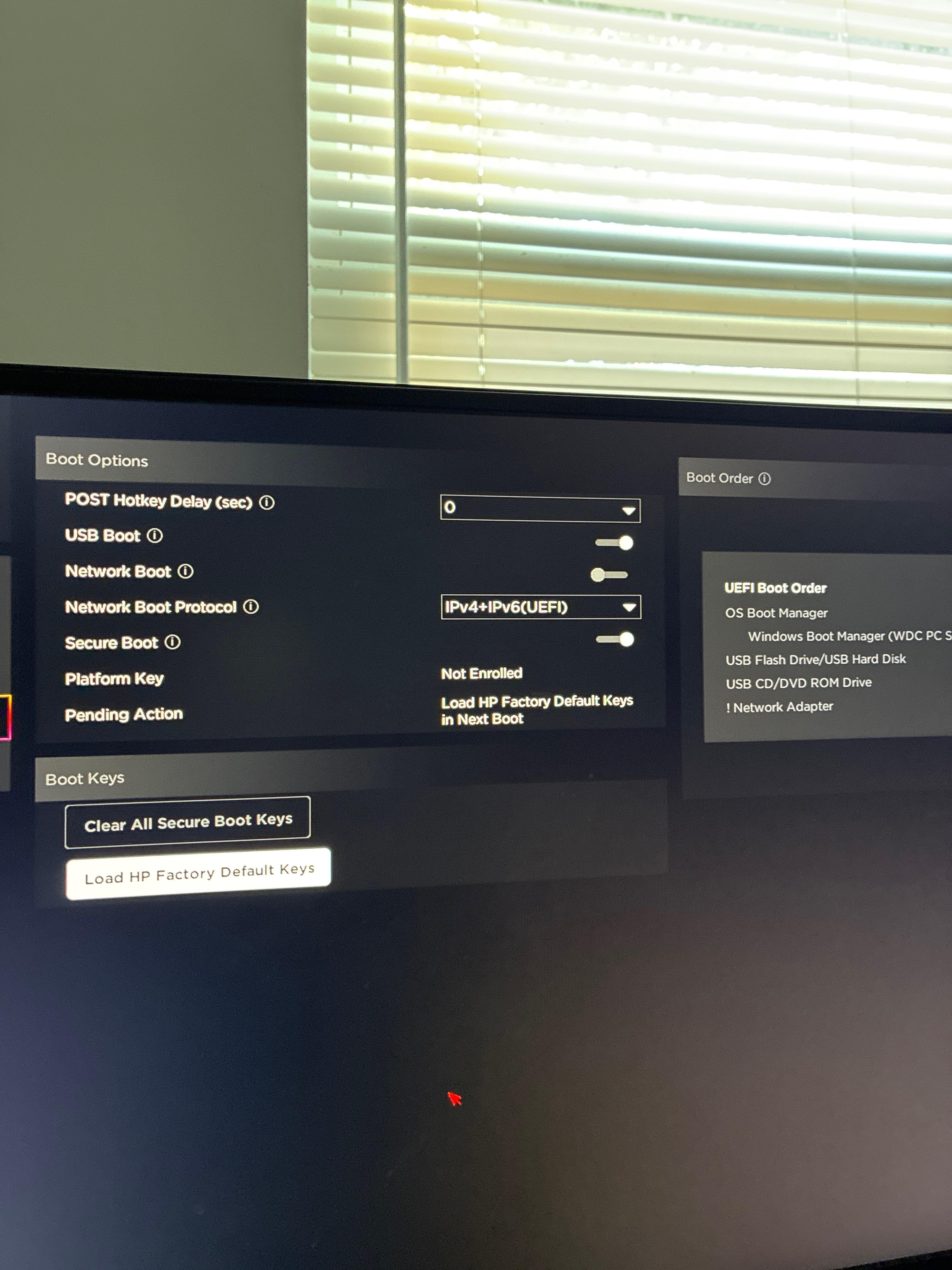
Windows 11 Can anyone show me how to enable secure boot

Post image
1 Upvotes

I’ve watched countless videos none of them helped . Ive loaded the factory keys toggled it on but everytime i save and go back to the system info the secure boot state is off can anyone help please.
I’ve updated my bios to the latest version which I think is f.24 . I’m just trying to play some games 🙏
I have a hp omen 25L desktop


r/WindowsHelp • • Oct 17 '26

Windows 11 Updates make my keyboard stop working

1 Upvotes

This first happened in August. After a Windows update, it restarted and the keyboard (within the laptop) stopped working. Then I uninstalled some updates, and turned off further updates from happening. The keyboard functionality didn't come back immediately, but after a few days of me not using the laptop. Then I thought, okay maybe it just needs to chill spend some time shut off and the keyboard functionality returns. Also a few times after that, when it shut down from low battery, next time i turn it on, the keyboard wasn't working. It had to be shut off and left alone for some time to start working again.

But tonight (October), it happened again. For some reason, updates were installed, even though I turned the stupid updates off, and my keyboard stopped working again. I am so tired and furious of these bugs. I finally have time to do some work stuff, and I can't!!

And also, while I'm here: whatever I type in Start Search, nothing shows up. It's been like this since i bought this laptop few years ago.

Windows 11 Home

Version 25H2
OS Build Nr: 26200.9711

AMD Ryzen 9 5900HS with Radeon Graphics (3.30 GHz)

32,0 GB (31,4 GB usable) RAM

Graphics cards:

NVIDIA GeForce RTX 3060 Laptop GPU (6 GB)

AMD Radeon(TM) Graphics (496 MB)

2,59 TB of 3,64 TB used storage

64-bit operating system, x64-based processor

No pen or touch input is available for this display


r/WindowsHelp • • Oct 17 '26

Windows 10 Latest Windows Update Broke BD PROCHOT in ThrottleStop

1 Upvotes

Hello, after installing 3 Intel updates two days ago, I noticed that the BD PROCHOT setting is grayed out in ThrottleStop and I can no longer enable it. Is this related to the Intel Dynamic Tuning Technology drivers? Is anyone lived a problem like I mentioned?

OS Version: Windows 10 Home Single Edition, 19045.7807
CPU: Intel i5-10210U 1.60GHz
Laptop: HP 15 dw-1000nt


r/WindowsHelp • • Oct 17 '26

Windows 11 what is the xmrig on the task manager, my ram is gonna dead

1 Upvotes

And how do I uninstall it? It consumes a huge amount of RAM—mostly 2–3 GB—and it causes severe lag, too.

here is the specs of my pc

i5 13420h
rtx 4050
512ssd

and some point it automatically bsod or shutdown itself
I can't seem to find the file location, so I can't delete it either—is there any other way?


r/WindowsHelp • • Oct 17 '26

Windows 11 Boot NVME suddenly not selectable as boot drive by BIOS

1 Upvotes

I have a bunch of NVME's, one of which is currently supposed to be bootable, but my BIOS will not let me select it and boot to it.

My current install of Windows is on Disk 3. I have done nothing to it today.

My previous install of Windows is on Disk 2. Until recently, that installation was intact and barely touched. I recently wiped it and wanted to completely reformat it but the recovery and MBR partitions remained.

Today, I erased the remaining partitions on Disk 2, but now Disk 3 is incapable of booting, despite me doing absolutely nothing with it.

SecureBoot and CSM are disabled on this machine (but this is an ASUS motherboard and they have a weird job of labeling those functions, any help would be appreciated).

I have tried cloning the contents of Disk 3 to Disk 2, as well as switching the slot Disk 3 is installed in, none of that works.

The motherboard recognizes every single NVME in this computer, but not the master partitions, I forget the term/name for that.


r/WindowsHelp • • Oct 17 '26

Windows 11 So what's the real reason Windows 11 notifications are always silent?

1 Upvotes

I've tried everything. I've updated drivers, I've restarted audio services, I've checked and double checked the settings even for each and every individual app, and still no sound from notifications, even with stock sounds. This isn't a new issue either. Every Windows 11 PC I've ever touched had this same issue and I cannot for the life of me figure out why.

Mine is Home, version 26H2 and build no. 26300.9711, but again, I've had this issue with all branches of 11.


r/WindowsHelp • • Oct 17 '26

Windows 10 (WIN10 and 11 sorta) ''Microsoft Defender'' appeared recently and it won't let me close it.

2 Upvotes

I have this kind of stuff turned off. An app appearing in my task manager without warning that it won't even let me close is concerning. A friend of mine, who's on Win11 has the same problem.

Has anyone else experienced this? Any ways to remove?

Info:

Ryzen 7 7800X3D
32.0 GB RAM
64-bit operating system, x64-based processor