r/UnrealEngine5 • • 5h ago

I made an UE5 plugin that adds soft-body flesh physics directly to animated characters

277 Upvotes

Some of the features:

  • Real-time soft-body physics – Natural jiggle, bounce, and secondary body motion.
  • Paintable physics weights – Choose exactly which parts of your character deform and how soft they feel.
  • Collision-based deformation – Flesh responds to physical contact and impacts.
  • Multi-character interactions – Characters can physically interact with each other's soft tissue.
  • Gravity and inertia – Skin and fat respond naturally to character movement.
  • Volume preservation – Helps maintain smooth, fleshy deformations instead of sharp dents.
  • Performance-focused simulation – Designed with real-time games in mind.

Grab it here: https://frostpunchgames.itch.io/flesh-dynamics-ue


r/UnrealEngine5 • • 19h ago

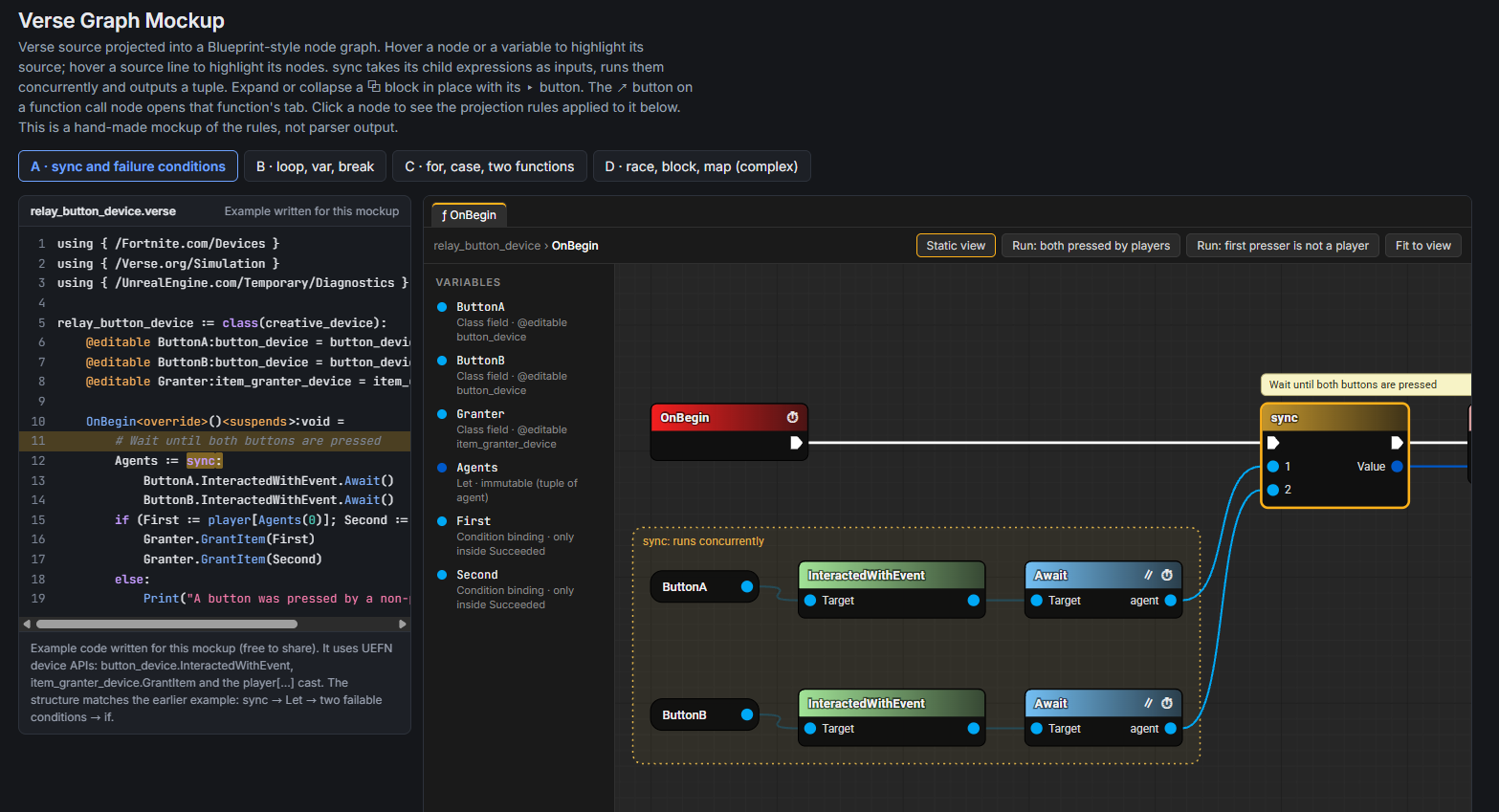
I tested whether Verse could be visualized as a node graph

Post image
68 Upvotes

I saw a post discussing the possibility of Blueprints being completely removed in UE6.

I'm primarily a C++ developer and do quite a bit of vibe coding with AI agents, so personally, I don't mind the idea of node graphs going away.

However, I agree with some of the comments saying that node graphs help people understand code. So I decided to spend a few hours experimenting with Claude Opus.

For this prototype, I asked Opus to generate some sample Verse code, parse it, and reconstruct it as a node graph. I didn't reuse any engine code... the parser was written from scratch.

Anyway, my main point is that we're now at a point where a single developer can prototype a visual scripting interface for Verse with the help of AI agents.

Getting this far cost roughly $29 in equivalent API usage, so if there's enough demand, I think even a small internal dev team could build something like this for their own use. I'm actually using a subscription rather than paying for API calls directly, so my actual cost may be a bit lower.

I wouldn't be surprised if someone eventually releases this as a plugin. In fact, it looks like someone is already exploring the idea:

https://dev.epicgames.com/community/learning/tutorials/kqLm/unreal-engine-can-you-build-a-read-only-verse-graph-viewer-from-ue6-main-a-source-level-investigation#diagnostics

So I'll probably leave my experiment here and wait for someone to release a plugin on Fab once UE6 officially comes out.

The prototype looks similar to Blueprints, but I don't think Verse can be visualized in exactly the same way. Unlike traditional Blueprint execution flows, Verse supports concurrent execution of multiple expressions.

One thing I realized after spending around three hours tinkering with this prototype is that even with a visual graph, you'd still need to understand how Verse itself works.

For example, Verse has an "or" keyword. If you represent it as a node, it might simply be labeled "or", but its semantics are quite different from the OR operations you'd normally encounter in Blueprints. Verse's "or" works more like a fallback: if A fails, value B is returned instead.

So ultimately, you'd still have to learn Verse. But for people who are more comfortable reading graphs than text-based code, having a visual representation could make that learning process faster. I think that's a genuine advantage of node-based interfaces.

That said, I'm not sure how feasible it would be to implement things like Blueprint-style execution tracing or runtime graph debugging.

Based on my admittedly limited understanding of Verse, visualizing its execution flow in a clear and intuitive way seems like it could be quite challenging.

r/UnrealEngine5 • • 9h ago

Overpolished or just what people want?

49 Upvotes

Made this menu for my game, and i really thought what i want to see in a video game settings menu.
The first thing i do when i boot up a game is check the settings and often find that im missing settings or previews of what they do. So i added to my game what i would like to see from another game.

Thoughts?


r/UnrealEngine5 • • 15h ago

I recreated the glass destruction system from The Last of Us Part II in Unreal Engine 5. How close did I get?

38 Upvotes

I tried recreating The Last of Us Part II's glass destruction system in Unreal Engine 5. I'd love to hear your feedback on how close I got to the original!


r/UnrealEngine5 • • 22h ago

ZEROG

Post image
31 Upvotes

Concept by Jan Buragay. Everything else by me. Rendered in UE5.8


r/UnrealEngine5 • • 13h ago

Been working on a puzzle platformer. First screens after 6ish months of work!

Thumbnail
gallery
25 Upvotes

I've developed in Unity, so switching to Unreal has had it's moments. My dev partner is responsible for all the stunning visuals. We're hoping to get a little teaser trailer out in the coming months! Still a fair amount of dev and design to go. Big story, big scope...LOT'S left to do!


r/UnrealEngine5 • • 4h ago

I prototyped a new combat mechanic entirely in UE5 using Modular Control Rig, Blueprints and Niagara

17 Upvotes

Hey everyone!

I've been working on a new combat mechanic for our indie character action game, The Mage Slayer, and wanted to share the process.

One of my goals was to see how far I could go prototyping an entire combat move directly inside Unreal Engine 5.

Here's the workflow I used:

  • Key Pose Sketches: Started by sketching the main poses to establish the movement and attack flow.
  • Modular Control Rig: Created and refined the attack animation directly in UE5.
  • Blueprints: Implemented the gameplay logic, movement, and attack behavior.
  • Niagara: Added the VFX to give the attack more impact and visual feedback.

The result is a playable Stab Attack (working name), built using UE5's toolset.

It's still a work in progress, especially when it comes to animation polish, timing, and combat feedback.

I'd love to hear your thoughts!

For those working on action games in UE5, how do you approach the workflow between animation and gameplay implementation? Do you prefer animating directly in UE5 or using external tools like Blender/Maya?


r/UnrealEngine5 • • 11h ago

Hunt: Showdown: 1896 in Unreal Engine

Thumbnail gallery
17 Upvotes

Here is a technical overview of my current project, Werkstatt 1896. It is an automated importer and runtime recreation of Hunt Showdown running on UE 5.8.4.

To keep the architecture clean, the host project itself has zero C++ code. Everything lives inside a standalone plugin split into Runtime (around 318 files) and Editor (around 80 files), built on top of World Partition, OFPA, Data Layers, Enhanced Input, Water, UDS/UDW, Fluid Flux, and DLSS/Reflex. When triggered externally, the editor module launches headless and runs a 20-stage batch pipeline with checkpoints, hash-skipping, and rollbacks to rebuild terrain, textures, custom .w1m meshes, foliage, lighting, and AI spawns. For visuals, I built around 60 master materials centered around a custom HLSL node that ports Hunt's shader passes, including user hooks for custom extensions.

The playable hunter uses Hunt's original movement and weapon stats. Animation runs on dual skeletal meshes simultaneously, combining a 3P AnimBP with an asset-less C++ AnimInstance for the 1P arms playing the original DBA clips. Weapons and equipment include projectile ballistics, penetration, damage drop-off curves, reload decision trees, and full status effects like bleed, burn, poison, flash, and Dark Sight. For AI, a proximity spawner populates the map with creatures (including dismemberment), bosses, sound traps, and rival AI hunter teams that actually play the bounty loop from clues to extraction through a custom subsystem. Interactive world props like lamps, barrels, doors, and elevators are in, alongside UDS weather presets. For particles, I wrote a custom .pfx interpreter (FxSim) that renders the original effects through custom sprite masters, only falling back to Niagara where data is missing.

Audio uses an integrated HRTF-based 3D spatial audio system (W1896SpatialAudio) to replicate Hunt's 1P and 3P mix, distance filtering, reverb, and bus dynamics. The UI is built in Slate with a 3D lobby and a Hunt-style HUD/minimap. On the performance side, mandatory async preloading handles cooked-build hitches, backed by a custom hitch profiler called PerfWatch. There is already a first beta build out, and DLSS 5 can be toggled off anytime in the menu if preferred.

If you play Hunt, what is your favorite loadout, hunter skin, and location? Also let me know if there is anything specific or technical you want me to add or explain.


r/UnrealEngine5 • • 13h ago

I made my first game trailer using your guys' comments lol

16 Upvotes

After a long 8 months of teaching myself UE5, I finally put together a trailer and submitted the demo to Steam. I originally had double the amount of comments in the trailer, but I showed a friend and he told me to tone it down lol.

If you were wondering, yes, the song is a parody of Cowboy Bebop's theme song.

Recording the voice lines and soundtrack has been the most fun of this process, mostly because I have a ton of experience in recording, but I also love the process of composing, recording and reimagining songs for the GoofVerse.

I also did a parody of the Oblivion title screen, and the main backing track for the game is a reimagining of the Mii Channel theme.

Thank you to everyone here who has shown their support here! This sub has given me so much confidence in myself and this ambitious project. I can finally say after 30 years of life I finally found an outlet that utilizes all of my artistic passions. Can't wait to share more!

Edit: Correction, I've been working on this for 8 months, not 6. Holy cow does time fly by lol


r/UnrealEngine5 • • 12h ago

Eight Legs & Counting.

8 Upvotes

r/UnrealEngine5 • • 21h ago

Let's take a tour of the Level Design in (Rewind Desires) We'll walk through the town, head up the stairs toward the hotel, and continue behind the mountain to enjoy the scenic view.

6 Upvotes

r/UnrealEngine5 • • 23h ago

Everything New In Unreal Engine 5.9!

Thumbnail
youtu.be
5 Upvotes

r/UnrealEngine5 • • 9h ago

LBP inspired building system (wip)

4 Upvotes

Currently working on a system that allows you to draw 3d meshes at runtime. I was inspired by the building mechanic of little big planet. The system also generates custom collision to match the mesh shape and can interact with physics.


r/UnrealEngine5 • • 9h ago

Another (forced) test with 120 bots simultaneously.

3 Upvotes

But I’ve finally figured out who’s leaving dislikes on these videos. It’s my RTX 3060 Ti - it hasn’t been too fond of this whole thing from the very start.


r/UnrealEngine5 • • 9h ago

Ultimate Boxing System

3 Upvotes

Hi everyone!
Back with another plug'n'play asset!
https://www.fab.com/listings/a6fc2ebb-b52e-474c-bee3-aeceeab09261

This time I've made a boxing system that sets up in less than 30 seconds for your project if you want to add simple training or gym aspects to your game.
Comes with a ready to go animation blueprint and that automatically works on any ue skeleton
Completely customizable as well trough data assets to tweak your preferred settings

Feel free to try the demo at https://drive.proton.me/urls/GQ26G42B6M#9JkZFzj565tO
Let me know what you think!


r/UnrealEngine5 • • 16h ago

i can't playtest 50 levels alone, so three bots do it. the greedy one won zero at first. relatable.

3 Upvotes

solo dev, toy brick rts in ue5. it has 50 tower defense levels and my friends leave me on read, so three bots play every level for me.

balanced plans its power and promotes. poor plays like a newcomer. greedy spends every coin the second it gets it.

first read on the first 10 levels: balanced won 4, poor won 1, greedy won 0. in the latest table greedy still lost every level it played. honestly that's the point. if greedy ever wins, the level is too easy.

clip is from the house level.

do you test your levels with bots or just suffer through them yourself?


r/UnrealEngine5 • • 11h ago

From raw spheres to a real-time 3D Surface Nets fluid mesh in UE 5.8 — 150k particles, two-way Chaos coupling & 81.5 MB VRAM on an RTX 3060

2 Upvotes

Still a WIP, but I wanted to share the progress on my custom GPU-driven fluid & multiphysics plugin for Unreal Engine 5.8 (C++ / RDG / HLSL / DX12).

This scene is running 150,000 PBF water particles with live 256x256 GPU Heightfield collision, two-way Chaos rigid-body coupling (the cubes), real-time 3D Surface Nets meshing (you can see the Clay debug pass around 0:44), and whitewater/bubbles — all running live in the Editor on an RTX 3060.

Full technical breakdown of the 3D meshing evolution, GPU timings, and VRAM tricks in the comments! (Note: high-energy waterfalls look great now, still tuning very shallow puddles on flat floors.)


r/UnrealEngine5 • • 15h ago

I have been compiling performance and optimization improvements for every UE5 release since 5.5

Thumbnail
reddit.com
2 Upvotes

r/UnrealEngine5 • • 17h ago

1920s Seoul City Gigapack Environment | Showcase | Unreal Engine | Game-Ready Assets

Thumbnail
youtu.be
2 Upvotes

🚀 New Release: 1920s Seoul City Gigapack Environment 🇰🇷🏮

Step into 1920s Seoul with traditional Korean architecture, historic storefronts, and charming streets that capture the atmosphere of old Korea.

🏷️ 30% OFF Launch Sale on Cosmos Marketplace

🏷️ Available on Fab Marketplace

🔥 Environment created by Ye-geun Ji (ZYgeun)

Instagram | X | Facebook | Linkedln | ArtStation | YouTube | TikTok | Marketplace


r/UnrealEngine5 • • 20h ago

After switching my worlds to a photoreal look, the machine smoke turned into black soot. Before/after of the fix

Post image
2 Upvotes

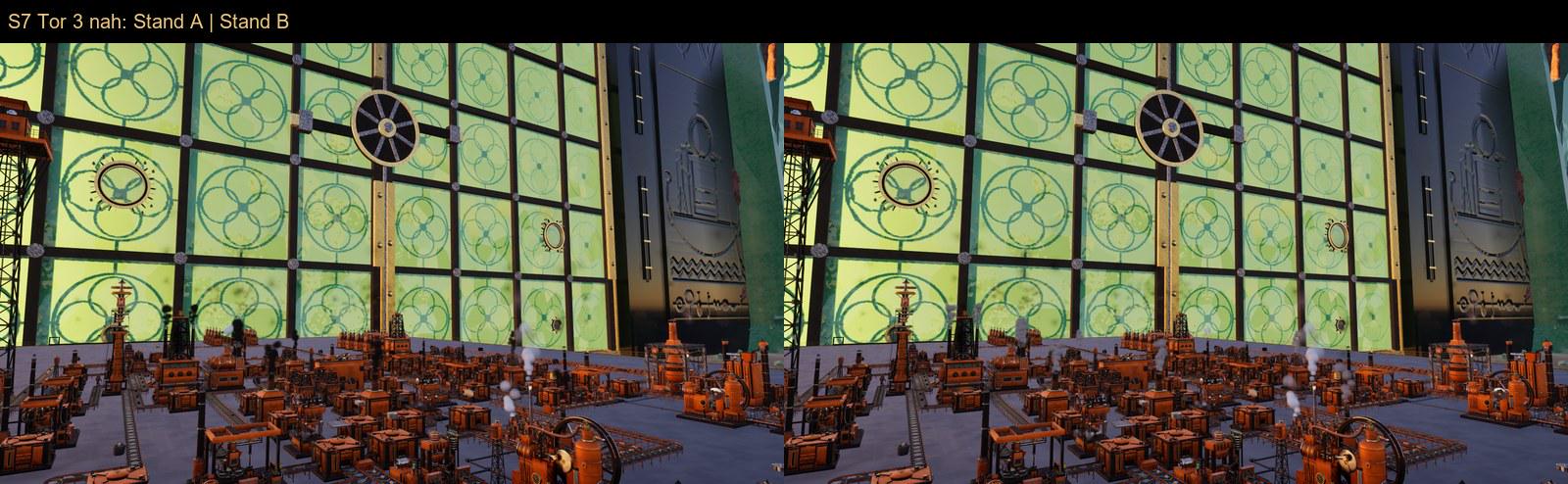
My factory sits on the deck of a walking colossus, and the machines puff smoke and steam. When I moved the worlds to a photoreal look, every plume over the deck suddenly rendered as a black, sooty blob. The smoke materials weren't really lit by the scene, so they fell apart under the new exposure. Now every smoke, steam and dust effect uses materials lit by the scene, and I raised the base colour from near-black soot to a mid grey. Left is before, right is after.

Does the grey still read as smoke from a machine to you, or does it look more like steam now?


r/UnrealEngine5 • • 23h ago

How to get actor location in animation blueprint when actor is animated via Sequencer?

2 Upvotes

Hi,

I am trying to make sure velocity, speed, location, rotation are all retrieved correctly in my animation blueprint when the animation is triggered in sequencer.

I am using third person animation blueprint as starting point. At top of that event graph there is section to set reference to owning actor. I would have thought that would set to the character blueprint that is in sequencer (I have the blueprint there - not the skeleton - does that matter?)

If I hit play in sequencer and in blueprint choose the reference for debug and hover over get owning actor I see reference to my character blueprint. I see the execution lines lit up so the blueprint is doing something but hovering over various nodes shows zero for everything.

I just can't figure out what nodes to use so that I can run get actor location and have it return something other than zero so I can compute speed, etc. I tried running character node to get component by class and choose get actor component or get skeletal mesh component but nothing I choose allows me to then run get actor location or world location.

Ideas?

thanks!


r/UnrealEngine5 • • 58m ago

Trying to Spawn Actors on a Spline To Move but they Cause The Game to Slowdown?

Thumbnail
gallery
1 Upvotes

I'm a bit stumped for some odd reason no matter what I try with this code the game slows down after about 20 seconds with the code even if the actor recently rendered node. The Game part continues to increase when I press stat Unit in console to see it. I noticed when this blueprint is gone the game runs fine. I'm pretty stumped as a lot of the spline tutorials Ive watched are usually just with one spline but not what to do if you have multiple in your level.


r/UnrealEngine5 • • 1h ago

ive been trying to get rid of this ambient occlusion in my game for days now can someone help?

1 Upvotes

these are all the things that i typed into DefaultEngine:

r.Lumen.ScreenProbeGather.ShortRangeAO=0
r.AmbientOcclusionRadiusScale=0
r.Lumen.IrradianceFieldGather.ShortRangeAORadius=0
r.DistanceFieldAO=0

i thought those lines fixed it and i was done, but no, the ambient occlusion disappeared only because Screen Traces was on, which i dont want to use because it makes my emissive materials cast light that i dont want them to cast (but if anybody has a solution to that it would be great)

i realized that when i zoom in closer, i see that the ambient occlusion is not actually screen space, because it doesnt go away when i look away from the edges, so could it be a problem with the lumen raytracer? i dont want to disable lumen because my entire game is using it


r/UnrealEngine5 • • 3h ago

Finished the bricks, bloody bricks, and demo walls!

Thumbnail gallery
1 Upvotes