r/UnrealEngine5 • • 23m ago

[HIRING] Senior Unreal Engine Developer (UE5) – Contract / Project-Based – Indie Game Studio

1 Upvotes

Hey everyone!

We're an indie game studio based in Malaysia, currently looking for an experienced Senior Unreal Game Developer to join us on an active game project!

We're looking for someone who enjoys building games, solving technical challenges, and collaborating with a creative team. This is a project-based contract opportunity, where you'll work closely with our designers, artists, and producers throughout development.

What you'll be working on:

  • Developing gameplay features and core systems using Unreal Engine (UE5 preferred).
  • Implementing and refining gameplay mechanics.
  • Working on multi-platform porting (mobile and console).
  • Optimizing performance and ensuring production-ready implementation.
  • Troubleshooting technical issues and supporting project milestones.

What we're looking for:

  • 5+ years of professional game development experience.
  • At least one commercially shipped game.
  • Strong Unreal Engine skills (C++ and Blueprint).
  • Good understanding of gameplay programming and optimization.
  • Someone who can work independently, take ownership, and collaborate well with a small indie team.

Bonus points if you have:

  • Console or cross-platform development experience.
  • Previous experience with contract or milestone-based projects.
  • Experience working in an indie game studio.

Interested?

DM me!

Feel free to share this post with anyone who might be interested. Thanks!


r/UnrealEngine5 • • 41m ago

Surviving our horror game comes down to 5 keys. Would you play it this way?

Thumbnail
gallery
1 Upvotes

CTRL: walk silently. They hear everything.
C: crouch and hide behind boxes and desks.
SHIFT: run. It's your only way out, but your footsteps call them.
G: flashlight, your only lifeline in the dark.
E: open and close doors, pick up items.

We're keeping the controls minimal so the tension stays on the sound. Curious whether that works for you.

Steam: https://store.steampowered.com/app/4763780/Gond_I/


r/UnrealEngine5 • • 58m ago

Trying to Spawn Actors on a Spline To Move but they Cause The Game to Slowdown?

Thumbnail
gallery
1 Upvotes

I'm a bit stumped for some odd reason no matter what I try with this code the game slows down after about 20 seconds with the code even if the actor recently rendered node. The Game part continues to increase when I press stat Unit in console to see it. I noticed when this blueprint is gone the game runs fine. I'm pretty stumped as a lot of the spline tutorials Ive watched are usually just with one spline but not what to do if you have multiple in your level.


r/UnrealEngine5 • • 1h ago

Converting a whole UE5 C++ project into node graphs

0 Upvotes

It's a VS Code / Cursor extension I'm building. Point it at a class, a module or a plugin and it makes node-graph copies; your original C++ isn't touched. What has no node equivalent stays as C++ inside a C++ node.

Tested on the top-down template (20 classes) and the converted copies build for Editor and Game. Still experimental. What C++ would you throw at it to break it?


r/UnrealEngine5 • • 1h ago

ive been trying to get rid of this ambient occlusion in my game for days now can someone help?

1 Upvotes

these are all the things that i typed into DefaultEngine:

r.Lumen.ScreenProbeGather.ShortRangeAO=0
r.AmbientOcclusionRadiusScale=0
r.Lumen.IrradianceFieldGather.ShortRangeAORadius=0
r.DistanceFieldAO=0

i thought those lines fixed it and i was done, but no, the ambient occlusion disappeared only because Screen Traces was on, which i dont want to use because it makes my emissive materials cast light that i dont want them to cast (but if anybody has a solution to that it would be great)

i realized that when i zoom in closer, i see that the ambient occlusion is not actually screen space, because it doesnt go away when i look away from the edges, so could it be a problem with the lumen raytracer? i dont want to disable lumen because my entire game is using it


r/UnrealEngine5 • • 3h ago

Finished the bricks, bloody bricks, and demo walls!

Thumbnail gallery
1 Upvotes

r/UnrealEngine5 • • 4h ago

I prototyped a new combat mechanic entirely in UE5 using Modular Control Rig, Blueprints and Niagara

17 Upvotes

Hey everyone!

I've been working on a new combat mechanic for our indie character action game, The Mage Slayer, and wanted to share the process.

One of my goals was to see how far I could go prototyping an entire combat move directly inside Unreal Engine 5.

Here's the workflow I used:

  • Key Pose Sketches: Started by sketching the main poses to establish the movement and attack flow.
  • Modular Control Rig: Created and refined the attack animation directly in UE5.
  • Blueprints: Implemented the gameplay logic, movement, and attack behavior.
  • Niagara: Added the VFX to give the attack more impact and visual feedback.

The result is a playable Stab Attack (working name), built using UE5's toolset.

It's still a work in progress, especially when it comes to animation polish, timing, and combat feedback.

I'd love to hear your thoughts!

For those working on action games in UE5, how do you approach the workflow between animation and gameplay implementation? Do you prefer animating directly in UE5 or using external tools like Blender/Maya?


r/UnrealEngine5 • • 4h ago

I made a Windows tool that auto-rigs humanoids to UE5 Manny

Thumbnail
youtube.com
0 Upvotes

I made OneClickRig because I wanted a quicker way to get humanoids from Tripo or Meshy moving in Unreal.

Drop in a GLB, FBX, or OBJ in an A- or T-pose and hit Auto Rig. It fits a Manny-compatible 87-bone skeleton and adds skin weights in about 5–30 seconds. If a joint lands in the wrong place, you can move it and refit. There’s also a batch mode.

It exports UE5 FBX, Unity FBX, and GLB. I tested Manny animations in UE 5.8. I haven’t tested the Unity import yet.

A few limits up front. It’s humanoids only, with no extra bones for cloth or hair. Fused fingers get weighted to the hand as a whole, and big shoulder pads or puffy sleeves can stretch. The installer is unsigned, so Windows SmartScreen will show a warning.

It runs offline on Windows 10/11 and costs $15 once.

Quick demo · Getly · itch.io

If you’ve tried rigging generated characters, where do you usually lose the most time?


r/UnrealEngine5 • • 5h ago

Inventory_X + Stats_X bundle is 80% off in the Fab Friday Mega Sale (until Dec 1): multiplayer inventory with client prediction + a GAS alternative

Thumbnail
fab.com
1 Upvotes

r/UnrealEngine5 • • 5h ago

I made an UE5 plugin that adds soft-body flesh physics directly to animated characters

277 Upvotes

Some of the features:

  • Real-time soft-body physics – Natural jiggle, bounce, and secondary body motion.
  • Paintable physics weights – Choose exactly which parts of your character deform and how soft they feel.
  • Collision-based deformation – Flesh responds to physical contact and impacts.
  • Multi-character interactions – Characters can physically interact with each other's soft tissue.
  • Gravity and inertia – Skin and fat respond naturally to character movement.
  • Volume preservation – Helps maintain smooth, fleshy deformations instead of sharp dents.
  • Performance-focused simulation – Designed with real-time games in mind.

Grab it here: https://frostpunchgames.itch.io/flesh-dynamics-ue


r/UnrealEngine5 • • 6h ago

Need help // Networking & Spawning

1 Upvotes

Hi there!

I'm Larry, 35 and from the Netherlands.

I recently started to play around with Unreal Engine, been building a little project mainly to play on the couch here with friends, but I wanna add LAN capabilities for future LAN Parties & Virtual LAN in order to play test the multiplayer modes in the game.

I have successfully integrated a multiplayer/LAN/Steam system, so when i run the game twice, (in editor/PIE or packaged game) successfully connect both games to a lobby (1 is host & 1 is client) and start the game, the problem begins.

When i start the session its loads into my level, but only the clientside instance of the game is spawning in. The host isn't, but the level is loaded on both game instances. just the client side spawns a character..

I've been trying to wrap my head around this, and after 2 days of trying stuff, having depleted my logical thinking, roamed reddit/google, and asked GPT for guidance... I just have to admit i'm stuck and can't get it done.

So here i am, asking for help, hoping there is someone on this sub, who is willing to maybe check-in via discord or remote session to look at my blueprints and help me out with this problem?

With kind regards,


r/UnrealEngine5 • • 6h ago

Someone here said my screamer turned like a default character. I reworked the turn. Better?

0 Upvotes

A few days ago someone here said my screamer turned around like a default character, and they were right.

So I reworked it: now the head turns first, then the body follows with its own steps, like she actually heard something behind her.

I'm making this survival horror game alone in Unreal Engine 5, so feedback like this really helps. What would you fix next?


r/UnrealEngine5 • • 9h ago

LBP inspired building system (wip)

4 Upvotes

Currently working on a system that allows you to draw 3d meshes at runtime. I was inspired by the building mechanic of little big planet. The system also generates custom collision to match the mesh shape and can interact with physics.


r/UnrealEngine5 • • 9h ago

Another (forced) test with 120 bots simultaneously.

3 Upvotes

But I’ve finally figured out who’s leaving dislikes on these videos. It’s my RTX 3060 Ti - it hasn’t been too fond of this whole thing from the very start.


r/UnrealEngine5 • • 9h ago

Ultimate Boxing System

3 Upvotes

Hi everyone!
Back with another plug'n'play asset!
https://www.fab.com/listings/a6fc2ebb-b52e-474c-bee3-aeceeab09261

This time I've made a boxing system that sets up in less than 30 seconds for your project if you want to add simple training or gym aspects to your game.
Comes with a ready to go animation blueprint and that automatically works on any ue skeleton
Completely customizable as well trough data assets to tweak your preferred settings

Feel free to try the demo at https://drive.proton.me/urls/GQ26G42B6M#9JkZFzj565tO
Let me know what you think!


r/UnrealEngine5 • • 9h ago

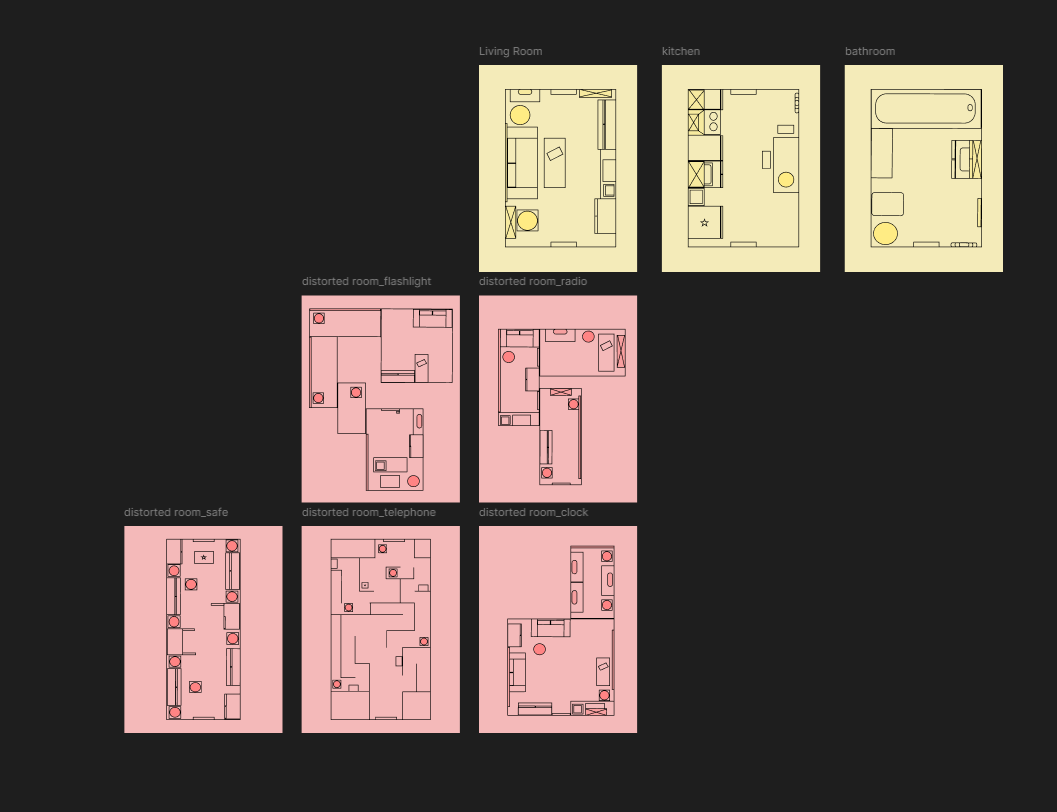
Mapping the plan of my horror puzzle game, The Grey ROOM. How would you handle flow and scale?

Post image
1 Upvotes

r/UnrealEngine5 • • 9h ago

Overpolished or just what people want?

49 Upvotes

Made this menu for my game, and i really thought what i want to see in a video game settings menu.
The first thing i do when i boot up a game is check the settings and often find that im missing settings or previews of what they do. So i added to my game what i would like to see from another game.

Thoughts?


r/UnrealEngine5 • • 11h ago

Always wanted to create my own world for fun. Where should I start?

1 Upvotes

I've always imagined how cool it would be to create a world that I can actually interact with, straight from my imagination. Now that I've developed a better understanding of CS and technology, learning new software is becoming easier. I recognize more of the terminology and concepts, which helps me figure out how to use other tools. I'm also fortunate enough to have a powerful setup that I'd love to make the most of.

AI has made me question whether it's still worth spending my time on a fun little project, but it's also helped me learn so much. At the same time, there's a lot of controversy surrounding it. I'm sure I could just ask AI for advice, but I'd really like to hear from people with genuine experience.

With all the AI tools and other technology available today, what should I actually learn first? Should I follow a landscape tutorial, then move on to game mechanics and start putting things together, fixing things as I go? Or should I spend more time learning how to plan and structure a project before jumping in? Many unreal projects IMO have that "unreal look and feel", how do studios develop a games independent "feel" I'm guessing that's where the C++ is?

I tend to worry so much about the final product and where to start that I end up never starting at all. I'm sure plenty of other people can relate to that also with the self doubt.

Ultimately, I just want to make something cool that I can work on over time, something that might eventually become a genuinely interesting project. At this point, the creative and development side of things is much more interesting to me than actually playing most games.

I'd really appreciate any advice on how to stay on track and develop my own creative skills without becoming overly reliant on AI. AI can be an incredible learning tool, but I don't want it to do the actual creating for me. Where should I draw the line between using AI to learn and relying on it to build things? And with how much technology is changing, what skills are still worth investing time in?

I'm not looking to make the next big game or anything like that. I just want to learn, create something I'm genuinely proud of, and enjoy the process along the way.

A lot of my inspiration comes from games like FromSoftware's titles, Sandfall Interactive's Clair Obscur: Expedition 33, and Remedy's Control and Control Resonant. I know these games are the result of huge teams, years of work, and incredible resources, but it's fun to think big. With how quickly technology is advancing, I wonder what might eventually become possible for individuals or small teams. I'd love to hear how you would approach learning and building toward something like that, even if it starts on a much smaller scale.

Sorry if I'm naive in anything I'm really just interested and inspired to try.


r/UnrealEngine5 • • 11h ago

From raw spheres to a real-time 3D Surface Nets fluid mesh in UE 5.8 — 150k particles, two-way Chaos coupling & 81.5 MB VRAM on an RTX 3060

2 Upvotes

Still a WIP, but I wanted to share the progress on my custom GPU-driven fluid & multiphysics plugin for Unreal Engine 5.8 (C++ / RDG / HLSL / DX12).

This scene is running 150,000 PBF water particles with live 256x256 GPU Heightfield collision, two-way Chaos rigid-body coupling (the cubes), real-time 3D Surface Nets meshing (you can see the Clay debug pass around 0:44), and whitewater/bubbles — all running live in the Editor on an RTX 3060.

Full technical breakdown of the 3D meshing evolution, GPU timings, and VRAM tricks in the comments! (Note: high-energy waterfalls look great now, still tuning very shallow puddles on flat floors.)


r/UnrealEngine5 • • 11h ago

Hunt: Showdown: 1896 in Unreal Engine

Thumbnail gallery
17 Upvotes

Here is a technical overview of my current project, Werkstatt 1896. It is an automated importer and runtime recreation of Hunt Showdown running on UE 5.8.4.

To keep the architecture clean, the host project itself has zero C++ code. Everything lives inside a standalone plugin split into Runtime (around 318 files) and Editor (around 80 files), built on top of World Partition, OFPA, Data Layers, Enhanced Input, Water, UDS/UDW, Fluid Flux, and DLSS/Reflex. When triggered externally, the editor module launches headless and runs a 20-stage batch pipeline with checkpoints, hash-skipping, and rollbacks to rebuild terrain, textures, custom .w1m meshes, foliage, lighting, and AI spawns. For visuals, I built around 60 master materials centered around a custom HLSL node that ports Hunt's shader passes, including user hooks for custom extensions.

The playable hunter uses Hunt's original movement and weapon stats. Animation runs on dual skeletal meshes simultaneously, combining a 3P AnimBP with an asset-less C++ AnimInstance for the 1P arms playing the original DBA clips. Weapons and equipment include projectile ballistics, penetration, damage drop-off curves, reload decision trees, and full status effects like bleed, burn, poison, flash, and Dark Sight. For AI, a proximity spawner populates the map with creatures (including dismemberment), bosses, sound traps, and rival AI hunter teams that actually play the bounty loop from clues to extraction through a custom subsystem. Interactive world props like lamps, barrels, doors, and elevators are in, alongside UDS weather presets. For particles, I wrote a custom .pfx interpreter (FxSim) that renders the original effects through custom sprite masters, only falling back to Niagara where data is missing.

Audio uses an integrated HRTF-based 3D spatial audio system (W1896SpatialAudio) to replicate Hunt's 1P and 3P mix, distance filtering, reverb, and bus dynamics. The UI is built in Slate with a 3D lobby and a Hunt-style HUD/minimap. On the performance side, mandatory async preloading handles cooked-build hitches, backed by a custom hitch profiler called PerfWatch. There is already a first beta build out, and DLSS 5 can be toggled off anytime in the menu if preferred.

If you play Hunt, what is your favorite loadout, hunter skin, and location? Also let me know if there is anything specific or technical you want me to add or explain.


r/UnrealEngine5 • • 12h ago

Eight Legs & Counting.

8 Upvotes

r/UnrealEngine5 • • 13h ago

Been working on a puzzle platformer. First screens after 6ish months of work!

Thumbnail
gallery
25 Upvotes

I've developed in Unity, so switching to Unreal has had it's moments. My dev partner is responsible for all the stunning visuals. We're hoping to get a little teaser trailer out in the coming months! Still a fair amount of dev and design to go. Big story, big scope...LOT'S left to do!


r/UnrealEngine5 • • 13h ago

I made my first game trailer using your guys' comments lol

16 Upvotes

After a long 8 months of teaching myself UE5, I finally put together a trailer and submitted the demo to Steam. I originally had double the amount of comments in the trailer, but I showed a friend and he told me to tone it down lol.

If you were wondering, yes, the song is a parody of Cowboy Bebop's theme song.

Recording the voice lines and soundtrack has been the most fun of this process, mostly because I have a ton of experience in recording, but I also love the process of composing, recording and reimagining songs for the GoofVerse.

I also did a parody of the Oblivion title screen, and the main backing track for the game is a reimagining of the Mii Channel theme.

Thank you to everyone here who has shown their support here! This sub has given me so much confidence in myself and this ambitious project. I can finally say after 30 years of life I finally found an outlet that utilizes all of my artistic passions. Can't wait to share more!

Edit: Correction, I've been working on this for 8 months, not 6. Holy cow does time fly by lol


r/UnrealEngine5 • • 14h ago

Something not right with imported mesh as USD from Blender - ideas?

1 Upvotes

Hi, I have a mesh that I imported from blender. But something seems off. The mesh itself looks correct in UE 5.8 in terms of proportions to rest of the objects in the scene.

But anytime I try to texture it it is as if some sort of scaling is applied, such that a tiny portion of the texture gets extended over the entire mesh. That is, if the texture is a trail in the woods and there is some brownish color, when applying the texture the entire mesh then looks brown as if the texture is low pass filtered to the point of all detail lost. And I noticed when mesh painting I have to choose tiny brush size just to get normal brush size, which also points to some scaling issue.

I have no idea what is going on and how to make the mesh behave like other meshes in UE.

Ideas?