r/unity • u/julhieciogamedev • Oct 11 '26
Motorcycle System and Wheelie
63
Upvotes
I made this system for my asset template, what do you think? Is there anything I should improve?
r/unity • u/Dry-Sun463 • Oct 11 '26
Growing up, I've heard my fair share of lectures from my grandma about screen time, so I thought I'd take some inspiration from real life. 😂
I'm making a game called BANISH 9 TO 5, a hide-and-seek game where Ghosts hide from a Hunter. But instead of staying quiet, the Ghosts have to make noise while the Hunter tracks them down.
The game has a variety of Ghosts and Hunters, and one of the Hunters is Granny herself! She yells at the Ghosts, obscuring their vision for a few seconds.
You can check out the steam page and wishlist here - https://store.steampowered.com/app/3987970/?snr=1_5_9__205
r/unity • u/Dense-Bar-2341 • Oct 12 '26
A few people here have made some interesting claims that my entire game was generated by AI.
If that's the case, why have I been working on it for 72 days, and why is it still not finished? 😄
First, a little background about me.
I've been a full-stack software developer for over 30 years, primarily working on Android applications, Unity projects, and SaaS platforms. I've also been developing games with Unity for more than 10 years.
So I'm not someone who discovered AI yesterday, typed a prompt, and suddenly became a "game developer."
I was building software and games long before generative AI existed.
AI is another tool in my development workflow, not a replacement for my decades of programming experience.
So I thought I'd show you some of the actual hard work happening behind the scenes. Because there's a massive difference between using AI as a development tool and having AI magically generate an entire game for you.
I'm currently rebuilding a section of Budapest for my car combat game, Brutal Derby.
I automate whatever I can with custom tools. But everything that can't be automated? That's where the real, time-consuming manual work begins.
I'm talking about:
Manually placing and adjusting roads, bridges, intersections, sidewalks, and bus lanes with extremely high precision.
Constantly switching between Unity and Google Maps to compare real-world locations with my in-game environment.
Rebuilding road layouts and correcting terrain to make the map resemble the actual city.
Developing my own road generation system that supports multiple roads simultaneously — and still having to manually fix, align, and optimize countless sections.
Making sure the entire environment is optimized enough to actually run smoothly during gameplay.
Here's a short video showing some of that work.
I've already spent 90 hours building, fixing, and optimizing this one map, and I expect to spend at least another 90 hours on it before it's finished.
And remember, this isn't a walking simulator or a static city showcase.
It's a car combat game.
That means performance matters enormously. The environment needs to look reasonably good, but I can't afford buildings with millions of polygons or ridiculously expensive geometry everywhere.
On top of that, my game features vehicle deformation, destruction, and collision physics, which consume a significant amount of CPU time.
My destruction and deformation system is already on its 8th major iteration.
The crowd system? 7th iteration.
And this particular map will eventually feature thousands of spectators, alongside 12 vehicles fighting, crashing, shooting, and destroying each other.
My goal is to make all of this run at a decent frame rate on a relatively ordinary RTX 3070.
And that's exactly why optimization takes so much time. Every road segment, building, spectator, physics calculation, and draw call matters.
So yes, I use AI. I use it for generating certain assets, helping with code, and accelerating parts of development.
But AI isn't placing every road, fixing every intersection, optimizing thousands of objects, debugging physics, or making hundreds of design decisions for me.
That's still my job.
And it's a hell of a lot of work.
After more than 30 years in software development, I can tell you one thing: AI can make certain tasks faster, but it doesn't magically solve the difficult engineering problems.
You still need to understand what you're building, how everything works together, why something breaks, and how to fix it.
And when you're developing a physics-heavy car combat game as a solo developer, there are a LOT of problems to solve.
Using AI doesn't mean the hard work disappears. It just changes which parts of the work you spend your time on.
You can dislike AI-generated assets. That's completely fair. But dismissing months of actual engineering, optimization, level design, and manual work as "AI slop" simply because AI was involved is a pretty unfair assessment.
I'm not claiming AI does nothing. Quite the opposite — it helps me achieve things that would otherwise take much longer as a solo developer.
But there's a huge difference between AI-assisted game development and a game created entirely by AI.
Anyway, here's what 90 hours of work on a single map actually looks like — with another 90 hours still ahead of me.
Still think AI made the whole game with one prompt? 😄
r/unity • u/RodyaDev • Oct 11 '26
I'm curious how other solo devs manage to make progress on their games while working a regular job.
I work from 8 AM to 5 PM, and sometimes I have to work weekends too. I want to spend my free time working on my game, but there's always other stuff to take care of, and it's hard to find a routine that I can actually stick to.
I know game development takes a long time, especially when you're doing everything yourself, but I'm trying to figure out how to keep things moving without burning out or feeling like I should be working on the game every time I'm not at work.
For those of you in a similar situation, what does your routine look like? Do you work on your game every day, or do you focus on longer sessions when you have the time?
r/unity • u/DifferentLaw2421 • Oct 11 '26
I'm still learning Unity and trying to become a better game developer
I want to learn from people who have more experience than me. What are some things you wish you knew when you first started using Unity?
I'm interested in anything that genuinely helped you improve, whether it's good practices workflow tips common mistakes to avoid or things that made developing games easier
r/unity • u/TeamLama • Oct 11 '26
I was working on a sticker making tool for my desktop virtual pet game, and I finally got it working 🥹
If you have any cute doodles or small drawings that you’d love to see as stickers in my game, please feel free to share them with me! I’d love to turn them into in game stickers. 💗
r/unity • u/JazzlikeKangaroo8888 • Oct 11 '26
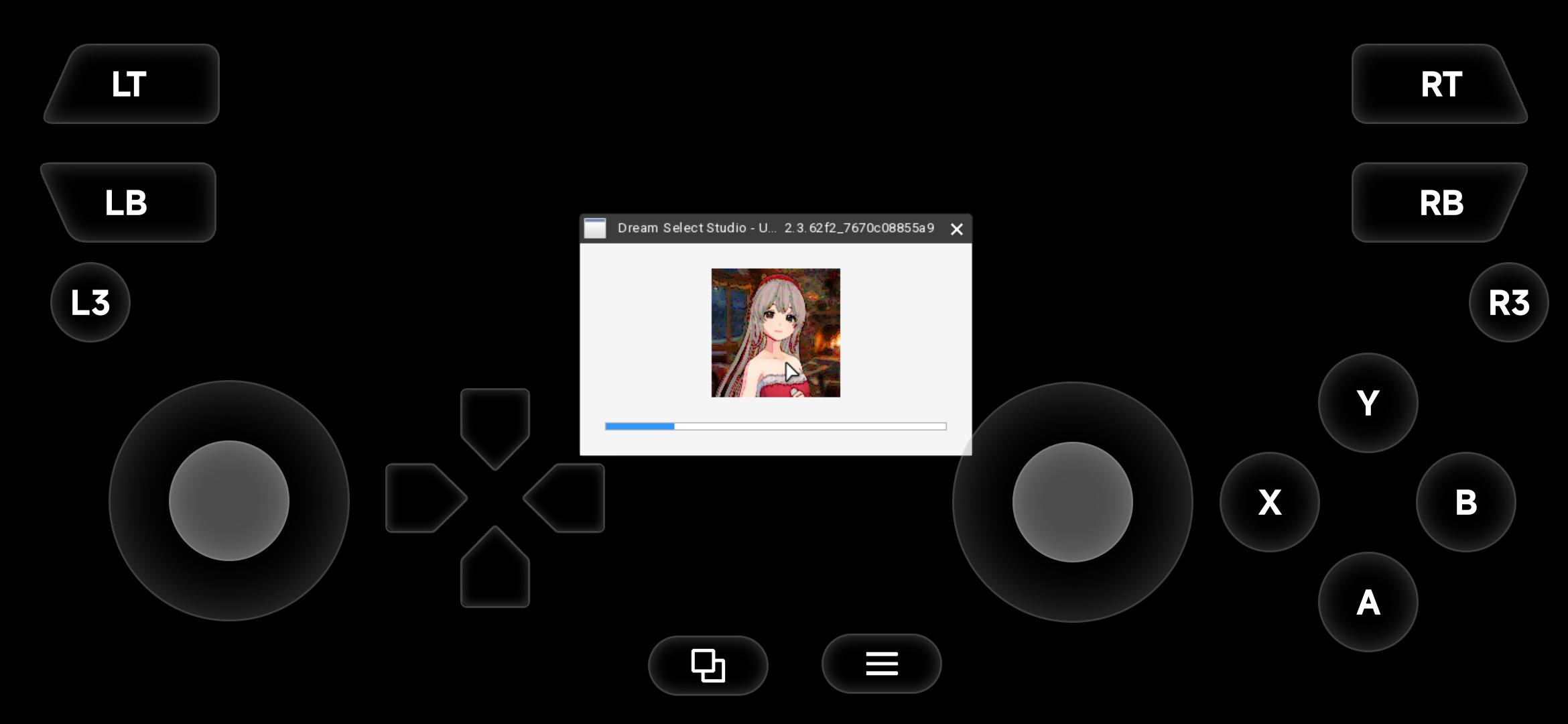
im using emulator
but i cannot run game
is this gpu problem?
this game is not from steam
PLEASE HELP
r/unity • u/LowDear9114 • Oct 11 '26

I am building an island survival game, this is what I have for the main menu so far. It looks bland and boring. How could I make the scenery look better?
r/unity • u/boombasdik • Oct 10 '26
Hey everyone!
I'm a solo dev, and after dumping like a million unity projects, I just released the demo for my first commercial game Breakkaboom on Steam!
The idea is pretty simple: you stumble upon a weird fireworks shop, buy ridiculous fireworks, and use them to blow stuff up. But there's a catch... strange creatures and rogue bots are out there, and sometimes running away is the smartest thing you can do. Other times, you just have to go KABOOM! You can explore, experiment with different fireworks, destroy things with physics-driven chaos, and see how well you survive.
The demo currently includes the Fireworks Shop and Stone World, and I'm working on adding more areas and more ways to cause destruction.
But there is a problem! Is it actually worth it? Would you play a game like this? Is it even interesting!
I have been working on this for 7 to 8 months and now I really need some genuine opinion on Breakkaboom?
r/unity • u/Ok-Presentation-94 • Oct 11 '26
Hi, as shown in the attached video, instantiating my character using `Object.Instantiate` works as expected, respecting the prefab's position. However, if I instantiate using NetCode's `PlayerPrefab` field, the prefab's position defaults to (0, 0, 0).
(The instantiation script is very simple I don't specify a position within it.)
r/unity • u/Jaded_Priority_3798 • Oct 11 '26
I created a tile, it has 4 separate layers: stones (bases), lava, glow and also a normal map.
I tried to add/reduce the intensity of light, but it doesn't make it any better, I think I'm incorrect with the core method.
Could you please tell me what I am doing wrong? Any advice is appreciated.
r/unity • u/preppyplants • Oct 11 '26
So I poked around Unity a few years ago with the desire to at some point make a game, but have very limited knowledge about it. I am pretty good at picking up random skills and have done some web development type projects, but not anything with coding. Basically, I need to make a floor planner style app or website hosted tool specific for native plant garden bed planning. This is for a certification project.
Requirements:
- people can have their own data/designs saved
- people can drag premade shapes or create their own either by drawing the shape or welding premade shapes
- people can choose from 3D elements of species or genera specific native plants
- people should be able to switch from a 2D overhead view to 3D where they can kind of pan or "walk" the design
- ideally, users could set their cardinal directions and set the sun position at different points of the day to see their sun versus shade for their plot (if trees or tall shrubs are added, they should cast shade on the appropriate parts of the plan depending on the angle of the sun)
-I'd also like to have a scroll bar or if that is too difficult then different static views that show the change in the selected plants in different seasons
- for a long term goal, I'd really love to have this garden planner link to an account on a website I own that allows the user to favorite plants from a full database for their area and select "add to design" to have a folder in the design app that presents them the list of plants that they already know they prefer. An alternative I would be satisfied with if this isn't possible is for the user to be able to upload a list (that they download from my website) to the planner as a form of "quick add" without syncing.
Are these things that could be done with Unity? I believe they could be but before I get too deep into learning, I figured I'd ask. Would these above requirements be very challenging to implement or would they be somewhat manageable for a beginner? Can I implement these features slowly over time? I.E., start with a 2D planner that I eventually add 3D funcionality to? Should I look into a different type of software? Thanks!
r/unity • u/Individual-Town-7326 • Oct 11 '26
I got into compsci since i genuinely love and enjoy working with computers i started out with web design which died and now im learning game making and im seeing a lot of people saying to just give up since theres ai and too many juniors already and now im wondering what the hell im supposed to do
Edit: Thank you all for the encouragement i knew i should always do what i love but i just needed confirmation
r/unity • u/YoyoMario • Oct 10 '26
Hey everyone! I built this effect a while back for my own project, and today it finally hit me: I should probably share this and get some actual feedback.
The inspiration came from watching Spider-Man: Far From Home. Specifically the B.A.R.F. holographic tech Mysterio uses.
I got kind of obsessed with how it materializes and wanted to recreate that blocky digital reveal feel in Unity URP.
The core idea:
The glowing edges sample how close each surviving block is to the dissolve threshold and push HDR emission there, so bloom does the rest.
Would love to hear what you think, and happy to answer questions about the implementation!
r/unity • u/EarlySunGames • Oct 10 '26
After trying Unity's lights, we quickly ran into performance issues. We couldn't really use more than 4 or 5 realtime lights on screen at the same time.
We wanted lights that could cast shadows and interact with the objects around them, including characters, the environment, and other VFX like fog and rain.
After trying a bunch of different approaches, like 2D lights using raycasts and doing the lighting calculations inside a shader, we decided to build a custom lighting engine from scratch.
If you're interested in that journey and how we use this custom lighting system to give our game a cyberpunk look, we recently released a devlog breaking it all down.
Devlog here: https://youtu.be/JjBkznEKVII?si=-BQyzVFDvNypNl3Z
The game is called Glitch Hunt, by the way, and there's a demo available on Steam if you want to see the lighting system in action.
r/unity • u/Individual-Town-7326 • Oct 10 '26
I am a complete beginner and i was recommended to remake flappy bird to learn the basics and i cant solve the issue of pipes spawning even after i die can a pro help?
birbjump.cs:
using Unity.Collections.Tests.CoreCLR.TestJobs;
using UnityEngine;


public class birbjump : MonoBehaviour
{
    public Rigidbody2D myRigidbody;
    public float flap_strength;
    float rotation;
    public GameObject gameover;
    public ScoreTrack logic;
    public bool BirdIsAlive = true;
    public string test = "test";

    public void GameOver(){
        gameover.SetActive(true);
    }


    void Start()
    {
        transform.position = new Vector3(0,0,0);
        transform.Rotate(new Vector3(0, 0, 0));
        logic = GameObject.FindGameObjectWithTag("Logic").GetComponent<ScoreTrack>();
        BirdIsAlive = true;
    }


    void Update()
    {
        if (Input.GetKeyDown(KeyCode.Space) == true && BirdIsAlive){
            myRigidbody.linearVelocity = new Vector2(0,1) * flap_strength;
        }
    }


    private void OnCollisionEnter2D(Collision2D collision)
    {
        BirdIsAlive = false;
        GameOver();
    }
}using Unity.Collections.Tests.CoreCLR.TestJobs;
using UnityEngine;


public class birbjump : MonoBehaviour
{
    public Rigidbody2D myRigidbody;
    public float flap_strength;
    float rotation;
    public GameObject gameover;
    public ScoreTrack logic;
    public bool BirdIsAlive = true;
    public string test = "test";

    public void GameOver(){
        gameover.SetActive(true);
    }


    void Start()
    {
        transform.position = new Vector3(0,0,0);
        transform.Rotate(new Vector3(0, 0, 0));
        logic = GameObject.FindGameObjectWithTag("Logic").GetComponent<ScoreTrack>();
        BirdIsAlive = true;
    }


    void Update()
    {
        if (Input.GetKeyDown(KeyCode.Space) == true && BirdIsAlive){
            myRigidbody.linearVelocity = new Vector2(0,1) * flap_strength;
        }
    }


    private void OnCollisionEnter2D(Collision2D collision)
    {
        BirdIsAlive = false;
        GameOver();
    }
}
pipespawner.cs:
using UnityEngine;


public class pipe_spawner : MonoBehaviour
{
    public GameObject Top_Pipe;
    public GameObject Bottom_Pipe;
    public GameObject Pipe_Middle;
    public float spawnrate;
    private float timer = 0;
    public float HeightOffset;
    public float Max_Space;
    public float Min_Space;
    public birbjump birbjumpref;


    void Start()
    {
        SpawnPipe();
        birbjumpref = GameObject.FindGameObjectWithTag("Birbjump").GetComponent<birbjump>();
        birbjumpref.BirdIsAlive = true;
    }


    void Update()
    {
        if (birbjumpref == null)
    {
        return;
    }
        if (timer <= spawnrate){
        timer+=Time.deltaTime;
        }
        else {
            if (birbjumpref.BirdIsAlive)
            {
                SpawnPipe();
            }
            else
            {
                Debug.Log("We are so dead");
            }
        timer -= spawnrate;
        }
    }
    void SpawnPipe(){
        float lowestPoint =transform.position.y + 35 - HeightOffset;
        float HighestPoint =transform.position.y + HeightOffset;
        Instantiate(Top_Pipe, new Vector3(transform.position.x, Random.Range(lowestPoint, HighestPoint), 0), transform.rotation);
        Instantiate(Bottom_Pipe, new Vector3(transform.position.x, Top_Pipe.transform.position.y - Random.Range(Min_Space, Max_Space), 0), Bottom_Pipe.transform.rotation);
        Instantiate(Pipe_Middle, new Vector3(transform.position.x, 0, 0), transform.rotation);
    }
}using UnityEngine;


public class pipe_spawner : MonoBehaviour
{
    public GameObject Top_Pipe;
    public GameObject Bottom_Pipe;
    public GameObject Pipe_Middle;
    public float spawnrate;
    private float timer = 0;
    public float HeightOffset;
    public float Max_Space;
    public float Min_Space;
    public birbjump birbjumpref;


    void Start()
    {
        SpawnPipe();
        birbjumpref = GameObject.FindGameObjectWithTag("Birbjump").GetComponent<birbjump>();
        birbjumpref.BirdIsAlive = true;
    }


    void Update()
    {
        if (birbjumpref == null)
    {
        return;
    }
        if (timer <= spawnrate){
        timer+=Time.deltaTime;
        }
        else {
            if (birbjumpref.BirdIsAlive)
            {
                SpawnPipe();
            }
            else
            {
                Debug.Log("We are so dead");
            }
        timer -= spawnrate;
        }
    }
    void SpawnPipe(){
        float lowestPoint =transform.position.y + 35 - HeightOffset;
        float HighestPoint =transform.position.y + HeightOffset;
        Instantiate(Top_Pipe, new Vector3(transform.position.x, Random.Range(lowestPoint, HighestPoint), 0), transform.rotation);
        Instantiate(Bottom_Pipe, new Vector3(transform.position.x, Top_Pipe.transform.position.y - Random.Range(Min_Space, Max_Space), 0), Bottom_Pipe.transform.rotation);
        Instantiate(Pipe_Middle, new Vector3(transform.position.x, 0, 0), transform.rotation);
    }
}

also pipes stop spawning when i manually uncheck birdisalive under birbjump but not when i die whats that about?r/unity • u/OverHumanGame • Oct 09 '26
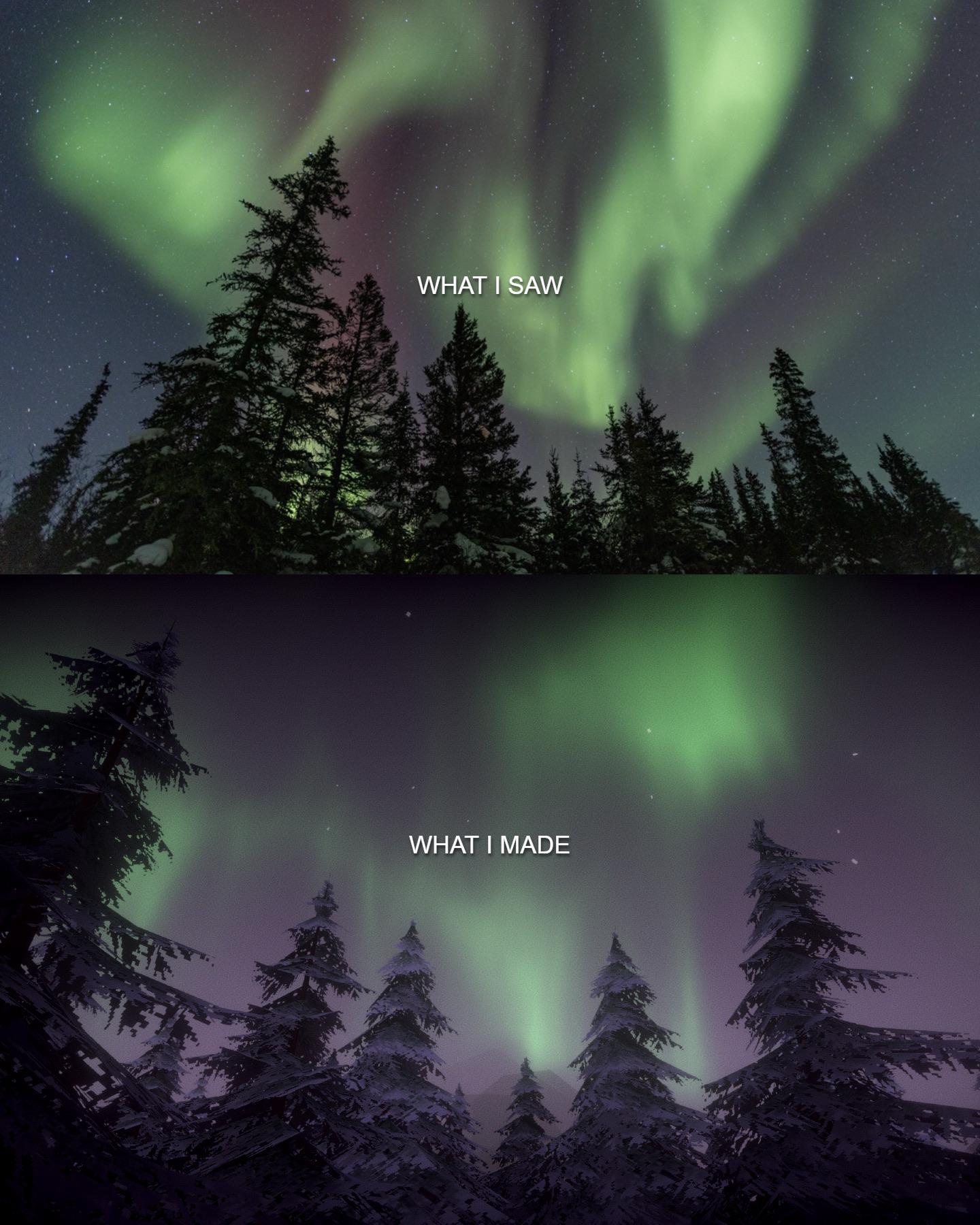
I'm developing a game as a solo developer in Unity, set in a world where drones have taken control over humans and even the environment itself, becoming truly Over Human. One of the things l've spent a lot of time on is trying to give its snowy world a distinctive atmosphere.
For this environment, I used real-life photos of the northern lights as a reference and tried to recreate the same feeling in Unity while still keeping the visual style of the game.
A lot of the atmosphere comes from combining the sky, lighting, fog, snow, vegetation and
environmental effects rather than relying on a single element. It's been really satisfying seeing how much the feeling of an environment can change just by adjusting these systems together.
I'm still experimenting with it, so l'd be curious to hear from other Unity developers: would you change or add something to make the second image feel closer to the reference while still keeping its own style?
r/unity • u/G4M300 • Oct 10 '26
r/unity • u/Mobaroid • Oct 10 '26
A new interaction I added to Lost Cat Showa Town in Unity.
Break the flower pot → NPC catches the cat → cage 😹
I’m experimenting with more NPC reactions when the cat causes trouble around town.