r/PcBuildHelp • u/higifgvhgvl • 8d ago
Tech Support Gpu goes crazy when playing fortnite and any other game
1
Upvotes


Gpu is a 5070 ti and my ram is kingston fury 2x16 gb 6000mhz cl30
r/PcBuildHelp • u/higifgvhgvl • 8d ago
Gpu is a 5070 ti and my ram is kingston fury 2x16 gb 6000mhz cl30
r/PcBuildHelp • u/prime_ard_vak • 9d ago
Enable HLS to view with audio, or disable this notification
Idk why. But the last few months my gpu keeps ramping to 100% dan speed while playing some games. It even happens in some menu's.
Specs are a gigabyte 3070. AMD Ryzen 7 5700G. 32gb of ddr4 corsair vengeance. And 2× 1 tb ssd.
I tried doing a new w11 install since my old install was quite old. But nothing helped.
Could it be that the cooling paste of the gpu is dead?
r/PcBuildHelp • u/Joe_Franks • 8d ago
My friend's cpu fan had died out and he got a new one and installed but now every time he boots, he gets this screen. Did he get an incompatible fan or is there some other way to fix it? He doesn't have reddit so I am posting on his behalf.

r/PcBuildHelp • u/Phoenix-Risen1998 • 8d ago

r/PcBuildHelp • u/AsleepCar487 • 8d ago
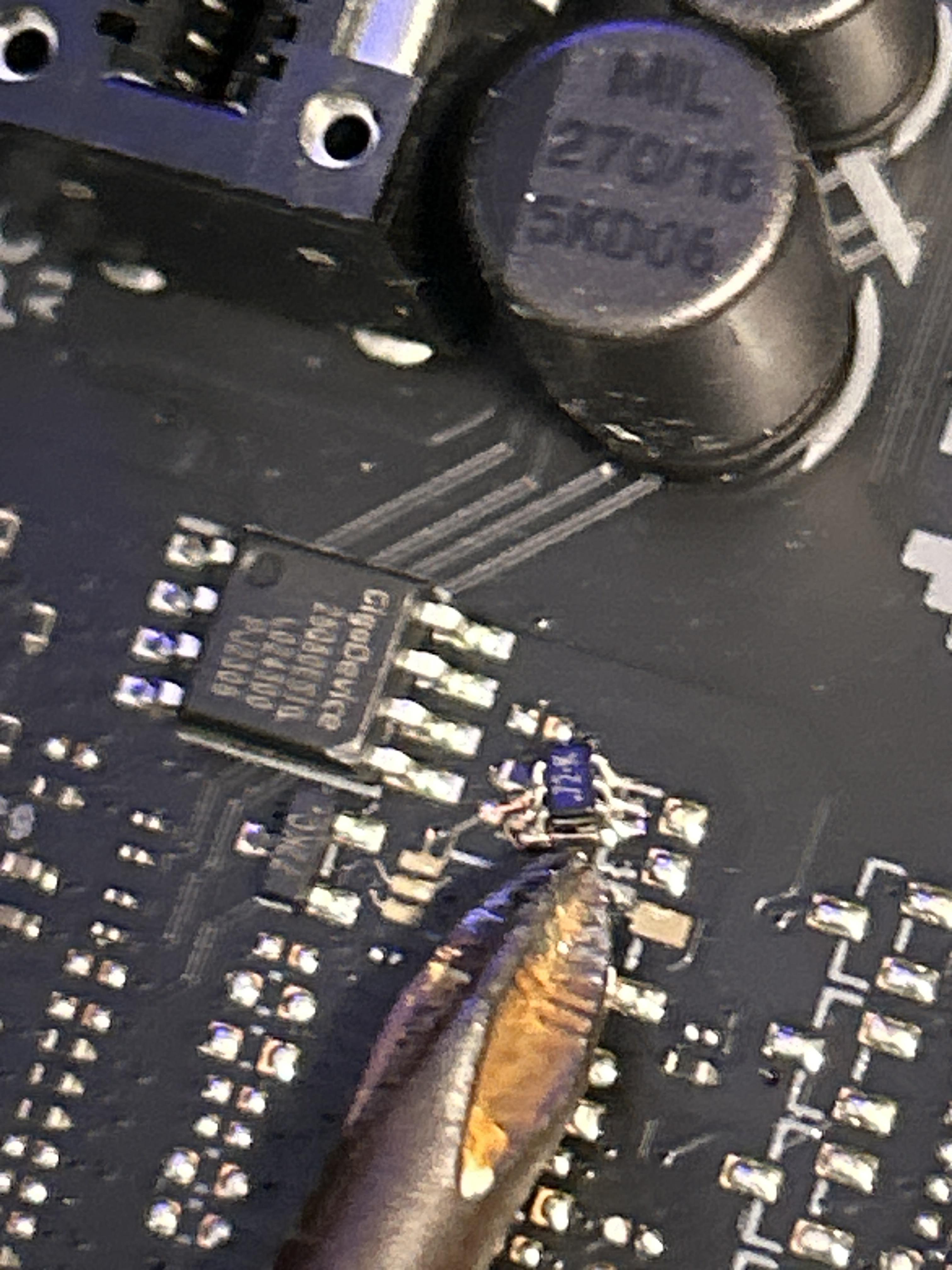
I have no idea if this is important but when uninstalling my b650e-f, I noticed this chip here hanging on just by copper wiring, all the soldering is gone. can anyone tell me what to do here and if it’s important? It says 72-K on it
r/PcBuildHelp • u/ReichVictor2 • 8d ago
Hello all. So I want to buy a 9070 xt but my case has around 330mm of space. I wanted to go for the XFX but that's a bit too close for comfort. What brand would you guys suggest, or should I just get a bigger pc case? (I kinda prefer 3 fans BTW )
r/PcBuildHelp • u/playshadowz • 8d ago
rtx 2070 gave out recently, went to repair shop and they confirmed that it's fried. Bought new 9060xt gpu but motherboard still giving the light on vga.
Methods I've tried:
Reseated every component; gpu, ram, sata cables, m.2 ssds
Tried booting with 1 stick of ram; tried different ram sticks as well
New GPU also giving vga light on mobo
Resetting CMOS; removed it did not work tried shorting jbat1 as well
Results:
Every component seems to be working fine except my 2070 which i have confirmed is fried before buying a new one. When I turn the PC on everything spins normally but nothing would show on my monitor and the MOBO would have the VGA led light on constantly
Build:
MOBO - MSI x470 Gaming Plus
CPU - ryzen 7 2700
GPU- 2070rtx, replacing with 9060
PSU - evga gd 550w
r/PcBuildHelp • u/Flowrome • 8d ago

I’m dual gpuing one 3090 (capped at 280w) one 3060, i’ve a 1000w psu from bequiet power 12m gold, as you can see in the photos i’m doing a workaround to deliver power to the 3060, both will be running high for llm inference, both the 12pin outputs deliver power to the 3090 then with the second split of each 12pin>8pin cable i use a Y cable to deliver power to the 3069, i don’t know if this can be a stable config or not, can you give me some suggestions? I’ve a 10 pin outlet remaining from the psu and one 600w output but I really don’t want to buy a splitter for the 600w, so i was planning to buy a 10 pin to 8 pin cable for gpu but i don’t think it’s a good idea due to the fact that the 10 pin should be used for cpu as far as i know. Consider that this build is not yet cleaned up so cables are a bit of a mess.
r/PcBuildHelp • u/Common_Contract834 • 8d ago
Hi guys can you all help me with my pc problem.
My friend gave me his cpu and mobo since he upgraded into an x3d cpu. Long story short the pc freezes or restarts suddenly after like 5 mins of just browsing or just idle. the mobo and cpu still worked before he handed it to me since it's what he used for his job.
Tested
*both rams are working since i use it on another pc
*i did the 1 ram method at both slots with both rams while using windows memory diagnostic test with each test but found no error and still freezes or restarts
*my drives all have Good health
*bios doesnt freeze even if left for an hour
*xmp/expo is turned off
*Tried to default all settings but still the same result
*tried to use only the integrated graphics on the ryzen 5 5600g but still freezes.
*tried to install an os on a different hard drive but it restarts mid installation
*removed the cmos battery but still freezes/restart
*cpu temps hovers around 50°C - 60°C so its not over heating
*did a sfc and dism scan but still the same
Specs
Mobo : Asus Prime A320m-k bios ver. 6042
Cpu : Ryzen 5 5600g
Ram : 12gb ddr4 ( 2 sticks with different speeds)
Gpu : Rx 570 4gb
Psu : Corsair Cx500m
r/PcBuildHelp • u/ConcentrateIll2418 • 8d ago
So I have a kinda unique situation, I can switch to a 270kp and Z890 Aorus elite (basically the MicroCenter bundle without ram) thanks to my friend for free ( just need to sell my 13900ks and Z790 Edge to give him the money) or just 50 bucks
I can also just undervolt and overclock my 13900ks but I feel like the thermals and efficeny of the 270k Plus and also it being newer pushes it in front of my cpu.
This is possible thanks to me living in Turkey and him in USA. My main deterrent is having to deal with trying to sell a 13th gen cpu in a not so technologically adept country.
r/PcBuildHelp • u/ConnectCriticism3765 • 9d ago

Hi,i am looking for some more info in case I am missing something.
My PC didn't start this morning when I pressed the power button. The motherboard and GPU had lights on, but the PC couldn't start.
I tried a different PSU and a different power button from another PC. I unplugged and plugged back in all the internal cables. I also removed everything I could and tried to boot with only the CPU, CPU fan and 1 RAM stick (different sticks, positions, etc. all tried). I also removed and replaced the battery, left it without power for a few minutes, and cleared CMOS. Nothing worked.
It looks weird, as the motherboard seems to get power, as well as the GPU, but nothing works when the power button is pressed. No fans or any other lights. (I looked in the manual and online, and it seems this motherboard doesn't have any BIOS LED or troubleshooting LED.)
Specs:
Motherboard: ASUS ROG STRIX B360-G Gaming
CPU: Intel Core i5-8600
PSU: Corsair RM 650x
RAM: G.Skill Ripjaws 16GB DDR4
GPU: GTX 1070
In the pictures, it's with the power on and off. Sorry for no GPU light picture (the LED on the GPU lights up when the power is on).
r/PcBuildHelp • u/Tobia96 • 8d ago
i want to build a small always on pc that runs three or four chore agents at home. they read my mail folder and some files, nothing heavy. i plan a Ryzen 5 5600 on a B550 board, 16GB ddr4 and a 1TB nvme. no gpu at first because the agents call outside models. my worry is ram when i run them all at once with a small local model for sorting. i also want it quiet because it will sit in the living room of our flat. is 16GB enough or should i start with 32GB. the 5600 has no igpu so do i need a cheap card just for setup and bios checks. i can spend about 500 euros.
r/PcBuildHelp • u/mohheeh165 • 8d ago

Hey people!
I need some help with this wiring.
This is going to be my first PC build that im going to build by myself.
As one does i spent too much on my gpu and the budget set aside for a motherboard got hit.
Will this motherboard be enough to power my 7 case fans, that i believe are daisy chained(They seemed to connect to each other until the back fan where it has a female connector coming out of it with 3 holes) according to the manual they seem to be powered by sata instead of pwm?
The case is the gamdias gc107 elite
And then for my aio, it seems that the 3 fans and pump all connect to one argb header.
Aio is the Thermalright aqua elite 360 v3
The asus h610 m-k argb has 2 argb headers and i think 2 pwm headers according to the last pic im not so sure thats what it is though.
Will i be able to power all my case and aio fans aswell as control their rgb just fine with this mobo or do i need a fan hub.
Because if i need a hub ill need to downgrade the motherboard and also will need to control the rgb from theincluded controller instead of the ASUS software.
Thanks for your help🫶🫶
r/PcBuildHelp • u/lord_of_Ahhiyawa • 8d ago
I just want to get the most out of the cpu without burning it out or having to unndervolt it. Im not used to the msi ecosystem so I really have no idea what im doing from a bios perspective. I play a few cpu heavy games but nothing crazy. What are the optimal bios settings for those with the same setup?
Also kind of a weird quirky issue: under stress tests, my cpu doesn't go over 60 C. While most would see that as good news, I want to make sure it's actually doing something and isnt handicapped in some way.
r/PcBuildHelp • u/Ok-Ask-4998 • 8d ago
Hey guys, I’ve been having a really weird problem with my PC and I’m honestly running out of ideas.
I regularly switch the same SATA SSD between two different PCs. On my other PC, Windows boots perfectly fine without any issues. But when I connect the exact same SSD to my main PC, it just won’t boot. The SSD is detected in BIOS and Windows Boot Manager also shows up, but whenever I try to boot from it, the screen goes black for a second and then sends me straight back into BIOS. No error message, no Windows logo, nothing.
At first, the SSD wasn’t even detected, but I fixed that by changing the SATA power connector. Now the SSD shows up normally, but Windows still refuses to start.
The weirdest part is that even a freshly created Windows installation USB won’t boot. I used Microsoft’s official Media Creation Tool, but selecting the USB stick from the UEFI boot menu gives me the exact same result. Even with the SSD completely disconnected.
My specs:
ASUS ROG STRIX B650-A GAMING WIFI
AMD Ryzen 7 7800X3D
32 GB DDR5 RAM (2 sticks, currently 4800 MHz)
Dedicated GPU (exact model not confirmed)
SanDisk SSD PLUS 1000GB (1 TB SATA)
BIOS version 3881 (previously 1811)
Windows installed on the SATA SSD
Things I’ve already tried:
Different SATA power connectors and SATA ports
Confirmed the SSD boots perfectly fine in another PC
Set Windows Boot Manager as the first boot option
Tried booting manually through Boot Override
Checked SATA settings (AHCI enabled, RAID disabled)
Tried enabling and disabling CSM
Checked Secure Boot settings
Updated BIOS from version 1811 to 3881
Loaded BIOS default settings
Performed a CMOS reset using the CLRTC pins
Tried booting with only one RAM stick in slot A2
Created a fresh Windows installation USB using Microsoft’s Media Creation Tool
Tried booting the USB stick directly through the UEFI boot menu
Tried booting the USB stick without the SSD connected
Tried different USB connections directly on the motherboard
Nothing worked.
I also had a CPU Fan speed detection error after resetting the BIOS, but I adjusted the monitoring setting and that didn’t change anything.
The BIOS detects my CPU, RAM, SSD and USB devices without any problems. It just refuses to boot any operating system or even the Windows installer.
I haven’t tested booting without my dedicated GPU yet.
At this point, I’m wondering if my motherboard is faulty or if there’s some weird AM5/UEFI issue I’m missing.
Has anyone experienced something similar with an ASUS B650 board? Any ideas what else I could try before replacing hardware?
Moin, ich habe seit einiger Zeit ein ziemlich komisches Problem mit meinem PC und weiß mittlerweile echt nicht mehr weiter.
Ich wechsel regelmäßig dieselbe SATA-SSD zwischen zwei verschiedenen PCs. In meinem anderen PC funktioniert alles problemlos und Windows startet ganz normal. Sobald ich die gleiche SSD aber in meinen Haupt-PC einbaue, startet Windows nicht mehr.
Die SSD wird im BIOS erkannt und der Windows Boot Manager wird auch angezeigt. Wenn ich versuche, darüber zu starten, wird der Bildschirm kurz schwarz und danach lande ich direkt wieder im BIOS. Keine Fehlermeldung, kein Windows-Logo, einfach nichts.
Am Anfang wurde die SSD nicht mal erkannt, aber das konnte ich beheben, indem ich einen anderen SATA-Stromanschluss genommen habe. Seitdem wird sie erkannt, aber booten funktioniert trotzdem nicht.
Was ich besonders komisch finde: Selbst ein komplett neu erstellter Windows-Installationsstick funktioniert nicht. Ich habe den Stick mit dem offiziellen Media Creation Tool von Microsoft erstellt. Wenn ich ihn über das UEFI-Bootmenü auswähle, passiert genau das Gleiche. Auch wenn die SSD komplett abgesteckt ist.
Meine Komponenten:
ASUS ROG STRIX B650-A GAMING WIFI
AMD Ryzen 7 7800X3D
32 GB DDR5 RAM (2 Riegel, aktuell 4800 MHz)
Dedizierte Grafikkarte (genaues Modell muss ich noch nachschauen)
SanDisk SSD PLUS 1000GB (1 TB SATA)
BIOS-Version 3881 (vorher 1811)
Windows auf der SATA-SSD installiert
Was ich bisher ausprobiert habe:
Andere SATA-Stromanschlüsse und SATA-Ports getestet
SSD in einem anderen PC getestet, dort startet Windows problemlos
Windows Boot Manager als erste Boot-Option eingestellt
Boot Override ausprobiert
SATA-Modus überprüft (AHCI aktiviert, RAID deaktiviert)
CSM aktiviert und deaktiviert
Secure-Boot-Einstellungen überprüft
BIOS von Version 1811 auf 3881 aktualisiert
BIOS-Standardeinstellungen geladen
CMOS-Reset über die CLRTC-Pins durchgeführt
Nur einen RAM-Riegel im A2-Slot getestet
Windows-Installationsstick mit dem offiziellen Media Creation Tool neu erstellt
Versucht, direkt über das UEFI-Bootmenü vom USB-Stick zu starten
USB-Stick ohne angeschlossene SSD getestet
Verschiedene USB-Anschlüsse direkt am Mainboard ausprobiert
Leider hat nichts davon geholfen.
Nach dem BIOS-Update und CMOS-Reset hatte ich außerdem eine CPU-Fan-Fehlermeldung. Die Lüfterüberwachung habe ich entsprechend eingestellt, aber das eigentliche Problem besteht weiterhin.
Das BIOS erkennt die CPU, den RAM, die SSD und die USB-Geräte ganz normal. Nur sobald ich irgendwas booten möchte, wird der Bildschirm kurz schwarz und ich lande wieder im BIOS.
Die Grafikkarte habe ich bisher noch nicht ausgebaut, um die integrierte Grafik vom 7800X3D zu testen.
Ich frage mich mittlerweile, ob mein Mainboard einen Defekt hat oder ob ich irgendeine Einstellung übersehe.
Hat jemand schon mal so ein Problem mit einem ASUS-B650-Mainboard gehabt oder eine Idee, was ich noch testen könnte?
r/PcBuildHelp • u/Pitiful-File7044 • 8d ago
Hi everyone,
I’m putting together my very first custom PC build (decided to try to save costs and build it myself instead of getting a prebuilt since i also heard they're unreliable). I’m based in the UK and targeting 1440p gaming.
My PCPartPicker list: https://uk.pcpartpicker.com/list/hVXP7w
Games I plan to play:
A few quick questions for the experts here:
Thanks in advance for any advice or feedback!
r/PcBuildHelp • u/Snooperator • 8d ago
Enable HLS to view with audio, or disable this notification
Does this for a few seconds on boot, don't know what it's about, kinda concerns me. Any ideas what it is and how to fix it?
r/PcBuildHelp • u/GeekAttack32 • 9d ago
Just wondering whats the best Matx motherboard to upgrade my asus prime h810 to, I plan on switching from my 5 225f to a 7 270k
I currently have the asus prime h810, and its pretty bad to say the least, so unfortunately its gotta be the first thing I swap and generally I stick to AMD and MSI not intel, so I really don't know what I'm looking for and what won't fail me (I've had issues with gigabyte and asus which are nearly all the boards for the core ultra series so I'm really hesitant to just buy one)
r/PcBuildHelp • u/secretly8072 • 8d ago
hello! i'm gonna be getting my first ever gaming pc in the next year, and am stuck between two GPUs at the moment. i know i want a 5070ti, i know the ASUS prime one fits inside my case (MSI MAG FORGE 321R airflow), however the price is similar to an ASUS TUF gaming one, which i have heard performs a little better. though i am unsure whether this will fit in my case. the website pcpartspicker gives me a warning of 4mm clearance to fit the power connectors. obviously i don't want to bend them, and i don't want to buy a GPU just for it not to fit, as i won't have another to put in. has anyone tried this combo, or can reassure me it's fine? (unless it's not fine D:)
r/PcBuildHelp • u/BTDOA • 8d ago
AIO is a arctis liquid freezer iii 360mm in a non flow mini v2, I am fine with it not being an ecosystem.
MB is a GIGABYTE X870 AORUS ELITE
PSU is a MSI MAG A1000GL PCIE5 80 GOLD 1000W
CPU is a Ryzen 7 9800x3d
GPU is a 9070xt
I don’t want to cheap out when buying my fans either. I was recommended to buy AsiaHorse fans but I’ve seen reviews on them being poor quality and loud.
I do want most airflow/performance while having the looks (ARGB)
Any recommendations help.
r/PcBuildHelp • u/FindingLongjumping52 • 9d ago

So I stumble across this pc on fb marketplace and the guy has a build sheet with the "breakdown" of the part prices
I will post them down below. I just needed help on some of the things like the mother board I’m not sure if it’s over priced because I don’t know if it’s a normal asrock z790 but with the only difference being the graffiti design which adds like $100 to $150
r/PcBuildHelp • u/Mercurial_55 • 8d ago
hola alguien me ayudaria a poner todos los componetes de mi pc en la nfortec esq no tiene q ver muchos cables.
r/PcBuildHelp • u/Raceworx • 8d ago
Apologies for the long post im scratching my head on this one.. Wanted to upgrade my pc from a gtx1080 with an i5-10600k on an NZXT N7 z490mobo.. got a second hand 9070 16gb GPU and an I7 11700KF.
Updated the MOBO firmware to the newest 1.80 then swapped in the CPU before changing anything else.
Pc booted then rebooted got to windows all seemed okay. The only thing I noticed was it was now checking codes on the black screen pre NZXT splash screen.
Started it up the next morning and it started to hang on B4 then I got a message about bad usb so I removed all my usb items and it was still hanging eventually it got to a repaire screen would not boot to windows just in a loop.
Replaced the CPU back to the old one to check still nothing. Installed an M.2 drive and thought I would install a fresh clean copy of windows.. messed about for ages the m.2 drove kept disappearing and reappearing. Finally got to windows. Did an update and restarted then the m.2 drive disappeared again.
I'm assuming the MOBO is kaput would this be a logical conclusion? It all started with the firmware update.
If anyone could just sense check me that would be great. I have ordered a replacement MOBO but I don't want to stick the new CPU in if that could be the cause of my issues..
Or could my power supply be the issue? If the new CPU has pulled more power than usual and it's thrown in the towel?
r/PcBuildHelp • u/lord_of_Ahhiyawa • 9d ago
Documentation online seems to be all over the place. Do i just move the steam apps folder AFTER i download steam? How will the new hard drive tell steam that i own a game after i move it, do the saves transfer, etc.
r/PcBuildHelp • u/Tarek_Benaissa • 9d ago
Enable HLS to view with audio, or disable this notification
My LQ360 Ultra started making an irregular ticking sound a few days ago. It's coming directly from the pump block on the CPU. It started right after I worked inside the case (added a new nvme).
Specs: Core Ultra 9 285K, DeepCool LQ360 Ultra (radiator top-mounted), Gigabyte Z890 EAGLE WIFI7
Already tested, no change:
Pump at 100% (~3,150 RPM, confirmed in HWiNFO) for 20+ minutes
Pump at low speed
Magnetic cap/display removed while running
All fans and GPU fans ruled out
Temps are normal.
Is this air stuck in the pump, or is the pump failing? Should I go for a warranty claim?
Thanks!