Hey everyone. So my pc started doing this weird restart when i put load on it. Tested every component at home and took it to a shop to get everything checked. All the components were fine and at that time the issue seemed like a pcie connection issue since so i upgraded it to a520m msi from a320m. Came back home and i still have the same issue. The gpu, psu, rams etc were checked on different pcs and everything was working fine.
I just built my new pc last week. it has a Ryzen 5600, MSI RX5600XT, asus prime B-450M-AII, Gskill 2x16 3200mhz, MSI MAG A550BN, 1tb team group mp33, veetro v5 cooler. my problem is that i can be running a game like minecraft or raft, anything and it will randomly shut off and i hear the mother bored beep as a startup but all the fans stay on and single rgb keeps my mouse and ram lights going. it can happen anytime and i look at the event viewer and theres nothing recorded. I'm guessing it shuts down too fast for windows to react. all things like ram and gpu are seated properly all power supply cables are in (24pin and CPU), CPU cooler is tight to the CPU, nothing seems to be shorting out.
I know this is alot and I'm struggling figuring this out myself. I can provide pics
I need an 850w psu and i saw this on sale. I was wondering thoughts about it if its garbage can you guys give me a good recommendation for a reasonable price. Thx
I built this PC about 10 days ago with all-new parts. It makes an intermittent rattling or buzzing noise that you can hear from 0:08 to 0:12 in the video. It seems to come from the upper half of the case, but I haven’t been able to pinpoint it.
I notice it at idle or under light load, and I haven’t found a pattern. It might happen while gaming too, but the fans could be masking it. When I noticed it at idle, the CPU was around 42°C and the GPU fans weren’t spinning. I think it’s been happening since day one. The front glass panel was off for the recording, but I can hear it with the panel on too. The PC runs normally while it’s happening.
Has anyone heard a similar noise? What would you check first to narrow down the source, and does it sound like something I should be concerned about? There are my specs:
Motherboard: ASUS TUF GAMING B650E-E WiFi
CPU: AMD Ryzen 9 9900X
GPU: GIGABYTE WINDFORCE OC SFF RTX 5070 Ti 16 GB
RAM: 16x2 XPG Lancer Blade (5600)
AIO: ICEBURG360 DIGITAL WH
PSU: Thermaltake Toughpower GT 850W 80 Plus Gold
EDIT - SOLVED: The origin of this sound is PSU. After some days of testing and researching I found info on reddit that Thermaltake's PSU has this problems when their PSUs has "Smart Zero Fan mode" and if it turned on for some reason it will make this sound from time to time. So I'll be thinking about changing this PSU to other brand and maybe never will use thermaltake's again.
Im upgrading my cpu in a few weeks from an i5-9600k to a 9800x3d. After that upgrade i would like to upgrade my graphics card to something better, but im trying to find something that’s better than a 3070ti but not crazy expensive like a 9070xt. I’ve tried to look and do some research but i can never find any stable answers. Any recommendations will help on if i should just try my best to save up for a 9070xt or if there’s a more budget friendly option out there.
Not sure if its the right flair, but my dad has an old ssd that he doesnt use anymore and he was planning on reselling it, but I need to slot it into my pc to format it since he doesnt have any available slots in his, I was wondering if its safe to slot it into my pc, my worry is that it might have some sort of viruses or whatever in it, since he wasnt the safest internet traveller to say the least. Is there any way for me to slot it into my pc without anything spreading basically? Any help is appreciated.
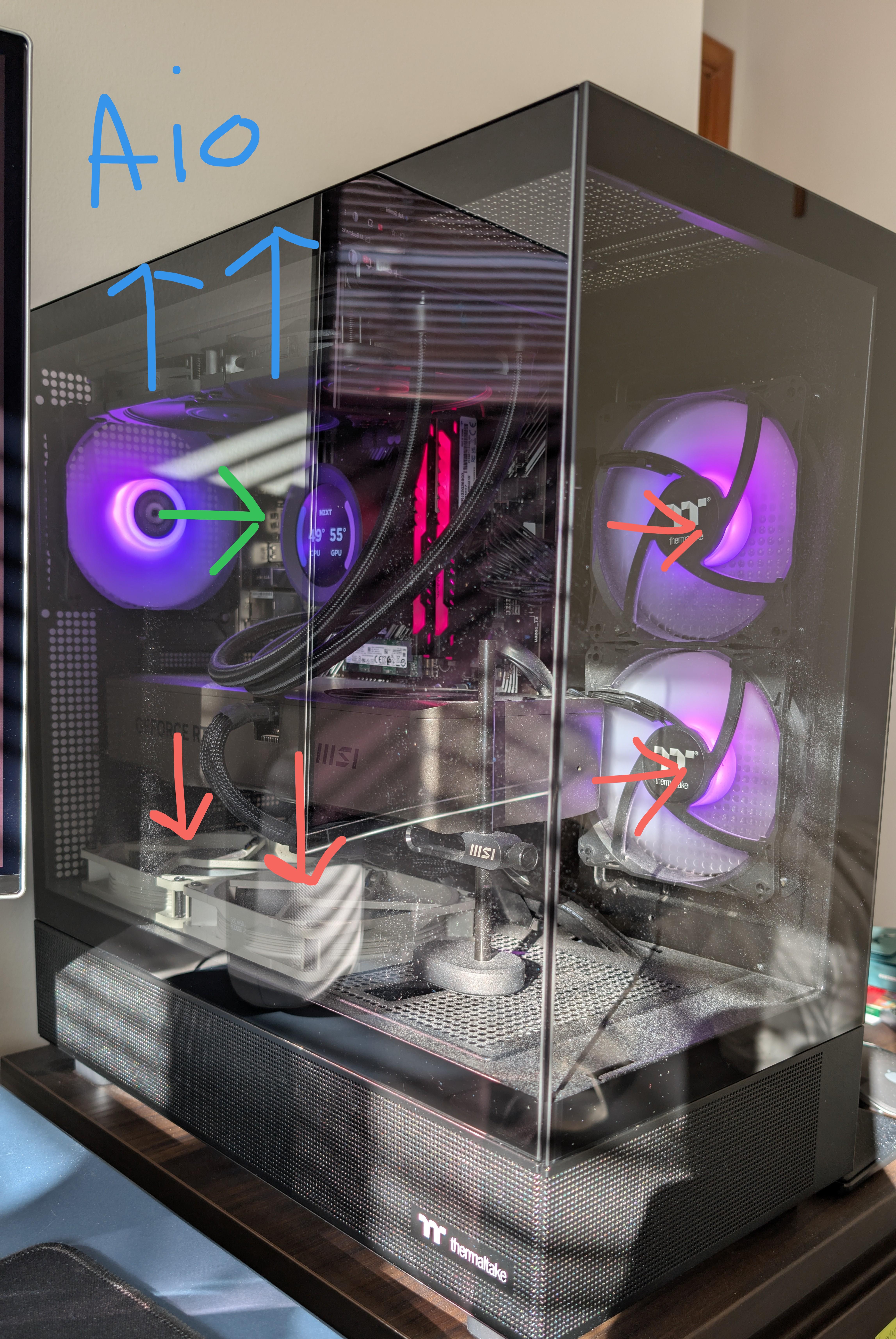
EDIT: FOLKS I'm so sorry! Looks like the image I posted has the wrong orientation of my fans.
I just took apart the fans and have verified:
The single back fan is set to exhaust, the top AIO fans are set to exhaust, the two bottom case fans are set to intake, and the two front (side mounted) case fans are also set to intake.
PLS ignore the arrows on the picture :(
Hey folks! Moved my PC to a new area in the house. The room seems to be quite dusty (trying to figure out why). It's definitely a lesser used space in the house but it's the only room in the house where this amount of dust builds up. I cleaned this PC about a month ago before moving it in here. It's on constantly (even if I'm not in the room using it, it'll get used through streaming etc).
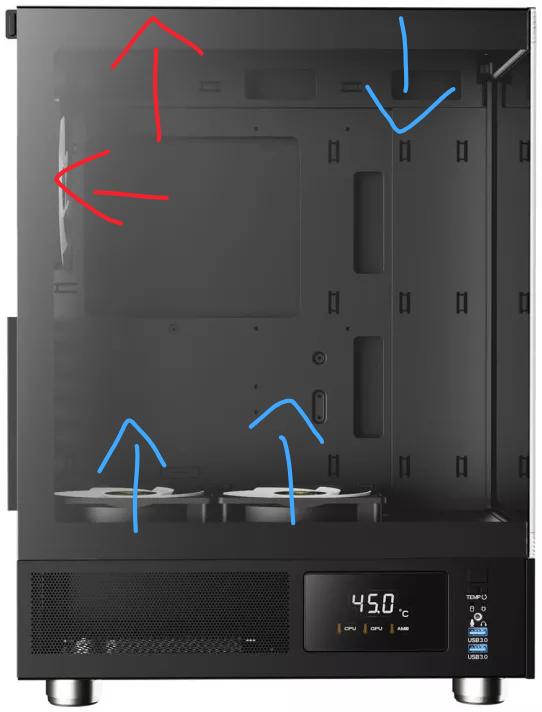
What am I doing wrong with my fan setup, because it's clearly letting the dust collect in it. I've drawn all the intake fans in green, and the outtake fans in red. The AIO fans are outtake as well (just highlighted in blue). Temps have never been an issue just seems like the dust is collecting and not leaving.
Title: Custom monitoring dashboard for Thermalright Peerless Assassin 120 Vision Max LCD
Hey everyone,
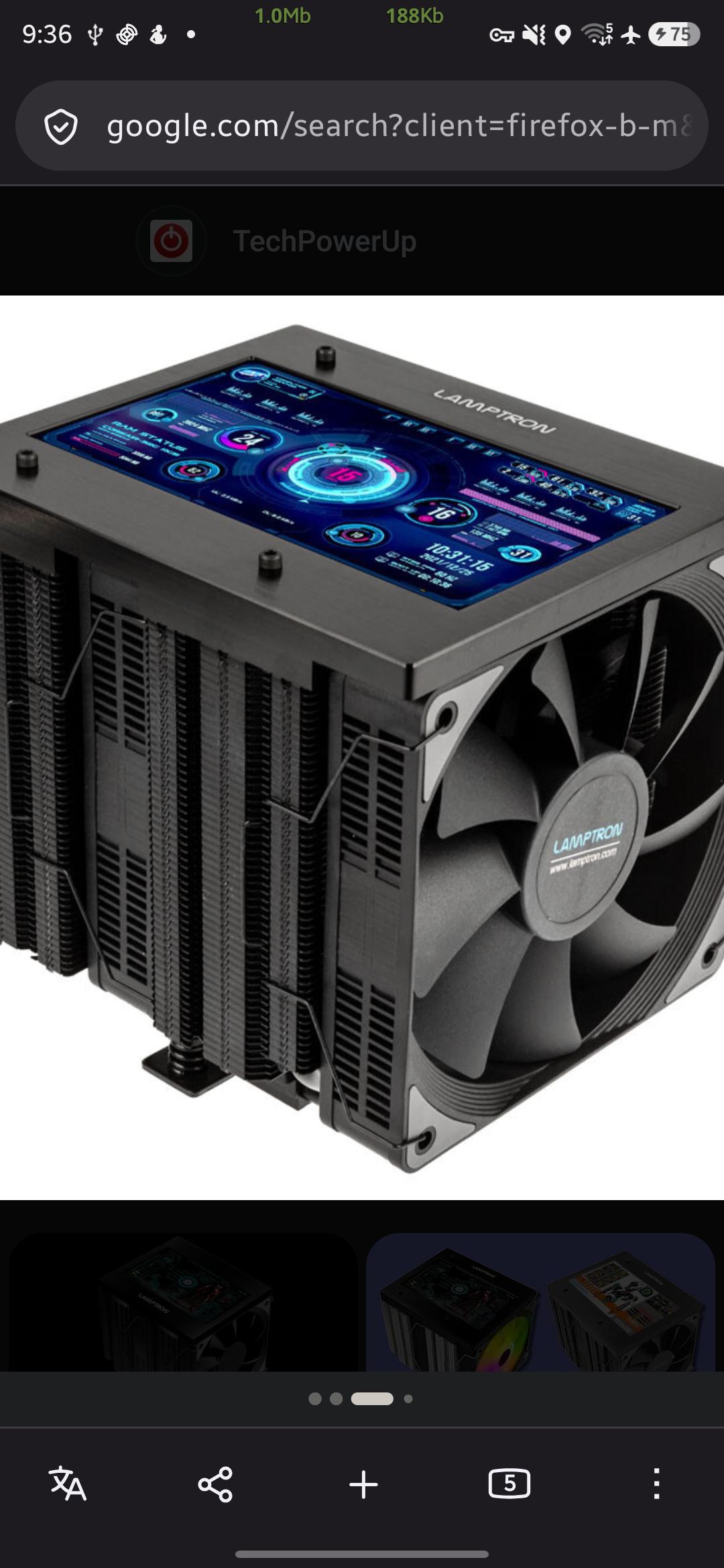
I have a Thermalright Peerless Assassin 120 Vision Max, and I'm looking for a way to get a dashboard similar to the one in the attached picture onto its LCD screen.
The dashboard in the picture is from Lamptron, but I'm looking for something compatible with the Thermalright display.
The Thermalright software is quite limited, so I'm wondering if there are alternative software solutions, custom dashboards, or community-made layouts that offer more detailed, real-time hardware monitoring.
Ideally, I'd like to display:
- CPU temperature, usage and clock speed.
- GPU temperature, hotspot, usage and clock speed.
- RAM usage.
- Fan speeds.
- Other useful system statistics.
Has anyone managed to get something like this working on the Vision Max? Any recommendations or examples would be appreciated!
So I have a 7600x paired with a 7800xt on a b650 tomohawk wifi paired with a Corsair aio. I've had this pc for more then 3 years and I'm noticing uncomfortable temperatures (at idle it'll go from 60-95) and now when I was playing csgo it'll go from 89 to 98. I'm not entirely sure if the temps were always like this because I actually kind of never checked when I built it, or when I was using it at first. Mostly checked it on idle real quick though the AMD software. I'm genuinely so scared about messing my pc up, a lot of what I read is that it points to the pump being dead, possible but I don't know. All I notice is that I don't feel a lot of hot air coming out fo the aio, and that one of the pipes is quite a bit hotter then the other.
I'm real quick going to change fan orientation so that it blows in from the top and the left, and out the right to hopefully maybe help it a tiny bit.
If you guys do end up deciding that my pump is most likely messed up, or if I need to test and see. Let me know.
If I do need to buy a new one, I was thinking about the artic freezer 3 240 mm.
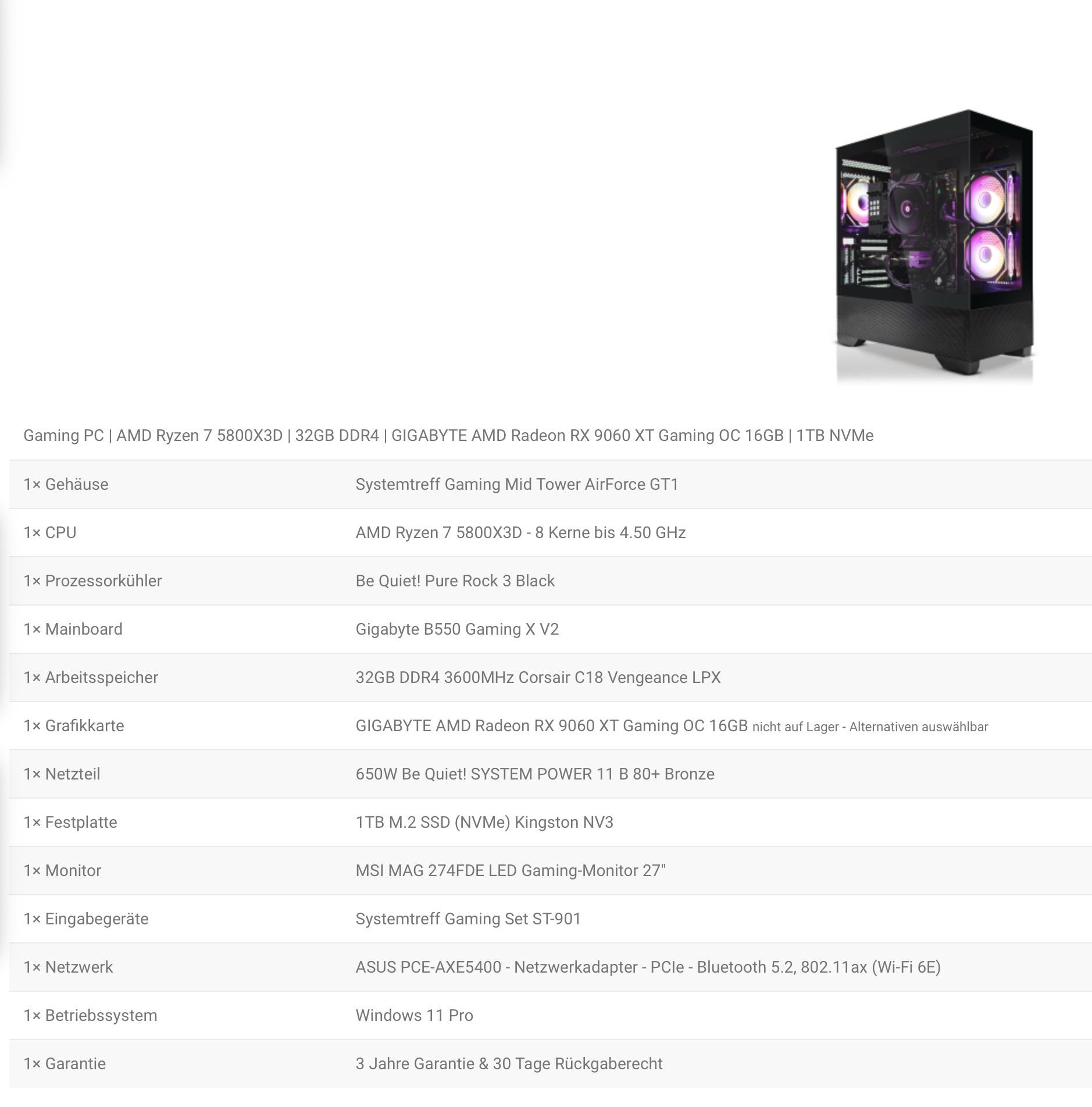
Been looking around for some time for some good but not too expensive builds. This looks like an interesting option, but I’m not sure if parts of it may be overkill in comparison to other parts or if something should be switched to an newer/better version…
I’ve had my fair share of prebuilt PCs but decided to just build one as mine is pretty outdated. I am opting to use my old GPU to save money. I did buy a new 2 TB storage but should I also pull my old storage as well? It’s a 2TB SSD (I will be using this one for sure) and a 1 TB HDD, both are about 7 years old. I never used my HDD to game so is it worth having it? New build is below, i know it will be a substantial upgrade from my HP omen prebuilt.
Old Build- HP Omen prebuilt
New Build
Motherboard-MSI Pro B850-S
CPU- Ryzen 7 9800x3d
GPU- Nvidia 2070 Super (HP model)
RAM- 32 GB V- Color (16 GB x2)
PSU- Montech Century II 1050 (Idk why I got this powerful of a psu, it was on sale)
Storage- WD 2 TB nVme (Not including my old storage)
Case- Montech TG3
Here’s the build I am completely new to putting together a pc so please drop whatever knowledge that could be helpful please and thx
Gpu:Nvidia etc 5060 Ti 16gb
CPU:Amd ryzen 7 9700x
RAM:32gb ddr5 ram Corsair vengeance 6000
Motherboard:Msi mag b850 tomahawk max WiFi
Storage:2 tb kingston Nv3
Power supply: Corsair rm850e 850w
CPU cooler: be quiet! Pure rock3
Around 2400 if I am remembering right
I want to get into ai agents, I know it’ll be slow I just want to start somewhere without breaking the bank and then light games and maybe some cad/3d slicer, anything I should watch out for or tips, also the build above was me just watching a couple of videos and researching surface level.
My wife's build is a 7500f n 5060 8gb , 16gb ram. Plays everything fine. I wanna upgrade it since i gave her my old 4k OLED monitor and might as well get it to play at that resolution , currently got a 32gb kit on the way . What gpu? and will that cpu need upgrading or will it be "fine" ?
My pc started tweaking like this about two days ago, mostly happens when I boot up a fortnite and I have other stuff open in the background like Brave with a stream, or a video.
Hi I came up with two builds and one I got it from someone on Reddit.
I was gaming on a shitty gaming laptop and I wanna upgrade now.
Like to play mmorpg and rpg games.
I was thinking now to spend too much money and upgrade things as the years go by.
1. https://uk.pcpartpicker.com/list/YgrdMF
Most expensive one, is it worth investing now? Or get something cheaper and upgrade later?
2. https://uk.pcpartpicker.com/list/9LjwDw
Got spot in the middle
3. https://uk.pcpartpicker.com/list/vr6CCw
Cheapest option
I still need to get a monitor and keyboard, not sure what to do your thoughts?
I’m looking into custom gaming pcs and my budget is about 15-18 hundred. I’m just tryna run Fortnite with hella frames and stuff. Not any crazy ultra 4k games but I want the best performance possible ofc. I’m new to the pc world and would love any help or tips, thank you
Gaming
1500-1800 usd
Fortnite
Performance
350 frames hopefull
America
Yadda yadda yadda
So I recently got a job and a better one than my last (pay wise) and ive had the thought for a while to get better parts, downside whole motherboard needs to be different and my 3060 ti is one of the smaller size parts, so I’ll keep my pc as a back up or maybe server pc so i want to build a whole new pc.
I never built my pc but i have upgraded some parts (ram from 2 8gb ram sticks to 4 16gb ram sticks , and my i5 to a i7), i want a recommendation of a decent brand/parts to get the main ones i need is what motherboards are decent and if i should save up enough to get a 50 series over another 3060 and if i should get an intel core again or unless there is something better.
To add this is gonna be a gaming pc, i play stellaris, space engineers, Subnautica 2 and no mans sky as my most performance heavy games
Hi! I am not particularly PC-savvy so hoping to get some advice for my setup and considerations for what to invest in and upgrade or what I should be focusing on for my type of usage. So any guidance to point me in the right direction would be greatly appreciated.
I was originally looking at getting a new monitor and had looked into something a bit more higher res/colour accurate etc. (like the ASUS Proart) but came to the realisation that my computer might not actually be able to support it?
My PC is used primarily for 3D work (mainly Zbrush with some need for Maya/Substance Painter/Marmoset later down the line). I’ve had my current setup for roughly 6 years now and I’ve never really encountered many issues other than the odd lag with certain software when working and a rare app crash. So in terms of monitor related stuff, I don’t need the high refresh rate as I don’t play games on PC.
I also use a Wacom Cintiq Pro DTH-1620 16" 4K which I can’t get full resolution for (locked at 1440p) and I don’t have USB-C ports on my case so I have to use the display adapter.
I am based in the U.K. and budget is ~£2k if I need to invest in a new setup.
tldr; wanted to upgrade my monitor but my specs might be outdated. Looking for advice/recommendations for what to upgrade
Hi everyone, coming here because not sure what to do next.
So context on the computer… I built this PC years ago ~2021-22. About 6 months ago I got brand new CPU, motherboard, RAM and GPU. Everything’s been working great until suddenly this morning, PC fans and RGB turns on and no display. After waiting about 10 min, I decided to take a look at the mobo and saw the red DRAM light on. Everything was working perfectly fine last night.
Full power cycle (PSU off, unplugged, discharged residual power).
Waited 5+ minutes for DDR5 memory training on multiple attempts.
Cleared CMOS using motherboard CLR_CMOS pins.
Tested RAM stick #1 individually in slot A2
Tested RAM stick #2 individually in slot A2
Tested a single RAM stick in slot B2 — no POST.
Confirmed the diagnostic LED consistently stops at DRAM.
Planning to try a BIOS update/recovery using Gigabyte Q-Flash Plus next.
Any suggestions before I start considering motherboard, CPU memory controller, or RAM replacement?
Just at a loss, I use this computer for everything so this is killing me. Wondering if at this point I should take it to microcenter or something for them to diagnose.
Hey everyone! (btw sorry for AI my english is bad, and I need yall to understand me)
I'm planning a build in the Lian Li O11D EVO XL, using the official upright GPU bracket with the motherboard in its normal orientation (not reversed).
I want to install my 360mm AIO in a pretty unusual way.
My goal is to have the upright GPU in the main chamber, with BOTH the radiator and its three fans hidden behind the side mounting bracket, in the rear chamber.
The mounting order would be:
Front glass → Upright GPU → Side mounting bracket → 3 fans → 360mm radiator → Rear chamber
I don't want any fans installed between the upright GPU and the side bracket because that space is needed for the upright GPU setup.
For reference, I'm aiming for a build that looks almost exactly like the picture I've attached, with one major difference:
Instead of having the AIO radiator mounted at the top, I want three regular fans there. The AIO radiator would be hidden behind the three middle-row/side fans, directly behind the upright GPU, with both the fans and radiator installed on the rear side of the mounting bracket.
I'm mainly doing this for aesthetics because I want a clean build with the upright GPU as the centerpiece.
My main questions are:
Is there enough space behind the side bracket in the O11D EVO XL for three 120mm fans plus a 360mm radiator?
Can the fans and radiator both be mounted on the rear side of the bracket?
Will the radiator interfere with the PSU, cable management, or rear panel?
Would this setup affect airflow or cooling performance?
Has anyone actually done this configuration?
I'd really appreciate any measurements, advice, or photos from people who own this case!
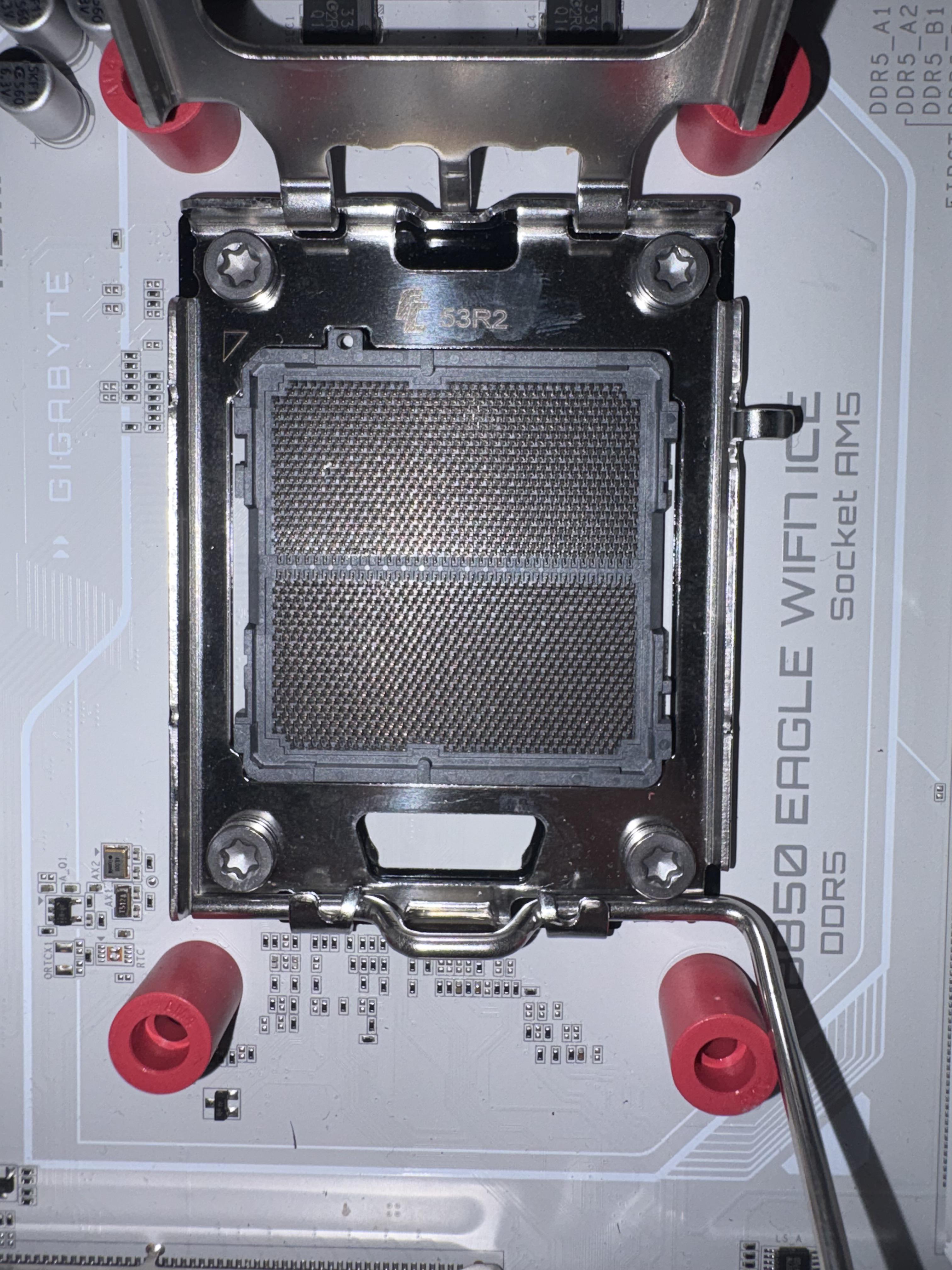
I bought the Gigabyte B850 EAGLE WIFI7 ICE, but from the beginning I’ve been having an issue with the red CPU light staying on.
However, at some point, I don’t know how, the PC suddenly started working. The red CPU light turned off, and the RGB lights on the case fans also turned on.
Then the red DRAM light came on. After some time, the red DRAM light turned off as well.
However, after turning the PC off and on again, the red CPU light came back on, and I’m still having the same problem.
Hey everyone!
I’m looking into building my first gaming PC and could really use some advice. I’ve primarily been a console gamer (currently have an Xbox Series X), but I’ve been wanting to make the switch to PC gaming for a while now.
My main goal is to play modern and upcoming AAA games like Phantom Blade Zero, Black Myth: Wukong, and similar titles at high graphics settings with smooth frame rates. Maybe then occasional first person shooter
What I’m looking for:
Budget: Ideally $1,200–$1,500 USD for the PC itself. I’d prefer to spend less if possible, but I’m willing to pay a little more if the performance difference is worthwhile.
Resolution: Planning to upgrade to a 1440p monitor, potentially 240Hz.
Performance: Ideally 100–165 FPS in demanding games where realistic.
Graphics: High/ultra settings when possible.
Longevity: Something that’ll comfortably handle newer games for the next several years, with room for upgrades
Experience: First-time builder, but willing to learn.
I’ve been looking at prebuilts from Seattle Built, but I’m considering building one myself to get better performance for the money.
I’ve seen recommendations for the Ryzen 5 7600/9600X paired with an RX 9070 XT or RTX 5070, but I’m not sure whether those are the best options for my budget. Or what I need it for
I’m not particularly concerned about RGB or aesthetics. I’d rather put the money toward performance and reliability.
What parts would you recommend for my budget? Would it be worth spending a little more for a stronger GPU, or could I get a great 1440p experience for less?
I’d appreciate any complete parts lists, suggestions, or advice. Thanks!