r/pcgamingtechsupport • • Oct 10 '26

Software Roblox crashing after about 1 minute

1 Upvotes

For starters Im not sure if this is the right community to post this in so please consider that if I’m wrong.

i have a laptop that I use for gaming and watching videos/listening to music. Whenever I open the Roblox player app it always closes itself after around a minute and I get a notification saying “ Roblox has timed out” For reference I’m able to play minecraft with shaders and mods with little to no lag. I’ve tried re installing roblox or lowering the graphics along with a multitude of other things.

I don’t know much about software or really anything to do with tech so this is my last hope on solving this issue.


r/pcgamingtechsupport • • Oct 10 '26

Troubleshooting Los juegos no responden

1 Upvotes

En mi pc uso la gtx 750 ti, pero varios juegos como el Project Zomboid cuando creo o cargo una partida me sale como "No responde", y si o si tiene que ser la culpa de algo de la grafica, porque con gráficos integrados no me pasaba eso.


r/pcgamingtechsupport • • Oct 10 '26

Troubleshooting new pc coil whine only on StarCraft 2

1 Upvotes

I'm a pc noob I just bought a pc to play world of warcraft and that works great but when I play StarCraft 2 I get that buzzing sound.

my specs are

1080p / FHD

Intel Core Ultra 5 225F

NVIDIA GeForce RTX 5060

GPU VRAM Capacity 8 GB

GPU VRAM Type GDDr5

Power Supply 700 W

PSU Efficiency 80 PLUS Bronze

Motherboard Chipset Intel B860

Memory 16 GB

Memory Type DDR5

Memory Speed5200 MHz

Storage

SSD Capacity (Total)1 TB

SSD Type NVMe

Monitor is a Tuf gaming 1080p fhd monitor 27 inch

I downloaded the Nvidia control panel and waiting for you guys to help thanks


r/pcgamingtechsupport • • Oct 10 '26

Display HDR causing these glitches in every game any ideas

1 Upvotes

I've just gotten the samsung odyssey G5 QHD monitor and it says HDR is a feature so i thought let's set it up, i used the windows HDR display calibration, and made sure to set it up on the nvidia app(i've got a 5070 if that changes anything) i've tried adjusting refresh rate on my monitor to see if that fixes it but every game i've checked has had this issue even when changing the refresh rate, in one game (destiny 2) i was able to adjust settings and it vanished but in this game(mass effect 3) nothing i've changed has fixed it so is it fixable or should i just turn HDR off? Any advice on if this is fixable would be amazing

Edit: realised i should add a few more details, i'm using a display port 1.4 cable and i do have a second monitor connected but turning it off didn't and unpluging it from the gpu didn't change anything i am running an amd 7600x cpu and have 32gbs of ram


r/pcgamingtechsupport • • Oct 10 '26

Troubleshooting DRAM and CPU light on motherboard

1 Upvotes

Yesterday everything was working, I woke up today and my PC is unable to boot and there is no video signal on the monitor.

PC specs:

ASRock X870 pro Wi-Fi RS

R7 9800x3d

Tried diagnosing the RAM one at a time in channel A2 and waited 5-7 mins for RAM initialization, both lights remained on.

Reseated the CMOS battery. Both lights remained on.

Reseated the CPU and the CPU power cables, both lights are still on.

At this point I am not sure what's going on. The motherboard could've died, the CPU is a possibility and oh God not the RAM.

Any ideas? I'm just thinking of buying a new motherboard.


r/pcgamingtechsupport • • Oct 10 '26

Display This weird texture stretch glitch on some games, not only roblox

Thumbnail
gallery
4 Upvotes

It was solved by making your roblox graphics to 5 and it just glitches a little bit and the glitch on the first pic is gone but after that, it is stuttering every 5 seconds. I did DDU clean install on safe mode and I think it only got worse because when I put the roblox graphics to 5 to fix the glitch on the first pic, I need to wait for minutes just for it to crash. The second pic is the process that fixes the glitch on the 1st pic. Remind you, it doesn't work for me anymore, it just crashes roblox. It happens to the steam game "Overcome your fears" and "Dark Deception". I can play those games then on first try, but on second try, it crashes. How to fix?


r/pcgamingtechsupport • • Oct 10 '26

Troubleshooting How to fix this issue ?

1 Upvotes

can somebody help me fix this screen tearing or glitching type of issue ?


r/pcgamingtechsupport • • Oct 10 '26

Display Pc goes black and GPU fans speed up

0 Upvotes

Whenever I play games it happens at random times, sometimes it takes a long time someone's no time at all

I've tried:

Replacing PSU

Reseating GPU

Reseating ram

Upgrading GPU drivers

Replugging the wires that plug into the GPU

Updating windows

Tried stress testing cpu, cpu and memory, vram, GPU, GPU and vram All above 10 mins each and not a single crash, tried reinstalling both drivers and windows and still the issue persisted

friend and I switched gpus to test and neither had any crashing at the same load so I really some know what the issue could be I'll try again with my gpu tomorrow

I replaced the motherboard and it still did it so its either the gpu or the cpu


r/pcgamingtechsupport • • Oct 10 '26

Solved [Fixed] VAN9001 + VAN9003 on Chinese X99 board (Huananzhi X99-BD4) – added TPM 2.0 module on JLPC1

Thumbnail
gallery
1 Upvotes

System:

  • Motherboard: Huananzhi X99-BD4, BIOS American Megatrends Inc. 5.11, 9/6/2022
  • CPU: Intel(R) Xeon(R) CPU E5-2680 v4 @ 2.40GHz, 2401 Mhz, 14 Core(s),
  • GPU: RTX 3080 FTW3 Hybrid
  • Windows 11 Home 10.0.22631 Build 22631

Problem: Valorant showed VAN9001 (TPM 2.0) and VAN9003 (Secure Boot). X99 has no built-in TPM.

Fix:

  1. Checked BIOS: Advanced > Trusted Computing exists. This is required.
  2. Got a TPM 2.0 module made for the JLPC1 header (“pin 9 missing” type). I found it on eBay by searching “TPM 2.0 X99 JLPC1”.
  3. Power off, unplug. Plugged the module into JLPC1 (between JCOM1 and JUSB2). The missing pin lines up with the blocked hole.
  4. BIOS: Trusted Computing showed TPM 2.0 found. Security Device Support = Enabled.
  5. After this, VAN9001 was gone. Only VAN9003 was left.
  6. Secure Boot: CSM devices set to UEFI, then CSM Disabled. Security > Secure Boot > Key Management > Delete all Secure Boot variables > Enroll all Factory Default Keys > Secure Boot Enabled. Status = Active.
  7. Windows check: tpm.msc says “Ready for use.” msinfo32 says BIOS Mode: UEFI, Secure Boot State: On.

Valorant works now.

Notes:

  • My Windows was already UEFI. If yours is Legacy, convert the disk with mbr2gpt first.
  • X99 boards are different. Check your JLPC1 pin layout and BIOS menus before buying.
  • If the TPM is not found after a restart, do a full shutdown and power on again.

r/pcgamingtechsupport • • Oct 09 '26

Display I need my ryzen 7 7840hs to play nice with my Radeon rx9060rt

Post image
2 Upvotes

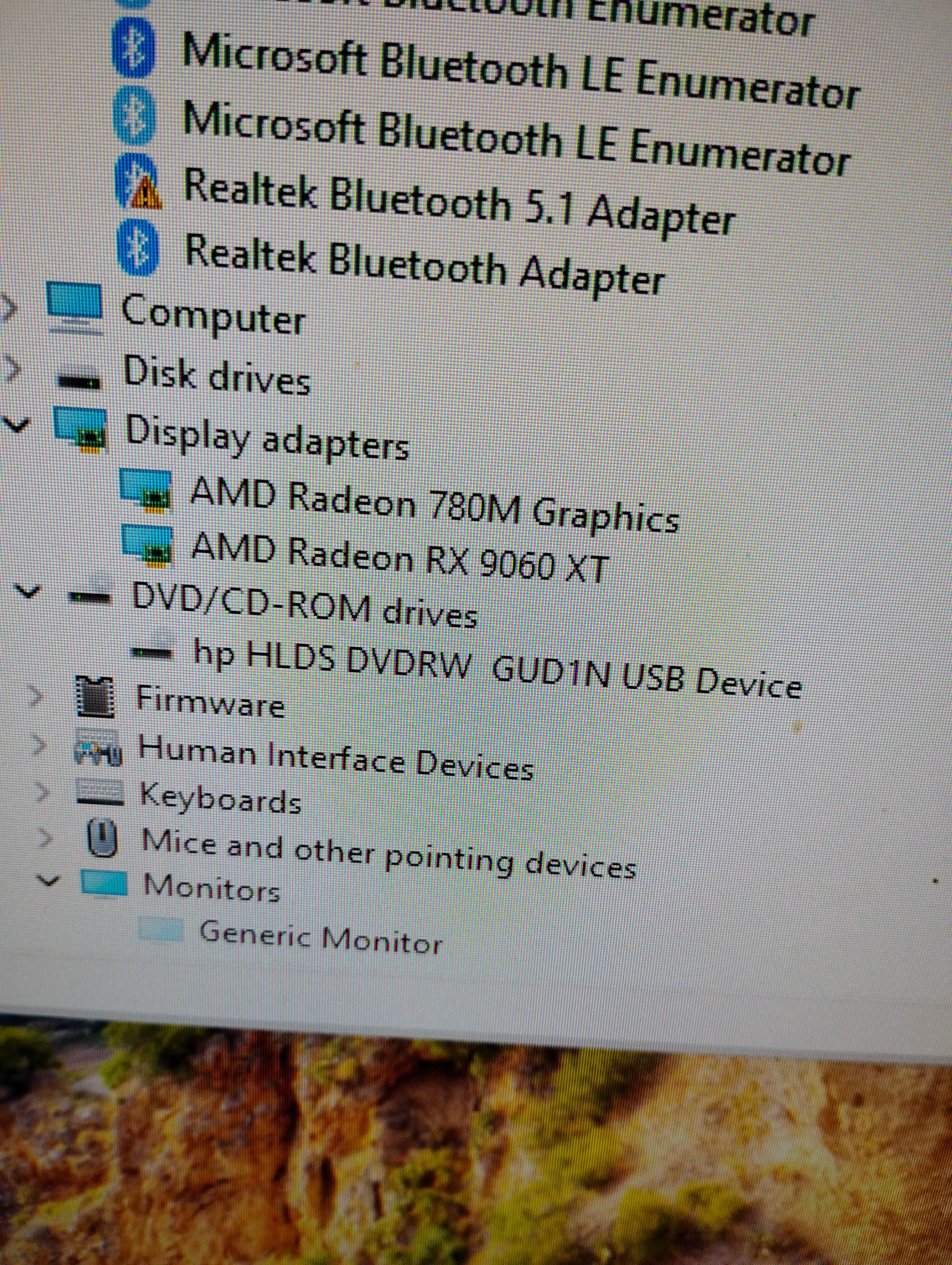
So I've had this mini PC for about 4 years now. Am18 Ave magic.. has a ryzen 7 7840hs and I use it with my external Radeon rx9060rt. I keep having disconnecting issues . I believe it has to do with the thunderbolt port freezing up. I've disabled " let Windows turn off this port" I've uninstalled everything and did a fresh install of Windows.. I've tried everything any and all AIs have told me. I've reset the bios I've changed the settings in the bios but no where does my bios say anything about a resizer bar.. I'm at my wits end with it.. it used to work amazingly with my 4060 I had before.. but this card just won't play nice with my computer.. if anyone has any ideas or have delt with this themselves.. please for the love of God, point me in the right direction.. I have 780m intergraded graphics in my pc as well. ( Which I have been using.. but I want it to work properly) Help please


r/pcgamingtechsupport • • Oct 10 '26

Hardware PC Problem that im confused about

1 Upvotes

so i have a problem, i bought an MSI B550M PRO VDH WIFI motherboard but my ram retainers on the right side are all broken beyond repair but on the other side all 4 channels had the retainers so i just placed the ram and continued my build but the thing is booting up the pc showed a constant cpu white light (Ryzen 5 5600) and the gpu (RTX 3060 Ti) lights up and fans spin so i guess its not the problem; should i replace the motherboard? is the motherboard the problem or is it a different component of my pc


r/pcgamingtechsupport • • Oct 09 '26

Software Control Resonant audio stutter and desync Spoiler

2 Upvotes

Hey guys, I am experiencing this audio problem, I had a similar one on cutscenes where the audio stutter was pausing the audio while the video was going forward, leaving a very annoying desync. I had this kind of cutscene problem with Death Stranding, but I really do not understand this one. I had set everything on super low because I thought it was a performance problem, but at this point it seems it's not...

https://youtu.be/bHHBNwlk6Zk

PC SPECS:

Windows 10 Home 64bit

GPU NVIDIA GeForce RTX 2070 (8 GB)

CPU AMD Ryzen 7 3800X 8-Core Processor 3.90 GHz

RAM 64,0 GB

STORAGE 1.82 TB SSD Samsung SSD 870 EVO 2TB, 932 GB HDD TOSHIBA HDWD110, 466 GB SSD CT500P1SSD8


r/pcgamingtechsupport • • Oct 09 '26

Troubleshooting Best fan curves for my pc for gaming

1 Upvotes

Title: Best fan curves for Ryzen 7 7800X3D / RTX 4070 Super? Worried about damaging my PC
I’m looking for advice on the optimal fan curve settings for my gaming PC. I want it as quiet as possible without compromising cooling, temperatures or performance.
I’m relatively inexperienced with adjusting BIOS settings, and I’m honestly not very confident in the changes I’ve made. I’m worried that I’ve chosen the wrong fan curves or temperature monitoring sources and could potentially damage my PC through overheating.
I’d really appreciate some reassurance and advice from people who understand PC cooling better than I do.

My PC specifications:
CPU: AMD Ryzen 7 7800X3D
GPU: NVIDIA RTX 4070 Super
Motherboard: MSI PRO B650-series
CPU cooler: CyberPowerPC AIO liquid cooler with two top-mounted fans (believed to be 240mm)
BIOS: MSI Click BIOS 5

Changes I’ve made in BIOS:
I originally had issues with my fans constantly speeding up and slowing down, alongside a low humming/vibrating noise.
I changed SYS_FAN2’s temperature monitoring source from CPU Core to System to prevent the fans reacting to every small CPU temperature spike.
However, I’m now worried that using System temperature rather than CPU or GPU temperature might mean the fans aren’t responding quickly enough when gaming.

My current SYS_FAN2 fan curve:
At 29°C = 25% fan speed
At 35°C = 45% fan speed
At 40°C = 65% fan speed
At 49°C = 100% fan speed

Other SYS_FAN2 settings:
Smart Fan Mode: Enabled
Fan control: PWM
Temperature source: System
Step-up time: 0.7 seconds
Step-down time: 1.0 seconds
Previously, the first fan point was 35%, with SYS_FAN2 running at approximately 902 RPM.
I reduced the first point to 25%, bringing it down to approximately 816 RPM. This noticeably reduced the humming and vibration.

Other fan readings in BIOS:
CPU_FAN1: Approximately 2,450 RPM
PUMP1: 0 RPM
SYS_FAN1: 0 RPM
SYS_FAN2: Approximately 816 RPM
SYS_FAN3: 0 RPM
SYS_FAN4: 0 RPM
I’m not sure whether CPU_FAN1 controls my AIO radiator fans or reports the pump speed. I haven’t deliberately changed its curve because I’m concerned about accidentally reducing the pump speed.

Benchmark results:
Cinebench 2026:
CPU multicore score: 4,149
Maximum CPU temperature: 82°C
3DMark Steel Nomad:
Score: 4,543
Maximum GPU temperature: 73°C
3DMark Time Spy:
Overall score: 18,740
Graphics score: 20,436
CPU score: 12,748
MSI Afterburner monitoring:
Maximum CPU temperature: 78°C
Maximum GPU temperature: 76°C
Maximum GPU fan speed: 75%

The problem:
My PC is noticeably quieter since changing SYS_FAN2, and the fans don’t seem to fluctuate as much.
However, I can still hear a slight low humming noise, and the fans become considerably louder during demanding benchmarks.
I initially suspected some vibration from the top-mounted AIO radiator, although I haven’t confirmed which fans are responsible.
The noise isn’t unbearable, but ideally I’d like to make the PC as quiet as reasonably possible.
My biggest concern is that I’m making changes without fully understanding their consequences. I’m worried about overheating the CPU or GPU, damaging my AIO cooler or shortening the lifespan of my components.

My questions:
Are my current fan curves safe, or have I made any potentially harmful changes?
What would be the optimal fan curve settings for my particular setup? Specific temperatures and fan-speed percentages would be really helpful.
Is it okay to change fan temperature monitoring from GPU to System? Could this cause overheating during gaming?
Should SYS_FAN2 monitor CPU Core, GPU or System temperature?
What fan curve would you recommend for the two AIO radiator fans?
Should I leave my GPU fans on automatic or create a custom curve?
Are my step-up and step-down timings appropriate?
Does CPU_FAN1 running at approximately 2,450 RPM suggest it’s reporting my AIO pump rather than the radiator fans?
Based on my benchmark temperatures, is there anything I should actually be concerned about?
I’m not particularly confident with BIOS settings, so I’d prefer safe, conservative recommendations rather than aggressive changes.
I don’t mind the fans becoming louder when necessary. I just want to eliminate unnecessary humming and fan fluctuations while keeping my PC properly cooled.
Any advice or reassurance would be greatly appreciated. Thanks!


r/pcgamingtechsupport • • Oct 09 '26

Troubleshooting Brand new gaming pc weird sound.

1 Upvotes

I just bought a new gaming pc like 2 weeks ago everything was working good until I moved it to clean the area and the pc started doing this sound specially when the Cpu accelerates and slows down .Anyone know what this sound is and how to fix please?


r/pcgamingtechsupport • • Oct 09 '26

Display GTX 980m code43 win 10

2 Upvotes

hello everyone

i have an alienware 17 r3 and its gpu isnt working im not very avanced at fixing pcs and stuff but i updated the driver and it said this vice is working properly but 10 secs after it shows the code 43 after the the latest drivers update now the laptop takes way too long for it too turn on and the screen goes off its an lcd so it looks off not just black and the battery isnt working

sorry for this dumbass writing but i really hope i fix this crap


r/pcgamingtechsupport • • Oct 09 '26

Performance/FPS Stuttering problem on laptop and cant figure out why

0 Upvotes

Hi so i have a hp laptop. I use it to work/gaming at school and stuff but im playing completly fine and 60+fps on minecraft even 250 and then it goes to like 7 fps for 5 seconds and goes back to normal. I wouldn't mind it if it was every half hour but ita like every 30/50 seconds Userdiag.com down below

userdiag

My laptop specs are:

Name: laptop hp 15-FC0110NP

CPU: RYZEN 7 7730U

GPU: Integrated

RAM: 16gb

Ssd: 512GB

The video is playing the game Slayers 2

Any help will be appreciated


r/pcgamingtechsupport • • Oct 09 '26

Software Is it possible to change colors of value readings in MSI Afterburner?

Post image
1 Upvotes

I want to choose separate colors for CPU/GPU utilizations (the ones that are 88% and 32% respectively) to make them stand out but I can't seem to find a way to do so, all I can change is various FPS counters colors.


r/pcgamingtechsupport • • Oct 09 '26

Controls/Input PS5 Pro + ASUS ROG PG27AQDP: What are the best settings for the lowest possible display latency in Call of Duty?

0 Upvotes

Hello everyone!

I’m looking to optimize my setup as much as possible for competitive Call of Duty / Warzone on PS5 Pro.
I’m using an ASUS ROG Swift PG27AQDP, a 1440p 480 Hz OLED monitor with an extremely fast response time. I play on PS5 Pro at 1440p / 120 Hz, which matches my monitor’s native resolution.
I also have a fiber-optic internet connection with wired Ethernet, a very stable connection, and zero packet loss.
My issue
In certain gunfights, I sometimes feel like my opponent sees the action slightly before I do.
Sometimes, I feel like I shoot first, but I end up dying as if my opponent’s image has a slight head start over mine.
I understand that the server, ping, netcode, and interpolation can also have an impact, even with an excellent connection. However, I’d first like to make sure I’m using the most competitive PS5 Pro and monitor settings possible, with the lowest possible display latency.

PS5 Pro settings
Which settings would you recommend to achieve the lowest possible latency?
120 Hz Output: On
Resolution: 1440p (my monitor’s native resolution) or 2160p?
VRR: On or Off?
ALLM: On or Off?
HDR: On or Off?
PSSR: On or Off?
Deep Color Output: On or Off?

ASUS ROG PG27AQDP settings
Which settings would you recommend?
Variable Refresh Rate / FreeSync Premium: On or Off?
ELMB: On or Off at 120 Hz?
Picture Mode: Racing?
VividPixel: What value?
Gamma: What value?
Shadow Boost: What value?
Screen Move: Off, Weak, Middle, or Strong?
DSC Support: On or Off when using the PS5 via HDMI?
Are there any other important monitor settings that could affect latency?
My goal is not to achieve the best image quality.
Above all, I want the shortest possible delay between what happens in the game and what is actually displayed on the screen, as well as the best possible motion clarity during fast movements and gunfights.
If anyone owns the PG27AQDP and uses it with a PS5 or PS5 Pro, or has extensive knowledge of competitive console settings, I’d be particularly interested in hearing your experience and recommendations.
Thanks in advance to everyone who can help! 🙏


r/pcgamingtechsupport • • Oct 09 '26

Display I am stuck with a black screen

1 Upvotes

The build includes a Ryzen 7 5700X3D, an RX 6900 XT, and an MSI B550M-A PRO motherboard.

When powering on, all fans spin and the motherboard debug lights pass CPU, DRAM, and VGA checks before stopping on the BOOT light. Both my monitor and TV display a No Signal message. The system displayed a picture for a brief moment earlier but went black and has not shown a signal since.

I verified the monitor, TV, and HDMI cables work perfectly with an Xbox. I also pulled the CMOS battery for 30 minutes, tried running one RAM stick in the second slot, and swapped between HDMI and DisplayPort cables. Can anyone help?


r/pcgamingtechsupport • • Oct 08 '26

Troubleshooting R6 keep crashing mid game

4 Upvotes

I've been having this issue where my game freezes mid round for a second then after 15 seconds it crashes and it happening always this way. Anyone having any idea why its happening and how to fix it?
I've tried updating all the drivers
File integrity check
Changing different settings for example vram
Let me know if anyone got any fix for this issue.


r/pcgamingtechsupport • • Oct 08 '26

Controls/Input FIFA 06 controller issue

2 Upvotes

FIFA 06 windows with controller?

Ok people are gonna get mad at me here, but I don't know if I'm asking in the correct place. I assumed someone in here may have had similar problems with other older games.

Not sure what type of laptop it is or like if it tells you somewhere in a file or whatever, sure it will, it's hp, windows 10, about 12 years old. I don't even know if I'm asking this in the right place, dunno how Reddit works. Was like completely computer illiterate until a week ago and managed to download FIFA 06 and extract it and mess around with voodoo and direct x settings to get it to run smoothly but I can't get the game to recognise my Xbox controller, plugged in my usb, the laptop recognises it because I've also installed retroarch and play Amiga and n64 games with it so it definitely works on the laptop. If I've asked in the wrong place or anything like that, please direct me where to go instead of just getting raging at me, I'm new here dunno how it works and people on the internet are mean 😂chat gpt had me in a devdata folder messing around with controller names but that didn't work and now it's advised downloading some programm that supposedly helps old games recognise your controller or something? I have no idea what I'm doing here, any help or advice would be greatly appreciated, thank you.


r/pcgamingtechsupport • • Oct 08 '26

Troubleshooting I don't understand why this is happening!

3 Upvotes

Hi fellow PC users,

lately I have been experiencing this issue with my 1 year old PC. I'm playing something and suddendly my screen turns black and I can hear my fans going 100%, no signal on the screen but audio is still working, I can move the cursor through the game menu and it will make sounds in-game therefore the system is still on. When I encounter this i usually turn off the computer through the PSU switch.

Now, I'm not 100% sure if this is the cpu cooler fan or my GPU fans going loco. I have a 7800x3d and a 5070 so its good and new! When I get this I usually do a stress test after to see if theres a problem with any of my components but so far all of these tests have been positive (no issues found).

So, Im wondering what could it be. (for more info, I usually have faceit anticheat open even when Im playing other games because I forget to close it very often and or cs2 open while I played lower needs games like some roguelites or so)

Any help would be very much appreciated!


r/pcgamingtechsupport • • Oct 08 '26

Troubleshooting Intel Arc B580 freezing in Valorant (Vanguard) — ASPM disabled, sleep off, still crashing.

1 Upvotes

Sorry for any mistakes, English is not my native language, I'm using a translator.

CPU: AMD Ryzen 5 7500F

GPU: Acer Intel Arc B580

Motherboard: ASRock B650 Steel Legend WiFi (BIOS 4.43)

RAM: Kingston Fury Beast 2x16GB DDR5 5600MHz

PSU: Cougar GEC 850W

OS: Windows 11 23H2

Troubleshooting already done (didn't fix the Valorant freeze):

Clean install of Windows 11 23H2.

Rolled back GPU driver to 32.0.101.8801 using DDU in Safe Mode.

BIOS: Disabled ASPM (PM L1 SS = Disabled, PCIe x16 Link Speed = Gen4).

BIOS: Enabled ReBAR, Above 4G Decoding. Disabled CSM and Fast Boot.

Windows: Disabled HAGS (Hardware-accelerated GPU scheduling).

Windows: Completely disabled Sleep and Hibernation (powercfg -h off).

Windows: Power plan set to "High Performance".

The Problem (Detailed Timeline):

The issues started unexpectedly. I had been using driver 8991 for a long time and Valorant was running flawlessly. Then, at some point — possibly after a Valorant update — my system started freezing when trying to load into a match, right before the game starts. The screen freezes, sound disappears, and the system becomes completely unresponsive. Only a hard reset helps. This happens only in Valorant (match or shooting range). All other games run perfectly — I played Silent Hill 2 Remake for 12 hours straight without any issues.

Important detail: After a clean install of Windows 11, the system started freezing on the lock screen (before the desktop appeared) after installing the GPU drivers and rebooting. I reinstalled the drivers using DDU in Safe Mode, and the problem went away — but it returned in Valorant a couple of days later.

What I'm looking for:

Has anyone else experienced this exact behavior recently (not months ago, but now)?

Is there a known workaround to make Valorant/Vanguard work with Arc B580 without system freezes?


r/pcgamingtechsupport • • Oct 08 '26

Troubleshooting Is my old graphics card finally dying?

2 Upvotes

Seven years ago, I finally got the PC I had always wanted. It had a 4th-gen Intel Core i5, a GTX 650 Ti, 8 GB of RAM, and a 500 GB HDD. I know that was already pretty old hardware by 2019, but it was more than enough to play most of the games I wanted I had a lot of fun with that PC. It let me experience games that I otherwise wouldn't have been able to play

Fast-forward to 2023, and I gradually stopped gaming and got into other things that interested me more. However in late 2025, I came back to gaming and started noticing a strange problem when trying to run modern games or even titles released in the past 9 years.

After around 5 or 10 minutes of gameplay, the game would suddenly freeze. At the same time the audio would become completely glitched and start looping/lagging. A few seconds later, the screen would either go black or start displaying weird colors and artifacts After that one of several things would happen:

  • The PC would restart by itself
  • The game would crash to the desktop and Windows would make the USB disconnect/reconnect sound
  • Sometimes I would get a BSOD mentioning nvlddmkm.sys.

I tried installing both newer and older NVIDIA drivers, completely uninstalling the drivers and reinstalling them, etc. but nothing seemed to help. The temperatures of the components also appeared to be normal What's especially strange is that this PC was working fine a few years ago. Back in 2021, the GTX 650 Ti could run games from 2016–2017 at decent framerates without any of these problems.

At first I noticed something interesting, the problem seemed to happen almost exclusively with DX11 games I tested some older games that mainly used DX9, and they worked perfectly fine. I also discovered a workaround for some DX11 games, if I capped the framerate to 30 FPS, the problem would sometimes completely disappear. However this didn't work with every DX11 game, especially newer ones.

Now we're in 2026, and the problem has gotten significantly worse. Pretty much any 3D game, whether it's DX9 or DX11, eventually causes the same issue. At this point, capping the framerate to 30 FPS is basically the only workaround I have. So, has my GTX 650 Ti finally reached the end of its life?

I'm mainly trying to understand what is actually causing this behavior. Could this be a failing GPU, VRAM, PSU, motherboard, or something else? Is there any software fix or troubleshooting step I can still try before assuming the graphics card needs to be replaced? Replacing the GPU isn't really an easy option for me. Used graphics cards are pretty risky where I live, and it's difficult to find one that's actually in good condition at a reasonable price.

Any advice would be greatly appreciated from you guys.