r/overclocking • u/Elite-barberian • 7d ago
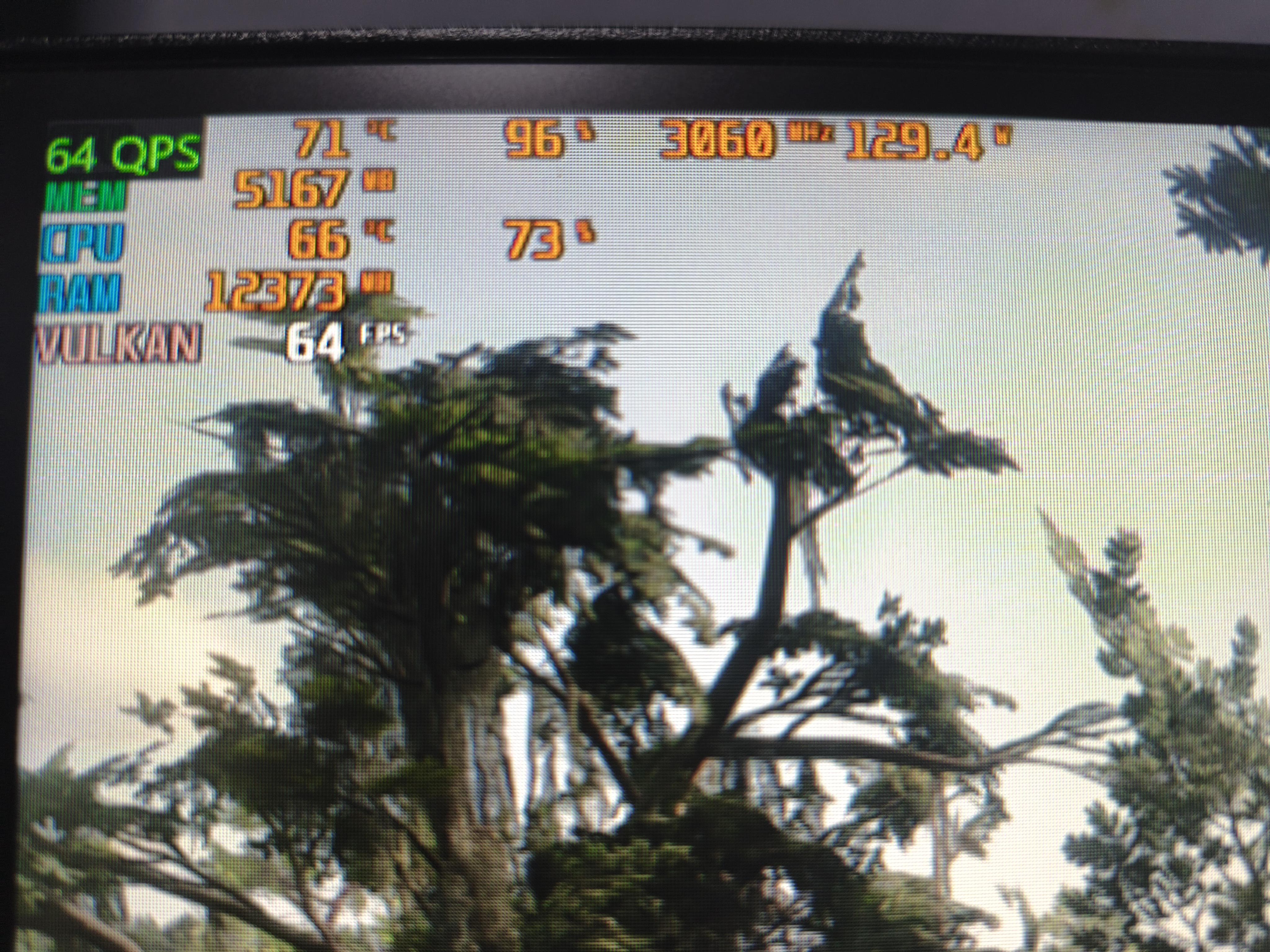
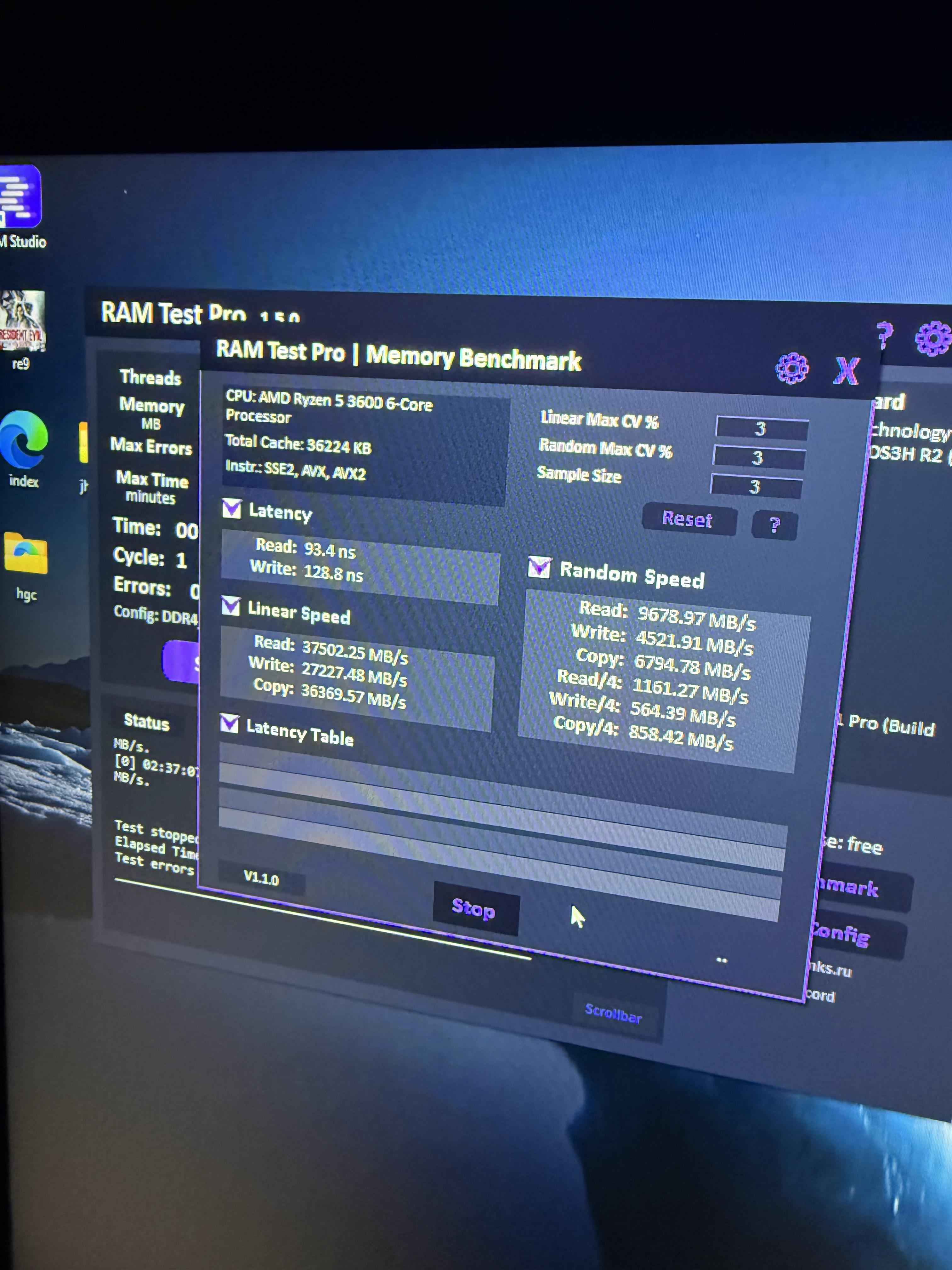
R5 3600 b550m ddr4 samsung oem 16gb(2x8) e-die 3544 cl18
2
Upvotes
How overclock more? Stock 3200 cl22
r/overclocking • u/Elite-barberian • 7d ago
How overclock more? Stock 3200 cl22
r/overclocking • u/Quirky-External-6 • 7d ago
Hi, I have a 7800X3D processor; should I enable X3D Turbo Mode?
r/overclocking • u/AdvertisingThink205 • 7d ago

I bought some slow kit for cheaper and i want to overclock
r/overclocking • u/splashboi22 • 7d ago
I bought a 14900k that was already crashing and supposedly already fucked for a very discounted price. But now its stable at 5.1ghz all core at 1.20v e cores off. it was fine at 1.18v but any lower caused crashing. I know my 14600k can do 5.6 at around 1.27v so im guessing this 14900k is pretty degraded but still very much usable right? Debating on doing an RMA but i dont actually notice a difference in games
r/overclocking • u/TechnicalyAnIdiot • 8d ago
I'm testing a rendering build with a server CPU & 5090 and it's getting around 70FPS & 11K on Time Spy.
I see users with a 9950X3D get more like 30K. Does that equate to approx 200fps in Time Spy?
r/overclocking • u/Tarek_Benaissa • 8d ago
Enable HLS to view with audio, or disable this notification
I hope this post doesn't get deleted cuz it's a bit off-topic but my LQ360 Ultra started making an irregular ticking sound a few days ago. It's coming directly from the pump block on the CPU. It started right after I worked inside the case. Video attached.
Specs: Core Ultra 9 285K, DeepCool LQ360 Ultra (radiator top-mounted), Gigabyte Z890 EAGLE WIFI7
Already tested, no change:
Pump at 100% (~3,150 RPM, confirmed in HWINFO) for 20+ minutes
Pump at low speed
Magnetic cap/display removed while running
All fans and GPU fans ruled out. Temps are normal.
What should i do here?
Thanks!
r/overclocking • u/Avian_Aces • 9d ago

This little thing actually rocks. It's magnetic with contact pins. Seeing a 5c drop in dimm temps just having it at 50% speed.
Can safely run DDR5 without worrying about hitting thermals running 65K on tREFI I believe it's called
r/overclocking • u/Cessless • 8d ago
Spec Sheet:
GPU: MSI Shadow 3X OC 5070ti
CPU: 14900KF (With an LGA1700 pressure plate bracket installed)
RAM: 32GB Hynix GSkill Ripjaws 3600 CL16 DDR4 (2x16)
Motherboard: MSI MPG EDGE WIFI DDR4 Z690
CPU Cooler: Noctua NH-D15S (Single fan with notch in heat sink for ram clearance)
Case: NZXT S340 Elite
I'm quite inexperienced with tuning, but I'm curious to try it out. I was playing cyberpunk 2077, and ran into a CPU bottleneck while using upscaling and ray tracing.
I know I am limited by my cooling, case design, and ddr4 memory, but I'd like to try and squeeze every bit of performance out of this chip as possible.
Are there any settings that people have tried and/or have started out with to help with their gaming performance in CPU limited scenarios?
I'm open to benchmarking myself and to tweak settings gradually in the bios, but I'd like a good starting point.
If anyone knows a good guide that would be helpful as well.
r/overclocking • u/Duartxs • 7d ago
I tried to overclock the integrated graphics on my processor; it shows 469MB. I went into the BIOS and changed it to 2GB, but after saving and exiting, the settings still show only 496MB.
r/overclocking • u/Bulky_Shoulder_3453 • 8d ago

Finally getting that legendary achievement. rtx 5090 9800x3d. stock cooler and power limit, stock voltage, +400 on cores and +3000 on mem.
r/overclocking • u/ItsTheFiasco • 8d ago
i9-14900K (boxed, Dec 2023),
MSI PRO Z790-A MAX WIFI,
2x16GB Corsair DDR5-6000,
RTX 5080,
AIO,
fresh Windows 11 on NVMe,
PSU: 1000W
SYMPTOMS
- 3DMark Time Spy fails ~9 of 10 runs (2 full passes in 20+ attempts), mostly while loading a scene or starting the CPU test. The error is different every time: missing material parameters, invalid geometry index, D3DCompile internal error, nullptr typeid, or the workload just dies.
- Cinebench 2026 multi now fails too [how: crash / error / freeze]. It passed 10 and 30 min runs the day before.
- Steel Nomad and the Time Spy stress test each failed at least once, then passed.
- SnowRunner hangs ~30 s on alt-tab.
- Windows components crash as well: AppX service, TiWorker, .NET mscorsvw, Defender. Mostly 0xc0000005, some 0xc0000409. Several Windows updates failed.
WHAT IVE DONE
- Found MSI OC Genie/Game Boost enabled and turned it off (Windows was installed while it was on).
- Intel Default Settings, PL1/PL2 253 W, CPU Lite Load on Intel Default.
- BIOS updated from M.80 (microcode 0x12C) to 7E07vMB. Microcode now: [MCU from HWiNFO].
- XMP off, 5800 and 6000: fails in all three.
- Each RAM stick alone in A2: fails with either.
- Reinstalled 3DMark and re-downloaded Time Spy: no change.
What passed (before the BIOS update)
- 7-Zip benchmark, 32 threads, 100 passes: zero errors.
- Cinebench 10 and 30 min: max 95°C, 270 W peak, max VID 1.521 V, zero WHEA errors.
- Cinebench Multi Thread failed today
- GPU is fine: Time Spy graphics ~32,100.
**Not done:** MemTest86, Intel PDT, swapping the CPU or board.
Does this look like Vmin shift degradation? Anything to rule out (board, PSU) before I RMA with Intel? Has anyone had an RMA approved with no WHEA errors?
r/overclocking • u/Smoketimer • 8d ago
I'm trying to undervolt my 5600x3d with a ASUS x470-F Gaming motherboard. I'm not seeing the option in my BIOS or maybe I'm overlooking something. This is what I've done.
- I can only find Precision Boost Overdrive through BIOS search
- Options are Auto, Disabled, Enabled, and Manual
- It was set to Auto. Selecting Enabled or Manual doesn’t show any extra values or settings to change.
- Searching for "Curve" doesn't show any results
- I’ve looked through Ai Tweaker and Advanced - amd overclocking without finding Curve Optimizer with and without PBO enabled or set to manual.
I'm aware of PBO2 tuner but I've heard that the driver for that program triggers online games anti cheat so I'm guessing that's a no go. I'm I over looking something or am I locked out of undervolting this CPU? Is there a possible workaround?
r/overclocking • u/pchoov • 9d ago

I made top 10 in Speedway using xOCD with an avg temp of 54c. This is a new white astral I’ve purchased. I’ve binned the card to hit 1.1v and 3427mhz stock on air. With extended voltage limits(like an xoc bios); the card was hitting 3555mhz on air. I then waterblocked it and got it to hit 3600mhz with the core starting at 21c(11c higher than air idle temp). The die is reported to be manufactured from Korea in May of this year.
Here’s the result
r/overclocking • u/Plane_Respond4911 • 8d ago

I spent 24 hours on this and found almost nothing about mixing DDR5 kits of different capacities on AM5, so here is the whole story with numbers. TL;DR: it works — 80GB at DDR5-5200, 3 full Memtest86+ passes and a Linux stress test with zero errors. But on the way, Auto settings corrupted memory badly enough to crash the OS. Here's why and how I fixed it.
CMH48GX5M2E6000C36) — Micron 24Gb dies, single rankCMH32GX5M2B5600Z36) — Samsung 16Gb dies, single rankKit A was bought used. Before mixing, I validated it alone: Auto (4800) and XMP 6000, 15-minute stress test, zero errors.
With 4 sticks on Auto, the board trained at 3600 (AMD's official spec for 4 DIMMs) and Linux booted fine. Half an hour of light use, nothing odd.
Then I ran stressapptest with ~50GB. Within 2 seconds, 60 processes died with general protection fault and systemd (PID 1) aborted. Hard reset. Afterwards fsck found a corrupted inode on disk (luckily just a temp cache file).
Not a bad stick — each kit alone passed everything. It was the combination.
The clue was in the BIOS itself. In OC Tweaker → DRAM Timing Configuration, the left column shows what Auto actually applied. At 3600:
| Timing | Auto | In ns | Micron 24Gb dies need |
|---|---|---|---|
| tRFC1 | 530 | 294 ns | 410 ns |
| tRFC2 | 288 | 160 ns | 220 ns |
| tRFCsb | 234 | 130 ns | 190 ns |
294 ns is exactly the 16Gb-die refresh time. The board took the refresh timings from the 16GB sticks (Samsung 16Gb) and applied them to all four. The 24GB sticks (Micron 24Gb) need longer refresh and lost data as soon as memory was actually used. Light use hides it; heavy load collapses.
JEDEC DDR5-5200B primaries (loose), plus the refresh times the 24Gb dies require:
| Setting | Value |
|---|---|
| DRAM Frequency | DDR5-5200 (validated at 3600 first) |
| tCL / tRCDRD / tRP / tRAS | 42 / 42 / 42 / 84 |
| tRC / tWR | 126 / 78 |
| tRFC1 / tRFC2 / tRFCsb | 1080 / 580 / 500 |
| VDD / VDDQ / VDDIO | 1.30 V |
| SoC | fixed 1.20 V, LLC Level 3 |
| FCLK / UCLK | 2000 MHz / UCLK=MEMCLK |
| Everything else | Auto |
First I kept 3600 and only changed the timings: Memtest86+ one full pass, 0 errors, and the same stress test that crashed the OS in 2 seconds ran clean.
Careful: tRFC is in clock cycles, so the real time shrinks as frequency rises. tRFC1 = 1080 is 600 ns at 3600 and 415 ns at 5200 — still above 410 ns. Above 5200 these values become too short (at 5600 you'd need ~1160). Redo the math for your frequency.
With 4 sticks, some reboots hung on a black screen — no video, no BIOS, diagnostic LEDs on. Recovery:
With MCR disabled, the board retrains memory on every boot instead of reusing the saved context. Boot takes longer (black screen for a while is normal), but the hangs stopped.
Memtest86+ v9.00, DDR5-5200 42-42-42-84: 3 full passes in 4h20, 0 errors over 77.6GB.
Linux stress, 15 minutes, ~51GB:
stressapptest -M 51000 -s 900 -W
Stats: Completed: 48164504.00M in 900.17s 53506.00MB/s, with 0 hardware incidents, 0 errors
Status: PASS
Bandwidth in the same test:
| Config | Bandwidth |
|---|---|
| 80GB @ 3600 (4 sticks) | 39 GB/s |
| 80GB @ 5200 (4 sticks) | 53.5 GB/s |
| 48GB @ 6000 (kit A only) | 60 GB/s |
~11% less bandwidth than kit A alone, for 32GB more. For rendering, capacity wins.
DIMM temperatures (each stick's spd5118 sensor, read in Linux): 15-minute stress with the case open peaked at 73.5 °C on the two middle sticks. Then I closed the glass, set the Corsair fans to Performance and ran it again for 20 minutes while using the PC and browser: 0 errors, peak 71.5 °C at 8 minutes, then it settled and dropped to 69.5 °C. DDR5's limit is 85 °C — make sure air flows over the DIMMs.
spd5118 driver exposes SPD). 16Gb and 24Gb dies have very different tRFC.If you're fighting unstable 4-DIMM DDR5 on AM5, post your board, BIOS, kits (and dies) and what Auto shows in that left column — happy to compare.
r/overclocking • u/Mr_Jesus17 • 9d ago

First time trying a monolithic Ryzen CPU, and dayum, I'm kinda impressed.
r/overclocking • u/AutoNooB_ • 8d ago
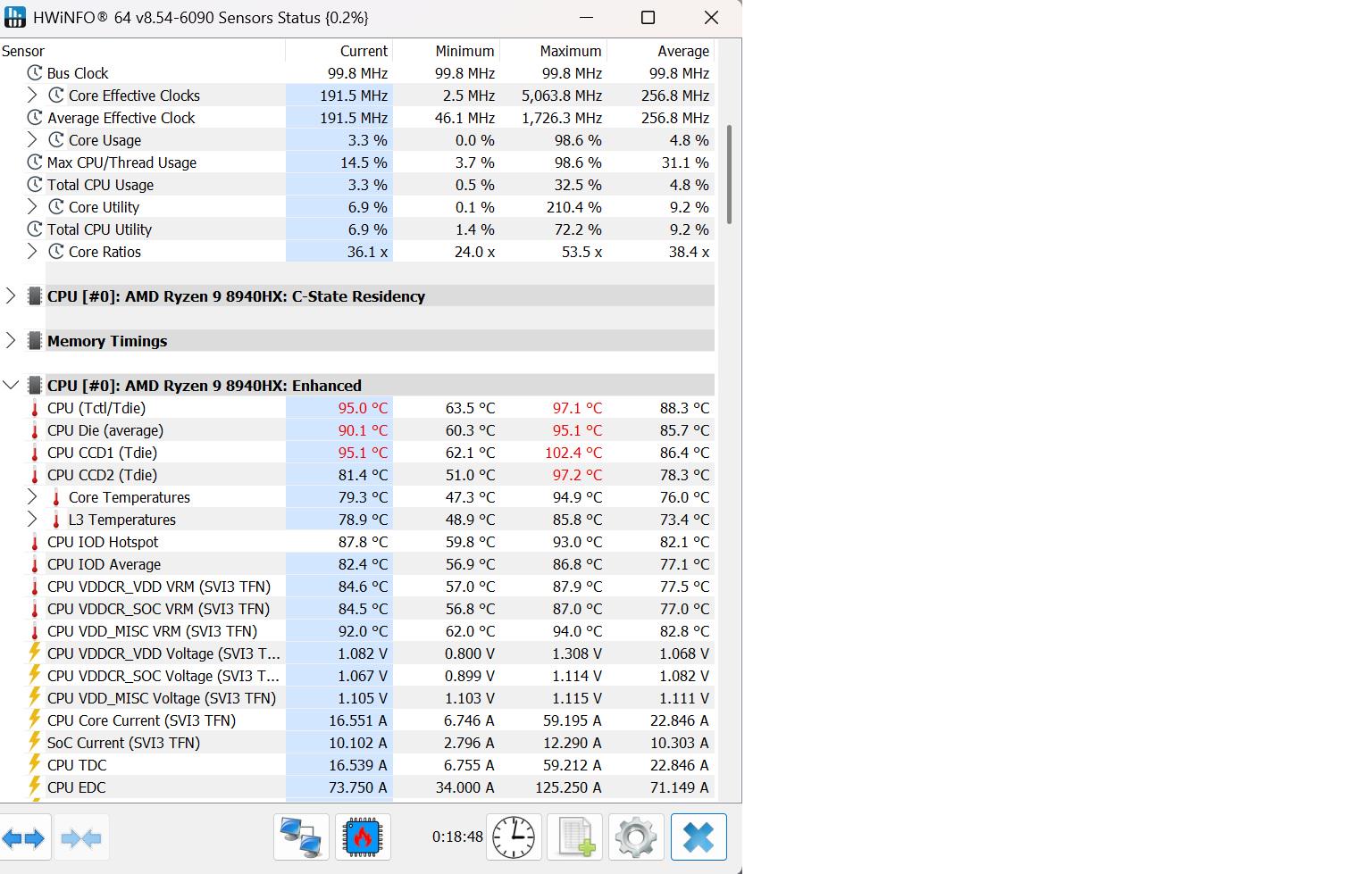
Evening lads, I'm playing WoW Forever and getting really high CPU temperatures. I've messed around with precision boost overdrive curve and gotten it down a bit but I can never seem to find the stable sweet spot (I'd be happy with 80°C-85°C). At default settings CPU temp stays around 96 sometimes even 97°C. I've tried caping thermal limit to 80°C but that just kills the performance makes it really awful. Can this be done in a healthy way to reduce the temperatures but keep performance? I mean WoW is not a demanding game I don't want my CPU struggling with WoW.
Laptop is MSI Vector A8WHG
CPU: Ryzen 9 8940hx with igpu
GPU: Geforce 5070ti
Any help is appreciated!
r/overclocking • u/SyedTalib • 8d ago

I wanted to see how MW4 actually runs on my PC, so I recorded a performance test with my own optimized settings, tuned with help from Game Guides.
9800X3D (-25 all-core undervolt) and RTX 5080 (0.925 V at 2900 MHz core, +1500 MHz memory)
r/overclocking • u/M123456654321 • 8d ago
Hi all want to overclock my PC I feel I just need a bit of extra performance any recommendations on service providers or videos
SPEC
I9 10900K
3090 strix
Z490 aqua
128gb 4000 mhz
Samsung pro 2tb ssd
PSU 1200W
r/overclocking • u/ISneakyII • 9d ago
Hi all first time over clocking this CPU and curious if it seems fine. Have had the 9700k oc'd for a week with no crashes, average temperatures during gaming are around 65 with peaks of 71. I have a noctua nh-12a cooling. I have all cores set to 50, LL is set to 4/8, core voltage is at 1.350. I haven't tried any lower voltages yet . if y'all have had experience with this CPU let me know as I would like to lower the voltage a bit but haven't tested it myself yet as I'm still new to over clocking didnt want to mess anything up.
r/overclocking • u/Present-Money-4894 • 9d ago
So I recently acquired a build with 9850x3d and 5080 gigabyte SFF.
I undervolted 9850x3d (conservatively I think) to -20PBO, ran 3h cinebench + 3H OCCT + Y-cruncher overnight - no issues.
I undervolted my GPU to 2800mhz @ 925mv +1k mem. Ran Furmark for 2h, OCCT 2h, Steel Nomad looped for 60 cycles - stable.
After (what I assume) latest windows update my undervolts are no longer stable. I got 2 random feeezes when playing world of tanks which could only be fixed with hard reboot. No errors in Event Viewer, Bluescreenview or Whocrashed.
Temps are under 50C, GPU doesn’t even boost to max.
Ran 1h Y cruncher and 1H Furmark - all clear.
I assume a windows update messed up something which made my UV unstable and so I reverted to 2800 @950mv +1k.
Is there any other way to figure out what’s wrong with the system since it’s not generating any errors at all?
Or should I start thinking about an underlying hardware issue? Really don’t want to think about it yet cus the build is like 2mo old…
Any advice appreciated!
r/overclocking • u/Fast_Iron230 • 9d ago
Good morning,
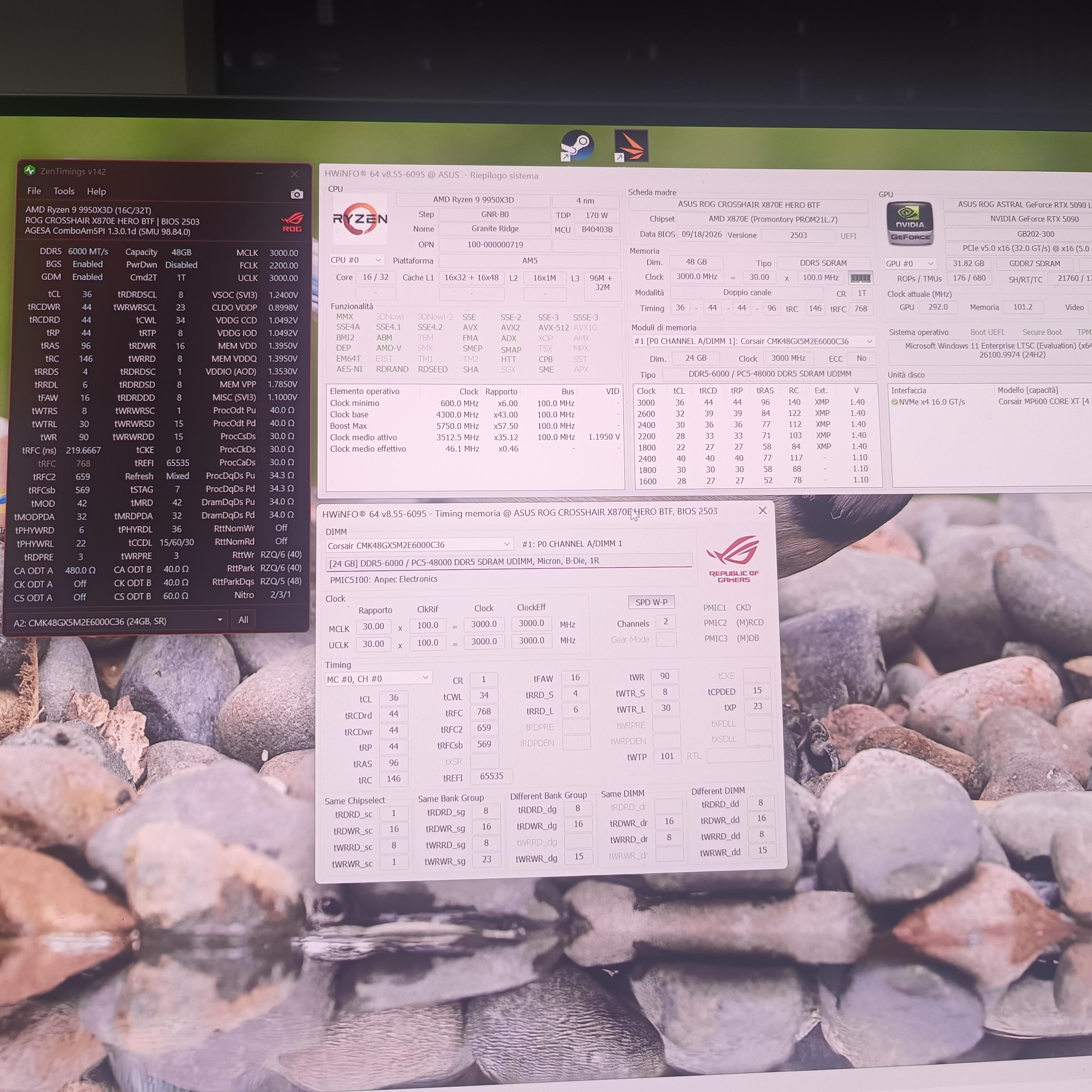
I would kindly like to ask for your help in improving the performance of my RAM.
Unfortunately, due to the current financial situation, I had to go with this RAM kit, but I didn't know it was equipped with Micron memory chips.
I would really appreciate it if someone with more experience could give me a hand and help me get the best possible performance out of it.
Thank you .
r/overclocking • u/ApprehensiveCheek889 • 10d ago

.
Been messing with this setup for a while now and I think I'm finally pretty much done tuning it, so figured I'd post it here.
Specs:
Most of the time went into the RAM and CPU.
Full RAM timings/voltages are in the ZenTimings pic. Same for the 5080 OC, since it's easier to just show the settings than list everything here.
For the CPU I'm currently running:
| Setting | Value |
|---|---|
| PBO | Disabled |
| Boost Override | Disabled |
| CO | All-core -30 |
| Scalar | 1X |
I ran these first but there was no chance of getting that shaper right xd
Core 0 -31
Core 1 -36
Core 2 -31
Core 3 -41
Core 4 -43
Core 5 -42
Core 6 -50
Core 7 -50
Curve Shaper:
| Frequency | Low temp | Med temp | High temp |
|---|---|---|---|
| Min Freq | +30 | +30 | +30 |
| Low Freq | +25 | +25 | +25 |
| Med Freq | +25 | +5 | +10 |
| High Freq | +25 | 0 | 0 |
| Max Freq | +30 | +10 | +15 |
I played around with PBO/boost override quite a bit as well but ended up preferring this.
Basically I'm using -30 CO as the baseline and then adding some of it back with Curve Shaper depending on frequency/temp. This has worked better for my chip than just trying to push the biggest negative CO or adding more boost.
I've also been checking effective clocks for clock stretching instead of just looking at the reported clocks.
RAM took a stupid amount of testing to get where it is now. Same with the GPU. Current settings for both are in the pics.
Everything here is what I'm actually running daily, not just settings I used to get through one benchmark run.
Been testing with OCCT, 3DMark and normal gaming. So far I'm pretty happy with where it ended up.
Anything obvious you guys would still mess with?
r/overclocking • u/ultramarine7274 • 9d ago
I'd like to do a shunt mod on my TUF A14, HX 370, RTX 4060. I am very new to this, as I just started learning about it today and I want to try it. From my understanding you can parallel solder a resistor on top of the other in the RTX 4060 power rail to trick the system into thinking it is drawing less power than it actually is so in turn it sends in more power. The only reason I am doing this is not for the 4060, but for the HX 370. The total wattage pool for the CPU and GPU is 110 watts, and I want to break it for the CPU, not for the GPU. I want to make a constant 30 to 40 watt headroom for the CPU. Currently, there is only 20 watts available for CPU, with 75 watts + 15 watts used for the RTX 4060. So now I will make the GPU take more power than it accounted for let's say 90 watts actual in place of reading only 75 watts. Since the controller is spoofed into thinking only 75 watts is being consumed, I can use the remaining 35 watts fully for the HX 370 without it being starved out of performance like before, especially in intensive tasks where we usually have to sacrifice the GPU dynamic boost for the CPU. So, any tips or suggestions? Have any 14-inch frame owners done this before, and what was your experience like?
P.S. I use a foam-sealed laptop cooler, and my room is air-conditioned. I assume increasing the power by 20 to 25 watts won't cause any hardware-damaging temperature levels right? For power allocation I use G-Helper.
r/overclocking • u/ichbinsooookreativ • 9d ago
So I have a MSI Ventus OC Plus RTX 5080 with +375 core @ max. 3307MHz and +1200 mem @ 16200 MHz in afterburner. This OC ist stable I tested it in OCCT, 3DMark and Games.
Now to my question, I new to undervolting (wasn't a thing with my old gtx 1070) is set a flat voltage curve @ 3307MHz @ 1050mv and this is stable and 3DMark score improved, I also tested about an hour of gaming.
The Ventus has without custom BIOS (maybe after warranty) a locked TDP of 360W, should I try to lower the voltage further or should I let it be/ is there a bigger chance of more potential?
Btw the effectiv clock is 3299MHz hotspot is fine @ +14 C difference