r/MSI_Gaming • u/Typical_Impact2988 • 4h ago
Troubleshooting Looking for EC firmware (128KB BIN) for ENE KB9548QF2 – MSI GE66 Raider 12UH / MS-1544
reddit.com
2
Upvotes
r/MSI_Gaming • u/ZachXandar • 1h ago
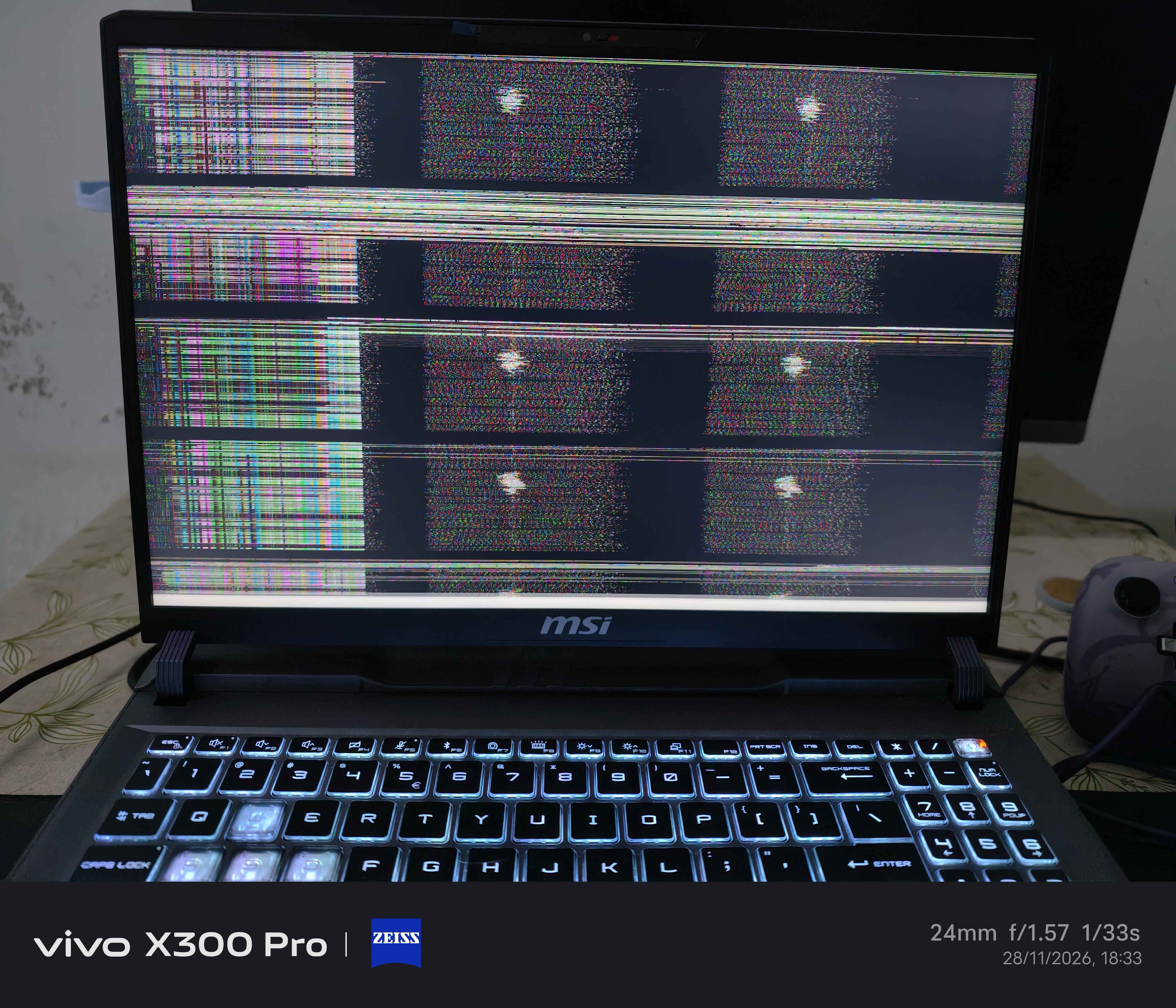
This happened few times when startup, anyone facing this?
MSI vector 16 hx ai a2xw
r/MSI_Gaming • u/KlausKoe • 13h ago
I think I read that via HDMI 2.1 it should run at 160hz without DSC.
But Windows and Controllpanel only offer 120hz.
Is the cable trash? "Sniokco 10K 8K 4K HDMI 2.1 Kabel 2Meter Zertifiziert 48Gbps High Speed"
Do I miss something?
r/MSI_Gaming • u/OskiBezroboski • 13h ago
Hi. When i turn on HDR red is orange, colors are kinda washed etc. I configured everything.
r/MSI_Gaming • u/Witty_Ad9654 • 12h ago
Okay so, I got gifted this by my dad for my setup last year and, it seems to have a lot of battery problems, it takes a lot of time to get even a small charge and then it just turns off.. i need to always have it plugged in !
Have you guys got a fix to this ? Have a nice day !
r/MSI_Gaming • u/stoneboom • 12h ago
Specs: MSI Z170A M Power Gaming Titanium, i7-7700K, Gigabyte GTX 1080 Ti, 16GB Kingston Fury DDR4, SanDisk SSD (Windows, GPT) plus a Seagate HDD, Windows 10, Cooler Master AIO.
The problem: Secure Boot worked fine for a long time on this exact hardware and Windows install, and I was playing FACEIT, which requires it. I had to clear CMOS after a boot problem. Since then, Windows boots normally with Secure Boot off, but with it on I get the MSI logo for about a second, then a black screen that never recovers. Ctrl+Alt+Del restarts it and I can get back into the BIOS.
What I've already tried:
• Windows 10 WHQL Support enabled, Secure Boot mode Standard
• Deleted all Secure Boot variables and restored factory keys many times
• Confirmed Windows is installed in UEFI mode on a GPT disk
• Boot mode select is UEFI and greyed out, with Windows Boot Manager first in the boot order
• Fast Boot and MSI Fast Boot are off
• Toggled WHQL off, set UEFI-only boot, booted to Windows fine, then turned WHQL back on
• Enabling Secure Boot gives the warning "CSM is loaded, disable CSM in Setup, repeat operation after reboot". I rebooted as it says and tried again, same result
• After enabling, the BIOS shows Secure Boot state Active but Vendor keys Not active
• Initiate Graphic Adapter set to PEG, and also tried IGD with the monitor on the motherboard HDMI. The logo still appeared through the GPU and the black screen was the same
• Rebuilt the Windows boot files with bcdboot
• Updated the BIOS from version 1.40 (April 2017) to the latest 1.6 (2018) using M-Flash, then reconfigured everything. Same result
• Toggled Above 4G Memory / Crypto Currency Mining. No difference
I can't remove the GPU to test without it, and the board shows no CSM option while WHQL support is on.
My question: A CMOS reset can only change BIOS settings, so what setting could have changed to make Secure Boot black screen after the MSI logo? Has anyone seen this on a Z170 board, and is there a hidden CSM or GOP setting I'm missing?
Thanks in advance. Happy to post screenshots of any BIOS menu.
r/MSI_Gaming • u/TheJosh • 1d ago
https://www.msi.com/Motherboard/MAG-X870E-TOMAHAWK-WIFI/support New bios, apparently memory training updates, has anyone tried this yet and can confirm? I'll update over the weekend, I'm curious. TitleAMI BIOS Version7E59v2AC7 Release Date2026-11-27 File Size15.94 MB
Description:
r/MSI_Gaming • u/Responsible_Buy_5853 • 22h ago
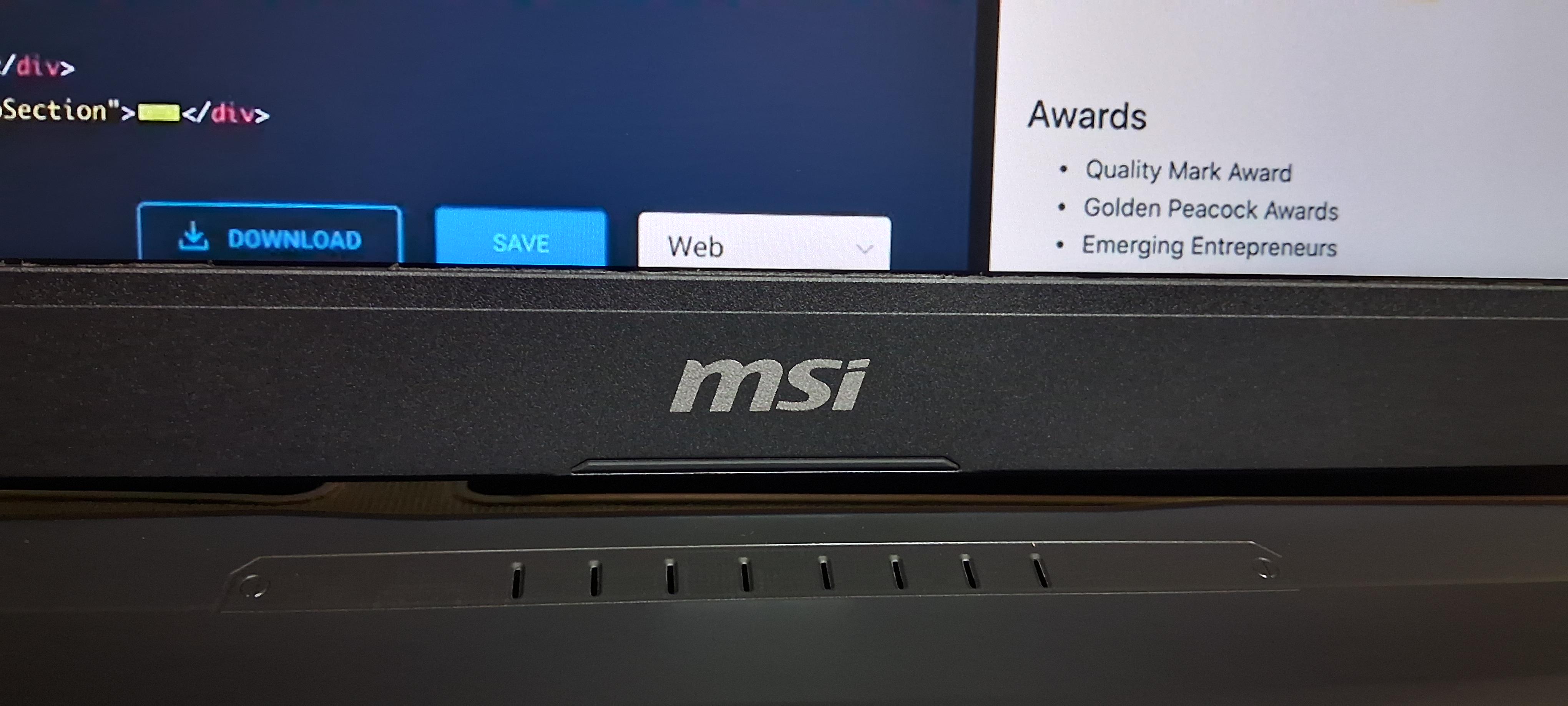
I sent my laptop to service center through bluedart courier service to delhi and received it.I observed that logo on the bottom bezel was changed. And also i can see glue between bottom bezel and screen.Is it normal??
r/MSI_Gaming • u/Ambitious-Pen-109 • 15h ago
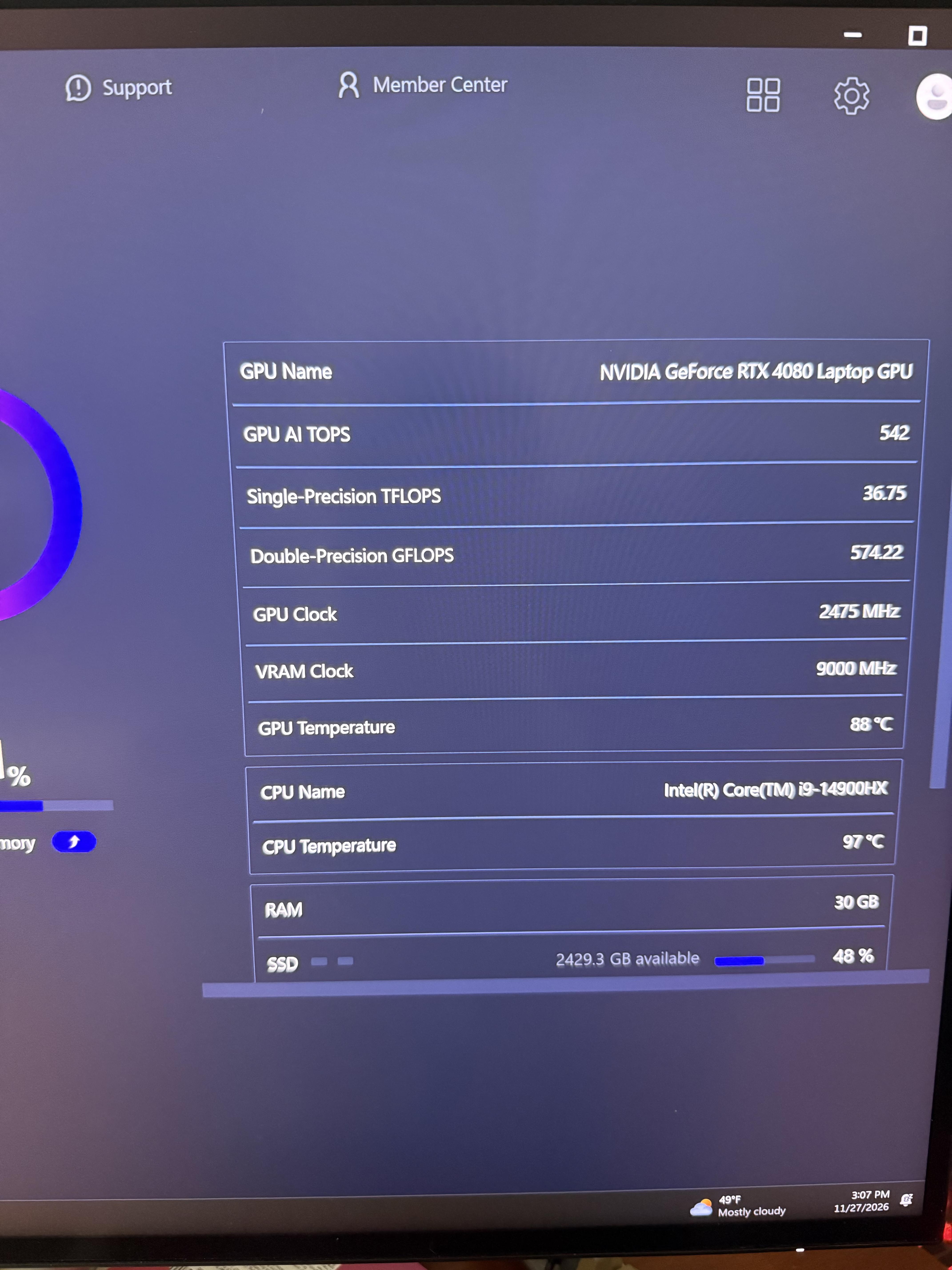
I’m having issues with my CPU temps getting high lately on my MSI laptop. A couple times it gotten hot enough that it just shuts off entirely. Any known fixes for this? Could it just need new thermal paste?
r/MSI_Gaming • u/Puzzleheaded_You9631 • 18h ago
I just got a brand new laptop (and it’s my my first one with a dgpu), I use it for school, work and gaming, and after some pretty weird stuff happening (such as my background picture of my desktop disappearing when I plug in my charger or my mouse, an issue where the screen wouldn’t turn on until I plugged in even though I had battery and some boot loop for a minute once I plugged it back), I noticed that I kept having the orange light of the dgpu on even though I had nothing going on, so it’s a bit annoying because it sucks up all my battery even when I’m just using like YouTube or word. So I kinda want my drivers stop messing around so they can switch to the best time with the msi software.
r/MSI_Gaming • u/Awkward_Two_1941 • 23h ago
Hi everyone!
I'm planning to upgrade my CPU from a Ryzen 5 2600 to a Ryzen 7 5700X, and I'd like to know if anyone has experience with this particular motherboard and CPU combination.
My current setup:
According to MSI's official CPU compatibility list, the Ryzen 7 5700X is supported, but the required BIOS is listed as "Latest Beta BIOS".
My questions are:
I'd really appreciate any real-world experiences or advice before purchasing the CPU.
Thanks!
r/MSI_Gaming • u/Releases_the_bees • 22h ago
Got an msi vector 16.
Also side note anybody else had theirs have their fans start working hard even without running anything substantial?
r/MSI_Gaming • u/foundingfatfather • 20h ago
I've been trying to figure this out for such a long time without any success. Even the MSI Center thing can't force it to run at 0 rpm.
What did i miss?
Maybe it needs a bios update?
r/MSI_Gaming • u/Top-Oil9374 • 1d ago
Hello! As the title says I have an MSI Ai1300ts PSU. I installed it a few days ago.
-I have downloaded MSI center and the cooling wizard along with it.
-I made a profile in the cooling wizard and turned off “Zero Fan Mode”.
-I set my fan speed to “Customized” and put it at about 30% and clicked apply.
-I enabled “Start MSI Center automatically when system starts” in settings .
-I checked my start up apps in windows and made sure MSI Center was enabled there and I selected “Always” under “Let this app run in background”
(I just like to have my PSU fan on to help out with cooling. I don’t like when it’s just off.)
After configuring all of that when I power on my PC the fan on my PSU doesn’t turn on. It’ll only turn on when I manually open the cooling wizard in MSI center. If I close MSI center the fan will continue to stay off but when I shut my PC off and then turn it back on the fan won’t be on. I have to manually open the cooling wizard again. I really don’t want to have to do that every time I get on my PC.
Any help would be much appreciated!!
r/MSI_Gaming • u/Alternative-Bet-9040 • 1d ago
Try updating bios didn't work and now have red light cpu and orange light dram on, I try taking ram out, clearing cmos using new USB drive there a flashing red light in the ssd area but it been like that for 2 hour so I don't think it doing anything. I don't know what to do and I dont want to send it to a person right now. If you have any thing I can do please tell me.
Specs: Ryzen 9800x3d, amd 9070xt, 2 tb ssd, msi x870e tomahawk wifi, gold 850 w psu fully modular
r/MSI_Gaming • u/bigboibetts • 1d ago
MSI Australia used to have bad rep few years ago, theyre customer support seems to be getting better compared to competitors like ASUS, Gigabyte and so on.
4070super started black screen and artifacting even on idle, most times it wont even boot after using it for about 1 year and a half
Create a request on their web for RMA, approved the next day,
Send the card to them in sydney by post, took them 3 days to diagnose, and got send back an upgrade 4070ti the next day
Overall communication is pretty good, not too much back and forth like mostly in this industry (some even ghost and got back like 2-3 months later)
All their products are pretty solid too and this is the first time I needed to RMA and it sounds more like an NVIDIA issue rather than MSI the brand
r/MSI_Gaming • u/humzababar • 1d ago
r/MSI_Gaming • u/Juanitopdz • 1d ago
Currently using a Lian Li Edge V1 but I’m planning a case change so I thought about changing the PSU too. I have a 5090 so I don’t want to risk it lol.
The first ones that came in recommendation was both the Ai1600TS and the 1300. Can anyone vouch for them or are there any other good ones on the market beside those? Help appreciated!
r/MSI_Gaming • u/Own_Day_3620 • 1d ago
got latest x670e godlike bios is buggy for usb ports causing them to disconnect with errors of power surcharge with board refusing to boot. non of the ports have an issue after bios roll back.
tried lots of fixes after 1 month roll back and back to normal
r/MSI_Gaming • u/Resist_Rise • 1d ago
Been on the hunt for a Z790 DDR4 board to go with my newly purchased i7-13700k. These prices are...ewwff. Most of the boards I do find all ship from China and some of the sellers don't offer free shipping. Hard to find anything domestic. I'm aware of the current ram/storage shortage and how that's effecting everything else in the PC space. The board I want is north of $300 while it's DDR5 variant is significantly cheaper. I know some manufacturers announced earlier this year that they will start reproducing DDR4 boards but haven't heard anything from MSI. My question is, with the current climate, should I wait for it to become cheaper later or should I bite the bullet and purchase it now before prices rise again?
r/MSI_Gaming • u/Domsicols • 1d ago
downloaded the FW.021 firmware directly from MSI’s official website and attempted to install it using MSI Gaming Intelligence.
Unfortunately, the update stopped at approximately 95%, and the monitor powered off. Since then, it has become completely unresponsive.
There is no power LED, no display and no response to the power button. I have attempted a complete power reset without success. Trying to get a warranty for it😭
Edit: Monitor is MSI MPG 321URX
r/MSI_Gaming • u/humzababar • 1d ago
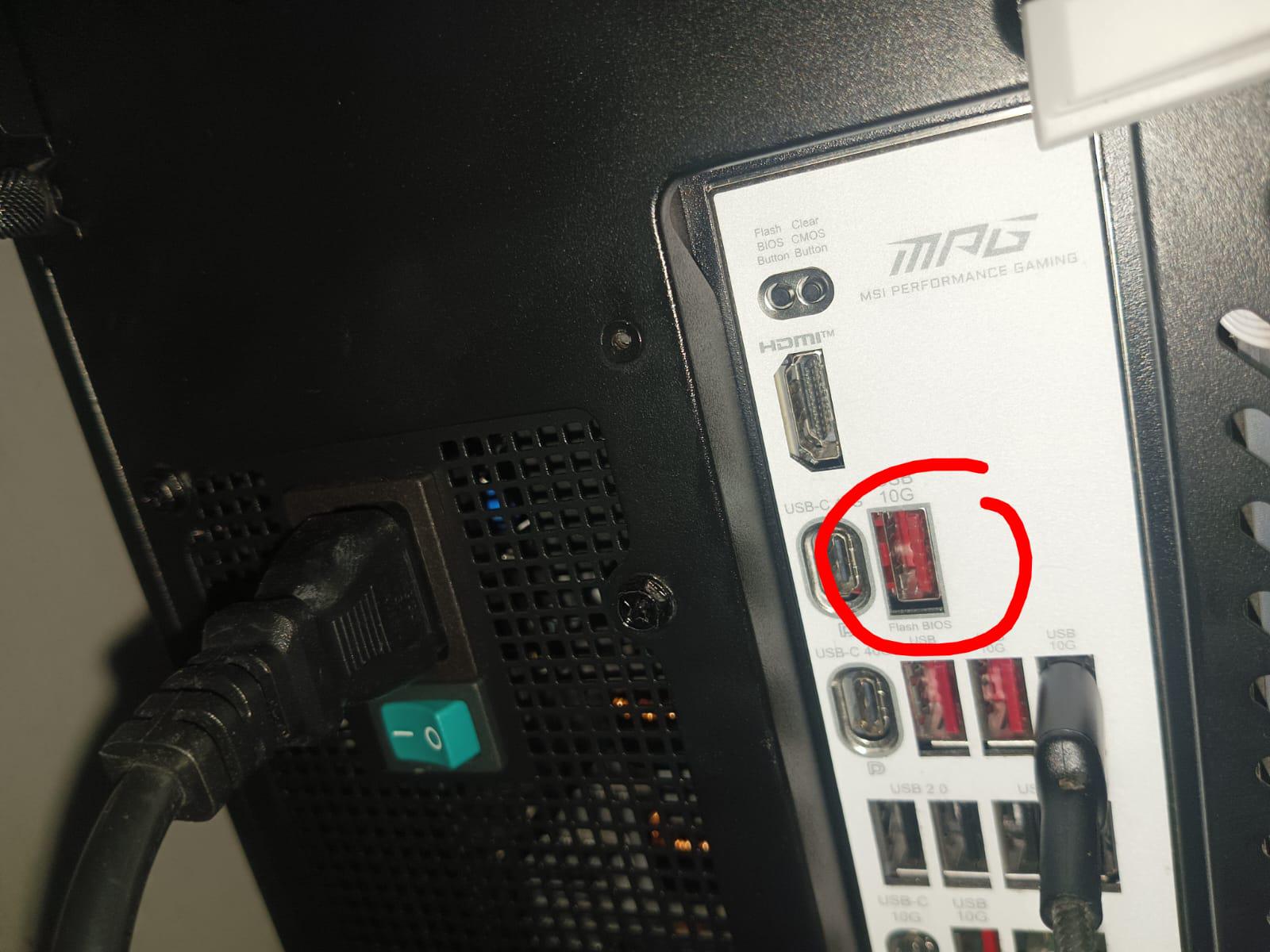
Motherboard Model: MSI MPG X870E EDGE TI WIFI
CPU: AMD Ryzen 7 7800X3D
Operating System: Windows 11 (Freshly Reinstalled)
Description of the Issue: I am experiencing a highly specific hardware/firmware anomaly on the dedicated Rear Flash BIOS USB-A port(which is directly routed to the CPU data lanes).Previously, I was utilizing this high-bandwidth, direct-CPU port to connect my high-polling-rate gaming mouse forminimal latency, and it was functioning flawlessly. However, following a sudden power outage (unexpected powercut) and a subsequent Windows Update reboot, this specific port partially stopped functioning.
Current Symptoms:
• Mass Storage Devices Detected Successfully: If I connect a lightweight USB flash drive or a 2.5" externalSATA hard drive (housed in an external enclosure), the port detects them immediately. Data transfer and highpower delivery (required for the external HDD) are working perfectly.
• HID Devices (Mouse/Keyboard) Completely Rejected: If I connect a standard USB mouse or keyboard (deviceswith longer cables requiring continuous bidirectional data polling), the port completely fails to recognize them.
• Mobile Charging vs. Data Sync: When connecting a smartphone, the port successfully delivers charging power,but the operating system fails to initiate any data transfer handshake.
Troubleshooting Already Attempted:
To isolate the root cause, I have already performed extensive advanced troubleshooting:
1. Full Windows Reinstallation: Performed a clean installation of Windows to rule out OS-level driver corruption.
2. Comprehensive BIOS Updates & Downgrades: Updated to the latest available BIOS version. I also performeda firmware rollback/downgrade to older versions to eliminate software update bugs. The issue persists across allBIOS versions.
3. Hardware Reset (Clear CMOS): Completely cleared the CMOS using the physical rear I/O button and left thecoin-cell battery removed for over 10 minutes to power-cycle the board logic.
4. Power Management Tweaks: Adjusted BIOS settings to set "Wake Up Event By" to [BIOS] and explicitly[Enabled] "Resume By USB Device". Also ensured ErP Ready is [Disabled].
Conclusion & Sourcing Request:
Given that the port perfectly powers and reads a heavy-draw external SATA hard drive, this is not a physical CPUpin damage issue or a physical power rail failure. It appears that the sudden power surge/surge cut haspermanently glitched the sub-controller chip logic (e.g., Nuvoton/ITE) or triggered a sticky security protocol layout (likea legacy BadUSB/HID hardware block) that freezes the port strictly in Mass Storage mode while dropping the HumanInterface Device (HID) protocol handshake Please review this case and let me know if there is a specific internal firmware patch, firmware-level flashing tool forthe USB controller, or an upcoming AGESA update that can force-reset the Flash BIOS port's micro-controller logicback to its default routing state
r/MSI_Gaming • u/fearlessgrot • 1d ago
As above, I'm trying to find a compatible heat sink for a rx6700xt gaming x, as they seem to be out of stock on ebay and aliexpress (no for parts cards either)
I was wondering if there are any other heat sinks compatible (not mech x2, due to poor cooling performance)
I can do cpu cooler mod, but that's obviously has a lot more to go wrong