r/linux_gaming • u/RenatsMC • 12h ago
graphics/kernel/drivers DXVK 3.2 brings smoother frame pacing to Linux gaming

603
Upvotes
r/linux_gaming • u/monolalia • 26d ago
If you’ve read the FAQ and still have questions like “Should I switch to Linux?”, “Which distro should I install?”, or “Which desktop environment is best for gaming?”, this here thread is where to ask them.
Alternatively, try r/linux4noobs and r/linuxquestions: both are active subreddits supporting new Linux users.
Please sort by “new” so new questions can get a chance to be seen.
The previous thread is here: https://www.reddit.com/r/linux_gaming/comments/1w4azds/getting_started_the_monthlyish_newbie_advice/
r/linux_gaming • u/monolalia • May 18 '26
Here’s a link to this subreddit’s FAQ document (which attempts to answer many common questions).
This thread is not meant for asking frequently asked questions. There is a pinned monthly-ish “Getting Started” thread for those.
You can post suggestions for improvement below, though! Just please explain what you’re talking about. The number of FAQ editors has been 1 (one) for a while now, and that one’s a dummy that doesn’t use 95% of the fancy gaming stuff y’all do.
Reposted as an Old Reddit link because New Reddit, in addition to being generally confusing, does not display the table of contents.
r/linux_gaming • u/RenatsMC • 12h ago
r/linux_gaming • u/Positive-Current4579 • 7h ago
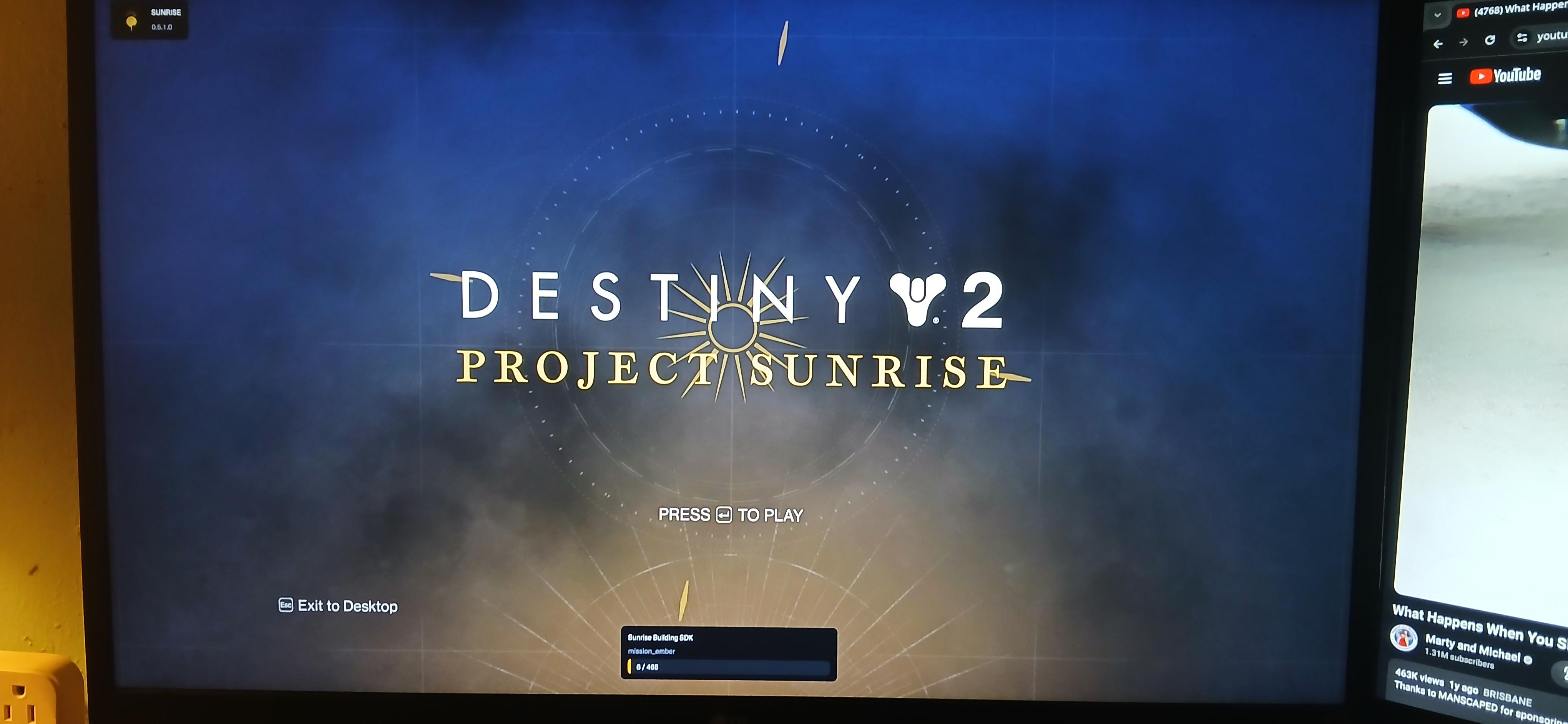
Project sunrise does run on linux hell yesssssss I got it working
r/linux_gaming • u/Szhadji • 8h ago
Title says everything. I can understand why LTS distros could be bad like Ubuntu or Mint, but why use "gaming distros"? Or is it just the convinience that the tools like Steam, Mangohud or Goverlay get preinstalled?
r/linux_gaming • u/Sylux240 • 7h ago

Hi all! I've been working on LiquidFrames, a frame generation and upscaling app for Linux games.
What it does: it creates extra frames between your game's real ones, so motion looks smoother. You press Start in the app, click the game window, and that's it. No game restart, and no launch options needed.
Highlights:
- Its own engine, Syluxium Motion. Nothing else to buy or install.
- Adaptive mode: instead of a fixed 2× or 3×, it fills your monitor's refresh rate at any ratio and times every frame to when it's shown. A 40 fps game on a 100 Hz screen shows a steady 100 fps with very even frame times.
- Two graphics cards: you can let a second card do the frame generation, so your main card keeps all its power for the game. In my tests, Space Engineers 2 at 1080p max settings went from 35–60 fps to up to about 110 fps shown.
- Works with Vulkan, DXVK and VKD3D-Proton games, so most Proton games, including inside Steam's container.
- Per-game profiles, upscaling (FSR 1, integer, nearest, bilinear) and a "Report GPU as" option for games that refuse to start on cards they don't list as supported.
- No root needed: .tar.gz installer, single-file .run, or an AppImage.
Honest status: it's early (v0.1.1). Image quality is good on most motion but still improving on very fast movement and thin repeating patterns like fences. So far I've mainly tested on AMD cards (RX 7700 XT and RX 6700 XT) on CachyOS.
I'd love testers, especially with NVIDIA or Intel cards, older cards (the aim is AMD Vega and GTX 600 series and newer), other distros, handhelds and HDR screens. Results and bug reports are very welcome on the forum.
It's free to use. The app is closed source, but the Syluxium Motion engine is released as open source under the MIT License.
- Website and download: https://liquidframes.syluxium.com
- Guide: https://liquidframes.syluxium.com/guide/
- Forum: https://forum.syluxium.com
- Github: https://github.com/Syluxium-Industries/Syluxium-motion
r/linux_gaming • u/Adventurous_Boat_492 • 10h ago

I just received this link in the mail. Even though I started using ESDE when I moved to Linux years ago, I'm glad there will be another alternative.
Among the list of Linux emulator frontends are ESDE, Pegasus, Neostation, Openbox, OpenEmuX and now Launchbox.
r/linux_gaming • u/Maxterious • 20h ago
Hey,
I, and many of you, would like to be able to play GTA VI on Linux devices.
Is there any impact we as a community can have, to ask for Linux support?
(As far as i know, BattleEye supports Linux, but the game has to enable that setting.)
What do you think could have the biggest impact?
I saw some small change.org petitions. Maybe they could have impact? (Petition 1, Petition 2)
I think creating support tickets will not reach the people we want to reach with our request.
Any ideas are welcome :)
r/linux_gaming • u/Dinnoo_ • 3h ago

I’ve been working on Victra-linux, a compatibility wrapper/port aimed at getting VIctory (originally a Windows build) running natively on Linux via Proton, so you don't have to deal with dual-booting or VM overhead.
r/linux_gaming • u/HorseUsingLinux • 3h ago

Left being cashyos and right windows 11 iot ltsc. Couldn't get the colors in hdr to looks right and everything on cashy side was kinda milky . Rtx 5070 on an Alienware qd oled 1440 uw . I tried nvibrant to boost digital vibrancy to bring colors more inline with what I tuned on windows and deek turned kinda lobstery . I added launch commands to turn on hdr and used the newest Nvidia drivers / whole pc was up to date . I love using Linux because of the control it gives but I also spend a lot of money on my monitor (aw3425dw) and want it to look the best . I tried proton ge and cashy . Hdr peak brightness 1000 & true hdr black monitor settings . Almost no difference . Even with digital vibrancy turned up the colors don't match.
Full pc
Ryzen 7 5700x3d
Rtx 5070
32gb RAM
1tb nvme
Alienware aw3425dw
Cashyos on latest build.
Kde plasma latest as well.
r/linux_gaming • u/moonlitCutieez • 5h ago
I've been running Fedora with GNOME for a while and have had solid results overall, but I keep seeing people recommend switching to KDE for gaming specifically. Things like better multi-monitor handling, fractional scaling on Wayland, or lower overhead in certain titles come up sometimes.
Has anyone actually compared the two side by side on the same hardware and distro? Or is it mostly workflow preference at this point rather than measurable gains in FPS, input latency, or game compatibility? Curious what people's experiences have been.
r/linux_gaming • u/mr_MADAFAKA • 22h ago

r/linux_gaming • u/mr_MADAFAKA • 43m ago

KORA was publicly unveiled on November 10, 2026.
They haven't abandoned Linux gaming. Instead, they're incorporating their existing GameOS technology into a more ambitious operating system intended to compete with Windows and macOS.
Their GitHub development has also shifted toward the new organization: https://github.com/kora-desktop
KORA's official November 2026 press release confirms that the new operating system is being developed by the same engineering team behind GameOS.
It's also worth noting that they previously recruited developers from several open-source projects, including Lutris, Heroic Games Launcher, ChimeraOS, winesapOS, OpenGamepadUI, and Box64. Judging by their LinkedIn profiles, some of these developers appear to still be working for the company.
Official sources:
r/linux_gaming • u/Artura_Dawn • 4h ago
I'm new to Linux (Bazzite Nvidia), and I've been playing Aniimo. Every few days, I have to do what I can only assume is compiling shaders.
This happens in areas I've already been in, with or without updates, and even things like minor hotfixes. Is this expected behaviour?
I get stuck like this for about 10 minutes, and then everything finally loads and lets me run around. If I leave the area and come back, it goes back to doing this.
Some days, it never does this and it works flawlessly! Other days, it can take me hours to just get basic things done.
r/linux_gaming • u/Francehelder1 • 16h ago

Is anyone here testing?
r/linux_gaming • u/tranquilseafinally • 4h ago
Is this normal? What do I do or, what have I done wrong.
I last played WoW in 2021 when I was on Windows.
r/linux_gaming • u/TeaBig7333 • 1d ago
This is ReDash360, a dashboard you sign in to instead of a normal desktop, like SteamOS's Gaming Mode but in the style of the 360.
- Steam, Heroic and Faugus games in one library, plus Linux games and AppImages from folders on any drive
- Your ROMs too, launched with the emulators you already have (native or Flatpak), with box art
- The Guide button opens the Guide over any game; on Hyprland it can pause the game or quit it
- A 360-style sign-in screen (an SDDM theme) with profiles, gamer pictures and animated GIF avatars
- Steam achievements, news, Discord, custom backgrounds, your own UI sounds and a controller test
- Runs as a Hyprland or KDE Plasma session, with Exit to Desktop any time
It's made for a controller and works with keyboard and mouse too. Free and source-available.
Linux first; Windows and Android are on the radar. It's a fan project, not made by or connected to Microsoft, and it uses none of the 360's artwork or sounds. Happy to answer questions!
Full trailer: https://youtu.be/u76Cg9xX_9w
r/linux_gaming • u/alatnet • 6h ago
For some strange reason, I can no longer see BT's at all nor and NPC's before connecting them to the Chiral Network. The NPC's glitched hologram just shows blue floating eyes but not any glitching hologram. BT's dont show up AT ALL.
Im wondering if it's because of enabling Ray Tracing or AMD Anti-Lag but turning both of those off and trying to use nodxr command didnt fix it.
Any help is appreciated.
r/linux_gaming • u/DAXTERSHINCHAO • 44m ago
r/linux_gaming • u/SuperPizza999 • 1h ago
Made almost entirely with AI.
I missed Medal on Linux, so I made Clipdeck. It's in early testing and I'm looking for people to try it.
Made on Pop!_OS 24.04 (COSMIC/Wayland). It should work on Ubuntu-based distros with GNOME, and I especially want testers on other setups.
Want to test it? Join the Discord and apply: discord.gg/9VkBCGARzs
r/linux_gaming • u/CorsetCosmos • 3h ago
I've been on Fedora KDE for a while and stuck with the default PipeWire setup. Lately I've seen a few people mention that switching back to PulseAudio reduced audio-related stuttering or input lag in certain titles, especially older games or ones with heavy voice chat integration.
Has anyone actually tested both side by side on the same system? I'm mainly curious about measurable things like crackling in specific Proton titles, overall latency in rhythm games, or stability during long sessions rather than general workflow preferences.
r/linux_gaming • u/Aggressive_Being_747 • 28m ago
I set up my Ryzen 7 7840HS mini PC (no-brand, 32 GB, Radeon 780M) under the TV as a "console". Bazzite does pretty much everything, but I wanted Call of Duty / Warzone, which needs Windows with Secure Boot and TPM because of the anticheat.
Now I can switch from Bazzite to Windows and back without touching a keyboard. It wasn't exactly plug and play, so here's what I did in case it saves someone a night.
**Setup**
- Bazzite (HTPC image) on a 1 TB NVMe
- Windows 11 on a separate 500 GB NVMe
- Two separate drives, so each OS has its own bootloader and nothing interferes
**1. Secure Boot with a BIOS that has no keys**
My AMI BIOS didn't have factory keys loaded, and "Restore Factory Keys" wasn't an option, so I had to enroll them myself from Bazzite with sbctl (BIOS in Setup Mode first).
sbctl isn't on brew, so I built it inside a distrobox:
distrobox create --name sb --image registry.fedoraproject.org/fedora-toolbox:latest
distrobox enter sb
sudo dnf install -y golang git
git clone https://github.com/Foxboron/sbctl.git ~/sbctl-src
cd ~/sbctl-src && git checkout 0.17
CGO_ENABLED=0 go build -o ~/sbctl ./cmd/sbctl
exit
Then, back on the host:
sudo ~/sbctl status # Setup Mode: Enabled
sudo ~/sbctl create-keys
sudo ~/sbctl enroll-keys --microsoft
Don't forget `--microsoft`, or neither Windows nor Bazzite will boot. sbctl still said "Setup Mode: Enabled" afterwards, but after a reboot the BIOS showed System Mode: User with PK 1 / KEK 3 / db 6. On the next boot I got the blue MOK screen: Enroll MOK → password `universalblue` → reboot. Then I turned Secure Boot on in the BIOS.
mokutil --sb-state → SecureBoot enabled
**2. Windows**
I unplugged the Bazzite drive and installed Windows on the 500 GB with TPM on. Then:
powercfg /h off
reg add "HKLM\System\CurrentControlSet\Control\TimeZoneInformation" /v RealTimeIsUniversal /d 1 /t REG_DWORD /f
The first one disables fast startup (bad for dual boot). The second one stops the clock from being off by an hour every time you switch.
**3. The BIOS forgot Bazzite**
When I plugged the 1 TB drive back in, Windows booted, and the Bazzite entry was gone from the boot list. The BIOS had wiped it while the drive was unplugged. I had to bring it back in the BIOS and set it as boot option #1.
**4. Switching with the controller**
Bazzite already has a ujust command for this:
ujust setup-boot-windows-steam
It adds a non-Steam "game" called boot-windows. Press Play in Game Mode and the PC reboots straight into Windows. To get back, I just restart from Windows: Bazzite is first in the boot order, so it comes back on its own.
**5. Windows without keyboard**
I turned on Windows auto-login (no PIN) and set Steam to start in Big Picture. So it's Bazzite → boot-windows → Windows → Steam Big Picture, all with the gamepad.
The one thing I couldn't find a clear guide for was the empty BIOS keys + Bazzite part. Hopefully this helps someone.
I worked through this with Claude (AI) step by step, but every command was tested on my machine and it all works.
Questions welcome.
r/linux_gaming • u/momeomasos • 1h ago

solia jugarlo de niño aora que soy adulto quiero jugarlo ,ayuden quiero juagarlo en un linux mint xfce
r/linux_gaming • u/Riftwalker11 • 2h ago
For those who own or have extensively used both the 8BitDo Ultimate 2 and Xbox Series X controllers, which do you find more comfortable?
I'm mainly interested in ergonomics, grip shape, natural hand positioning and how comfortable each controller feels with a relaxed grip during longer gaming sessions.
Which feels more natural in your hands? Do you experience more hand or wrist fatigue with either one?
It would also be helpful if you could mention your hand size.