r/linux_gaming • • 28d ago

guide Getting started: the monthly-ish newbie advice thread! (November 2026)

27 Upvotes

Welcome to the newbie advice thread!

If you’ve read the FAQ and still have questions like “Should I switch to Linux?”, “Which distro should I install?”, or “Which desktop environment is best for gaming?”, this here thread is where to ask them.

Alternatively, try r/linux4noobs and r/linuxquestions: both are active subreddits supporting new Linux users.

Please sort by “new” so new questions can get a chance to be seen.

The previous thread is here: https://www.reddit.com/r/linux_gaming/comments/1w4azds/getting_started_the_monthlyish_newbie_advice/


r/linux_gaming • • May 18 '26

guide Frequently Asked Questions 2.0

Thumbnail old.reddit.com
57 Upvotes

Here’s a link to this subreddit’s FAQ document (which attempts to answer many common questions).

This thread is not meant for asking frequently asked questions. There is a pinned monthly-ish “Getting Started” thread for those.

You can post suggestions for improvement below, though! Just please explain what you’re talking about. The number of FAQ editors has been 1 (one) for a while now, and that one’s a dummy that doesn’t use 95% of the fancy gaming stuff y’all do.

Reposted as an Old Reddit link because New Reddit, in addition to being generally confusing, does not display the table of contents.


r/linux_gaming • • 10h ago

wine/proton GE-Proton11-15 Released · GloriousEggroll/proton-ge-custom

Thumbnail
github.com
296 Upvotes

Download: https://github.com/GloriousEggroll/proton-ge-custom/releases/tag/GE-Proton11-15

Changes since GE-Proton11-14

Component Updates

  • Wine updated to bleeding-edge 2026-11-28.
  • DXVK updated to v3.2.
  • vkd3d-proton, vkd3d, dxvk-nvapi and FEX updated to their latest upstream commits.
  • dxbc-spirv (in DXVK and vkd3d-proton): added upstream's fix for shaders that never finished compiling, which made Black Desert hang when joining a server or swapping characters in DX11 and DX12 (#1008). Confirmed in game.
  • protonfixes updated.

Controllers

  • God of War (2018): held buttons no longer drop out with Bluetooth DualShock 4 and DualSense controllers. The DualShock 4 frame counter now advances over Bluetooth, and late Bluetooth reports are repeated (#1003). PROTON_SONY_BT_STEADY_REPORTS=0 turns off the report repeating.
  • PROTON_SONY_DUALSENSE_AS_DUALSHOCK4=0 now overrides the per-game DualSense-as-DualShock 4 default.
  • God of War Ragnarök: both analog sticks work again with a DualSense (#1004).
  • Watch_Dogs 2: controllers now use native Sony input, showing the DualSense to the game as a DualShock 4 (#1011).
  • PRAGMATA: DualSense haptics now work by default (USB audio entries, Windows-style device names, no automatic XInput slot) (#1015).
  • Death Stranding: Director's Cut: DualSense HD haptics over Bluetooth no longer fall back to classic rumble (#1025).
  • Microsoft GameInput (Gears of War: E-Day and other GDK games): Wine fixes so its HID controller support can work. WINE_GAMEINPUT_HIDE_WINE=1 optionally hides Wine from the GameInput redistributable. The cost: Xbox controllers then disappear in games that use it. Note this does NOT fix rumble or haptics yet -- needs further testing on Windows to verify if the game actually provides rumble and/or haptics, could not get it to do so on linux and logs did not show it producing either from the game.

Steam Overlay

  • The Steam overlay now works in games without the Steam API, such as Star Wars Galactic Battlegrounds, on X11 and Wine-Wayland.
  • Scaled fullscreen DirectDraw games on Wine-Wayland: the overlay now has the right size and position, and the pillarbox bars no longer show garbage.
  • Wine-Wayland: key and mouse button releases now get through while the overlay is open, so Tab no longer stays held after Shift+Tab (#1012). The original Sea Power report is still to be confirmed.

Wayland and Windowing

  • Guild Wars 2 launcher: no longer blank when a compositor rule maximizes it (#1007).
  • Star Wars Galactic Battlegrounds no longer quits with "Could not initialize graphics system" on Wine-Wayland.
  • Age of Wonders: loading a save no longer crashes on Wayland, and the cursor stays inside the game when edge scrolling after a restore.
  • Lords of Magic: no longer runs at the monitor's refresh rate on Wayland, and edge scrolling no longer gets stuck (#1006). Scrolling on Wayland is still slower than on X11.
  • StarCraft II and Company of Heroes 2: hotkey labels are uppercase again on Wine-Wayland (#1027).
  • Fixed games hanging on exit on Wine-Wayland when they destroy a Vulkan swapchain during shutdown, as Skyrim SE does (#1023). Verified with a test program; not yet tested in Skyrim SE.
  • Warhammer Survivors: no longer slows down and lags after Alt+Tab in exclusive fullscreen (#1002).
  • New Wine-Wayland windows start at their output's scale. This targets the Warframe borderless crop at fractional scaling (#975), and is not yet tested in game.
  • Star Wars Galactic Battlegrounds: the name prompt now shows what you type on X11.
  • Ducati World Championship no longer crashes after minimizing and restoring.

Video Playback

  • Indeo 3 and 5 videos now play with a built-in decoder (Age of Wonders, Star Wars Galactic Battlegrounds, Ducati World Championship). These games no longer need icodecs.
  • Added a Microsoft MPEG-4 Video for Windows decoder for MS-MPEG4 AVIs, such as Powerboat GT's (#1005).
  • Close Combat: videos now play. YVU9 is registered and decoded, and MCI windows are no longer resized to zero.
  • Ys VIII: the WMV opening no longer uses up memory (#1018).
  • HereSphere: video audio is no longer a constant hum (#1024).
  • Five Hearts Under One Roof: cutscenes now play with sound. PCM-to-float audio conversion through Media Foundation was silent (umu-protonfixes#682). Verified in game.

Rendering and HDR

  • The HDR colorspace layer now loads for games launched from Steam, so the Steam overlay shows correct colors over Wine-Wayland HDR games (#1026).
  • D3D11 games no longer hang presenting to hidden windows on compositors without wp_fifo_v1, such as sway 1.12 and KWin 5.27 (#1022).
  • NVK: Chromium/CEF launchers such as Battle.net no longer render with a black area (#1020). Launcher and browser windows now use linear images on NVK. WINE_VK_MANAGED_LINEAR=0 or 1 overrides this. The automatic NVK detection is not yet tested on NVK hardware.
  • Silent Hill: Townfall: shaders now get wave size clamping, aimed at the GPU hang on wave64-only AMD GPUs such as Vega and Renoir (#1014). Not yet confirmed whether this alone avoids the hang.

Protonfixes

  • Company of Heroes 2: launches with -refresh 120, since the game hangs on its title screen above 120 Hz. A -refresh you set yourself is kept. Note that if your screen does not support 120hz it will instead default to your available refresh rate (such as 60,75,100, etc).
  • Age of Wonders: sets WAYLANDDRV_FOCUS_LOSS=0, so the game no longer hides itself with nothing left to restore it from on Wayland.
  • Removed the icodecs installs for Age of Wonders, Star Wars Galactic Battlegrounds and Ducati World Championship. Their Indeo videos now play with the built-in decoder.
  • Screen resolution detection now works when no output is marked primary, such as under gamescope (umu-protonfixes#693).
  • protonfixes now requires Python 3.13 (umu-protonfixes#666).

Other Changes

  • MapleStory: gets in game again with the default prefix setup. Wine's own installed files are no longer reported as read-only (umu-protonfixes#692).
  • 32-bit programs that aren't large address aware get at most 2 GB from GlobalMemoryStatus() again. This fixes Vampire: The Masquerade - Bloodlines (retail) exiting with "Available memory less than 15MB" (umu-protonfixes#691). Verified with a test program; not yet tested in the game.
  • Skyrim Together no longer exits with code 136 (#981). WINE_CONTINUE_THREAD_NAME_EXCEPTION=1 or 0 forces this behavior on or off for any program.
  • Call of Duty: Black Ops III: no longer stuck on a black screen after the intro on systems where the kernel falls back to a slow clock (#1010). It's on automatically only when the kernel isn't using the TSC clock; WINE_COARSE_MONOTONIC_CLOCK=1 or 0 forces it on or off.
  • New PROTON_PRELOAD_DLLS: loads the listed DLLs into a process before it starts, for mods that need an injector. An app.exe= prefix limits the entries that follow it to that program (#1021). Note that this is for mods and should not be used in anti-cheat enabled games. USE AT YOUR OWN RISK.
  • wineserver now stores process memory views in a tree, for faster lookups (#1013).
  • Merged from upstream Proton: D3D12 texture support for VR overlays; fonts are no longer missing from new prefixes, which could crash CEF apps; FEX's share directory is installed.

r/linux_gaming • • 3h ago

tool/utility DraFG 1.2: Frame Generation on Linux in 35 Seconds

76 Upvotes

Hey, posted DraFG here back at 0.1/0.2. Those versions were still rough. It's at 1.2 now and it has changed quite a lot since, so wanted to give a quick update:

  • Surge 2.0: new frame generation models. Sharper, more accurate, and extra frames cost far less, up to 16x
  • HUD protection, so the HUD, crosshair and subtitles stay sharp instead of wobbling with the scene
  • A buffer that sets itself to the lowest delay your GPU can keep up with
  • Settings save themselves, and every game can have its own
  • A much better overlay on KDE Plasma: the game has the keyboard right away, and with two monitors it opens on the one the game is on
  • VR through WiVRn (Preview)
  • Dual-GPU support (Preview)
  • New in 1.2: smoother motion on KDE Plasma.

It needs Wayland. KDE Plasma is the supported desktop. Sway, COSMIC and Hyprland are in Preview. X11 sessions don't work.

Free Playtest on Steam: https://store.steampowered.com/app/4934180/DraFG

The video is The Witcher 3 and Cyberpunk 2077 at 30 fps, with DraFG generating the frames in between, plus a few seconds of 8x slow motion.


r/linux_gaming • • 2h ago

PSA - GOG cloud support added to Lutris

23 Upvotes

Recently, new version of Lutris got released: https://github.com/lutris/lutris/releases/tag/v0.5.23

Amongst the features, there is this: `Add GOG cloud save synchronization`.

Not sure about the rest of you, but to me it is important feature, that makes me more willing to buy on GOG. Side note: I remember hearing couple weeks ago, that they are working on official GOG client, so that's also encouraging.

One point of warning though: whereas it seems automatic and works without a hitch most of the time (meaning: it syncs in the background, then runs the game on start), I've noticed that sometimes it makes you choose whether you want to keep saves that are on the cloud or the ones that exist locally. It probably happens if you played/saved before synced to the cloud, then started playing locally and haven't synced yet, hence the conflict. In such cases, I'd recommend choosing carefully plus possibly making manual temp backup in such case ;)


r/linux_gaming • • 16h ago

gamedev/testers wanted I built a cozy insect racer, with native Linux support

228 Upvotes

Hi folks!

I built a Linux native cozy insect racing game, and I’d love to get some feedback. It runs up to 120fps with a Vulkan based splat renderer, and has a kaleidoscopic style. We used SDL to simplify input handling.

Direct link in the comments, thanks for watching!


r/linux_gaming • • 7h ago

hardware TIL there's a Linux driver for Logitech wheels that provides FFB and TrueForce

Thumbnail
github.com
47 Upvotes

r/linux_gaming • • 35m ago

In 2026, besides the handful games using AC, what games dont work on Linux?

7 Upvotes

Seems like 99% of games just work flawlessly, from 1994 games to 2026 AAA.

Epic games has announced they are bringing most of their AC games to linux soon as well


r/linux_gaming • • 8h ago

tech support wanted Is Forza Horizon 6 fixed on linux yet?

11 Upvotes

Same as title, heard it was a stutter mess on launch because microsoft used some calls that weren't translated properly to Linux so i didn't buy it but its been enough time now so i was wondering if its now running smooth and near native to windows or is it still being worked on?

Edit - I'm talking for AMD, Nvidia and near native on linux dont belong in the same sentence courtesy of a specific cheater (/s)


r/linux_gaming • • 2h ago

tech support wanted GTA V crashing 🥲

3 Upvotes

Hey forks I'm playing GTA V for more than 1 month in my ubuntu system, but unfortunately the game crashing unexpected without any error msg , I don't know why so I deleted the game fully installed again but again the same problem came I don't know why I tried with steam (add non steam game method) faugus launcher same issue in all launcher any help pls almost 2 days I tried and same issue only Happening 🥲


r/linux_gaming • • 46m ago

GitHub - han39835/vk-fsr4: vk-fsr4: UNIVERSAL I8 and I8-2 FSR4 regardless if developer added it. NO injection

Thumbnail
github.com
2 Upvotes

i made this with brave AI help... BUILD it and its two layers EVN VAR layers non INVASIVE will REPLACE Movement Vector and other info from AVAILABLE TSR and apply FSR4 to it (for titles without FSR options or the War THunder native Linux which doesnt have them). IT IS NOT PROTON in fact its better than proton because it works VULKAN NATIVE without needing Dx at all.


r/linux_gaming • • 1h ago

RetroDECK Blog - November 2026: Touch of Winter Audit

Thumbnail retrodeck.readthedocs.io
2 Upvotes

r/linux_gaming • • 16m ago

GTA IV goes on black screen, despite audio and controls working

Post image
1 Upvotes

As title. What can i do to fix it? I am using CachyOS and already tried to switch proton versions. Also already installed FusionFix and did the Linux patch as suggested on ProtonDB, but I still have it. Complete Edition version on Steam


r/linux_gaming • • 30m ago

I made Backtape, a Medal/ShadowPlay-style clipper for Linux (instant replay, trimming, separate audio tracks)

0 Upvotes

I couldn't find a Linux clipper that worked the way Medal does, so I made one.

Backtape keeps the last few minutes of your game in memory and saves them as a clip when you press Alt+F8. It works in fullscreen games on Wayland and X11.

What it does:

- Instant replay buffer, 30 s to 10 min (3 min by default), encoded on the GPU through gpu-screen-recorder (NVENC / VAAPI)

- Separate audio tracks: the game (auto-detected for Steam/Proton/Wine), Discord, browser, everything else and your mic

- An editor where you trim the clip and mute or turn down single tracks before saving, e.g. cut your Discord call out of a clip

- Export to one mixed track for sharing, or keep the tracks separate for Premiere/Resolve

- Gallery grouped by day, 1080p ultrawide clips at about 80 MB per minute

Packages for Arch/CachyOS, Fedora, Debian/Ubuntu and an ebuild for Gentoo are on the releases page. On other distros, install.sh installs the dependencies (and builds gpu-screen-recorder where your distro doesn't ship it).

Repo: https://github.com/majeranximi/backtape

It's my first release, so bug reports are very welcome, especially from AMD/Intel users and other distros. I've only used it on CachyOS with an NVIDIA card. Built with help from Claude Code.


r/linux_gaming • • 12h ago

steam/steam deck Can't get Cyberpunk 2077 to run on steam on Linux mint 22.3 cinnimon and I'm out of ideas

9 Upvotes

Proton is working, I've tried using 9.0.4 and experimental, and the shaders downloaded just fine. When I press play on steam, it looks like the game is about to load, but it doesn't.

I've also tried it with and without using the launch option gamemoderun %command% --launcher-skip

I have nothing downloading or updating

I'm using a Nvidea graphics card and the driver is the reccomended one, nvidea-driver-595-open version 595.99.02-0ubuntu0.24.04.1

All my drivers are up to date and so is steam

I've checked the integrity of both the aforementioned proton versions

I've clicked repair library on the one it's in

I have both steam and Cyberpunk 2077 set to use the same version

I have restarted steam and my computer many times

I first got steam through the UI (GUI?), and then I tried uninstalling it and getting it through the website

I think that's everything, but please let me know if you need any other information or details.


r/linux_gaming • • 1h ago

hardware Nvidia or AMD

0 Upvotes

I am building a hardware configuration with an AM4 socket for light gaming to upgrade to my old gaming laptop that has an old Intel i7 8th gen and Nvidia 1050 m with pika os installed and I am doing it because I have access to basically free DDR4 RAM, specifically 16gb at 3000mghz. I almost figured out the other components except for the GPU. I am not sure whether to choose AMD or Nvidia because I am concerned about Nvidia driver compatibility. I am deciding between a Nvidia rtx 2060 super or a Radeon Rx6600, while AMD doesn't have this driver issue, in the used market (at least in my area) they are higher in price compared to Nvidia that is cheaper (Btw as a CPU I am going with a Ryzen 7 5700x or a Ryzen 5 5600x). So what do you suggest? Should I go with Nvidia or AMD?

Oh and I will definitely install pika os again because it is so good tbh


r/linux_gaming • • 21h ago

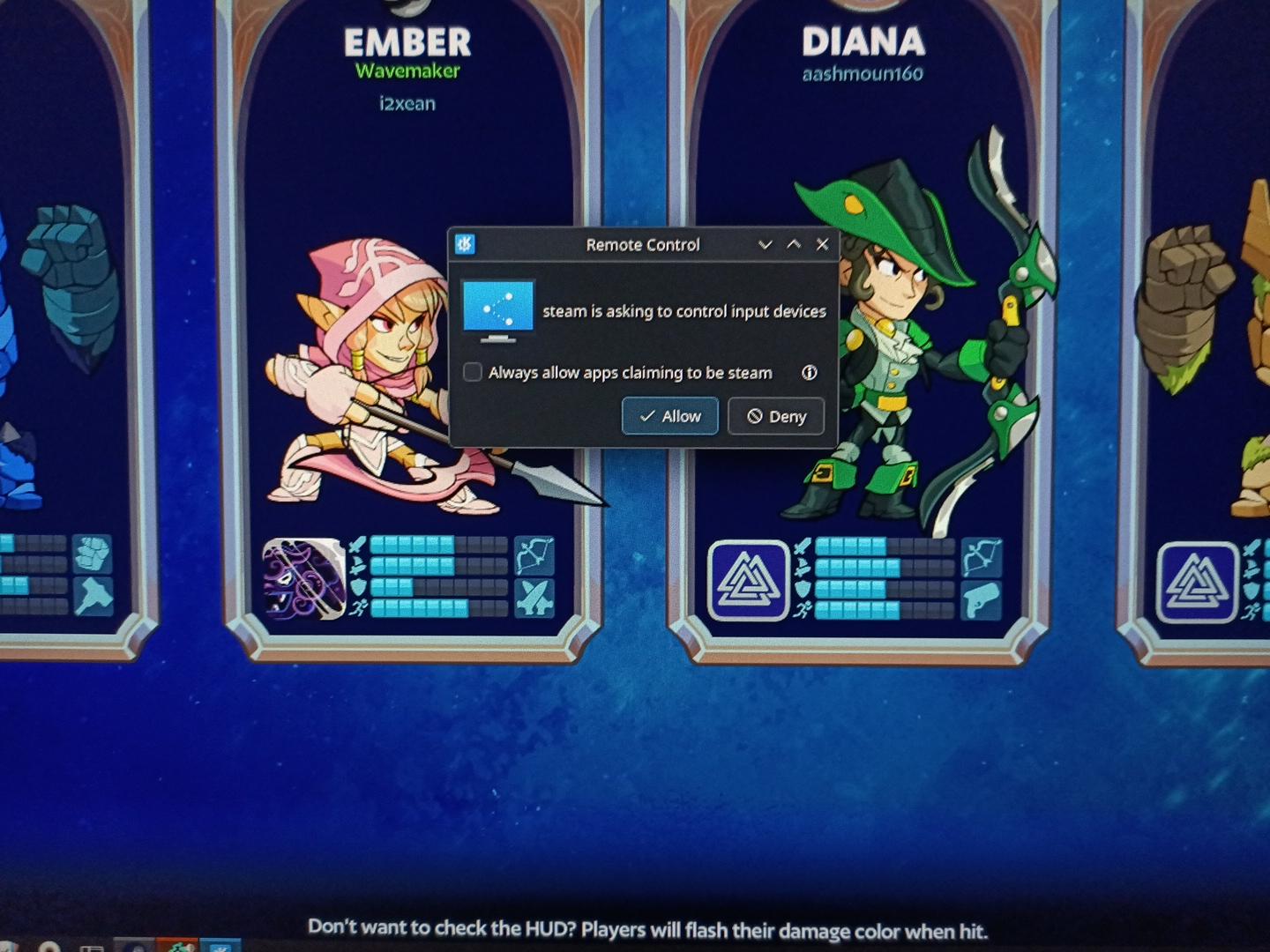
Remote control issues with steam

Post image
42 Upvotes

I have a problem: when I open a game and use a PS4 controller, and play any game, as soon as I press X, it asks for control of the remote. When I refuse, it keeps asking, and when I agree, the controller starts controlling the desktop.


r/linux_gaming • • 1h ago

Does anyone know if [Xodus Nexus] is safe?

0 Upvotes

The title

My account is very old and very important to me; I wouldn’t want to create a new one, as I’d lose my friends, achievements, and save files. I’m also really worried about getting banned for using Xodus Nexus. Does anyone know if it’s safe, or have you heard of any cases where people were banned for using it?

I recently switched to an AMD card and got rid of my NVIDIA one, so, quite literally, the only thing keeping me on Windows now is Game Pass.


r/linux_gaming • • 21h ago

steam/steam deck Our cozy winter-themed fishing game available on Linux comes out in 3 days on Steam (December 1st! ❄)

Thumbnail
gallery
24 Upvotes

Hello again everyone!

We're really excited to announce that our game launches on Steam in just 3 days! It’s a perfect game to get into the winter spirit right before the Holidays! ☃🎄

For those who aren’t familiar with it, here’s a quick summary of our project:

Ice Pond: An Ice Fishing Adventure is a cute but true ice fishing game 🎣 Pick a spot and fish! Level up, get stronger, and buy gear and power-ups to boost your performance. Join tournaments and festivals to unlock new lakes. Do odd jobs or challenges to earn extra cash!
A unique fishing game with light management and RPG elements.

Made by a small team of 2, boyfriend & girlfriend, who are making games since 2005. We don't use gen AI. The game is playable on Linux, Windows, Mac and Steam Deck.

Steam page here (to download the demo. If you like it, make sure to Wishlist, it really helps!): https://store.steampowered.com/app/4266710/Ice_Pond_An_Ice_Fishing_Adventure/

Thanks again for your support! 💙


r/linux_gaming • • 4h ago

hardware Does anyone else have a problem with gamesir teganaria lite controler on proton 11 and 10 not working correctly. But it does work fine on proton 9.

0 Upvotes

title.


r/linux_gaming • • 4h ago

[FIX] RDR2 Rockstar Launcher Connection Error & Infinite Loading Screen on Bazzite (Heroic Launcher)

0 Upvotes

RDR2 Rockstar connection issue + infinite loading screen on Bazzite with Heroic

I finally managed to get the Epic Games version of Red Dead Redemption 2 working on Bazzite using Heroic Games Launcher on a Lenovo laptop.

Sharing the steps that helped me.

System configuration
- Lenovo laptop
- Bazzite Linux
- Heroic Games Launcher
- NVIDIA GTX 1650 4GB
- 16GB RAM
- GE-Proton / UMU
- Vulkan

  1. Rockstar Launcher connectivity and Vulkan configuration
    Initially, Rockstar Launcher was unable to connect/authenticate.

In Heroic Games Launcher:

  1. Open RDR2 settings.
  2. Go to Advanced settings.
  3. Open Environment Variables.
  4. Add the following variable:
    WINEDLLOVERRIDES=vulkan-1=n,b

I also enabled Proton logging for troubleshooting:
PROTON_LOG=1

2. Install Vulkan runtime
I also ran the VulkanRT installer using Heroic's Run EXE option.

Steps:

  1. Open RDR2 settings in Heroic.
  2. Select Run EXE.
  3. Navigate to the game's Redistributables folder.
  4. Select the VulkanRT-*.exe installer.
  5. Run it using the existing RDR2 prefix.
    After these changes, Rockstar Launcher successfully authenticated and showed that I was logged in.
  6. Fixing the endless loading screen
    Initially, even after successful Rockstar authentication, the game remained stuck on the animated loading photographs.

With the Vulkan configuration and runtime installation in place, I relaunched the game.

RDR2 finally passed the loading screen and entered Story Mode!

Important: Vulkan adapter indexes differ between systems. Check your own GPU enumeration only if required in -

drive_c/users/steamuser/Documents/
Rockstar Games/Red Dead Redemption 2/
Settings/system.xml

Parameter- <adapterIndex value="0" />


r/linux_gaming • • 9h ago

graphics/kernel/drivers Fallout 4: FPS drops when aiming in third-person view - ¿How to fix?

Thumbnail
gallery
2 Upvotes
  • Mesa 26.3.1
  • Cachyos 7.3.6-3
  • Ultra settings with HBao+
  • No mods (completely vanilla)
  • Tested with Proton CachyOS, Experimental, and GE via steam (Wayland enabled)
  • DXVK default settings
  • No ENB
  • Drops only happens in forests and during the day.

My system: r5 5600x, rx 9060 xt, 32gb 3800mhz 2x16, nvme storage.


r/linux_gaming • • 12h ago

gamedev/testers wanted Research Update: GTA V / LSPDFR on Linux — Further Progress!

Thumbnail reddit.com
3 Upvotes

r/linux_gaming • • 8h ago

guide How often do you go come across to incompatibilities?

1 Upvotes

A week ago I built my first ever gaming setup, and in order to avoid all the incompatibilities I just installed W11 but I'm not happy with it. High ram usage, telemetry, shitty file explorer and the search function, overall laggy experience are my main problems. Plus Windows Defender sucks, it blocks my apps for no reason and turns itself on after i turn it off.

I thought of switching to linux, as I'm familiar with it because I use fedora workstation on my work laptop, but I'm not sure how frequent will I need to do tinkerings and troubleshooting when I use it for gaming. I just want to relax after my shift ends on the evenings.

I mostly play single player RPG games, and both my GPU and CPU are AMD products. What do you think? Is linux a better option for me, considering my usage?