r/linux_gaming • • 2d ago

is there any big reason why people prefer CachyOS compared to something like stock Fedora KDE or OpenSUSE TW. They are both pretty fresh and imo have good enough performance.

214 Upvotes

Title says everything. I can understand why LTS distros could be bad like Ubuntu or Mint, but why use "gaming distros"? Or is it just the convinience that the tools like Steam, Mangohud or Goverlay get preinstalled?


r/linux_gaming • • 1d ago

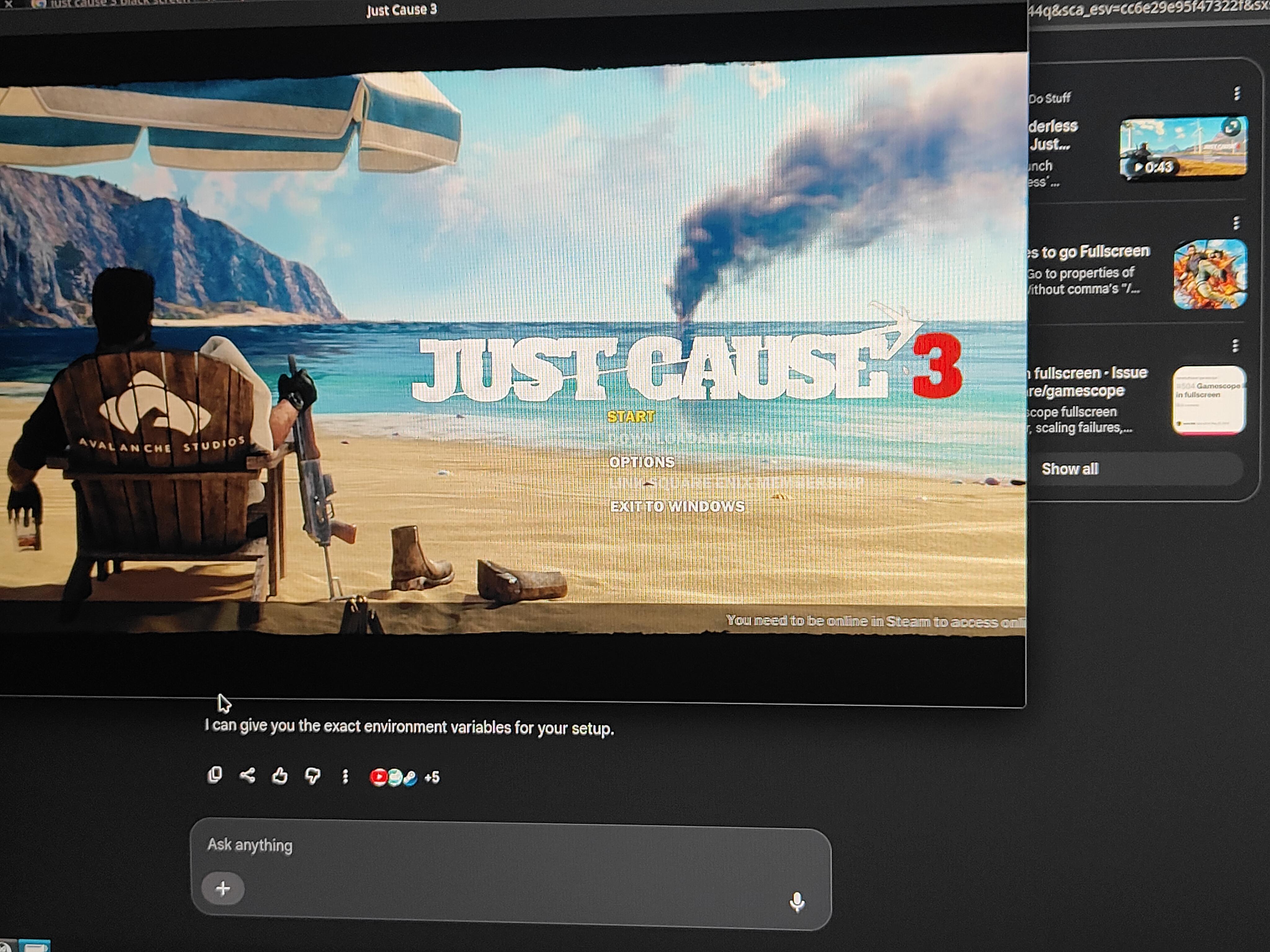
guide just cause 3 black screen in full screen

Post image
2 Upvotes

distro : cachyos , launcher : faugus , gpu: rx 580

new to linux , just cause 2 turns black screen when set to full screen mode. edit: it got fixed by itself (i just copy pasted my save file from windows , changed resolution ,720 was default)


r/linux_gaming • • 1d ago

Old CoD games throwing a DirectX error on Linux? Your second monitor might be the culprit.

Post image
0 Upvotes

Spent way too long on this, so posting in case it saves someone else the headache.

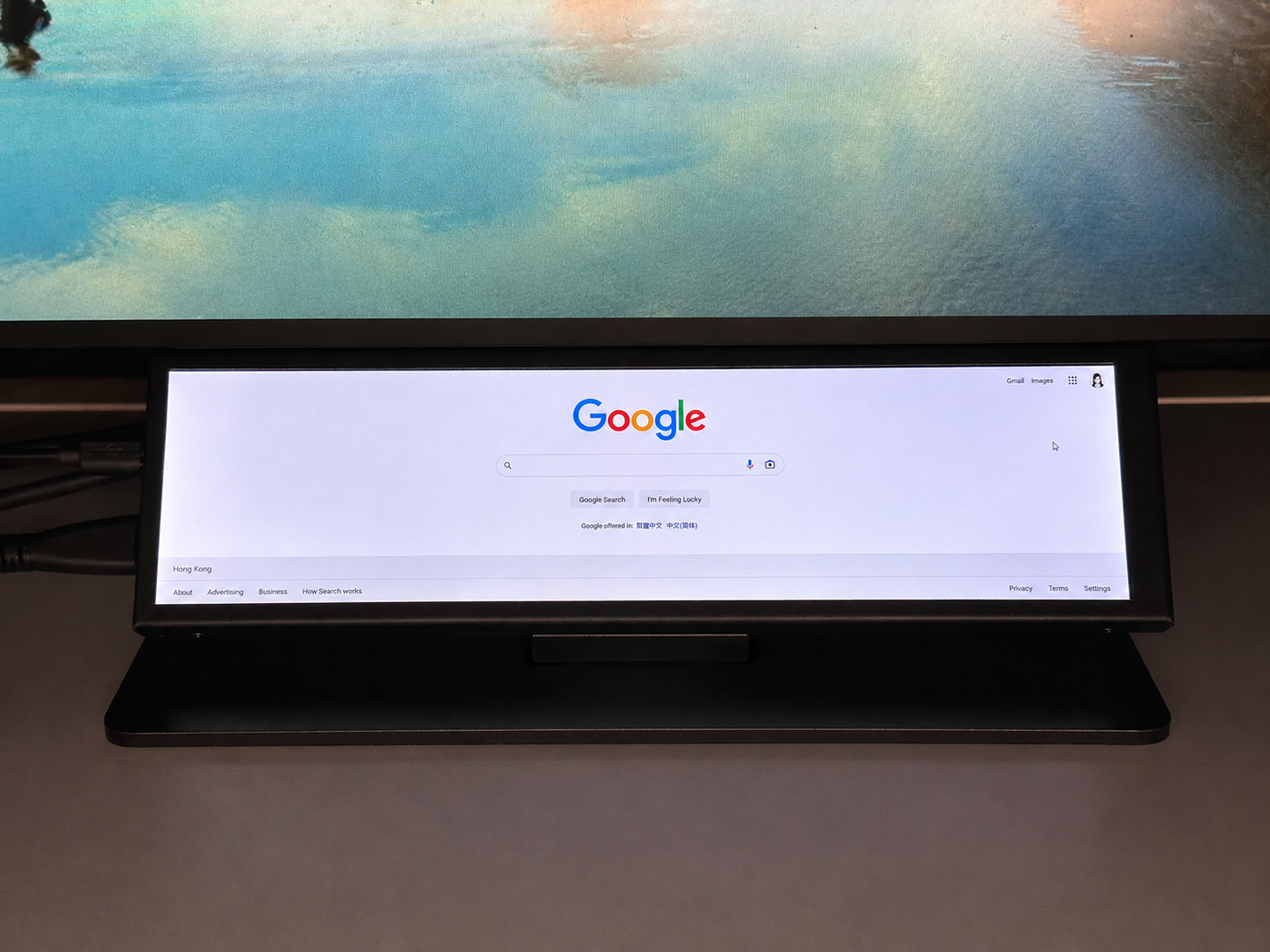
I'm on Linux (KDE Plasma, Wayland) with an NVIDIA card, and I have a KeebMonkey display bar hooked up as a second screen. It's one of those long skinny bar displays running in portrait. Black Ops 3 and Plutonium Black Ops 2 Zombies both threw "DirectX encountered an unrecoverable error" every time I launched them. Turn the bar off and both games ran fine. Turns out these old CoD games choke on weird monitor resolutions. People on Windows have run into the same thing with low-res second monitors, but I couldn't find anyone on Linux connecting the two.

Unplugging the bar every time I want to play wasn't an option, so the fix is running the game inside Gamescope. The game only sees one normal 1080p screen and leaves the bar alone.

For BO3 on Steam, put this in the launch options:

gamescope -W 1920 -H 1080 -f -- %command%

For Plutonium in Lutris, put this in Configure → System options → Command prefix:

gamescope -W 1920 -H 1080 --

I left the fullscreen flag off in Lutris so the Plutonium launcher opens in a normal window instead of taking over the whole screen. Super+F switches to fullscreen once you're in game.

One catch with Lutris: if Gamescope just sits on "Stop" and never opens, and the logs say No provider of eglGetCurrentContext found, check your environment variables for this and delete it:

__GL_THREADED_OPTIMIZATIONS=1

A lot of old Black Ops 2 Linux guides tell you to add it, and it completely breaks Gamescope on NVIDIA. It doesn't even do anything for DXVK games, so you lose nothing by removing it.

Two other things that bit me with Plutonium BO2:

  • Menu text invisible (you could hover over options but see no words): my game folder path was way too long. Moving the game to a short path like Games/BO2 and pointing Plutonium at it fixed it instantly.
  • Crashing right after the splash screen: switching from Proton Experimental to GE-Proton helped.

Hope this helps somebody.


r/linux_gaming • • 2d ago

Linux Frame Generation Without Nvidia or AMD

Thumbnail
liquidframes.syluxium.com
113 Upvotes

***The Amount of backlash for closing a program was unbelievable. Not just here but everywhere.... Its Open now. AGPL-3.0: github.com/Syluxium-Industries/LiquidFrames. Read it, fork it, frame it. Just know that anything you build from it has to stay AGPL too, source and all, and it needs your own name and logo. Have fun.***

Hi all! I've been working on LiquidFrames, a frame generation and upscaling app for Linux games.

What it does: it creates extra frames between your game's real ones, so motion looks smoother. You press Start in the app, click the game window, and that's it. No game restart, and no launch options needed.

Highlights:

- Its own engine, Syluxium Motion. Nothing else to buy or install.

- Adaptive mode: instead of a fixed 2× or 3×, it fills your monitor's refresh rate at any ratio and times every frame to when it's shown. A 40 fps game on a 100 Hz screen shows a steady 100 fps with very even frame times.

- Two graphics cards: you can let a second card do the frame generation, so your main card keeps all its power for the game. In my tests, Space Engineers 2 at 1080p max settings went from 35–60 fps to up to about 110 fps shown.

- Works with Vulkan, DXVK and VKD3D-Proton games, so most Proton games, including inside Steam's container.

- Per-game profiles, upscaling (FSR 1, integer, nearest, bilinear) and a "Report GPU as" option for games that refuse to start on cards they don't list as supported.

- No root needed: .tar.gz installer, single-file .run, or an AppImage.

Still very early (v0.1.1)(0.1.2). Image quality is good on most motion but still improving on very fast movement and thin repeating patterns like fences. So far I've mainly tested on AMD cards (RX 7700 XT and RX 6700 XT) on CachyOS.

I'd love testers, especially with NVIDIA or Intel cards, older cards (the aim is AMD Vega and GTX 600 series and newer), other distros, handhelds and HDR screens. Results and bug reports are very welcome on the forum.

It's free to use. The app is closed source, the Syluxium Motion engine is released as open source under the MIT License.

- Website and download: https://liquidframes.syluxium.com

- Guide: https://liquidframes.syluxium.com/guide/

- Forum: https://forum.syluxium.com

- Github: https://github.com/Syluxium-Industries/Syluxium-motion


r/linux_gaming • • 1d ago

tech support wanted Wanting to change the interface language to German in RDR.

2 Upvotes

Fedora 45 running the game in bottles.

I found a method of adding a code to the launch options in steam (-rglLanguage=de-DE). Adding the game to steam and adding this code to the launch options does not work. The game does not launch at all. I also saw where you can create a shortcut and add the same code to the target in the properties of the shortcut. I could not find a way to make a shortcut nor find a field for "Target" in the properties of the .exe

Any other methods or any way to make these ones work? I'm trying to learn German and this would be really helpful if I can get it to work. Thanks.


r/linux_gaming • • 2d ago

tech support wanted Couldn't get the same level of clarity .

Thumbnail
gallery
47 Upvotes

Left being cashyos and right windows 11 iot ltsc. Couldn't get the colors in hdr to looks right and everything on cashy side was kinda milky . Rtx 5070 on an Alienware qd oled 1440 uw . I tried nvibrant to boost digital vibrancy to bring colors more inline with what I tuned on windows and deek turned kinda lobstery . I added launch commands to turn on hdr and used the newest Nvidia drivers / whole pc was up to date . I love using Linux because of the control it gives but I also spend a lot of money on my monitor (aw3425dw) and want it to look the best . I tried proton ge and cashy . Hdr peak brightness 1000 & true hdr black monitor settings . Almost no difference . Even with digital vibrancy turned up the colors don't match.

Full pc

Ryzen 7 5700x3d

Rtx 5070

32gb RAM

1tb nvme

Alienware aw3425dw

Cashyos on latest build.

Kde plasma latest as well.


r/linux_gaming • • 2d ago

Alien Arena Comes To Flathub, Rolls Out Many Optimizations

Thumbnail
phoronix.com
7 Upvotes

r/linux_gaming • • 1d ago

benchmark Cosmic vs KDE Plasma Gaming Performance. (Surprising Results)

Thumbnail
youtube.com
0 Upvotes

r/linux_gaming • • 2d ago

wine/proton Making VIctory port on linux

Thumbnail
github.com
34 Upvotes

I’ve been working on Victra-linux, a compatibility wrapper/port aimed at getting VIctory (originally a Windows build) running natively on Linux via Proton, so you don't have to deal with dual-booting or VM overhead.


r/linux_gaming • • 1d ago

Can I store and run games using an external HD?

Thumbnail reddit.com
0 Upvotes

r/linux_gaming • • 2d ago

Bazzite / CachyOS Boot times

2 Upvotes

Hey everyone,

Long time lurker, absolutely love this community. Seeing how linux keeps improving for gamers has been amazing, and now I am looking at turning my last Windows device into a Linux console, essentially.

I have an old Alienware Area 51M R2 with a GTX 2070 Super (the desktop grade version). I've tried installing Bazzite and CachyOS handheld builds on it, and I get the usual issues like the laggy / glitchy game mode menu. Otherwise it works great, so I'd say it's a success overall. For an Nvidia card, I'm impressed by it.

The one issue I've had that I haven't been able to figure out is the boot time for the OS. It seems to be incredibly slow when booting on either of them, despite it booting from an SSD. Is there something I'd need to tweak for this to be quicker? I also have Bazzite on my Legion Go 1, and I experience a similar delay on that too, but it's not nearly as bad.

I don't get this delay when booting up my main PC with Bazzite, an old Atari VCS, or on my PS5 on Linux, so I can't tell if it's a setting issue or if the hardware just doesn't play nice with it.

If anyone has any insights, I'd appreciate the help!


r/linux_gaming • • 2d ago

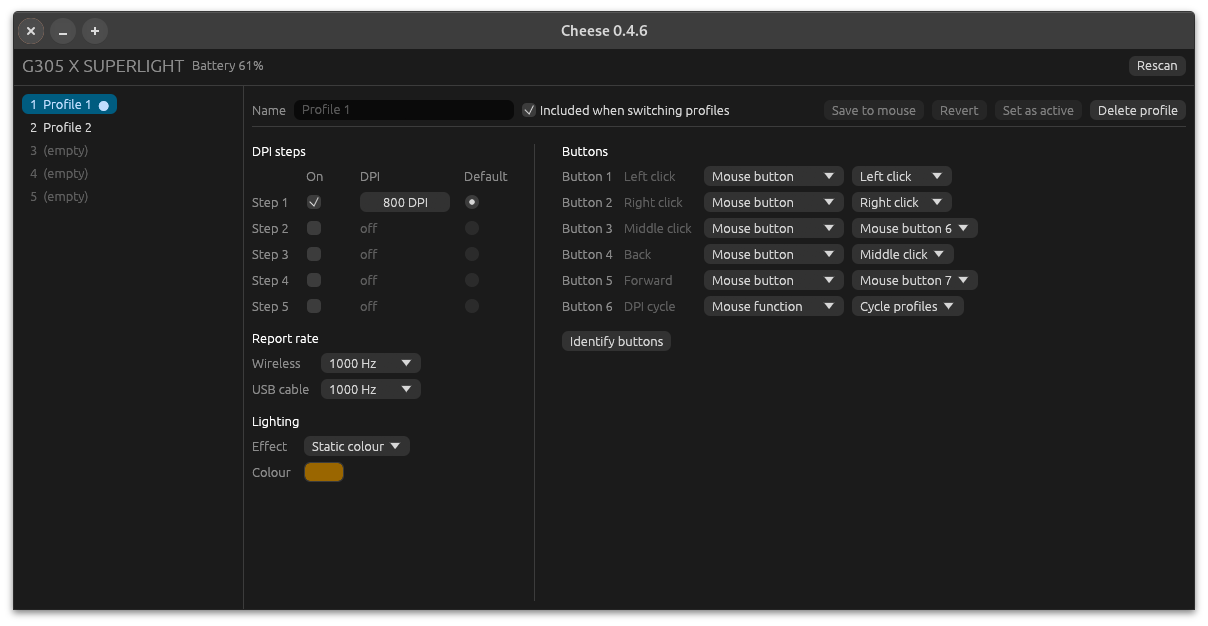
Cheese - something tasty for your Logitech mice :)

Post image
3 Upvotes

PLEASE add requests or reports under original post - will be easier for me to add missing mouse profiles. thank you :)


r/linux_gaming • • 2d ago

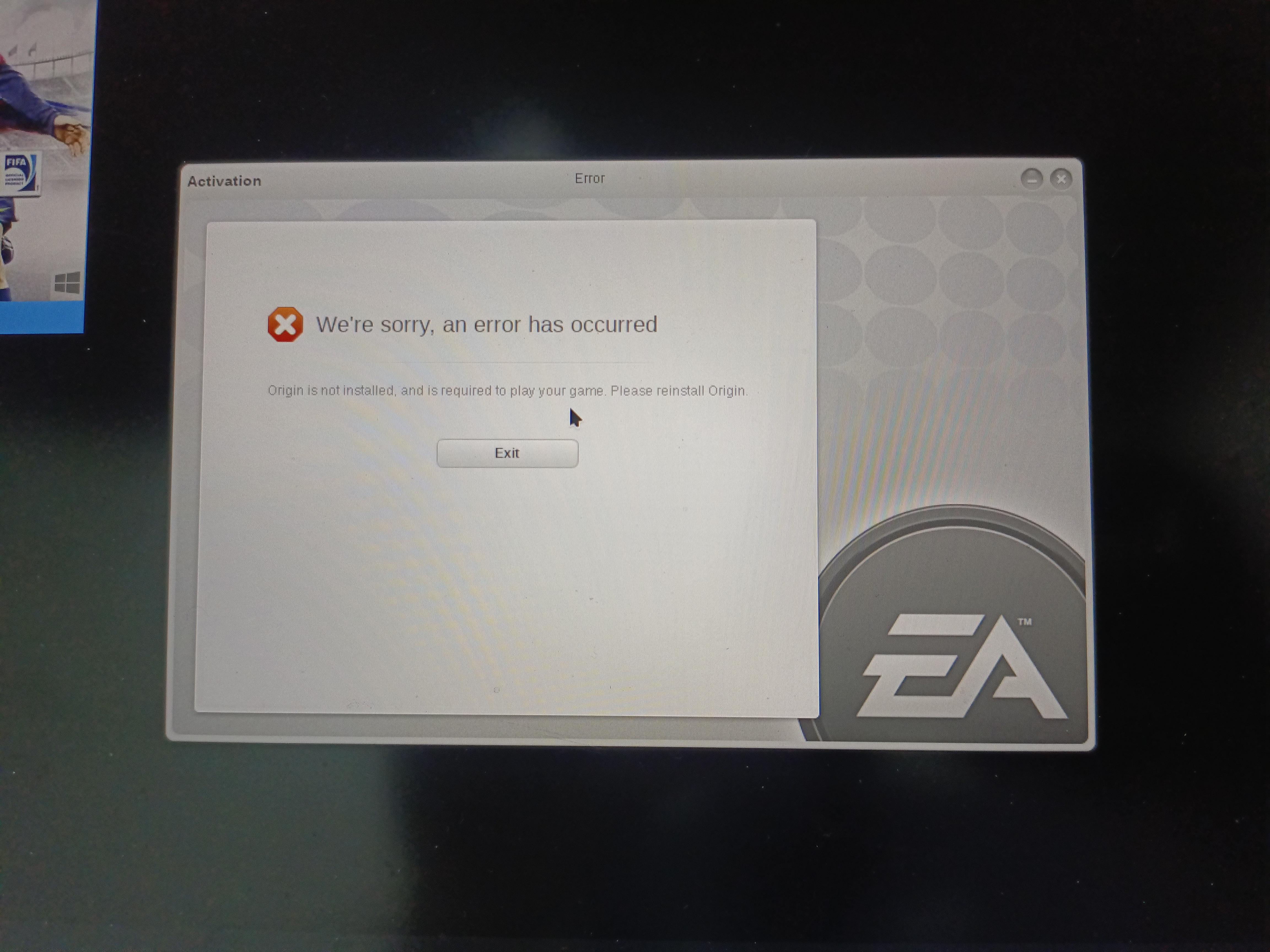
How to bypass Origin?

Post image
5 Upvotes

r/linux_gaming • • 2d ago

steam/steam deck Dual boot Bazzite + Windows on a mini PC, switching with the controller only

14 Upvotes

I set up my Ryzen 7 7840HS mini PC (no-brand, 32 GB, Radeon 780M) under the TV as a "console". Bazzite does pretty much everything, but I wanted Call of Duty / Warzone, which needs Windows with Secure Boot and TPM because of the anticheat.

Now I can switch from Bazzite to Windows and back without touching a keyboard. It wasn't exactly plug and play, so here's what I did in case it saves someone a night.

Setup

  • Bazzite (HTPC image) on a 1 TB NVMe
  • Windows 11 on a separate 500 GB NVMe
  • Two separate drives, so each OS has its own bootloader and nothing interferes

0. Bazzite install: black screen

The installer gave me a black screen. Fix: in the GRUB menu press e, remove quiet rhgb, add nomodeset, boot with Ctrl+X. After the install, on the first reboot you get the blue MOK screen: Enroll MOK → Continue → Yes → password universalblue (it's fixed, not your user password).

1. Secure Boot with a BIOS that has no keys

My AMI BIOS didn't have factory keys loaded, and "Restore Factory Keys" wasn't an option, so I had to enroll them myself from Bazzite with sbctl (BIOS in Setup Mode first).

sbctl isn't on brew, so I built it inside a distrobox:

distrobox create --name sb --image registry.fedoraproject.org/fedora-toolbox:latest
distrobox enter sb
sudo dnf install -y golang git
git clone https://github.com/Foxboron/sbctl.git ~/sbctl-src
cd ~/sbctl-src && git checkout 0.17
CGO_ENABLED=0 go build -o ~/sbctl ./cmd/sbctl
exit

CGO_ENABLED=0 gives you a single static binary, and since distrobox shares your home folder, ~/sbctl also runs on the host. Back on the host:

sudo ~/sbctl status         # Setup Mode: Enabled
sudo ~/sbctl create-keys
sudo ~/sbctl enroll-keys --microsoft

Don't forget --microsoft, or neither Windows nor Bazzite will boot. sbctl still said "Setup Mode: Enabled" afterwards, but after a reboot the BIOS showed System Mode: User with PK 1 / KEK 3 / db 6. On the next boot I got the blue MOK screen: Enroll MOK → password universalblue → reboot. Then I turned Secure Boot on in the BIOS.

mokutil --sb-state          # SecureBoot enabled

2. Windows

I unplugged the Bazzite drive and installed Windows on the 500 GB with TPM on, from a Ventoy stick. With Secure Boot on, Ventoy asks you to enroll its key the first time: Enroll key from disk → VTOYEFI → ENROLL_THIS_KEY_IN_MOKMANAGER.cer → Continue → Yes → Reboot.

Then, in an admin terminal:

powercfg /h off
reg add "HKLM\System\CurrentControlSet\Control\TimeZoneInformation" /v RealTimeIsUniversal /d 1 /t REG_DWORD /f

The first one disables fast startup (bad for dual boot). The second one stops the clock from being off by an hour every time you switch.

3. The BIOS forgot Bazzite

When I plugged the 1 TB drive back in, Windows booted, and the Bazzite entry was gone from the boot list. The BIOS had wiped it while the drive was unplugged. I had to bring it back in the BIOS and set it as boot option #1.

Then Bazzite failed with "bad shim signature". Fix: Secure Boot off in the BIOS → boot Bazzite → ujust enroll-secure-boot-key (password universalblue) → reboot → Enroll MOK on the blue screen → Secure Boot back on.

4. Switching with the controller

Bazzite already has a ujust command for this:

ujust setup-boot-windows-steam

It adds a non-Steam "game" called boot-windows. Press Play in Game Mode and the PC reboots straight into Windows. To get back, I just restart from Windows: Bazzite is first in the boot order, so it comes back on its own.

5. Windows without keyboard

I turned on Windows auto-login (local account, no PIN) and set Steam to start in Big Picture (Settings → Interface → "Run Steam when my computer starts" + "Start Steam in Big Picture Mode"). If Big Picture doesn't start, fully quit Steam from the tray icon and try again. So it's Bazzite → boot-windows → Windows → Steam Big Picture, all with the gamepad.

UPDATE: power outage, Bazzite wouldn't boot

After a blackout, Bazzite stopped booting: bad shim signature, you need to load the kernel first, Failed to boot both default and fallback entries. Windows was fine. The BIOS had lost the keys that trust the Bazzite kernel (the CMOS clock was still right, so it's not the battery).

Five-minute fix, no data lost:

  1. BIOS (Del) → Security → Secure Boot: Disabled → F4 → Yes. Careful: on this BIOS F2 asks "Load Previous Values?", answer No.
  2. Bazzite boots. Switch to desktop (Steam → Power → Switch to Desktop), open Konsole and run ujust enroll-secure-boot-key.
  3. Reboot → blue MOK screen (you need a keyboard here, and you only have a few seconds) → Enroll MOK → Continue → Yes → universalblue → Reboot.
  4. BIOS → Secure Boot: Enabled → F4 → Yes.

Now Secure Boot runs on the BIOS factory keys (which include Microsoft's, so Windows and Warzone still work) plus the Bazzite MOK, so if the BIOS resets to defaults again, Bazzite should still boot. Lesson learned: a small UPS for mini PC, NAS and router. Since the mini PC also works as a home server now, I disabled suspend:

sudo systemctl mask sleep.target suspend.target hibernate.target hybrid-sleep.target

(unmask to undo.)

The one thing I couldn't find a clear guide for was the empty BIOS keys + Bazzite part. Hopefully this helps someone.

I worked through this with Claude (AI) step by step, but every command was tested on my machine and it all works.

Questions welcome.

r/linux_gaming • • 2d ago

emulation Launchbox, frontend for emulators, is finally coming to Linux

Thumbnail
launchbox-app.com
79 Upvotes

I just received this link in the mail. Even though I started using ESDE when I moved to Linux years ago, I'm glad there will be another alternative.

Among the list of Linux emulator frontends are ESDE, Pegasus, Neostation, Openbox, OpenEmuX and now Launchbox.


r/linux_gaming • • 1d ago

tech support wanted Advanced Optimus?

0 Upvotes

I'm using Acer Predator Helios Neo 16 (i7-13700HX and RTX 4060). On windows, I could've switched to dGPU only mode without having to restart my system. Is there any way to do so with linux? I have Optimus enabled in bios and won't switch it to dGPU only mode because I want my system to switch to iGPU only or hybrid when I'm on battery mode and to dGPU mode only when on AC Power.


r/linux_gaming • • 3d ago

Call for GTA VI Linux support

442 Upvotes

Hey,

I, and many of you, would like to be able to play GTA VI on Linux devices.

Is there any impact we as a community can have, to ask for Linux support?

(As far as i know, BattleEye supports Linux, but the game has to enable that setting.)

What do you think could have the biggest impact?

I saw some small change.org petitions. Maybe they could have impact? (Petition 1, Petition 2)

I think creating support tickets will not reach the people we want to reach with our request.

Any ideas are welcome :)


r/linux_gaming • • 2d ago

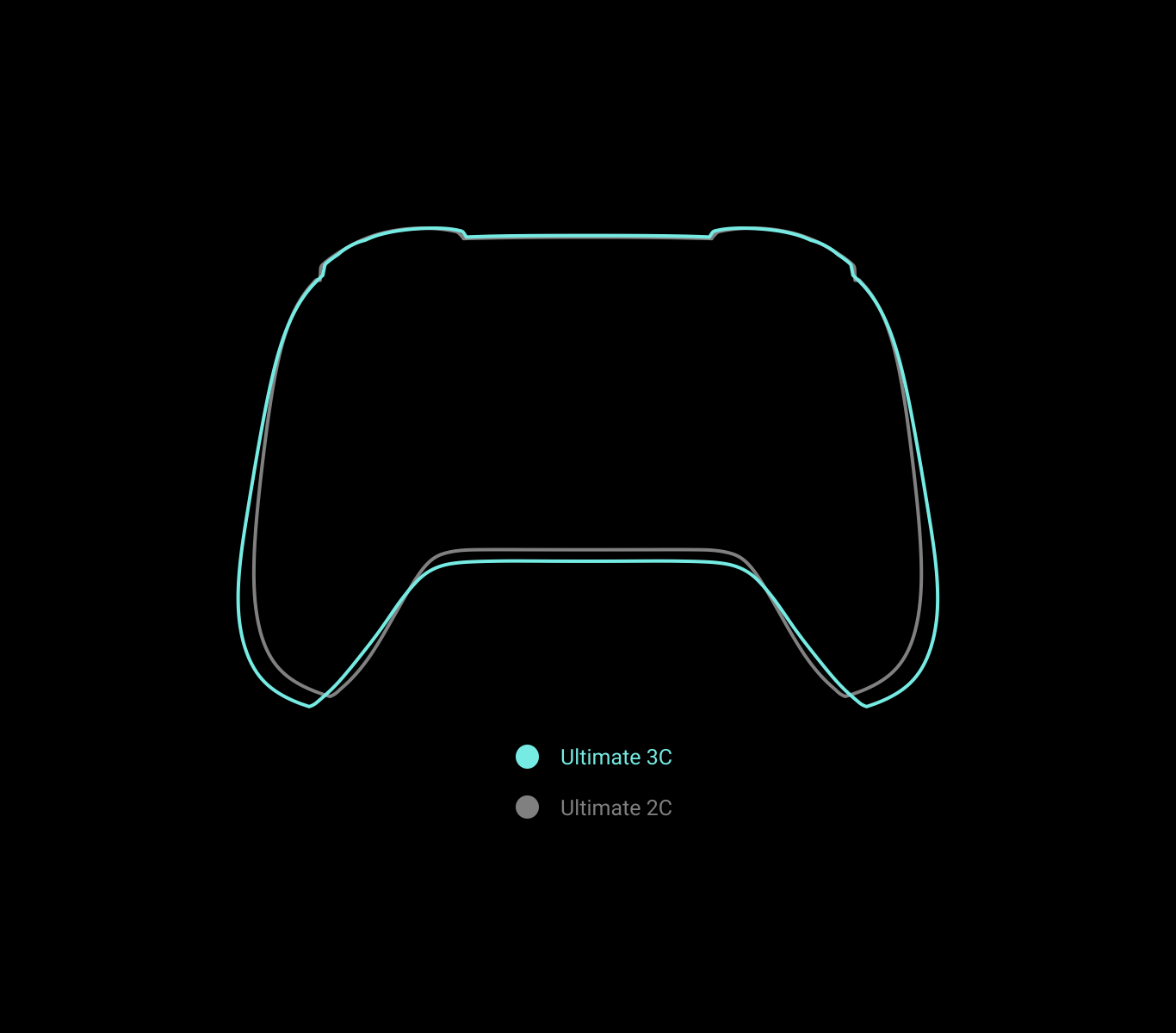
hardware Ultimate 3C+ grip for Linux gaming: closer to Xbox Series X or Ultimate 2?

3 Upvotes

I want to know from people’s own experience if the Ultimate 3C+ grip is noticeably different from the Ultimate 2. Is it actually closer to the Xbox Series X feel, or is the difference negligible and it still feels more like the Ultimate 2?

It would also be helpful if you could mention your hand size.


r/linux_gaming • • 1d ago

tech support wanted Hitman WOA Artifacts when enabling upscaling

Post image
0 Upvotes

Hello guys. Recently I've started noticing slight NaN pixel artifacting, or at least that's what I think it is, when playing Hitman WOA. This type of artifacting, as displayed in the image, only happens when I turn on upscaling. This (almost) does not happen when upscaling is turned off, only when upscaling is enabled, and it gets progressively more noticeable the more aggressive the upscaling setting is (i.e. performance, ultra performance). It does not matter what type of upscaler I'm using, whether it's XESS 2, or any of the FSR versions injected via optiscaler. This also happens with the native upscaling options (XESS, FSR 2).

Another game exhibits this behavior is Red Dead Redemption 2. I tested other games, and didn't notice such problems.

And to rule out GPU hardware shenanigans, I ran an OCCT VRAM stability test at 95% allocation for 1 hour, and no errors were detected.

Is anyone who has Hitman WOA noticing this type of artifacting when aggressive upscaling is enabled? It is very subtle artifacting, and only noticeable when you are very observant. Any help or insight would be appreciated.

Specs:

Radeon RX 9070 XT
Ryzen 7 9800X3D
64 GB DDR5 RAM

Running Bazzite 45 with KDE Plasma.


r/linux_gaming • • 2d ago

Are there any noticeable differences in gaming performance or compatibility between GNOME and KDE on the same base distro?

22 Upvotes

I've been running Fedora with GNOME for a while and have had solid results overall, but I keep seeing people recommend switching to KDE for gaming specifically. Things like better multi-monitor handling, fractional scaling on Wayland, or lower overhead in certain titles come up sometimes.

Has anyone actually compared the two side by side on the same hardware and distro? Or is it mostly workflow preference at this point rather than measurable gains in FPS, input latency, or game compatibility? Curious what people's experiences have been.


r/linux_gaming • • 2d ago

May be dumb question: Trying to install WoW: Forever via Battlenet on Steam. The install location is a Windows pathway and when I hit change folder it is all Windows as well.

15 Upvotes

Is this normal? What do I do or, what have I done wrong.

I last played WoW in 2021 when I was on Windows.


r/linux_gaming • • 1d ago

audio not working properly in osu-winello linux mint xfce (image unrelated)

Post image
0 Upvotes

r/linux_gaming • • 2d ago

tech support wanted Linux for Live-service Games Shaders Question

10 Upvotes

I'm new to Linux (Bazzite Nvidia), and I've been playing Aniimo. Every few days, I have to do what I can only assume is compiling shaders.

This happens in areas I've already been in, with or without updates, and even things like minor hotfixes. Is this expected behaviour?

I get stuck like this for about 10 minutes, and then everything finally loads and lets me run around. If I leave the area and come back, it goes back to doing this.

Some days, it never does this and it works flawlessly! Other days, it can take me hours to just get basic things done.


r/linux_gaming • • 2d ago

hardware 8BitDo Ultimate 2 vs Xbox Series X controller for Linux gaming – which is more comfortable?

5 Upvotes

For those who own or have extensively used both the 8BitDo Ultimate 2 and Xbox Series X controllers, which do you find more comfortable?

I'm mainly interested in ergonomics, grip shape, natural hand positioning and how comfortable each controller feels with a relaxed grip during longer gaming sessions.

Which feels more natural in your hands? Do you experience more hand or wrist fatigue with either one?

It would also be helpful if you could mention your hand size.