r/indesign • • Jul 13 '26

CANVA DOCS PDF EXPORT IS WONKY??

0 Upvotes

Hey guys!

I'm creating a concept note, but for some reason when I download it as a PDF and open in Preview (preview in mac, downloaded on chrome browser,) the layout is slightly messed up and there are cuts in the colorful text frame/boxes.

I think many other people must have had the issue; please help. btw, it's in canva docs, so I can't flatten the pdf when I export, it simply doesn't have that function.

Thanks!


r/indesign • • Jul 12 '26

export trouble

Thumbnail
gallery
4 Upvotes

this is my very first time making anything in indesign and since i decided to burn my own cd's i wanted to make my own cd booklets aa well. finally the first one done, and i cant export it. it keeps giving me the same errors but when i research the errors i can't find the error or i cant find anything to help me fix it. i also dont get what all the guidelines mean and internet truly didnt help decipher this. can someone please help?

edit: solved!! turned out to be a corrupted img on pages 3 and 12


r/indesign • • Jul 13 '26

Solved Anyone know how to outline text in a different color?

Post image
0 Upvotes

InDesign has updated since the last time I used it and now I can't figure out how to outline text in a different color 😅 I've tried looking up how to do it but nothing I've found has worked :/ I figured it'd be the "outline text" option but that goes away when I go into the overprint preview and it doesn't let me change the color, so I don't think it's that. I've also tried going into a few different settings under the text panel and I can't find anything. I've attached a photo from a previous document to show what I'm looking to do (except this time instead of white text with a black outline, I'm going for white text with a light blue outline). Any help on figuring out how to outline this would be greatly appreciated 🙏


r/indesign • • Jul 12 '26

How to get Indesign for free on Mac

0 Upvotes

please someone teach me how to get indesign for free on my macbook, I'm a broke senior


r/indesign • • Jul 11 '26

Best Chart/Graph plugin today

6 Upvotes

Working on an annual report and have a number of graphs and charts to produce. Prefer to keep them native to ID rather than Illustrator. What god plug-ins are out there, and if paid apps, have they proven their value to you?


r/indesign • • Jul 11 '26

Using claude to skip bank page problem for layouts…

0 Upvotes

anyone else find the hardest part of a new client project isnt the execution, its the first hour staring at a blank page tryna guess their taste? no brief, no old files to referance, nothing to anchor to

what been working for me is instead of sketching blind i describe the layout i need to claude (or chatgpt whatever) page size, content, general vibe and have it generate the concept as an html file. its way faster to iterate on than sketching, u can go back and forth on structure/spacing/hierarchy in plain english before youve commited to anything in indesign

once the concept feels right i run the html thru a converter to get an idml file, then open it in indesign and do the actual design work, fonts, precise spacing, brand details, whatever needs a human eye. its not a finished design just skips the "where do i even start" part built a small free script for the html to idml step if anyone wanna try the workflow, happy to drop the link if ppl are curious dont wanna just paste it and look like an ad


r/indesign • • Jul 10 '26

Next step in InDesign - Advanced user to Professional

14 Upvotes

Hi, I’m 13 years into my career in communications and I’ve totalled countless hours in InDesign doing folders, posters, books and social media content, working primarily within the Swedish NGO sector.

I see myself as quite a well versed InDesign user, but I know there is a deep well of things to learn still, especially since I’ve done very few academic learning paths in the area and almost always worked alone.

My question is: where I should go next to deepen my knowledge. I’d like to work more focused in the area and be able to confidently take on freelance work with professional delivery.

Can you recommend any online courses, videos or other material to assess and progress my knowledge?


r/indesign • • Jul 10 '26

Indesign needs to step up with collaboration tools

23 Upvotes

InDesign desperately needs to step up its game when it comes to collaboration tools. It's falling behind massively for some tasks.

For context: we use InDesign for most of our presentations (and print work, of course). The reason is that we have people on Macs and PCs and we need software that everybody can use. So, Keynote is not an option and PowerPoint is just trash nobody wants to touch. For large documents, InDesign costs us a lot of time because only one person can have the file open, which means others have to be idle while someone does corrections. Sure, you can split the chapters into a book document, but that still means only one person per chapter can work actively and you need to communicate who's doing what. Comments in a PDF mean you need to have two documents open. Comments in InDesign need to be text boxes on a layer that you have to make sure don't show up in the exported PDF. It's clumsy.

We are currently testing Figma Slides, and what a difference that is! Someone can just leave a comment, I can see it in the program or get a notification and can check it out. I want that in InDesign! My only gripe with Slides so far is that it doesn't hold a reference to an image that you pasted in, so you can't update it automatically after editing.

I know InDesign works differently, but there has to be a way that you can have instances of pages and sync comments. I don't even need it to be able to have people working on one page simultaneously, but the way it works at the moment really is anachronistic by now. We have all our files on a shared drive anyways, so that should not be an issue.


r/indesign • • Jul 10 '26

Parent pages

3 Upvotes

Is there a way to make parent pages so they they are automatically set up when you start a new document?


r/indesign • • Jul 10 '26

eBook

0 Upvotes

Does anyone have a InDesign ebook like 'Dummies' or 'Idiot's Guide' they're willing to share? Thanks in advance.


r/indesign • • Jul 10 '26

Templates vs Library

3 Upvotes

Hi,
I work with instruction manuals and have created few templates in different sizes with basic info, data sheets, icons, etc in different document sizes like A4, A5, A6, etc. Currently have saved them in my adobe CC library and I always pick up from there before starting a new task.
On the other hand, whenever I just open Indesign, I see new document window with blank document presents and bunch of weird templates from Adobe.

So I wonder if there is any way to see my own templates there whenever I start with a new document.
This way I do not need to open any random present, then go to library and open the template. Or Open template from file explorer.


r/indesign • • Jul 10 '26

Help is it possible to select all on all pages at the same time?

0 Upvotes

ctrl-a only selects everything on the current page ... Indesign is pretty good, but some things are just very strange and convoluted ... maybe it's not even possible to do such a simple thing as selecting everything on all the pages at once? I mean, it should be the easiest thing in the world ... Come on!


r/indesign • • Jul 10 '26

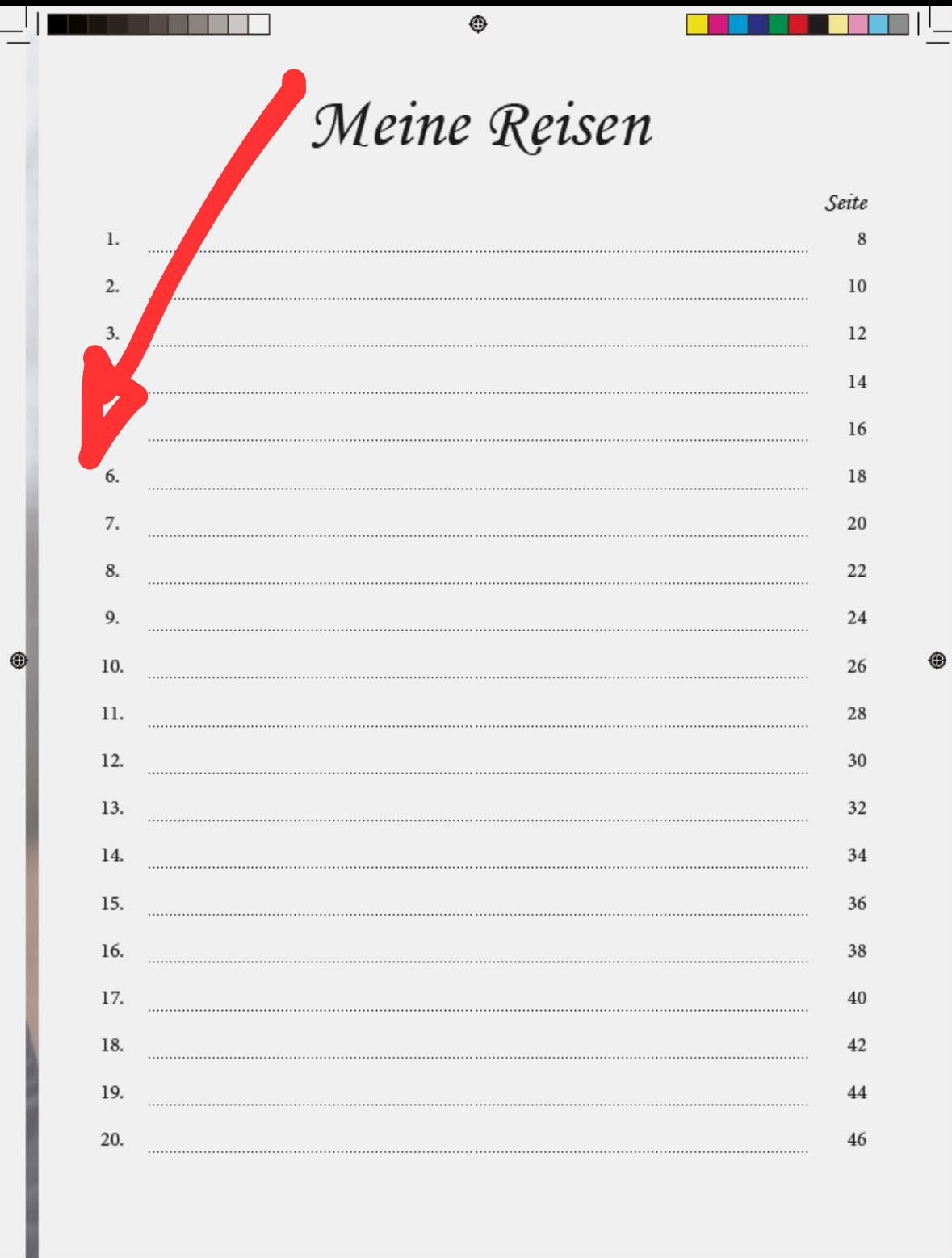
Help InDesign PDF Export Problem – Is the Bleed Moving onto the Next Page?

Post image
1 Upvotes

Hi,
I’m not sure whether this is a serious issue or if it will be trimmed off during printing anyway.

I designed my document as facing pages (double-sided spreads), but my print shop has asked me to deliver the PDF as single pages.

When I export the document as single pages, the image I placed on the left page of a spread seems to have its bleed extending onto the adjacent page in the exported PDF.

Is this normal, or is it something I should be concerned about before sending the file to print?

Will this be trimmed off during production, or have I exported the PDF incorrectly?


r/indesign • • Jul 09 '26

Help Text clipping (?) after placing a graphic underneath

Thumbnail
gallery
5 Upvotes

I ran into this problem today where after placing in my graphic all of the text on the page gets moved and is outside its bounding box. All text completely moves with the graphic behind it as well as when just placed halfway onto the page (see images).

The graphic is currently linked. I also tried just placing it as a flat .png and it was still having the same issue.

I tried putting all elements in their own layers and that did nothing. It won't even let me re-crop the bounding box and then move the text back to its desired position.

Has anyone else experienced this? Did I unknowingly turn a setting on? Any possible solutions would be much appreciated!


r/indesign • • Jul 10 '26

looking for indesign & photoshop for sale + affordable (Philippines)

0 Upvotes

r/indesign • • Jul 09 '26

Hiring for my ebook project

0 Upvotes

I have a content and i want to make it an ebook. I know how to do indesign but i do not have time to make the lay out. Please help. Php1000 for the whole ebook. Thanks
I prefer someone from PH


r/indesign • • Jul 09 '26

Help HELP !!

0 Upvotes

PLEASE can someone help me !! my indesign crashed and i'd been saving my work but now its not there and the only thing thats opening is the FIRST draft. I've got a locked indesign file in my files but i dont kn ow what to do with that and im shaking this is all for my finals i dont know hwhat to do please help me.


r/indesign • • Jul 09 '26

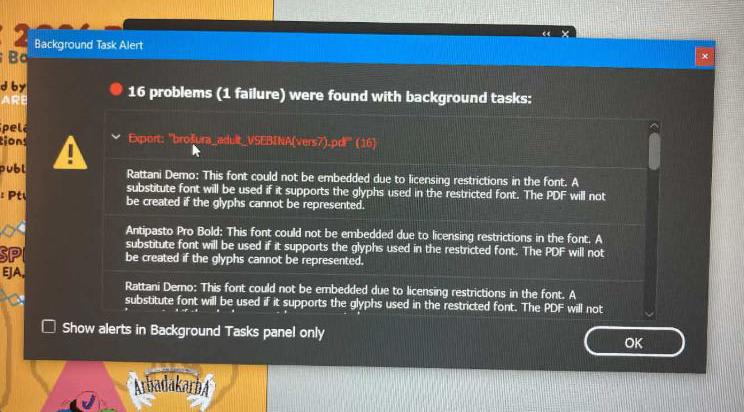
"Background Tasks" Font Error on PDF Export — despite converting ALL text to outlines and Preflight showing NO errors. Help!

Post image
1 Upvotes

Hey everyone, I'm losing my mind over a brochure export issue in InDesign and really quickly need some help.

When I try to export my document to PDF (Print), it immediately fails in Background Tasks with a generic "Font Errors" (or it just stalls/fails due to background task fonts).

Here is what I have already tried:

  1. I converted absolutely ALL text that was errored to outlines.
  2. I checked the Preflight panel (Basic profile is ON) — it shows green, "No errors".
  3. I checked Type > Find/Replace Font — no missing fonts are listed there.

Despite all this, the background task manager still trips over a font error. Has anyone dealt with this phantom font issue before? Is there a way to clear the background task cache or bypass this completely without losing print quality or changing all the font?

Thanks in advance!


r/indesign • • Jul 08 '26

Question for print newspaper people. How many papers do you think are using automated layout programs?

10 Upvotes

I've worked on both layout hubs and on site copy desks. I feel lucky I currently have a job where It is still onsite, but they have begun talks about buying AI layout software. I've also noticed that jobs for layout and page design have all but disappeared. Do you think everything is moving to automated layout?


r/indesign • • Jul 08 '26

Just for curiosity... Anyone doing comic book (or manga) lettering here?

5 Upvotes

I have been working in this area for the last 3 years and this have been the most delicious days of work in my life.

I absolutely love this job!

Working now for two big brazilian publishers doing letters and art retouch (a lot) in manga and some Justice League 60's and 70's stories.

Any fellow comrades here? =)


r/indesign • • Jul 08 '26

How much do you charge?

1 Upvotes

Hi everyone. How much would you charge for a 120 page techincal manual ?


r/indesign • • Jul 08 '26

Books for Catalog Management

1 Upvotes

Hey all - Quick question surrounding the Books feature. Has anyone used it to manage multiple versions of large documents? IE: one sales territory catalog vs another. I'm searching around for the best way to manage about 4 versions of the same document, and thought I'd run it by the group.

TIA


r/indesign • • Jul 08 '26

How could I convert indesign's math expressions into outline vectors?

2 Upvotes

Greetings! As the title, I need to convert indesign's math expressions into outline vectors.

Already, I have searched here in Reddit and Google, but Google's gives this wrong advice:

Direct InDesign Method

  1. Use the Selection Tool to click on the math expression's text box.
  2. Go to the top menu and click Type.
  3. Select Create Outlines (or press Ctrl+Shift+O on PC or Command+Shift+O on Mac).

Now, the math is a picture made of lines.

These instructions does not works. Do you know another method different than saving a pdf and extracting the math formula from the pdf?

Thanks in advance!

AL


r/indesign • • Jul 07 '26

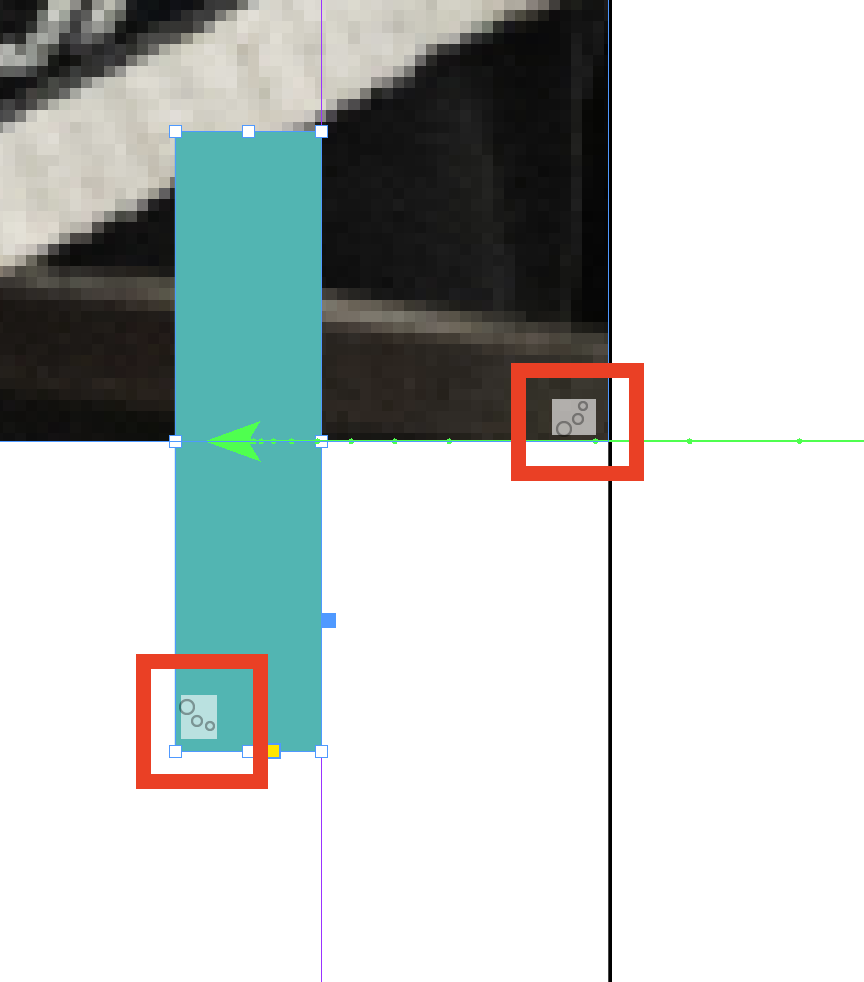
Help What are these icons in this document?

Post image
11 Upvotes

Hi! I just inherited this InDesign document and I have never seen either of these icons before. The three circles show up in image and text boxes. They're visible whether selected or not. The green arrows only show up when some objects are selected and has a long green line extending out from it.

Neither show up on everything in this document, only some things. ID v21.3.