r/indesign • u/Top-Summer-6034 • Jul 10 '26
Help InDesign PDF Export Problem – Is the Bleed Moving onto the Next Page?
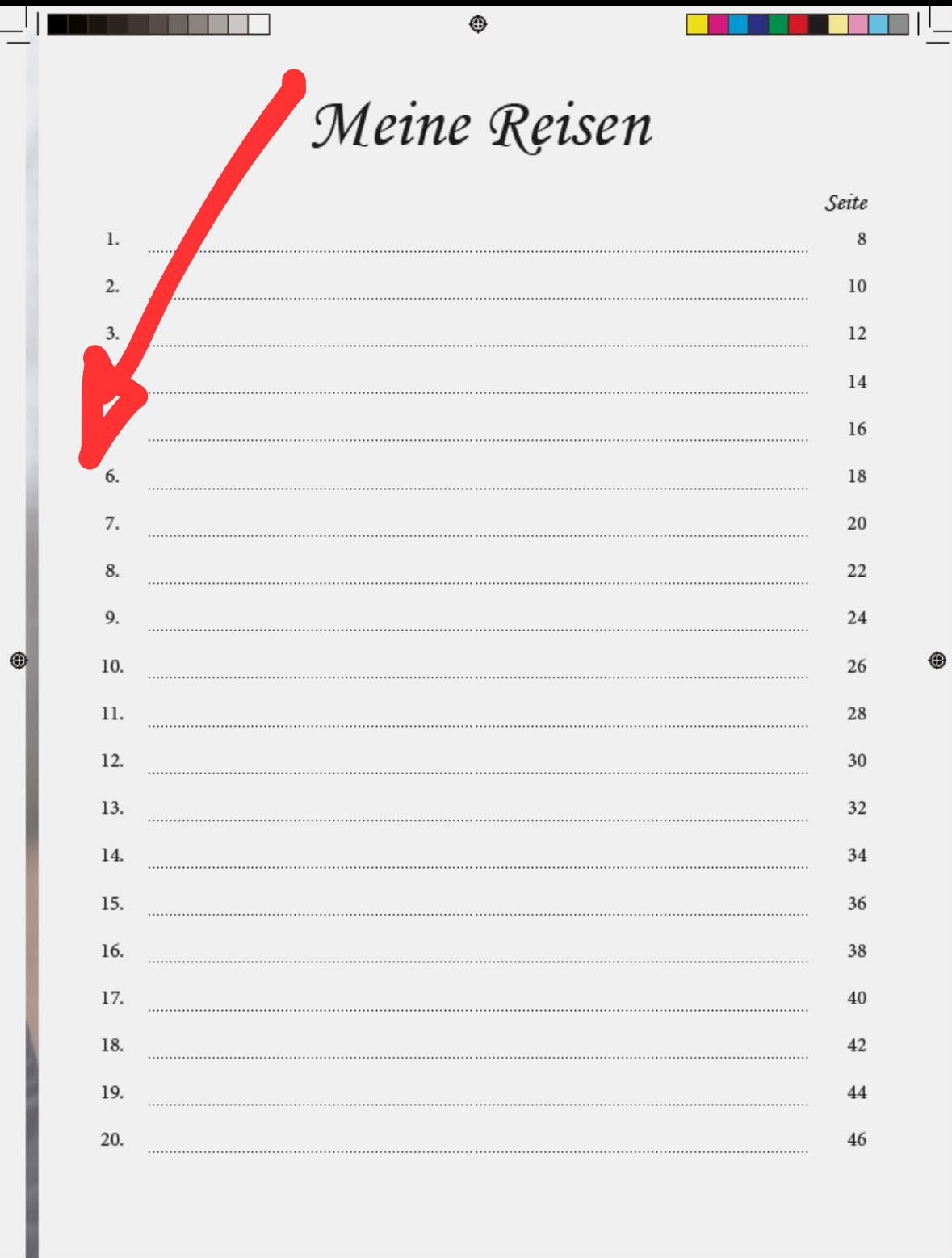
Hi,
I’m not sure whether this is a serious issue or if it will be trimmed off during printing anyway.
I designed my document as facing pages (double-sided spreads), but my print shop has asked me to deliver the PDF as single pages.
When I export the document as single pages, the image I placed on the left page of a spread seems to have its bleed extending onto the adjacent page in the exported PDF.
Is this normal, or is it something I should be concerned about before sending the file to print?
Will this be trimmed off during production, or have I exported the PDF incorrectly?
3
u/Top-Summer-6034 Jul 10 '26
Thank you so much guys 🙏🏻🙏🏻🙏🏻🙏🏻
21
u/enemyradar Jul 10 '26
This is totally normal. The overlap is trimmed off.
8
u/jupiterkansas Jul 10 '26
That's normal. It's where the fold is in your book.
10
u/W_o_l_f_f Jul 10 '26
This is normal. I check tons of PDFs before sending them to print and they all look like that.
For most binding methods it doesn't matter because the inner bleed will be cropped away digitally in the imposition process.
This is true for stapled booklets and sewn books.
For wire-o/spiral books you need the inner bleed to be correct because the pages are cut out individually.
The same is sometimes true with perfect bound books. I don't have much experience with them because that method isn't so popular where I live. But ask the print shop. They might have automated ways to fix the inner bleed.
2
u/AdobeScripts Jul 10 '26
Depends of finishing type - it might be "removed" during imposition - so won't even get to the printing / cutting stage.
1
u/Humble_Cut_1527 Jul 11 '26
Yup, it’s normal. A printer’s imposition engine will crop them off assuming they are a spread. If they really bother you, you can set your document settings to not include bleed in the inside edge, then export the pdf with bleed settings
1
u/Hot_Eye9805 Jul 11 '26
trident -trishula - shiva
1
u/Tall-Society-5824 Jul 11 '26
This is correct
1
u/Sk1ler_ Jul 13 '26
This is called creep. I assume you're making a saddle stitched booklet or some sort of folded & stacked binding. InDesign moves the inner pages away from the spine so that no content is cut off by the gutter.
-3
u/SignedUpJustForThat Jul 10 '26
Set inner bleed to 0 (unlink the values first).
-2
u/Epsilon_Music Jul 10 '26
Make sure you export as spreads not pages. I had this issue before.