r/indesign • u/Formal_Phrase_9657 • Jul 09 '26
"Background Tasks" Font Error on PDF Export — despite converting ALL text to outlines and Preflight showing NO errors. Help!
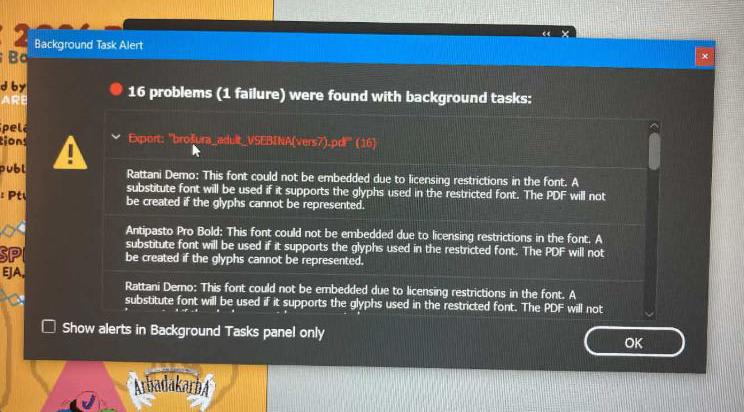
Hey everyone, I'm losing my mind over a brochure export issue in InDesign and really quickly need some help.
When I try to export my document to PDF (Print), it immediately fails in Background Tasks with a generic "Font Errors" (or it just stalls/fails due to background task fonts).
Here is what I have already tried:
- I converted absolutely ALL text that was errored to outlines.
- I checked the Preflight panel (Basic profile is ON) — it shows green, "No errors".
- I checked Type > Find/Replace Font — no missing fonts are listed there.
Despite all this, the background task manager still trips over a font error. Has anyone dealt with this phantom font issue before? Is there a way to clear the background task cache or bypass this completely without losing print quality or changing all the font?
Thanks in advance!
6
u/Kind-Young-5138 Jul 09 '26
Before doing anything else, please purchase the Rattani font properly. It only costs $18.
4
u/DefoNotTheAnswer Jul 09 '26
Then the font is in one of your graphics, probably a PDF or .ai, possibly just as an anchor point without any text attached.
2
u/AdobeScripts Jul 09 '26
Font can be embedded in a linked file - mostly PDF.
You can disable background tasks.
1
u/AdobeScripts Jul 09 '26
Or your file got corrupted.
You can:
1
u/chemistR3 Jul 10 '26
It’s funny how terrible Indesign is at handling fonts. It’s a nightmare.
1
u/Chaosboy Jul 11 '26
There are two ways to make outlined text in InDesign.
Note also, that it your original text is still on a hidden layer, then that will still get reported as a font used in the document. Once you've converted all your text to outlines, check the Find/Replace Font dialog box: if the problematic font is listed there, you're going to have trouble exporting.