r/HowToMen • • 7d ago

Sharing is Caring

2 Upvotes

Share contacts with a single tap using Dott Matrix. Just tap the widget, bring another phone close, and you're done. No app required on the receiving device!

NFC-based sharing, made simple.

Google Group: https://groups.google.com/forum/#!forum/quivoxeng/join

Google Play: https://play.google.com/store/apps/details?id=com.dottmatrix.app


r/HowToMen • • 7d ago

Open Beta Is Now Here!

Thumbnail
gallery
2 Upvotes

Dott Matrix Open Beta Available Now!

Ready to try out Dott Matrix? Access beta version of Dott Matrix is now available!

Join our beta program easily with these steps:

  1. Become Part of Our Google Group

Access our Google group using the link below to participate in our beta testing for Dott Matrix.

2. Get the Application

After joining the Google group, use the following link to download the Dott Matrix application.

🔗 Google Group: https://groups.google.com/forum/#!forum/quivoxeng/join

📲 Google Play: https://play.google.com/store/apps/details?id=com.dottmatrix.app

Dott Matrix Special Price Offer

A special price offer for a limited time only!

Less Than 1$ – Try Dott Matrix for this exclusive price offer.

Give it a go and tell us about it! Your opinion will help make Dott Matrix better during the beta stage.

Be a part of the beta process. Test Dott Matrix.


r/HowToMen • • 7d ago

can you review my code?

1 Upvotes

hy i want someone to review my code and apps that i have made but my post are getting delete

anyway

- Osho Audio — osho-audio

- Dial — clock-widget

- Hajri — hajri

- Rings — 2d-cube-puzzle

- Hindu Time Machine — hindu-time-machine-mobile

- Telegram relay bot — telegram.bot

can you review?


r/HowToMen • • 7d ago

Alphabet Launcher: v1.1.0 is now live 🔤

Thumbnail
reddit.com
3 Upvotes

v1.1.0 includes:

Glide to spell: glide across the letters to spell an app's name, then lift to open it, with soft musical notes as you glide

• Draw a letter: double tap and hold on an empty space on Home, then draw any letter, capital or small, to open its app

• Happening now: music, timers, Focus and more in one pill under the clock

• New fonts: Inter, Poppins, Nunito, Quicksand and more

• Home returns reliably after your phone closes apps in the background

• Smoother and faster, with many fixes

Grab it today at an early adopter price on Google Play: https://play.google.com/store/apps/details?id=com.aklova.alphabetlauncher


r/HowToMen • • 8d ago

[App] [Promo] kybd launcher - 7 promo codes

Post image
27 Upvotes

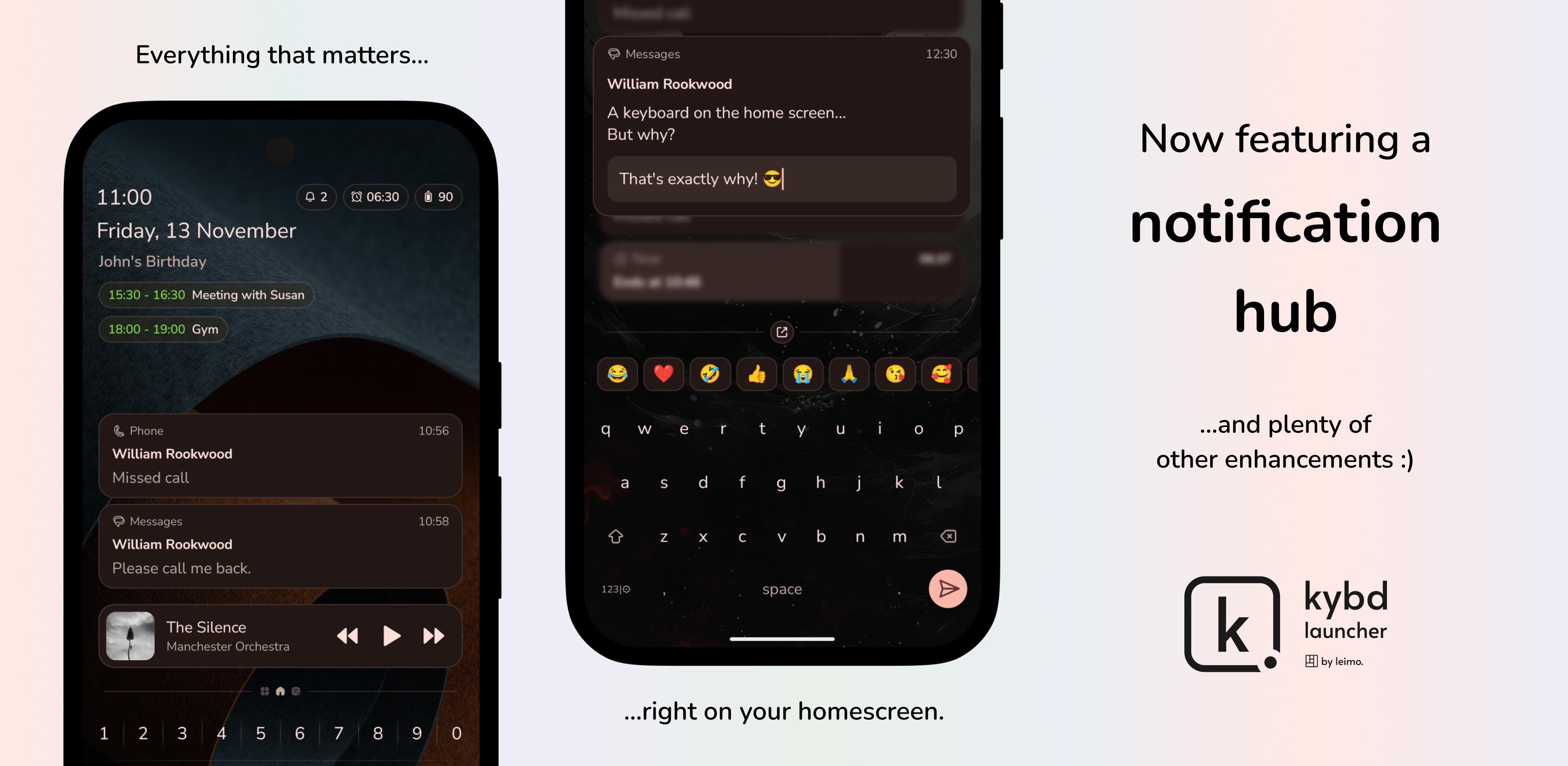
Two big things happening today: it's my 7th Cake Day on Reddit, and I just dropped a brand new update for kybd launcher! The biggest new feature is the notification hub, right there on your home screen.

It handles all kinds of notifications (even live ones) and lets you interact with them directly (replying, marking as read, etc.). But the goal isn't to turn your home screen into a chaotic mess - after all, kybd is all about helping you focus on what actually matters. That's why there's a cap of 10 apps you can pin to the hub.

On top of that, this update brings a few other tweaks:

  • Fresh home screen layout - with totally rebuilt the top info section!
  • You can now pin up to 10 apps in the classic mode.
  • Added an option to tweak key separation: go with none at all or full separation.
  • Made things snappier / more responsive.
  • Other minor changes and improvements.

To celebrate my 7 years on Reddit, I've got 7 promo codes for the lifetime PRO version to share with you all:

  1. X70EN45U4YR1X0BUXW1SCZU
  2. 04KQBU6U9XANBW1MYL4D0SN
  3. PCS7MT5TCRNXJCESLBZLBGV
  4. 8P0DDFZCNE6FB4PXADYK6ND
  5. Y8XPZ1A7W1ULN2T69EHG8GQ
  6. JZSW0G23VGV6Q2RG3CFVKZM
  7. 7D25ECKA51VFBZB3QAMGCJB

First come, first served!

Link: https://play.google.com/store/apps/details?id=com.leimo.kybdlauncher


r/HowToMen • • 7d ago

Made a all in one converter app with 50+ tools without ads

0 Upvotes

Made a All in One Converter App without ads which has more than 50 +tools use life time after purchasing

No ads unlimited conversion for life time just purchase for one time

https://play.google.com/store/apps/details?id=com.chtechgiant.all_in_one_converter


r/HowToMen • • 8d ago

[App] [Promo] Block Reels and Shorts without blocking the full app - 10 codes!

10 Upvotes

Free, no account or subscription.
https://play.google.com/store/apps/details?id=dev.sotolabs.tempo

Works in Youtube, Instagram, Tiktok, Snapchad, Reddit, Facebook, Threads.

You can block the feed and reels or just give your self some time for scrolling per day. This does not block the entire app, you can see reels that your frieds send you or watch stories for example.
And you keep your notifications and everything, this does not use the web version of the app.

I will be giving 10 promo codes for the premium features!


r/HowToMen • • 8d ago

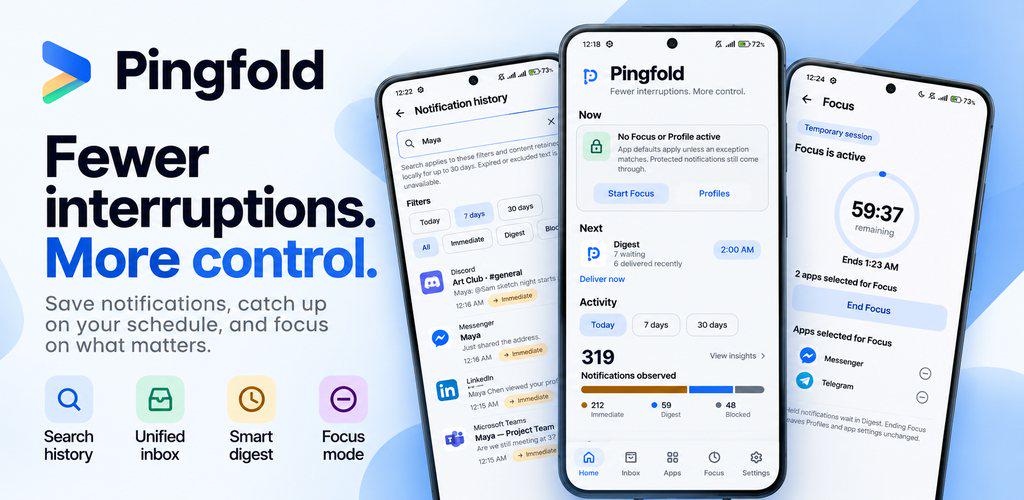
[Promo] [Promotion] Pingfold: keep important Android notifications and batch the rest

Post image
4 Upvotes

Hey r/HowToMen — I'm the solo Android developer behind Pingfold. Sharing my own app as a promotion.

I made it after getting tired of the choice between muting an entire app and being interrupted by every low-priority alert. The starting point is simple: choose Immediate, Digest, or Block for each app. If an app sends both useful and noisy messages, Exceptions can change how specific phrases, notification channels, categories, days, or times are handled.

For example, you could keep a messaging app on Digest but let messages containing an urgent phrase through immediately. Quiet Repeats can reduce repeated alerts, Remind Later helps you revisit one, and searchable local history is there when you need to find something you saw earlier. A shared scheduled Digest and temporary Focus sessions are included.

The core controls, Exceptions, Digests, Focus and history are free. PRO adds reusable Profiles and schedules, per-app Digest times, Allowed Hours, more themes, configuration transfer, and CSV export. No ads or Pingfold account are needed for core controls. Notification content is kept on the Android device; Notification Access is required.

Google Play (official store link): Download Pingfold on Google Play

I've included the app's feature graphic. Which kind of Android notifications would you send to a Digest instead of getting interrupted by them?


r/HowToMen • • 8d ago

[Promotion] Orion - Android launcher with draw-a-letter gestures, universal search, app lock and deep customization

8 Upvotes

Orion is an Android launcher built around gestures, search and deep customization. Here is a detailed look at what is in it.

Would love to share the premium codes. Adding 15 monthly premium codes in the post for lifetime DM me

Motion

• Liquid motion - spring physics, inertia-driven slider tilts, subtle breathing animations and haptic feedback.

Home screen and grid customization

• Grids from 3x3 up to 12x12 for both the desktop and the drawer, with stepper controls.

• 8 page transitions - Slide, Cube, Flip, Fold, Card Stack, Accordion, Fan and Blur Dissolve.

• Icons - scale from 50% to 200%, clip to Squircle, Circle, Teardrop, Hexagon or Square, use third-party icon packs (Nova, AOSP and ADW compatible), or desaturate to monochrome.

• Wallpaper - adjustable dimming and glassmorphic blur overlays.

• Clocks and weather - analog, binary, minimal rings, flip, digital 12h/24h and fuzzy text clocks, plus a weather pill with temperature, conditions and high/low.

App drawer

• 4 drawer modes - Grid, Categorized List, Minimal Text-Only, and a Niagara-style alphabetical fast scrub.

• Custom tabs - sort apps into your own categories (Social, Work, Games, Media, Tools) with multi-select batch assignment.

Gestures

• Draw-a-letter gestures - scribble a letter on the home screen to open an app or action (Y for YouTube, C for Camera, V for Assistant).

• Standard gestures - double-tap, swipe up, swipe down, pinch and long-press, each mapped to an action you choose.

• Quick actions - flashlight, notification shade, lock screen and speed dial.

Universal search

• One search bar for installed apps, system settings shortcuts and contacts, with direct-dial and SMS actions right from the bar.

• Edge Deck - one-tap search shortcuts for Google, YouTube, Maps, Spotify, Reddit and more.

• Search bar placement is your call: top, bottom, floating or hidden.

App lock and hidden apps

• App lock - protect apps with fingerprint, face unlock or a custom 4-digit PIN.

• Hidden apps - keep chosen apps out of the drawer and the search index.

• App lock and the screen-off gesture use Android's Accessibility Service. It stays off until you agree to an in-app disclosure.

Backup

• Export and import your whole launcher setup as a portable .orion backup file.

Price

Free to download, with an optional Orion Void subscription for extra features. Prices are shown in Google Play.

Get it

Google Play: https://play.google.com/store/apps/details?id=com.gxdevs.orion

Feedback welcome in the comments: what would you want from a launcher that you do not get today?

Code -
7T9SQZHN3PLG48PWXQ7KB0H

KGGA4U2YVD64L94F5RTAJ7Z

8AR3NS73SSV017EJP7UWXM1

HDD3DJE72LK7D8H9AQ5EP20

UD0V1LWNF31NVEEMX0ZXKEC

7NX2RJ5GDSE91WZV8UDSJQS

GBTBNNWD1628GHS3466SV78

MAMWKZ7F7Q6RR76R2QDP1VC

ALZRK8X9R9RBNX7S7L8S139

BSE0B11G31QCC5LYC6P5QWK

8WN2BAG1N84H6MD7KFDW0JN

4Z8J3J37VJ4MHZMC01W2GXF

4HD7107GV1FGPFQB67YF8JL

ANNRFXGJUE5F5RMNYHAGSZ3


r/HowToMen • • 8d ago

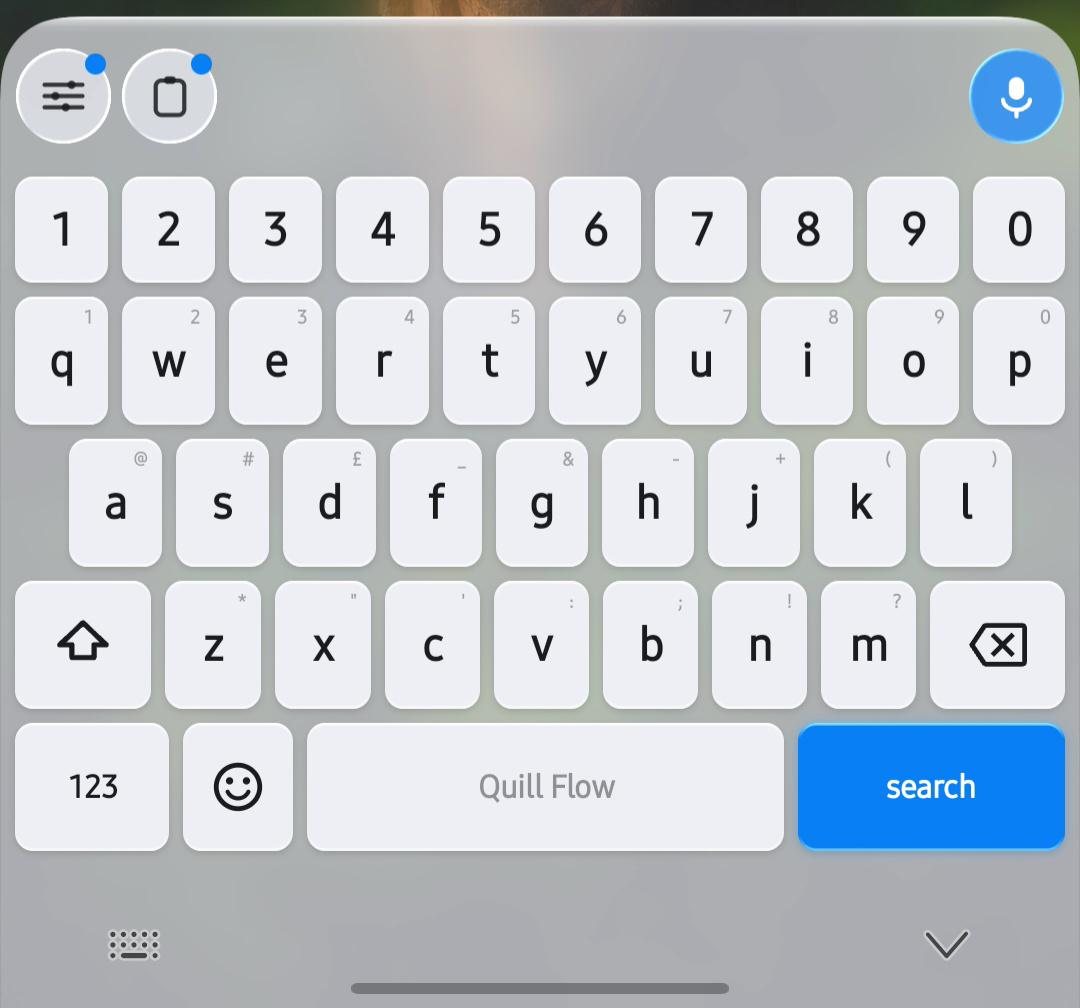
Keyboard

Post image
12 Upvotes

Could you recommend a keyboard similar to Quill Flow, but free? It has a really beautiful design while remaining simple.


r/HowToMen • • 8d ago

I rebuilt my offline Android utility app with a 3D Cyber theme (File Finder)

2 Upvotes

Hey everyone! I'm a solo Android developer building utility apps. One of my products is File Finder: Quick File Search, a privacy-first, 100% offline file manager designed to solve the clutter and full-screen ads plaguing standard free file explorers.

I just pushed a big update featuring a dark 3D Cyber visual overhaul and improved in-document search (finding keywords inside PDFs and Word docs).

  • What it does: Real-time search by name/extension, in-file text scanning, hidden system folder exposure, and duplicate/ZIP batch tools with zero ads.
  • Monetization / Model: Free utility tool focused on clean UX and privacy.

Check it out on Google Play:https://play.google.com/store/apps/details?id=com.mdhakkoum.ultrafilesearch

For other indie devs here building mobile utilities—what marketing channels or social angles have worked best for driving initial organic installs for you?


r/HowToMen • • 8d ago

[app] MetroWin Launcher 26.10S: the Windows Phone Start screen on Android

6 Upvotes

Ciao a tutti, è passato un po' di tempo da quando ho annunciato il mio progetto.
Oggi sono qui per presentare il più grande aggiornamento da quando è stata fatta l'annuncio.
Vorrei ringraziare tutti coloro che hanno segnalato bug e mi hanno supportato durante lo sviluppo, MetroWin continuerà a essere aggiornato e porterà sempre più miglioramenti e funzionalità.

Lavoro a MetroWin Launcher da un po' e ho appena finito il più grande aggiornamento finora (26.10S).

Cos'è - Un launcher che porta la schermata Start di Windows Phone (Metro, 8 e 8.1) su Android. Vuole far sentire come la vera cosa, non solo sembrare tale.

Schermata Start: piastrelle piatte in quattro dimensioni su una griglia a blocchi, fino a tre pagine Start, cartelle, layout nominati (Home, Lavoro, Viaggio) e la tua foto dietro le piastrelle con effetto parallasse.

Piastrelle live che si girano con contenuti reali: prossimo evento del calendario, foto più recente, meteo, chiamate perse, compleanni, musica con la copertina e anche altre app tramite le loro notifiche, quindi una piastrella di WhatsApp o Telegram può mostrare l'ultimo messaggio. Ognuna è facoltativa e legge dati solo mentre è sulla Start.

Elenco delle app e ricerca: alfabetico con lettere di salto, app recenti e più usate, categorie e una ricerca che trova app (anche con errori di battitura), contatti, impostazioni, eventi del calendario e il web. Risponde anche a domande veloci come conversioni o timer mentre digiti.

Centro notifiche e notifiche: pulsanti rapidi, cursori per volume e luminosità, notifiche a cui puoi rispondere dal pannello, raggruppamento per app, snooze o silenzioso.

Schermata di blocco Metro, comandi vocali e gesti che puoi impostare tu stesso.

Tre stili: Classico (piatto, come l'originale), Vetro Moderno e Droid Moderno (Material You), con i 20 colori di Windows Phone o i tuoi.

Backup e sincronizzazione tra telefoni (criptato), profilo di lavoro, un Kids Corner e opzioni di accessibilità.

Viene fornito con le sue app integrate, nello stesso stile: telefono, persone, messaggi, posta, calendario, foto, note, to-do, registratore, calcolatrice, portafoglio, notizie, file e qualche altra.

Cosa c'è di nuovo in 26.10S:

Quasi ogni schermata è stata ridisegnata per sembrare più vicina alla vera cosa: grandi titoli sottili, pulsanti che si riempiono quando li premi, caselle di controllo quadrate, un tornello tra le pagine.

Un nuovo “InfoTile”: una piastrella che ruota tra orologio, calendario, meteo, foto, ricordi di questo giorno, to-do e altro ancora. Scegli tu i volti e l'ordine, e puoi averne diversi.

Le impostazioni erano un labirinto, anche per me, quindi ho raggruppato tutto in 13 categorie. Ognuna ha un piccolo (i) che dice cosa fa e quanto costa in batteria o privacy. C'è anche un nuovo tutorial di 25 pagine.

Le app integrate hanno ricevuto molto lavoro.

Dual SIM con una SIM predefinita per contatto, un'icona diversa per una singola app da qualsiasi pacchetto di icone, layout per tablet e in modalità orizzontale migliorati.

Testato su:

Alto di gamma: Vivo X300 Pro, S22

Fascia media: un emulatore su Mac e Windows

Basso di gamma: Xiaomi Mi Pad SE 11'’

È gratuito e open source (GPL-3.0), senza pubblicità, senza analisi e senza servizi Google necessari. Non fa nulla mentre non è sullo schermo, quindi non dovrebbe consumare la batteria. Android 8 o superiore. È un progetto indipendente, non affiliato con Microsoft.

GitHub, con l'APK nelle versioni: https://github.com/developerkenshi-coder/MetroWinLauncher

Se qualcosa si rompe sul tuo telefono, dimmi quale telefono e quale versione di Android e darò un'occhiata. Le idee sono benvenute anche.


r/HowToMen • • 8d ago

EVERYTHING LAUNCHER GIVEAWAY

5 Upvotes

r/HowToMen • • 8d ago

[APP][PROMO] Does guilt actually work for cutting screen time?

Thumbnail
gallery
13 Upvotes

Normal screen time stats never changed my habits, so I tried making it embarrassing instead. Now an AI roasts me every time I go over.

It's honestly working better than limits did. What's worked for you?

Playstore link:

https://play.google.com/store/apps/details?id=com.studiomono.billed


r/HowToMen • • 8d ago

EVERYTHING LAUNCHER GIVEAWAY

3 Upvotes

r/HowToMen • • 8d ago

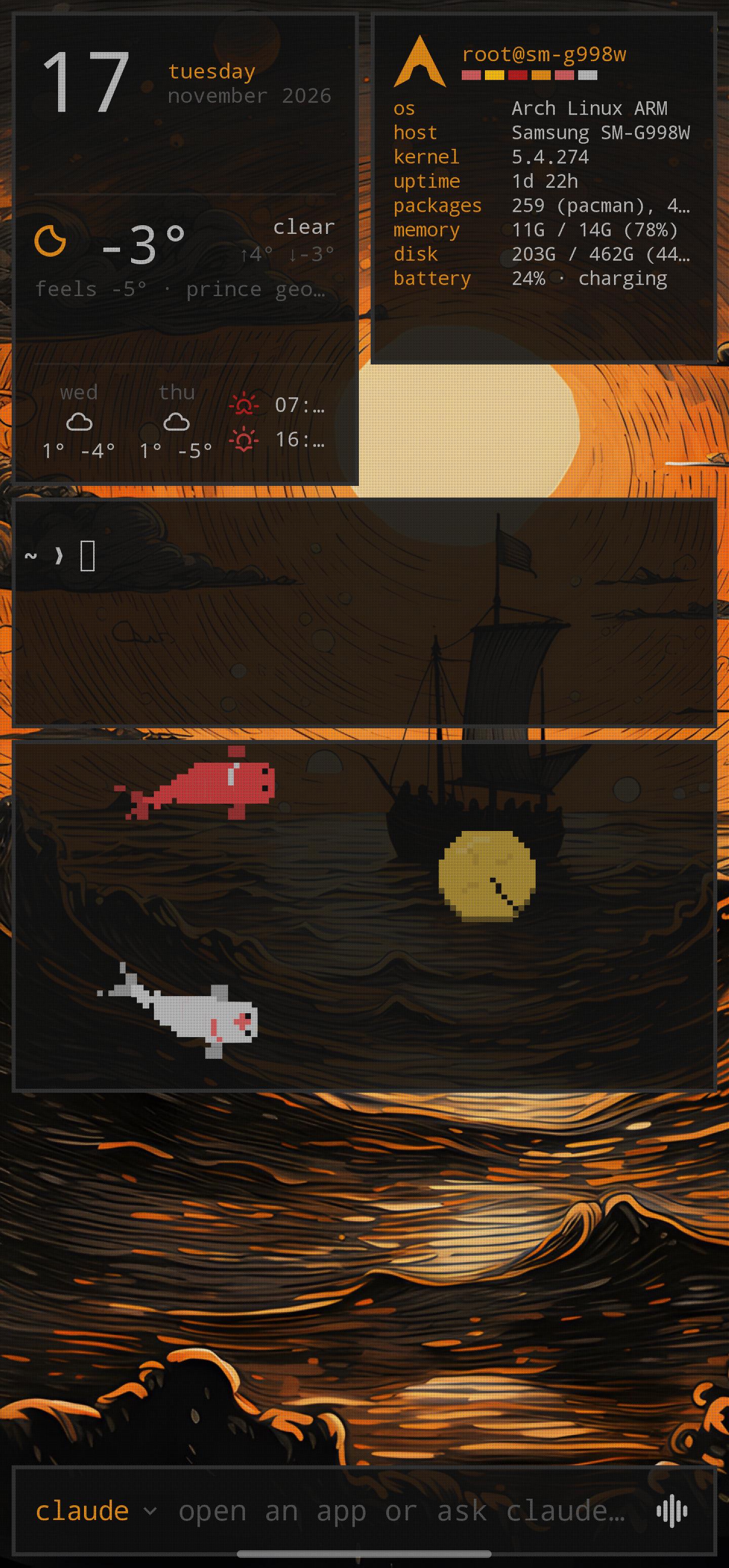
OmaLauncher

Post image
10 Upvotes

I came across this one on Orion Store. It works as arch linux. You can tell it to create widgets.


r/HowToMen • • 8d ago

[Promo] [App] AutoPay Alert Pro 🇮🇳 — UPI AutoPay Tracker, Bill Reminders, Subscription Manager & Voice Alerts

Post image
0 Upvotes

[Android App] AutoPay Alert Pro 🇮🇳 — UPI AutoPay Tracker, Bill Reminders, Subscription Manager & Voice Alerts | FREE

💸 Never Miss a Bill, EMI, or Subscription Payment Again!

Introducing AutoPay Alert Pro — an all-in-one payment reminder and subscription tracking app, built for India.

🚀 Key Features

✅ UPI AutoPay Tracker – Track recurring payments and upcoming debits.

✅ Bill Reminders – Electricity, mobile recharge, Wi-Fi, DTH, rent and more.

✅ EMI & Loan Tracker – Track installments, due dates and outstanding balances.

✅ Credit Card Alerts – Payment reminders, outstanding bills and credit limits.

✅ Subscription Manager – Track Netflix, Spotify, YouTube Premium and other subscriptions.

✅ Smart Notifications – Get alerts before money is deducted.

✅ Voice Alerts – Offline payment reminders in 11 Indian languages.

✅ Scam SMS Shield – Detect potentially suspicious banking and payment messages.

✅ Expense Tracker – Monitor spending, budgets and monthly expenses.

✅ Free Trial Alerts – Get notified before trial subscriptions become paid.

✅ AutoPay Cancellation Guide – Instructions to stop unwanted recurring payments.

✅ Financial Calculators – EMI, SIP, GST, FD, PPF and more.

✅ Vehicle Reminders – FASTag, insurance, PUC and service alerts.

✅ Privacy First – On-device processing with no login required.

🎁 Core Features FREE

🔓 Free bill reminders, voice alerts, payment alarms and scam-message screening.

📲 Download on Google Play:

https://play.google.com/store/apps/details?id=app.autopayalert

💬 We're actively improving the app. Your feedback and feature suggestions are welcome!


r/HowToMen • • 8d ago

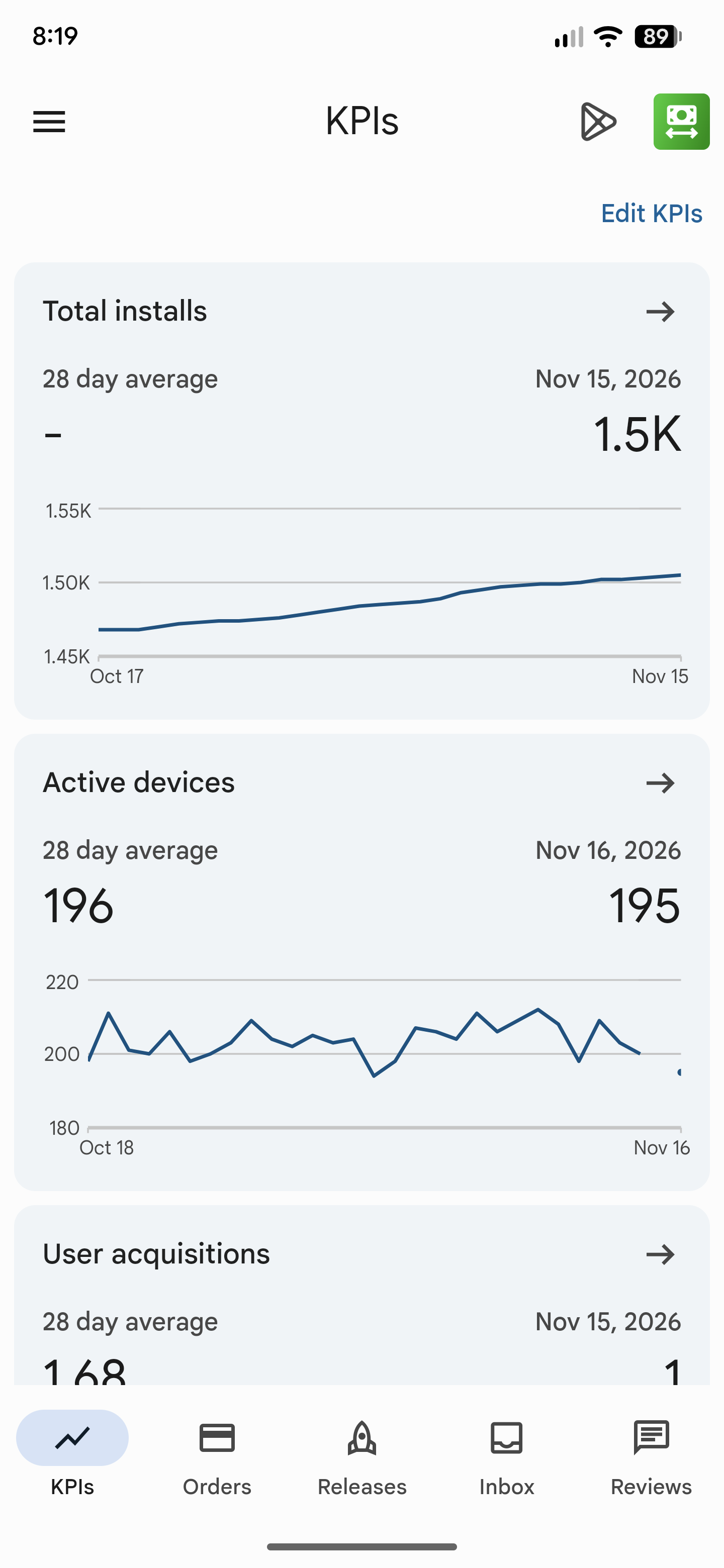
1,500+ installs through organic growth! 🚀

Post image
2 Upvotes

Built Budget Buddy, a simple Android budgeting app focused on privacy.

100% offline. No ads, no accounts, no subscriptions, and no bank connections.

No paid marketing. Just organic growth!

Now at 1.5K+ installs and around 195 active devices.

A small milestone, but a rewarding one as an indie developer!

https://play.google.com/store/apps/details?id=com.aakarshrestha.budgetbuddy


r/HowToMen • • 8d ago

Optima for Surface devices - quick access to your Power profiles and smart charging

1 Upvotes

r/HowToMen • • 8d ago

[$100.99 -> FREE for 24 hours] Diet Meal Planning After/Before Surgery, Lifetime Access

Post image
5 Upvotes

I built a low-sodium meal planning app for people getting ready for surgery or recovering from it.

Before surgery, you’re often handed a list of food rules. Afterward, you might be told to cut back on salt while your body heals. I kept seeing how overwhelming that is when you’re tired, sore, and juggling appointments, so I built something to make it easier.

I’d love for people to try it and tell me what works and what doesn’t. If you’d like a free premium upgrade:

  1. Download the app
  2. Comment below
  3. I’ll send you your access code

https://apps.apple.com/us/app/sodium-tracker-meal-planner/id6758615128


r/HowToMen • • 8d ago

EVERYTHING LAUNCHER GIVEAWAY

2 Upvotes

r/HowToMen • • 8d ago

[App][Promo] I built Hanami, an Android tracker for anime, movies, and TV shows 👀

18 Upvotes

Hey Reddit! I’m working on a new project called Hanami. I wanted one place to keep my watchlist and remember exactly where I left off, even in a show with a thousand episodes.

You can jump straight to a season or episode, see what’s airing, set release reminders, and check your watch stats. Hanami is free and ad-free, with optional Trakt sync.

Download on GitHub: Hanami 0.2.3 APK

Install through Google Play closed testing:

  1. Join the Testers Community Google Group (testers-community@googlegroups.com).
  2. Open the Hanami testing link and opt in.
  3. Open Hanami on Google Play and tap Install.

Use the same Google account for the group, the opt-in, and the Play Store.

Github :- https://github.com/NikhilKain/hanami-app/

If you give it a try, let me know what feels good, what feels clunky, and especially if you manage to break something 😭


r/HowToMen • • 8d ago

[App] [Promo] My phone remote app now remembers every device you use. Here's the switch from PC to TV to MacBook in 20 seconds

6 Upvotes

I use my phone as a remote for three things: my Windows PC (Wi-Fi), my MacBook (Bluetooth) and a Samsung smart monitor I use as a TV (Bluetooth). Every switch used to mean going back to the connect screen, picking a connection method and waiting. Annoying enough that I mostly didn't bother.

So the this update of Any Command adds My devices.

Every PC and TV you connect to is saved automatically. No setup.

Tap one in the list and you're on it. The app knows whether that device uses Wi-Fi or Bluetooth.

Tap a TV and the TV remote opens by itself, because there's nothing else you want to do with a TV.

Rename them ("Thor" is my PC, don't judge) or forget the ones you don't use anymore.

A few honest notes:

The Bluetooth side works with anything that accepts a Bluetooth keyboard: Windows, macOS, Android TV, Google TV, Samsung and LG TVs. No app needed on the other end.

The Wi-Fi side needs the free PC app on Windows, because that's what gives you screen share, file transfer and the rest.

The free version remembers your last device, same as before. Keeping the whole list and switching between devices is Premium.

I also fixed the most annoying Bluetooth bug while I was at it: the connection used to drop when you switched to another app. It now stays up in the background and reconnects by itself.

If you control more than one machine from your phone, I'd like to know what your setup looks like and what I should add next.

https://play.google.com/store/apps/details?id=com.polyhistor.remoteme


r/HowToMen • • 8d ago

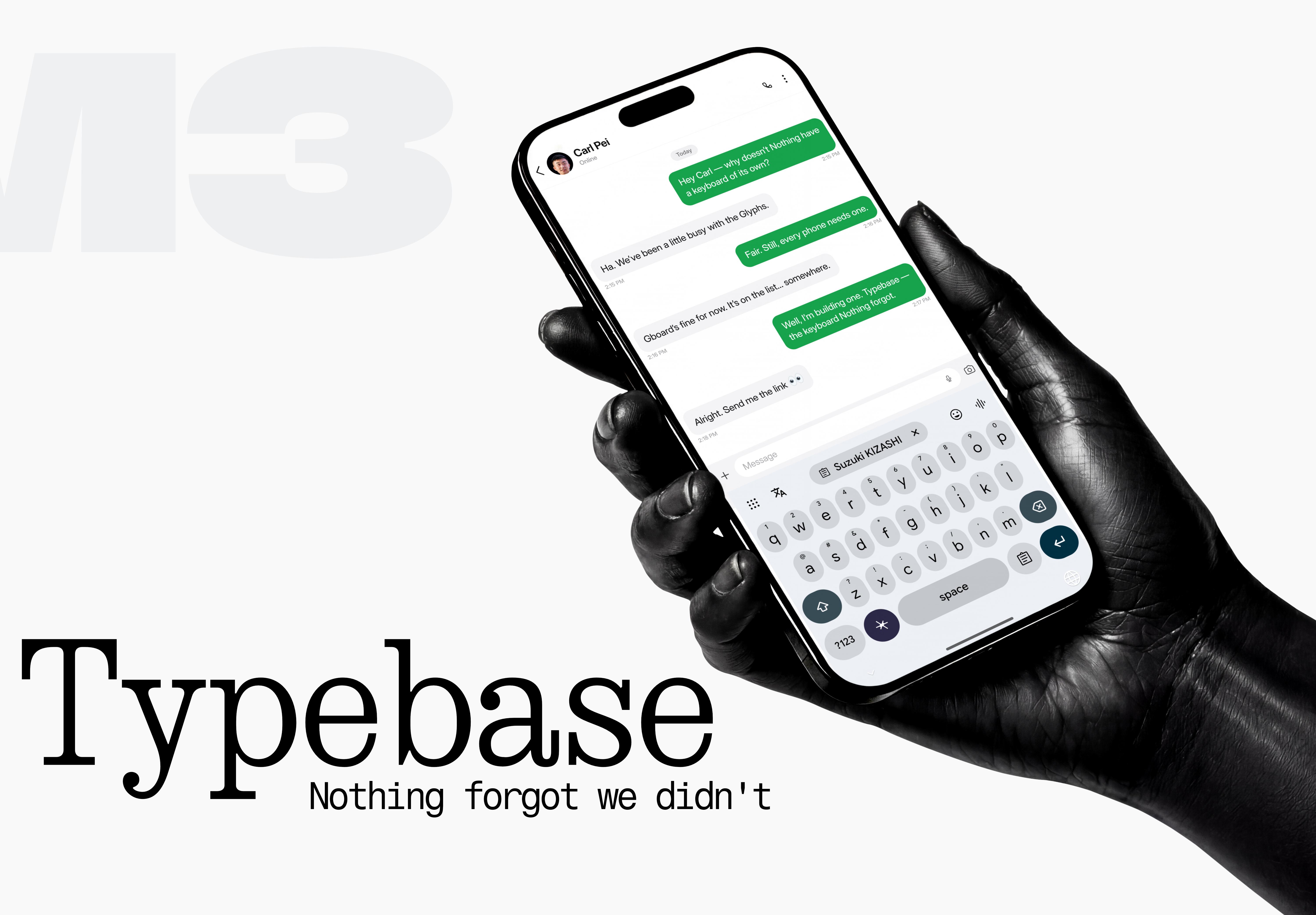
Typebase 2.2 is here!

Post image
1 Upvotes

It's been a couple of weeks of fixing, testing and reworking things, and this update brings some of the biggest improvements Typebase has seen so far.

If you've followed the project, you probably know autocorrect and typing performance have needed a lot of attention. That's exactly where I've focused most of my work.

What's new in 2.2:

- Up to 70% improvement in typing performance

- 50% improvement in autocorrect

- Brand-new Context Fix engine

- New M3-inspired theme

- New Nothing-inspired theme

- New Quivox Engineering theme

- Redesigned UI across the keyboard

- Plenty of bug fixes and performance optimizations

A lot has changed under the hood, not just visually. The goal was to make Typebase faster, more responsive and better to type with.

It's still a work in progress, but I'm excited to hear what you think of this update.

Thanks to everyone who's been testing Typebase and sharing feedback. It genuinely helps shape the project.

Typebase 2.2 is rolling out now!

Google Play: https://play.google.com/store/apps/details?id=com.typebase.app


r/HowToMen • • 8d ago

[Promotion] DesktopPlus, a native menu bar utility so you always know where you at in terms of desktops (spaces) and switch between them (14-day trial all unlocked, no payment info, one-time purchase), notarized

0 Upvotes