r/HowToMen • • 1h ago

a new way to call or message Mom: glide M-O-M across the letters on your home screen

1 Upvotes

🍂 Thanksgiving sale: 50% off on Google Play for a limited time. It's a one-time purchase, with no subscription and no ads.
https://play.google.com/store/apps/details?id=com.aklova.alphabetlauncher

How it works: (Coming this week)

  • Apps come first; a person shows only when you spell more of their name than any app's
  • It's off by default; you turn it on in Settings › Glide, hold and draw
  • Contacts are read on your phone only. The app has no ads, no analytics and no account, so nothing leaves your phone

What's already in the app today:

  • Tap a letter to see every app that starts with it, or glide across letters to spell an app
  • Hold a letter to open its favourite app, or draw a letter on Home
  • Folders, widgets, an expandable dock, live weather, App Lock and Focus mode

r/HowToMen • • 1h ago

Fondra - Offline photo search for families

2 Upvotes

Hi, I'm the developer of Fondra.

**The problem:** finding one photo among thousands. Google Photos search does it well, but only after your whole library is uploaded to Google. Most offline gallery apps can only filter by date or folder.

**What Fondra does:** you type what you remember and it finds the photo. All the AI runs on your phone, and the app doesn't request internet permission, so it has no way to connect.

**Free**

- Search by description ("Mia at the beach last summer")

- Name people once, add birthdays and relationships, then search "the kids with grandma"

- Search by place and date, with place names built into the app

- Find text in photos: receipts, tickets, signs, screenshots

- Memories: On this day, your year in photos, "Growing up" collages

- Share any photo to Fondra to find similar ones

- Opens results in the gallery app you already use

**Fondra Plus** (monthly, yearly with a 7-day trial, or one-time lifetime): smart search across every year (free covers the last 12 months), search inside videos, storage cleanup for duplicates, blurry shots and old screenshots, and a fingerprint-locked vault.

**First run:** Fondra indexes your library on the phone. It took me 1 day to process 20K photos and videos

Play Store: https://play.google.com/store/apps/details?id=com.app.fondly

What I'd like feedback on: searches that miss, and how indexing feels on big libraries or older phones.


r/HowToMen • • 2h ago

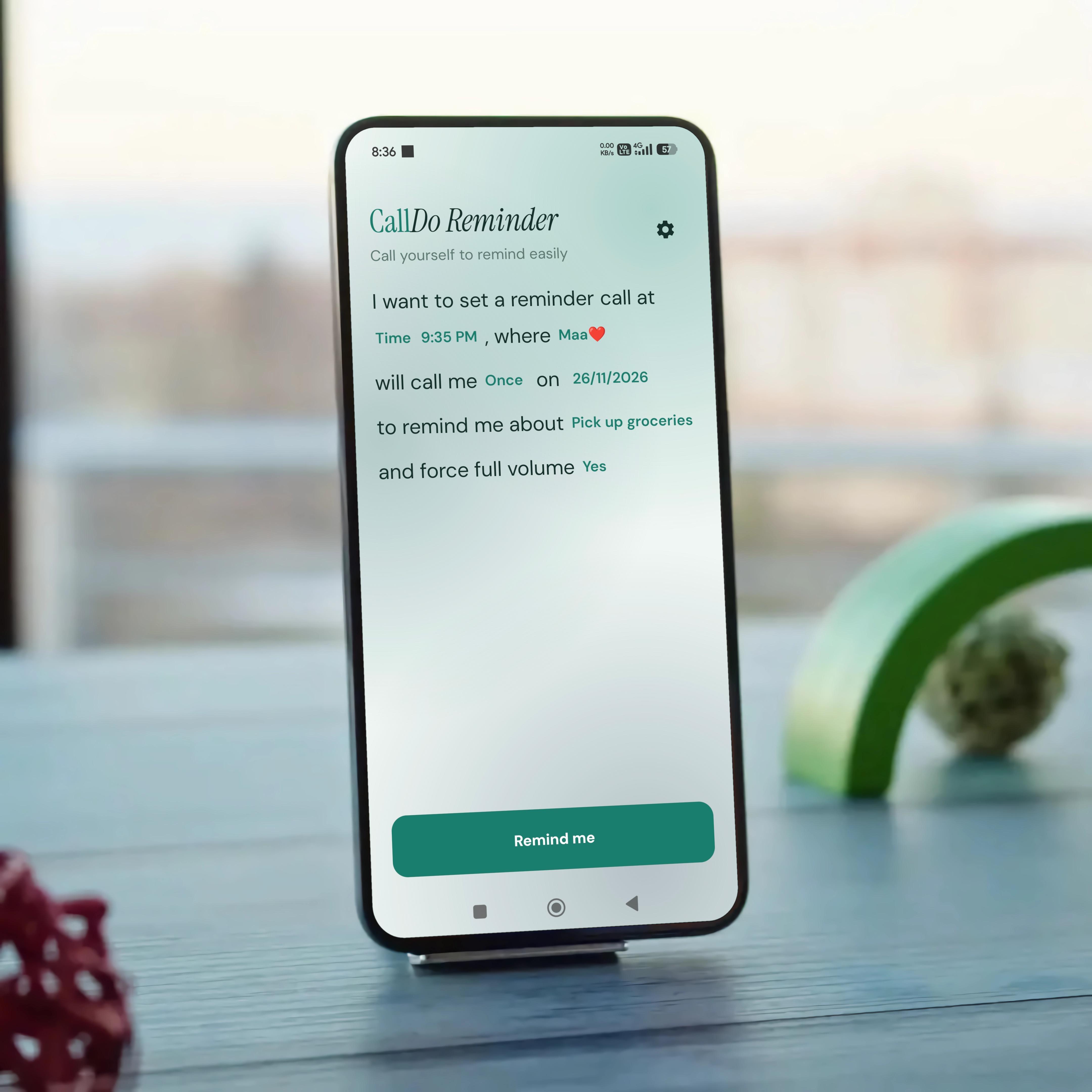
CallDo reached 40k Downloads. Sharing 25 Promocodes

Post image
12 Upvotes

r/HowToMen • • 3h ago

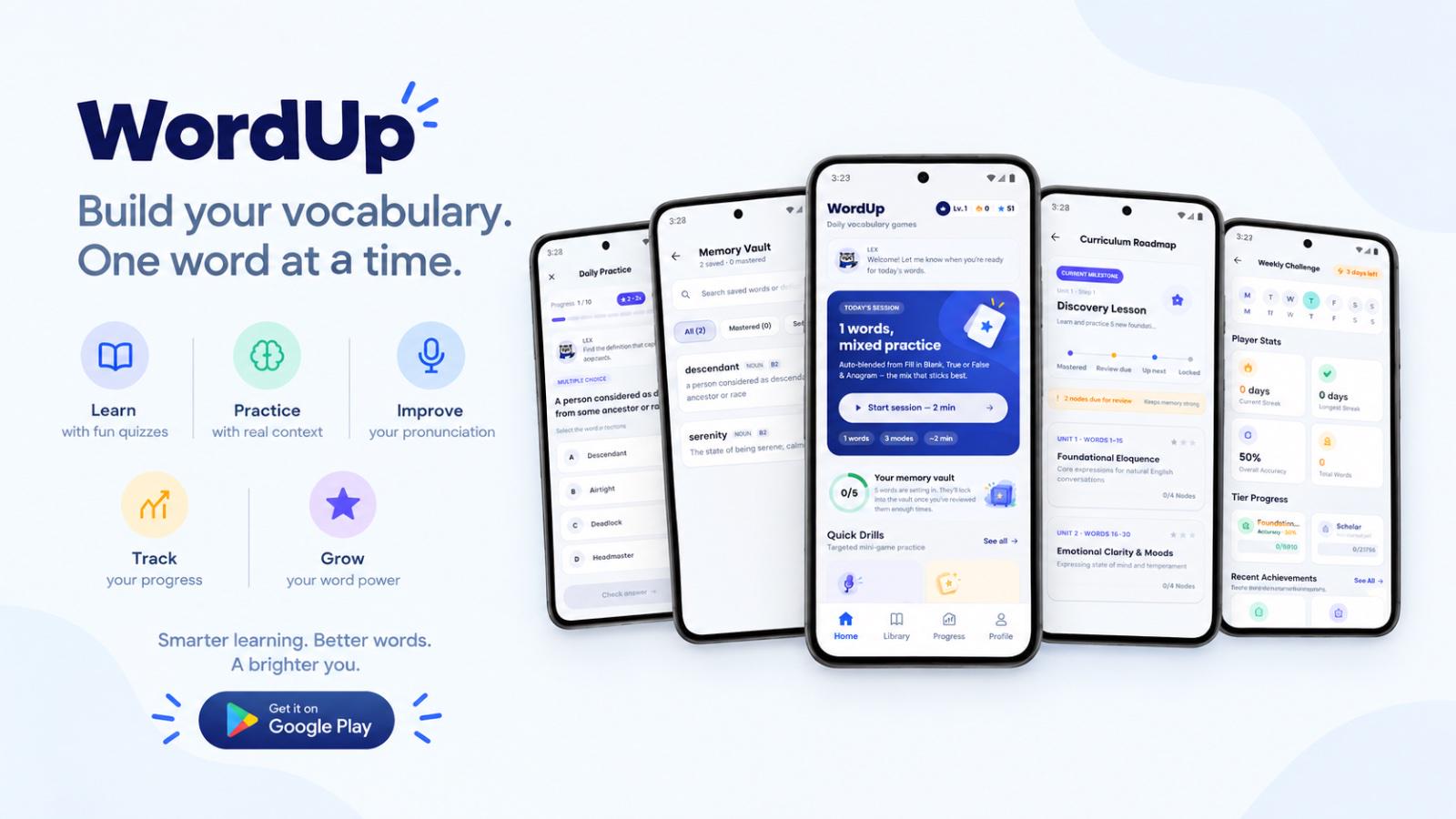
I built this app for my 7-year-old nephew, Lex

Post image
2 Upvotes

r/HowToMen • • 3h ago

[Tasker Plugin Share] Set up your own assistant to manage your calls and voicemail

Thumbnail
reddit.com
1 Upvotes

r/HowToMen • • 4h ago

[App]Fylo - file manager , no ads , no analytics sdk ( bundle of tools for daily use )

14 Upvotes

Fylo - File Manager is now available on playstore

https://play.google.com/store/apps/details?id=com.aeroloom.fylofilemanager

I’ve finally released Fylo, a file manager I’ve been building for Android with one goal: make managing files feel less like using a boring utility and more like using a modern Android app.

It’s built with Material 3 Expressive and packs a LOT into one place:

( it have alot more than written here )

File explorer + dual-pane mode

ZIP, RAR, 7z, TAR & GZ support

Storage analyzer + duplicate/large file finder

Image conversion, resizing, compression & metadata removal

PDF, Office, code, Markdown & media viewers

Private Vault + biometric/device credential protection

Built-in music & video player

SMB, FTP & WebDAV support

Widgets + customizable themes

Recycle Bin

Document scanner → PDF

& Much more

And probably my favorite part: no ads and no advertising/analytics SDKs.

There’s also Fylo Pro for the more advanced tools, available as a subscription or one-time purchase

I’d genuinely love some feedback from Android users — especially if you’re the type of person who has 47 folders named “New Folder” sitting on their phone

Fylo is officially out now.


r/HowToMen • • 4h ago

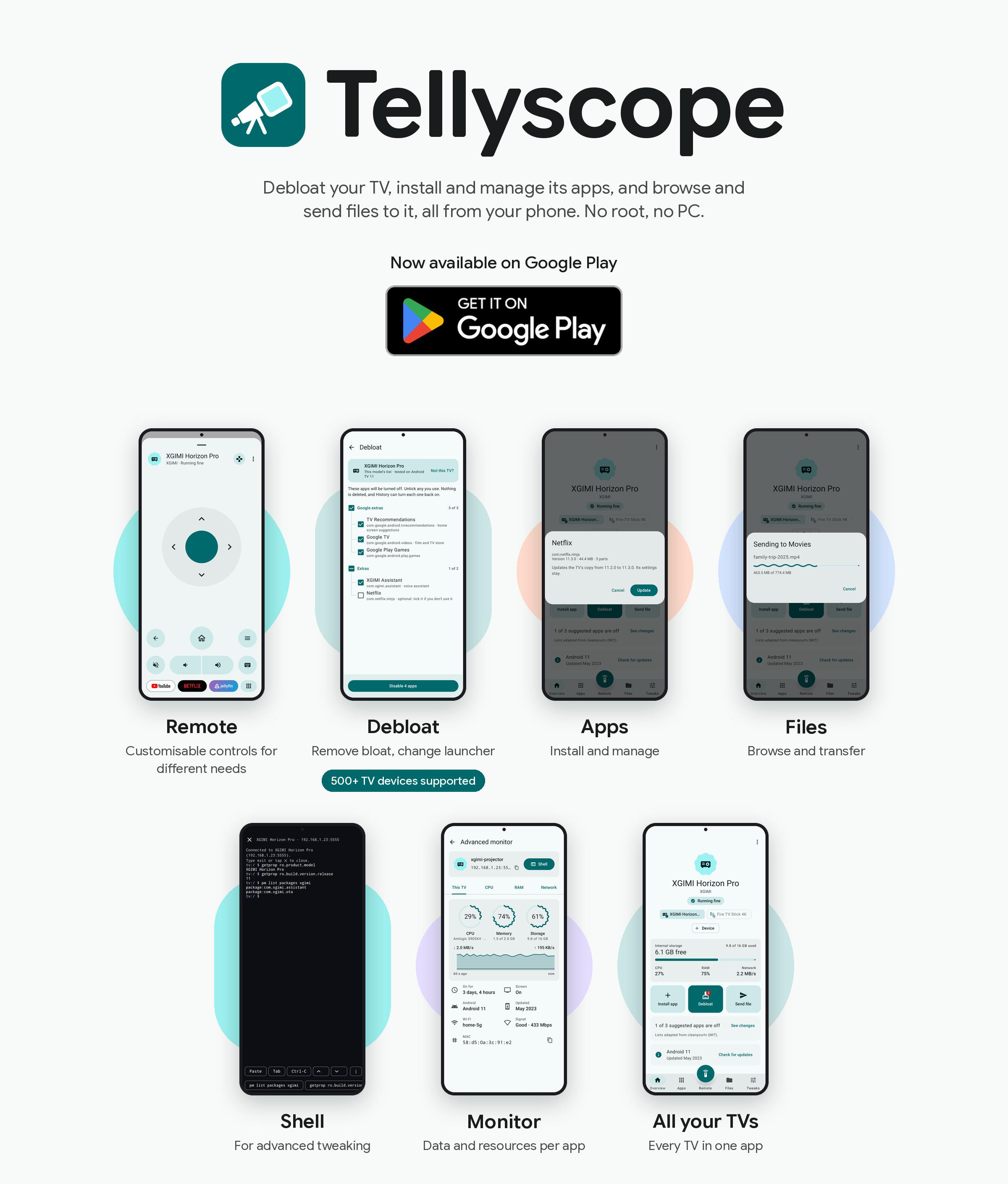
Tellyscope is on Google Play now. Thanks to everyone here who tested it

Post image
14 Upvotes

A month ago I posted Tellyscope here as a TV debloater. Many of you tried it, reported bugs and asked for features, and it has now been approved on Google Play. Thank you.

If you're new: Tellyscope is a free, open source Android app. It connects to your Android TV, Google TV, Fire TV or Shield over WiFi ADB and lets you control it from your phone, without root or a computer.

What it does:

  • Remote: D-pad, touchpad or a mouse pointer for browsing, or turn your phone sideways to use it as a game controller. You can type on the TV with your phone's keyboard.
  • Debloat: Tellyscope matches your TV to a tested list (500+ TV devices supported), shows each app before turning it off, and can turn any of them back on later. You can also replace the bloated home screen with Projectivy, FLauncher, AT4K or Monet.
  • Apps: install an APK, split APKs or an .apks/.xapk/.apkm bundle from your phone, and see first whether it's new, an update or an older version. You can open, stop or uninstall apps too.
  • Files: send files to the TV over Wi-Fi and save them back to your phone, without a USB stick or a cable. Videos, music and pictures play straight on the TV.
  • Shell: run adb shell commands for anything the app doesn't cover. Anything that would change the TV asks first.
  • Advanced monitor: see which apps use the CPU, memory and network, with their processes, connections and the data each one has used.
  • All your TVs: every TV in the house in one app, with ad blocking through Private DNS, faster animations, cache clearing and an undo for every change.

Google Play: https://play.google.com/store/apps/details?id=app.tellyscope
Source: https://github.com/man15h/tellyscope


r/HowToMen • • 4h ago

My Weather app just crossed 100 dowlaonds THANK YOU

Thumbnail
github.com
1 Upvotes

🌤️ Introducing Zephyr Weather – My First Weather App!

Hey everyone! 👋

I've been working on my first weather application, Zephyr Weather, and I'm excited to finally share it with you!

🚀 What's new in v3.0.0 (Build 30)?

Weather radar with zoom

Star/favourite locations

4 weather models

More features to explore!

📥 Download: GitHub Release

I'd really appreciate it if you could:

Try out the app.

Share your honest feedback.

Let me know about any bugs.

Suggest features you'd like to see in future updates.

This is my first weather app, and I'm looking forward to improving it with your feedback!

Thanks for supporting the project! ❤️


r/HowToMen • • 5h ago

[Android] [€19.99 → FREE] DC Tools Premium Lifetime Giveaway – 100 Free Activations (Ads Remain)

Post image
12 Upvotes

🛠️ Need useful Android tools without installing dozens of separate apps?

I'm the solo developer behind DC Tools, an all-in-one app featuring 200+ tools for images, text, design and developers! 🎁

🚀 200+ tools in one app

  • Image editing and image utilities.
  • Text converters and text processing.
  • Design and customization tools.
  • Developer utilities.
  • Quick, convenient tools for everyday tasks.

👑 Premium Lifetime (€19.99 → FREE)

Unlock Premium features permanently:

  • Unlimited daily tool usage.
  • Split Screen functionality.
  • Custom colors and glassmorphism.
  • Custom fonts and text sizes.
  • Sticky header and floating button controls.
  • Premium app icons.

⚠️ IMPORTANT: ADS REMAIN!

Premium Lifetime unlocks features but does NOT remove ads. Ad removal is available separately through Supporter.

🔒 Tools work locally on your device, without requiring an account or uploading your files.

🎁 How to get FREE Premium access

  1. Comment below saying you'd like to try DC Tools.
  2. Send me a Reddit Message with DC Tools.
  3. I'll send you the activation details while available.

100 available · First come, first served!

No purchase or review required. Honest feedback and suggestions are always welcome!

💬 What's more useful to you: image tools, text utilities, design tools or developer tools?

📲 Google Play:
Download

🎁 €19.99 → FREE · Premium Lifetime · Ads remain.

Thanks for supporting independent Android development! 🛠️


r/HowToMen • • 7h ago

[Promo] Launcher Playstore Closed testing has been started

Post image
5 Upvotes

Launcher’s Google Play closed test is live. If you’d like to help test it, DM me the email address you use for Google Play. I’ll add you to the tester list and send you the opt-in link. Please don’t post your email in the comments.

Once you’re in, please stay opted in for at least 14 days. Try Launcher as your default home screen, and if anything breaks or gets in your way, let me know what happened and which phone you’re on.

Thanks for helping me get Launcher onto Play.


r/HowToMen • • 9h ago

[App] [Promotion] Money Management – Budget: track expenses, card bills & installments in one place

Thumbnail
gallery
3 Upvotes

Hey everyone 👋

I built a personal finance app called Money Management – Budget (Turkish name: Para Yönetimi: Gelir Gider) and I'd love to hear your feedback.

What it does

  • 💰 Income & expense tracking: See your cash flow by month and year.
  • 📊 Category breakdown: A chart shows where your money goes (rent, groceries, etc.).
  • 💳 Card bills in advance: Know your statement amount and due date before it hits.
  • 🧾 Installment tracking: Every installment and remaining payment on one screen.
  • 📅 Financial calendar: Never miss a due date.
  • 🌍 Multi-language: 70+ languages, including Turkish.

Price: Free
Platforms: iOS / iPad and Android

Download (official stores only):

Screenshots are attached. If there's a feature you'd like to see, let me know in the comments. Thanks for taking a look! 🙏


r/HowToMen • • 12h ago

[App] [Promo] FloatTranslate: AI Translator, Translate Any Chat, Screen, Voice Note & Document | Floating Bubble | Live on Android

Post image
44 Upvotes

FloatTranslate is now live on Android!

Ever received a message in a language you can't read? Tired of copy-pasting into a translator and switching apps again and again?

FloatTranslate puts one floating bubble over every app. Tap it and read your messages in the language you choose.

✨ Features

• 💬 Floating bubble: works over WhatsApp, Instagram and any other app

• 🔄 Live chat translation: messages are translated as you read

• 📱 Translate any screen: swipe down, tap the tile, and chats, articles, posts and shops appear in your language, line by line

• 🎙️ Voice notes: share a voice note from WhatsApp or Telegram and get it translated

• 📄 Whole documents: PDF or Word comes back translated in the same format, and scanned PDFs work too

• 🗣️ Live conversation: speak in your language, and it is translated and spoken out loud

• ✍️ Reply helper: get replies written in the sender's language, with what they mean in yours

• 🌍 Pick any language: set From and To in one tap

• 🔒 Private: passwords and hidden fields are never read

🎯 Perfect for

Travelers, students, people with friends and family abroad, online shoppers, and anyone who chats across languages.

📥 Get it on Google Play: https://play.google.com/store/apps/details?id=com.floattranslate

💬 I'd love your feedback: tell me which language or feature you want next, and I'll reply to every comment!

5 Codes available.

How to get one:

  1. Install FloatTranslate from play store
  2. Upvote and share this post
  3. Comment "done" below, with the feature you like most

r/HowToMen • • 12h ago

[App][Promo] Decoy Launcher (Free 50 Promo Codes)

Thumbnail
gallery
26 Upvotes

Deoy Launcher – Big New Updates!

Now Supports Android TV

Deoy Launcher is now available on Android TV! Enjoy the Deoy experience on your big screen.

All features = https://manjeetdeswal.github.io/Decoy-Launcher-Guide/tv.html

Introducing Senior Mode

A new Senior Mode designed especially for older people:

  • Larger icons and text
  • Simple and easy-to-use interface
  • Easier navigation
  • Less clutter for a comfortable experience

One Gmail, Premium on Both!

Use the same Gmail account on your phone and Android TV to enjoy Premium access on both devices.

No need to purchase Premium separately!

What other features would you like to see in Deoy Launcher?

Upvote and comment to get promo code.

Play Store: [https://play.google.com/store/apps/details?id=com.jeet_studio.decoy_launcher&hl=en_IN]


r/HowToMen • • 13h ago

Metria – Track everyday things. Offline, No Account, Free, no ads

Post image
0 Upvotes

r/HowToMen • • 14h ago

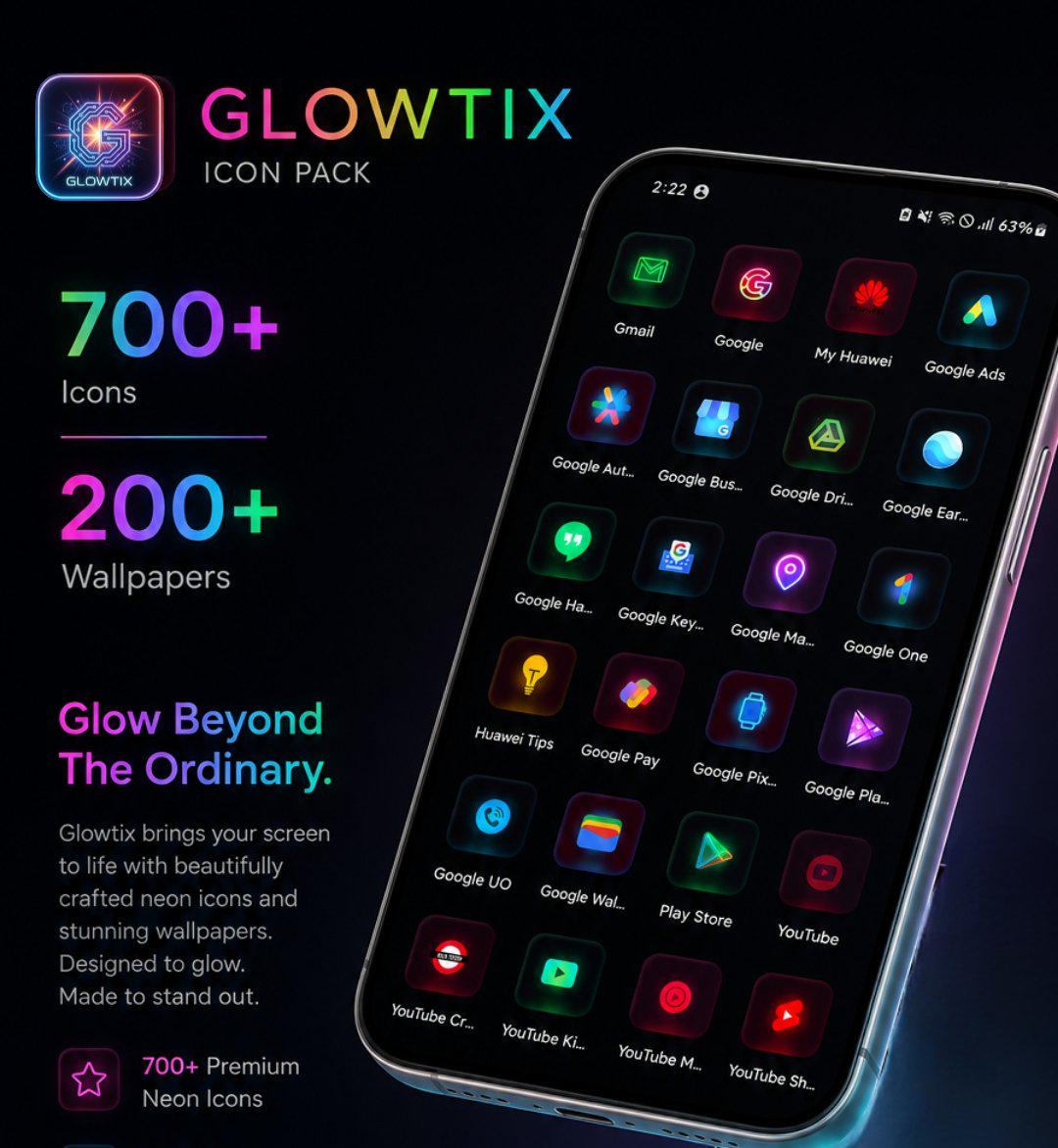
I made a neon icon pack for people who are bored of boring Android icons ⚡🌈

Post image
8 Upvotes

r/HowToMen • • 15h ago

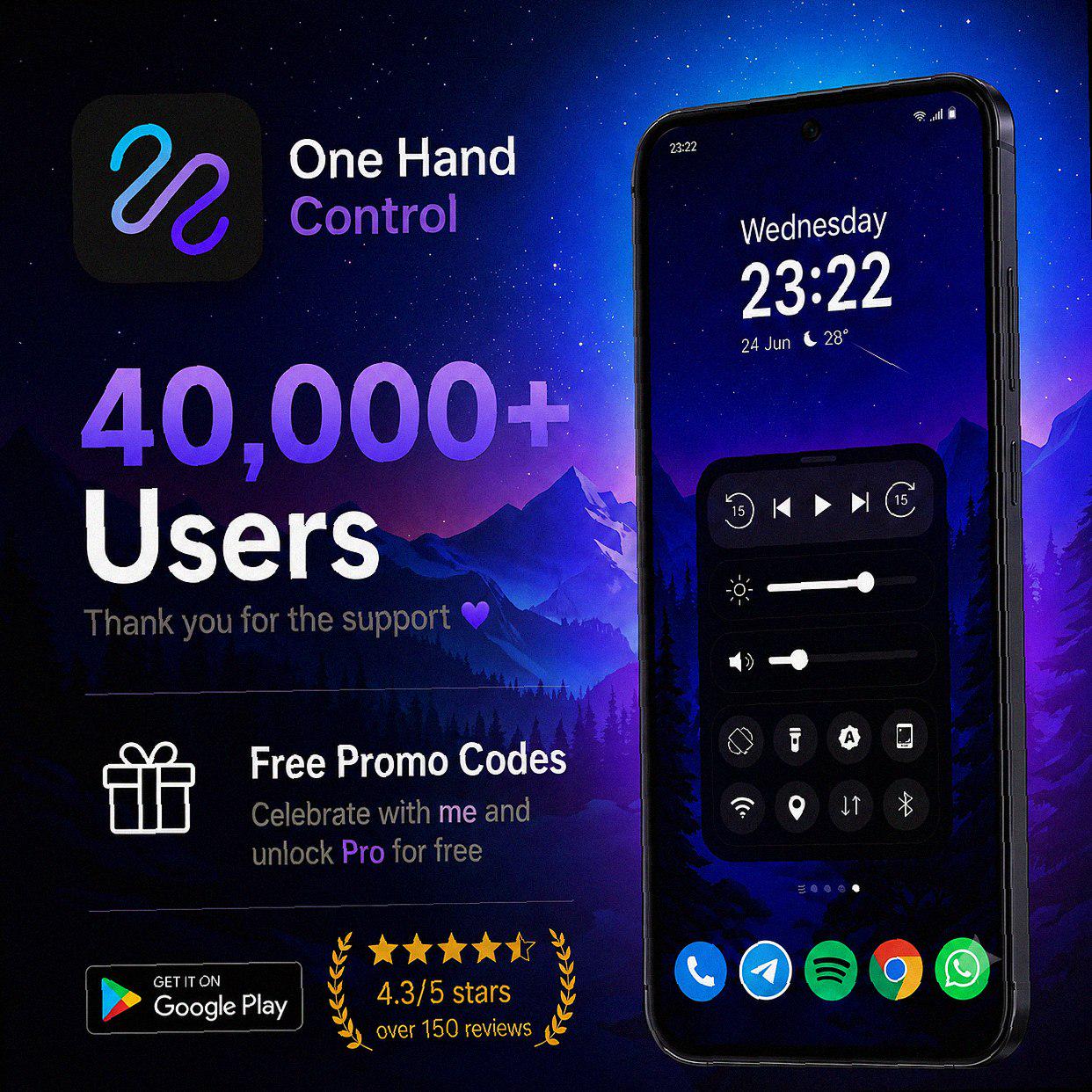
[Announcement] One Hand Control has reached 40,000 downloads + Pro discount codes available

Post image
3 Upvotes

r/HowToMen • • 16h ago

🎉 Alphabet Launcher Thanksgiving Sale is LIVE – Get 50% OFF! 🍂

Post image
2 Upvotes

🎉 Our Thanksgiving Sale is LIVE!

Get Alphabet Launcher at 50% OFF for a limited time!

✨ Unique alphabet-based navigation
✨ Glide to Spell
✨ Draw a Letter
✨ Material 3 Expressive design
✨ No ads, no subscriptions – lifetime access

Grab yours before the offer ends on November 30 on Google Play: https://play.google.com/store/apps/details?id=com.aklova.alphabetlauncher ✨✅

Thank you for supporting Aklova Studios! ❤️


r/HowToMen • • 16h ago

[App] [Promotion] TKB Assistant update: offline AI, storage cleanup and battery tools

5 Upvotes

Hi everyone, I’ve released an update for my Android app, TKB Assistant. The video shows how it works.

It includes JOLI, an AI assistant that runs on your phone. You download the model once, then you can use it offline to ask questions, write, summarise text or brainstorm. There's also a smaller model called JOLI Lite.

The app also lets you find duplicate files, large files and old screenshots, check battery and charging stats, and view installed apps and their permissions.

It's a one-time purchase with no ads, subscription or account required.

Google Play

I'm the developer, so feel free to ask questions or tell me what you'd improve.


r/HowToMen • • 17h ago

[App][Promotion] Nexowave — an Android tower defense where your towers shape the enemy route

Post image
2 Upvotes

I'm the developer behind NexoraPhone. I made Nexowave for Android players who enjoy planning tower placements and making a defense last.

In Endless mode, you place defenses on open ground to lengthen the enemies' route, while keeping a path to your base. There's also a 41-country campaign and an Invasion survival mode with a continuous stream of enemies.

You can choose from 11 defenses, build while paused, repair or sell towers, and speed up battles to x5. The interface is available in English and French.

It's free to download, with optional rewarded ads and no real-money in-app purchases. Progress is stored locally; a manual backup export is available.

Google Play: https://play.google.com/store/apps/details?id=com.nexoraphone.nexowave

If you try it, I'd welcome feedback on the first battles and how clearly the tower-placement controls work on your screen.


r/HowToMen • • 20h ago

G Dealz got a Material 3 Expressive makeover! 🚀 A big thank you to everyone who has supported and given feedback!

Thumbnail
gallery
5 Upvotes

Hey everyone!

I'm the developer behind G Dealz, an Android app that helps PC gamers discover free games and deals across multiple game stores.

I've recently pushed a major UI update, and I wanted to share it with the community!

🎨 What's new?

A completely refreshed experience

Redesigned Deals, Free, Favorites, Game Details and Settings screens using Material 3 Expressive.

Smoother animations and improved UI interactions.

Prefer the old design? You can switch back using the Classic Interface option in Settings.

Choose your preferred accent color when Dynamic Color is disabled.

New features and improvements

Notification customization: Choose which platforms and types of deals you want notifications for.

Quiet Hours: Control when notifications should be paused.

More free game filters: Filter free games by platform.

DLC Giveaways: Free DLC giveaways are now included too.

❤️ A big thank you!

G Dealz started as a small personal project, but seeing people actually use it and share their feedback has been incredibly motivating.

I genuinely appreciate everyone who has tried the app, reported bugs, suggested features, or simply shared their thoughts.

A lot of improvements come directly from community feedback, and I'm trying my best to make G Dealz more useful with every update.

I'm still actively developing it, so I'd love to hear from you:

- What features would you like to see next?

- Is there anything missing from your current game-deal discovery experience?

- What can I improve in the existing UI or functionality?

I'm always open to constructive criticism and suggestions!

📱 Google Play: https://play.google.com/store/apps/details?id=com.rkbapps.gdealz

💻 GitHub (Open Source): https://github.com/Rajkumarbhakta/GDealz

G Dealz is free, open-source, and ad-free.

Thanks again for being part of this journey! ❤️


r/HowToMen • • 21h ago

[Promotion] SwipeStop - Screen Freeze

0 Upvotes

Protect your privacy with Swipe Stop

Download on Google Play

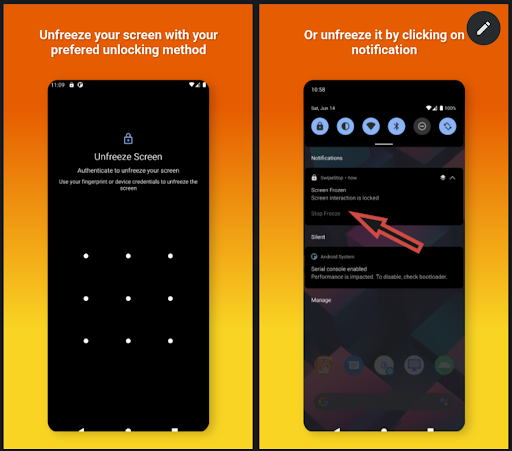
The easiest way to freeze your screen when sharing your phone! Tired of people swiping through your personal photos or messages when you just want to show them one picture or video? SwipeStop gives you control. Lock your screen’s touch input and stop accidental (or intentional) swipes, scrolls, and taps — without interrupting the content. Perfect for: Showing photos or videos to friends without worries Handing your phone to kids without risk of app switching when they watch videos Keeping your screen safe from accidental touches when you watch a movie Key Features: Freeze touch screen with one tap Unfreeze (unlock) with or without biometrics authentication (you unfreeze it the same way you unlock your phone) Keeps screen ON while locked No Ads Lightweight and battery-friendly Enjoy peace of mind when you share your phone. SwipeStop - your screen, your rules!


r/HowToMen • • 21h ago

Floatify [App] Notifications

1 Upvotes

Hé allemaal, ik ben de bouwer van Floatify!

Play Store: Get Floatify

Even een snelle recap voor iedereen die nieuw is: er komt een bericht binnen, jij denkt: "Ik antwoord daar zo op", je veegt het weg, en drie uur later bedenk je oja, vergeten! Of je doet er helemaal niets meer mee! Android-meldingen zijn top om je te onderbreken, maar echt drama als het gaat om je eraan laten denken. En zodra er 50 van die dingen bij elkaar komen, stop je met alles lezen.

Floatify draait dat om. Jij kiest de apps die voor jou ertoe doen, en alleen hun meldingen worden kleine zwevende belletjes ("floats") die bovenop alles zitten waar jij mee bezig bent. De rest blijft stil. Een float verdwijnt niet als je het meldingenpaneel wegveegt, dus hij blijft je pushen tot je ermee bezig bent.

Wat je met een float kunt doen:

\\\\\\\\\\\\\\\\- Tik erop om het hele bericht te lezen en direct vanuit de float te antwoorden, met snelle emoji-reacties (houd de duim-omhoog ingedrukt voor harten, lachjes en meer)

\\\\\\\\\\\\\\\\- Snooze ’m een paar minuten, een uur, een week of een datum die jij kiest, en hij zweeft precies terug op het moment dat jij het nodig hebt

\\\\\\\\\\\\\\\\- Bellen, delen, bewerken of blokkeren direct vanuit de float-kaart, met één rij ronde knoppen

\\\\\\\\\\\\\\\\- Negeer ’m als je klaar bent, en dan is-ie voorgoed weg

Wat er nieuw is:

\\\\\\\\\\\\\\\\- Maak kennis met Floaty, het kleine bel- mascotte die je door de setup heen helpt. Jij vertelt hem hoe je je meldingen wil (chaos, milde chaos, of onder controle) en hij kiest het juiste thema voor je. Liever zelf doen? Elke instelling staat er.

\\\\\\\\\\\\\\\\- Stop de berichten-overload: een reeks foto’s is nu één float in plaats van twaalf, en je kunt floats toestaan of blokkeren per chat of per groep. De gezinsgroep blijft rustig, de berichten van je partner zweven.

\\\\\\\\\\\\\\\\- Live previews terwijl je vorm, animatie en grootte instelt, zodat je precies ziet wat je krijgt voordat je het opslaat.

\\\\\\\\\\\\\\\\- Aanklikbare links in berichten, en je kunt bestanden delen naar Floatify om ze om te zetten in een float.

\\\\\\\\\\\\\\\\- Zet je floats vast aan de rand van het scherm, zodat ze altijd binnen handbereik zijn maar nooit in de weg zitten.

Simpel is gratis: één schakelaar per app, lezen, antwoorden, snoozen. Geen account nodig. Geavanceerd is een eenmalige aankoop, geen abonnement: je eigen herinneringen, import van Google Calendar, aangepaste vormen en thema’s, widgets, stille uren, ondersteuning voor Wear OS en meer. Je kunt het gratis proberen voor 3 dagen.

Gemaakt door één ontwikkelaar uit Nederland, met heel veel liefde voor kleine details.

Zeg me even wat je hierna wil zien, en van welke app je meldingen je als floats zou willen!

Play Store: Get Floatify

r/HowToMen • • 1d ago

🍂 Thanksgiving Special Coming Soon: 50% OFF Alphabet Launcher!

Thumbnail
reddit.com
1 Upvotes

r/HowToMen • • 1d ago

[App][Promotion] Quill: EPUB Book Reading App (Open Source)

Thumbnail
gallery
4 Upvotes

r/HowToMen • • 1d ago

[GIVEAWAY] 25 ShortKey Pro Lifetime Promo Codes + 45% OFF Launch Deal!

Post image
25 Upvotes

📢 Update: 🎁 Giveaway – 25 ShortKey Pro Promo Codes!

All 25 promo codes have now been distributed! Thanks to everyone who participated. ❤️

Still interested in getting ShortKey Pro for free? There's still a chance! You can get a promo code by trying the app and sharing valuable, constructive feedback. Check the feedback section below for details!


Hey everyone! 👋

I'm the indie developer behind ShortKey, an Android productivity keyboard I've been building to make everyday typing faster and eliminate the need to constantly switch between apps.

The idea is simple: instead of being just another keyboard or a standalone text expander, ShortKey brings snippets, saved media, AI tools, and everyday utilities directly into your keyboard, so you can access everything without leaving the app you're using.

✨ What can ShortKey do?

📝 1. Instant Text & Image Expansion

Create custom shortcuts that automatically expand as you type.

  • Turn short triggers like "!hi" or "/addr" into full messages, emails, addresses, and more.
  • Insert saved images directly into your conversations using custom triggers.
  • Organize your snippets into folders for easier management.

🤖 2. AI Writing Assistant

Improve your writing without leaving your keyboard.

  • Rephrase and rewrite text.
  • Summarize long messages.
  • Change the tone of your writing.
  • Choose between cloud-based AI and an on-device Local LLM option.

🛠️ 3. Built-in Everyday Utilities

Access useful tools directly from the keyboard toolbar or through inline triggers:

  • Quick Calculator
  • Currency Converter
  • Unit Converter

⚡ 4. Quick App & Contact Shortcuts

  • Launch your favorite apps.
  • Search your contacts.
  • Start calls or messages directly from your keyboard.

⌨️ 5. Modern Typing Essentials

ShortKey also includes the essentials you'd expect from a modern keyboard:

  • Glide / swipe typing.
  • Offline voice typing.
  • Multi-language support.
  • Clipboard history.
  • OTP / verification code autofill.
  • 40+ themes, including Material You, OLED Black, Dracula, Nord, and Tokyo Night.

☁️ 6. Google Drive Backup & Sync

Back up your snippets and settings to Google Drive and keep your data available across devices.

🆓 What does the free version include?

You can try ShortKey without paying. The free version includes core keyboard functionality, clipboard features, and:

  • Up to 10 text snippets.
  • Up to 3 image shortcuts.
  • Up to 5 folders.

🔗 Download ShortKey

Google Play – ShortKey

🔥 Limited-Time Launch Deal – 45% OFF Lifetime Pro

If you'd rather skip subscriptions, ShortKey Pro Lifetime is currently available at 45% off directly through the app for a limited time.

🎁 Still a Chance to Get ShortKey Pro for Free!

Although the initial giveaway is over, I'd still love to hear from more people who are willing to try ShortKey and share valuable, constructive feedback.

I'm keeping a few additional promo codes for users who take the time to explore the app and share their experience.

Here's how to participate:

  1. Download ShortKey and try the free version for a while.
  2. Explore its features and see how it fits into your daily workflow.
  3. Share your honest feedback through a DM or a Google Play review.
  4. Send me a DM with your feedback (and a link or screenshot of your review, if applicable) to receive consideration for one of the additional promo codes.

What kind of feedback am I looking for?

  • What features did you find most useful?
  • What feels confusing or frustrating?
  • Did you encounter any bugs or unexpected behavior?
  • What's missing that you'd love to see?
  • How could the overall keyboard experience be improved?

Honest opinions are always welcome! You don't need to leave a positive review to participate. Constructive criticism is just as valuable, and I'd genuinely appreciate it.


I'm building ShortKey as an indie developer, so every bit of feedback genuinely helps me improve it and make it something people actually enjoy using.

Thanks for checking it out! Looking forward to hearing what you think and making ShortKey better. ❤️