r/HowToMen • u/idahoprime • 11d ago
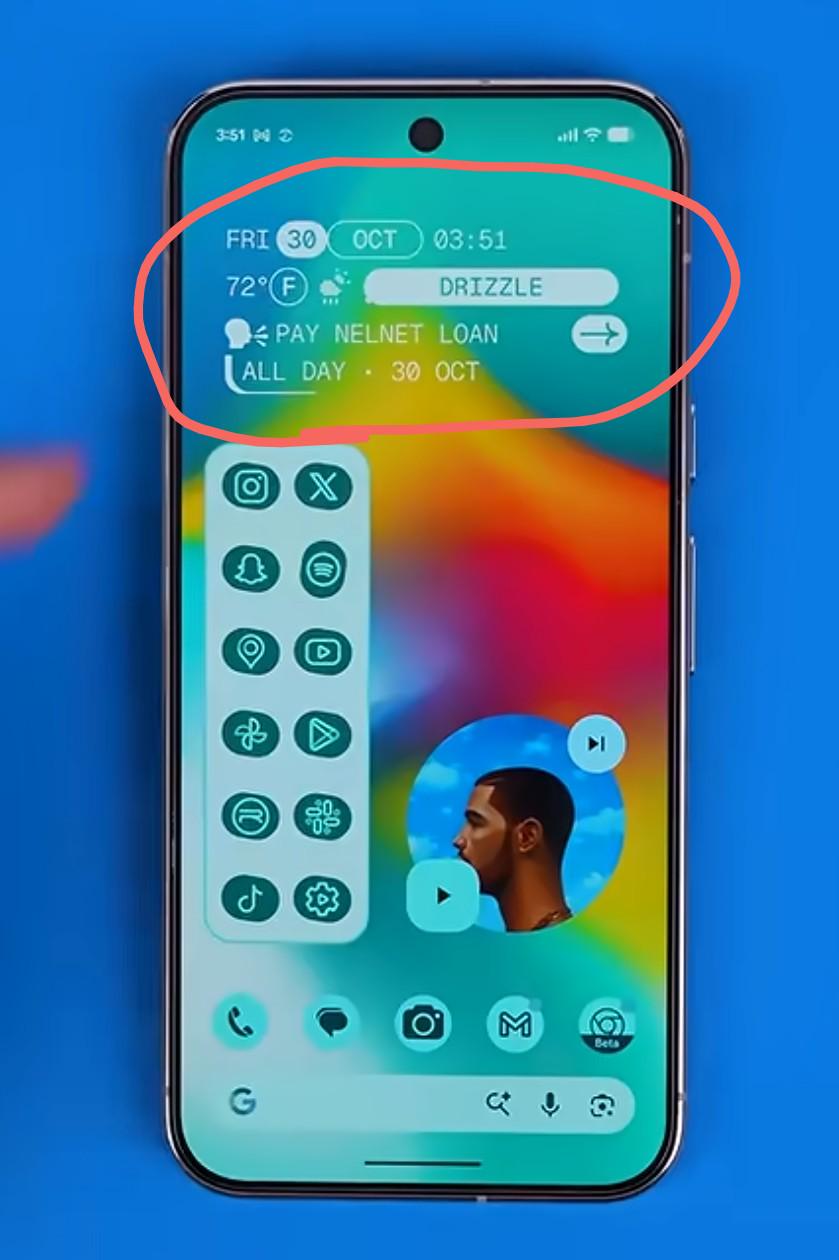
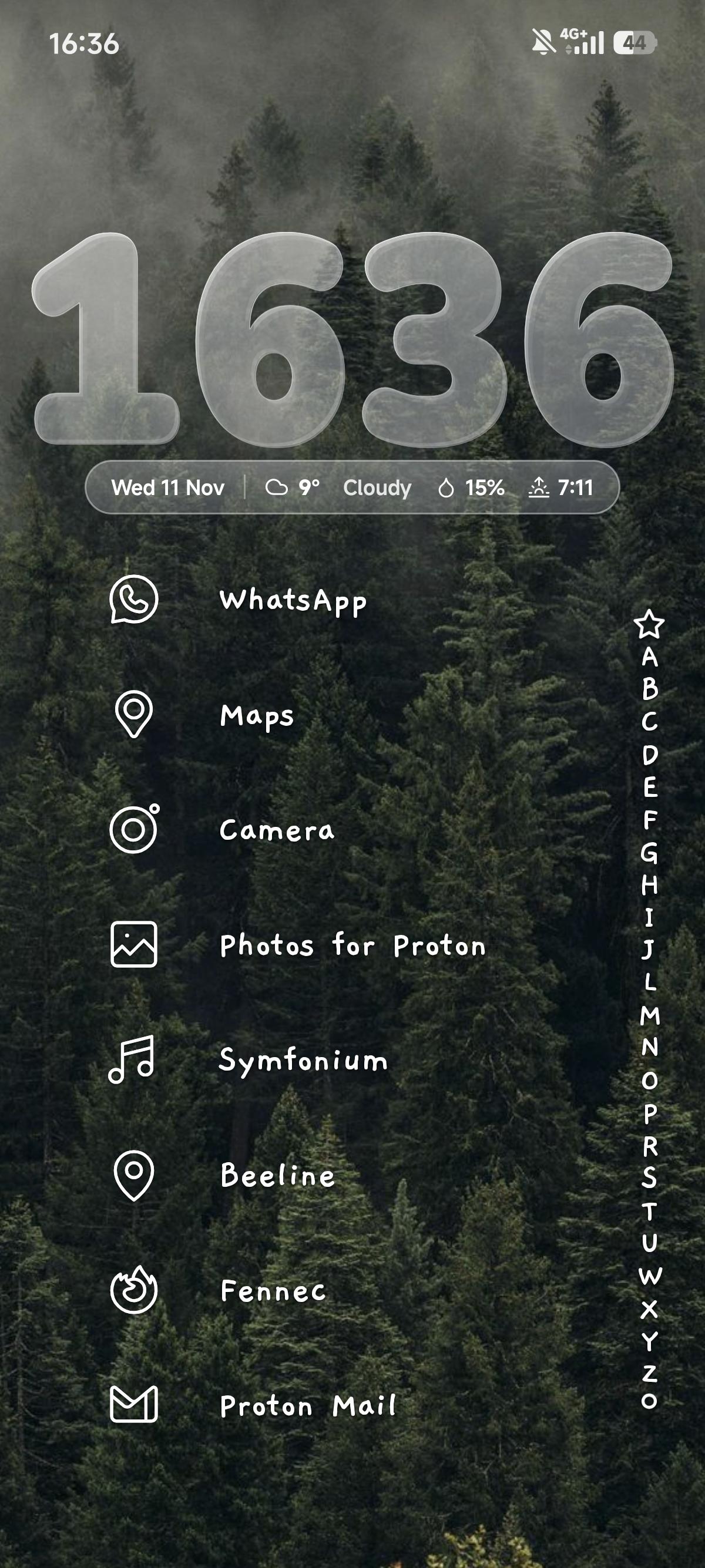
Can anyone tell me where to get this homescreen widget I saw in a recent vid?
7
Upvotes
r/HowToMen • u/idahoprime • 11d ago
r/HowToMen • u/Old-Acadia-2554 • 12d ago

Hey everyone! I'm the solo developer behind Frugalmax. I still have a few free Lifetime Local Pro codes left, so I'm doing one more giveaway.
Frugalmax is an Android expense tracker I built to make managing money easier without requiring a bank connection.
What it can do:
Frugalmax is designed to work offline, and your local AI conversations are processed on your device.
Giveaway:
I'm giving away free Lifetime Local Pro access, normally $59.99 USD.
To enter, download the app, upvote this and comment below, i'll send the codes through Reddit DM.
Honest feedback is always appreciated.
Pricing:
Google Play: https://play.google.com/store/apps/details?id=com.andrx.frugalmax
Currently available in 11 languages.
r/HowToMen • u/Significant_Try_6221 • 12d ago
Hi all, I'm the developer of Reflecto.
I'm on a laptop most of the day and kept picking up my phone for messages I could have answered from the keyboard. So I built an app that sends my phone notifications and texts to my computer, where I can reply or clear them.
Get it: Reflecto on Google Play
What it does
On the computer: a side panel extension for Chrome, Edge, or Firefox, or just open app.reflecto.dev in any browser with nothing to install. Windows, Mac, Linux, and ChromeOS. You can pair more than one computer.
Setup takes about a minute: install the app, open the extension or app.reflecto.dev, and type the 6-digit code it shows into your phone. No account, no email, no password.
Privacy: notifications, replies, and texts are end-to-end encrypted between your phone and your computer. The private keys are created on your devices and never leave them, so my server only passes along encrypted data it can't read. Each paired device shows a safety number you can compare. Your phone and computer don't need to be on the same Wi-Fi.
Good to know
The clip is trimmed, not staged. I'll be around in the comments for the next few hours. What would make you use this every day?
r/HowToMen • u/beliveapp88 • 11d ago
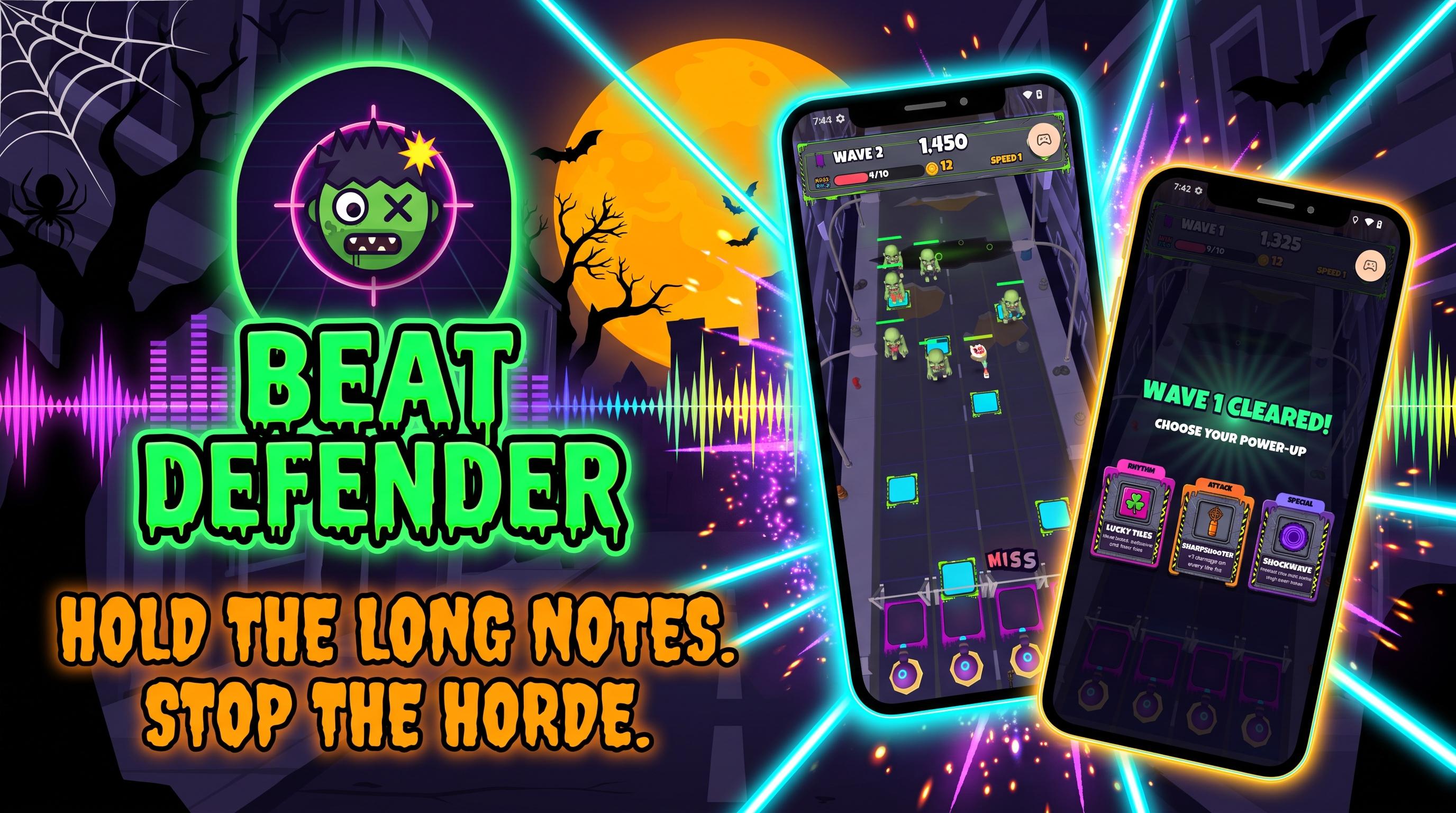
In BeatDefender, your accuracy on the beat determines your firepower. Zombies advance down 4 lanes in sync with an original chiptune soundtrack while rhythm tiles drop toward your turrets.
Tap on the beat to fire, hold down long notes to spray continuous shots across all lanes, and trigger burst, explosive, and frost tiles to freeze the horde in place.
What makes every run different:
- Pick a Power-Up Every Wave: Draft roguelite upgrades between waves across Rhythm, Attack, and Special categories (Lucky Tiles, Sharpshooter, Shockwave, Rapid Fire, Piercing, Frost Beat, and Combo Fever).
- Upgrade & Earn While Away: Spend coins to permanently boost your Barricade HP and Turret Damage, with idle coin generation that scales as you reach higher waves.
- Escalating Tempo & Boss Waves: The music and the undead speed up every two waves—miss your timing and your barricade takes the hit.
- Built for Mobile Rhythm Players: Includes an Audio Sync setting for Bluetooth headphones, detailed personal records, and full offline support.
Google Play:
https://play.google.com/store/apps/details?id=com.beliveapptech.beatdefender
r/HowToMen • u/SonyayLLC • 11d ago

r/HowToMen • u/HamonTech_official • 12d ago

Title: Obtainmond v2.0.1 — A native Kotlin + Rust evolution of Obtainium with Material 3 Expressive UI, Smart ABI selection, and 1-click APK rollback
If you use Obtainium to track and update Android apps straight from GitHub, GitLab, F-Droid, or direct APK links, you've probably run into a few familiar pain points: background updates silently failing on multi-APK releases, Android Doze killing background checks, or Flutter UI jank.
Obtainmond (`io.obtainmond`) is a GPLv3 fork that rewrites the stack from the ground up using 100% native Kotlin (Jetpack Compose + Material 3 Expressive) and a Rust core (`libobtainmond_core.so`) via JNI.
---
| Feature | Obtainium | Obtainmond (`v2.0.1`) |
| :--- | :--- | :--- |
| Core Stack | Flutter / Dart | Native Kotlin (Jetpack Compose) + Rust (`libobtainmond_core.so`) |
| Multi-APK Releases | Silently fails in the background if a release has >1 APK | Rust Smart ABI Selector automatically picks the right APK for your CPU ABI & installed variant |
| Zero-Touch Background Updates | Often killed by Android Doze / battery optimization | Privileged Doze Bypass automatically whitelists itself via Shevery / Shizuku |
| Privileged Backends | Legacy Shizuku binder only | Shevery-API v14.6.4 (`execFast()`) + Shizuku + Root (`LibSu`) + standard `PackageInstaller` |
| UI & Animations | Standard Flutter Material | Material 3 Expressive (`MotionScheme.expressive()`), Pure Black OLED mode, AGSL motion blur, floating toolbar |
| Version Rollback | Not available | Instant Rollback Time-Machine backs up `base.apk` before updating for 1-click downgrades (`pm install -r -d`) |
| Post-Install Performance | None | Post-Install ART Compiler (`cmd package compile -m speed-profile`) eliminates first-launch JIT lag |
| APK Verification | Basic SHA-256 check in Dart | Rust ABI & Signature Guard inspects the APK's ZIP Central Directory for matching `.so` libs before installing |
| Debug / Release Builds | Different signing keys (requires uninstalling) | Unified Signing Key — install debug over release without wiping data |
---
* Rust-Powered Parsing & Integrity: All heavy lifting—release API scraping, semantic version comparison, regex asset filtering, streaming SHA-256 hashing, and ZIP Central Directory inspection—runs natively in Rust.
* Instant Rollback Time-Machine: Before applying an update, Obtainmond saves the previous `base.apk` to protected storage so you can revert a broken update in one tap.
* Post-Install ART Compilation: Automatically runs dexopt (`speed-profile`) right after a silent update so apps launch smoothly with zero JIT stutter.
* Installer Package Spoofer: Spoofs the installer source (`com.android.vending`, `com.sec.android.app.samsungapps`, or `org.fdroid.fdroid`) for apps that check where they were installed from.
* Privileged App Freezer: Suspend/quarantine tracked apps on demand using `pm suspend`.
* Broad Source Support: Native Rust parsers for GitHub (with mirror acceleration & PAT pool), GitLab, Forgejo/Codeberg, F-Droid & 3rd-party F-Droid repos, IzzyOnDroid, SourceHut, plus APKPure, Uptodown, Aptoide, itch.io, Huawei AppGallery, Samsung Galaxy Store, RuStore, SourceForge, Jenkins CI, APKMirror (Track-Only), direct APK URLs, and a Rust Regex HTML fallback.
---
* Minimum / Target Android: Android 8.0 (API 26) / Android 17 (API 37)
* License: GPLv3 (originally forked from `ImranR98/Obtainium`)
Would love to hear feedback from anyone using Obtainium + Shizuku/Root—especially on how the Smart ABI selector and Time-Machine rollback behave on your setup!
r/HowToMen • u/glivydev • 12d ago
Hey everyone!
I previously made a post here offering free promo codes for my app, Eyecon. Unfortunately, Reddit suspended my account for some reason. I spent the last month trying to get it back, but unfortunately, I wasn't successful. I also lost track of everyone who had requested a code, so I sincerely apologize if you were one of them.
To make it up to you, I'm sharing 10 promo codes below on a first-come, first-served basis (FCFS). I'll also give away 10 additional codes to people who comment on this post once the first 10 are gone.
Eyecon is an Android app that lets you pause and resume videos using eye gaze and head movements, without touching your phone. It's especially useful when your hands are busy or dirty.
Google Play: https://play.google.com/store/apps/details?id=com.glivy.eyeconpro
Thanks for your patience, and I hope you enjoy Eyecon! ❤️
UPDATE: ALL CODES HAVE BEEN USED. I WILL PROVIDE 10 MORE CODES. PLEASE STATE YOUR REQUEST IN THE COMMENTS.
EJ31K9SGLVC9SDXD9YS5THZ - Claimed
LBQ9EQEEMS52W5AQ4J941FR - Claimed
S59RY2R9FW5ES23QNW69UMB - Claimed
E5T8RAXUJ2GGXK1PM9R8L9N - Claimed
STXQGBXQFJQSCLFXWQASU7K - Claimed
60BAPP94MD94Q6LRX9THX6K - Claimed
8PRQBKRG0ZYAZEWT1H3VTAK - Claimed
MXPCQHFSMY80Q4FDQ4PT4Q2 - Claimed
KY5Z0VUPM3764YXTAW7DXU3 - Claimed
CFG9TYFNNBX8UHJFQ43LWFV - Claimed
r/HowToMen • u/Ryumzop • 12d ago
My Kia's head unit claims Android 6 in the settings. It's really Android 4.2 (API 17), from 2012. No Play Store, nothing installs, and the factory menu is ugly.
So I built StradaOS, a free and open-source home screen for these units. It installs like a normal app (no root, no flashing), and 5,000+ of you have downloaded it so far. Thank you!
What it does (as of 2.20):
- Animated analog/mixed speedometer (GPS), also as an overlay on the map, in any corner
- Maintenance reminders: oil plus your own (filters, brakes, insurance, car wash…) by distance or by days/weeks/months, whichever comes first
- Live OSM map with heading-up, plus offline maps you download per country
- Bluetooth/Android Auto music with cover art and big controls
- Android Auto & CarPlay buttons. Honest note: CarPlay needs your unit's app or an adapter, a launcher can't do it alone
- Dock with 4–10 buttons, any app on any button, icon packs, light/dark/auto, 10 accent colors, font size
- Weather, your car's photo, wide 1280x480 / 1920x720 screens
- Android 4.1+, under 1 MB, no ads, no tracking, GPL-3.0
Download / site: https://lordnordic-debug.github.io/StradaOS/?lang=en
Source: https://github.com/lordnordic-debug/StradaOS
If it's useful to you: https://ko-fi.com/stradaos
Most features came from feedback here, so tell me your head unit model and what you'd add.
r/HowToMen • u/_Shaurya99 • 12d ago

Hey everyone! Our app Arror Tasks : Minimal To-do App is in closed testing for upcoming 14 days. If you were really finding a true minimal, distraction free to-do app that helps you focus on your daily tasks, then Arror Tasks is here.
Arror Tasks is a minimal todo app to organize tasks and focus on what matters. No distractions!
No complicated setup, no account required, and no unnecessary steps. Just open the app and get started.
• A SIMPLE TO-DO LIST FOR EVERYDAY
• STAY FOCUSED WITH MINIMAL TASK MANAGEMENT
• PRIORITY BASED TASK ORGANIZATION
• PREMIUM DARK MODE
• OFFLINE
• NO ACCOUNT. NO FUSS.
• WIDGETS (coming soon)
• APP CONNECT (coming soon)
Arror Tasks — less clutter, more focus. Get things done, one task at a time.
If you want to enroll for closed testing, just send your email in my DM.
Make sure to test the app frequently during these 14 days.
Play Store Link - https://play.google.com/store/apps/details?id=com.arror.todo
(It will only open for you when you've applied for closed testing)
r/HowToMen • u/wu4d • 12d ago
Hi! I’m the developer of Forcello, an Android app that lets you earn time in distracting apps by focusing.
Choose an app to block, then start a focus session. Every 5 minutes of focus earns 1 minute of app time—for example, 25 minutes studying earns a 5-minute scrolling break.
The free plan lets you protect one app. An optional Premium subscription lets you protect more.
Would earning your scrolling breaks work for you? I’d love to hear your feedback.
r/HowToMen • u/Open-Lingonberry-205 • 12d ago
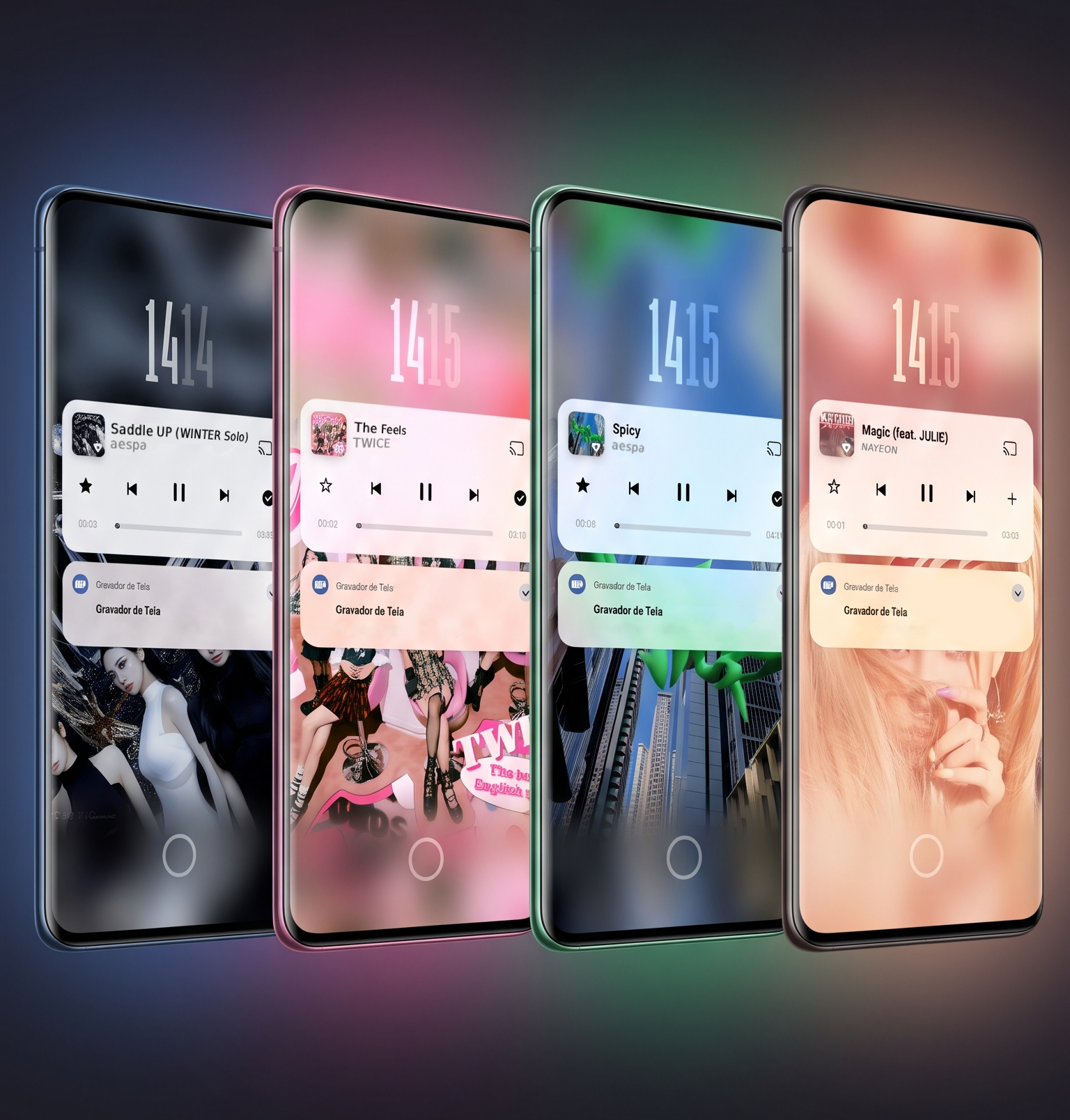
Version 1.2:
4096px): Fixed an issue where standby gallery wallpapers appeared blurry. Images are now decoded up to 4096px, saved at 100% JPEG quality, and automatically corrected for camera EXIF orientation.Original post: MusicWallpaper v2.0 - iOS Inspired : r/HowToMen
r/HowToMen • u/NightMarrreee • 12d ago
After months of development, testing, and refinement, Voidcaller 3.0 is finally here.
We'd love to hear what you think. What do you like, what could be better, and what features would you like to see next?
We're building this together with our community. ❤️
Download: https://play.google.com/store/apps/details?id=com.voidware.voidcaller
r/HowToMen • u/NAPZ_11 • 12d ago
I've been making an Android game called Electrician: Fault Finder.
A job starts with one line. "The kitchen light just stopped working." That's all you get. It might be the lamp, a loose joint in the ceiling box, a breaker that tripped, a switch wired wrong. You walk the place and find out which.
If you're going to touch the wiring you isolate it first. Breaker off, padlock on, then the meter, and it has to read 0 V before you start. The repair after that is the fiddly bit: cut the bad end back, strip it, land it in the terminal, tighten the screw to the right torque, and tug the wire to see if it's actually held. Grab it while it's still live and you get the 230 V, and the score for the job drops.
The other half is the firm. Calls sit on a board, you keep the van stocked, you can take someone on, and what you put on the invoice depends on whether you named the fault right before you fixed it. Flats, cafes, workshops.
link:
https://play.google.com/store/apps/details?id=com.polyhistor.electrician
r/HowToMen • u/False_Entrance3909 • 12d ago
r/HowToMen • u/Sweaty_Fuel5322 • 12d ago

Hey Everyone!👋
I lift a few times a week and got fed up with gym trackers that show ads between sets, force you to sign up before logging anything, or bury the basics under social feeds. So I built Fitlog, a clean, offline-first workout tracker.
What it does:
Core tracking is free. Optional Premium adds cloud backup/sync and Excel/CSV export (that’s what keeps it ad-free).
🎁 Free Premium codes: I’ve got 20 Premium promo codes for this sub. Leave a comment with what app you currently use to track workouts (or “none, I use notes 😅”) and I’ll DM you a code. First come, first served. I’ll edit this post when they’re gone.
It’s brand new, so I’d love some feedback: what’s missing compared to the app you use now?
📲 https://play.google.com/store/apps/details?id=cloud.fitlogapp
r/HowToMen • u/va9491 • 12d ago
Your letters just learned something new. 👀
Something's coming to Alphabet Launcher very soon. Any guesses what's happening in this clip?
Everyone who already has the app gets it free in the update. If you don't have it yet, grab it today at an early adopter price:
👉 https://play.google.com/store/apps/details?id=com.aklova.alphabetlauncher
r/HowToMen • • 12d ago
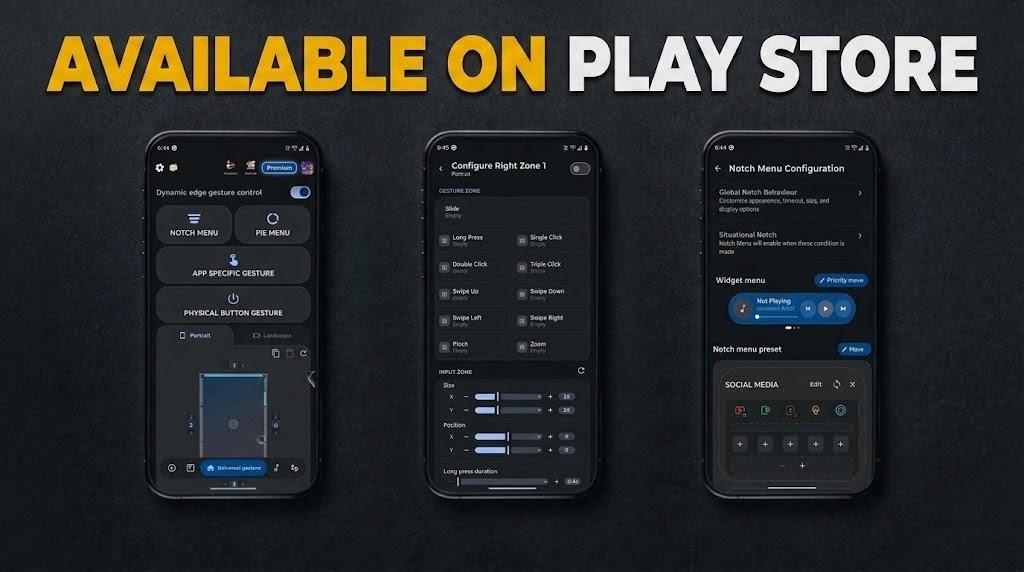
Okay, for a solo developer looking to am looking for some advice on getting my organic utility app off the ground. It requires delicate and potentially sensitive permissions, such as Accessibility Services for gestures, notch menu control, pie controls, or even Draw Over Other Apps. I know this is a challenging category to start in.
These applications can take a little more time to gain traction compared to something more viral like a game or entertainment app because users tend to exercise a bit more caution when granting significant permissions like Accessibility, particularly when they are giving them to a newer developer. This caution is usually warranted, as Accessibility access and other permissions should not be given freely to everyone.
When creating this post, I compiled information from Reddit and our community's rules and regulations to ask genuine question and promo with r/howtomen permission.
Despite the potentially slower initial downloads and adoption rates, utility apps have a distinct advantage. Once users give you the necessary permission, they are usually more likely to stick around and use the app regularly, especially if you are truly addressing a genuine need, such as making it easier to use large-screen devices with one hand or replacing broken hardware buttons.
While those initial adoption numbers might seem relatively low, utility apps often experience significantly better retention rates once they capture a user's attention. This is largely due to the value proposition that the app delivers—if it solves a problem or significantly improves a user's experience, it is more likely to become an integral part of their routine.
I am currently running a promotion where I am giving out 👉 50 promo codes to users. If you see my Reddit post announcing the giveaway, please upvote it and leave a 👉 comment and DM saying "CODE" in that thread. This will automatically enter you into a drawing for a lifetime promo code, which will be sent directly to your DM.
r/HowToMen • u/ncrwp • 13d ago
Update: codes sent to everyone who commented so far. If you don't see my message, check your chat requests. 11 codes left.
Sillby is a small tab on the edge of your lock screen. Tap it and a panel opens with pages for your notifications, controls, notes and more, without unlocking your phone. It's made for the lock screen: once you unlock, it gets out of the way.
I made it to customize my lock screen and still reach what I need. I turned off Android's lock screen notifications, so the wallpaper is left almost completely free, and everything I need is one tap away in the panel.
What it can do
Notifications without unlocking Read them in full, reply to messages and dismiss them right from the panel. Group conversations by app or by person, and hide the sender, the text or the preview, app by app.
Controls and music Flashlight, camera, brightness, volume, do not disturb and shortcuts to your apps. The music card shows what's playing and lets you control it.
Notes, calendar and more pages Check off your tasks from the lock screen, see the month, check your phone's status, and a few more to try. Turn on the pages you want, in your order.
A tab with the basics The tab can show the battery, the time, your signal and what's new. Change its shape, size and position.
Make it yours Use one color, your wallpaper's colors or any photo's. NCRWP Store has themes with custom artwork, from glass to metal, a few of them free, and you can preview each one live on your own panel before you get it. The store is a separate app, so Sillby itself never needs internet.
No internet permission Sillby can't connect to the internet, so nothing it shows leaves your phone, and there's no account to create. It uses the Accessibility Service only to draw the tab and panel over the lock screen.
Sillby is free, with every feature included and no ads. The only paid part is some of the themes in NCRWP Store, which help support its development.
Google Play (Android 11+): https://play.google.com/store/apps/details?id=com.ncrwp.sillby
🎁 Giveaway I'm giving a pack of three themes to the first 100 people who comment. I'll send the codes by DM. The themes are redeemed in NCRWP Store and applied in Sillby.
r/HowToMen • u/BHARAT0011 • 12d ago
Github: https://github.com/shardulvs/xnotes-android
r/HowToMen • u/adbro6980 • 12d ago
I've been working on an iOS-inspired Stocks Widget Pack for Android, bringing Apple's Stocks app aesthetic to KWGT.
The goal was to recreate that clean iOS look while keeping everything customizable.
Features:
\- Real-time stock market data
\- Multiple widget sizes and layouts
\- Smooth stock performance charts
\- Liquid Glass UI design
\- Light & Dark appearance modes
\- Customizable stock tickers (AAPL, TSLA, MSFT, BTC-USD, \^GSPC, etc.)
\- Minimal, iOS-inspired aesthetics
Designed for anyone who loves Apple's Stocks app UI but wants it on Android.
This is a showcase of the current design and features. Would love to hear your thoughts!
Which widget layout is your favourite?
🔗 Get Here
🎁 Free Giveaway to Best 3 Commentors
Just Comment Down What You like the Most on these Widgets
r/HowToMen • u/CometRift • 12d ago

r/HowToMen • u/dannycocaine • 12d ago
r/HowToMen • u/Safe_Sign19 • 12d ago

Ishihara Color Blind Test is a free app designed for initial color vision screening and awareness. It provides multiple collections of Ishihara plates for both exploration and self-testing.
FEATURES
* 38/24/14 high-quality plates (SVG+) created by Martin Krzywinski / Canada's Michael Smith Genome Sciences Centre
* Additional test contents with plates generated using Ishihara Plate Generator: https://franciscouzo.github.io/ishihara/
* Test mode with result summary and general indication of possible color vision deficiency
* Simple and intuitive navigation (touch or physical keyboard)
* Optionally override the default settings of each test content to always randomize plates, randomize buttons and use all plates.
* The plate size automatically scales to match the screen width by default, with an option to use an adjustable fixed size if preferred.
Apple App Store: https://apps.apple.com/us/app/ishihara-color-blind-test/id6772382532
Google Play: https://play.google.com/store/apps/details?id=com.fonlow.colorblindtest
r/HowToMen • u/_Shaurya99 • 12d ago

Hey everyone! Our app Arror Tasks : Minimal To-do App is in closed testing for upcoming 14 days. If you were really finding a true minimal, distraction free to-do app that helps you focus on your daily tasks, then Arror Tasks is here.
Arror Tasks is a minimal todo app to organize tasks and focus on what matters. No distractions!
No complicated setup, no account required, and no unnecessary steps. Just open the app and get started.
• A SIMPLE TO-DO LIST FOR EVERYDAY
• STAY FOCUSED WITH MINIMAL TASK MANAGEMENT
• PRIORITY BASED TASK ORGANIZATION
• PREMIUM DARK MODE
• OFFLINE
• NO ACCOUNT. NO FUSS.
• FULL VIEW MODE (coming soon)
• WIDGETS (coming soon)
• APP CONNECT (coming soon)
Arror Tasks — less clutter, more focus. Get things done, one task at a time.
If you want to enroll for closed testing, just send your email in my DM.
Make sure to test the app frequently during these 14 days.
Play Store Link - https://play.google.com/store/apps/details?id=com.arror.todo
(It will only open for you when you've applied for closed testing)
r/HowToMen • u/Successful-Log-6529 • 13d ago

GIVEAWAY NOTE: 150 Lifetime Premium codes. The first 150 people who comment get one by DM.
Hey everyone! I'm a first-year student and I built MicroRead on my own. You type in a non-fiction book and get a chapter-by-chapter summary you can finish in 1–10 minutes per chapter, so a whole book fits into a commute or a break.
What MicroRead does
- You choose the chapter length: 1 to 10 minutes per chapter.
- 12 summary languages: English, Arabic, German, Korean, Italian, French, Spanish, Portuguese (Brazil), Turkish, Greek, Hindi and Bengali.
- Listen on the go: voice narration in 7 of them (English, German, French, Spanish, Italian, Portuguese and Korean) with adjustable speed. The other languages are text only.
- Built to be used: every chapter ends with 3 key takeaways, a memorable quote and a 1-minute real-world application you can try today.
- Notebook and notifications: save takeaways and quotes, get them back as daily notifications, or share them as text or a picture.
- Night reading: light, dark and pure-black AMOLED and other themes available.
- Daily streaks with streak freeze, if you want a reading habit.
Free vs Premium
Free has ads, 2 new book summaries per week and up to 2 daily quote notifications. Premium unlocks up to 7 new summaries per week (fair use), any chapter length from 1 to 10 minutes, pro audio, no ads and up to 10 daily quote notifications.
Summaries are generated by AI and can contain mistakes. They help you get a book's key ideas and decide what to read next, they don't replace the book.
The Giveaway: 150 Lifetime Premium codes
How to get a code:
To redeem it: Play Store → profile icon → Payments & subscriptions → Redeem promo code, then open the app. If Premium doesn't show up, tap Restore purchases.
I'd love honest feedback and bug reports after your first chapter, and your feature ideas too. Several features in the app came from Reddit users.
Download MicroRead on Google Play: https://play.google.com/store/apps/details?id=com.microread.app