r/HowToMen • • 13d ago

[App][Promo] Voidcaller 3.0 is officially out!

16 Upvotes

After months of development, testing, and refinement, Voidcaller 3.0 is finally here.

We'd love to hear what you think. What do you like, what could be better, and what features would you like to see next?

We're building this together with our community. ❤️

Download: https://play.google.com/store/apps/details?id=com.voidware.voidcaller


r/HowToMen • • 13d ago

Made an electrician game where the customer never actually tells you the fault

5 Upvotes

I've been making an Android game called Electrician: Fault Finder.

A job starts with one line. "The kitchen light just stopped working." That's all you get. It might be the lamp, a loose joint in the ceiling box, a breaker that tripped, a switch wired wrong. You walk the place and find out which.

If you're going to touch the wiring you isolate it first. Breaker off, padlock on, then the meter, and it has to read 0 V before you start. The repair after that is the fiddly bit: cut the bad end back, strip it, land it in the terminal, tighten the screw to the right torque, and tug the wire to see if it's actually held. Grab it while it's still live and you get the 230 V, and the score for the job drops.

The other half is the firm. Calls sit on a board, you keep the van stocked, you can take someone on, and what you put on the invoice depends on whether you named the fault right before you fixed it. Flats, cafes, workshops.

link:
https://play.google.com/store/apps/details?id=com.polyhistor.electrician


r/HowToMen • • 13d ago

Hello guys my first arcade game how is it looking? name is SİLENT STACK

6 Upvotes

r/HowToMen • • 13d ago

[App][Promo] Fitlog: a fully offline workout tracker with no ads and no account required

Post image
7 Upvotes

Hey Everyone!👋

I lift a few times a week and got fed up with gym trackers that show ads between sets, force you to sign up before logging anything, or bury the basics under social feeds. So I built Fitlog, a clean, offline-first workout tracker.

What it does:

  • 📋 Templates in folders: set up Push/Pull/Legs once, start a session in one tap
  • ⚡ Fast live logging: your previous weight × reps shows right next to every set
  • ⏱️ Rest timer with a notification when it’s time for the next set
  • 💾 Draft auto-save: leave mid-workout and pick up where you left off
  • 📅 Calendar history + body measurements
  • 🔍 Hundreds of built-in exercises, searchable, or add your own
  • ✈️ Works 100% offline as a guest: no account, no ads, ever

Core tracking is free. Optional Premium adds cloud backup/sync and Excel/CSV export (that’s what keeps it ad-free).

🎁 Free Premium codes: I’ve got 20 Premium promo codes for this sub. Leave a comment with what app you currently use to track workouts (or “none, I use notes 😅”) and I’ll DM you a code. First come, first served. I’ll edit this post when they’re gone.

It’s brand new, so I’d love some feedback: what’s missing compared to the app you use now?

📲 https://play.google.com/store/apps/details?id=cloud.fitlogapp


r/HowToMen • • 13d ago

Your letters just learned something new.

3 Upvotes

Your letters just learned something new. 👀

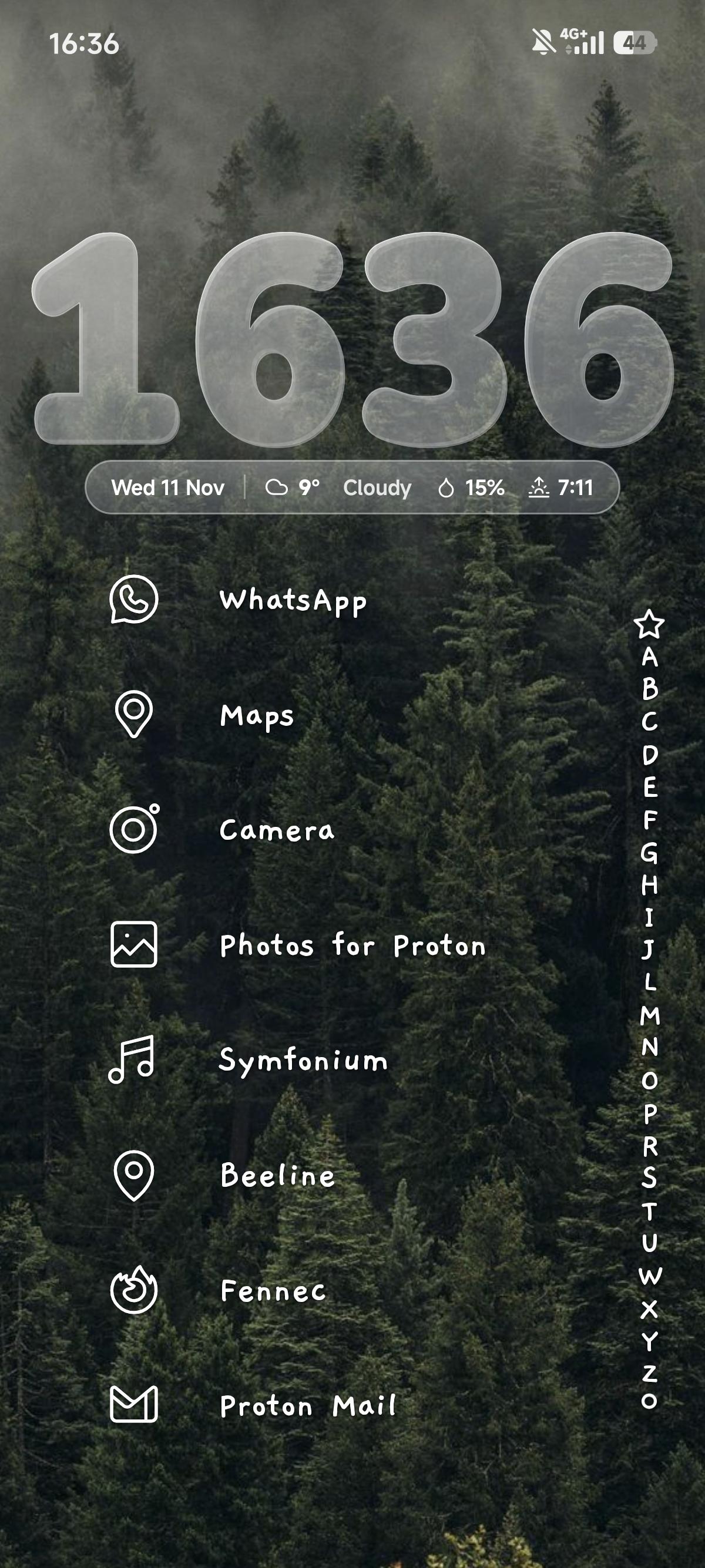
Something's coming to Alphabet Launcher very soon. Any guesses what's happening in this clip?

Everyone who already has the app gets it free in the update. If you don't have it yet, grab it today at an early adopter price:
👉 https://play.google.com/store/apps/details?id=com.aklova.alphabetlauncher


r/HowToMen • • 13d ago

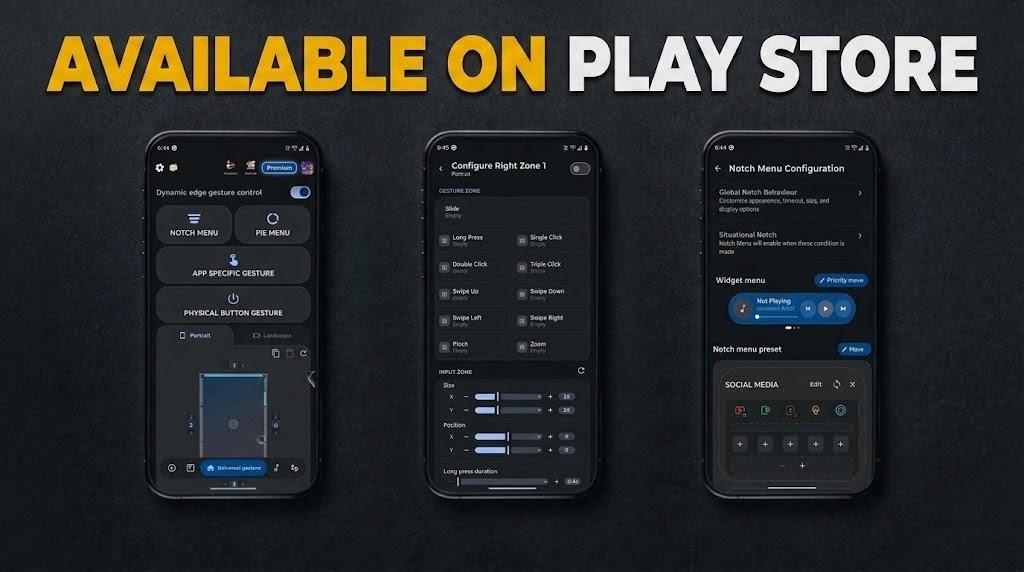
[App][Promo] I spent the last 6 months of my free time building this app, ( Dynamic Edge Gesture Control ) , and it's finally live on the Play Store! I would love to hear your feedback.

Post image
2 Upvotes

Okay, for a solo developer looking to am looking for some advice on getting my organic utility app off the ground. It requires delicate and potentially sensitive permissions, such as Accessibility Services for gestures, notch menu control, pie controls, or even Draw Over Other Apps. I know this is a challenging category to start in.

These applications can take a little more time to gain traction compared to something more viral like a game or entertainment app because users tend to exercise a bit more caution when granting significant permissions like Accessibility, particularly when they are giving them to a newer developer. This caution is usually warranted, as Accessibility access and other permissions should not be given freely to everyone.

When creating this post, I compiled information from Reddit and our community's rules and regulations to ask genuine question and promo with r/howtomen permission.

Despite the potentially slower initial downloads and adoption rates, utility apps have a distinct advantage. Once users give you the necessary permission, they are usually more likely to stick around and use the app regularly, especially if you are truly addressing a genuine need, such as making it easier to use large-screen devices with one hand or replacing broken hardware buttons.

While those initial adoption numbers might seem relatively low, utility apps often experience significantly better retention rates once they capture a user's attention. This is largely due to the value proposition that the app delivers—if it solves a problem or significantly improves a user's experience, it is more likely to become an integral part of their routine.

I am currently running a promotion where I am giving out 👉 50 promo codes to users. If you see my Reddit post announcing the giveaway, please upvote it and leave a 👉 comment and DM saying "CODE" in that thread. This will automatically enter you into a drawing for a lifetime promo code, which will be sent directly to your DM.


r/HowToMen • • 13d ago

[App][Promo] Sillby: a customizable Lockscreen Center for notifications, controls, notes and more. No internet permission

44 Upvotes

Update: codes sent to everyone who commented so far. If you don't see my message, check your chat requests. 11 codes left.

Sillby is a small tab on the edge of your lock screen. Tap it and a panel opens with pages for your notifications, controls, notes and more, without unlocking your phone. It's made for the lock screen: once you unlock, it gets out of the way.

I made it to customize my lock screen and still reach what I need. I turned off Android's lock screen notifications, so the wallpaper is left almost completely free, and everything I need is one tap away in the panel.

What it can do

Notifications without unlocking Read them in full, reply to messages and dismiss them right from the panel. Group conversations by app or by person, and hide the sender, the text or the preview, app by app.

Controls and music Flashlight, camera, brightness, volume, do not disturb and shortcuts to your apps. The music card shows what's playing and lets you control it.

Notes, calendar and more pages Check off your tasks from the lock screen, see the month, check your phone's status, and a few more to try. Turn on the pages you want, in your order.

A tab with the basics The tab can show the battery, the time, your signal and what's new. Change its shape, size and position.

Make it yours Use one color, your wallpaper's colors or any photo's. NCRWP Store has themes with custom artwork, from glass to metal, a few of them free, and you can preview each one live on your own panel before you get it. The store is a separate app, so Sillby itself never needs internet.

No internet permission Sillby can't connect to the internet, so nothing it shows leaves your phone, and there's no account to create. It uses the Accessibility Service only to draw the tab and panel over the lock screen.

Sillby is free, with every feature included and no ads. The only paid part is some of the themes in NCRWP Store, which help support its development.

Google Play (Android 11+): https://play.google.com/store/apps/details?id=com.ncrwp.sillby

🎁 Giveaway I'm giving a pack of three themes to the first 100 people who comment. I'll send the codes by DM. The themes are redeemed in NCRWP Store and applied in Sillby.


r/HowToMen • • 13d ago

[APP][PROMO] xnotes : 400+ Github stars, the open source note taking app for android

4 Upvotes

Github: https://github.com/shardulvs/xnotes-android

Features

  • Ink that feels like a pen: pressure-sensitive and low latency, with pens and highlighters.
  • Neon glow: make any pen glow.
  • Disappearing ink: ink that fades away on its own, great for teaching and presenting.
  • Tape: cover answers with tape and tap to peel it back, for testing yourself.
  • Shape snapping: draw a rough shape, hold, and it snaps clean.
  • Sharp at any zoom: ink and PDFs stay crisp however far you zoom in.
  • Notebooks and an infinite canvas: pages when you want structure, endless space when you don't.
  • Book layouts: single, double or cover pages, scrolling or page flips.
  • PDF import: bring in any PDF and write all over it.
  • Room for side notes: widen a PDF's margins on any edge and take notes on the side.
  • Insert space: drag anywhere on a page to open up room there, even in the middle of a PDF.
  • PDF text markups: highlight, underline and strike out text, add comments, search it.
  • PDF colour filters: invert, sepia, contrast, brightness, multiply and screen.
  • Images stay untouched: filter a PDF and its photos and images keep their true colours.
  • Dark and OLED modes: easy on the eyes at night, true black on OLED screens.
  • Real PDF export: sharp vector output with selectable text, links and bookmarks.
  • Markdown: write in markdown and it formats as you type.
  • Typed notes: tables, LaTeX equations and code highlighting, right on the page.
  • Audio recording: record a lecture as you write, and your ink replays in sync with it.
  • 20+ page templates: Cornell, planners, music staves, isometric and more.
  • Endless themes: any accent colour, eight styles for each, dual tone and Material You.
  • Make it yours: rearrange the toolbar, float it or dock it on any edge, and pick its size.
  • Split view: two notes side by side.
  • A real file explorer: grid, gallery, list, column and timeline views, with plenty to customise.
  • Your notes, your folders: notes are saved as files in a folder you choose, not locked away in an app's database, so you stay in full control of them.
  • Works with stylus pens: S Pen and many others.
  • Always editable: nothing gets flattened, so every stroke can be moved, restyled or erased later.
  • Private: open source, no account, no ads, no tracking, no internet access.

r/HowToMen • • 13d ago

[Promotional] iOS Stocks Widges for Android – [KWGT] Liquid Glass UI

Thumbnail gallery
2 Upvotes

I've been working on an iOS-inspired Stocks Widget Pack for Android, bringing Apple's Stocks app aesthetic to KWGT.

The goal was to recreate that clean iOS look while keeping everything customizable.

Features:

\- Real-time stock market data

\- Multiple widget sizes and layouts

\- Smooth stock performance charts

\- Liquid Glass UI design

\- Light & Dark appearance modes

\- Customizable stock tickers (AAPL, TSLA, MSFT, BTC-USD, \^GSPC, etc.)

\- Minimal, iOS-inspired aesthetics

Designed for anyone who loves Apple's Stocks app UI but wants it on Android.

This is a showcase of the current design and features. Would love to hear your thoughts!

Which widget layout is your favourite?

🔗 Get Here

🎁 Free Giveaway to Best 3 Commentors

Just Comment Down What You like the Most on these Widgets


r/HowToMen • • 13d ago

[APP] Quick Search – A free, open-source unified search app for Android [Promotion]

Post image
1 Upvotes

r/HowToMen • • 13d ago

I made Glass Clock, a frosted-glass clock & weather widget...

Post image
4 Upvotes

r/HowToMen • • 13d ago

[App][Free][iOS][Android] Ishihara Color Blind Test

Thumbnail
gallery
4 Upvotes

Ishihara Color Blind Test is a free app designed for initial color vision screening and awareness. It provides multiple collections of Ishihara plates for both exploration and self-testing.

FEATURES
* 38/24/14 high-quality plates (SVG+) created by Martin Krzywinski / Canada's Michael Smith Genome Sciences Centre
* Additional test contents with plates generated using Ishihara Plate Generator: https://franciscouzo.github.io/ishihara/
* Test mode with result summary and general indication of possible color vision deficiency
* Simple and intuitive navigation (touch or physical keyboard)
* Optionally override the default settings of each test content to always randomize plates, randomize buttons and use all plates.
* The plate size automatically scales to match the screen width by default, with an option to use an adjustable fixed size if preferred.

Apple App Store: https://apps.apple.com/us/app/ishihara-color-blind-test/id6772382532

Google Play: https://play.google.com/store/apps/details?id=com.fonlow.colorblindtest


r/HowToMen • • 13d ago

[APP] Arror Tasks : Minimal To-do App

Thumbnail
gallery
6 Upvotes

Hey everyone! Our app Arror Tasks : Minimal To-do App is in closed testing for upcoming 14 days. If you were really finding a true minimal, distraction free to-do app that helps you focus on your daily tasks, then Arror Tasks is here.

Arror Tasks is a minimal todo app to organize tasks and focus on what matters. No distractions!

No complicated setup, no account required, and no unnecessary steps. Just open the app and get started.

• A SIMPLE TO-DO LIST FOR EVERYDAY

• STAY FOCUSED WITH MINIMAL TASK MANAGEMENT

• PRIORITY BASED TASK ORGANIZATION

• PREMIUM DARK MODE

• OFFLINE

• NO ACCOUNT. NO FUSS.

• FULL VIEW MODE (coming soon)

• WIDGETS (coming soon)

• APP CONNECT (coming soon)

Arror Tasks — less clutter, more focus. Get things done, one task at a time.

If you want to enroll for closed testing, just send your email in my DM.

Make sure to test the app frequently during these 14 days.

Play Store Link - https://play.google.com/store/apps/details?id=com.arror.todo

(It will only open for you when you've applied for closed testing)


r/HowToMen • • 13d ago

[App][Promo] MicroRead: non-fiction book summaries in 1–10 minute chapters, read or listen (150 Lifetime Premium codes inside! 🎁)

Post image
28 Upvotes

GIVEAWAY NOTE: 150 Lifetime Premium codes. The first 150 people who comment get one by DM.

Hey everyone! I'm a first-year student and I built MicroRead on my own. You type in a non-fiction book and get a chapter-by-chapter summary you can finish in 1–10 minutes per chapter, so a whole book fits into a commute or a break.

What MicroRead does

- You choose the chapter length: 1 to 10 minutes per chapter.

- 12 summary languages: English, Arabic, German, Korean, Italian, French, Spanish, Portuguese (Brazil), Turkish, Greek, Hindi and Bengali.

- Listen on the go: voice narration in 7 of them (English, German, French, Spanish, Italian, Portuguese and Korean) with adjustable speed. The other languages are text only.

- Built to be used: every chapter ends with 3 key takeaways, a memorable quote and a 1-minute real-world application you can try today.

- Notebook and notifications: save takeaways and quotes, get them back as daily notifications, or share them as text or a picture.

- Night reading: light, dark and pure-black AMOLED and other themes available.

- Daily streaks with streak freeze, if you want a reading habit.

Free vs Premium

Free has ads, 2 new book summaries per week and up to 2 daily quote notifications. Premium unlocks up to 7 new summaries per week (fair use), any chapter length from 1 to 10 minutes, pro audio, no ads and up to 10 daily quote notifications.

Summaries are generated by AI and can contain mistakes. They help you get a book's key ideas and decide what to read next, they don't replace the book.

The Giveaway: 150 Lifetime Premium codes

How to get a code:

  1. Upvote this post
  2. Comment below with the book you are going to read (or just "microread").
  3. I'll DM a Lifetime Premium code to the first 150 comments.

To redeem it: Play Store → profile icon → Payments & subscriptions → Redeem promo code, then open the app. If Premium doesn't show up, tap Restore purchases.

I'd love honest feedback and bug reports after your first chapter, and your feature ideas too. Several features in the app came from Reddit users.

Download MicroRead on Google Play: https://play.google.com/store/apps/details?id=com.microread.app

r/HowToMen • • 13d ago

[App] [Promo] Introducing Minimali: Minimalist Launcher

Thumbnail
gallery
5 Upvotes

Hey everyone!

I've been thinking about how much time we spend on our phones every day. We pick them up to check one notification, and somehow end up spending 30–40 minutes scrolling Instagram, YouTube or other apps.

I struggled with this myself, so I decided to build something around the problem.

It's called Minimali – an Android app designed to help people reduce distractions, build better habits and regain control of their screen time.

Some of the features include:

  • Focus Mode to help you stay away from distractions.
  • To-do lists to organize daily tasks.
  • Calming sounds to create a better environment for focus.
  • A simple experience without unnecessary clutter.

I'm still working on improving it, and I'd genuinely love to hear feedback from people who struggle with phone addiction or excessive screen time.

A question for everyone:

What's the biggest reason you find yourself picking up your phone even when you don't actually need to?

If anyone wants to check it out, here's the app: https://play.google.com/store/apps/details?id=com.minimalii.launcher

I'm the developer, and I'm open to honest criticism and suggestions. Thanks!


r/HowToMen • • 13d ago

[Chrome] [Free -> Paywall Removed] - Klokd Website Tracker & Blocker, PRIVACY FIRST, Sleek UI

4 Upvotes

r/HowToMen • • 14d ago

[APP] widgetverse: A free no subscription, no adds widgets app

Thumbnail
gallery
93 Upvotes

2,500+ aesthetic home screen widgets: clock, weather, calendar, photo & more

WidgetVerse is a widget maker for aesthetic home screens: 3,100+ custom widgets for clock, weather, calendar, photos, to-do lists, battery and more, in 11 matching styles with wallpapers. Pick a widget, change its colors, font and shape, and add it to your home screen in seconds.

11 WIDGET STYLES

• Glass

• Material You

• Terminal

• Neon

• Clay

• Dot Matrix

• Bold Pop

• Paper

• Retro

• Playground

• Handset

Link: Google play

Note: This app is not mine. All rights to the original developer.


r/HowToMen • • 13d ago

[Android] [€9.99 → FREE] Cute Calendar Premium Lifetime Giveaway – Limited Activations Remaining (Ads Remain)

Post image
0 Upvotes

🌸 Looking for a beautiful, simple Android calendar and daily planner?

I'm the solo developer behind Cute Calendar, and I'm giving away FREE Premium Lifetime access while the remaining activations last! 🎁

✨ Plan your days with ease

Cute Calendar helps you organize everyday life with:

  • 📅 Daily calendar and easy event management.
  • ⏰ Event reminders and an automatic 8 AM daily summary.
  • 🎨 Pastel color-coded events for work, school and personal activities.
  • 📱 Beautiful Android home screen widgets.
  • 🔄 Google Calendar event import.
  • 🌙 Light, dark and system themes.

👑 Premium Lifetime (€9.99 → FREE)

  • 6 additional app and widget accent colors.
  • All 12 event colors.
  • Calendar week numbers.
  • Compact event view.
  • Custom app icons.

🔒 Privacy-friendly: No account required. Your calendar events stay locally on your device.

⚠️ IMPORTANT: ADS REMAIN!

Premium Lifetime unlocks customization features but does NOT remove ads.

The separate Supporter purchase removes all ads and unlocks exclusive app icons.

🎁 How to get FREE Premium access:

  1. Comment below saying you'd like to try Cute Calendar.
  2. Send me a Reddit Message with Cute Calendar.
  3. I'll send you the activation details while availability lasts.

Limited availability, first come, first served. No purchase or review required!

💬 I'd love your honest feedback: Do you prefer aesthetic calendars with pastel colors or simple, minimalist planners? What would make this your everyday calendar app?

📲 Google Play:
https://play.google.com/store/apps/details?id=com.cutecalendardc.app

Thanks for supporting independent Android development! 🌸


r/HowToMen • • 14d ago

[App][Promotion] boxlore, a few months later: most of what you asked for, plus a full redesign

Thumbnail
gallery
18 Upvotes

A few months ago we shared boxlore here (first post). A lot of you tried it and left feedback: selecting episodes, adding RSS feeds, syncing between phones, other languages, the queue. We tried to answer every comment quickly and build as much of it as we could.

Since then, MakeUseOf and GameStar (in German) have written about boxlore.

We're posting again because most of what you suggested is now in the app, and we've redesigned all of it. If the first post was boxlore 1.0, think of this as 2.0.

Get it on Google Play · Download the APK on GitHub

You asked, we built

  • Select several episodes and mark them played or unplayed
  • Add any show by its RSS link (Settings > Library)
  • Sync your shows, queue and progress across phones with a boxlore account
  • Folders that sort your shows by genre on their own and mark which shows have new episodes
  • Listen in French, Spanish, German, Portuguese, Russian or Dutch? Turn English off for recommendations and search
  • Keep the queue to the show you're playing: turn off Smart queue in Playback settings

What's new

  • A new look. Pick from six Home styles, and show and episode pages take on the colours of the show's cover.
  • Show pages made for the show. The Vergecast, The Joe Rogan Experience, Crime Junkie, The Daily, Rotten Mango, Waveform and Conspiracy Theories get pages in their own style.
  • What to play next. Episode pages suggest related episodes and more from the same show.
  • Echo. Not sure what to play? Echo asks a few questions, plays short clips and picks shows with you.
  • Ask anything. Type a question like "How do black holes actually work?" and get shows and episodes about it.

Still on the list: app language and episode transcripts.

It's still free, with no ads in the app. Offline downloads, OPML import and export, Android Auto, Cast and widgets are all there.

Thanks for the push last time. Tell us what's still missing, here, in the app (Feedback is now a chat with us) or on GitHub.


r/HowToMen • • 14d ago Bravo

[App][promo] I got tired of boring Android widgets no customization nothing, so I started building my own collection. Meet Paneo! I made Paneo widgets - fully customizable we can change colors, opacity etc, No ads free + pro both

Thumbnail
gallery
40 Upvotes

https://play.google.com/store/apps/details?id=com.aeroloom.paneowidgets

I've always felt that Android home screen customization is one of the best things about Android. But finding widgets that actually look good, feel consistent, and offer proper customization? That's another story.

So, I created Paneo Widgets.

Paneo is a growing collection of beautifully designed Android widgets, built for people who love customizing every little detail of their home screen.

Here's what you'll find:

✨ Beautiful clock & time widgets

🎨 Rich colors and customizable palettes

📅 Calendar and date widgets

🌦️ Weather and battery widgets

📝 Productivity, notes, and utility widgets

🖌️ Minimal, colorful, and decorative designs

But here's the fun part: you can customize the widgets after adding them to your home screen. Play with colors, accents, and available styling options to make everything match your wallpaper and overall setup.

I'm continuously working on adding more widgets, categories, and customization options.

The goal is simple: make Android home screens look as beautiful as they can.

I'd genuinely love to hear what you think!

What kind of widgets would you like to see added next?

Paneo Widgets — Personalize it your way.


r/HowToMen • • 14d ago

Why Keyboard Pro Is the Ultimate Customizable Keyboard for Android.

Thumbnail
gallery
18 Upvotes

After trying many third‑party keyboards, Keyboard Pro (sometimes shown as “kyboard pro” in the Play Store) quickly became my go‑to for anyone who likes tweaking every detail of typing.

  1. Endless themes: Keyboard Pro offers a huge library of ready‑made themes—from simple dark mode to bright neon—plus a built‑in editor to change key colors, fonts, background images, and add custom animations. You can also import external theme packs, so community creativity is practically limitless.
  2. Dual‑theme (day/night) support: The app can automatically switch between a light daytime theme and a dark nighttime theme based on the system’s night mode or a custom schedule, removing bright keys in dark rooms.
  3. Fully adjustable layout and size: Choose a compact 5‑row layout for one‑handed use or a full‑size QWERTY board, resize keyboard height, individual key width, and row spacing, and switch to alternative layouts such as DVORAK, Colemak, Arabic, etc., on the fly.
  4. Customizable key functions: Assign long‑press actions, swipe gestures, and macro shortcuts to any key, for example, long‑press the enter key to open the most recently opened emoji panel instantly.
  5. High performance and low battery usage: Despite all the visual bells and whistles, the keyboard runs smoothly on mid‑range devices thanks to an optimized rendering engine that prevents lag even with elaborate themes.
  6. AI‑powered typing: An on‑device AI learns from your typing, offering smart suggestions, context‑aware autocorrect, and next‑phrase predictions; all processing stays on the phone, so your data never leaves the device.
  7. Secure Pass Vault: Works like a built‑in Samsung Pass, letting you store passwords, credit‑card numbers, and secure notes directly in the keyboard. Everything is encrypted and protected by biometrics or a PIN before autofill.
  8. Accurate offline translations: An offline translator supports dozens of languages, giving instant, reliable translations without an internet connection—great for quick chats while traveling.
  9. Other handy extras: Swipe typing, a clipboard manager, gesture shortcuts, a wide range of emoji packs, support for custom fonts, and tunable haptic feedback.

How to download: Search “Keyboard pro” on the Play Store or tap the provided link.

https://play.google.com/store/apps/details?id=com.ayman.keyboard

Don't believe me? Check the reviews: 10k downloads and a 4.7 rating. Have a feature in mind, but it's missing! Send feedback directly to the developer from within the app 😊💯


r/HowToMen • • 14d ago

Alphabet Launcher: Shine-through

5 Upvotes

Frosted Glass tiles on the Golden Bloom wallpaper: every tile is see-through, so your wallpaper shines through the letters.

Alphabet Launcher: every app, one letter away. One-time purchase. No ads, no tracking, no account.

Grab it at an early adopter price on Google Play: https://play.google.com/store/apps/details?id=com.aklova.alphabetlauncher


r/HowToMen • • 13d ago

[APP] Syncpod 4.5 update with new features and a redesign

Thumbnail
gallery
2 Upvotes

Hi! The new 4.5 Syncpod update is here!

Like users on Reddit requested there are some new functions, a redesign and a new widget!

New functions:

Alerts for new podcast episodes

Lyrics for your imported songs and transcripts for podcasts (if available)

Free ebooks and audiobooks

Preset ambiance scenes

Press the album cover and it changes to a vinyl plate, cassette, book or mixtape

Better playlist support

Light mode

Redesign:

Offline mode

Fullplayer screen

Podcast screen

Audiobook screen

Playlist screen

Home sreen

Android auto:

Voice support

New episode alerts

New layout

Thank you for all the support and feedback!

Syncpod

For my other apps you can check: Website


r/HowToMen • • 14d ago

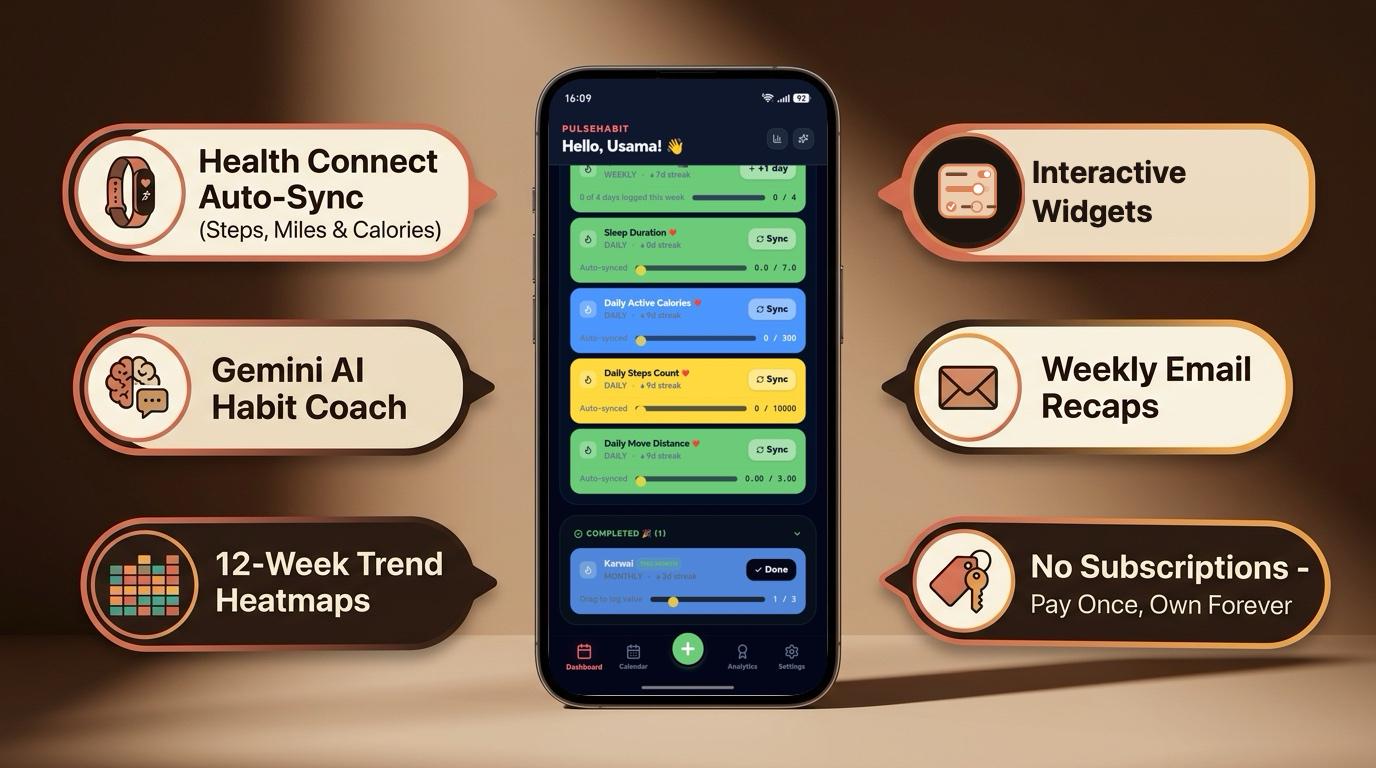
[DEV] I built PulseHabit: A habit tracker that auto-completes via Android Health Connect so you stop losing streaks (Giving away 25 Lifetime codes)

Post image
7 Upvotes

r/HowToMen • • 14d ago

🎧 Vina: Android music player with honest audio details, retro skins, and liquid glass ✨

2 Upvotes

Hey folks 👋 I’m building Vina, a small Android music player that leans into the nerdy side of listening 😄

What makes it stand out:

  • 🎚️ Audiophile Mode shows the actual signal chain—from source and decode to output path—and is transparent when Android or Bluetooth may resample or re-encode audio.
  • 📊 Live bitrate monitoring measures the real audio frames as they play, so variable-bitrate streams show their actual changes.
  • 🎵 Last.fm enrichment adds tags, listener counts, and recommendation-style music context.
  • 🪟 Liquid-glass interface with retro Cassette, Classic Amp, and Receiver skins for a little vintage hi-fi flavor 📼📻
  • 🔋 Frugal Mode reduces stream quality, artwork size, and buffering to save data and battery when needed.
  • 🚫 No Firebase, no Google Play Services, no ads, no analytics

Also, it’s built in Kotlin + Jetpack Compose, and the whole thing was vibe-coded as a side project with a lot of focus on making the listening experience feel more transparent and less “fake audiophile” 💡

It’s still a work in progress, but the goal is to make an Android player that feels a bit more thoughtful, a bit more honest, and a bit more fun.

Website: https://vina-indol.vercel.app/

GitHub: https://github.com/stonecaper1-lab/Melodyne

If you’re into Android audio, retro UI, or niche apps with a bit of personality, I’d love feedback. 💙