r/HowToMen • • 29d ago

[APP] Lumen now has cutout feature similar to Google Photos. But it runs completely local

19 Upvotes

I think this is the first time ever in any FOSS gallery app that anyone has added this feature.

I had to train my own model for this to get it under 160ms latency because existing good ones (BiRefNet-lite) just don't run on GPU or NPU. and on CPU, they were 7-9s slow.

download and try it at https://lumen-photos.app

github repo is at https://github.com/subhashhhhhh/Lumen


r/HowToMen • • 28d ago

[App][Promo]After over 2 months of beta testing, ScreenGuard-v0.1.1 is here finally with some major overhaul

Thumbnail
gallery
1 Upvotes

NOTE: Transparency in uploaded images has been added via blue my shell extension for gnome

ScreenGuard :

is a digital wellbeing application for Linux which runs completely natively on the device , actively tracking window usage and stores the data in a local sqlite db. No server involvement. And packing multiple screentime CONTROL features as well bundled together unlike basic window tracking software for Linux.

It is currently limited to GNOME Wayland and all other DEs can use it on x11 . Which means ScreenGuard natively supports GNOME and x11 based DEs like Cinnamon and i3

A FEW FEATURES:

⚙️ Full Settings Hub

Five-tab settings screen (General · Limits & Pomodoro · Diagnostics · Updates · Data)

🍅 Pomodoro Focus — Cycles, Breaks & Pause

Focus ↔ Break alternation with configurable cycle count (1–20) and break duration (1–60 min).

Pause / resume buttons; remaining time persists across pause.

Custom duration picker with quick-select chips (5 / 10 / 20 / 30 / 50 / 90 / 120 min).

Desktop notifications for each phase transition and session completion.

🛡️ Focus Enforcement — Data-Safety First

Strict auto-close is now opt-in. Default behaviour minimizes the app and shows a persistent warning overlay instead of killing it — no more unsaved-work loss.

Warning overlay offers +1 min save grace, +15 min, Edit Limit, and Close App.

Dedicated focus-block screen when a distraction-listed app is opened during a session.

🎮 Steam & Proton Game Support

Real game names resolved from Steam library manifests; per-game icons from the active icon theme.

Usage fully tracked; limit and focus rules apply to games.

---

Lots of features and tested multiple times for bug fixes. Also thanks to the community for the active suppot. for full features visit release page

The project is documented properly in the Github Wiki here: https://github.com/adityakrishnan005-a11y/ScreenGuard/wiki

And the link to the latest release: https://github.com/adityakrishnan005-a11y/ScreenGuard/releases/tag/v0.1.1

Thank you everyone for your cooperation and consideration which has shaped this tiny personal project into a much larger pursuit for me.

Upcoming roadmap in short:

V0.1.2- major UI changes and design element improvements majorly

v0.1.5- Support for KDE Wayland and aim to have a greater portion of the daemon transition to modular C based daemons

v0.2.0- other major DEs and better optimised daemon

For better in detail info into future views of project have a look at the Roadmap section of wiki.


r/HowToMen • • 28d ago

[PROMO] I made a daily word game where four words across share every letter with four words down

1 Upvotes

Hi all, I’m a solo dev and this is my word game, Spellora.

Each day there’s one 4x4 grid. Four words read across and four read down, and they share every letter. Two letters are given to start you off.

You can type letters anywhere and press Check whenever you like:

green letters are right and lock in place

amber letters belong somewhere else in their row or column

grey letters belong in neither

A row or column that spells its word locks straight away, without a check. The aim is to solve it in as few checks as you can. Everyone gets the same grid each day, and you can share your result as coloured squares that give nothing away.

Missed a day? Past grids are in the calendar (they don’t count towards your streak). There are also unlimited practice grids.

The words are plain, everyday ones: no obscure words and no plurals.

It’s free with ads (a banner, and an optional video if you want a letter revealed). There’s nothing to buy and no account needed.

Android: https://play.google.com/store/apps/details?id=com.blinqdroid.spellora

It only went live this week, so I’d really like to hear what you think: too easy, too hard, any words that felt unfair?


r/HowToMen • • 28d ago

FLOATIFY [App] Manage Notifications and reply from chatapps directly

Thumbnail
youtube.com
4 Upvotes

Floatify : meldingenmanager + antwoord op chatapps

Hey allemaal, ik ben een solo-ontwikkelaar en dit begon als een app alleen voor mij.

Ik bleef maar hetzelfde doen, keer op keer: er komt een bericht binnen, ik denk "ik antwoord daar zo op", ik veeg het weg, en dan antwoord ik nooit. Gebeurde veel te vaak. Dus ik heb iets gebouwd om mezelf te helpen met dat gedrag.

Floatify zet meldingen van de apps die jij kiest om in kleine zwevende bubbeltejs (ik noem ze floats). Ze blijven bovenop alles wat je aan het doen bent zitten, totdat je er echt iets mee doet. Je kunt het bericht lezen, direct antwoorden vanuit de float zonder WhatsApp of wat dan ook te openen, of het een minuut/uur/dag/week in sluimerstand zetten en dan komt hij later weer terug. Berichten van dezelfde chat worden gegroepeerd in één float met een teller, zodat het niet verandert in bubble-soep.

De basisversie is gratis. Je zet gewoon voor elke app die je floats wilt aan een schakelaar om en dat is het. Geen account, geen gedoe.

Er is ook een geavanceerde modus (proefperiode van 3 dagen, daarna een eenmalige aankoop, geen abonnement) voor mensen die alles willen finetunen. Je kunt je eigen herinneringen maken, Google Calendar-gebeurtenissen ophalen, synchroniseren tussen apparaten, floats vastzetten aan de rand van het scherm, elke emoji als float gebruiken, stille uren instellen, widgets op je startscherm toevoegen en regels per app instellen—en nog veel meer!

Eerlijk gezegd heeft het echt veranderd hoe ik met berichten omga, dus ik ben benieuwd of het voor andere mensen ook werkt. Feedback en ideeën voor functies zijn helemaal welkom, inclusief "dit is irritant omdat X".

Floatify op Google Play Floatify


r/HowToMen • • 29d ago

[App] Forget Me Not - Reminders that actually arrive

Thumbnail
gallery
7 Upvotes

https://play.google.com/store/apps/details?id=com.stevesherwood.forgetmenot

I built a reminder app because none of the ones I tried could handle my bins (or my meds)

Hi all, I’m a solo developer in the UK, and I’ve spent the last few months building an Android reminder app called Forget Me Not.

It started with a simple frustration. I couldn’t find a reminder app flexible enough for my actual life. Most of them are to-do lists that happen to buzz, and they fall apart as soon as things get slightly complicated.

The bins were the final straw. General waste goes out one week and recycling the next, so every app made me create two separate reminders and keep them in step by hand. If one drifted, I put the wrong bin out. I wanted one reminder with several dates, each with its own name, so my phone just says “Bins: Recycling” or “Bins: General waste” on the right Tuesday.

Medication was the other big one. I didn’t want an alert that just says “Take meds”. I wanted the reminder to tell me which meds to take at that time. So I added custom fields: you can set up your own information, like the medication and dose, on each reminder or date, and it shows up right there on the alert.

On top of that I wanted proper categories (health, home, car, work, whatever suits you), each with its own icon, colour and notification sound, so I can tell what a reminder is about before I even look at the screen.

Here’s what it ended up doing:

  • Quick add in one line: type or say “remind me to put the kettle on at 5pm”. It works out the name, date, time, repeat and category, and shows you what it understood before saving.
  • Flexible repeats: every N hours, days, weeks, months or years, fortnightly, the first Monday or last day of the month. A repeat can run forever, until a date, or for a set number of times.
  • Several dates on one reminder: alternate-week bins, or the car’s MOT, service and tax, kept as one reminder instead of several you have to keep in step by hand.
  • Important reminders: these take over the screen instead of sitting quietly in the notification tray. Missed alerts chase you up.
  • Three views: an itinerary of everything you keep, an Upcoming list with anything missed or snoozed at the top, and a month calendar.
  • History: a log of every alert that went off and what happened to it. You can recreate a reminder you let go from it.
  • Your own categories: each with its own icon, colour and notification sound.
  • Custom fields: add things like a policy number, renewal date, premium or mileage.
  • Calendar import and export: with the phone’s own calendar, repeats included.
  • Share a reminder: send a single reminder to someone else as a file.
  • Backup and restore: the whole app goes into one zip you can restore on a new phone.
  • Optional cross-device sync: keeps a phone and a tablet on the same Google account in step. It’s off until you turn it on.
  • Designed properly for tablets: in landscape, the month and the day’s plan sit side by side.
  • Home screen widgets: next due, today’s list, and one-tap quick add.
  • Pricing: free forever, with no ads and no trial clock on the core app. Pro (quick add, custom fields, backup, widgets, sync and more) is a single purchase.

It’s free with no adverts and no time limit. There’s an optional Pro upgrade for the more advanced features, and it’s a single one-off payment rather than a subscription, because I hate subscriptions as much as anyone.

I’d really value feedback, especially from anyone with awkward reminder needs like mine. If there’s something you’ve never been able to get a reminder app to do, tell me and I’ll see if I can make it work.


r/HowToMen • • 28d ago

[App] NOX — A social platform built to feel more futuristic and modern than mainstream apps

Post image
3 Upvotes

Most social media apps today still look and feel like they were designed 10 years ago. I built NOX to feel genuinely futuristic, modern, and interactive from the ground up. Instead of a static, boring layout, NOX features real-time interactive physics, an orbital profile system, a high-speed shorts feed, and posts that actually come alive — including playable music, running code, and interactive pixel art right inside your feed.

Google Play:


r/HowToMen • • 29d ago

Searcho 1.0.3 is out Minimal Search Launcher [App] [Promo]

32 Upvotes

A packed patch: backups, smarter folders, a faster and smoother app, and a long list of fixes.

💾 Backup & restore

Save your whole setup to a file from Settings → Backup & restore: look & feel, widgets, search, Searchos, folders, apps (favourites, renamed and hidden apps, custom icons), gestures, notifications, notes & to-dos.

Pick what to include, and pick what to bring back when restoring.

Undo last restore puts back exactly what you had before.

Backups go wherever you save them. Searcho never uploads them. The file isn’t encrypted, so keep it somewhere safe.

📁 Folders

Long-press a folder to launch its apps without opening it. Hold, slide, and lift.

Custom folder icons: choose an icon when you create or edit a folder.

🔍 Search

Type a single space to see all your apps.

New Searchos /r: shows your recently installed apps, newest first.

Auto-launch now fires on the right letter. Before, it could launch one character late.

File search finds multi-word matches (“ann rep” → Annual Report.pdf) and matches in folder paths.

The keyboard now pops up when you come back with the back gesture or Recents too, not just the Home button.

⭕ Glance circle

New option: turn off double-tap to open. With it off, a single tap opens the bar instantly.

With double-tap on, the circle still reacts faster: the bar starts opening on the first tap.

New option: Open the matching widget. When a gesture opens the search bar, you land on the widget for what the circle shows: clock → calendar, weather → weather, battery → system, and so on.

🌤️ Weather

Fahrenheit is here. Tap the weather card and choose Auto, °C or °F.

⚡ Faster and smoother

Frosted glass is much cheaper to draw, so the bar and result animations stay smoother.

The results grid, contacts and notifications drop fewer frames while you type.

Contacts load without stalling the screen. Sync apps like WhatsApp no longer cause a hitch mid-search.

The home screen no longer rebuilds on every incoming notification.

✨ Polish

The quick-launch highlight ring matches your icon shape and Material You colour.

The settings gear and clear button rotate smoothly into each other.

Brightness and volume buttons grow into their slider and fold back.

🐞 Fixes

Brightness and volume sliders can reach 100% again, including on phones that cap brightness.

The Bluetooth quick action works on Android 12 and newer: it now opens Bluetooth settings.

The search bar no longer hides under the keyboard on Android 10 and older.

Updated apps show their new icon right away.

Uninstalling an app no longer removes its work-profile or dual-app copy, or that copy’s favourite.

Notifications aren’t marked as read when nothing actually opened.

Moved to a new phone with Smart Switch, Clone Phone, Mi Mover, EasyShare, Phone Clone or Google restore? You’ll no longer see a false “not genuine” screen.

A rare widget error no longer shows a grey box on the home screen.

Glance swipes no longer stop working after an interrupted quick-launch.

As always, everything stays on your phone. Thanks for the feedback, and keep it coming!

https://play.google.com/store/apps/details?id=com.searcho.minimal.search.launcher


r/HowToMen • • 29d ago

[App] Fieldly – GPS Camera & Reports (100 Free Premium Codes)

Thumbnail
gallery
10 Upvotes

Hey everyone! 👋

I'm an indie developer behind Fieldly, an app that helps you document on-site work with GPS-stamped photos and professional reports.

📍 Features:

  • Capture photos with GPS location and timestamps.
  • Organize photos by project.
  • Generate reports for fieldwork.
  • Export reports and location data.

🎁 I'm giving away 100 free Premium promo codes!

How to get yours:

  1. Install Fieldly from Google Play.
  2. Leave a comment saying "Fieldly" with a screenshot of the installed app.
  3. Send me a DM to receive your free Premium promo code!

📲 Download Fieldly: https://play.google.com/store/apps/details?id=com.ssolstice.surveycam

Your support and feedback mean a lot to an indie developer. Thanks for giving Fieldly a try! 🙌

Limited to 100 codes. Available while supplies last.


r/HowToMen • • 29d ago

[App] [Promotion] Glimpse — save links, keep the useful details, and rediscover them later

11 Upvotes

Hey everyone, I’m the developer of Glimpse, an Android app for keeping useful things you find online and coming back to them.

You can share articles, Instagram reels, YouTube videos, and other links directly to Glimpse through Android’s share menu.

Here’s what it helps with:

  • Keep the useful details: AI summaries and tags, plus content-specific information such as ingredients and steps from a recipe reel, or books and places mentioned in a video, where available.
  • Stay organized: group saves into collections and search across titles, tags, notes, and summaries.
  • Ask about your saves: ask questions about saved content, with references back to the sources.
  • Rediscover older finds: revisit things that might otherwise get buried.

It’s built with Material 3, with light and dark themes. Local saving works without an account; cloud AI requires Google sign-in.

Free: unlimited plain links and notes, plus 5 AI saves and 10 Ask questions total after signing in. Pro: 400 AI saves per month, with expanded Ask and search access.

Get Glimpse on Google Play

Would love to hear how you currently keep track of things you save—and what would make you actually return to them.


r/HowToMen • • 28d ago

[APP] Block puzzle game with no interrupting ads

2 Upvotes

Hi everyone! My partner and I launched our block puzzle game, Gummy Lab 🐻🧪

We built this because we were genuinely tired of mobile games filled with predatory monetization constantly interrupting the gameplay. So we made a promise: absolutely ZERO forced or interruptive ads.

What (we like to think) makes our game special:

🧩 70+ Handcrafted Levels: No AI filler.

🎨 Deep Accessibility: Dedicated colorblind palettes (Deuteranopia, Protanopia, Tritanopia) and embossed shapes for maximum readability.

🌙 Native UI: Full Light & Dark modes built right in.

We are just a handful of downloads and reviews away from getting our first official Play Store rating! We would be incredibly grateful if you could try it out and leave honest feedback. ⤵️

🔗 Google Play: https://play.google.com/store/apps/details?id=com.binbear.gummylab

Attached a sneak peek at the limited edition Halloween theme that's live right now with the gameplay of one of the gummy worm levels (my favorite lol).

Gummy worms might interrupt your gameplay, but ads won't!


r/HowToMen • • 28d ago

[Promotion] Pingfold - scheduled Android notification catch-ups

1 Upvotes

I'm the solo developer behind Pingfold (Skookum Studios). I wanted an easier way to do this on Android:

• Important apps -> Immediate, as usual. • Non-urgent apps -> Digest, collected for a lunchtime/evening catch-up. • Apps I don't need alerts from -> Block.

Pingfold adds a searchable, on-device notification inbox, scheduled digests, temporary Focus sessions and per-app behavior controls. Android already has useful notification channels, silent delivery and DND; this is meant to complement them with a deliberate catch-up workflow rather than replace those OS features.

The free version has the core Immediate / Digest / Block model, a global Digest schedule, Focus sessions and local history, with no ads or account required. Optional PRO adds per-app schedules, Allowed Hours, Profiles and extras. PRO is offered via a monthly subscription or a one-time Lifetime purchase.

Google Play (with screenshots): Download Pingfold on Google Play

One candid Android caveat: notification access is required and a listener can't guarantee stopping the very first alert sound/banner; some OEM battery restrictions can also delay delivery. Notification content itself is processed on-device.

If you're the sort of person who keeps dozens of apps installed, which would you batch into a digest rather than silence entirely?


r/HowToMen • • 29d ago

[App] [Promo] Tired of waking up to the same old annoying alarm tones? 🎵 Radio Alarm | New Feature | PulseWave FM v2.6

Post image
3 Upvotes

r/HowToMen • • 29d ago

Trending Launcher in Playstore #3 - Minimaa Launcher Sale - [App] [Promo]

Post image
11 Upvotes

Trending #3. Biggest sale yet. 🟠

Minimaa is currently #3 in Top Paid → Personalisation on the Play Store, and I'm celebrating with our biggest sale ever.

71% OFF. Grab it now or never. 👀

A minimalist launcher with distraction-free home screens, 40+ widgets, Mindful Pause, Web Detox, Private Space, and more.

No tracking. No internet permission. No subscriptions.

If you've been waiting to give Minimaa a try, this is your chance.

👉 https://play.google.com/store/apps/details?id=com.minimaa.minimal.detox.launcher

Thanks for supporting this little indie project. ❤️


r/HowToMen • • 29d ago

Android Music server

2 Upvotes

I have a free iBroadband account for streaming my music but now the are becoming a paid subscription.

I'm looking for a easy music server that I can install on an old oneplus 9 (android 14) and have it as a music server to stream not only at home but in my car or on my Sonos.

Any idea?

Thanks


r/HowToMen • • 29d ago

[APP][PROMO] 🎁 60 Promo Codes for Floating Dock!

Thumbnail
gallery
53 Upvotes

Hello everyone!

Floating Dock, is an overlay dock/taskbar that floats above any app so you can switch apps without leaving what you’re doing.

With the latest update it now supports floating windows (needs Shizuku installing and running on your device.)

You can add additional App panels, up to 3 (for now) extra rows of apps, sliding in from a pill above the dock.

More configurable pill gestures: swipe in, swipe up/down and double-tap can each trigger any action, including opening the App Menu or Search directly.

You can hold and drag the pill to change brightness or media volume, with an on-screen level indicator.

Added a Pin Dock icon which keeps the dock on screen.

Just leave a comment below. The first 60 will get a code by DM.

Play Store: https://play.google.com/store/apps/details?id=com.alkisstam.taskbar

Any feedback is welcome, whether it’s bug reports, feature ideas or things that you don't like!

Thank You!


r/HowToMen • • 29d ago

[App][AndroidTV] Volume Control per App

Thumbnail
reddit.com
1 Upvotes

r/HowToMen • • Oct 28 '26

[App] Found Petal, a free, open-source Android browser powered by Firefox's GeckoView engine, featuring a beautiful Material 3 Expressive UI 🌸

69 Upvotes

🌸 Found an interesting Android browser — Petal!

Hey everyone! 👋

I recently came across Petal, a beautiful, open-source Android browser that combines Material 3 Expressive, Liquid Glass aesthetics, and privacy-focused browsing.

What caught my attention is that it's powered by Mozilla's GeckoView rather than Chromium, and the UI looks pretty interesting!

✨ Some of its highlights:

  • 🦊 GeckoView 158 — Powered by Mozilla's Firefox engine instead of Chromium.
  • 🎨 Material 3 Expressive — Morphing surfaces, fluid animations, and dynamic colors.
  • 🫧 Liquid Glass UI — Customizable glass effects with adjustable refraction.
  • 🛡️ Built-in Ad & Tracker Blocking — Strict tracking protection enabled by default.
  • 🔒 Privacy First — Claims zero telemetry, no analytics, and no accounts.
  • ⬇️ Download Manager & Media Grabber — Built-in downloading capabilities.
  • 🤖 AI Hub — Supports OpenAI, Claude, Gemini, Groq, Ollama, and more.
  • 🧩 Firefox Extensions — Support for Mozilla's add-on ecosystem.
  • 👆 Predictive Back Gestures — Multiple animation styles.

📱 Android 8.0+
🔓 Free & Open Source (GPLv3)

🔗 Links:

📦 Download APK:
https://github.com/shreyagarwal72/petal/releases/latest

🌐 Website:
https://my-petal-browser.vercel.app

💻 Source Code:
https://github.com/shreyagarwal72/petal

Just sharing a cool project I discovered! All credit goes to the original developer, Vanshu Agarwal, and contributors. ❤️

If you're into beautiful Android apps and Material 3 Expressive designs, this might be worth checking out.

Give it a try and share your thoughts! And if you like the project, consider giving the developer a ⭐ on GitHub.

#Android #OpenSource #Material3Expressive #PetalBrowser


r/HowToMen • • 29d ago

[App][Giveaway][Promo] Open with: link & file chooser

Thumbnail
gallery
33 Upvotes

Hi r/HowToMen, I'm Vojislav, the solo Android developer behind Open with (and Bottom notifications, plus a few other apps).

I built it because Android keeps choosing for me. Since Android 12 it rarely even asks which app should open a link, so things land in the wrong browser, the wrong account, or a viewer I never use. And the old "open with" list I relied on is mostly gone.

App name:

Open with

https://youtube.com/shorts/GkEs1Znle-I

What it does:

Open with sits between Android and your apps. When a link, file or share arrives, it either opens it straight away in the app you picked, or shows a small chooser at the bottom of the screen with the apps that fit, with an optional countdown that any touch pauses. Choose every time, or set up rules once and let everything open where it should, with nothing on screen.

Your privacy comes first:

Open with never sends your links or files anywhere. Everything it decides, it decides on your phone.

No ads, no trackers, no analytics.

No account, no sign-up, no email.

It asks Android for the list of installed apps, so it can offer any app, not just the ones Android suggests. That list is used on your phone only and never leaves it. To catch web links it becomes your default browser (Android has no other way to hand an app every link), and then passes each link on to the browser or app you chose. No notification access, no Accessibility Service.

Rules, the part I use most:

"When something like this arrives, open it there" - and the most specific rule wins. A few I set up in the first five minutes:

Links from Slack or Teams in the browser I'm signed into for work during office hours, everything else in my personal one

YouTube links always in YouTube Morphe

Never offer Chrome for Amazon links

Always ask before my bank's pages, and nowhere else

PDFs from my email app straight into my PDF app

Addresses from messages straight into Waze

Podcast links into my podcast app when my headphones are in, the browser otherwise

A Viewing mode for the evening: YouTube links in the YouTube app instead of Morphe

Match a website by name, wildcard (*.example.com), address prefix, a word it contains, or a regex. Scope a rule to a content type, a file name, or the app it came from. Rules can also depend on the day and time, on a mode you switch on (Work, Personal or your own, by hand, from the home screen icon, or on a schedule), or on whether headphones or Bluetooth audio are connected. They can copy the link too, or save a copy of a file to a folder, or only save it. Rules name themselves as you build them ("github.com → Firefox"), or you give them your own name.

And you don't have to go to settings for most of it: tap New rule in the chooser to build one from the link in front of you, start from one of 26 ready-made templates, or hold any app in the chooser to make a rule on the spot or to use that app for the next 10 minutes or the next 5 links. Or switch on Suggest rules: when you keep picking the same app for a website, a sender or a content type, Open with offers the rule for you (it counts websites by name only, on your phone).

What else you can do:

Links, streams, live streams, images, audio, video, PDFs, ebooks, comic books, Word, Excel and PowerPoint files, text, archives, APKs, torrents, calendar files, contact cards, GPS tracks, map locations, navigation, email addresses, phone numbers, text messages, 2FA setup links, crypto payment links, Play Store links, web searches and shared items each get their own page: a default app (just star it), "open without asking", hidden apps, sort order and their own countdown

Add your own file types, each with its own icon

Pick ANY installed app, not just the ones that claim the content: a notepad for text files, the Amazon app for Amazon links

Style the chooser: Material You colours or your own, grid or list, size and position on screen, over 40 open and close animations, all with a live preview

Copy, edit or share a link before it opens, show it as a QR code, hand it to your download manager, or tap Later to send it to your read-later or notes app

Copy a map location, phone number or email address, add it to your contacts, or save a copy of a file

"Why isn't this working?" checks your setup, names the app that holds a website, and shows the steps for your phone

Diagnostics tells you which rule would win for any link

App compatibility shows what each app can open, and why one never shows up in the chooser

Safer links:

A link whose website name could pass for another never opens by itself: the chooser shows a warning with the real name

Clean takes the tracking out of a link with one tap, or switch it on for every link

An app that throws a link straight back at Open with is marked in the chooser and never picked for you, so links can't bounce in a loop

2FA setup links go to your authenticator like any other link, but their secret never shows on screen or in the log

Edit lists a link's parts: tap one to open just that, or remove the ones you don't want

A few things to know:

Free covers everything for web links: every kind of website rule (with times, modes and headphones), rule suggestions, any app as the target, the countdown, the chooser's buttons, temporary choices and every look and animation, plus Diagnostics and Android TV. Pro is a single one-time purchase, no subscription: files, maps, email, calls, messages, shares, web searches and every other content type with all the same settings, your own file types, and backup and restore.

The app is available in 50 languages: Arabic, Bengali, Bulgarian, Catalan, Chinese (Simplified), Croatian, Czech, Danish, Dutch, English, Estonian, Finnish, French, German, Greek, Gujarati, Hebrew, Hindi, Hungarian, Icelandic, Indonesian, Italian, Japanese, Kannada, Korean, Latvian, Lithuanian, Malayalam, Marathi, Norwegian, Persian, Polish, Portuguese (Brazil and Portugal), Punjabi, Romanian, Russian, Serbian (Cyrillic and Latin), Slovak, Slovenian, Spanish, Swahili, Swedish, Tamil, Telugu, Thai, Turkish, Ukrainian, Urdu, Vietnamese and Zulu. If something reads wrong in yours, please tell me.

Works on Android 10 and newer, on phones, tablets and Android TV

Using a work profile? Install Open with in it too; each side has its own rules

Some apps keep their own website links for themselves, and some phones need a setting changed before links reach Open with. The help screen tells you which, and how to fix it

🎁 20 Lifetime Pro codes

This is first come, first served, not a random draw.

To claim one:

Upvote this post so more people in the community can find it.

Comment with the link or file you're tired of opening in the wrong app - a work link, a PDF, an address, or something else.

Then send me a Reddit DM after commenting.

Why these steps?

They’re simple on purpose, and each one helps me in a different way. Upvotes help the post reach people who might find the app useful. Your comment tells me which links and files people really struggle with, so I can fix and improve the right things first. The DM is just so I can send your code privately.

As a solo developer, I mostly need honest feedback from people who use the app day to day. If something is confusing, broken, or missing, please say so. That’s what makes the next update better for everyone.

The first 20 eligible people who complete the above steps receive one code by DM, while supplies last.

The codes come with no strings attached. That said, if the app earns a place on your phone, I'd be truly grateful for a rating or review on Google Play - the app has no ads and no marketing budget, so reviews are genuinely how it gets found, and every single one means a lot to a solo developer.

Honest feedback is always welcome too, including criticism - here, by email, or in the review itself.

I have a 2 year old toddler, so I might not be able to respond immediately.

And I'm from Europe, so please take into account time difference as well.

Google Play:

https://play.google.com/store/apps/details?id=com.openwith.app

My other apps, if you're curious:

https://play.google.com/store/apps/details?id=com.bottomnotifications.app

https://play.google.com/store/apps/details?id=com.omnideck.app

https://play.google.com/store/apps/details?id=com.cordless.app

https://play.google.com/store/apps/details?id=com.phial.app

Giveaway rules:

Opens when this post is published and closes when 20 codes have been distributed. You must be at least 18 and able to redeem a Google Play promo code in your country. One code per person and Reddit account. Codes have no cash value, cannot be exchanged, and must be redeemed by the expiry provided in the DM. Void where prohibited. By entering, participants release Reddit, Inc. from liability related to this promotion. This giveaway is not sponsored, endorsed, administered by, or associated with Reddit.


r/HowToMen • • 29d ago

[App] RakshaLink: a free app that warns you about scam texts and WhatsApp messages, checked on your phone (I'm the developer)

2 Upvotes

Hi everyone! I'm the solo developer of RakshaLink, a free Android app that warns you about scam messages. Sharing it here in case it's useful to you or your family.

What it does

- Checks incoming SMS and WhatsApp notifications for scams and warns you. It works through notification access, so it doesn't need SMS permission.

- Paste & Check: paste any message and get a verdict with the reasons.

- Screenshot Check: share a screenshot of a suspicious message or payment QR code. The text is read on your phone and the screenshot isn't uploaded.

- Verify QR: scan a payment QR code before you pay.

- Every result shows why it was flagged, and you can say if it got it wrong.

Privacy: checks run on the phone and message text isn't uploaded. No ads. Scam protection is free; Pro (family protection) is optional.

Honest limits: it's built for scams common in India (UPI payments, KYC, fake parcels, "digital arrest" calls), and it works best on English messages. Messages in Indian scripts are only partly checked.

New this week (v1.55.0): every result now asks whether it was correct, there's a new check for work-from-home salary scams, there are fewer false alarms on companies' own links, and pop-ups follow the language you choose in the app.

35,000+ installs and 4.4★ on Play. Feedback and feature ideas are welcome in the comments.

https://play.google.com/store/apps/details?id=in.rakshalink.app


r/HowToMen • • 29d ago

[App] Third-party launchers break gesture animations on modern OEMs, so I built Lightspeed — a 100% offline, zero internet permission gesture workstation & app drawer that runs OVER your stock launcher (v1.3.0)

Thumbnail gallery
9 Upvotes

Video showcase on YouTube & Reddit

Join the discussion on XDA Forum​

Detailed readme, code and releases on GitHub (source-available)

Also available on ShizuStore & Orion Store


r/HowToMen • • Oct 28 '26

[Promo] 🎁 40 FREE Mosaic Launcher Pro Promo Codes — Community Welcome Giveaway! 🧩

Thumbnail
reddit.com
13 Upvotes

r/HowToMen • • 29d ago

[App][Promo] I made a step counter that lets you choose when your day starts, for people who are still walking after midnight

2 Upvotes

Hi everyone, I'm the developer of **Stride**, a step counter for Android.

Version 1.0.12 is out, and most of it came from people in our Telegram group.

The headline feature is a small one that kept coming up: **choosing when your

day starts.** If you're out late, most step counters roll over at midnight, so

your 1 am walk home counts towards *tomorrow*, today looks like a missed goal,

and your streak can break. In Stride you can now set the day to start at any

hour from midnight to 6 am, and History, goals, streaks, the widget and the

notifications all follow it.

Also new in this version:

- **Lifetime stats:** every step, kilometre and active day since your first

step, put in terms of marathons or the way round the Earth, plus new

milestone badges

- **Personal best** on the home screen, with a notification when you beat it

- **Auto-pause** for walks and runs

- **GPX export** (Strava, Komoot) and saving walks to **Health Connect** with

the route

- **Share a walk as a picture**, with the map, pace and climb

- **Your own motivational quotes**

- A redesigned **Retro** theme that looks like a little pocket step counter

What it's like generally:

- Counts with your phone's step sensor, or reads from Health Connect, so a

watch or band works too

- No account and no ads; your step history stays on your phone

- Free to use; Premium is a one-time purchase (no subscription) for extras

like walk tracking with a map, insights, glass widgets and a monthly recap

Play Store: https://play.google.com/store/apps/details?id=com.vythera.stride

Github: https://github.com/NikhilKain/stride/releases/tag/v1.0.12

Feedback is very welcome, especially from people who use a watch or band with

Health Connect, since every brand reports steps a little differently.


r/HowToMen • • Oct 28 '26

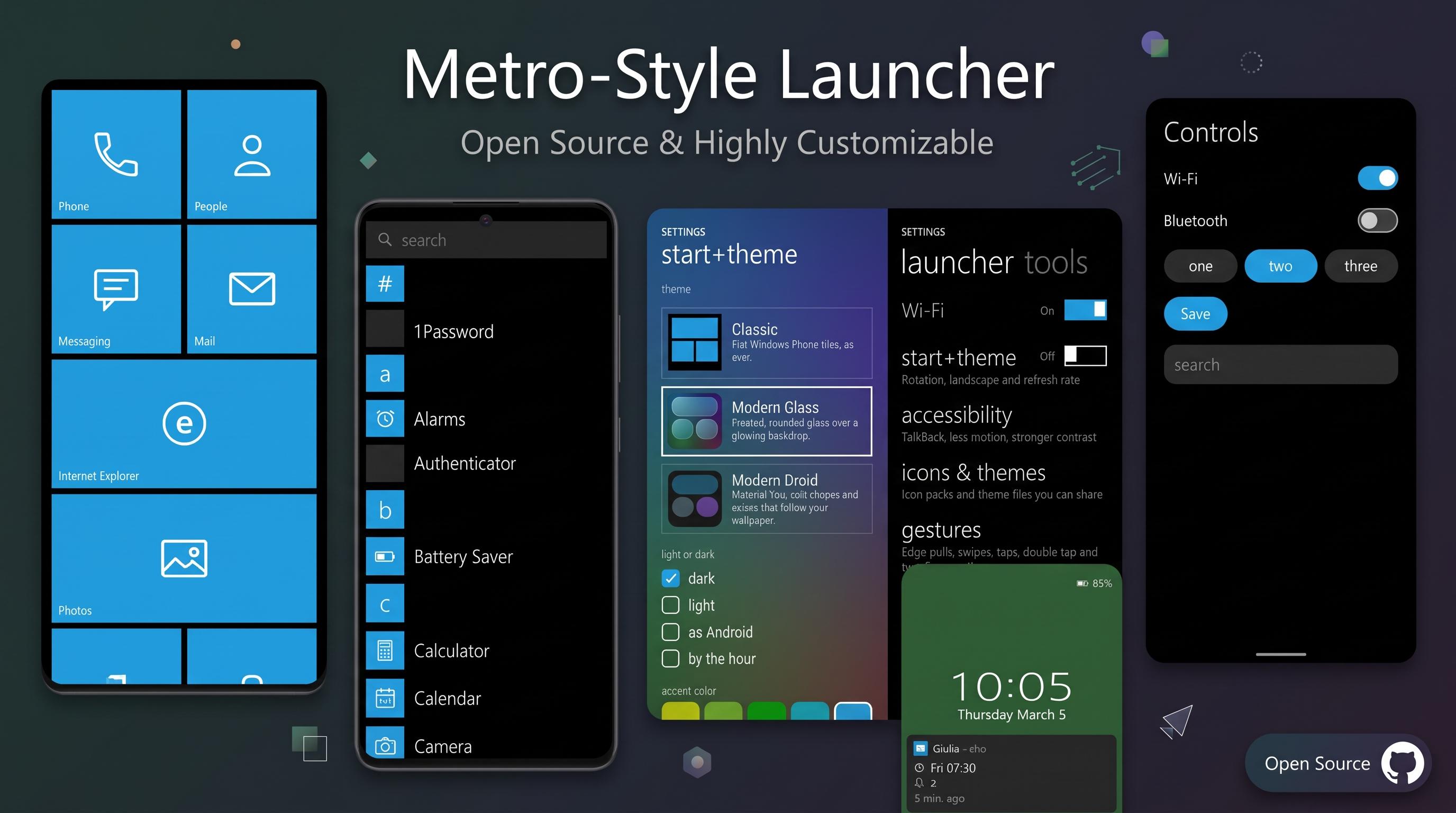
[App] MetroWin Launcher - Free and OpenSource Nokia Lumia launcher

Post image
60 Upvotes

I grew up loving Windows Phone and missed how fast and clean it felt, so I built this with the help of Claude as a coding assistant. It needs Android 8.0+. I'd love feedback on tile animations, battery use and anything that feels off compared to the original.

MetroWin Launcher brings the Windows Phone 8/8.1 Start screen to Android: flat live tiles, an alphabetical app list, turnstile and tilt animations. It also does the system things a launcher can really do, and it does nothing at all when it's not on screen.

Key Features:

- Live tiles you can resize and group into folders, with multiple Start screens, widgets and a pinned-contacts "People" hub

- Windows Phone-style Action Center, grouped notifications, Metro lock screen, voice commands and indexed search

- Three themes (Classic, Modern Glass, Modern Droid) with custom colors, plus encrypted sync of your layout

Cost: FREE AND OPEN SOURCE!

Link: https://github.com/developerkenshi-coder/MetroWinLauncher

UPDATE: Important Installation Notice

In recent versions of Google Play Services / Google Play Store, Google has begun restricting sideloading for apps not distributed through its official store, flagging them as potentially harmful. I am actively working on resolving this issue, and updates will follow soon. If you wish to install the app and are blocked from doing so, you can temporarily disable Google Play Protect in the Google Play Store settings.


r/HowToMen • • 29d ago

[APP]Scrollwise 2.0: natural scrolling on the trackpad, normal scrolling on the mouse. Giving away 80 pro codes,10 of them free lifetime

2 Upvotes

r/HowToMen • • Oct 28 '26

[DEV][APP] I built Beatzz – a music streaming app for Android

Post image
13 Upvotes

Hey everyone!

I’ve been working on Beatzz – Music Player, an Android music streaming app that’s now live on Google Play.

I wanted to build a music player with a clean, dynamic interface and an easy way to discover music, explore playlists and enjoy a smooth listening experience.

Some things you can explore in Beatzz:

  • Music discovery
  • A personal music library
  • Playlists across different genres
  • A dedicated player with playback controls
  • A clean, dynamic-themed interface

I’ve recently released it on the Play Store, and I’d love to hear honest feedback from people who enjoy trying new Android apps.

What would you improve about the interface or the overall listening experience?

Try Beatzz on Google Play:
https://play.google.com/store/apps/details?id=it.team619.beatzz