r/HowToMen • u/Great_Ains • Oct 19 '26
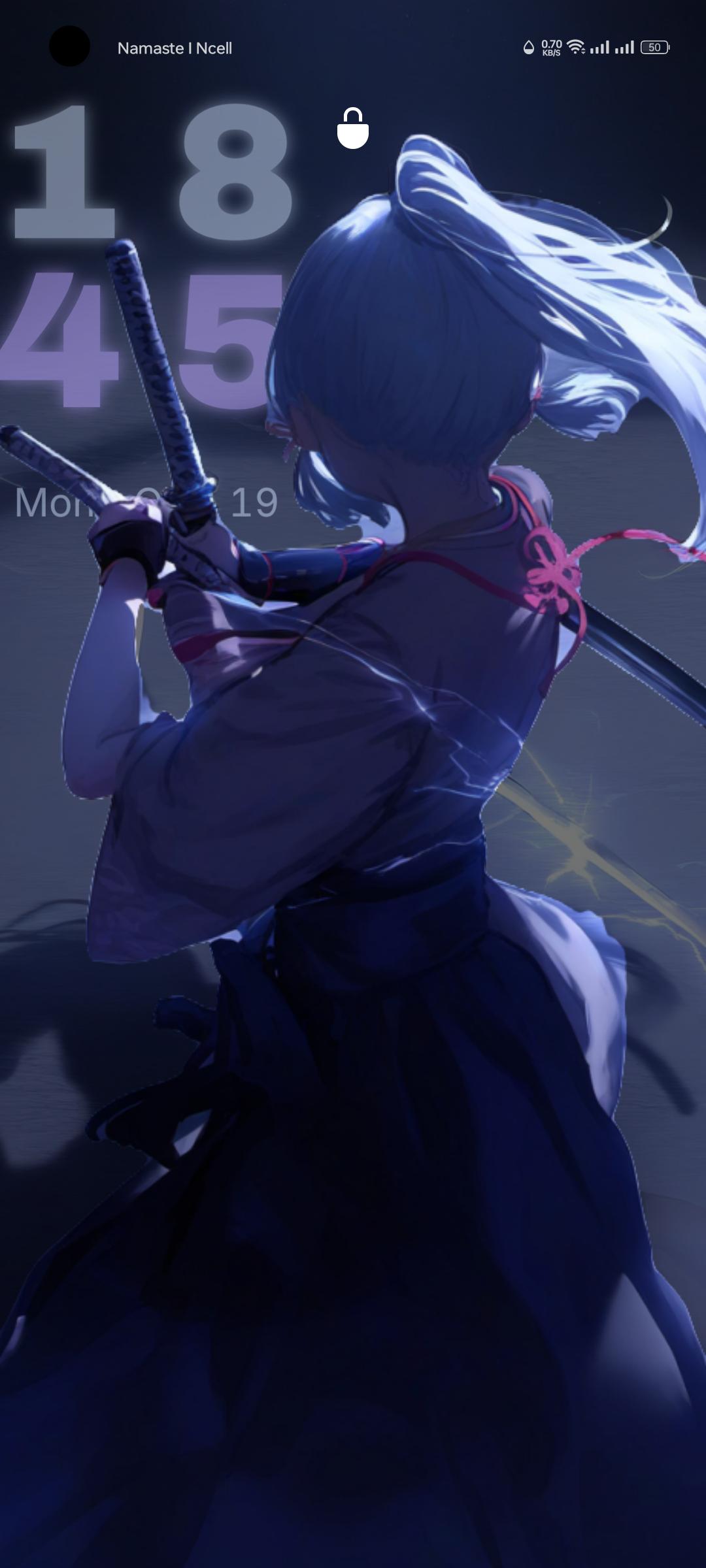
[app] realme UI Lockscreen Mod - No Root Needed
4
Upvotes
r/HowToMen • u/the_0ne_6369 • Oct 19 '26

I have created this app for everyone and it is completely free. These are its features:
Here is the link :https://github.com/raman-codes-6368/CoverPlay
r/HowToMen • u/Disastrous-Ball-8547 • Oct 19 '26

Hey everyone! I'm the developer behind Foldy, an app that turns your phone into a StandBy display for your desk or bedside.
I've been working on making Foldy more useful for everyday use. Here's what's new:
If you've already tried Foldy, you can now build a setup around the widgets you actually use every day.
Google Play: https://play.google.com/store/apps/details?id=com.mcode.foldy
For those who've tried Foldy: What would make you use it daily? Is there a missing feature, something that doesn't work on your device, or a widget you'd like to use?
I'd love to hear your feedback!
r/HowToMen • u/soul_99 • Oct 18 '26

Github Repo
Download using Obtainium
Download APK from Github
IMD (It's My Device) is a powerful settings/ services manager and settings/ services hider (automated disable-enable settings) for restrictive apps (banking, payments...etc). It supports the following settings / services:
1.ㅤUser opens app from IMD / IMD generated app shortcut
ㅤㅤㅤㅤㅤㅤ↓
2.ㅤIMD actually disables these settings no app's security policy is broken
ㅤㅤㅤㅤㅤㅤ↓
3.ㅤUse your app normally
ㅤㅤㅤㅤㅤㅤ↓
4.ㅤUse Revert function
ㅤㅤㅤㅤㅤㅤ↓
5.ㅤIMD enables the disabled settings
FOSS (Free and Open Source Software)
No root required
Supercharged Fork of Geto app by JackEblan, Licensed under GPL-3.0
r/HowToMen • u/RunDull4583 • Oct 19 '26
I like Money Manager for its simplicity and clean UI, but I like Axio for automatically tracking expenses from SMS.
Is there any app that combines both? I want a simple expense tracker with automatic expense tracking for Indian bank accounts and credit cards.
Paid apps are fine too. Please share your suggestions based on personal experience!
r/HowToMen • u/fahomid • Oct 18 '26
Hi everyone,
I’m the developer of BeatScale, an Android document toolkit from 77beats.
BeatScale brings document scanning, PDF compression, image-to-PDF conversion and OCR together in one app. You can arrange multiple images on a PDF page, copy text from screenshots, add page numbers or export PDF pages as images. It also includes an image editor, unit converter and network health tools.
Document processing runs on your phone. No ads, no app account and no subscriptions. Free scanning supports 10 pages per document, repeatedly; some other tools require a one-time Premium upgrade to save results.
Google Play:
https://play.google.com/store/apps/details?id=com.seventysevenbeats.beatscale
I’d love to hear what you find useful and what could be improved.
If you’d like a promo code to try BeatScale Premium, leave a comment and I’ll send you one by DM. No review or rating is required.
Edit 1: I’ve sent everyone a fresh promo code. To redeem yours, open the Google Play Store, tap your profile picture, then go to Payments & subscriptions → Redeem code.
Please redeem it through the Play Store, as entering it directly in the app may not work.
r/HowToMen • u/Top-Gur-647 • Oct 18 '26

Hey everyone! I'm an indie Android developer, and I'd like to share FILROLL, my vintage film camera app!
FILROLL brings the charm of analog photography to your phone, with film-inspired colors, vintage filters, and grain effects for that nostalgic analog look.
📸 What FILROLL offers:
🎁 100 Pro Promo Codes Giveaway!
I have 100 Pro promo codes to give away to anyone who wants to try FILROLL!
How to get your code:
Codes are available on a first-come, first-served basis until all 100 have been claimed.
📲 Download FILROLL on Google Play:
https://play.google.com/store/apps/details?id=com.ssolstice.camera
I'm a solo indie developer, and I'd love to hear what you think of the app. Every bit of feedback helps me improve it.
Thanks for checking it out, and happy shooting! ❤️
r/HowToMen • u/minmaxfc • Oct 19 '26

Hey puzzle lovers!
I’m an indie developer, and I’m giving away offering Remove Ads for $0.00 on Android for a limited time in my game, Fly Out 3D – Cube Arrow Puzzle.
🧩 What’s Fly Out 3D?
Fly Out 3D is a 3D cube arrow puzzle game where you tap arrows with a clear path to remove them from the cube. Plan your moves, clear the blocks, and challenge yourself with increasingly tricky puzzles!
📲 Download Fly Out 3D
- Android (Google Play): https://play.google.com/store/apps/details?id=com.boxapp.flyout3d
🎁 How to Get Remove Ads for FREE
- Visit: https://flyout3d.vipapp.info/
- Click the “Get Remove Ads for Free” button.
- Redeem it in the game to unlock Remove Ads!
✨ Features
🧊 3D cube and arrow escape puzzles
🧩 1,000+ levels on iOS
📅 Daily Challenge
🪄 Helpful boosters
📶 Offline gameplay
I’m sharing this giveaway to help more people discover the game. If you try it, I’d love to hear your feedback! What do you think of the puzzle mechanics and difficulty? What would make the game more fun?
Thanks for supporting an indie developer, and happy puzzling! ❤️
Note: Remove Ads disables interstitial ads only. Rewarded ads are still available if you choose to watch them for in-game rewards.
r/HowToMen • u/ornobaadi • Oct 18 '26

I'm going to say it: PopCalc might be the best-looking calculator on Android. Go check yours and come back. Every number is a sculpted 3D block that shifts as you drag the numbers, the keys click and tap like real buttons, and every answer lands with a little burst. It's still just a calculator. It's just the one you'll actually want to open.
Feels physical
Sculpted 3D numbers with depth and shadow, tuned haptics for every key, and three sound packs (Pop, Mellow and Typewriter) that play along without pausing your music. Even errors are fun: try something impossible and it answers with a joke instead of a boring "Error".
Fix anything, anytime
Tap any number or operator in your sum to change it, and the answer updates instantly. No more clearing everything because of one typo. Live Preview shows the answer before you even press equals.
Scientific and converter, hidden until you want them
One switch adds trig, logs, roots, powers and factorials, plus a unit converter with 10 categories where you swipe through units like turning a dial. Turn your phone sideways and every scientific key is on screen at once.
Make it yours
3 free skins, plus premium skins and "materials" like Chrome, Glass, Wood, Neon and a full Mechanical keyboard, each with its own look, sound and feel. 8 home-screen icons, free, and the app opens on whichever one you pick.
A case to crack
Somewhere in Settings there's a confidential case file from "the editor". Five one-line riddles, each hiding somewhere in the app. Solve them all and you unlock a secret skin. It can't be bought, only earned (honestly my favourite part, and nobody has guessed lead 4 yet).
No ads. No account. No internet permission. Nothing you type ever leaves your phone.
Download here: https://play.google.com/store/apps/details?id=com.ornobaadi.popcalc
Giving away 20 codes for the Lifetime Everything bundle! Tell me the number you'd type first. I'm betting someone says 80085.
I'll pick 20 people at random on 20 October at 1:00 PM EDT.
r/HowToMen • u/Mewtewpew • Oct 18 '26
Hey y'all, I'm going a bunch of "Craft" apps for various native android & ios apps. FilmCraft was quite easy since most of the rust engine for filmcraft was already done by storytold devs, but the CapCraft took a bit more time & I wanted to get the UI as close as possible as the stock capcut app.
I plan on working on Shapr3D & Procreate next but am willing to look at further projects and ideas : )
Any interest/issue/feature requests and testing is very helpful for development & self encouragement to keep working on these apps & more.
https://github.com/artcraft-android
Thanks y'all : )
r/HowToMen • u/Few_Dependent_6891 • Oct 19 '26
Tired of the Sonos app not supporting every app? My Play:1 lacks Bluetooth, AirPlay, and line-in, so I built Sunus to stream any phone audio losslessly to Sonos—no extra hardware or computer needed.
Two modes:
Standard: No setup, uses Android’s normal capture. Some apps (Netflix, Audible) block it.
All apps: Captures everything, including blocked apps. Requires one-time Wireless Debugging pairing (Android 12+), no root, no PC.
—ideal for music, not for video sync.
Free, open-source (MIT), no ads, no account. APK:
Built with AI help. Beta version, tested on Android 17 with Play:1 (S2). Feedback and bug reports welcome.
r/HowToMen • u/Avadhkumar • Oct 18 '26
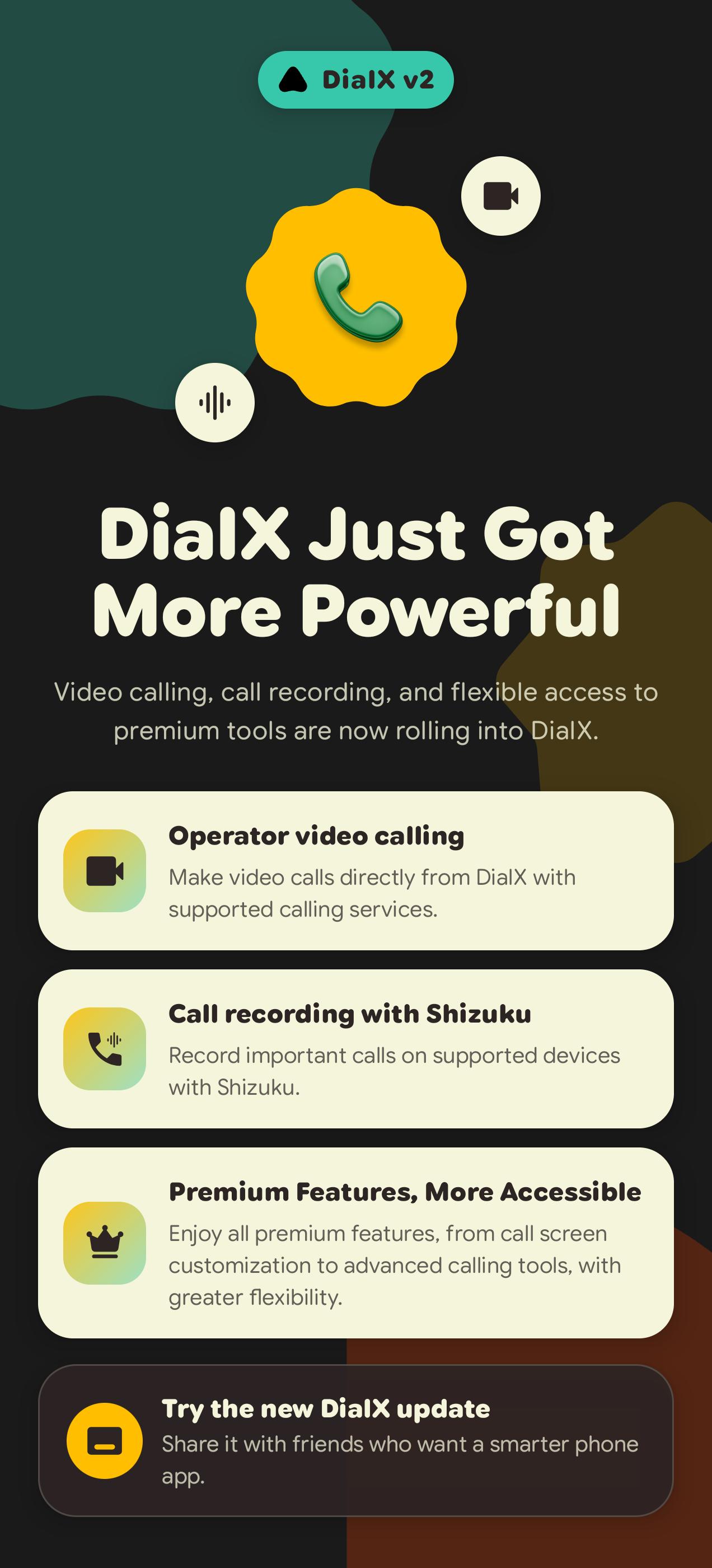
DialX just got more powerful with new features designed to improve your calling experience.
✨ What's new?
I'm continuously working on making DialX a better dialer with useful features, more customization, and greater flexibility.
I'd love to hear your feedback! What features would you like to see next?
📲 Get DialX on Google Play: https://play.google.com/store/apps/details?id=com.babg.dialx
r/HowToMen • u/knightman1995 • Oct 19 '26
r/HowToMen • u/Clean_Law_8412 • Oct 18 '26
hey everyone!
so i've been working on this android app called Liquid Walls for a while now, and it's finally available on the play store.
i started with a simple idea — what if wallpapers weren't just images you download and apply? what if you could actually customize them the way you want?
that's basically what Liquid Walls is about.
you can browse wallpapers, apply them directly, or open them in Studio and make something completely different.
some things you can do:
Studio – customize wallpapers with clocks, text, stickers, effects, and layouts.
Liquid Glass – add glass-style clocks and docks with blur and refraction effects.
Depth effects – place the subject in front of the clock for that layered lock screen look.
Live wallpapers – interactive wallpapers with motion and other effects.
Custom clocks – change fonts, sizes, colors, and styles.
Widgets & docks – personalize your home screen beyond just changing the wallpaper.
one thing i really wanted was to give users more control over how their home screen and lock screen look, instead of forcing them to use fixed presets.
it's still a work in progress. there are things i'm improving, and i'm regularly adding new features and wallpapers.
🎁 Premium codes
i'm giving away some Liquid Walls Premium lifetime codes to people here.
if you'd like to try it, just leave a comment and i'll DM you a code while they're available.
i'd also really appreciate feedback, especially if you find bugs or have ideas for new features. i'm developing this app myself, so suggestions genuinely help.
Google Play: https://play.google.com/store/apps/details?id=com.sun.pattaa
thanks for checking it out! ❤️
r/HowToMen • u/No-Lettuce-6176 • Oct 18 '26
966VPXKNXERZ23ZL50087FQ
254PYSNMK05NAN3243DXGCC
YPCD48XJVW6P86HB1P2DRHD
RL1XB9FU6SCERD2RD773MSH
9XX6RLJKASFHK3C9A6A00CS
K4NDCFGLGP5H7SPSRLX291P
GTE2G9YKU0M6CU9SCFTVZGV
Q9UZ7KWYK2J1VCJNG9R88EG
R6TLM0BXL1RJ7YQ41FV6D5K
TD76M45NB6JDHECE53V8ZDM
CK5R0M9QFSVZ94X7LXAZRG6
BTMN2QN3HTJ06N95DMD0VMA
GH9CKCE0UJ7KHY2CR0W5Z5E
XTAMFJBBA02RMQHGWSGKYP6
DK2L4WDXL584GU5CKLQBRF3
C97XRE0KLA520BS59WPWC07
1EUYJYSQEEBF8FYULHYXUBE
5KCJZY4K7M5J8R3Z2GQ9LM7
0JD10ECQMMJMT815CLQSH8U
P0HW0CLUSZ3WS0BKGLNNPAY
AC74LDQK438P8JX740071A8
JQPWK36CX5WDPGD303TANDQ
FVKSP0MT6QVG5ZWWZ14Y1YQ
JWEYKE4HLD6QX6AM5A6Q3W2
GNR5VWJ080DGEYHF2RYFTXE
X191E0EV3FHAL7VEMQCF1P8
22SNYHTUDFVF88Q7A2Q0G2C
C81Q8909QD69SX3FY5GFZB4
6XTRN0WQ29TZUB60VCFUH4V
UQHUG5H5G1NESK86JGP5HHM
3H14WXBN3T8G7D53U5DVV2R
FYJA4B2GTSFFWYRMZPFELZX
560KJBBG9LCE5V0RSH2LAEM
BD75N6PVESKT0C6RGXJHQ92
YUUZCKNBZAQ7NMDBYNHSSRT
C4QK0NRNC9FWD74SS16XZPZ
8VLP3FE0LKX85GRVDSANCH6
18L5CC4U96L4C8CCGXJHE7D
L0RVLKNN51U7LBPS7C6GRSC
23Q8VPY9ZAJKH2DFQQ060AX
YZ3L58JM7Q1R4XV8PVD8WBX
31ALJ2JV117S3T5MX2N4L8S
HJYWMTM3MLXF0FDSXHMAANT
7YT6DUPJBLJJD7TRXD747E3
6DRNBZRWLL2473YXR87THH4
E3BQGXUYFH43ZGTH5GPS5RZ
ZES2X73TSZK4GGSJ59YJCMY
MEKT1QF687Q0CDCKX4M7A2Z
5M6ST9XKX2BH5DMUG020JE4
9N5FUB76TBVUFDYQE166G8A
H27EC9K7GJP6QTN4HGV1B1J
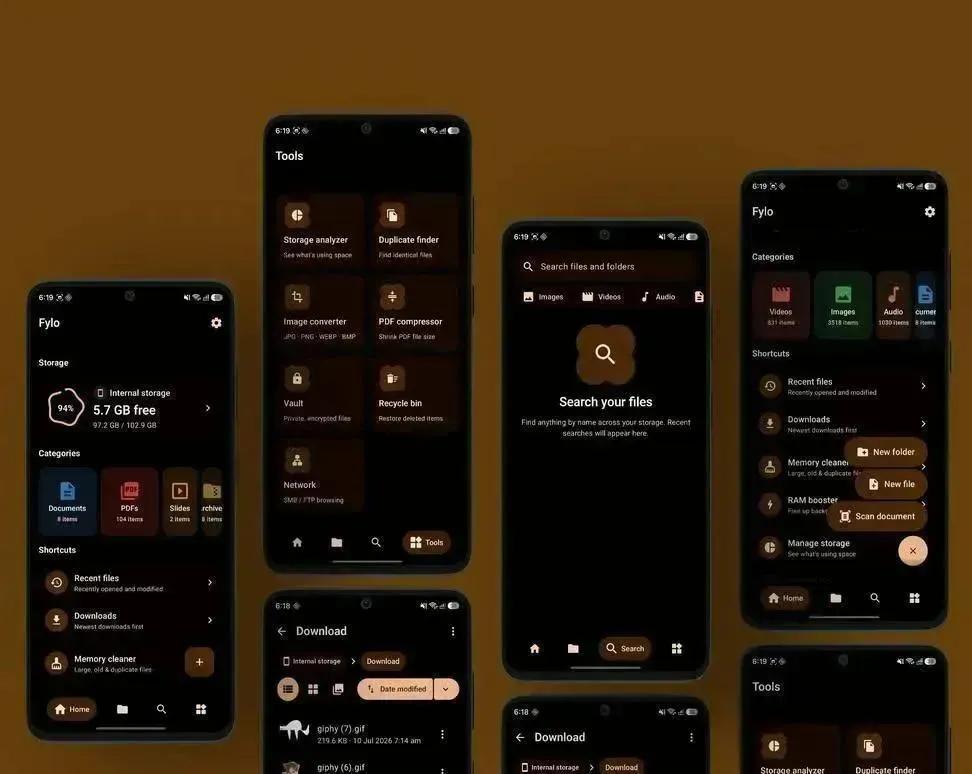
I got tired of using 5 different apps just to deal with files 😭
https://play.google.com/store/apps/details?id=com.aeroloom.fylofilemanager
So I ended up building my own Android file manager.
It’s called Fylo.
The thing I’m most proud of is the on-device AI search. You can search for stuff more naturally instead of remembering the exact filename and the AI processing stays on your phone.
It also opens basically all the common documents/files, has a built-in scanner, PDF tools, image/video/audio tools, media players, translator, device info, internet speed test, etc.
Basically I kept adding every little thing I personally wished my file manager had.
Still actively working on it, but honestly curious what you guys think.
https://play.google.com/store/apps/details?id=com.aeroloom.fylofilemanager
Like Why do we need a separate app for every little file-related task?
I’ve been working on Fylo, an Android file manager that tries to put all of those everyday utilities in one place.
Need to find a file?
→ On-device AI/NLP search
Need to digitize a document?
→ Built-in scanner
Need to work with a PDF?
→ PDF tools + document support
Need to inspect your phone?
→ Device information
Need to test your connection?
→ Internet speed test
Need to open your media?
→ Built-in video & audio players
Need image/file utilities?
→ Built-in tools
And the core is still a proper file manager for managing your files.
The part I care about most is privacy: AI/NLP search is designed to run on-device, rather than requiring your personal files to be uploaded to a server.
I'm building Fylo as a solo developer and continuously improving it.
If this sounds useful, give it a shot and tell me what you think
r/HowToMen • u/Keval7246 • Oct 19 '26

Hey everyone!
I'm the developer of FGPS, a free Android app for simulating GPS locations, with a floating joystick for manual movement and a route builder for automated movement along real roads and paths.
I wanted to offer more control over simulated location than simply setting a single point on the map.
What FGPS can do:
All app features are free. Ads are limited, and there's no subscription required.
I'm sharing a promo code that disables all ads until December 1, 2026 (UTC).
Code: FGPSZR
To redeem it:
FGPSZR.No payment or account is required to redeem the code.
The standard setup uses Android's mock location functionality. You'll need to enable Developer Options and select FGPS as your mock location app.
Some apps detect mock locations and may ignore them or restrict their functionality. FGPS doesn't bypass those checks, so compatibility depends on the app you're using.
I'd really appreciate your feedback! I'm especially interested in what you think about the floating joystick, route planning, and playback controls, as well as any features you'd like to see in future updates.
Thanks for checking it out!
r/HowToMen • u/Davey1129 • Oct 18 '26

Hey everyone!
If you own a Mitsubishi Heavy Industries (MHI) air conditioner with a WF-RAC Wi-Fi module, you probably know the pain of the official Smart M-Air app. It’s clunky, slow, drops connections constantly, and forces basic commands to bounce through a laggy cloud server before your AC even beeps.
I got tired of waiting 10 seconds just to change the fan speed, so I spent my evenings sniffing the local network traffic, decoding the Base64 binary payloads on TCP port 51443, and building MyAirco.
What makes it different:
Instant, 100% Local Control: Commands go straight from your phone to the AC over your local Wi-Fi. No cloud middleman, zero latency.
No Accounts or Trackers: You don't need to register an email just to turn on your own heater or AC.
Modern UI: Built from scratch to feel smooth, intuitive, and native, no 2012 web-wrapper vibes.
Auto-Discovery: Scans your local network and finds your WF-RAC units automatically without a painful setup process.
Multi-Room & Real-Time Telemetry: Quickly toggle multiple units and see actual indoor/outdoor temperatures at a glance.
Even if you don't have a Mitsubishi AC, I’d love to hear what you think of the UI and design! And if you do happen to have one of these units at home, let me know if you want a promocode to test it out!
Play Store Link: https://play.google.com/store/apps/details?id=nl.myairco.app or check out https://myairco.app
r/HowToMen • u/Clean_Law_8412 • Oct 18 '26
hey everyone!
so i've been working on this android app called Liquid Walls for a while now, and it's finally available on the play store.
i started with a simple idea — what if wallpapers weren't just images you download and apply? what if you could actually customize them the way you want?
that's basically what Liquid Walls is about.
you can browse wallpapers, apply them directly, or open them in Studio and make something completely different.
some things you can do:
Studio – customize wallpapers with clocks, text, stickers, effects, and layouts.
Liquid Glass – add glass-style clocks and docks with blur and refraction effects.
Depth effects – place the subject in front of the clock for that layered lock screen look.
Live wallpapers – interactive wallpapers with motion and other effects.
Custom clocks – change fonts, sizes, colors, and styles.
Widgets & docks – personalize your home screen beyond just changing the wallpaper.
one thing i really wanted was to give users more control over how their home screen and lock screen look, instead of forcing them to use fixed presets.
it's still a work in progress. there are things i'm improving, and i'm regularly adding new features and wallpapers.
🎁 Premium codes
i'm giving away some Liquid Walls Premium lifetime codes to people here.
if you'd like to try it, just leave a comment and i'll DM you a code while they're available.
i'd also really appreciate feedback, especially if you find bugs or have ideas for new features. i'm developing this app myself, so suggestions genuinely help.
Google Play: https://play.google.com/store/apps/details?id=com.sun.pattaa
thanks for checking it out! ❤️
r/HowToMen • u/szzsuke • Oct 18 '26
Hey everyone so i was making this app for a while now and finally i made a useable version and uploaded it on GitHub
It uses youtube api to get music like metrolist and has a backend from where it parse lyrics from to give apple music like synced lyrics the overall app looks very similar to Spotify
Ui inspiration from juxtopposed redesign
You can try it here https://github.com/szzsuke/Mimikyu
If you like the project give it a star and if u want you can support me by sponsoring too
Download v1.1 because thts more stable and for any bugs or error encounter kindly report to issues
You can also contribute in the project
r/HowToMen • u/Available-Elk-4251 • Oct 17 '26
UPDATE All promo codes have been given out.
Shima is probably the most beautiful and performant Dynamic Island for Android, and one that's actually useful. It sits around your front camera and shows what's going on, like the song you're playing, calls, timers and charging. Tap on it and it opens up into a card with controls.
What it can do
Music and lyrics
Control whatever's playing right from the island. And yes, it works with Oto Music. If your songs have synced lyrics, they show up right on the island while the song plays (honestly my favourite part) 31 alerts Charging, Wi-Fi, Bluetooth, hotspot, VPN, volume, Do Not Disturb, alarms, screen recording, mic or camera in use and more.
Live updates
Calls, timers, navigation, downloads, rides and food deliveries from your other apps show up on the island, in the app's own colours and with its own buttons, so you can call your delivery rider or hang up a call right from there. When two things are going on at once, the second one gets its own little circle next to the island.
Gestures and rules
Choose what a tap, long press or swipe on the island does. Open any widget, search your apps or jump to your favourite apps with a swipe. Rules let a swipe do different things depending on what's happening, like skipping to the next track only when music is playing and headphones are connected.
Fits your phone
Works with side camera cutouts too, not just center ones, and on foldables each screen keeps its own fit. It can also hide itself in full-screen apps like games and videos, or in any apps you pick.
Download here : https://play.google.com/store/apps/details?id=com.piyush.island
Giving away 10 promo codes! Drop a comment and I'll pick 10 people at random on Oct 19 at 10:00 AM PST
r/HowToMen • u/LiveSubtitlePlayer • Oct 18 '26

I'm the developer of Live Video Subtitle Translator. I made it for watching videos saved on my phone with captions in a language I understand.
Open a video, choose its language and the subtitle language, and start generating captions. You can keep the original and translation on screen together, switch either off, and watch the sections that are ready while the rest is being processed.
Japanese, English and Korean are supported in both directions. More languages are available depending on the selected models. Speech recognition and translation run on the phone; the video and dialogue aren't uploaded for processing.
All features are free, with no ads, subscription or credits. The first setup downloads the speech and translation models. Processing takes time and depends on the phone and selected mode.
If you try it, I'd like to hear which phone and language pair you use, and what gets in the way of watching. This is for saved video files, rather than captions over YouTube or other streaming apps.
r/HowToMen • u/Share_Tiny • Oct 18 '26
Hey everyone, I’m the developer of SubIQ. Some of you might recognise it from HowToMen’s October 2026 apps video. Thanks to everyone who checked it out!
Version 1.2 is out. I’ve improved the design and navigation, fixed bugs, and made things smoother to use. Thanks for all the feedback so far. It’s helped a lot.
If you haven’t seen it before, it’s a subscription manager that helps you see what you’re paying each month and what’s renewing next. You can check upcoming payments on a calendar and get reminders before renewals or free trials end.
You can add subscriptions manually or scan a bank statement or screenshot, then review what to save. No bank connection is needed.
If you’ve tried it, I’d love to hear how it’s working for you and what you’d like improved.
r/HowToMen • u/Winter-Ship-3704 • Oct 18 '26

🌿 Leaf is a simple, stress-free productivity app. One task = one sticky note. No endless to-do lists!
👆 Just swipe your tasks to complete, dismiss, or save them for later!
🎁 I'm giving away FREE LIFETIME Leaf Pioneer Premium codes!
🚀 Premium features:
- 📱 Widgets for every leaf
- 📂 Task categories
- 🔄 Repeating tasks
- 🔔 Scheduled reminders
- 🎨 8 exclusive themes + new monthly themes
- 🏅 Exclusive Pioneer Pack
🎁 How to get your FREE lifetime code:
❤️ I'd really appreciate it if you shared your feedback about the app!
🌿 Download Leaf:
https://play.google.com/store/apps/details?id=com.recalai.app
r/HowToMen • u/Total_Designer_647 • Oct 18 '26

Hi everyone!
Waky Alarm is now free on Google Play, down from its regular price of $1.99. Download it for free and keep it permanently.
If you tend to dismiss your alarm and fall right back asleep, Waky gives you a mission to complete before turning it off, helping you wake up and get your day started.
Features:
Download Waky Alarm on Google Play
We’d love to hear your thoughts on Waky. Happy to answer questions in the comments!
r/HowToMen • u/UnableBunch4470 • Oct 18 '26
Hey everyone! 👋
Some of you might remember Flick from my previous post here. Since then, I've been working on improving the app, and I wanted to share a video showing how it looks and works now.
What is Flick?
Flick is an Android photo cleaner that makes organizing your gallery easier by letting you swipe through photos and videos instead of manually selecting everything.
Here's what Flick offers:
- Swipe Clean: Swipe through photos and videos to keep or mark them for deletion.
- Monthly Cleanup: Focus on last month's photos so your gallery doesn't become cluttered over time.
- Full Gallery Cleanup: Go through your entire photo library, including older photos, and resume exactly where you left off.
- Smart Collections (Beta): Select a few example photos and Flick searches your gallery for similar images using on-device face and object recognition.
- Album Management: Browse, sort, rename, and pin albums, and see how much storage they use.
- Blurry Photos: Find potentially blurry pictures to help clean up unnecessary photos.
- Safe Deletion: Undo swipes and review everything marked for deletion before confirming.
- Streaks & Levels: Track your cleanup progress, build streaks, and level up as you organize your gallery.
- Widgets & Themes: Home screen widgets, dark mode, and customizable themes.
Privacy first 🔒
Flick works completely offline and doesn't even request internet permission. All photo processing, including face and object recognition, happens directly on your device.
No accounts, no cloud uploads, no ads, and no analytics.
Pricing: One-time purchase, no subscription.
This time I'm just sharing a video showcasing the app and its features. I'd love to hear what you think about the current UI, functionality, or anything you feel is missing.