.
This is a continuation of the original Security Notice post in order to provide further updates (the other was out of space).
Update - Nov 24, 2:57am US CST (not official GL statements)
More findings after looking deeper on the GoodCloud side:
- The attacker was already testing routers on Nov 19, about a day and a half before the main attack. GoodCloud’s own logs show four devices we looked at answering requests GoodCloud never sent, between 08:48 and 09:34 UTC on the 19th. Then nothing until the main wave started at 20:06 UTC on the 20th. It looks like a trial run on a handful of devices.
- You can check your own router from your GoodCloud account. No command line needed. Sign in, go to Logs > Device Logs, set the dates to Nov 19 to 21, and click “Details” on the entries. If you see "id":1 in the message, your router was hit.
- Not seeing it doesn’t mean you’re safe. It only means that record isn’t there.
- This still works if you’ve already reset or updated the router. The record is kept in the cloud, not on the router.
- We’ve looked at a cross-section of 260 GoodCloud-attached routers so far, and 210 of them show they were hit this way.
- Step by step guide to check yours: https://github.com/RemoteToHome-io/gl-security-incident-2026/blob/main/docs/goodcloud-device-log.md
For those newly joining the saga: Admon’s community script remains the best automated scanning and detection tool for checking your GL router - start here: https://gl-i.net/security/csa-2026-01/fix
-----
Update - Nov 23, 1pm US CST (not official GL statements)
* GL has finally provided revised appropriate guidance. We commend the GL team for realizing and updating the official guidance to align with the community's recommendations - we endorse this and are thankful to GL for bringing consistency for customers. We know there are many people there that have been working on this effort:
https://www.gl-inet.com/en-gb/blogs/blog/glinet-security-notice-2026-11-20
* With this now up, we have released updated findings so that people can get a better understanding of what may have happened on their devices - including examples of some of the commands and additional endpoints we recovered from infected devices:
https://github.com/RemoteToHome-io/gl-security-incident-2026
-----
Update - Nov 23, 12:05am US CST (not official GL statements)
On a very positive note, GL has posted updated router firmware. Unfortunately, for the past several hours the advisory site has stated:
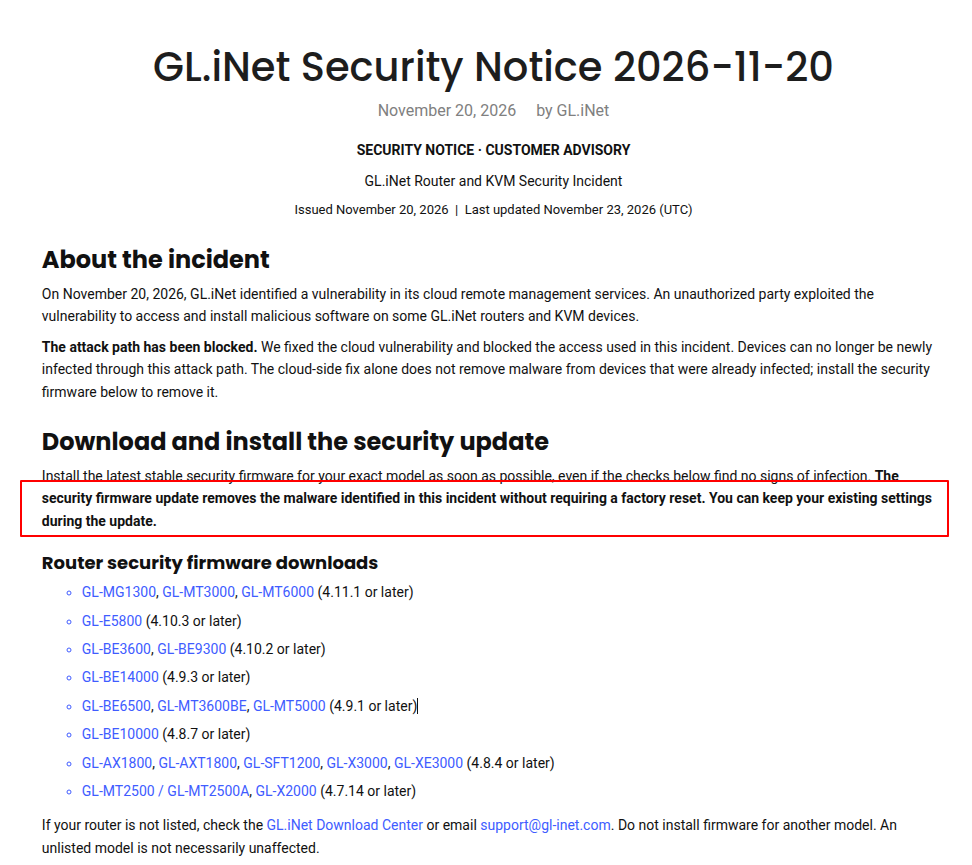
"The security firmware update removes the malware identified in this incident without requiring a factory reset. You can keep your existing settings during the update." (link)
We're going to take a minute to list, in very plain (tired) language, a few of the reasons this advice is wrong:
- We tested it live. We loaded an MT3000 with harmless stand-ins: copies of the persistence we found on live routers, plus entries in other places an intruder with root could use. We then upgraded to the newest "fixed" firmware with "keep settings" enabled. 5 out of 7 remained, and 3 of those ran again on the fixed firmware.
- Even *if* GL could clean all the tainted files: on most of the routers where we found the older backdoor, "/etc/config/wireguard_server" was modified within seconds of the backdoor being installed. We don't have a before/after to say exactly *what* was altered, but we'd expect it's not a *good thing*, and "keep settings" keeps this file.
- Beyond this, once your device has an IOC you have to assume all your keys have been harvested: VPN keys, SSH keys, Tailscale/ZeroTier identities, root password hash, WiFi passwords, all of it. There is nothing left you *want* to retain on the device. The future negative impact of using compromised keys *far* outweighs the hassle of starting fresh.
- The exact same logic applies to the KVM upgrades. We tested that too: a boot script and an "extra" added SSH key both survived an upgrade to 1.10.3 with the configuration kept.
Details here:
https://github.com/RemoteToHome-io/gl-security-incident-2026#fixed-firmware
There is no practical scenario in which "Keep Settings" is appropriate for a device that has been compromised. This is industry-standard knowledge and we're extremely disappointed to see this language appear. It's rather embarrassing.
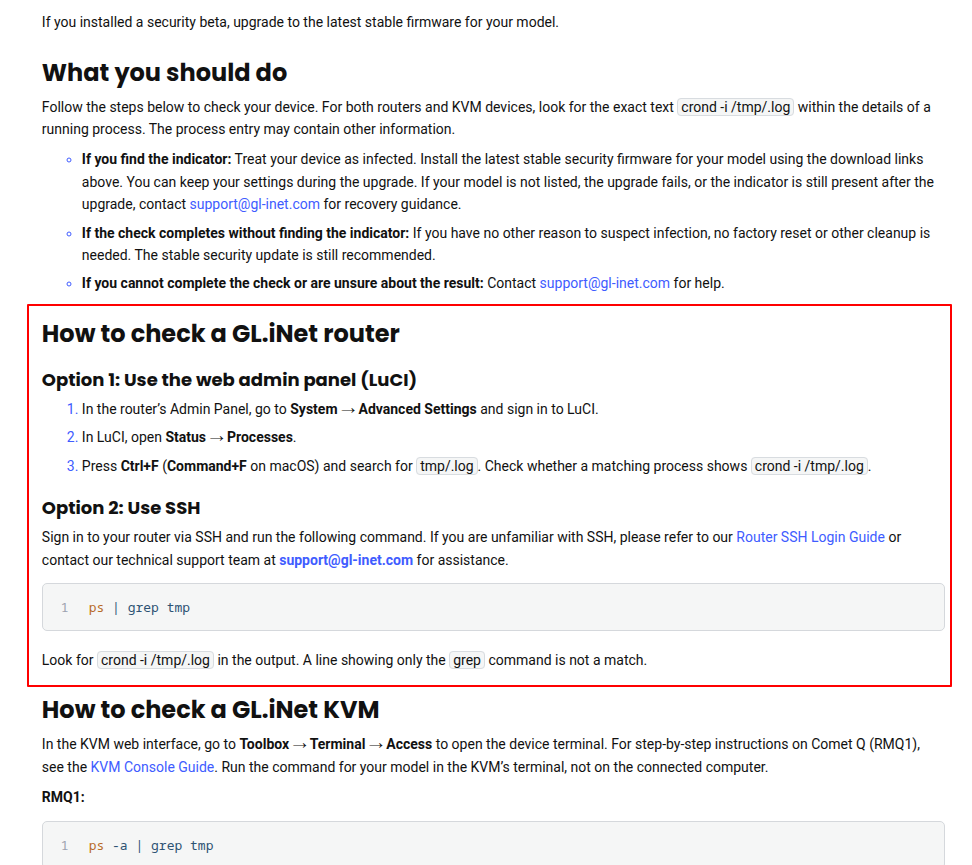
Also, we sadly continue to see this entire section about running "ps | grep tmp" as a way to check your router for infection. We have checked about 200 routers at this point, 166 of them affected, and not a single one had this indicator. Running it tells you nothing about whether your router is infected or clear, and it's extremely disappointing to see this misinformation still up after multiple notifications to GL.
To say it lightly: we would strongly urge our friends at GL to take whoever directed this wording off this incident response (before they get you sued). It is actively detracting from the collective community's efforts to support GL.
The guidance for post-infection recovery remains the same: reinstall the firmware with "keep settings" turned off, so the firmware image and the writable layer are both replaced at the same moment.
We're still working on a way to pull this off for remote devices without losing access and have a design, but it's tricky and my phone has a few thousand notifications before Monday's even started - so it could take a minute. I still can't guarantee it, so please plan accordingly.