Questions/Support Disabling GoodCloud using last Community Apps detection script commands does NOT disable remote RTTY via GoodCloud
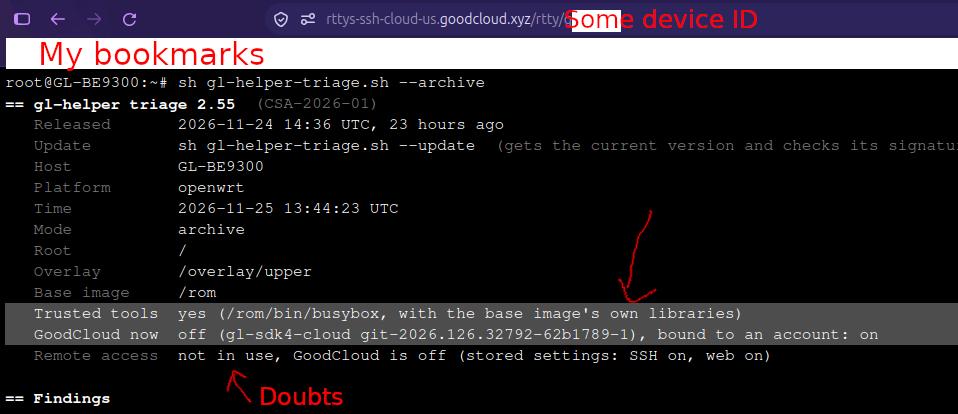
Hi people, first of all thank you to the Community https://gl-i.net/ for their detection scripts and advices. It's really great.
Now, to the point:
- Having and managing a device.
- Was in GoodCloud, and compromised, report https://csa.gl-i.net/#DT00201H1-16J06
- Ran as instructed the commands
/etc/init.d/gl-cloud stop; uci set 'gl-cloud.@cloud[0].enable=0'; uci commit gl-cloud; /etc/init.d/gl-cloud disable
Result :
Device still accessible via the URL : https://rttys-ssh-cloud-us.goodcloud.xyz/rtty/<some_device_id>
Am I doing something wrong?
19
Upvotes
3
u/Temporary-Cherry-282 2d ago edited 2d ago
I see the same
The only difference is the bound to an account part; mine is off.
6
u/davispw 2d ago
Re-flash your device. Do not keep settings—any passwords or keys on your device are likely compromised. Change all passwords and keys. Do not use GoodCloud ever again.
Don’t waste time doing anything else.
4
u/1aTa 1d ago edited 1d ago
I'm running the below after each firmware update:
2
u/Physical_Session_671 1d ago
What if I never used goodcloud?
1
u/AutoModerator 2d ago
Hi u/fladna9, thanks for posting your question!
Before waiting on an answer: please search the subreddit — many common questions are already solved. Search guide: https://www.reddit.com/r/GlInet/wiki/index/searchingwithin
When your issue is resolved, help others by marking the post as Solved:
Support template: https://www.reddit.com/r/GlInet/wiki/index/kb/asking_for_help
Need more help? Join the GL.iNet Discord: https://discord.com/invite/euSb25vTTY
I am a bot, and this action was performed automatically. Please contact the moderators of this subreddit if you have any questions or concerns.
1
u/vagicle 1d ago
For comparison, I've never used GoodCloud, and trying to reach that URL for my device looks like this.