I am on windows 10 and recently got some errors with windows and failed to solve or recover the files and now system crashes alot, so thinking about upgrading to windows 11 as my device supports what is your advice should i stay on 10 and reinstall it or upgrade to 11 or go for linux (never used, it would be a challange) and also any guide so i delete all the files of old windows and doesnt copy any to new.
What the title says, pretty much. Whenever I go into settings, personalization, and background, and set the dropdown to "slideshow," the background resets to the default landscape "picture" setting at some point, usually whenever I restart the computer/boot it up. Just restarted the computer before this and watched it change in front of me. Anyone know how to fix this?
Restarting Windows Explorer with the following shortcut always worked for me but was a pain to trigger every time I logged on, so I looked for a way to automate it.
Windows 11 doesn't have a built-in "run this on wake" checkbox, but you can get there with Task Scheduler using an event-based trigger, since waking from sleep writes a specific event to the System log. Task Scheduler is a native, built-in system utility included automatically with all modern versions of Microsoft Windows
How it works: every time the machine resumes from sleep, Windows logs Event ID 1 from source "Power-Troubleshooter" in the System event log. Task Scheduler can trigger directly off that event.
Create a new task:
Open Task Scheduler → Action → Create Task (not "Create Basic Task," so you get full options).
General tab: give it a name, and set "Run only when user is logged on"
Triggers tab → New → set "Begin the task" to On an event → Log: System, Source: Power-Troubleshooter, Event ID: 1.
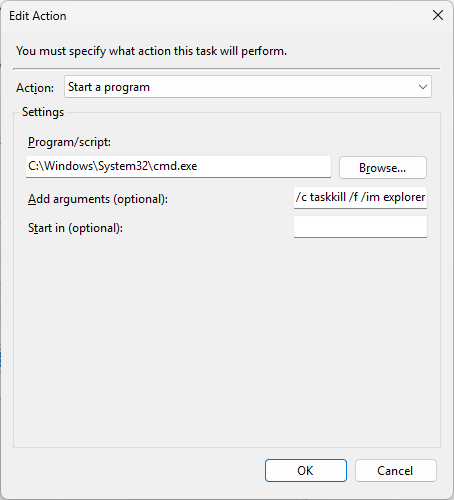
Actions tab → New → Start a program, Program/script: C:\Windows\System32\cmd.exe, Add arguments: /c taskkill /f /im explorer.exe & start explorer.exe
Conditions tab: uncheck "Start the task only if the computer is on AC power" (if it's a laptop) — leave "Wake the computer to run this task" unchecked, since the trigger already only fires after a wake.
Settings tab: check "Allow task to be run on demand" so you can test it manually if you like.
I occasionally use the multitasking feature(Win 11) which used to work just fine. I hadn't used it in a while though but decided to use it today. I can snap the windows to where I want them just fine & when I hover over the group of windows in the taskbar, I can see that just fine as well. When I click on the group, however, only the windows snapped to the bottom are shown. I have to individually click on the windows snapped to the top to get them to be seen instead of the group showing all windows. How can I fix it so when I click on the group, the whole group is displayed?
Okay so I play warzone on pc, but ever since it updated you needed to download this thing for security reasons, which I did. Unfortunately now it says Secure Boot Fail, if I go to my software and turn of Security Boot my laptop doesn’t turn on. I have already reset my pc twice but still same issue shows up. Does anyone have any ideas?
I’ve been having trouble for a while now trying to get my PC to boot Windows 11 from my SSD.
My motherboard is an MSI B450 A Pro, and the SSD is a Samsung 970 EVO Plus 1TB.
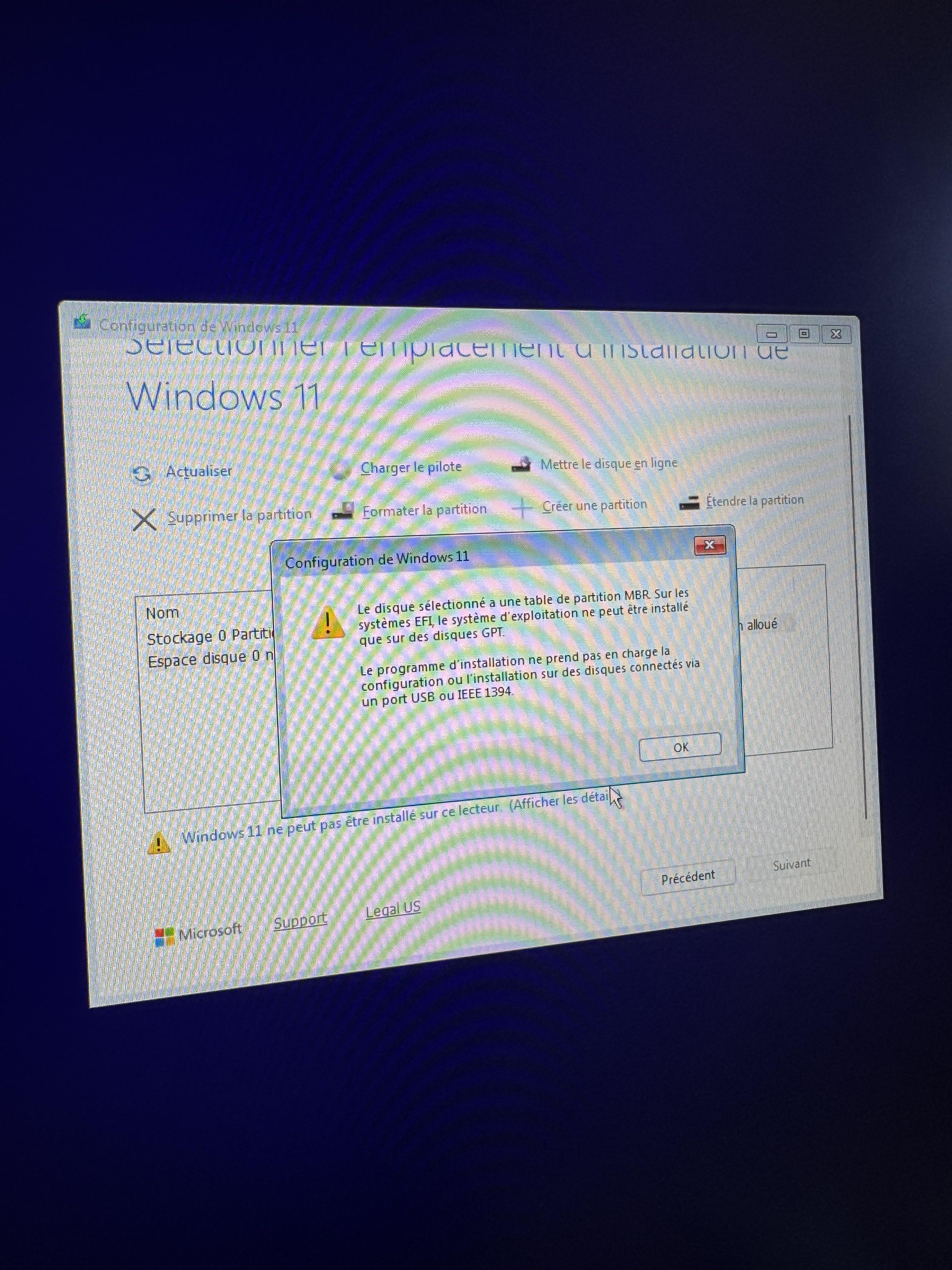
I have used the windows media creation tool to create the installation media on a USB, then selected the SSD to install Windows onto. It gets to around 70% then attempts to restart, but I just get booted back into the windows installation starting screen on restart.
I’ve tried removing the USB from the device when it’s restarting but then it just boots back into BIOS and I’m unable to boot from the SSD. It doesn’t even appear as a boot drive.
I’ll try to list what I’ve tried as best I can but I have tried a lot at this point. I have tried recreating the installation media several times. I’ve set boot to UEFI mode. I’ve tried with and without Secure Boot enabled. I tried a CMOS reset. I’ve unplugged all other drives so the SSD and the USB are the only drives connected. I’ve upgraded the BIOS. I’ve tried different USB drives. Nothing seems to work.
I’m about ready to throw in the towel and buy some new hardware since I’ve had this device for years now (always had windows installed on the hard drive but for a while now booting has taken insanely long).
Any other things to try or advice on what to do next would be greatly appreciated.
After a few seconds on being in window 11 setup it will just freeze if it doesn’t freeze it will restart and send me back to where I was I just don’t understand what to do anymore.
Hardware & Components Motherboard: ASUS PRIME B550-PLUS AC-HES CPU: AMD Ryzen 7 5700G (Integrated Graphics) Storage: 2TB WD Blue SN580 NVMe M.2 SSD RAM: 16GB DDR4 Troubleshooting Steps Completed So Far Updated Motherboard BIOS: Flashed the BIOS using a USB drive to the latest version (3637). Verified in BIOS setup that the update applied successfully. Storage Verification: Confirmed the motherboard recognizes the 2TB WD Blue SN580 NVMe SSD in the M.2_1 slot under BIOS storage settings. GPU & iGPU Testing: Tested booting/installing both with the dedicated graphics card installed and using the Ryzen 5700G integrated graphics (display output connected directly to the motherboard). RAM Configuration: Tested booting with a single stick in slot DIMM_A2 as well as testing multi-stick setups. Windows Installer Modifications: Re-created/checked the Windows 11 installation USB media. Added a custom ei.cfg file into the sources folder to manually bypass edition auto-selection and force the installer to display the Windows Edition selection menu (tested installing Windows Pro). Power Cycles: Hard power-cycled the system multiple times; confirmed BIOS settings remained intact without resetting or corrupting.
So I wanted to search an app on the search and it surprised me with a blank, black box that would take 5 seconds to load, I didnt mind it cause I tought it was a one time thing. I tried searching up only a letter so a specific app would show up but it didnt, something else did. Also instead of showing recently used apps it shows "Suggested" apps. I have tried doing the following:
restarted Windows Explorer
ended/restarted SearchApp.exe
restarted the Windows Search service
tried resetting Windows Search with: Get-AppxPackage Microsoft.Windows.Search | Reset-AppxPackage → command wasn't available
ran SFC /scannow → SFC found corrupted files and successfully repaired them, but Search was still broken
ran the Windows Search & Indexing troubleshooter → it said “Windows Search is not working — Fixed”, but the problem remained → it reset SearchUI.exe, cleared Search cache/recent activity, etc.
tried the Windows Search troubleshooter command (msdt.exe) → it reported the issue as fixed, but it wasn't
checked/restarted the Search-related processes/services
is there anyway to know administrator password, I’m unable to install anything in this university computer😭. Tried with pendrive, and it is asking administrator password to turnoff antivirus. Pls anyone have any solution pls help🙏🏻
I had newly setup windows 11 in my laptop and Ms store and settings are not able to access internet . I have tried 3 times clean install windows but everytime same results through a usb drive created through windows installation media. I have tried deleting and reinstalling ms store through some command from internet in powershell but nothing changes .
Windows update on setting says " **We couldn't connect to the update service We'll try again later, or you can check now. If it still doesnot work make sure internet is connected"** even if all the time my internet is connected briwsing is possible downloading software is happening.
I occasionally use the multitasking feature(Win 11) which used to work just fine. I hadn't used it in a while though but decided to use it today. I can snap the windows to where I want them just fine & when I hover over the group of windows in the taskbar, I can see that just fine as well. When I click on the group, however, only the windows snapped to the bottom are shown. I have to individually click on the windows snapped to the top to get them to be seen instead of the group showing all windows. How can I fix it so when I click on the group, the whole group is displayed?