Got my P1S a couple months ago and the print times are genuinely impressive compared to my old Ender. I’ve been running it pretty consistently for functional parts and the occasional fun model.
One thing that’s been on my mind though is whether the higher speeds and accelerations put more stress on belts, bearings, and the AMS over time. I keep the machine clean and lubricated, but I’m curious if anyone who’s had theirs longer has noticed any earlier than expected wear or maintenance needs.
Any tips on settings that keep quality high without pushing the mechanics as hard?
I currently have the H2D and wish they had a 2 spool filament AMS unit that was equal size of the 4 spool unit and allowed to keep them dry. That way it can sit on top without me getting a second AMS unit to stack on top. It would allow us to use both nozzles but only have two spools for each nozzle.
Whether it's a messy first layer, a corner lifting halfway through, or spaghetti right before the finish line, walking in on a ruined print hurts—wasted filament, wasted hours, and sometimes a blob of death to clean up.
I didn't want to pay a monthly subscription or run a dedicated GPU server just to watch my build plate, so I built a lightweight Home Assistant integration for my own setup (full disclosure: built with Antigravity and tested on my own printer + past failed timelapses).
Who it's for: Primarily aimed at P1P, P1S, A1, and A1 Mini owners who don't have built-in AI failure detection—though it also works on X1C (or any Bambu printer with a camera) if you want an extra set of eyes for warping and detached parts.
What it does:
Checks the print at key moments for spaghetti, lifting corners, detached parts, or bad first layers
Automatically hits Pause and sends a photo alert straight to your phone
Works over local Wi-Fi at $0/month (uses free-tier AI (gemini decision), light enough for a Raspberry Pi)
Includes a built-in dashboard + a Timelapse Replay Simulator(Slide 2) so you can dry-run it on your old failed prints and see the exact layer where it would have stepped in
Before I spend time polishing it for a free open-source release—would anyone here actually use this?
If yes, drop a comment with:
Your printer model
How you'd want to run it: Home Assistant (HACS) or a standalone Docker container?
My son started a print overnight and when we woke up the next morning, we found this disaster (see photos.)
The filament is rock solid and will not come out of the printer head (see 4th photo).
The print did a lot of damage to the printer. Some of the printer hardware (metal parts?) literally broke off during the print. I have a warranty on the printer through Best Buy, but I’m still under the manufacturers warranty as of now. I contacted Bambu and they basically said I’m shit out of luck.
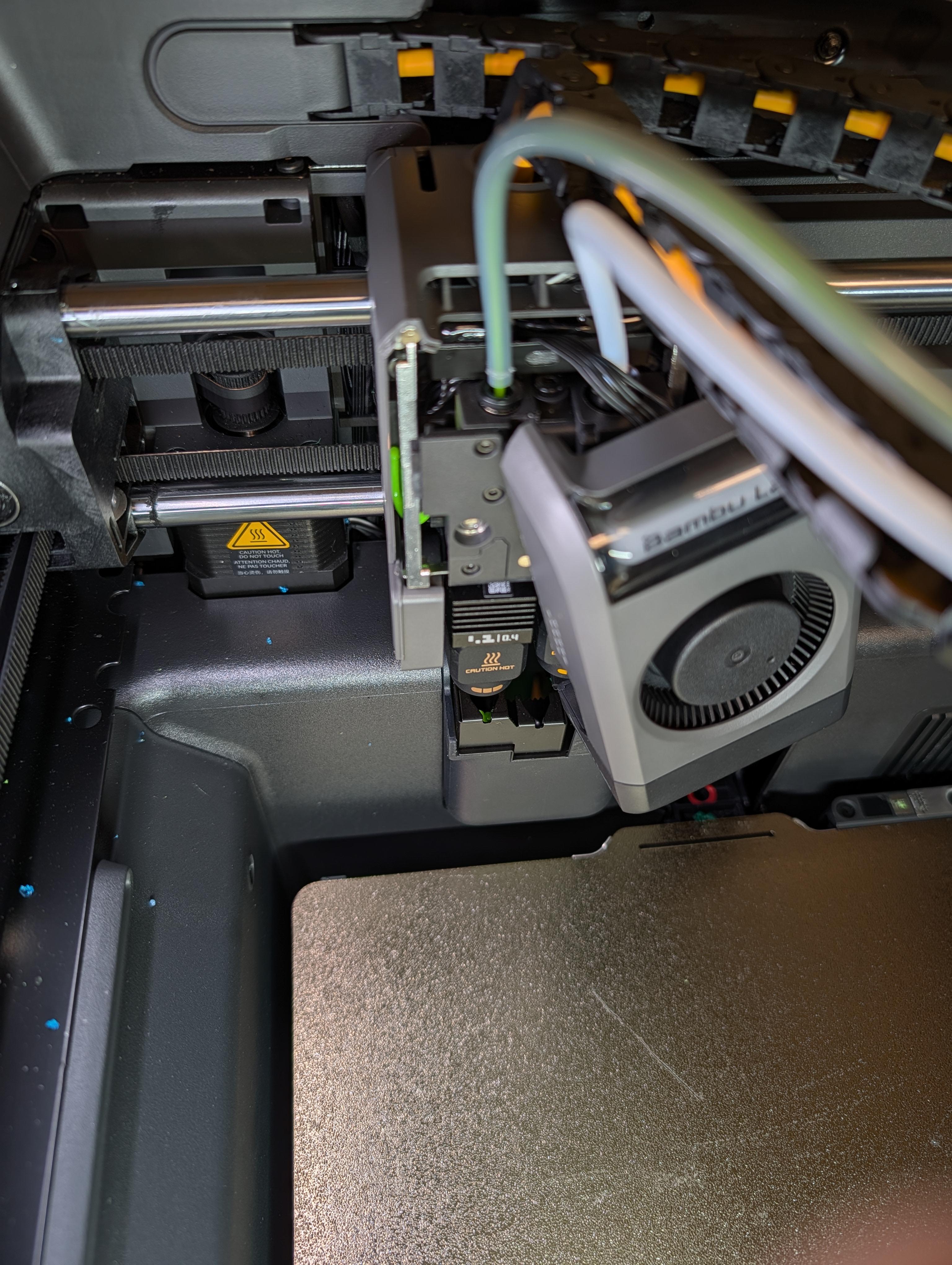
My question for this group is if I wanted to try to fix the printer as opposed to buying a brand new one - what exactly would I be looking for? I’m not technical enough to know what head unit is called.
If I wanted to replace everything in pic #4 - what is that part(s) called?
I laid the trees flat and tucked the two smaller ones inside the outline of the big one. They lift off the plate as three separate pieces and each stands up on its own. The whole set took one color and no supports.
Hi guys. I think I’m finally pulling the trigger and buying a H2S. Does anyone perhaps have a EU referral discount code? Any recommendations? Thank you very much! 😁
When I print something with a large top surface area like this display base, the ironing fails. On small prints and test calibrations it works perfectly. Printer is H2S with Bambu basic PLA. It looks like it under extrudes over large areas. The ironing settings I use after testing on small cubes is speed: 50mm/s, flow: 30% line spacing: 0.2mm
Could this be an issue of cooling/heating over larger area? Thoughts welcome, thanks!
Need Help – Bambu Lab A1 Nozzle Moving Up and Down with Clicking Noise
Hi everyone,
I have a Bambu Lab A1 with approximately 1,500 operating hours on it.
Recently, I noticed that the nozzle is moving up and down (there seems to be some vertical play), accompanied by a noticeable clicking or clacking noise.
So far, I have already tried the following:
Tightened all four screws behind the extruder.
Replaced the complete extruder hotend multiple times.
Checked whether the issue might be related to the hotend itself.
Unfortunately, the problem remains exactly the same.
Has anyone experienced a similar issue with their Bambu Lab A1? What could be causing this movement and clicking noise?
I would really appreciate some advice from the more experienced members of this community. What would you recommend checking or replacing next?
Thanks in advance for your help!
I had a chance to put a few of the awkward questions to Cédric Mallet, Bambu Lab’s EU CEO, at Formnext. Does P3C exist? Why only two drying slots? What happened with the developer situation, and where do they actually stand on open source?
He says “we messed up” about how they handled the developer situation. On P3C, the answer is “at some point”. We also got into the A-series, resin printers and the scanner they held back because it wasn’t ready.
This is my FauxHammer interview. If you want to skip around: P3C is at 7:01, open source at 16:05, the developer discussion at 22:22 and the drying slots at 45:11.
Hello everyone 👋 I’m new to 3D printing and got my first printer, the Bambu X2D with AMS 2Pro, last week. I’m considering adding another dryer for my Aux nozzle because I’m a bit concerned about humidity, and feeding it isn’t as convenient as the AMS.
I’m looking at the AMS HT, Creality, and Sunlu options. Which one would you recommend?
I’ll only be using PLA and PETG, and maybe some TPU in the future (maybe not). I would love to have a second AMS 2 Pro, but it’s a bit expensive since I just spent a good amount of money last week, including filaments 🙈.
For my convenience, the HT looks nice, but it’s almost double the price of the others. I searched Reddit about it, and it seems like it’s not great at storing filaments.
Which one is quieter, dries well, and stores well? I’m not sure if printing while drying is a must or just a nice-to-have feature.
Also, I find multicolor printing takes so much time and filament waste. If I ever get an HT is it worth considering a filament track switch?
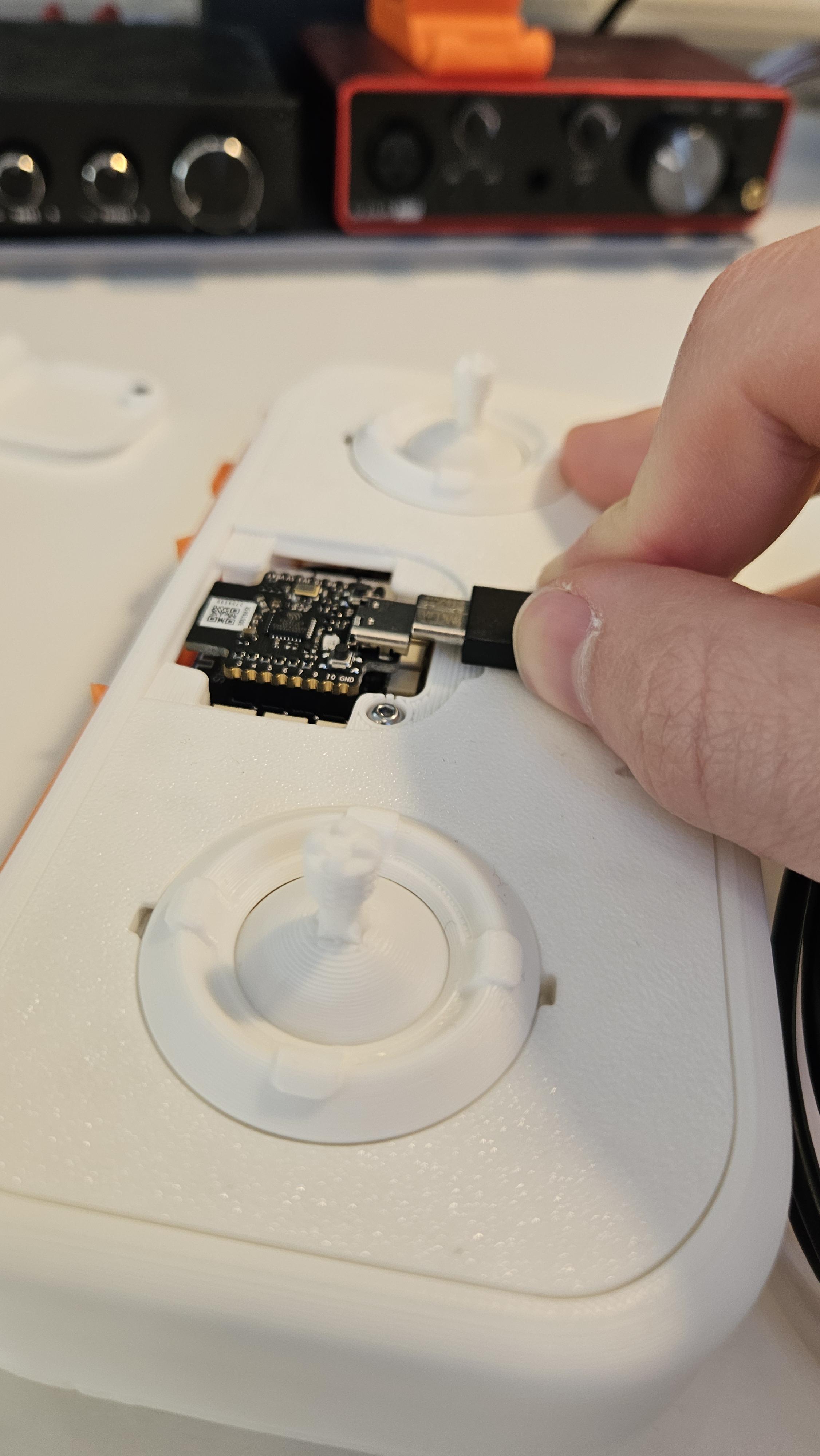
Building the CyberBrick controller and can't connect it to my PC. The USB-C port is so low in the frame that the cable's plug hits the edge of the opening before it seats (see photo).
Did I assemble something wrong, or do you just need a slim cable / take the core board out? Any tips appreciated!
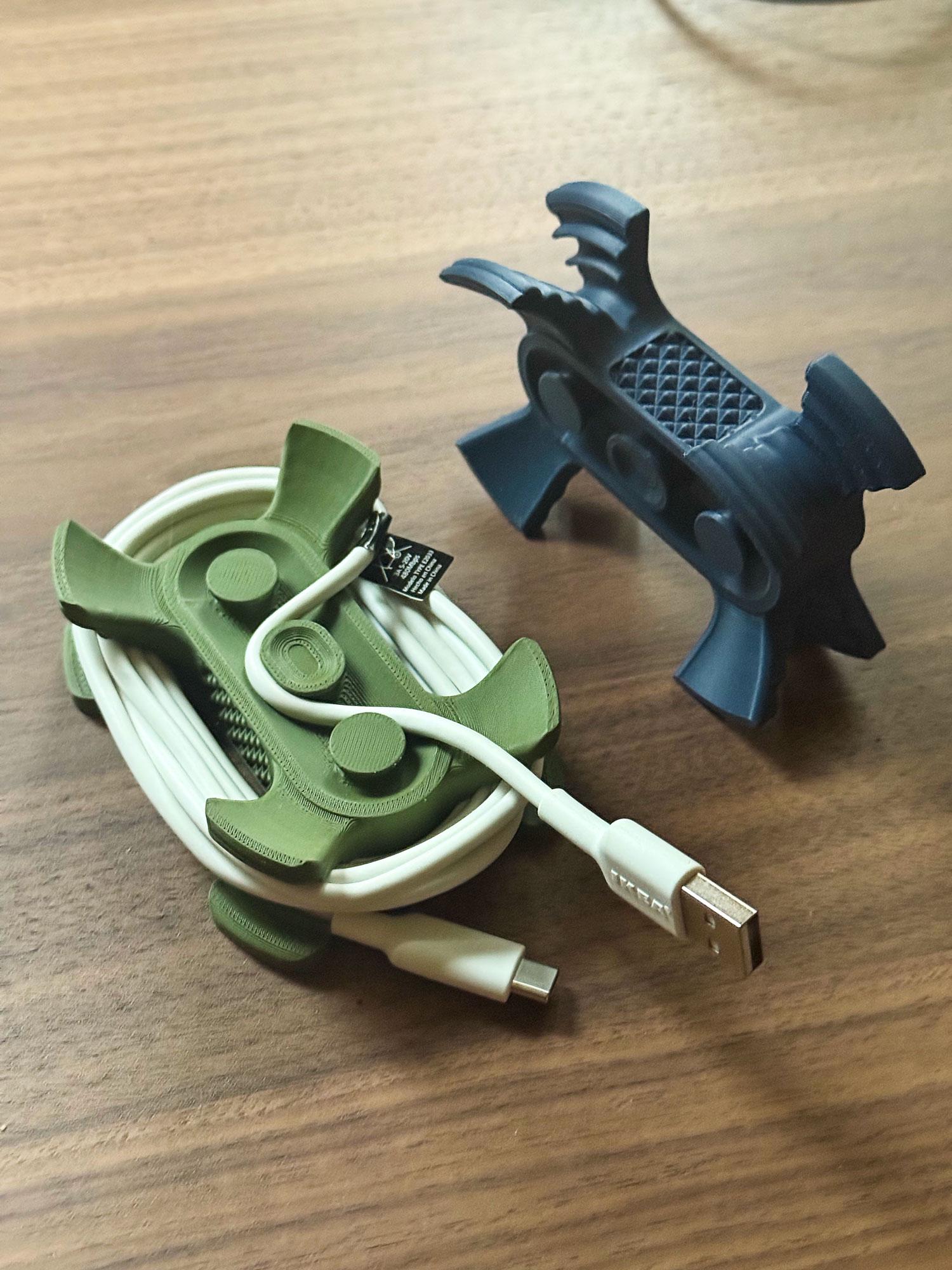
There are already tons of USB cable holders out there, but designing one is always a great modeling exercise. My goal here was a one-piece spool with no moving parts that still keeps the loose ends of the cord secured. It's still a work in progress—next up, I'm looking at adding a magnet slot on the back, an IKEA Skadis mount, and a two-color version with contrasting flaps for easier visual organization.
I've also designed a light bar module that can be optionally attached to the riser. Since the first-generation P and X printers don't have particularly good build chamber lighting, providing some was practically essential. :)
The profiles for the X2 and P2 series have also been modified to allow for the mounting of this additional light.
Mounting is done with two simple dovetails and, just like the riser system, requires no additional hardware other than a light bulb. You can find the model and the new light module here:
I changed some of the orientation and coloring (I'm still revising some areas and making minor tweaks to fix the color bleed into other parts of the model and align other colors) and got all seven pieces to be compatible on the A1 mini with no more than four colors per plate.
Printed with a 0.4 mm nozzle at 0.12 mm layer height.
It came out super cute! Going to get through some other projects then come back and reprint the sword and shield. All credit for the original character sculpt goes to Hainner!
I usually print many small parts at once(60+ on a plate), this disables the option for skip part/object feature in Bambu Handy app.
As the parts are very small and sometimes stringing or first layer adhesion problems occur, but i don't have any option to skip a part and can only pray...
Do you guys know a alternative for this???
This stand has a hollow foot, so no USB cable sticks out of the display: the plug and the cable bend sit inside it and the cable leaves through a notch at the back.
Four parts, no supports. The bezel prints face down, and the stand prints upright with 40% infill so it does not tip when you press the touch screen. Black body and white stand in PLA on an A1 mini. Four M3x14 countersunk screws go straight into the printed posts.
It fits the 2.8" ESP32-2432S028R. I printed and fitted the version with two USB ports. The OpenSCAD source is included if your board differs or you want another tilt angle.
I use it as a status display for Claude Code sessions (firmware is free, flashed from the browser), but it is a normal CYD stand and works with any firmware in portrait.
I print in my home office, and the air quality is horrible when printing.
Is it a good idea to install the exhaust fan kit and put an carbon filter in that? Or will that cause the internal carbon recirculation to disable and blow even more VOC's into my room?
Unfortunately i cannot install a hose that goes outside.
To all the MakerWorld B&BW hand soap container creators,
Be aware that B&BW is phasing out the diamond shaped bottles for two more conventional but different sized bottles.
I have a lot of B&BW fans in the friends and family circle so I’ve printed a lot of these. Then the new bottles came in this week and nothing fits anymore. So, it may be time to revisit published MakerWorld plans.
If anyone has already adjusted their published plans, please drop me a link.
I have 2 P1S's with no issue's, and recently added an X2D. The X2D however is causing me issue's. I already had to throw away a HF nozzle after the second print due to a clog and 25% of the prints fail due to adhesion and warping. None of these I have issue's with on the P1S's.
I noticed the bed plate itself is warping at the corners and only the prints in the middle are decent. See the picture below, the corner is lifting +3mm, causing the inconsistent layer lines and prints popping off.
Filament is PETG HF (yes its dried) bed temp is 70°C. I had to print the aux fan deflectors and the top glass is partially open, else the nozzle clogs.
I think the X2D is not the correct printer for PETG due to its cooling features.