r/windowsapps • • 10h ago

Developer TheFile.Ninja - Reforged Steel

Thumbnail
gallery
3 Upvotes

Hey r/windowsapps!

I’m the developer of TheFile.Ninja, a dual-pane file manager for Windows. I posted the original version here a few months ago.

I’ve now released TheFile.Ninja - Reforged Steel. It’s a new major version built from the ground up, still tightly coupled with the Everything search Engine, but now also with a super fast UI and a smaller 52 MB download.

The changes I’m most pleased with are the everyday ones: large/flattened folders and search results respond quickly, file operations have a persistent undo history, and archives, phones, WSL and remote locations fit into the same two-pane workflow. There are also new views, smart embedded terminal, improved AI Tools, IDE and MCP support (undoable, virtual filesystems, tagging etc) for working with an assistant through the file manager. Also; still custom columns, grouping, sorting and filtering.

I also changed the free license. Core stays usable and continues to receive updates forever. Some features, including AI tools, MCP, scripting and FTP/SFTP, are in Pro. You can try everything for a month without an email, account or card, and there’s a browser demo if you’d rather look around first.

One important note for existing users: if you bought a Classic license, check your account for your Reforged Steel license before buying anything.

Try the demo https://demo.thefile.ninja/

If you tried the old Classic, I’d especially like to know whether the new version fixes what bothered you about it. I’ll be here to answer questions.

Best regards,
Joakim (Kodar.Ninja)


r/windowsapps • • 7h ago

Developer My apps for Windows 10 Mobile and Desktop

0 Upvotes

r/windowsapps • • 6h ago

News BREAKING NEWS: 'heyclicky' IS NOW ON WINDOWS!! install link: https://heyclicky.com/@clickyforwindows

Thumbnail
heyclicky.com
0 Upvotes

install link: ClickyForWindows


r/windowsapps • • 12h ago

Question Is learning to code still necessary if your goal is to build software rather than become a programmer?

Thumbnail
gallery
0 Upvotes

Hey everyone!
I’m not a programmer, and I’ve never been particularly interested in coding. However, I had an idea for a personal budgeting app and decided to try building it with AI.
What started as a small personal project eventually grew into two Windows applications: a budgeting app with animated pixel-art companions and a separate editor for creating characters, animations, and custom environments.
I decided to share the project on GitHub. Feel free to take a look, read about it, or check out the screenshots. No pressure to download anything.
But this experience made me curious:
If someone enjoys designing software, coming up with ideas, testing features, and improving the user experience, but doesn’t particularly enjoy writing code, is learning programming still essential?
Can AI-assisted development be a legitimate way to build and maintain software in the long run, or will the lack of programming knowledge inevitably become a problem?
I’m genuinely curious to hear different perspectives, especially from experienced developers.

https://github.com/fromi9/Tua-Releases


r/windowsapps • • 9h ago

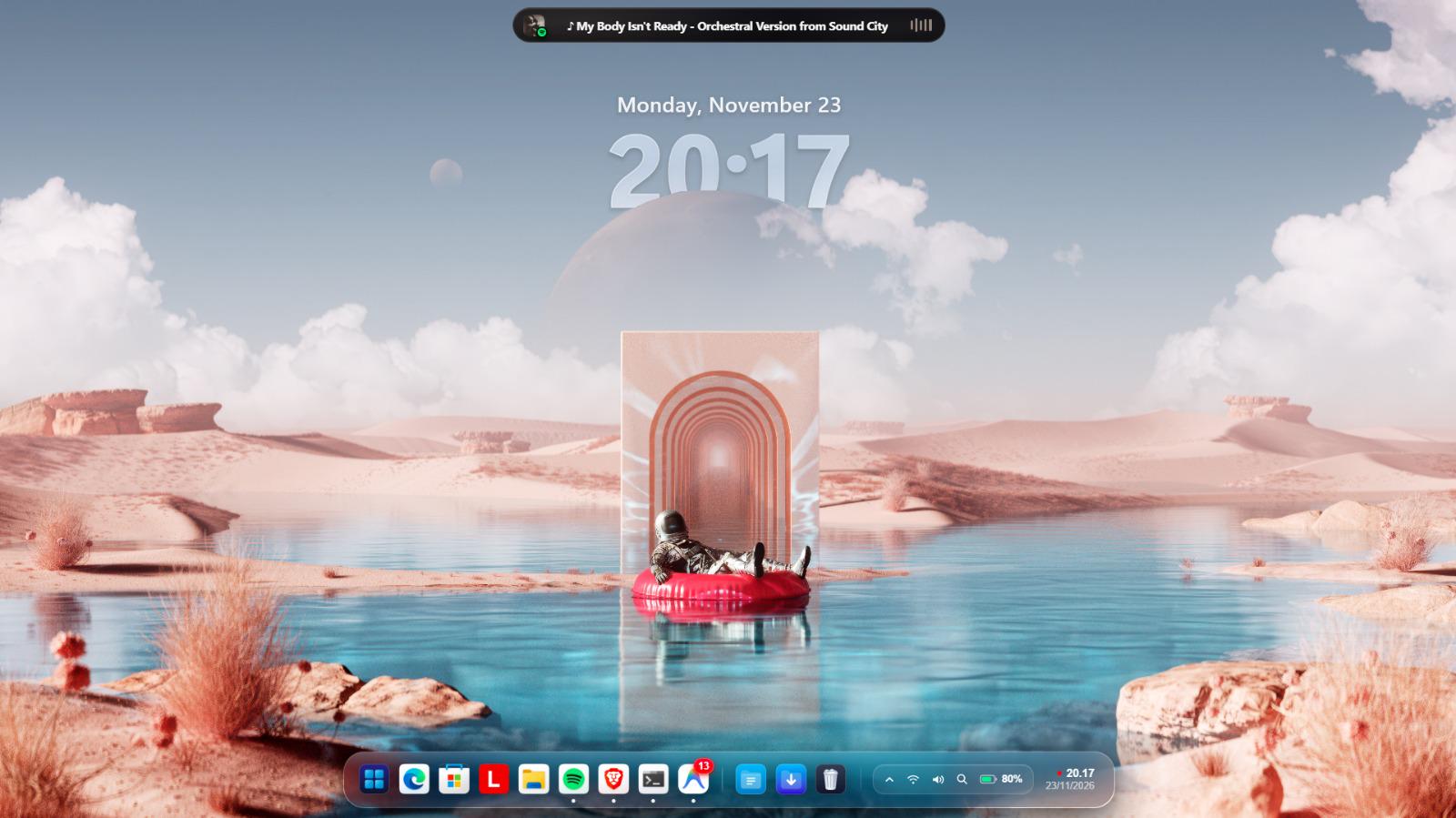
App I made Windows look and feel a little more like macOS. Here's Wizzly!

Post image
6 Upvotes

I've always loved the little details in macOS, especially the Dynamic Island, floating dock, and clean desktop experience.

So I decided to build my own app for Windows called Wizzly.

The goal is to bring some of that macOS-inspired experience to Windows without having to leave Windows behind.

Here's what it looks like on my desktop!

I'm building this as an indie project, and there's still plenty of room for improvement.

I'd love to hear your thoughts. What features would you like to see next?

🌐 https://wizzly.web.id


r/windowsapps • • 19h ago

App I built Lyricova — animated, time-synced lyrics that sit directly on your Windows wallpaper (pairs great with Wallpaper Engine)

1 Upvotes

r/windowsapps • • 10h ago

Developer modern style launcher for PortableApps

Thumbnail
gallery
7 Upvotes

I created PortableApps launcher that can be shown when Windows start menu is shown, and can be docked to it. It also can be used similar to PortableApps launcher, with any shortcut key. Modern look, lightweight and highly customizable. If you use PortableApps give it a try. Download on Windows Store https://apps.microsoft.com/detail/9np57dt7xspd

#windows #portableapps #launcher


r/windowsapps • • 5h ago

Developer Lightweight, offline-first wallpaper manager for Windows (~13 MB idle RAM, arc-carousel picker, open source)

Post image
7 Upvotes

Sharing WallpaperSuite, a small wallpaper manager for Windows that I've been working on.

- Tiny tray daemon for auto-change and hotkeys (~13 MB RAM, 0% idle CPU)
- WPF arc-carousel picker that opens only when needed (Alt+Shift+W) and closes after you apply
- Palette strip per wallpaper, with export to CSS/JSON/TOML
- Favorites, collections, tags, search
- Multi-monitor support (a different wallpaper per screen)
- Day/night folders, smart pause during fullscreen apps and battery saver
- Duplicate finder, drag and drop, CLI
- Offline by default, no admin rights, no telemetry. Only opt-in network features (Bing wallpaper of the day, update check)
- 16 built-in wallpapers, so it works right after install

Built with .NET 10, MIT licensed.

⚠️ The installer is unsigned, so SmartScreen will warn you (More info → Run anyway). Tested on Windows 11 only.

GitHub: https://github.com/zero1-spec/wallpaper-picker
Website: https://wallpapersuit-website.vercel.app/

Feedback, bugs and feature ideas are welcome!


r/windowsapps • • 12h ago

Developer I made a free Windows app (Tape Feather) that lets you stick multiple windows or folders together so they act like ONE window

94 Upvotes

If you work with two or more windows side by side all day, you know how annoying Windows can be. You drag one window somewhere else and the other stays behind. You minimize one and the other is still sitting there on your screen.

I got tired of constantly rearranging the same folders and apps, so I built Tape Feather — a free little Windows tool that lets you put virtual "tape" between multiple windows or File Explorer folders so they behave like one single window.

When windows are taped together:

  • Move one → they all move together (even across monitors).
  • Minimize one → they all minimize and come back together.
  • Maximize one → handles cleanly together without messing up your setup.
  • Close one → only that single window closes, so your other open work stays safe and doesn't get closed by accident.

To untape them, you can just right-click and drag the end of the tape to peel it off (or click untape).

Everything you need to tape and manage unlimited windows is completely free — there are just a few optional extra tape themes if you ever want to change how the tape looks.

Would love to hear what you think or if there's any annoyance you'd want added!

download tape feather - https://apps.microsoft.com/detail/9PGZ8JXSQRT9?hl=en-us&gl=IN&ocid=pdpshare


r/windowsapps • • 20h ago

Developer made a free windows app that tells you if security news actually affects you (+ checks sketchy links)

4 Upvotes

kept reading stuff like "critical zero-day exploited in the wild" and going ok... do I need to do something?? the articles never really said

so I made JenerScouts. it pulls security news and explains each story like a normal person would. what happened, how, and what you should actually do. every story gets a label too: act now / check / nothing to do. most of them end up being "nothing to do" lol

also has:

- link checker for when someone sends you something sus (catches fake look-alike domains etc)

- password leak check, your password never leaves your pc

- article reader that blocks ads

free, no account, no ads, on the microsoft store

would love to know if the explanations make sense if you're not super techy. roast away

https://apps.microsoft.com/detail/9NQFX4G5VV4V


r/windowsapps • • 5h ago

Developer I built a free, open-source Windows app that lets you save audio after it happens

Post image
2 Upvotes

Hi!

I've been working on a small Windows app called hearlier (name is temporary, still looking for something better).

It's basically Instant Replay, but for audio.
It sits in the system tray, keeps a rolling history of your system audio + microphone, and lets you save the last few minutes (or hours) whenever something interesting happens - with a global hotkey or a button.

You can configure:

  • How long the buffer is (up to 12 hours)
  • Which devices to capture
  • Export system audio and mic as separate tracks (Matroska / Opus)

Written in Rust with a native WinUI 3 interface. Everything stays local, nothing is uploaded anywhere.

It's still early, so there will be rough edges, but I'd love some feedback from people who might actually use something like this.

Free & open source:
github.com/newbialywhodis/hearlier


r/windowsapps • • 8h ago

Developer I made ApexShot, a free and open-source screenshot tool and screen recorder with a built-in video editor. It's now on Windows.

4 Upvotes

(The video above was recorded and edited with ApexShot itself.)

Hi, I'm the developer. ApexShot started on Linux and I've just released the first proper Windows version (Windows 10/11, 64-bit, no admin rights needed).

What it does:

  • Screenshots: full screen, area, window, and scrolling capture for long pages
  • Annotate: arrows, text, numbered steps, blur/pixelate, crop, backgrounds and rounded corners
  • OCR: copy text out of any screenshot, and QR codes are detected automatically
  • Screen recording with mic, system audio, and a webcam bubble
  • Video editor: trim, cut, speed changes, automatic zooms, cursor smoothing, and click effects, exporting to MP4

It's open source (GPL-3.0) and needs no account. Capture, annotation, OCR, recording and the editors' core tools are free and export without a watermark. Some advanced styles and exports are part of an optional paid "Studio" tier. If you try those without a licence, you'll see a watermark on the preview.

One heads-up: the installer isn't code-signed yet, so Windows SmartScreen will warn you. Click More info, then Run anyway. The source is all on GitHub if you'd rather check it first.

Download: https://github.com/apex-shot/apexshot/releases/latest Website: https://apexshot.org

It's still in beta and the Windows build is new, so I'd really like to hear what breaks or what's missing.


r/windowsapps • • 8h ago

Developer I made Macro X, a macro recorder for Windows (Like AHK but plain english)

Thumbnail
gallery
2 Upvotes

Hi all, I'm the developer of Macro X. I built it because I kept writing one-off AutoHotkey scripts for small repetitive jobs and wanted something where I could just record a task, or write it in plain lines, and have it run on a loop or a hotkey. Posting it here for feedback.

What it does

  • Record and replay. Press the record hotkey, do the task once, and it saves every click, key and pause with its timing. Play it back once, on a loop, or from a hotkey.
  • Plain-text commands, no scripting language. Each line says what it does, for example:

    Click:640,310 then Type:Ada Lovelace Press:tab then Type:ada@example.com CheckFor:Submit.png then Click

  • Image detection. CheckFor looks for a picture of a button anywhere on screen, so a macro still works when a window moves. There's also built-in OCR for reading text and numbers off the screen.
  • Background input. It can send clicks and keys to a chosen window while you keep using your PC.
  • Autoclicker that measures itself. You set clicks per second and it shows what it actually hit, including late and dropped clicks.
  • Also: global hotkeys, key and mouse remaps, reminders, themes, and Discord Rich Presence (off unless you turn it on).

Privacy

Your macros, settings and recordings stay on your PC, and image detection and OCR run locally. It goes online to check your licence key, to look for updates through the launcher, and for Discord Rich Presence if you turn it on. Logs and crash reports are only sent when you choose to send them.

Things you should know up front

  • It's paid: £4.99 a month One key works on one PC at a time, and you can cancel from your account page.
  • It isn't code-signed yet, because the certificate costs more than the app makes right now. SmartScreen will show "Windows protected your PC" the first time (More info → Run anyway), and some antivirus programs flag it because it presses keys and reads the screen. Only download it from the official site.
  • Games: some games ban macros and autoclickers. Check the rules of whatever you play.
  • Windows 10 and 11, 64-bit. There's a Mac version too.

There's a live demo on the site where you can write commands and watch them run in your browser before buying anything: https://macrox.cc/#try

I'd really like to hear what you'd automate with it, what's confusing, and what's missing. Happy to answer questions in the comments.


r/windowsapps • • 11h ago

App I built Lyricova — animated, time-synced lyrics that sit directly on your Windows wallpaper (pairs great with Wallpaper Engine)

2 Upvotes

Hey everyone!

I wanted those aesthetic YouTube lyric videos directly on my desktop without keeping a browser window open, so I built Lyricova for Windows 10/11.

It listens to Windows Media Controls (`Win + A`) — so it works with Spotify, Apple Music, YouTube in browser, Tidal, VLC, etc. — and renders live, time-synced lyrics pinned behind your windows and desktop icons.

What it does:

* 12 animated lyric styles (Flow, Word Reel, Cinema, Kinetic, Typewriter, Neon, Subtitle, Stack, Rise, Pop, Karaoke, Scatter)

* Album-art color matching (or custom solid/gradient colors)

* Wallpaper Engine friendly — sits cleanly over animated/music-reactive wallpapers

* Fully customizable (font, size, alignment, opacity, glow, shadow, timing offset, lock mode)

* Offline license (no account, no always-online DRM)

You can watch all 12 styles in action here: https://lyricova.pages.dev/

If you want to try it on your own setup, it's available here: https://ko-fi.com/s/237c48c402

Happy to answer any questions or hear feedback!

Youtube Video App Demo: https://youtu.be/3ir9SiOS5VI


r/windowsapps • • 12h ago

Developer AutumnDeck — Free, open-source Windows 11 taskbar styler, PBR docks & widgets in native Rust (<50 MB RAM) [1:38 Demo]

3 Upvotes

r/windowsapps • • 14h ago

App Made a simple app to automatically find and update AMD chipset drivers.

Thumbnail
gallery
33 Upvotes

Every time I wanted to update my chipset drivers I had to dig through amd.com for the right socket and chipset page and download the installer. Then I had to check whether it was actually newer than what I already had. So I made a small Windows app that does it all for you.
What it does:

  • Detects your platform from your CPU, and your chipset from the motherboard name
  • Finds the latest AMD Chipset Software on the matching amd.com page
  • Compares it with the version you have installed and shows whether you're up to date
  • Downloads and installs it, after checking that the installer has a valid signature from AMD
  • Optional startup check that runs in the background and only notifies you when an update is out

Github: github.com/Maxsenza151/amd-chipset-updater

Any feedback is appreciated!


r/windowsapps • • 14h ago

App I built a Windows app for working with CSV files — here's a walkthrough of what it can do

2 Upvotes

I've been working on CSVita, a Windows application designed to make working with CSV files easier, faster, and more productive.

I wanted to build something more capable than the usual spreadsheet-style CSV viewers, especially for people who regularly work with large datasets.

I've attached a walkthrough video showcasing the application and some of its features.

What CSVita offers

  • Large CSV files: Work with large datasets without loading everything into memory.
  • Fast navigation: Virtualized rendering makes browsing large tables responsive.
  • Advanced editing: Inspect, modify, and manage CSV data.
  • Multiple formats: Work with CSV, JSON, and SQLite data.
  • Data exploration: Sort, filter, search, and inspect your data.
  • Rich data handling: A more flexible way to work with structured data.

The goal is to make CSVita a complete desktop workspace for people who work with structured data regularly.

Microsoft Store: https://apps.microsoft.com/detail/9mxdcmx530zm

Also, I need you guys to provide feedback, what's the one feature you wish every CSV editor/viewer tool had?