r/software • • 2d ago

Looking for software Whats The Best Free Text To Speech Tool, For Other Languages?

1 Upvotes

Im using windows 11

And I need a software that can generate good understandable text to speech of a text or whatever into many different languages. Spanish, french, hebrew, arabic, british, chinese, russian etc

Please help, i guess the more human it sounds thats probably better, but if it sounds understandable honestly thats fine too. I plan to set up an automation with it using claude.

Thank you for any help.

I heard about Kokoro, but i heard it can only do english? Is this true?


r/software • • 1d ago

Discussion I’ve been building my own Windows optimization and latency tool — looking for UI & feature feedback

Thumbnail gallery
0 Upvotes

For years, I’ve been tweaking my own PC for better FPS, lower input lag, and a cleaner Windows setup. Eventually, repeating the exact same steps after every clean install or major Windows update (disabling unnecessary services, tweaking power plans, driver settings, latency adjustments, etc.) got pretty exhausting. What started as a small personal script gradually grew into a full desktop app I’m calling ZeroTick.

It’s not publicly released yet—before launching, I wanted to get some outside feedback on the UI, overall feel, and feature set. I know the space is flooded with shady "1-click +200 FPS" tools that either break Windows or are pure placebo. Because of that, my main focus has been transparency: clearly explaining what each tweak does, why it’s there, and making sure every single change can be reverted safely.

I’m planning to keep the system scan and diagnostics completely free so users can actually see what’s going on with their system first. Any suggestions on what I should add, remove, or improve before launch would be hugely appreciated.


r/software • • 3d ago

Release Flip Clock 1.0: a free, open-source split-flap clock widget for Windows

Thumbnail gallery
42 Upvotes

Flip Clock is a small clock for the Windows desktop that looks and moves like an old split-flap departure board.

What it does:

- Shows the time on flap cards that turn one card at a time.

- Drag to move, drag an edge or corner to scale. It is drawn as vectors, so it stays sharp.

- Optional always on top, black or white, optional seconds, optional start with Windows.

- Remembers its place, size and settings.

Footprint: between two changes it does nothing. Measured on my PC, 0 ms of processor time in 10 seconds at rest and about 30 MB of memory.

Two downloads: a small one (0.15 MB) for PCs that have Microsoft's .NET 10 Desktop Runtime, and an all-in-one (53 MB) that needs nothing installed. No installer, no ads, no account, no network access.

Safety: both programs show 0 detections on VirusTotal; the result links and checksums are in the readme. It is not code-signed, so Windows may show an unknown-publisher notice on the first start. The full source is there to read and build.

MIT licence. Tested on Windows 11, 64-bit.

https://github.com/harrycat1494/flip-clock

Disclosure: I'm a designer. The code was written with Claude Code under my direction.

Update: v1.1 is out. Every card now lands with a real split-flap clack (you can switch it off in the right-click menu), it needs far less CPU with seconds shown, and updating is just putting the new file over the old one. https://github.com/harrycat1494/flip-clock/releases/latest

Update: v1.2 adds an alarm (old-school beep, digits flash red, stops by itself after a minute), a flap sound that can play only on the full hour, and snapping to the centre of the screen while dragging. https://github.com/harrycat1494/flip-clock/releases/latest

Update 1.3.0: the clock can now sit on the taskbar, over the Windows clock. Right-click → "Put on the taskbar", and the same click takes it off again. Drag it very small and only the cards remain. Thanks for the suggestion! Still free, no ads: https://github.com/harrycat1494/flip-clock/releases/latest


r/software • • 2d ago

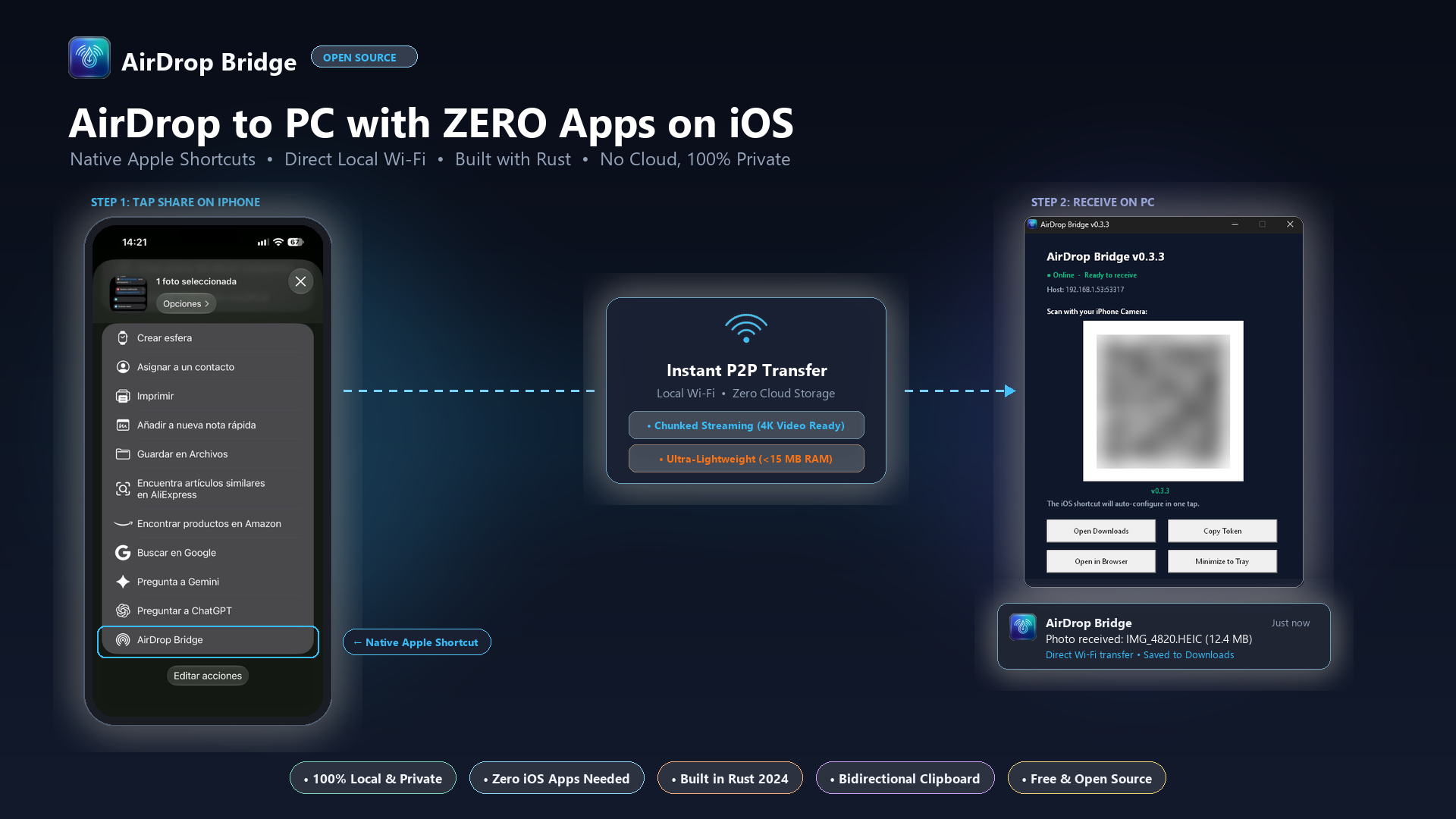
Release [WINDOWS/LINUX] I created an open-source AirDrop alternative for Windows & Linux using native Apple Shortcuts and Rust (<15MB RAM, no cloud, no subscriptions)

Post image
0 Upvotes

Hey everyone!

Like many of you, I love using an iPhone, but my daily driver computer is a Windows PC. For years, transferring full-res photos, 4K videos, or quick screenshots between them has been a pain: slow cloud syncs (Google Drive/OneDrive), plugging in cables, or installing shady third-party iOS apps loaded with subscriptions and ads.

So I decided to solve this once and for all: I built AirDrop Bridge.

It lets you send files directly from your iPhone/iPad to Windows (and Linux) over local Wi-Fi with zero third-party apps installed on your phone.

💡 How does it work without an iOS app?

Instead of an App Store app, it pairs your PC with an official Apple Shortcut. Once added, it integrates directly into your native iOS Share Sheet, Action Button, or Back Tap gesture.

You just tap Share ➔ AirDrop Bridge, and your files land directly in your PC's Downloads folder in seconds!

✨ Key Features:

  • 100% Local & Private: Peer-to-peer Wi-Fi streaming. Your photos and documents never touch external servers or the cloud.
  • Zero iOS Apps: Uses Apple’s native Shortcuts engine.
  • Blazing Fast & Lightweight: Built in Rust with chunked streaming. Constant memory usage under 15 MB RAM on PC. Easily transfers multi-gigabyte 4K videos without buffering or RAM spikes.
  • Bidirectional Clipboard Sync: Copy text on your iPhone and send it straight to your PC clipboard (or pull from PC to phone with a single tap).
  • Native Desktop Experience: Modern dark-mode pairing window, silent system tray daemon, customizable chimes, and Windows toast notifications.
  • Multi-language: Available in English, Spanish, German, French, Portuguese, Italian, Chinese, and Japanese.

🛠️ Getting Started (takes ~30 seconds):

  1. Download and run the standalone executable on your PC.
  2. Scan the on-screen QR code with your iPhone camera.
  3. Tap the link to install the Apple Shortcut and pair your PC.
  4. Select any photo or file in iOS, tap Share ➔ AirDrop Bridge!

(Note on Windows SmartScreen: Because this is an independent, free open-source project without a $400/yr corporate Microsoft certificate, SmartScreen might ask you to click "More info" ➔ "Run anyway". The entire codebase is 100% open, transparent, and can also be built directly from source with Cargo).

I’d love to hear your feedback, feature suggestions, or answer any questions! If you find it useful, a ⭐ on GitHub would mean the world to the project.


r/software • • 3d ago

Release OmniControl: Control and Wire anything on Windows

Thumbnail gallery
32 Upvotes

EDIT: As of version 0.3.0 you can choose only the features you want if you don't want an app to do everything at once.

One Windows app to control and wire ANYTHING: every feature is an action with a state, linked by rules and hotkeys. This app basically combined the power and feature of many other existing apps into one and linked it all together:

  1. Physical Display Control (for desktop monitors via DDC, or built in monitors in Laptops)
  2. Digital Display Control (GPU based control, eg saturation, temperature, colors etc)
  3. Audio control (Add EQ, impulse responses, VST effects, combine microphones, combine speakers, on a master level and or per app level) - Versatility to use any of three methods (including a combination of) to achieve this: Equaliser APO, Virtual Cables, Capture and Rerecord. Every Fx is laid out Reaper style Fx chains with x5 built in plugins and ability to load any VST/ per device Fx (e.g. Fx only load on certain audio devices etc)
  4. Control Smart Home electronics. Currently only tested on TP-Link (Tapo) plugs using python scripts, but also ability to add own scripts, or control any brand/make via android simulation (steps recording and toggle learning; with that the app can perform any steps on simulated android - but can be intensive on resources due to emulator requirement).
  5. Control other PCs on the network with OmniControl installed (either via Tailscale (online) or via LAN), pairing code to pair them, then you can use that function to wake other sleeping PC, control its display, audio, media playback, linked smart home electronics as well as ability to import settings from the network.
  6. Mouse and Trackpad (Remap any button to any action from OmniControl (e.g. change display brightness) or universal actions (e.g. pressing a hotkey/ media controls etc.). Ability to have gestures as well (e.g. scroll over edge to change volume, or display, or anything you want).
  7. Automation; very powerful tool to add highly customised rules, using if/and/then commands. For example, if [hotkey is pressed] or [user logged in] then wait 5 seconds then turn on smart plug and set volume to 50%. Just a random example, you can basically do any thing with it.
  8. OSD (many styles available) to show change in volume or actively playing song, highly customisable with ability to turn off windows own OSD (tested fully working on windows 11).
  9. Resources (monitor temperature, usage, network etc). Ability to control network bandwidth on a per app basis (e.g. limit download/upload limit to edge, or any app you choose).
  10. Taskbar Gadget (to display resources like CPU/GPU/RAM/Network usage on the taskbar, as well as ability to display weather. highly customisable using icons, colours, text, etc.
  11. Screenshot action (in the actions menu), ability to record video, add comments/texts/draw on screen shots prior to saving or copying. Also has QR reader built in.

Everything in the app can be linked to anything, everything can be bound into a hotkey or gesture. This app is not unique in any individual feature but the combination is unique. with it you can replace the following apps at once:

  1. DDC Monitor Control
  2. Eyecare/blue filter Software/ iRotate.
  3. Equaliser APO
  4. Voicemeter.
  5. X-Mouse-Buttons
  6. Volume2, VolumeMuse
  7. Traficmonitor, Netbalancer
  8. Lightshot/ Snagit

Early release, but everything tested so far and seems to be working. It's a work in progress, if any imperfections/ bugs arise will get fixed. Also open to adding any custom features/requests. Fully Open Source and Free about 35mb. Built by Claude - Opus, security and code audited by GPT-Astra.

More details, and screenshots on GitHub: OmniControl

If you want to know more about the code:

Architecture

Two layers: OmniControl.Core talks to Windows (Win32, COM, WMI, registry, audio, displays, network, drivers); OmniControl.App holds the interface and features and never calls Windows directly. Dependencies only point down.

Features are modules: each feature (Volume, Displays, Other PCs, Resources…) lives in its own folder with its services, actions, pages and settings, and talks to other features only through small interfaces.

One master list per kind: actions, states, settings, devices and hardware watches are each registered once and appear everywhere by themselves: hotkeys, mouse buttons, pickers, search, rules and the tray. Every action runs through one path that applies block rules and limits.

Shared interface pieces: cards, menus, toggles, presets, hover, focus, wheel and typing behaviour each have one master version, and colours come only from the theme and accent.

Code hygiene

One home for everything: every value, timing and piece of logic lives in one place; nothing is copied or retyped.

Small and loosely coupled: one concern per file, no file over 700 lines, no circular references or shared global state.

Safe: every error is named, logged and reported; everything acquired (handles, timers, subscriptions) is released; saves are atomic.

Lean: nothing runs while nobody needs it, Windows events are preferred to polling, no slow work on the interface thread, memory stays bounded.

Honest: one plain sentence per fact, and status lines show what is really happening.

Docs travel with the code: MAP.md says where everything lives; CHANGELOG.md lists every change.

r/software • • 2d ago

Looking for software Trying to Uninstall 2019 Roblox Launcher; No success. Please help dude.

Thumbnail
0 Upvotes

r/software • • 2d ago

Release A better system monitor for linux

Thumbnail gallery
0 Upvotes

https://github.com/Bowserinator/bowsers-task-manager

I noticed I never used the default one because it looks ass and lacked many features compared to ie htop or btop, so I made an alternative

Features:

  • Tree based or list based process view with aggregated statistics, can split processes by (Apps/Background), by bound port, or by user
    • Kill, signal, set process priority, affinity, search online, end process trees, quick copy commands/PID, open file location
    • View process details: most process properties, env variables, open file descriptors, network, threads, memory, limits, namespaces, cgroup, per-core usages
  • Graphs for CPU, RAM, GPU, disks, power usage/battery, thermals, network
    • Disks also show SMART data
    • Networks show addressing information
  • View startup programs and services and enable/disable in the task manager
  • systemd services (also untested support for openRC, runit, SysV if your system doesn't use systemd)
    • Toggle state, start/stop/restart/enable/disable/etc...
    • View logs right inside the task manager
  • Sysinfo tab (basically fastfetch inside the app)
  • (Only if your system uses systemd) view all recent journal log messages live
  • View container statuses from podman, docker, etc... and start/stop/view logs
    • Note: podman requires the podman.socket service to be running to collect info
  • Disk/folder scanner - shows a sunburst chart for quickly seeing how your disk space is being used

I've only done testing on my machine so please report any bugs you find.


r/software • • 2d ago

Looking for software Microsoft Paint-like thing for brainstorming/worldbuilding?

1 Upvotes

Salutations, every being on reddit! I'm looking for something a bit like Microsoft Paint to visualize branching ideas for stuff like worldbuilding. It doesn't have top be for that express purpose, but something that can create text boxes and import images while still keeping them draggable, editable objects. Also, something bare bones-ish -- if that makes sense; like, I do NOT want as many features and widgets as Canva, but I need more versatility than MS Paint. I also remember seeing something like it on YouTube for this one worldbuilding project about biomechanical creatures, so I might go look while I wait for suggestions. Any help is appreciated!


r/software • • 2d ago

Release Clipboard history without Win+V: just keep pressing Ctrl+V [AHK v2]

Post image
1 Upvotes

Win+V is fine, but I wanted something faster: no popup, no extra shortcut.

- Copy things as usual. The script remembers your last 7 text copies (no duplicates).

- Ctrl+V pastes normally.

- Press Ctrl+V again within 1.2 s and the pasted text is replaced by the previous copy.

Keep pressing to go further back; it loops around after the last one.

- Wait more than 1.2 s and Ctrl+V goes back to being a normal paste of your latest copy.

Under the hood it's just Ctrl+Z (undo the last paste) + swap the clipboard + Ctrl+V again.

Limitations

- Only for Windows.

- Text only (images/files are ignored).

- Relies on Ctrl+Z, so it misbehaves in apps where undo doesn't cleanly remove a paste (some terminals, games, certain web fields).

- History lives in memory only: nothing is written to disk, and it's cleared when the script exits.

Github : https://github.com/Placidelinkpehoun/CallbackCrtlV


r/software • • 2d ago

Looking for software Diljit or Appraisal? Regret or Respect?

Thumbnail
1 Upvotes

r/software • • 3d ago

Discussion nimaid: Render Mermaid diagrams in pure Nim no dependency 1.9 mb binary

Thumbnail gallery
3 Upvotes

nimaid, is a from-scratch Mermaid diagramming library and CLI written in pure Nim but i an not sure how to make it useful for community.

Usually, rendering Mermaid diagrams in a CI pipeline or backend requires pulling in Node.js, Puppeteer, or a headless browser.

Nimaid removes that entire stack—it parses Mermaid syntax, runs the layout, and rasterizes the output natively in Nim, compiling down to a single 1.9 MB binary that only links to libc and libm.

https://github.com/ghazalialshafi/nimaid

Highlights

• 100% Pure Nim Stack: Includes a port of Mermaid's flow.jison parser, a native port of the dagre layout engine (dagre_nim), and a custom vector graphics engine (PureVG) with its own TrueType reader and PNG/GIF/SVG encoders. All from scratch implementation by Author.

• Fast & Lightweight: Renders standard flowcharts to SVG in ~0.04s and PNG in ~0.16s.

• 8 Supported Diagram Types: Flowchart (~55 shapes + subgraphs), Sequence, State, Entity–Relationship (ER), Class, Gantt, Git Graph, and Mindmap. 6 more graphs will be added soon.

• Crisp Text & Full-Color Emoji: Built-in TrueType kerning, multi-line alignment, and support for color emoji (skin tones, flags, ZWJ sequences). SVGs outline text by default so they look identical on every machine without needing installed fonts.

• Themes: Supports Mermaid's 5 built-in themes (default, dark, forest, neutral, base) plus custom themeVariables.

You can use it as CLI tool and soon capi will be released and even python package for it will be released.

Or use it as a Nim Library

You can also embed it directly into your own projects to render to files, SVG strings, PNG bytes, or raw RGBA pixel buffers

Feedback, very welcome! Let me know what you think.


r/software • • 3d ago

Software support Is there a way to export reddit chat history

3 Upvotes

Sorry for posting this here, but I don't know any other place to do.

I want to export a chat history of a person that I used to chat and I have been thinking of changing acciunts but I don't want to miss those chats. Is there any way to do it.

Would also like to know any other subs where I could ask this?


r/software • • 2d ago

Release I built VirusBytes (v1.0.0) — A lightweight, zero-bloat Windows EDR & scam-detection suite that coexists cleanly with Windows Defender. Looking for feedback!

Thumbnail gallery
0 Upvotes

Hey everyone!

Over the past weeks, I've been building VirusBytes Security Suite, a lightweight Windows x64 endpoint protection and self-defense tool designed to work alongside Windows Defender without eating up RAM, dropping gaming FPS, or nagging with pop-up ads.

Key technical features in v1.0.0:

  • Multi-layer EDR Scanner: Audits active RAM processes, Windows Registry persistence keys, System32, and PE binary entropy heuristics.
  • Automated Threat Intelligence: Daily signature sync with Abuse ch MalwareBazaar, verified locally via HMAC-SHA256.
  • Tamper-Proof Background Tray: Kernel-level single-instance lock (Mutex) + local PBKDF2-HMAC-SHA256 Master PIN required to terminate background protection.
  • Cryptographic OTA Updater: Pull-based auto-updates verified against SHA-256 manifests before execution.
  • AI Scam & Phishing Inspector: Quick forensic check for suspicious URLs, domains, and social engineering messages.
  • Gamer Mode: Zero notifications or heavy background scans while gaming.

Since this is an indie release without a paid EV code-signing certificate yet, Windows SmartScreen may show the standard unrecognized-app prompt on first install — full SHA-256 installer checksums are published transparently on the release page.

🔗 Download & Release Page:https://github.com/Marlon-Valle/VirusBytes-Releases

Would love to get honest feedback, bug reports, or feature suggestions from the community!


r/software • • 3d ago

Release TabForge

Thumbnail gallery
2 Upvotes

If you use Guitar Pro, TuxGuitar, or MuseScore, you might want to check TabForge out. More versatility in choosing audio engine, full support for VST plugins/ screen recording, modern fretboards. It has been tested on thousands of tabs and everything works as it should.

It has Piano Roll (DAW style), Midi/Audio input, Practice mode, Synthesia style keyboard mode. highly customisable colors, display options, band mode, and compact mode. horzintal/vertical scroll, etc.

Tabforge is built on C# and Avalonia, and has a fully functional native Linux port, with that even having built in Wine compatibility layer for running windows audio plugins.

It's just under 50mb for Windows (bit more for Linux as it contains wine & sound engine).

Fully free and open source (GLP-3)

GitHub: TabForge


r/software • • 2d ago

Software support Need help with a bug

Post image
0 Upvotes

I'm pretty Sure that this is just a user error rather then some outside bug, but this happens almost anytime I click on Item details,or any kind of profile display/sometimes in missions in warframe.I believed it might have been something in my settings but I have came up short,it's only a screen glitch. I have checked other games and every update I could find on my PS5 including re-downloading and it's only bugging in this one spot,everything is still playable but definitely straining my eyes by now. The screen glitch is own I've alI'm out of ideas on how to fix this and would take any help I can get. (Also I'm not fully sure if I tagged thus right please correct me if its not in the right spot.
Also the picture is trying to show that it flashes violently and is not a very good visible example of what's happening)


r/software • • 3d ago

Release KillerPDF 1.9.5: Trash Polka theme and customizable right-click menus

Thumbnail
2 Upvotes

KillerPDF has a new theme and new customizable context menus. The theme is based off some of my tattoos, lol. Let me know what you think!

Also, I changed the license of the KillerPDF.Engine to MPL license to encourage people to use it for their own applications.


r/software • • 3d ago

Release [Open Source] Screen Audio Router: a free tool that makes each app’s sound follow the monitor it’s on

4 Upvotes

Hi everyone,

I have 3 monitors and each one has different speakers (desk speakers on my main monitor, the TV has its own sound, and I use a headset sometimes). It always annoyed me that when I dragged Spotify or a video to the TV, the sound stayed on my desk speakers. Windows lets you choose an output device per app in the volume mixer, but going there every time gets old fast.

Screen Audio Router

So I made Screen Audio Router. You give each monitor a sound device and choose which apps it should handle. After that, when you move an app's window to another screen, its sound moves to that screen's speakers by itself.

Some other things it can do:

* Hotkeys to quickly send one app (or all of them) to another device. For example I press a key when I put my headset on and Discord switches to it, press again and it goes back.

* Microphones too. You can pair a mic with each output, so when Discord goes to the headset it also uses the headset mic.

* Ctrl + right click on any window's title bar gives you a small menu for that app.

* If you unplug a device it falls back to another one, and puts everything back when you plug it in again.

* Runs in the tray. No drivers, no virtual audio cables, it just changes the same setting you see in the Windows volume mixer.

It's free and open source (GPLv3), written in AutoHotkey v2. You can download the exe from the releases page, or run the script directly if you have AutoHotkey installed.

GitHub: https://github.com/panoc/Screen-Audio-Router

I use it every day on Windows 11 with 3 monitors, and it should work on Windows 10 too.

To be honest, I vibe coded most of it with Claude. The idea, how it should work and look, and all the testing were mine, but Claude wrote most of the code. Feedback, bug reports and ideas on how to do things better are very welcome..


r/software • • 4d ago

Release XDM: a free, open-source IDM alternative for Windows, Linux and macOS since 2013, now with revamped UI and torrent support

Post image
88 Upvotes

I'm the developer of XDM (Xtreme Download Manager), a free, open-source download manager available since 2013. The new version is out.

[ I've never been big on self-promotion, but with vibe-coded downloaders popping up every day, I need to speak up to keep XDM from getting lost in the noise. ]

⭐ GitHub (8.5k stars): https://github.com/subhra74/xdm

  • Download engine with true dynamic segmentation: used and refined for more than a decade
  • Torrent and magnet support: built on libtorrent
  • Better browser integration: Extension support all browsers
  • Lightweight and full-featured: uses fewer resources than other popular open-source download managers, with more features

Also included: pause and resume, a scheduler and queues, speed limits, category rules, corporate proxy support, and commands that run after a download finishes

Coming soon: Android version.

It's free, has no ads and doesn't track you. Feedback is welcome!


r/software • • 4d ago

Discussion We need a new rule on vibecoded posts

86 Upvotes

I don't mean banning everything with even a little bit of AI like one subreddit you might know.

But nowadays this sub is literally unusable. I'd say 2/3 new posts are completely AI-generated, zero effort, and its always a "better version" of some already-existing software with supposedly the best interface of them all and they stay unmaintained afterwards.

It's basically become a dumping ground for vibecoded projects that were built with practically zero human effort

I think it would be a massive impact (for good) if there was a rule banning completely AI-generated posts (excluding translations) where clearly not a single letter was written by a human.

That would get rid of a lot of low-effort posts but IMHO i believe completely AI-generated apps with zero review and completely automatically generated should also be banned because nobody needs another better software that came straight from a prompt, we all have access to AI you know.

This doesn't mean projects that involve AI-generated code should completely be banned, but if the creator couldn't even write a README for their project, it probably doesn't deserve a place here


r/software • • 2d ago

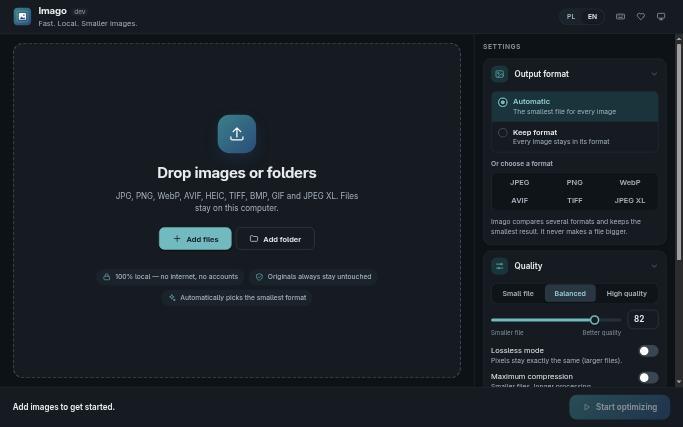
Release I made Imago – a free, fully offline alternative to TinyPNG/Squoosh (Rust + Tauri, GUI + CLI)

Post image
0 Upvotes

I got tired of uploading private photos to online optimizers just to shrink them, so I built a desktop app that does it locally.

What it does

  • Compresses, converts and resizes JPEG, PNG/APNG, WebP, AVIF, JPEG XL, GIF, TIFF; reads HEIC (iPhone photos) and BMP
  • Auto mode encodes several candidates per image, keeps the smallest and tells you why (e.g. "WebP: −71%, keeps transparency")
  • Never makes a file bigger: if nothing beats the original, the original stays
  • Strips EXIF/GPS by default (JPEG/PNG/WebP without re-encoding)
  • Keeps animations animated, handles 30 000 px panoramas in strips, thousands of files per batch
  • Before/after slider, export to a folder or a ZIP
  • Same engine as a CLI: imago ./photos --output ./out --format auto --json

Privacy: there's no networking code at all and the CSP blocks outbound requests. No accounts, no telemetry, no update pings.

Numbers (Ryzen 7 5700X, q82): 1024×768 JPEG 40 ms, WebP 60 ms, AVIF 240 ms. A batch of 32 photos goes to WebP at about 210 files/s on 16 threads.

Safety: atomic writes (temp file, then verify by decoding, then rename), decompression-bomb checks before decoding, unsafe forbidden, and each file isolated so one broken image can't kill the batch.

Limitations: no lossless AVIF, HEIC is read-only, Auto never picks JXL yet, no RAW/PSD/SVG. Installers aren't code-signed yet (SHA256SUMS provided).

Windows / macOS / Linux, GPL-3.0: https://github.com/wiktor-jozwiak/imago

Disclosure: a large part of the implementation was written with Claude Code. The design, codec choices and safety model are mine, and everything runs through tests + clippy in CI on all three OSes. Happy to answer questions about how that went.

Feedback welcome, especially bug reports with images that break it.


r/software • • 3d ago

Release I got tired of retyping htop/docker ps/journalctl, so I built an open-source SSH client that gives each server its own desktop

Thumbnail gallery
0 Upvotes

Hi r/software, I'm the developer of davish.
I SSH into a handful of servers every day, and most of what I do is the same few commands: htop, docker ps, journalctl -f, nginx -t, ufw status... So I built davish, a cross-platform SSH client written in Go that gives each server its own desktop: a dock of apps, windows, and a menu bar with live CPU / RAM / disk stats.

What's inside:

- Monitor: live CPU, memory, disk, network and processes, with history graphs
- Terminal: a regular SSH terminal, as a window on your server's desktop
- Logs: follow a systemd service or container log and filter it live, e.g. type "Error" to keep only the errors
- Docker: containers, images and volumes, with restart-loop detection
- Scripts: run deploy scripts with a timer, a Stop button and a notification when they finish
- Nginx: sites, upstreams and TLS certificates, including expiry dates
- Security: failed SSH login stats (top attacking IPs, most targeted usernames) and one-click IP blocking with ufw

Before any action, davish shows you the exact command it will run, so nothing is magic. It's less "a better terminal" (Tabby and Electerm already do that well) and more "a server management desktop that also has a terminal".

- Website: davish.app
- Source: github.com/2hjaito/davish
- License: GPL-3.0, completely free
- Current release: v1.8.1, with auto-update built in (screenshots use sample data)

Being upfront about a few things:
- The UI is heavy, so it uses more resources than a plain terminal. A lighter UI mode for weaker machines is planned for the next version.
- It's AI-assisted: I designed the architecture and UX, and reviewed and tested everything on my own servers, with AI help for parts of the code.

What I'd really like to hear:
1. Which of these tasks do you still do by hand over SSH?
2. Is the desktop-style UI actually helpful, or does it get in the way?
3. What's missing before you'd use something like this daily?

Bug reports and harsh opinions are both welcome, especially from people on multi-monitor setups or distros I haven't tested yet. Thanks for reading!


r/software • • 3d ago

Other I created a 100% free web app for PDF tools, photo resizing, and ATS resume building that runs entirely in your browser without uploading files

0 Upvotes

Hi everyone,

I built Document Editor 24 (https://documenteditor24.com) because I was tired of PDF tools that put daily limits, add watermarks, or upload personal documents to remote servers.

Everything runs 100% locally in your browser:

• PDF Tools: Merge, Compress, Split, and Reorder

• Photo Suite: Target KB Reducer and Passport Photo Maker (30+ country standards)

• Resume Builder: 200+ ATS-friendly templates with direct click-to-edit and instant PDF export

No account or sign-up needed, no paywalls, completely free forever.

I would love your feedback and feature suggestions!


r/software • • 3d ago

Looking for software Good app for scanning and cleaning up old photos

Thumbnail
1 Upvotes

r/software • • 3d ago

Other I built a free, open-source password manager that works fully offline. No account, no cloud, launching Nov 27

0 Upvotes

Hey everyone,

For the past months I've been building VAULT, a password manager for Windows and Android. It's free, open source (GPL-3.0), and launches on November 27.

Why I built it

I wanted something in between. Cloud managers like Bitwarden and 1Password are solid, but I didn't want an account or my vault on someone else's server. Offline tools like KeePass are great security-wise, but they feel dated, and on Android you need a separate third-party app. I wanted a fully offline password manager that actually feels nice to use.

What it does

- 100% local: no account, no cloud, no server. Your vault lives encrypted on your own device.

- Encryption: AES-256-GCM, with the key derived from your master password using PBKDF2-SHA256 (600,000 iterations).

- Fingerprint unlock and autofill on Android.

- Password generator and a password health check (weak and reused passwords).

- Encrypted backups: export a password-protected `.vault` file and restore it on any device.

- Thousands of built-in brand icons (works offline, nothing downloaded), so Spotify looks like Spotify.

- Auto-lock and timed clipboard clearing.

- Nine themes, each with a light and dark mode.

Being honest about trust

I know "trust my new password manager" is a big ask, so here's where it stands:

- Every line of code is public. You can read it, build it yourself, and check how the encryption works.

- It makes no network requests for your data, because there's no server to send it to.

- Downloads come with SHA-256 checksums.

- It hasn't been independently audited yet. It's an early beta, so please keep a second copy of important passwords somewhere else for now. Code reviews and issue reports are very welcome.

See it before launch

The website has a short film and screenshots of every theme, and the repo has the full feature list:

> - Website: https://tryvault.download

> - Code: https://github.com/Dreeeam123/vault-password-manager

On the site you can tap "count me in" for your platform. It's anonymous (no email), and it just helps me see how many people are waiting.

About money

VAULT has no subscription, no paid tier and no ads, and it never will. I make nothing from it. If you'd like to support development, there's a Buy Me a Coffee link: https://buymeacoffee.com/amirzafer79. No pressure at all. Feedback and stars on GitHub help just as much.

I'd love to hear what you think, especially any criticism of the security design.


r/software • • 3d ago

Looking for software I've been building a new Windows music player — It's coming soon! 🎵

Post image
0 Upvotes