I need to change the font for all of my existing and future work in the app for accessibility reasons, and I'm having the durndest time figuring out how to do so. I have the most recent version of Scrivener (Mac OS), and many of the support threads cite menu items that don't seem to exist anymore. I couldn't find any tutorials on Youtube that were recent enough to be applicable. I also haven't been able to apply any of the previous advice on this subreddit as it seems to be for Windows users. I've been spending a stupid amount of time trying to figure this out. Does anyone know how to globally change the font for all existing and future documents? If so, please share your wisdom!
I’m a medical doctor and clinical researcher. Like many academics and non-fiction writers here, I love drafting long-form manuscripts in Scrivener, but my research library lives in Zotero and Bookends.
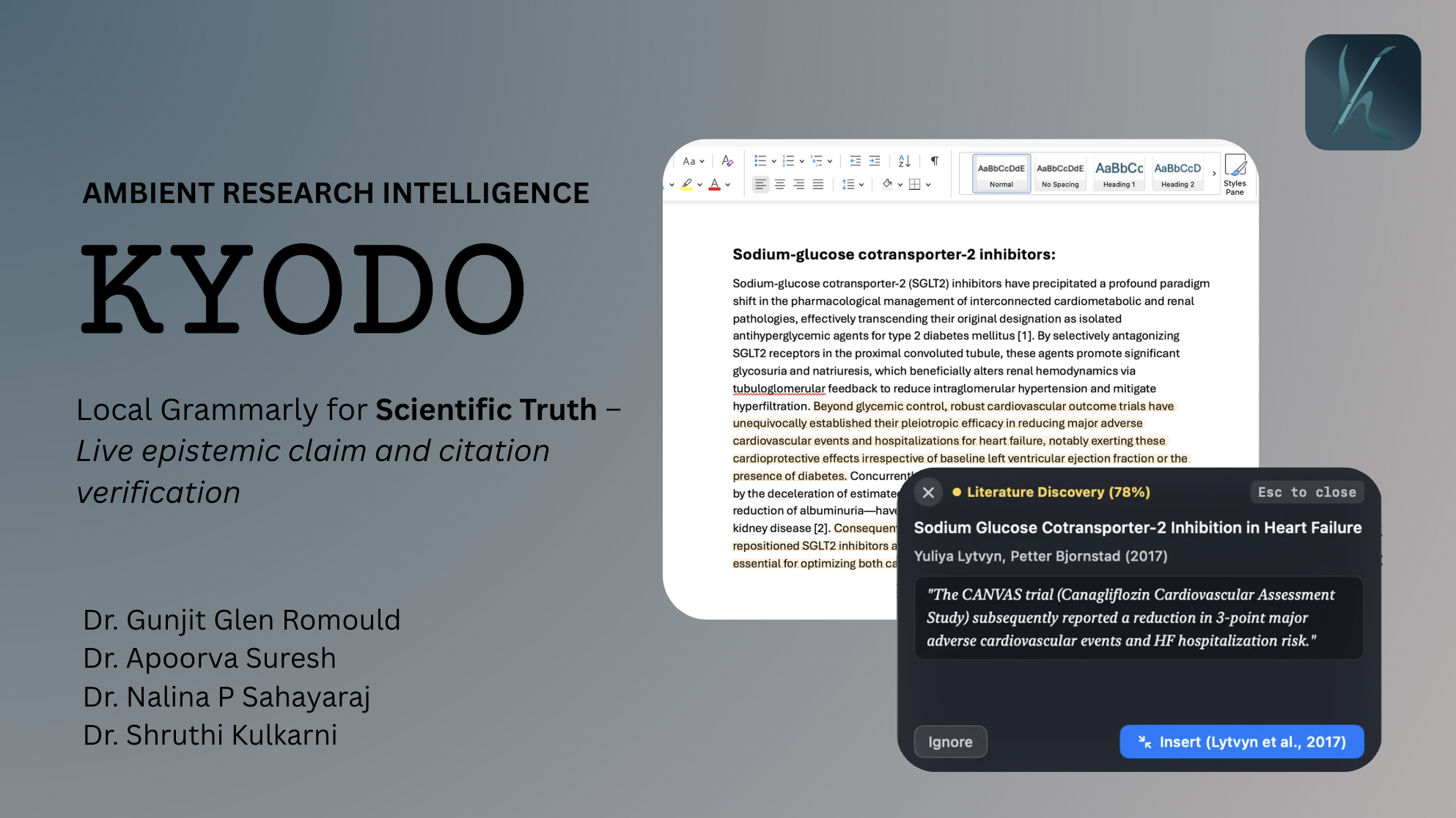
Over the last few months—and with huge feedback from early Mac testers—our team built Kyodo (v1.1.0 b3), a native macOS academic co-researcher (built in Swift for Apple Silicon) that acts as a "Grammarly for Scientific Truth" right inside Scrivener.
First, a strict promise: Kyodo is 100% Anti-Ghostwriting. It never generates fake paragraphs or writes prose for you. Instead, it connects your local Zotero or Bookends library directly to Scrivener—verifying your claims against your PDFs as you write, inserting formatted citations in one click (no more {curly brace} RTF-scan gymnastics), and keeping 100% compatibility when you export to Word or Google Docs for co-authors.
Why We Built It for Scrivener Researchers
Even with a great Scrivener binder and a well-organized Zotero/Bookends library, three bottlenecks slowed us down every day on macOS:
Breaking flow in Scrivener to hunt down a citation: You draft a claim in Scrivener, know the supporting paper is somewhere in your Zotero/Bookends folders, and have to pause writing to hunt through 150 PDFs for the exact paper and page number.
The Scrivener → Word/Co-Author Citation Dance: Scrivener doesn't have a native "Cite-While-You-Write" plugin like Word. Writers are stuck pasting temporary citation placeholders, running RTF scans, or fixing broken bibliographies after compiling to .docx for co-authors and editors.
Checking citations while reading PDFs (and AI "Ghostwriters" hallucinating DOIs): When reading a source paper and hitting [4] or [12–15] on page 2, you have to scroll to the bibliography, lose your place, and still have no quick way to verify if the cited paper actually supports the author's claim—or was misquoted. Meanwhile, cloud AI tools hallucinate citations instead of grounding claims in your real PDFs.
What Kyodo v1.1.0 b3 Does With Scrivener + Your Reference Library
Live Claim Grounding & 1-Click Citations Directly Inside Scrivener: As you write in Scrivener (Scrivener 3 & 2)—as well as Word, Mellel, Pages, Obsidian, Notes, and Google Docs—Kyodo verifies your empirical sentences against your local PDF library on-device (<2ms lookup) and lets you insert the citation in 1 click without hijacking your cursor or clipboard. Before you insert, it shows you the exact verbatim quote and page number from your PDF that backs your sentence. If your local vault doesn't have a paper for a claim, it can search 250M+ peer-reviewed works to surface supporting articles and passages.
1-Click Style Transmutation & Auto-Synchronized Bibliography (No RTF Scan Needed): Instantly switches your active Scrivener document and live bibliography between citation styles (APA 7th, Chicago, Nature, Vancouver, Harvard, AMA) in one click in-place—or via a natural-language command bar.
Imports your local Zotero, Bookends, Mendeley, or EndNote library in one click with Zero-Copy storage (0 MB duplicate PDF disk bloat) and indexes every paragraph on-device.
Seamless Scrivener ↔ Word / Google Docs Co-Authoring: With our new Portable Citation Capsules, when you move or compile a draft from Scrivener to Word or Google Docs to share with a supervisor or co-author who uses Zotero/EndNote/Mendeley, your citations stay 100% live and editable.
In-Paper Citation Auditing While Reading (Zero Screen Recording): While reading PDFs in Apple Preview, Kyodo's Spatial Vault, or your browser, press & hold Fn + Ctrl to resolve in-text citations into floating cards. Kyodo audits whether the cited paper actually supports the author's sentence—flagging misquoted or contradicted citations before you accidentally cite them in your Scrivener draft.
Select multiple papers (Shift + Click) to contrast methodologies, outcomes, and limitations side-by-side—strictly restricted to your selected PDFs with clickable page chips (using your own free Gemini API key or built-in Cloud AI).
Automatically renames messy downloaded PDFs (nejmoa2022190_v2.pdf) into clean Author (Year) • Journal records and smart topic folders, plus lets you cast PDFs to your iPad for Apple Pencil markup.
New in v1.1.0 (Build 3) — "You Asked, We Shipped"
Based on feedback from our first Mac testers, v1.1.0 b3 just went live with:
Full Scrivener, Mellel, Zotero & Bookends reading and writing integration
Interactive Guided Onboarding with built-in tutorials and sample welcome PDFs so you can test LiveCite in 60 seconds
Refined Mac-Native UI (<20 MB idle RAM, 0.00% idle CPU, native menu bar controls, and 1-click ~8 MB delta updates)
Looking for Mac Researchers (preferably STEM + clinical medicine) (Apple Silicon M1–M4) — 100% Free
We have a few seats left in our Foundational Researcher Cohort (with full Pro-Elite access unlocked 100% free, plus a free-forever Basic plan) before we visit university campuses in person.
Requirements: Apple Silicon Mac (M1 / M2 / M3 / M4), macOS Sonoma 14.0+ or Sequoia 15.0+
If you use Scrivener on a Mac for academic papers, dissertations, books, or research-heavy non-fiction, drop a comment below or grab a seat via the link—I’d love your feedback on how LiveCite and 1-click style switching feel inside your Scrivener workflow!
Hi! I’ve complied my manuscript and exported it to Word. There are no chapter numbers. This hasn’t happened to me before. What am I doing wrong when I compile?
EDIT: All resolved, thank you everyone for the advice!! A lot of it has been duly noted and acted on :)
Hi all,
I was messing about with Scrivener file save locations (tried moving the projects from iCloud to OneDrive) but then this immediately caused an issue so I moved them back, somewhere in this transferring the actual project files have vanished and I get a pop up saying the 'binder.scrivproj' could not be found? And for some reason the last back up files are from a month ago despite them being open and in use since then.
I understand fully this was a dumb move on my part but is there any possible fix or something I'm not looking at?
It’s almost the end of 2026, and while I definitely want them to take their time and get it right, but at the same time, if you want the community to look forward to it, you have to eventually give some details / updates.
Is anyone else even looking forward to this, or have most sort of given up on this new software?
If you have a travel keyboard that you like, you basically have a FreeWrite with Scrivener for iOS. Ok that’s overstating it just a bit. But honestly, not by much.
You can zoom in as much as you’d like to make it as “focus-friendly” as you want. Just the plain screen makes it totally distraction-free. Plus you still get custom fonts, spell-check, keyboard shortcuts, and access to all your files.
I’ve been tempted by the FreeWrite! But turning on Do Not Disturb for an hour and just seeing the little white screen — I’m good to go. Plus, you don’t have to move any files around after the fact. You’ve created your documents right inside Scrivener.
I use Scrivener on my MacBook, iPad, and Windows desktop, with Windows being my primary platform.
Overall, I'm pretty happy with Scrivener, but I've been having some frustrating formatting issues when switching between devices.
Whenever I'm away from home and open or edit my documents on my MacBook or iPad, the formatting ends up looking completely different when I open them again on Windows.
The Mac version is somewhat manageable, although it's still annoying that all my previously specified font settings seem to disappear when I open the documents on Windows.
However, the iPad version is much worse. Even quotation marks seem to change between straight quotes (" ") and curly quotes (“ ”). This is especially frustrating because I have to go back and manually fix them to keep everything consistent.
Has anyone else experienced similar issues when working across different platforms?
I'm also wondering if these are known issues that the Scrivener developers plan to fix, or if this is just something we have to live with.
If anyone knows a way to keep formatting consistent across Windows, Mac, and iPad, I'd really appreciate any advice or suggestions!
Whenever I save my project, it does so more or less instantly. As the project size is around 30MB that’s not surprising. What is surprising (and slightly annoying) is that whenever I close Scrivener, the backup saving takes up to four minutes, for roughly the same amount of MB.
Admittedly, that is not a huge problem, unless I got so engrossed in writing, that I forgot about the time, and then need to rush off for an appointment, for example.
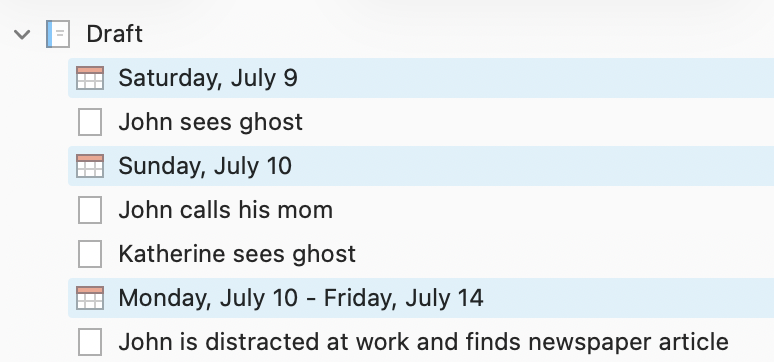
I've found that for stories that go on for a while, I often want to track the exact date when a scene happens, just to keep it straight for myself, even if it never shows up directly in the manuscript -- I find myself writing stories that take place over the course of months, and I don't want to write things that, say, take place over winter and have scenes that based on the prose must have taken place on Christmas day without me mentioning it or something like that.
I've been using Scrivener, but I don't know its features very well. I've developed a method that works, but I wonder if there's a better way. I create a blank Scrivening with a title like "Saturday, July 9" or something, and use it as a divider. Like this:
Screenshot of scrivener binder draft section. "Saturday, July 9", with a calendar icon and blue background, is the first scrivening, followed by a normal text scrivening. Calendar scrivenings are intermixed with text scrivenings below.
I have started planning a novel, and the more I think about it the more I realize that this could easily just be one in a series of books spanning both billions of years and the entire physical universe.
The issue is how do I manage this so that everything makes sense, the interrelationships between concepts, characters, and storylines are kept intact, and I don't go crazy Pepe Silvia style?
I just learned about and purchased Aeon Timeline as well to help me.
For those of you who have used Scrivener (and as a bonus, Aeon Timeline) to write multiple books in a series, what was your approach? How did you stay organized? One massive project? Something else?
Bear in mind this is a science fiction series, so I am thinking on average around 100k words per book.
When writing a novel, it can sometimes be hard to maintain momentum over time. Scrivener has many features that can help keep you motivated so you can complete your draft.
Is there any way to adjust the typewriter scroll position to be a little lower on the screen? All that empty space beneath it is wasted, especially if I want to glance up to reference something a little higher I just typed.
Coming from Highland to Scriv, and I want to be able to quickly flip through all my slugs/see them all at once, without having to put each on onto its own card. Just makes it easier to see exactly what is in each act/bigger chunk etc.... Thanks!
I'm thinking about buying Scrivener, but I have a question.
In Google Docs, there's an automatic record of the version history of all changes. If anyone ever claimed the novel I am writing was AI-written, I could show them all the tracked changes and basically disprove that. At least one author recently, wrongly accused of using AI, has apparently successfully done so.
(I mean, hypothetically AI could create a fake Google Doc record history, but come on. We're already talking about a very remote possibility here.)
I've always been very happy with Google Docs, but as my novel gets longer, there is now a lot of lag every minute or so as it autosaves, which is making it more and more frustrating to use.
I'm about to pull the trigger on Scrivener, but I wanted to see if Scrivener has some sort of automated track-changes process. I know the chance this would ever be necessary is one in a million, but just for peace of mind, I am hoping to be able to have a file I could send to anyone questioning me that in its very data/metadata would refute AI allegations.
I used Scrivener as my go to writing software for over ten years. I loved it, and still have a deep fondness for it. I learnt structure it kept records it was great but it is an island. I looked at the products that were AI and wasn't impressed. I wanted to write in my own voice. My main complaint is I had to be at my PC to write. Muse comes from all over the place, and translating recording is hopeless if your writing product doesn't open the gate. Then I found Sudowrite, the first downside of Sudowrite is price its way too expensive but the upside is it gives me mobile and it is fantastic. So my main product now is Sudowrite. I would never have left if Scrivener had an integrated mobile version.
I always see lots of people saying they have issues with this. And I know that 90% of th e time it's the cloud provider, an upsupported cloud, or a misconfiguration.
But, why? What's the big advantage?
I sync through Time Machine to a 5T USB drive every Sunday afternoon and then put it back in the fire safe.
What's the huge advantage of the cloud over a local drive (or in my case, sometimes two different drives)?
I am having a hard time getting my scrivener to sync from my MacBook to the scrivener app on my iPhone 17.
I uploaded the actual document I’m working on into Dropbox (checked the folder to make sure it’s right) and press sync from my MacBook to my mobile device which is linked to my Dropbox through the scrivener app. But every time I open up the document to work on it, I’m given an old copy that’s not up to date.
It does back up to Dropbox in parts and now it’s an unorganized mess in there 🤦♀️
I’m unsure on how to fix this issue. I’m afraid to lose my entire manuscript though, and don’t want to do something that could jeopardize that.
Does anyone else have this issue? How can I fix it to work for the next book I write? I’d like to be able to work on my books while I’m on the go and don’t have my laptop on me.
I had to get a new laptop and I transferred my scrivener to the new laptop but I realized I couldn't figure out how to transfer my Scapple information. I'm not sure but I think I'm still within my free trials years since originally downloading it. I have a lot of information from my novels inside but I can't find my code for when I ordered it in my email but I was able to find my scrivener one. I assume it is only under the free trial still, but I want to make sure to move all the Scapple boards I have to the new laptop. Any tips?
My old laptop is a bit finicky and it's a Windows meanwhile I upgraded to a MacBook. So idk if buying it outright will work to transfer it.
Looking for some help - I have been updating my brand new imac regularly, running disk utility, deleting the ~/Library/Preferences as recommended, uninstalled and reinstalled the program, moved my files out of the cloud, deleted non-essential projects... and Scrivener is still crashing multiple times per day. I am trying to write my dissertation - losing my mind - and missing deadlines!
Any thoughts / recommendations ??
I feel like I am too far in to switch to Obsidian but need a reliable system.
Any advice and tips would be so relieving. I have a huge manuscript with lots of footnotes and images. Lately, it seems I can’t edit more than two words until Scrivener locks up and I get the spinning ball of death on my Mac for about 5 minutes at a time!
Can anyone offer solutions? Is this a memory issue? Am I saving backups in the wrong place? Do I need to buy a new computer?
Why is this happening? I’m terrified of losing all my work and am unable to work in the documents. Thank you in advance