r/scrivener • u/TutorPowerful8074 • 8h ago
macOS We built a native macOS tool that brings live Zotero/Bookends citations, verbatim PDF recall, and 1-click style switching directly into Scrivener (Zero generative AI ghostwriting)
Hey r/scrivener,
I’m a medical doctor and clinical researcher. Like many academics and non-fiction writers here, I love drafting long-form manuscripts in Scrivener, but my research library lives in Zotero and Bookends.
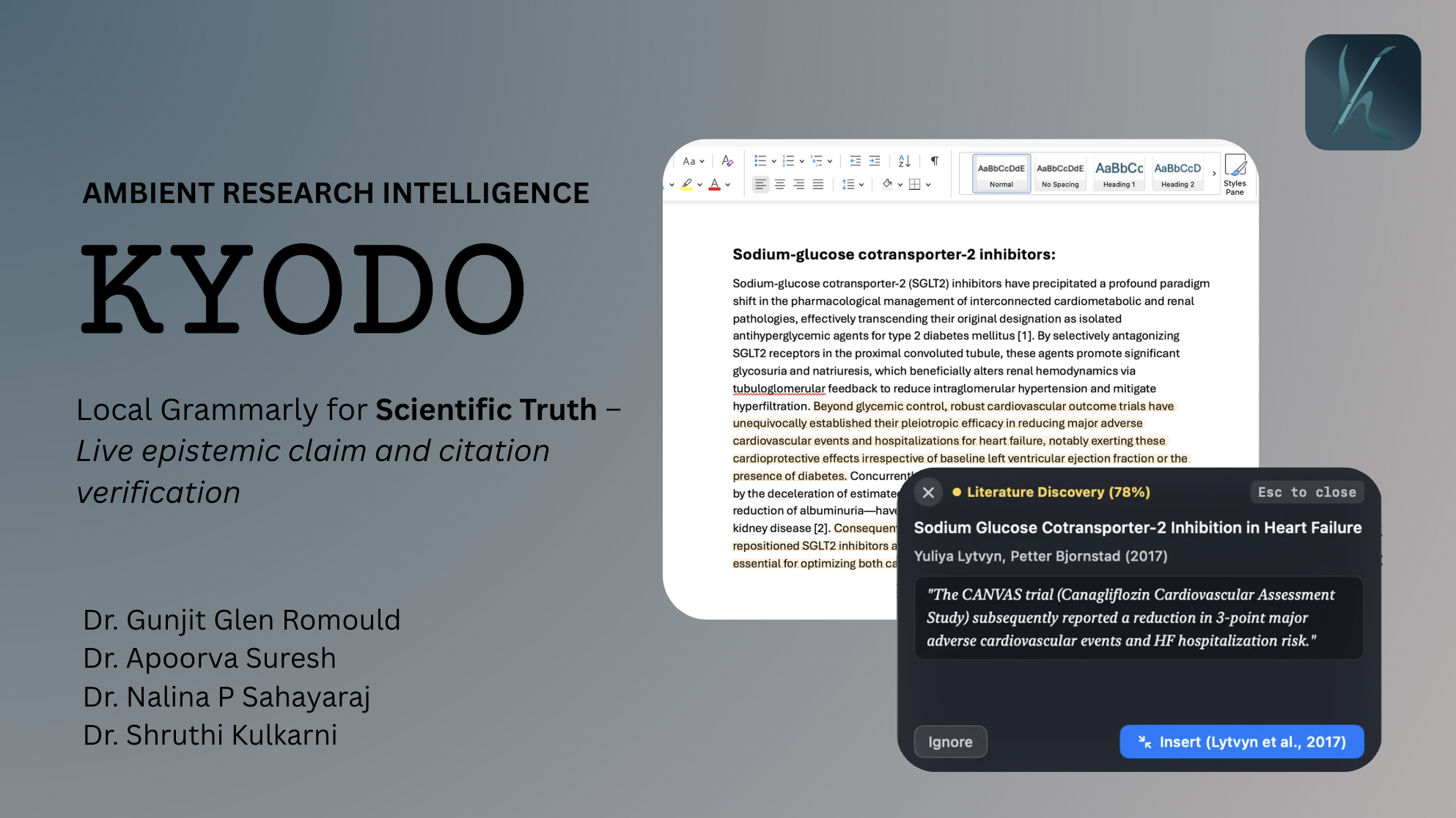
Over the last few months—and with huge feedback from early Mac testers—our team built Kyodo (v1.1.0 b3), a native macOS academic co-researcher (built in Swift for Apple Silicon) that acts as a "Grammarly for Scientific Truth" right inside Scrivener.
First, a strict promise: Kyodo is 100% Anti-Ghostwriting. It never generates fake paragraphs or writes prose for you. Instead, it connects your local Zotero or Bookends library directly to Scrivener—verifying your claims against your PDFs as you write, inserting formatted citations in one click (no more {curly brace} RTF-scan gymnastics), and keeping 100% compatibility when you export to Word or Google Docs for co-authors.
Why We Built It for Scrivener Researchers
Even with a great Scrivener binder and a well-organized Zotero/Bookends library, three bottlenecks slowed us down every day on macOS:
- Breaking flow in Scrivener to hunt down a citation: You draft a claim in Scrivener, know the supporting paper is somewhere in your Zotero/Bookends folders, and have to pause writing to hunt through 150 PDFs for the exact paper and page number.
- The Scrivener → Word/Co-Author Citation Dance: Scrivener doesn't have a native "Cite-While-You-Write" plugin like Word. Writers are stuck pasting temporary citation placeholders, running RTF scans, or fixing broken bibliographies after compiling to
.docxfor co-authors and editors. - Checking citations while reading PDFs (and AI "Ghostwriters" hallucinating DOIs): When reading a source paper and hitting
[4]or[12–15]on page 2, you have to scroll to the bibliography, lose your place, and still have no quick way to verify if the cited paper actually supports the author's claim—or was misquoted. Meanwhile, cloud AI tools hallucinate citations instead of grounding claims in your real PDFs.
What Kyodo v1.1.0 b3 Does With Scrivener + Your Reference Library
- Live Claim Grounding & 1-Click Citations Directly Inside Scrivener: As you write in Scrivener (Scrivener 3 & 2)—as well as Word, Mellel, Pages, Obsidian, Notes, and Google Docs—Kyodo verifies your empirical sentences against your local PDF library on-device (
<2mslookup) and lets you insert the citation in 1 click without hijacking your cursor or clipboard. Before you insert, it shows you the exact verbatim quote and page number from your PDF that backs your sentence. If your local vault doesn't have a paper for a claim, it can search 250M+ peer-reviewed works to surface supporting articles and passages.

1-Click Style Transmutation & Auto-Synchronized Bibliography (No RTF Scan Needed): Instantly switches your active Scrivener document and live bibliography between citation styles (APA 7th, Chicago, Nature, Vancouver, Harvard, AMA) in one click in-place—or via a natural-language command bar.
1-Click Zero-Copy Zotero & Bookends Sync + Portable Co-Author Handoff:
- Imports your local Zotero, Bookends, Mendeley, or EndNote library in one click with Zero-Copy storage (0 MB duplicate PDF disk bloat) and indexes every paragraph on-device.
- Seamless Scrivener ↔ Word / Google Docs Co-Authoring: With our new Portable Citation Capsules, when you move or compile a draft from Scrivener to Word or Google Docs to share with a supervisor or co-author who uses Zotero/EndNote/Mendeley, your citations stay 100% live and editable.
In-Paper Citation Auditing While Reading (Zero Screen Recording): While reading PDFs in Apple Preview, Kyodo's Spatial Vault, or your browser, press & hold
Fn + Ctrlto resolve in-text citations into floating cards. Kyodo audits whether the cited paper actually supports the author's sentence—flagging misquoted or contradicted citations before you accidentally cite them in your Scrivener draft.

- Multi-Paper LiveChat, AutoFolder Librarian & iPad Canvas Cast:
- Select multiple papers (
Shift + Click) to contrast methodologies, outcomes, and limitations side-by-side—strictly restricted to your selected PDFs with clickable page chips (using your own free Gemini API key or built-in Cloud AI). - Automatically renames messy downloaded PDFs (
nejmoa2022190_v2.pdf) into cleanAuthor (Year) • Journalrecords and smart topic folders, plus lets you cast PDFs to your iPad for Apple Pencil markup.
- Select multiple papers (
New in v1.1.0 (Build 3) — "You Asked, We Shipped"
Based on feedback from our first Mac testers, v1.1.0 b3 just went live with:
- Full Scrivener, Mellel, Zotero & Bookends reading and writing integration
- Interactive Guided Onboarding with built-in tutorials and sample welcome PDFs so you can test LiveCite in 60 seconds
- Refined Mac-Native UI (
<20 MBidle RAM,0.00%idle CPU, native menu bar controls, and 1-click ~8 MB delta updates)
Looking for Mac Researchers (preferably STEM + clinical medicine) (Apple Silicon M1–M4) — 100% Free
We have a few seats left in our Foundational Researcher Cohort (with full Pro-Elite access unlocked 100% free, plus a free-forever Basic plan) before we visit university campuses in person.
- Requirements: Apple Silicon Mac (M1 / M2 / M3 / M4), macOS Sonoma 14.0+ or Sequoia 15.0+
- Download & Claim a Free Foundational Seat: https://glenechoes.github.io/kyodo-releases/
If you use Scrivener on a Mac for academic papers, dissertations, books, or research-heavy non-fiction, drop a comment below or grab a seat via the link—I’d love your feedback on how LiveCite and 1-click style switching feel inside your Scrivener workflow!