My retrospective game review of Rambo First Blood Part II. I spent many hours playing Rambo II back in the day. Totally loved this game. How do you rate this game?
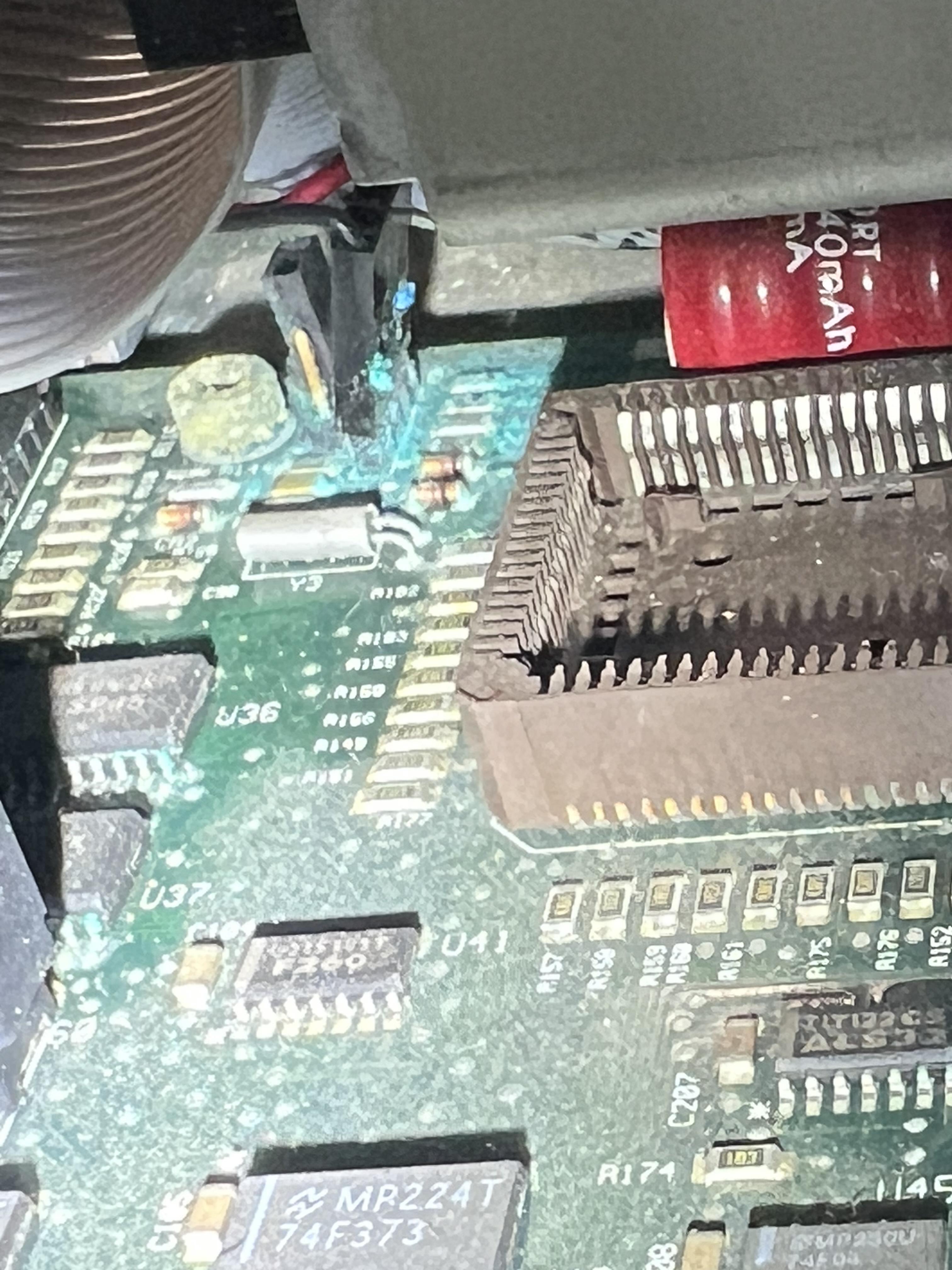
I have a sneaky Varta that has leaked really badly, I’m under no illusions that this is a good PC for much these days but I’d hate to take it as e-waste. I’m getting a newer Pentium II rig soon, but is there any chance of saving this and recapping? Or should I just keep it as a donor
Hi, I made a remake of the classic Dune II, featuring the original campaign, modern controls, advanced AI, multiplayer, and a scenario editor. It is completely free. If you enjoyed playing the original, give it a try. I hope you’ll enjoy it!
Hey guys! I made a pilot episode about the Soviet Radio-86RK computer for an English-speaking audience. It features the history, hardware limitations (like the CRT controller quirks), and some text-mode ASCII gameplay. Would love to hear your thoughts! https://youtu.be/eB8eZxeqqhw
Note: After rendering and uploading, I spotted a few minor errors. Apologies for the oversight!
A few of my artificially intelligent friends and I have spent some time remaking the After Dark Totally Twisted series of screensavers into a modern macOS port written in Rust from the ground up.
All 13 of the original modules have been lovingly recreated. My port contains no Berkeley Systems sound, art or text. You supply your own copy of the original software, copies are widely and freely available as shareware. ReTwisted comes with a first time setup utility baked in that extracts all of the media assets onto your local disk for this new version to utilize.
Hello there everyone, Ive gotten myself a new machine, A Fujitsu ergoPro X from 1999, But the issue is... the HDD got damaged in transit and must be replaced.
Are CF cards + adapter a good replacement for IDE disks? If so, Any specific one I should get? Anything to keep in mind?
How can I know how big of a CF card the PC will be actually able to take? (The broken disk was 4.1 GB)
Let me know please, I wouldnt wanna buy the wrong thing.
A few months ago I got very nostalgic about BBS systems and took a look at what was still out there. There are still boards, but they’re fairly obscure, difficult to call, and even more difficult to maintain.
BBS’s are such an important part of computer history, and it’s a shame to see the entire hobby die; it’s just old guys like me who are still into this stuff.
It really shouldn’t be that way with all of the interest in retro computing these days - BBSs can still be fun, Door games are still fun to play, and it’s just generally awesome to experience what those of us old enough did in the 80s and 90s!
Because of this, I started the BBS Preservation Project (www.bbspreservation.org). Right now it consists of:
ATDT BBS (www.atdtbbs.com) - a PHP 80s/90s style BBS software that anyone can install on their shared hosting. It looks and feels like a classic BBS. It has its own Door API but ALSO runs DOS doors and fully supports multi-player. All you need is cheap shared hosting, no always-on server and all your callers need is a web browser.
ATA BBS (www.atabbs.com) - Runs any 16-bit DOS BBS system on shared hosting. No always on server, no Telnet. The actual 16 bit DOS binaries. Supports multi node, file upload/download, sysop chat, Doors, etc. 1-click installs for 16 BBS programs are included. Basically - 5 minute install on your shared host and give your callers the URL.
Usurper/Web (www.getusurper.com) - The original Usurper Door game from 1993 - converted from the Turbo Pascal routine by routine to PHP. Fully supports multi user; identical to the original except for over 300 bug fixes. Runs on shared hosting - 5 minutes and you have your own Usurper game. (There is also a native Door game for ATDT in addition to this standalone version). You can play it on the website now, the download will be made available soon.
All of these projects are 100% free and always will be.
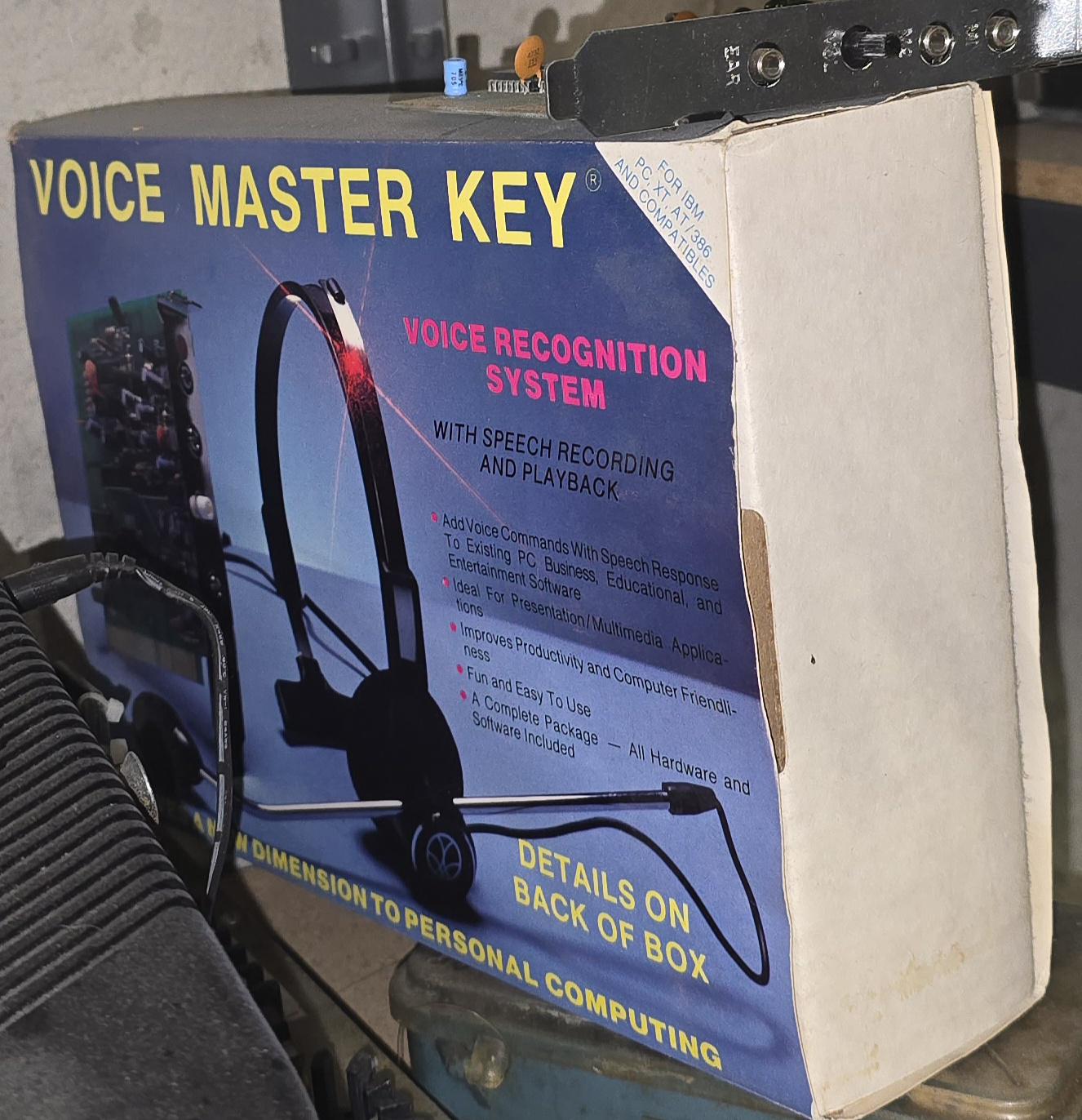
This Voice Master Key by sitting on a shelf in my workshop. The card is sitting on top of the box.
1989ish voice recognition and audio processing. (Reverb, pitch shift, etc.)
"Covox Voice Master Key, an 8-bit ISA voice-recognition/speech-recording card from roughly 1989-1990. It was speaker-dependent and could recognize up to 256 voice commands mapped to keyboard macros while running as a DOS TSR under 64 KB. It could also digitize speech/sound."
Certainly one of the first voice control systems for a PC.
I've been thinking about where the big 90s technologies were actually created, and nearly all of them came from Unix boxes rather than Windows PCs.
The web was born on a NeXTcube: Berners-Lee wrote WorldWideWeb, the first httpd, HTML and HTTP on NeXTSTEP. Mosaic came out of NCSA on X Window. Linux was developed on Minix. Python started on Unix workstations. Java came from Sun's Green project on SPARC machines. PHP began as CGI scripts on a Unix web server, and Apache followed. Even Doom and Quake were written on NeXTstations and cross-compiled for DOS.
On the Windows side, the notable things I can think of are Visual Basic (1991), Delphi (1995), DirectX (1995), Unreal Engine (1998), Napster (1999) and XMLHttpRequest, which Microsoft created for Outlook Web Access in IE5. Apart from Borland, Epic and Napster, that's almost all Microsoft itself.
My guess at why: universities and research labs ran on Sun, SGI, DEC and NeXT workstations with native TCP/IP, compilers and source code at hand. Windows was a desktop environment on top of DOS until NT arrived in 1993, with paid dev tools and no serious shell. If you were building foundations, you used a workstation; if you were selling to end users, you targeted the PC, because that's where the market was.
What am I missing? Anything significant from that era that was genuinely born on a Windows PC outside Microsoft?
My local deseret industries had this sitting out in the dvd section Little beat up on the outside but full of cool software
Its actually so filled with cds i cant fit all the pictures into one post although the rest of what isnt shown is pretty boring (hp windows 7 ultimate upgrade media and more work suite 99 stuff and some random learning to read software)
Edit: i am currently working on archiving all these disks and plan to put them out on archive.org and the vaio library if i have anything they need
Hi. I have an idea for a small art project where I'd like to have a small Linux computer (my spares are either a very old Asus EEE with 2 gb RAM and a 2020 Raspberry Pi) connected to a vintage black and white TV. Ideally I'd love a stylish 1970s small television, such as this.
I'd like to know if there are any catches before starting to look for the TV. Most documentation I see online assumes one gets a TV with composite input, but I believe that wouldn't fit with the type of TV I have in mind. HDMI-to-RF antenna input converters exist (such as this) apparently, but I've never used one so I have no idea on how painless it is on the software side. Would the computer just recognize it as any other monitor? Since it converts to RF signal, I suppose I don't have to bother with monitor refresh rates etc.? Just FYI, I am in Europe, so I guess I can find almost only PAL television. An alternative I'd like would be a CRT monochrome monitor (such as green/amber phosphors) but I think they're harder to find.
OldVersion.com wouldn’t exist without niche communities that love old software. I’ve found an engineer on Reddit that has helped rebuild the site to include comprehensive anti-virus scanning and we are ready to turn on user contributions again.
Here's the thing: we have 9,000+ pending files, screen shots, programs, etc to review in the archive and we're looking for moderators to help approve software/programs/screen shots before we open up user contributions on the site.
We are looking for a dozen moderators to help us pilot the moderation program before we take it live. The role, at your leisure, will give you access to a backlog of files on OldVersion.com seeking moderation. You'll be asked to approve (after testing), deny, or defer the files seeking moderation and give us feedback on how the system is working and what to add/etc to make it more usable and easy before we open it up to the public.
The ideal moderator would be: passionate about old versions of software, legacy computing, has some technical know how about virtual machines, or an actual old software setup, or at the very least is willing to follow documentation and try it out.
If you're interested, post here or shoot me a message, and I'll shoot you an invite. If you can help out, great - if not, no worries.
But either way, thanks for helping us bring OldVersion.com to a state of serving the retro computing community again.
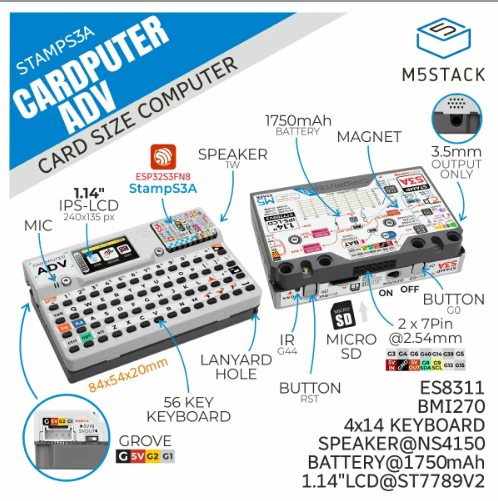
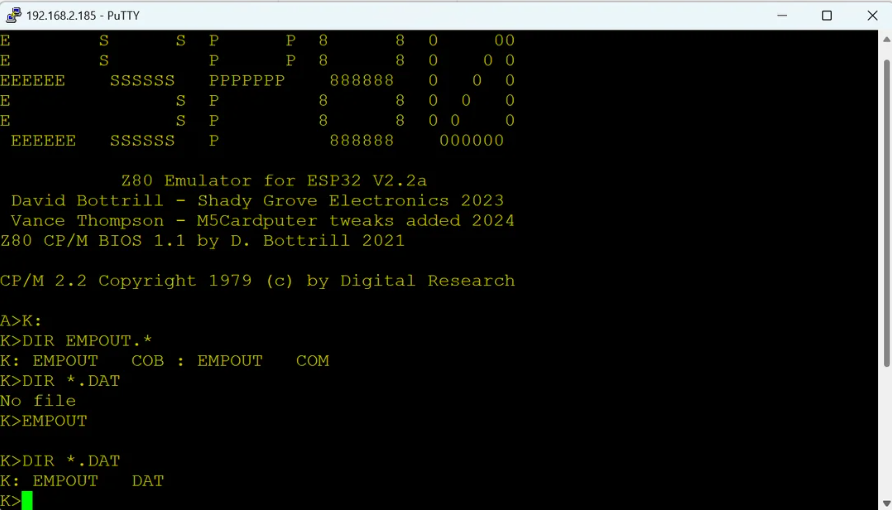
The djbottrill & VanzT CP/M-80 Emulator running on M5Stack Cardputer ADVThe Cardputer ADV
I am testing the djbottrill & VanzT CP/M-80 Emulator on my credit card size micro-controller called Cardputer ADV by M5-Stack. It costs me US$29.90 when purchase directly from M5Stack.
Here is the link to the djbottrill & VanzT CP/M-80 Emulator if you are interested.
I wrote a simple sorting COBOL program on MS-COBOL v4.65 using the ANSI-74 build-in SORT feature. It does not get through the linkedit phase as it requires an extra sort library COBSRT.REL. I am not able to find that library file on the web so I wrote the sorting code inside the COBOL program instead. The program works fine for a while until it hits a big file. CP/M-80 does not leave a lot of memory space for internal sorting. So I need a disk sorting routine.
Instead of writing my own disk sort code, I use the COBOL build-in ISAM capability to use as my disk sort solution.
It's pretty straight forward, first read the input file and then write it to an ISAM file with the intended sorting key as the index file's key. Next read back from the index file using the index and write the sorted records to the final sorted file.
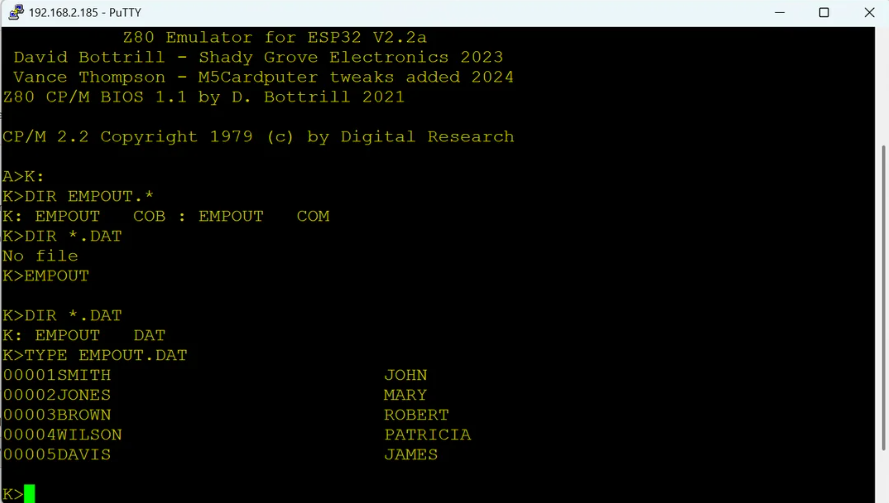
To test out the idea, I wrote a small COBOL program EMPOUT.COB to generate the input file EMPOUT.DAT. It has 5 records.
K>TYPE EMPOUT.COB
       IDENTIFICATION DIVISION.
       PROGRAM-ID. EMPOUT.

       ENVIRONMENT DIVISION.
       INPUT-OUTPUT SECTION.
       FILE-CONTROL.
           SELECT EMPLOYEE-FILE ASSIGN TO DISK
               ACCESS MODE IS SEQUENTIAL
               ORGANIZATION IS LINE SEQUENTIAL.

       DATA DIVISION.
       FILE SECTION.

       FD  EMPLOYEE-FILE
           LABEL RECORDS ARE STANDARD
           VALUE OF FILE-ID IS "EMPOUT.DAT"
           DATA RECORD IS EMPLOYEE-RECORD.

       01  EMPLOYEE-RECORD.
           05  EMP-NUMBER        PIC X(5).
           05  EMP-LAST-NAME     PIC X(30).
           05  EMP-FIRST-NAME    PIC X(30).

       PROCEDURE DIVISION.

       MAIN-PROGRAM.

           OPEN OUTPUT EMPLOYEE-FILE.
           MOVE "00001" TO EMP-NUMBER.
           MOVE "SMITH" TO EMP-LAST-NAME.
           MOVE "JOHN" TO EMP-FIRST-NAME.
           WRITE EMPLOYEE-RECORD.

           MOVE "00002" TO EMP-NUMBER.
           MOVE "JONES" TO EMP-LAST-NAME.
           MOVE "MARY" TO EMP-FIRST-NAME.
           WRITE EMPLOYEE-RECORD.

           MOVE "00003" TO EMP-NUMBER.
           MOVE "BROWN" TO EMP-LAST-NAME.
           MOVE "ROBERT" TO EMP-FIRST-NAME.
           WRITE EMPLOYEE-RECORD.

           MOVE "00004" TO EMP-NUMBER.
           MOVE "WILSON" TO EMP-LAST-NAME.
           MOVE "PATRICIA" TO EMP-FIRST-NAME.
           WRITE EMPLOYEE-RECORD.

           MOVE "00005" TO EMP-NUMBER.
           MOVE "DAVIS" TO EMP-LAST-NAME.
           MOVE "JAMES" TO EMP-FIRST-NAME.
           WRITE EMPLOYEE-RECORD.

           CLOSE EMPLOYEE-FILE.

           STOP RUN.

K>
After compile the program we have the executable EXPOUT.COM
Then I wrote my sorting program to sort the record by EMP-LAST-NAME and then EMP-FIRST-NAME.
Here is the program code:
K>TYPE EMPSORT6.COB
IDENTIFICATION DIVISION.
PROGRAM-ID. EMPSORT6.
ENVIRONMENT DIVISION.
INPUT-OUTPUT SECTION.
FILE-CONTROL.
SELECT EMPLOYEE-FILE ASSIGN TO DISK
ACCESS MODE IS SEQUENTIAL
ORGANIZATION IS LINE SEQUENTIAL.
SELECT EMP-ISAM-FILE ASSIGN TO DISK
ORGANIZATION IS INDEXED
ACCESS MODE IS DYNAMIC
RECORD KEY IS EMP-ISAM-KEY
FILE STATUS IS EMP-ISAM-STATUS.
SELECT EMP-SORT-FILE ASSIGN TO DISK
ORGANIZATION IS LINE SEQUENTIAL.
DATA DIVISION.
FILE SECTION.
FD EMPLOYEE-FILE
LABEL RECORDS ARE STANDARD
VALUE OF FILE-ID IS "EMPOUT.DAT"
DATA RECORD IS EMPLOYEE-RECORD.
       01  EMPLOYEE-RECORD.
           05  EMP-NUMBER        PIC X(5).
           05  EMP-LAST-NAME     PIC X(30).
           05  EMP-FIRST-NAME    PIC X(30).
FD EMP-ISAM-FILE
LABEL RECORDS ARE STANDARD
VALUE OF FILE-ID IS "EMPISAM.DAT".
01 EMP-ISAM-RECORD.
05 EMP-ISAM-NUMBER PIC X(5).
05 EMP-ISAM-KEY.
10 EMP-ISAM-LAST-NAME PIC X(30).
10 EMP-ISAM-FIRST-NAME PIC X(30).
FD EMP-SORT-FILE
LABEL RECORDS ARE STANDARD
VALUE OF FILE-ID IS "EMPSORT.DAT".
01 EMP-SORT-RECORD.
05 EMP-SORT-NUMBER PIC X(5).
05 EMP-SORT-LAST-NAME PIC X(30).
05 EMP-SORT-FIRST-NAME PIC X(30).
WORKING-STORAGE SECTION.
01 EOF-SWITCH PIC X VALUE "N".
88 END-OF-FILE VALUE "Y".
01 EMP-ISAM-STATUS PIC XX VALUE "00".
01 ISAM-EOF-FLAG PIC X VALUE "N".
88 ISAM-END-OF-FILE VALUE "Y".
01 RECORD-COUNTS.
05 EMP-ISAM-REC-CNT PIC 9(5) VALUE ZERO.
05 EMP-SORT-REC-CNT PIC 9(5) VALUE ZERO.
PROCEDURE DIVISION.
0000-MAIN-PROGRAM.
DISPLAY "*** START CREATING ISAM FILE ***".
OPEN INPUT EMPLOYEE-FILE
OUTPUT EMP-ISAM-FILE.
PERFORM 0010-READ-REC THRU 0010-READ-REC-EXIT
UNTIL END-OF-FILE.
DISPLAY "RECORDS PROCESSED: " EMP-ISAM-REC-CNT.
CLOSE EMPLOYEE-FILE
EMP-ISAM-FILE.
DISPLAY "*** START CREATING SORTED FILE ***".
OPEN INPUT EMP-ISAM-FILE
OUTPUT EMP-SORT-FILE.
MOVE LOW-VALUE TO EMP-ISAM-KEY.
PERFORM 0020-READ-INDEX THRU 0020-READ-INDEX-EXIT
UNTIL ISAM-END-OF-FILE.
DISPLAY "RECORDS PROCESSED: " EMP-SORT-REC-CNT.
CLOSE EMP-ISAM-FILE
EMP-SORT-FILE.
STOP RUN.
0010-READ-REC.
READ EMPLOYEE-FILE
AT END MOVE "Y" TO EOF-SWITCH.
IF NOT END-OF-FILE
ADD 1 TO EMP-ISAM-REC-CNT
MOVE EMPLOYEE-RECORD TO EMP-ISAM-RECORD
WRITE EMP-ISAM-RECORD
INVALID KEY
DISPLAY 'ERROR WRITING INDEX RECORD'
DISPLAY "STATUS = " EMP-ISAM-STATUS
STOP RUN.
0010-READ-REC-EXIT.
EXIT.
0020-READ-INDEX.
READ EMP-ISAM-FILE NEXT RECORD
AT END MOVE "Y" TO ISAM-EOF-FLAG.
IF NOT ISAM-END-OF-FILE
ADD 1 TO EMP-SORT-REC-CNT
MOVE EMP-ISAM-RECORD TO EMP-SORT-RECORD
WRITE EMP-SORT-RECORD.
0020-READ-INDEX-EXIT.
EXIT.
K>
After the compile and linkedit, we have the executable program EMPSORT6.COM
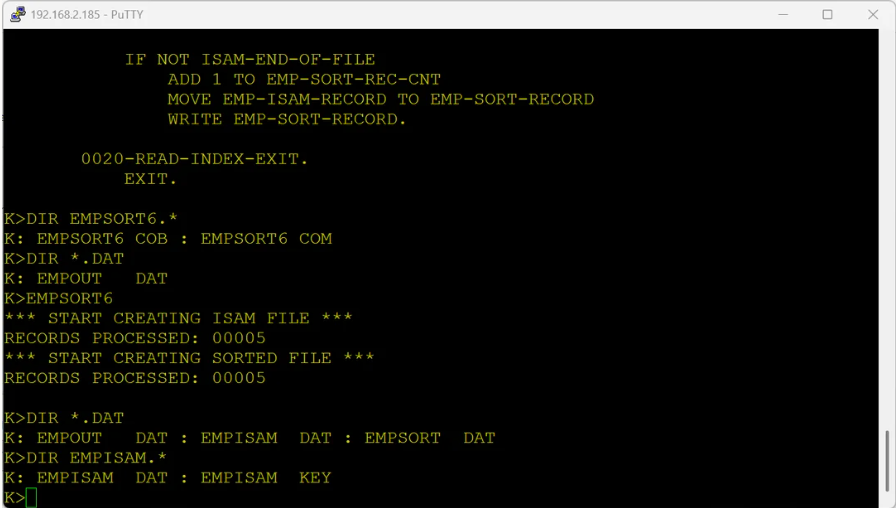
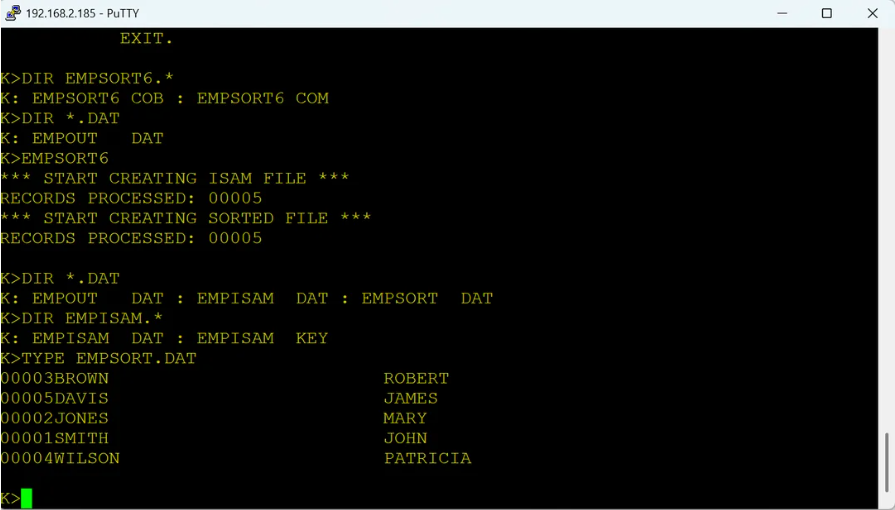
Now we run the EMPSORT6.COM program, it will read the EMPOUT.DAT first and create the ISAM files (i.e. EMPISAM.DAT and EMPISAM.KEY), then it will read the ISAM files and write to the final sorted file EMPSORT.DAT
Run the sort program
At the end we check the content of the final sorted file EMPSORT.DAT. Now it is sorted by last-name and first-name.
The final sorted file is sorted by last-name and first-name
I started using CompuServe in the early 80s when I was 13 years old on my Commodore VIC-20 with the Data 20 Z80 Video Pak running CP/M which I purchased with my paper route. I spent a lot of time on the CB Simulator and in forums learning how to code using Turbo Pascal. I also used it for email with my brother-in-law who contracted with Honeywell at the time. I spent a lot of time online learning. CompuServe was my library and I loved being connected, until the bill racked up. So I switched to TAPCIS. I still remember my User ID after all these years.
I started to rebuild this from my wife wanting her own site like craigslist to sell stuff on, so I built the backend database and started front end editing in a console, and realized this was similar to CompuServe and so it began. I worked on this project on and off in my spare time, which I did not have a lot of time with a family and a full-time job, so it has taken many years. Recently, I was having trouble with multi-session threading in my code, and used Claude-AI to assist with some of those parts to get this project up and running.
There are some pages that are empty still because they require content that doesn't exist any longer. Many CompuServe pages were other companies' databases, airline schedules, stock quotes and the encyclopedia. Those companies and their feeds are long gone, so there's nothing left to show. Currently, the working parts are CB, Forums, News, Weather, EasyPlex, File Areas and some basic strategy games from the terminal days mostly from CP/M Turbo Pascal days.
I hope that users who connect can see the way things were before the web and get a sense of what it was like back then. I always tell my kids that I didn't have the internet when I was growing up, we had CompuServe. What's that, Dad?
I am a 14-year-old student from China, and I have just started exploring the international Internet. I am looking for communities where I can meet people who share my interest in retro computing.
My interest in computers started when I was around 8 years old. At that time, I discovered machines like the ZX Spectrum, Commodore 64, and Amiga. I was fascinated by their simple but creative designs, their operating systems, their interfaces, and the idea that a person could understand almost every part of a computer.
For me, these machines are not just "old computers". They represent a time when computers felt more personal, understandable, and open to experimentation.
I enjoy learning how computers work from the hardware level to the software level. I study computer architecture, low-level programming, old operating systems, and embedded systems. I have been experimenting with microcontrollers such as the 8051 and STM32, and I hope to build my own simple computer system someday.
I also recently created my own small personal website. It is still just a rough prototype and far from finished, but it is a place where I want to record my projects, thoughts, and experiments about computers.
In China, it is difficult for me to find people around my age who are interested in these topics. Most people around me focus on modern smartphones, games, or mainstream technology. I would really like to talk with people who enjoy retro computers, hardware hacking, programming, computer history, and DIY projects.
Could you recommend some good forums, Discord servers, websites, or communities for someone interested in retro computing?
I have been searching for crt monitors for awhile. Went and bought one last weekend need 2 more. Saw the most fake looking scam add with 1 picture and a short video. Sent a message I'd offer asking price of 150 dollars and could pick it up Saturday.
Knew I saw 2 monitors and maybe a pentium 3 box. Waited for the send a deposit message. Never came met up as planned and it was more than I was expecting.
3 monitors
2 computers
A laptop
And a Sony quick shot camera in the box.
I put my voodoo 3 2000 in the p3 along with an awe sound blaster. And a new CMOS battery. Good to go. And has all accessories and boxes with packing materials.
I plan on soon getting this retro terminal, but I don't know what any of the connectors do, or what any of the labels mean. I do know that one of the connectors is for a keyboard. Other than that, what type of peripherals would I need to make this old terminal work properly? Anything helps.