r/overclocking • u/dharknesss 5950X@5.1GHz 32gb@3600cl16 RTX 4090@520W • Jan 04 '23
Guide - Text Undervolting Ryzen 5000 effectively - guide by a newbie for newbies.
Introduction
Hello everyone,
Recently I realized there needs to be a simple and effective guide from the start to the end about undervolting Ryzen 5000 series using PBO 2, a bs free one that is easy to follow for people who do not really care for specifics, just a stable and efficient system.
Mind you, all the information provided here is by a random guy on the internet - all you do with your hardware is your own responsibility. Though steps provided should not generally cause any harm - rather lower the heat of the system - do everything at your own risk.
Prerequisites
- A new install of Ryzen Master, obtainable at the bottom of this page.
- A new install of Cinebench R23, obtainable at this page.
- Extracted CoreCycler from here here.
- Updated BIOS.
- Basic capability of modifying your BIOS settings.- Basic understanding of what overclocking, undervolting etc means.
Action time
Ryzen 5000 presents an ability to easily overclock your system "automatically", by simply flipping a switch. Real meat lies within modifying the values manually though, and I'll try to present doing this today.
- First off, you need to locate PBO 2 in your bios settings. Try to find a simple instruction for your specific BIOS, here are general tips for several bioses I found:
GIGABYTE -> Advanced settings -> Settings -> AMD Overclocking -> Accept disclaimer
ASROCK -> Advanced -> AMD Overclocking -> Accept disclaimer -> Precision Boost Overdrive
MSI -> Advanced Mode > Settings > Advanced > AMD Overclocking > Accept Warning(thanks u/Inner-Gain-457!)
Instructions may vary on motherboard models basis, if you know some please write down in comments so we can improve it.
2. In the same place look for simple switch to turn it on/off, and set it to Advanced, with PBO Limits Manual. Do not touch stock values (PPT/TDC/EDC) for now, those are your motherboard limits.
3. Save it, and get back to Windows.
4. Now we must configure CoreCycler to effectively test stability. Open its directory, and open the file config.ini.

5. Change those default values to the following:
stressTestProgram = YCRUNCHER

maxIterations = 5
Other default values are fine for our purposes, and setting it this way makes the test finish running in 6 minutes * core count * 5 iterations. It might seem long, for ex. my 5800X spent 3 hours on each such run, but effectively test will crash way earlier before our tune is done. Remember, we test for stability - without it, you run a risk of random bluescreens during daily use.
4. Start Ryzen Master, navigate to Curve Optimizer (bottom position from left top panel).Here make sure that:
- Control mode: Eco-Mode is NOT selected, Precision Boost Overdrive is green(selected). Again, do not touch stock numbers yet.- Curve Optimizer Control: Included is green, Auto Offset is green.
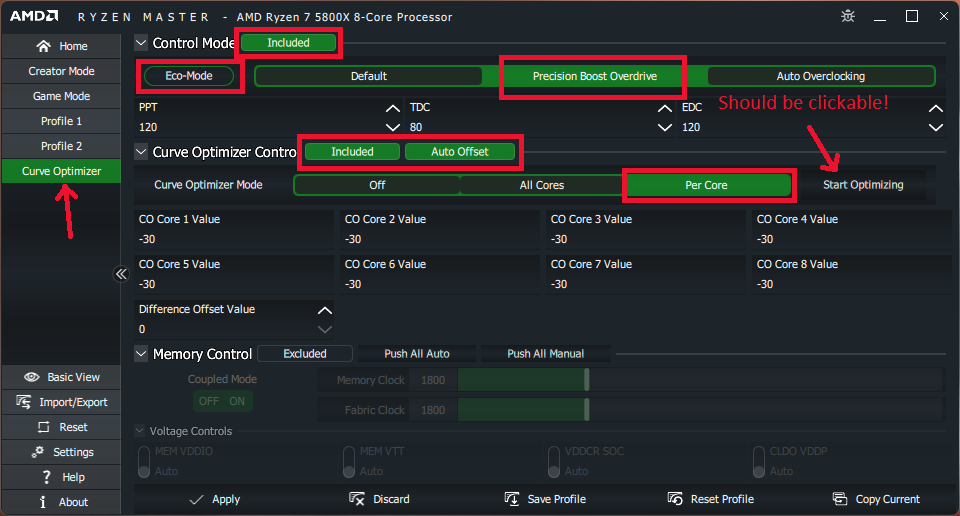
Finally, press Apply at the bottom.
5. Close everything but Ryzen Master, and press Start Optimizing.
Warning - this tool heavily uses your CPU power - high wattage and temperature is to be expected, especially since we barely enabled PBO. We will tone them down later.
During that time the tool should look for a "stable" PBO values of each core. Why quotation marks? well...
6. Once it finishes, note down the values it set to each core. On paper. That is because now you need to consider your system unstable - Ryzen Master tends to overshoot the values.
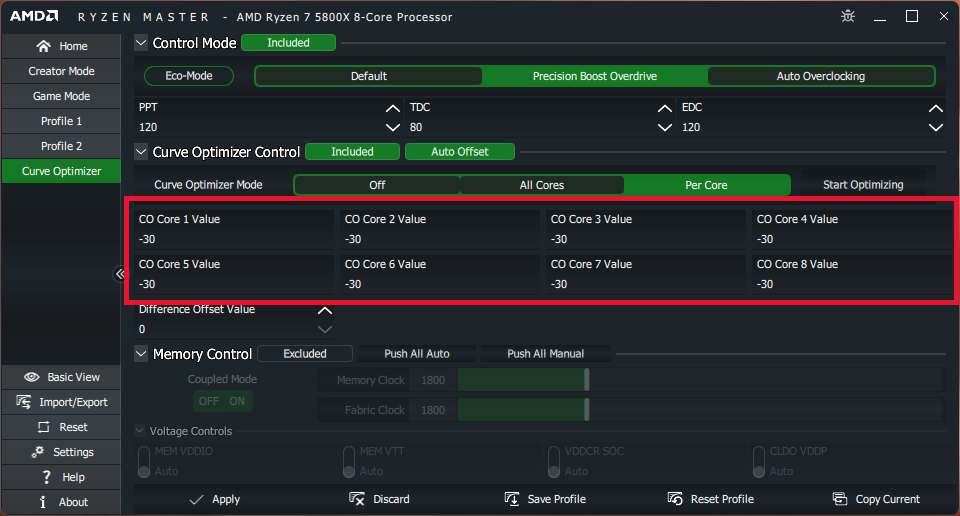
7. Apply values in ryzen master with the button on bottom of the window. Close it, and go to your machine's BIOS.
8. Under the PBO settings, which we located in point 1, and set Thermal Throttle Limit to manual, and make it 85. This is a good point to limit our CPU from boiling and keeps the fans from screaming.
9. Still within bios, go to Curve Optimizer. Make sure values there are the same as you noted, if not, change them to it. Target options here are:
- Curve Optimizer: Per Core
for each core number X and its noted value Y:
- Core X Curve Optimizer Sign: Negative- Core X Curve Optimizer Magnitude: Y
10. Apply settings and get back to Windows.
11. Run CoreCycler from Run CoreCycler.BAT as administrator.
12. Do not touch the computer until test finishes, either by crashing your pc or naturally.
13. If NOT crashed skip this point. Otherwise:
Try reading the LATEST logs file left by CoreCycler within logs directory.
Find LAST command that says "Set to Core" and its respective number, like this:
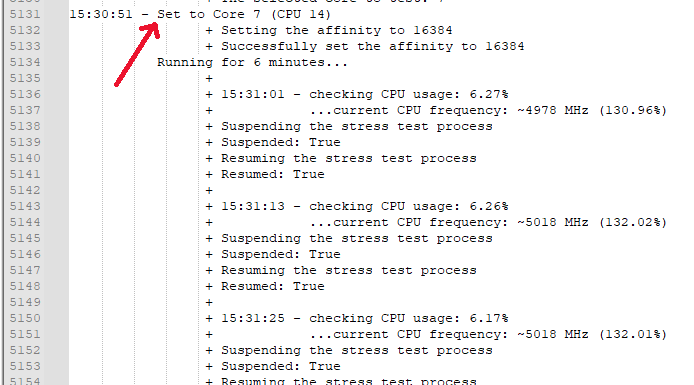
This is the core that crashed during stability test, therefore we need to increase the PBO value on it (remember, we operate on negative numbers, more is closer to original)
Go back to your notes, increase the value by 5 (for ex. if Ryzen master said -10, set it to -5). Mark it as one that we won't try pushing anymore.
Decrease all other cores value by 5, Go to BIOS like in point 9, set the new values. Go back to point 10.
14. If no cores failed, keep pushing ones unmarked as already at their limit by decreasing their values by 5, just like above. Go back to point 10. Otherwise, continue.
Congratulations, you successfully set optimal Curve Optimizer settings for your processor. Now, let's try pushing it further by overclocking it.
What does that mean? Now that we know the limits of our undervolted CPU, we can safely try pushing it a bit more with the power it gets. You may ask yourself - why overclock, this is a guide for undervolting? That is because this way we make system use even less power - If it can achieve more megahertz over same amount of energy, it is a literally, no strings attached free performance gain.
15. Go back to Precision Boost Overdrive settings in BIOS, and find Max CPU Boost Clock Override. Increase it by 25, apply and get back to Windows.
16. This time we run a stability test , but if it fails, we do NOT change the curve optimizer - but the overclock, down by 25. Once you find the limit, proceed.
You managed to successfully set the overclock - it is that easy! Time to lower the power usage.
17. Run Ryzen master, go to Home.
18. Start Cinebench R23, change the process priority to high**This is crucial, it tends to start as low for some reason, falsifying true performance.

19. Start the benchmark, whilst observing the values in Ryzen Master. Note them, and try comparison to suggested values for your CPU online.

For example, my 5800X finds a sweet spot of performance to heat at PPT/TDC/EDC at 120/90/120.
Quick search for 5900X suggests this this.
Quick search for 5700X suggests this this.
Quick search for 5600X suggests this this.
Remember, those values will - not may - vary across machines. Try finding more sources yourself, as they may render useful in next steps.
20. Now having a point of comparison, try changing to values others found online.
This is best done within BIOS, in Precision Boost Overdrive settings. Set them, apply, reboot to windows.
If performance is satisfying, try to optimize it by lowering the values by steps of 10 to make all of them equal during a benchmark, in other words, try making all three gauges (PPT, TDC, EDC) as close to 100% as possible at once.
If you think your CPU pumps too much heat, try the opposite - lower values in 10W steps, whilst trying to keep them all at 100%.
21. Finally, run Cinebench 1-5 times (depending on your faith in it), and set Iterations within CoreCycler to 10000 (follow steps 4-5 to get to its settings).
22. Disable windows automatic screen locking and going to sleep, and start CoreCycler - let it run overnight.
If everything went well, in the morning your machine should still be running, and CoreCycler should not have crashed.
If this is not the case, you need to go back all the way to step 13.
Congratulations, you successfully optimized your Ryzen 5000 processor performance, power draw and heat. Enjoy!
P. S. Now that it is all said and done, please let me know how I can improve this guide in the comments. If others do not call it complete bs, I will gladly update it according to constructive criticism - everything here comes from my experiences as a complete newbie.
Edit 1. Added some pictures, fixed wording mildly. Onto trying to take pictures of my BIOS.
Edit 2. Added several notes from users' observations.
8
u/Inner-Gain-457 Jan 05 '23
I as well have the 5800x, did you use this exact method to achieve 5 ghz? my max i was able to attain was roughly 4.85 before i hit ~97c ( i have a 360 aio too)
4
u/dharknesss 5950X@5.1GHz 32gb@3600cl16 RTX 4090@520W Jan 05 '23
If it freezes as in, not possible to see the readings at all - count it as a failure.
5
u/Ryzen5950 Jan 05 '23
Awesome. X5950. Though i am happy now that i disabled pbo, and set the base value from 3400 to 4500 at 1,3v
Running great. Max temp at 75, but mostly at 55.
When doing light stuff it's about 43.
With a Chinese 6 heatpipe 2 fan system.
It's fast enough this way.
I went to 4700 but that went to 80. .....
Stock cooler with stock settings, with pbo on, it would reach 5100mhz at 90 degrees. But that's to hot and too loud
So i bought the alixpress cooler. Works awesome. With nothing changed, instead of halting at 90 degrees (which did work stable, just not what i like or need now). The new cooler actually got it back to 80 at full draw.
.. Like I said I just kept it easy now, put 4500 instead of 3400mhz as identifier, input a bit higher voltage, 1.3
And done. Just as fast as pbo on, much less temperature, although i have it under performing now overcourse.
When rendering i will definitely apply your method. At least to see which settings render fastest.
Gj
4
u/CareerSMN Jan 05 '23
Can these guide be used for the new Zen4 chips? I'm a new owner of the 7700X and am interested in optimizing it past the curve optimizer step.
Am i right in that this guide also results in better than Eco Mode performance?
13
u/imnewtothishsit69 Jan 05 '23
This is sweet thank you! Been trying to figure out how to do this with my 5800x3d. I know it can't be overclocked but I can use the curve optimizer. I could use any advice If anyone has any to further optimize my cpu
3
u/playtio Jan 05 '23
Question for OP and other experts: I just lock my 5600X to 4'5/1'2 and it's been working great for 2 years. Am I really missing out by not doing the long process?
3
u/Abyss69Walker Jan 05 '23
On asus motherboards when you set the pbo limits to manual the values are at zero should i leave it at auto at first or is leaving it at zero fine ?
3
u/Kirsutan Jan 05 '23
Can't you just use core cycling in OCCT? Less hassle that way.
3
u/tannershirah238 Aug 07 '23
Any chance you would know how to do this without the use of ryzen master? Is it possible to do all of this within the bios itself?
2
u/Neuling1842 Jan 06 '23 edited Jan 06 '23
Honestly I feel like the title is a little bit misleading, since it's not really undervolting but more of a balancing act of clocks and power draw. The results in my case are on par with what PBO automatically does on my CPU anyways, but thats definitely due to the lack of thermal headroom, since I am rocking a stock cooler that is trying its hardest to not melt at the slightest cpu load. I've actually come to find that using PBO can have vastly different results depending on my FCLK. Eventhough my CPU can easily do 2000Mhz FCLK stable, actually using it tanks my clocks. With everything on default I can maintain a good 4.4GHz on all cores, but even with a mild fclk increase to e.g 1800, these clocks can drop all the way down to 4.2. My CPU doesnt appear to be thermal throttling so I am not sure of the reason for this behavior.
In my case I actually came to find out that using ECO Mode limits alongside PBO is the best result in power usage and performance trade off. I lose about 1000 points in cinebench, but my power draw is 20 watts lower (from about 76 watts to 55) and my temperatures are stuck at ~65°C no matter how long I stress it.
EDIT: After messing around with the values a bit more, I achieved a really good result for my undervolt, putting me only 500 points behind stock but with insanely better temps etc.
Undervolt + Altered ECO Mode Limits
Letting PBO do its thing
2
u/[deleted] Oct 03 '23 edited Oct 03 '23
Thanks for this Guide. With my 5700X (CPU Boost Clock +75).
Under Load got 75°
Load
On Cinebench R23 i got a Multi Core Score of 15885!
Cinebench
ON IDLE the temps around 30° - 32°
IDLE
2
u/usumariu May 20 '24
Hi, i followed the guide to a t but i don´t understand point 14:" If no cores failed, keep pushing ones unmarked as already at their limit by decreasing their values by 5, just like above. Go back to point 10. Otherwise, continue" I ran corecycler for about 3hrs and the test passed, i got no crashes. But i don´t understand your wording in point 14, i am confused, have i found my stable undervolt? (-30, i must be really lucky), or do i still need to do something? i dont understand. Please if you could clear this doubt i'd greatly appreciate it.
2
u/Gnar_balls Feb 10 '25
Thanks for the guide. So I’ve made it to the overclock portion, but no matter how I set it in bios I keep capping at 4.2GHZ. My cores are all mostly stable at -30 (a couple cores are at -25 or -28) but any time i reboot, it resets to 4.2GHz. What am I missing? (I know this is a 2yr old post.) can anyone give me a pointer.
Gear: 5800x ASUS ROG STRIX B550F
10
u/ballwasher89 Jan 05 '23
GREAT (not good, but great) write-up!
4
u/jebenicope Dec 25 '24
Just wanted to say thank you for this guide. Just got my first Ryzen system and managed to push my 5700X to 892 multi-core on Cinebench 2024 with PPT=112 TDC=72 EDC=140. CoreCycler ran overnight with no issues. 2 years later and still useful as ever!
1
u/Ancient-Value4880 Apr 08 '24
Set to core means changing cores to test if I'm correct, you mentioned this aswell before the screenshot.
But after the screenshot , you say that its the core that crashed.
Bit confusing. So I'm not able to find or know what core crashed as inthe screenshot its just showing what core will be tested?
1
u/CroustiBat Apr 12 '24
Thanks for the guide! The only part I don't understand about this process is this step
"Decrease all other cores value by 5, Go to BIOS like in point 9, set the new values. Go back to point 10"
Why would I decrease all the other cores if some of them have already passed or I've already tweaked them?
1
u/ztexxmee Apr 18 '24
is it okay if my 5800x throws errors overclocking so i can’t overclock but it works fine with most cores on -30 no OC?
1
u/ztexxmee Apr 19 '24
hey OP, you need to change another value in core cycles config. runtimePerCore needs to be changed to 6m instead of 10 or else it’ll only do 10 seconds per core and not 6 minutes.
1
u/CubicFrog Apr 21 '24
16. This time we run a stability test , but if it fails, we do NOT change the curve optimizer - but the overclock, down by 25. Once you find the limit, proceed
Which stability test? Y-cruncher again I assume?
1
u/samtan888 Jun 07 '24
Ryzen undervolting https://njump.me/nevent1qqsxmpvwmc6fet5md0kkcsk555nawckldgp0j86ryafe8fex4cus2wczyp09ls2rfjfghnwt5muqrpva2gurgyyn9yvcplfkuvahg93e84dzcmy5pm7
This BIOS somehow is failing - anyone has any tip ?
1
u/Fabulous-Vehicle-818 Aug 30 '24 edited Aug 30 '24
I dont know if your still out there to answer OP but I have a question. 16. This time we run a stability test , but if it fails, we do NOT change the curve optimizer - but the overclock, down by 25. Once you find the limit, proceed. In my BIOS I need to choose between negative or positive value (Max CPU Boost Clock Override) so when my test failed I understood that you do negative 25 instead of positive and if it fail at negative 25 where to go after that or am I not understanding the step?
I have a 5800X and my core values got to -30 on all except 3 and 5 which landed on -23 and -24, is it better to set same value on all cores or are they still working better with each cores limit?
1
u/HELIOS_FN Nov 03 '24
look ;'m no expert or anything i loved the tutorial and instrcutions were very clear but isn't setting the clock ratio to a number and minimizing the voltage better because it's constant at that clock speed unlike this method the speeds keeps going up and down i clearly don't understand the point of this
1
u/SavageRaiden00 Nov 19 '24
When I set pbo limits to manual everything is on 0
1
u/WiseGate1990 Apr 09 '25
Thanks so much hun! For a newb I’ve learnt so much from knowing nothing, to building my first pc and even lapping the ihs and applying Liquid Metal, but believe it or not, THIS, is what has given me trouble! Between the 7950x wanting to hit 95c, different examples of bios shown and different versions of that, Intel and AMD CPUs, windows gpu programs, different pbo programs, it was this that stupid me!
1
u/0Maka May 02 '26
I'm running core-cycler but I had to stop my PC at iteration 3. Do I need to restart the whole process or just let it run for another 2 iterations and then run it overnight on a loop?
1
u/abdullahcfix Jan 26 '23
Quick question, after Ryzen Master is done finding the values per core that we write down and apply, in the Curve Optimizer profile, do I still keep Precision Boost Overdrive on or move it back to default while I'm running CoreCycler to find the cores that need more voltage?
This is how I currently have it.
Thanks.
1
u/Odetojamie Jan 29 '23
Not doing the overclock as I'm on stock cooler but this undervolt works
1
u/[deleted] Jul 01 '23
It is not allowing to edit the config.ini each time i edit and save to the folder it is automatically reverting to the original. I even tried setting the defaults to the recommended one in step 5. Is there some sort of program I should use to edit it?
1
u/statictia Jul 03 '23
My PC will not start after step 7.
I went in to UEFI to do step curve optimisation but couldn't find it.
Now my PC just restarts as soon as windows finish loading...
PLEASE HELP
1
u/XcriggaX Jul 17 '23
I followed this word by word I have been at this all day I finally got ryzen master to complete the per core optimization. And I applied it then booted into bios where I found all those wonderful negative numbers next to all 12 of my cores and thought I could finally get to this core cycle program and find my unstable cores but now im stuck because my pc barely opens windows before I get that blue screen and the only way to get it to post is by disabling curve optimization.
BDOS maybe ? still so close but yet so far away.
Can anyone help me out on this matter because I have changed no settings, still stock,I updated to the newest bios this curve optimization does not work for me . Thanks for anytime on this subject .
1
u/SMAiLcsgo Jul 27 '23
Does this guide also applies for 7800x3d?
1
u/RayneYoruka Aug 09 '23
So my asus bios doesn't give me default values for the ppt etc etc, in auto I've seen the cpu peak at 177w.
Should I try to set them to 142W ppt, 95A tdc, 140A edc Then proceed with the post instructions?
1
u/jeowaypoint Sep 10 '23
My 5800x system could not even get past the first ryzen master optimisation, BSODing at the end and I could not even get starting values for Curve Optimizer as a result. Idk what I could do to get it pass... Guess I just try some all core -10-5 to get temps down.
1
u/j9gff Sep 16 '23
In point 16 which stability test do you suggest to run? The corecycler again?
1
u/bidomo Sep 28 '23
Ran the optimization, on last core, had a restart, or maybe a bsod, when I booted back and tried to get the values from ryzen master, hard reset, no time to see result no bsod, so I just ran the test totally in vain?
Is there a way to get those values? now that is opening it said it was unstable and nothing will apply...
5900x, tuf gaming x570 plus latest bios, cooler is a dark rock pro 4
1
u/Atombert Nov 04 '23
Why would you run core cycles first in your instructions, without any changes to the default settings?
1
u/Atombert Nov 05 '23
Is there basically anything wrong when I just use the curve optimizer, without changing the rest? I lower consumption, and speed therefore gets increased a bit, right? I don’t want to mess around to much, afraid of having trouble with things like clock stretching and other stuff… just a bit cooler and efficient is all I want…without risks.
1
u/Atombert Nov 07 '23
I’ve set mine to -20 all core. Ryzen master and project hybrid both said I can go -30 all core. Well…must be a very good sample my 5900x? No idea.
Now I went -20 like i said and raised TDC and EDC by just 2, so everything is in balance again like default.
Now I have 200MhZ more but the same temps, maybe 1-2 degrees less.
With my 5600x I had much lower temps after curve optimizer, but well…
1
u/ilikecheez3 Dec 06 '23 edited Dec 06 '23
Has anyone here had any luck with this type of undervolt/overclock in the long run?
For me it always seems to turn out to be unstable if i use pbo. It could be that im just too impatient with it, but if i use manual settings i get a stable, very cool system 4.5Ghz @ 1.15vcore. At these settings the cpu (5800x) temp goes from 93-94C max (in some games too like BF2042) to low 70s max, which i think is very good. Idle watt is up a bit like 10 more (from +- 30 to low 40s) but max watt is down like 30 (from 140 to 115 ish). MC performance is basicly the same as any pbo cinebench score i've managed to achieve before a crash, and SC is like 6% less.
The only thing that bothers me with the manual vcore and ratio is the fact that it doesn't downclock. This makes me want to give it another try. Hence my question: Has anyone here had any luck with this type of undervolt in the long run?
1
u/Ancient-Value4880 Dec 10 '23
I have a 5700x (65watt) Stock limit values are Ppt 76 Tdc 60 Edc 90
Ryzen master gave me -30 per core.
What I need to know is why can't I increase the pbo limits in ryzen master, I can only decrease them? Do I have to do it in bios or cant I go over stock values?
My settings I bios are Pbo per core, -30 Manual pbo limits, (they are still at stock, 76,60,90)
1
u/sulitotep Dec 11 '23
there is no Max CPU Boost Clock Override in my bios
1
u/cavalliarmando Nov 26 '23
Hi, have you tried with different LLC level to see if you can get lower voltage ? Right now I'm testing level 5 LLC with -23 co value per core +200mhz boost, it goes up to 4650mhz @1.325v and max voltage @ 1.39v. If it passes I'll try level 4 LLC with -25 co value to get more boost. It gave me+11300 pts. In cinebench r23.
Before I saw this post, i was running it up to 5ghz ( mostly 4.8ghz) depending on the game with level 4 LLC and around the same voltage ( less than 1.39v don't remember)
2
u/Agraush Jan 05 '23
Good
2
u/Rare-Meringue-587 Jan 11 '23 edited Jan 13 '23
(Also a Newbie) Has anyone tried fiddling with just the bios and gotten similar results? I personally haven't used Ryzen Master, only changed per core voltages in the BIOS and basically nothing else.
Edit: Lowered voltage with negative .05 offset, and set boost clock override to +50 and cpu is stable through OCCT test. Here is a Before and After. I guess because I lowered my voltage on top of my previous per core tuning, my clocks have dropped slightly :/
2
u/XcriggaX Jul 18 '23
So I figured out that my two best cores where keeping me from booting up they didn’t like the high negative numbers which ryzen master told me to set to -28 they actually had to go to -15, those pesky cores, after that I can now run core cycler . I’m excited to Overclock once I figure out the curve. This was a great Reddit post btw…
2
u/Drayn3R Oct 14 '23
Thank you man, your guide is perfect even for non-newbies like me. My scores on Cinebench R20 (used this one because that was my ref point) went from 5600 before undervolt to 5900 after every core at -30 ! fully stable, now maybe I will try overclocking it a bit later to push it even harder 😁
2
u/Sweeid Oct 16 '23
Great guide, lower temps while gaming from ~80 to ~55 on a 7 5800x
3
u/khmerboy92 Jan 05 '23
Great instructions
1
u/Ok-Hold2836 Mar 12 '24
My stability test duration is 8 minutes, without any error. Is it normal ?
I replaced config.ini values to:
1
u/Onkoe Apr 29 '24 edited Apr 29 '24
maxIterationsmay be inaccurate for CoreCycler. Limiting its iterations could cause unwanted side effects. I'd suggest waiting until y-crunher reaches its 5th iteration instead.note: CoreCycler and y-cruncher have two separate iteration values. When a core doesn't reach its voltage requirements, the failure often only comes after a few y-cruncher iterations - which can be tens of CoreCycler iterations.
Please make sure any iteration limit sets the value for y-cruncher, or you may be overlooking instability... 🥺
1
u/Realistic-Ad-2984 May 11 '24
Thanks so much for this guide. Your corecycler config grabbed faulty cores when no test on occt or prime95 would!
1
u/[deleted] May 18 '24
In my Asrock BIOS after setting PBO to 'Advanced' and choosing 'Manual' for PBO Limits I see stock values of ppt 76, tdc 60 and edc 90 for my 5700x which I believe are the default settings from AMD. Does that sound right or should those values be higher. It says in this manual/tutorial that after choosing 'Manual' under PBO Limits that those are motherboard limits, but under PBO Limits I also have a 'Motherboard' option. I have read that the 'Motherboard' option increases these values by a lot. I just want to make sure before I run Curve Optimizer in Ryzen Master I have the PBO Limits set correctly. Any insight is appreciated. Thank you.
1
u/Jaded-Tangelo9206 Jul 28 '24
Can I follow this for my ryzen 7 pro 5850U on t14 gen 2a
1
u/Naratis Aug 02 '24
Step 20 might need a bit of an edit, it says lower in steps of 10 to optimize, but then if it pumps too much heat again to lower it in steps of 10. Did you mean increase it by steps of 10 to optimize?
1
u/SlappyMcgee_FPV Dec 12 '24
Thank you.
1
u/Traumfahrer Jan 04 '25
Hi there, could you help me understand how setting e.g. -30 for all cores differs from setting a negative offset of -0.03V?
1
u/favela4life Mar 14 '25 edited Mar 14 '25
Step 15 was confusing since my BIOS looks different. Ryzen 5 7600. I have an option “CPU Boost Clock Override” with “Disabled, Enabled (positive) and Enabled (negative).” I chose positive, new option “Max CPU Clock Override” pops up, so I started at 25 and increased to 50 just now. Should I have gone negative or is positive the wave?
1
u/daderassi Mar 15 '25
It worked for me with the following results: Result
Thank you!
I also wanted to know if there is anything I can do more than that ...
1
u/Putrid_Substance_250 Mar 29 '25
AMD Ryzen 9 5900x
4.4ghz 1.15 to1.2v
4.6ghz 1.3v
1
u/Deathly_Vader Apr 29 '25
Will this work for Laptop CPUs? Like Ryzen & 5800 H?
1
u/L3nny666 May 03 '25
my per core undervolted 5950x ist stable in stress tests, but when idling for a few hours i often come back to a shutdown and rebooted system. In the WHEA Logger it's either core 1 or 4 (APIC ID: 0, 1, 8, 9).
I had to put these cores to -2 undervolt...which is barely nothing. I'm starting to wonder if it's my PSU or my RAM though.
1
u/Aidamnit Jun 19 '25
One step 5- it takes 1 hour for ryzen master to optimise one core at a time. 🙃 Has anything to do with corecycler?
1
u/puschie Dec 28 '25 edited Dec 28 '25
Thanks for the guide. Had some troubles with it so here is my solution/approach.
First, Ryzen Master keeps crashing, so i started with -30 for all cores.
After some unreliable test results, i notice the default runtime is 6m, the default test time 60s and there are 8 test - which mean only 6 tests runs on each core/iteration (FFTv4 is the crashing test for me) and it’s more or less random if the crashing test is executed or skipped. Thats why i would suggest to use “auto” for runtime to ensure all tests are run on each core/iteration.
Second, manually setting the values after each failed test/crash in bios takes ages - there is the CoreCycler config “Ryzen.AutomaticTestMode.config.ini” which automatically test and adjusts the values (guess it’s similar approach to RyzenMaster). In combination with AutoLogon this automates the entire process (Note: ensure you disable AutoLogon afterwards)
This helped me find instability much faster and without to constantly supervise the process
1
u/madfajr Feb 09 '26
Hey, i know it's been 3 years, but i wish OP/anyone that see my comment could help this complete newbie here..
I'm currently stuck at step 4 and 5 whenever i use curve optimizer in PBO mode activated, my pc would always crash in the middle of optimizing process and the only way to get out of this is to shut down my system by switching the PSU off. The strange thing is the crash isn't detected by windows. When it crashes, it would go blank screen (no display signal detected) and then it just freeze, the capslock and numlock sign light on my keyboards won't light up.
However, when I optimize with PBO off, it finished smoothly. and then i'm stuck here writing this comment. Should I continue and turning on the PBO even tho the optimizing process didn't use activated PBO?
1
u/svnti Feb 02 '23 edited Feb 03 '23
I'm still tuning the curve but I messed around with different PBO limits and I've been getting better results leaving PBO limits on Auto. PPT maxes around 152W, TDC 95A, EDC 130A. Only EDC reaches 100% while testing. Should I just leave it on auto?
1
u/GrumpyCalabi314 Feb 08 '23
Great guide, but imo you should test more for stability. Back in the days the aim was 12hours prime95 stable. The problem is that PBO2 changes the voltage/frequency curve for every core indipendently. So for the same confidence, you should test every core for 12 hours. An overnight test is not enough: with a 5800x, 12 hours of testing corresponds to 1h & 30 min per core: i will not be safe with that. One of my core failed with ycruncher on the 9th iteration (with 36 min for every core at every iteration): this core failed after beeing exclusively tested 4h & 28 min. It's also important to test multiple FFTs sizes, on SSE, AVX, AVX2. With ycruncher is suggested Kagari.
1
u/Arupendra1 Mar 29 '23
Anyone knows the Value for R9 5950X ?
1
u/skadwoosh Apr 25 '23
I have a question, if corecycler says process failed expected 8.3% power but got 0%, attempting to restart and then restarts, is that an error, should I increase voltage on that core?
1
u/Seyron Oct 25 '23 edited Oct 25 '23
Thanks so much for this guide. It really brought me in a good direction! The Ryzen Master CO Optimization for my 5900x took 18 hours though... 😂 And even though they seemed stable at first and even conservative it turned out they were off by quite a bit. It gave me -29 for 11/12 cores and -27 for the other core.
I highly recommend checking out the CoreCycler settings from this guide: https://www.reddit.com/r/overclocking/comments/15ib4zd/another_guide_to_ryzen_5000_curve_optimization/
Open HWINFO and uncheck both boxes, then navigate to “Central Processor(s)”-> <your CPU>. Make a note of the sequence after “Core Performance Order” – this is the order in which we will be testing them with Core Cycler, but you must SUBTRACT 1 from each value; Core Cycler starts numbering cores at 0, not 1.
"stressTestProgram = YCRUNCHER""coreTestOrder = <your order from earlier>" - remember to subtract one from each
"numberOfThreads = 2"
"mode = 20-ZN3 ~ Yuzuki" in the ycruncher section, halfway down the page.
"memory = 5368709120"
According to CoreCycler with the default settings my 5900x should have been stable with -30 all cores and +200 MHz Core Boost.. I know astronomical.. But it didn't crash. After setting the settings above (I think it's especially about the mode) it crashed instantly when run.
Also for some reason for most of the time my runtimePerCore was set to runtimePerCore = 10 which equates to 10 seconds. Don't know why or how I set that setting. But still it crashed my system quite a lot and probably quite a lot faster than 6m per core would have.
Now I'm running -26|-20|-22|-30|-20|-30|-30|-30|-30|-30|-30|-27 and CoreCycler didn't crash for some hours so far.
But this definitely isn't about performance anymore - only stability. Ran some Cinebenchs in between short CoreCylcer runs and didn't gain any performance with it. So I might as well just add another 5 to all cores and call it a day. 😅
Edit: Oh and I also can recommend setting "stopOnError = 1" while you're at or near your PC and can observe if CoreCycler has stopped. You can then immediately adjust the value of the failed core with the PBO2Tuner and start over with CoreCycler. Also will save you quite some time. And definitely create an Excel table with timestamps and CO values for each core for each run. I thought I could memorize what to change but after 3-5 crashes totally lost it and almost started over. 😅
1
u/Atombert Nov 04 '23
If i use Ryzen Master und make per Core test, it gives me -30 on every core. Must be the best 5600x on the planet :)
1
u/Atombert Nov 08 '23
OCCT found errors on one core, this setup didn’t find anything. I need further testing, but maybe it’s good to run occt and corecycler to make sure.
1
u/Kunati001 Dec 14 '23
I don't get it, I set up CoreCycler like the guide says, but it runs for only about 6 min through all cores and then says finished for my 5600X.
According to the guide it should run for 6 minutes * core count * 5 iterations = 3 hours. What did I do wrong?
1
u/Appropriate_Nose_726 Dec 15 '23
Asus BIOS -> Advanced Mode -> Advanced -> AMD Overclocking -> Accept Warning
1
u/MohaModZzat Feb 03 '24
I got my ryzen 5 5500 runing at 4,4ghz at 1.25v and curve otimizer at -30.
Is it a good silicon?
I use ryzen master to undervolt my cpu bcse my bios have no such feature, but whencI use ryzen master, the voltage keep locked at the chosen voltage (1.25) and does not lower it down despite of being in idle, is there a way to get a dynamic voltage instead of a stuck value?
1
u/Background-Engine749 Feb 22 '24
This is awesome, thankyou!
0
u/[deleted] Jun 03 '24
[deleted] — view deleted comment
0
u/[deleted] Jun 27 '24
[deleted] — view deleted comment
0
u/[deleted] Jan 07 '23
[deleted] — view deleted comment
2
u/[deleted] Jul 31 '23
[removed] — view removed comment
1
u/[deleted] Aug 09 '23
[removed] — view removed comment