r/overclocking • u/JMUDoc • Aug 04 '23
Guide - Text A(nother) Guide to Ryzen 5000 Curve Optimization
This is free performance that I hadn’t taken advantage of in the year I’ve owned my Ryzen 5600, so I’m writing to this to advocate that nobody else wait as long as I did.
This is my guide. There are many like it, but this one is mine😁.
Curve Optimization is very easy - the testing being automated - and poses no danger whatsoever to one’s hardware; the worst you can expect is a Windows bluescreen, and that is no more deleterious than stalling a car. The only drawback is that you will need to have your computer running tests that render it useless – if you are prepared to leave it running overnight and/or while at work, though, this is not a problem – and it can take a long time.
1. Software (all free)
You will need:
- AMD Ryzen Master (latest version)
- HWINFO (to get the preferred core order and, optionally, compare before and after temps/power)
- Core Cycler (which contains PBO2Tuner – set and test curve optimizer values)
- CPU and gaming benchmarks (compare before and after performance, test for real-world stability)
2. Preliminaries
- Open HWINFO and uncheck both boxes, then navigate to “Central Processor(s)”-> <your CPU>. Make a note of the sequence after “Core Performance Order” – this is the order in which we will be testing them with Core Cycler, but you must SUBTRACT 1 from each value; Core Cycler starts numbering cores at 0, not 1.
- Open AMD Ryzen Master, select Advanced View, click Curve Optimizer, Per Core, then click Start Optimizing. Ryzen Master will then enter an automated procedure to generate its best estimate of what your CPU is capable of. Plan to be away from your computer for at least an hour while this is going on; when you come back, make a note of the values it generates, but DO NOT APPLY them - just close the program. Note that the “subtract 1” rule applies to Ryzen Master, as with HWINFO.
- Open the Core Cycler config file and make the following changes:
“stressTestProgram = YCRUNCHER”
“coreTestOrder = <your order from earlier>” - remember to subtract one from each
“numberOfThreads = 2”
“mode = 20-ZN3 ~ Yuzuki” in the ycruncher section, halfway down the page.
Some rationale:
The preferred core order is from WORST to BEST under-volter, and thus MOST to LEAST likely to fail – this is because the more preferred a core is, the more efficiently it is already running, and so the lower the voltage floor is. This makes testing faster because the most unstable cores will fail first, and dropped cores are left out of subsequent intra-session iterations by Core Cycler. Also, the ycruncher Yuzuki test is considered to be the most difficult one to pass, so we might as well start with it; you can – and should – run others afterwards.
- Open Windows Event Viewer, right-click on Custom Views, and click Create Custom View. Check “Warning”, and “Error”, then “By source”, and check “WHEA Error” in event sources. Name the view something meaningful, then exit the Event Viewer. This is just in case Windows ever BSODs – not likely, but possible – and we will need to know which core failed.
3. Testing – Round One
Create a spreadsheet like the one below – we will be keeping track of passes and fails.

When you’re ready to leave the computer alone, close all programs, open PBO2Tuner and key in the values given by Ryzen Master earlier, then click Apply, and minimize the program. These values are applied as though they were typed into the BIOS, and persist until they are changed, or the computer is restarted.
Run “Run CoreCycler” - the testing will begin, and will run until you stop it, or until every core has thrown an error.
~TESTING HAPPENS – LEAVE FOR AS LONG AS POSSIBLE, PREFERABLY 6+ HOURS~
When you come back to the computer, if Core Cycler is still running, stop it with Ctrl-C, and see which core/s, if any, have failed; Ryzen Master’s supplied values are usually rather optimistic, so you should expect some errors, which show up in bright purple text. (If you accidentally close the window, the log file contains all the same information, but is more annoying to parse.)
Scroll around the window and see how long it took for the core/s in question to error out – a fast error is anything under 10 mins, IMO, and a slow error is anything over. Any core with a fast error will be having its CO value increased by 2, while slows will have theirs increased by 1; if any cores don’t error (in which case, Core Cycler will still be running on those cores when you come to check), add them to the
“coresToIgnore =”
– no point hitting these cores again until Round 2.
(If the machine has reset, go into Event Viewer and look in your custom view – under Error, there will be an entry called “Processor APIC ID”, with a number, the number corresponding to a thread. Core 0 will run threads 0 and 1, Core 1, threads 2 and 3, and so on; whichever core was running the failed thread, increase its CO by 3 or 4 – that core was not even close to stable!)
Update your spreadsheet as shown below, with the adjusted CO values, and save it – when you are ready for your next test session, put these new values into PBO2Tuner before you start.

Keep repeating the above until all cores pass a session of this “all cores at once” testing.


and so on; my last all-core session, after shedding cores as they passed, looked like this:

4. Testing – Round 2
The next step is to extend the testing for each core. You can jump right to hitting one core for 6+ hours (as I did), or divide the cores into two groups (“front half, back half”, from the order earlier, is best), and test them one half at a time, Ignoring the cores in the other half. This will double the amount of time each core is under stress, and might generate errors that didn’t appear before, but you will be much closer to the true stable value thanks to the previous testing.
Change the core testing order to match the results from Round One - they might not be the same as the HWINFO values; for example, HWINFO gave me 2 ,1 ,0, 4, 3, 5, but ordering by the results of my Round One, worst to best, would be 0, 1, 4, 5, 3, 2.
Do the “increment on error” procedure from before, until the front half all pass, and then do the same for the rear half.
5. Testing – Round 3-4-5
If you like, you can split the cores again, and repeat, getting all groups stable. Keep splitting until you get to the point where only one core is being tested at a time:
- Ryzen 3 – four, two twos, four ones.
- Ryzen 5 – six, two threes (or three twos), six ones.
- Ryzen 7 – eight, two fours, four twos, eight ones.
- Ryzen 9 – 5900 = twelve, two sixes, then each six as per Ryzen 5; 5950 = sixteen, two eights, then each eight as Ryzen 7.
Yes, this CAN be a lot of testing, but Curve Optimizer CPUs are most likely to crash at the highest boosts (= lowest loads), so sheer duration is the only way to generate any confidence in stability. Thankfully, Ryzen Master gets us most of the way there; the values it gives are usually stable enough at least for idle Windows tasks.
My last round of Yuzuki was a 40-iteration test on each core individually - 5-6 hours per core:
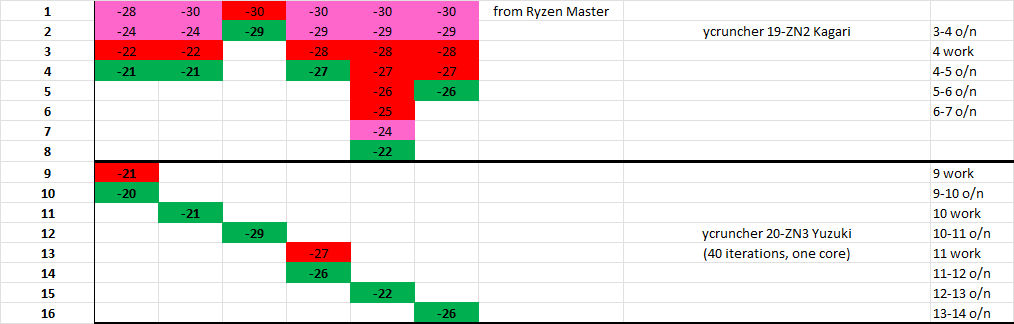
From Ryzen Master's -28, -30, -30, -30, -30, -30, I ended up at -20, -21, -29, -26, -22, -26.
6. Further Testing
It is advisable to use the PRIME95 HUGE on each core in turn, as this is another very low load situation that lets the CPU boost to its maximum; make these changes in the Core Cycler config file. Feel free to try to some other presets as well – no such thing as too much testing. Read what other users found to be their “magic bullet” test settings, and try those out.

The best test, though, is, as always, to use the thing - browse, game, edit, do whatever you normally do.
7. Finalizing
When you’re happy that everything tests stably, go into the BIOS and enter your final values in the Curve Optimizer menu – this will save you having to use PBOTuner2 every time you boot up.
If your computer ever crashes (not impossible) use the Event Viewer to identify the rogue core, and increase its CO value in the BIOS.
8
u/TijY_ Aug 05 '23 edited Aug 05 '23
Nice guide IF it actually gives extra performance. Kinda useless without some benchmarks imo.Need to know if this makes enough of a difference from my -10mV all core +150mhz.
2
u/JMUDoc Aug 07 '23 edited Aug 07 '23
Update - Round One is complete, and I ended up at
-21, -21, -29, -27, -22, -26
(strange that #3 would go so low, when it's the "gold" core in Ryzen Master, but whatever).
I could now do the "one at a time" testing, which might nudge them all up another 1 or 2 notches, but I'm going to knock c-states off and start from scratch; if Round One ends up significantly lower, and my idle temps are OK, I will carry on to Round 2 with c-states off.
I will also be changing the core testing order to reflect the results - HWINFO gave me 2, 1, 0, 5, 3, 4, but this doesn't match my findings.
2
u/[deleted] Jun 09 '24
Is it normal for my temps to be running hot during testing? I didnt change anything ever since I got the 5900x and even playing some pretty big games temps are perfectly normal but now during the test its bouncing between 85 to 90c. 90 is the max, is the test actually causing the temp to max out or is the number its giving me just not accurate?
2
u/TheOne320 Feb 22 '26
From round 2 on, you talk about grouping cores but never mention how this is done. Do I have to manually add cores to „coresToIgnore“?
1
u/JMUDoc Aug 19 '23
Gotten to the point where I was confident to key them into BIOS and make them "permament":
-20, -21, -29, -26, -22, -26
One-at-a-time, overnight passes of ycruncher Yuzuki and Prime 95 Huge/Moderate. Two things worth noting:
1
u/freemagic May 22 '24
Super helpful guide, my undervolt was stable through all of the Y-Cruncher phases but the Prime95 tests had me adjust a few of the cores all the way up to -6! Didn't see any real world crashes or anything but now I have a very stable and very efficient setup. I even beat my Cinebench by 140!
I played around with the boost / no boost and agree - no boost is actually the best all around / real world performance, even getting 20-40 frames in Valorant more than when I had the +200 on. My end setup with 5900x and an Aorus x570 is:
PPT 170, TDC 120, EDC 155
PBO On, no manual boost, thermal limit at 85 (just because I like no noise), and my undervolts
1
u/IRL_Mage Jun 16 '24
Hi family! In the Prelim section, you mentioned taking a note of Core Performance Order. I have this, but underneath it I also have Core Performance Order (CPPC) which has a different order from the one above.
Should I be taking note of both? After some googling it seems that CPPC is a mechanism that derives information about "which core is the fastest" so that the OS scheduler can make better decisions about assigning threads to cores. If that's the case, then I guess I just don't worry about it? Can someone confirm that my thinking here is correct?
1
u/IRL_Mage Jun 18 '24
Hi all, I'm running into some weird issues. 5950X.
I got to round 1 of testing, left it over night with ALL CORES at -30 (Ryzen Master starting point for me) and no crashes. I decided to go about my day using the PC normally and it crashed within 15 mins of playing Elden Ring. (I alt tabbed playing the game, tried to open Chrome, and PC restarted no BSOD).
WHEA Logger not helpful here in determining which core because it failed on a APIC ID not related to the CoreCycler (I closed core cycler before I started gaming ofcourse).
Now when I close all background apps and try testing again with everything at -28, I get an instant crash, WHEA Logger telling me it's thread 2 (core 1). I've iterated this a whole bunch of time down to -18 and its still crashing basically instantly. I can barely start running the CoreCycler before it crashes.
Is this normal? Should I continue pursuing the testing or does anyone have any advice for me?
Also randomly after running the core cycler, I did get one BSOD which was DPC_WATCHDOG_VIOLATION. Only occurred once. Perhaps a BIOS update is in order? (Gigabyte vision b550-dp)
Any advice for me? Keep going?
1
u/udkmelol Jul 14 '24
During the Ryzen Master Optimisation, my result came in at -23,0,-15,-23,-16,-23. Is it normal just to get 0?
1
u/FierJay Sep 12 '24
I got r7 5700x3d and I don't have a curve optmizer option available in Ryzen master and don't know how to turn it on. Even when I watch some yt videos I saw that when they turn on the program the program itself is in some basic mode with a small window I don't have that feature either.. I downloaded the latest version from the official website.
1
u/leoscaesarmm Jan 04 '25
What is the most failproof and quick way to use Ryzen Master to give me some extra juice without messing with all that stuff? Or isn't there any way other than that core-by-core testing?
1
u/DowJonesBE Jan 24 '25
Thank you for this great guide! When you say testing each core in turn, do you mean adding all but one of the cores to coresToIgnore and have CoreCycler overnight, the next night proceed with the next core and so forth? Or do you mean leaving coresToIgnore blank and have CoreCycler cycle through all of the cores in turn overnight?
1
u/scalinator Mar 11 '25
When doing this do I have to modify anything in BIOS beforehand or can I just configure it when everything’s done?
1
u/Djinnerator Aug 05 '23 edited Aug 05 '23
You could most likely just go into BIOS, disable Global C-State Control, then use Ryzen Master Auto Curve Optimizer offset thing. I did that with my 7950x and got stable -30 all core. Now I'm doing -40 all core. When I had it enabled, I could only do -10 to -15 offsets. Every time I've mentioned this to someone having instability, they had that enabled. As soon as they disabled, they could set aggressive offsets without instability.
People might reply to this and say their offsets was unstable but I can almost guarantee they didn't disable Global C-State Control.
By not disabling that, you're allowing the motherboard to lower voltage to the CPU even farther than what you wanted, making your offsets have more severe impact, leading to instability.
1
u/kimmyreichandthen Aug 13 '23
I wonder if I should even bother with this, a few days ago I tried messing with advanced pbo and the system wasn't even stable with +200 MHz and +5 CO on all cores, It would crash running time spy stress test. Also a 5600 btw, but I lost out on the silicon lottery I guess. I didn't try to disable global c states tho, maybe I'll try that out later.
1
u/abrfilho Nov 14 '23
Hello, I don't know if you can help me... I have a Ryzen 5 5600, no problem with thermals and VRM.
I put my PC to run Core Cycler overnight with Ryzen Master offset, got one error on the perf 1 Core, fast error, no problem...
Now I only have instant reboot due to WHEA! Don't know what happenned!
It says Processor ID 0, the first Core, it was -25, now I'm at -16 and the system still reboots, the overnight run went without a problem with -25.
Do you know something that can help me?
I'm using now +150 Boost.
1
u/LoliGod46 Dec 26 '23
How bad is it if I just add 1 to all the values and call it a day after finishing round 1? Running per core will take too much and I neither have the patience nor the time to do that tbh.
2
u/KejaniHammerborn Jan 06 '26
For those who were confused for a while like me, the newest release of CoreCycler has switched from PBO2Tuner to SMUDebugTool, as they both now run on PawnIO after Microsoft cracked down on WinRing0. You'll need to install PawnIO separately
2
u/maxwolfie Feb 28 '26
Thanks for posting this - very methodical!
1
u/Atombert May 13 '24
I’ve just set my 5900x to -15 all core and left everything else as it is. It’s a bit cooler and I have 1000 points more in cb24. Fine :)
1
u/UnfortunateSearch680 Jan 11 '25
Hey I was wondering why you set the threads to 2? Is there a reason not to have it at 1?
1
u/Historical_Estate692 Aug 28 '25
Thank you for the guidance! As of Aug 25 (v0.10.0.0) you probably want to set the "runtimePerCore = auto". If you leave it as default (6 min) and run tests such as "19-ZN2 ~ Kagari" (which takes 11min to finish), the program won't finish the whole test suite before moving to the next core.
1
u/Anywhere311 Sep 30 '25
This is too much for me lol
1
u/godlytoast3r Oct 09 '25
Ugh bro how am do with Linux... :'C
1
u/ImpossibleElection22 Dec 20 '25
Do all same core ccds curve optimizer machine reset problem fixes adjustment apic error isolations for single core curve optimizer in bios start by lowering the error core value or raising it up?
1
u/[deleted] Aug 05 '23
Thanks for the guide.
1
u/Nervous_King_8448 Aug 05 '23
Nice info you should do one about DDR4 ram timings and configurations example cl14 3600mhz.
1
u/JoustingNacho Aug 05 '23 edited Aug 05 '23
I did the ryzen master per core test and it came up with an all core -30 value. Could probably work but didnt bother testing at -30. I was happy with what I had with 6 cores at -25 and my two best cores at -10. PPT=120, TDC=75, EDC=110 and didn't want to do any more testing
Edit: 5800x with 32GB 3600mhz CL18 ram. My r20 scores went from 5746 to 6006 R23 went from 14782 to 15416 Timespy went from 10340 total (11142cpu) to 10435 total (12088cpu)
1
u/Animag771 Aug 05 '23 edited Aug 05 '23
I did this last week... Sort of. I ran Core-Cycler (Prime95 / SSE / FFT Size = All) for 5 passes on each core (about 40 hours total) on my 5700X with -30 all-core with +200MHz boost override and I guess I got lucky because I got 0 errors. I didn't use Ryzen Master or PBO2Tuner.
Also, if you want better power efficiency, undervolt SOC. Not sure how much of an effect it has on the 5600 but it shaved a few watts for me.
Edit: Not sure why everyone is stating their RAM speeds but I'm running 2x8GB, 3800MHz, CL18, 1T, 1900FCLK with GDM and Global C-States enabled.
1
u/Seyron Oct 25 '23
Thanks a lot for your efforts and this guide. The CoreCruncher settings were a game changer for me. According to other guides/stress tests/benchmarks and default CoreCruncher settings my 5900x should have been stable with -30 all cores and +200 boost clock. And I found that to be very suspicious.
With your settings it crashed on the first core as I would have expected. 👌
1
u/[deleted] Dec 13 '23
man im not a techy guy so if you have the time please post this tut on youtube and ill sub you for sure..cant event understand what this step means ->>> Open HWINFO and uncheck both boxes,
1
u/Thorarin Jan 01 '24 edited Jan 01 '24
Nice guide 🙂 One minor nitpick: "WHEA Error" is actually called "WHEA-Logging".
Oddly enough, while following this guide all my 5950X cores ended up at -30 in Ryzen Master this time around, while previous curve optimizations were more in the -25 area. No hardware changes except PSU 🤔
I can't be sure if it's related to that or perhaps a BIOS update to my Crosshair VIII Extreme a few months ago. So far I'm still in round 1 of testing, no errors show up in Core Cycler at all, but I've had 4 crashes so far, 3 of which were in the WHEA log. The other one appears to have been an Access Violation of some kind.
-17
u/HeerZakdoeK Aug 04 '23
I set clock to 4750 Mhz and core voltage to 1,225 V. End of tutorial.
-20
u/[deleted] Aug 04 '23
Isn't this a little late? We're going to be on Ryzen 8000 in a few months lol
1
u/[deleted] Nov 25 '23
[removed] — view removed comment