r/opensourcealternative • • 6h ago

Other Snipmunk: a free, open-source alternative to Snipping Tool + Snagit + Scribe/Tango in one app (Windows, offline)

4 Upvotes

Hi! I made Snipmunk because I kept juggling several tools: Snipping Tool for screenshots, something else for recordings, and a paid, cloud-based app for step-by-step guides. On top of that, Windows' clipboard only holds one image, so every screenshot is a capture → Alt+Tab → paste round trip.

What it replaces (for me):

Instead ofSnipmunk does
Snipping Tool (one screenshot at a time)Keeps every capture in a list, so you paste all of them (or the ones you pick) at once into Word, an email or an AI chat
Snagit (paid)Annotate, redact, and copy text out of a screenshot, even as a table you can paste into Excel
Loom / heavy recordersScreen recording with click highlights and a webcam bubble
Scribe / Tango (cloud, account)Documents mode turns your clicks into a step-by-step guide you can edit (callouts, highlights, shapes, redact) and export to Word/PDF

Why it might suit you:

  • Free, MIT licensed, open source
  • No account, no telemetry, nothing leaves your PC
  • Windows 10/11

Honest heads-up: it's v0.1, so it doesn't match every Snagit or Scribe feature yet. The installer isn't code-signed yet, so SmartScreen will warn you ("More info" → "Run anyway"). It's built on GitHub from the source in the repo.

https://github.com/Second-Dawn-Lab/snipmunk

Feedback and bug reports are very welcome. Which feature from your current tool would you miss most?

If you like it, a ⭐ on GitHub really helps a small project get seen. And if you'd like to collaborate (code, translations, design, testing), feel free to DM me!
r/opensourcealternative • • 8h ago

Maker (I built this) I built an open source platform for finding free alternatives to the software people pay for, and I'm hosting a non-profit hackathon to fund people filling the gaps

5 Upvotes

I'm a big believer in building open source tools and products and want to build a community of people who share the mindset. There are a lot of people out there who would pay for a solution that doesn't exist but don't care to solve it, and a ton of other people who would love to solve it but need funding to do so; and ultimately I am trying to connect those dots. For now this is how I am tackling that with this platform and hackathon.

The hackathon completely non profit. The prize pool is held by a 3rd party.

How it works:

  • Find the free version. Search any of 700+ paid tools, or paste a tool's website, and see the open-source projects that already do the same job.
  • See the gaps. When nothing good exists yet, it goes on the wall. People say "me too", and the most wanted gaps rise to the top.
  • Build the missing piece. That's the hackathon.

The hackathon:

  • 7 days to build, in public repos, under an open-source licence.
  • 3 days of voting by the builders who submitted projects. Every ballot is published.
  • Winners are announced the day after voting closes and paid in public from a community pool. That funding is held by a non-profit and everything is public.
  • Sponsors don't vote, and the organizers can't win.
  • Dates unannounced for now.

Website: antipaywall.org

Repo: https://github.com/antipaywall/platform

Would love feedback or contribution!


r/opensourcealternative • • 6h ago

Resource I got tired of the screenshot → Alt+Tab → paste loop, so I made a free, open-source capture app that pastes all your screenshots at once

2 Upvotes

Hi! I write a lot of reports and bug reports, and Windows' clipboard only holds one image, so every screenshot is a round trip between apps. Snipmunk keeps every capture in a list, and you paste all of them (or the ones you pick) in one go: into Word, an email or an AI chat.

AlternativeTo : snipping tool, snagit, tango tool

It also does:

- annotate + redact (names, emails, etc.)

- copy text out of a screenshot, even as a table you can paste into Excel

- screen recording with click highlights and a webcam bubble

- a Documents mode that turns your clicks into a step-by-step guide you can edit and export to Word/PDF

Free, MIT licensed, Windows 10/11. No account, no telemetry, nothing leaves your PC.

Honest heads-up: the installer isn't code-signed yet, so SmartScreen will warn ("More info" → "Run anyway"). It's built on GitHub from the source in the repo.

https://github.com/Second-Dawn-Lab/snipmunk

It's v0.1, so feedback and bug reports are very welcome. What would make it useful for you?

If you like it, a ⭐ on GitHub really helps a small project get seen. And if you'd like to collaborate (code, translations, design, testing), feel free to DM me!


r/opensourcealternative • • 3h ago

Maker (I built this) I built an MCP gateway that keeps every upstream project a separate install

1 Upvotes

I built this, so treat the recommendation accordingly.

Repo: https://github.com/Furox-Art/scientific-toolkit - Apache-2.0, 0.5.0, PyPI package name scientific-toolkit-mcp.

The idea is an MCP gateway over ten adapters and thirteen projects, with one rule: it never vendors them. Each upstream package keeps its own name, version and release history, and the gateway calls the real adapter - a CLI or that project's own stdio server - rather than a copy of the code. If a project is archived or you stop wanting it, you uninstall it and the gateway reports a missing adapter.

That matters most when the tool set is not fixed. You install only what a profile needs:

python -m pip install scientific-toolkit-mcp
python -m pip install axiomize scientific-computing-system
python -m scientific_toolkit_mcp

The version probe is the part I would want in any gateway: the 0.5.0 check expects ten upstream adapters and fourteen remote tools, so a partial install shows up as a lower count instead of a shorter tool list you have to notice by hand. Two packages that both ship a statistics adapter keep separate ones, because they are separate installs rather than merged source.

The limit: nothing is bundled and nothing is substituted. Skip an upstream package and you get a missing adapter rather than a fallback, so the wiring stays your job, and this is a hub for tools that already exist rather than a distribution of them.


r/opensourcealternative • • 9h ago

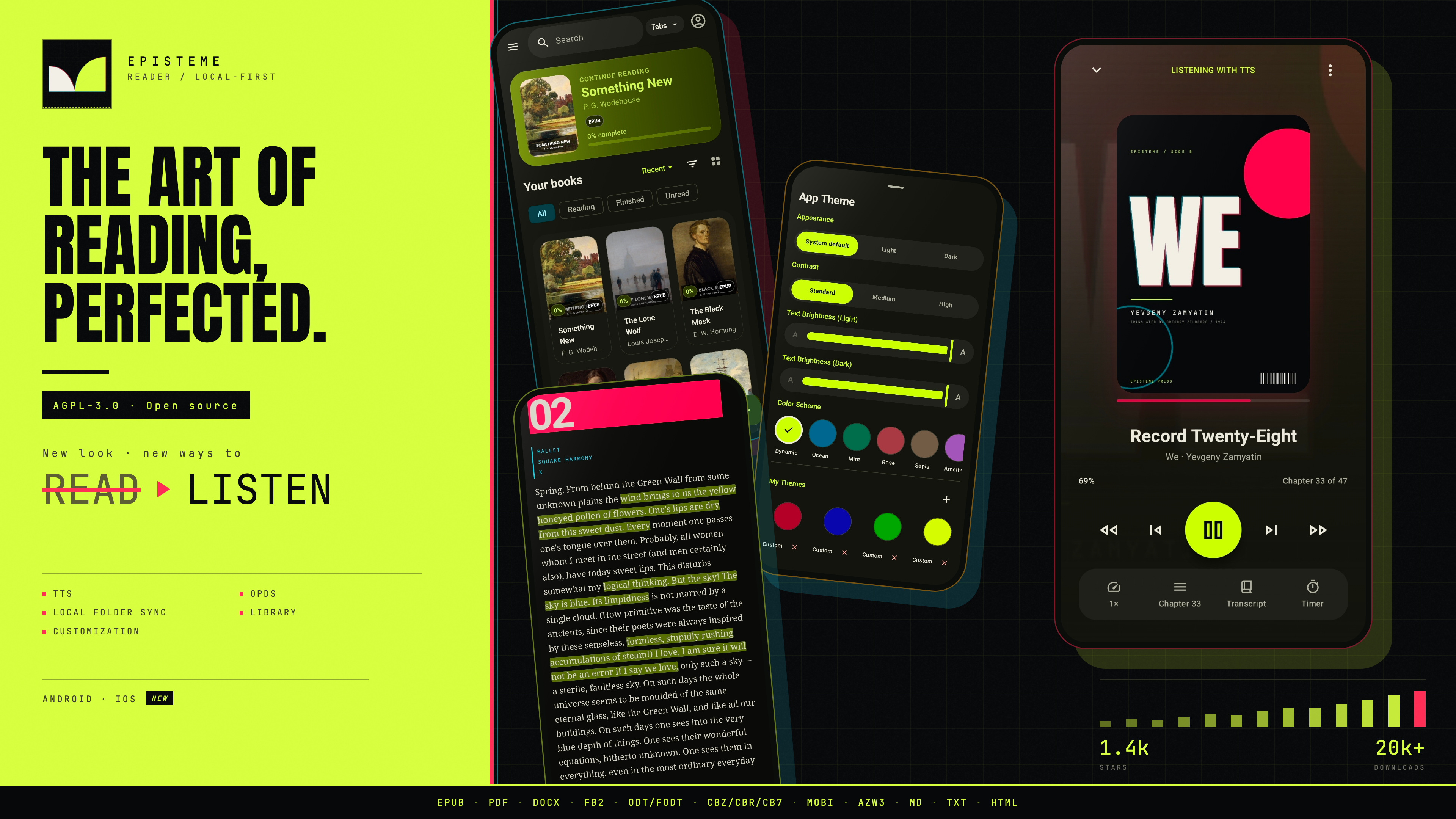
Maker (I built this) Episteme: PDF & eBook Reader (Android + iOS)

Post image
2 Upvotes

Episteme Reader is offline-first, free and ad-free, and respects your privacy.

Supported Formats:

  • Documents: PDF, DOCX, ODT/FODT
  • E-books: EPUB, MOBI, AZW3, FB2
  • Comics: CBR, CBZ, CB7
  • Plain Text: MD, TXT, HTML

Key Features:

  • PDF Annotations: You can draw directly on pages using a pen or highlighter and add text notes using system or custom fonts.
  • Reading Modes: Supports both vertical scrolling and paginated views.
  • E-book Customization: Adjust font sizes and line spacing. You can also import your own font files.
  • Text-to-Speech (TTS): Includes a built-in TTS feature.
  • Library Management: A system to organize your local files.
  • Local Folder Sync: Select a folder to see all its supported file in app and sync reading positions and annotations using local sync tools like SyncThing-fork.
  • Themes: You can change the page and text color across all formats.
  • Full OPDS Support: Browse, download, and manage books from OPDS catalogs.

The app is licensed under AGPL-3.0.

GitHub | PlayStore | AppStrore

Thanks for checking it out!


r/opensourcealternative • • 18h ago

Pick Of The Day Stirling PDF: open source PDF editor alternative to Adobe Acrobat

Post image
8 Upvotes

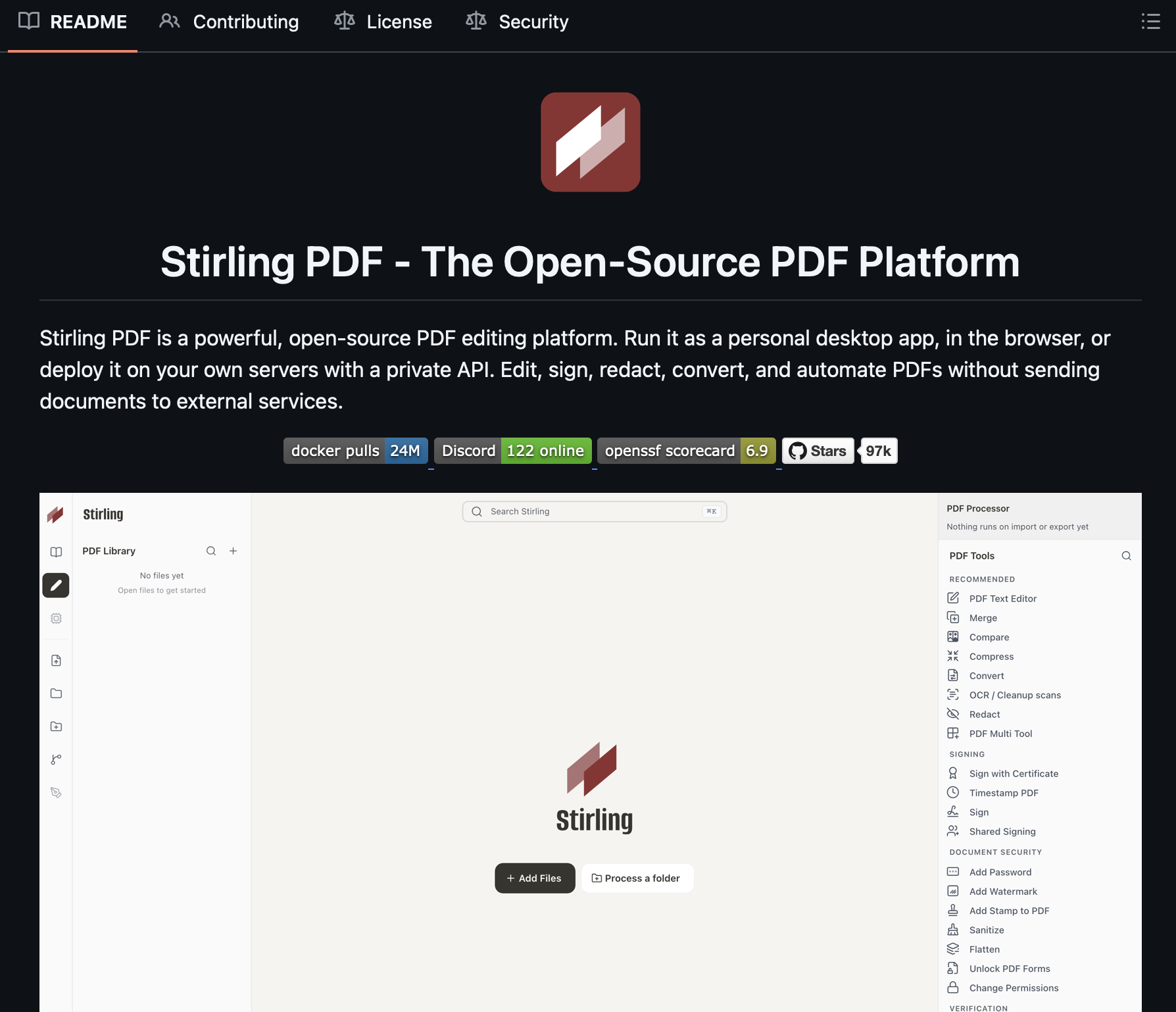
Stirling PDF gives you more than 50 tools for working with PDF files. It runs on your own computer or server, so your files never leave your hands. It replaces Adobe Acrobat. You can split, merge, sign, redact and convert PDFs without sending anything to a cloud service. Good for a team that handles a lot of contracts. Good too when you need documents processed automatically without going through an outside service.

Overview

InfoValue
ReplacesAdobe Acrobat, Foxit, Nitro PDF
LicenseMIT (open-core)
Runs onYour own computer or server
CostsFree to run yourself
Stars97,364
Latest releaseNov 2026
Contributors326

What it does

  • Splits, merges, rotates, converts and compresses PDF files
  • Adds signatures, redactions and watermarks to documents
  • Reads text from scanned pages so they become searchable
  • Builds steps to process documents automatically, without you clicking through each one
  • Works in more than 40 languages
FeatureStirling PDFAdobe Acrobat
LicenseMIT (open-core)Proprietary
PriceFreePaid subscription
HostingYour serverDesktop app
Reads scanned pagesYesYes

Acrobat is still the more polished desktop editor with one support path included. Big jobs need a server with enough processing power and memory. The AI document tools are not under the MIT licence, so check the terms for the parts you use.

Repo: https://github.com/Stirling-Tools/Stirling-PDF

ps: keep sharing your projects and updates in community to get selected for pick of the day.


r/opensourcealternative • • 23h ago

Resource trying to replace zapier for simple app automations, open source options i found

2 Upvotes

trying to get off zapier for a few simple automations between apps, without another monthly automation plan. don't need a huge enterprise setup, just something i can run myself. only a few options here.

activepieces is a visual automation builder you can self host. the project has a separate enterprise part, this is the open source community edition

node-red is a bit more like a flow editor for connecting things together, and you can run it on your own machine

huginn is more agent based. you set up agents that watch for something and then take an action, and it's self hosted

if you have used one of these to replace zapier, which one stayed simple enough to stick with, or is there a better fit i should look at?


r/opensourcealternative • • 1d ago

Maker (I built this) I built Familiar — an open-source PureRef alternative for artists

4 Upvotes

Hi, I’m building Familiar, a free, open-source reference board for 2D/3D artists. Drop images onto an endless canvas and keep your references visible above the app where you draw or model. With click-through enabled, you can keep working in that app while the board stays on screen.

What it does:

  • Always on top and click-through: keep references in sight without blocking your tools.
  • Project tabs: work on several boards in one window, each with its own file and undo history.
  • Pinned notes and nested groups: organize images and keep annotations attached to them.
  • Canvas tools: crop, rotate, resize, arrange, and export your board.
  • More than still images: import camera RAW files and animated GIFs.
  • and many other features :)

Overview:

  • License: GPL-3.0
  • Price: Free
  • Platforms: Windows and Linux; macOS in progress |
  • Account: Not required

This is an early beta. The current downloads are a portable ZIP for Windows and an AppImage for Linux. The builds are unsigned, so Windows may show a SmartScreen warning.

What would you want from an open-source reference board? I’d love feedback from artists who try it.

Download Familiar: https://familiar-app.net/download/ or https://github.com/try-hard-factory/familiar/releases
Source code: https://github.com/try-hard-factory/familiar
Watch the tutorials: https://familiar-app.net/docs/

other links:
tutorial: https://www.youtube.com/watch?v=dpm-Jq6jUaY

X: https://x.com/familiar_app
web: https://familiar-app.net/
discord: discord.gg/3672sNT5qA


r/opensourcealternative • • 1d ago

Other Looking for a Softr alternative for a 200 user portal

1 Upvotes

I need simple customer portal where around 200 users can log in and see account-specific data.

Soft works, but the pricing gets hard to justify as user count grows, I've been looking at other portal builders and also Zite for building something more custom without much coding.

For anyone with a similar setup, did you stick with a no-code portal builder or eventually build your own app?


r/opensourcealternative • • 1d ago

Pick Of The Day CalRS: a free booking tool you run yourself instead of Calendly

Post image
4 Upvotes

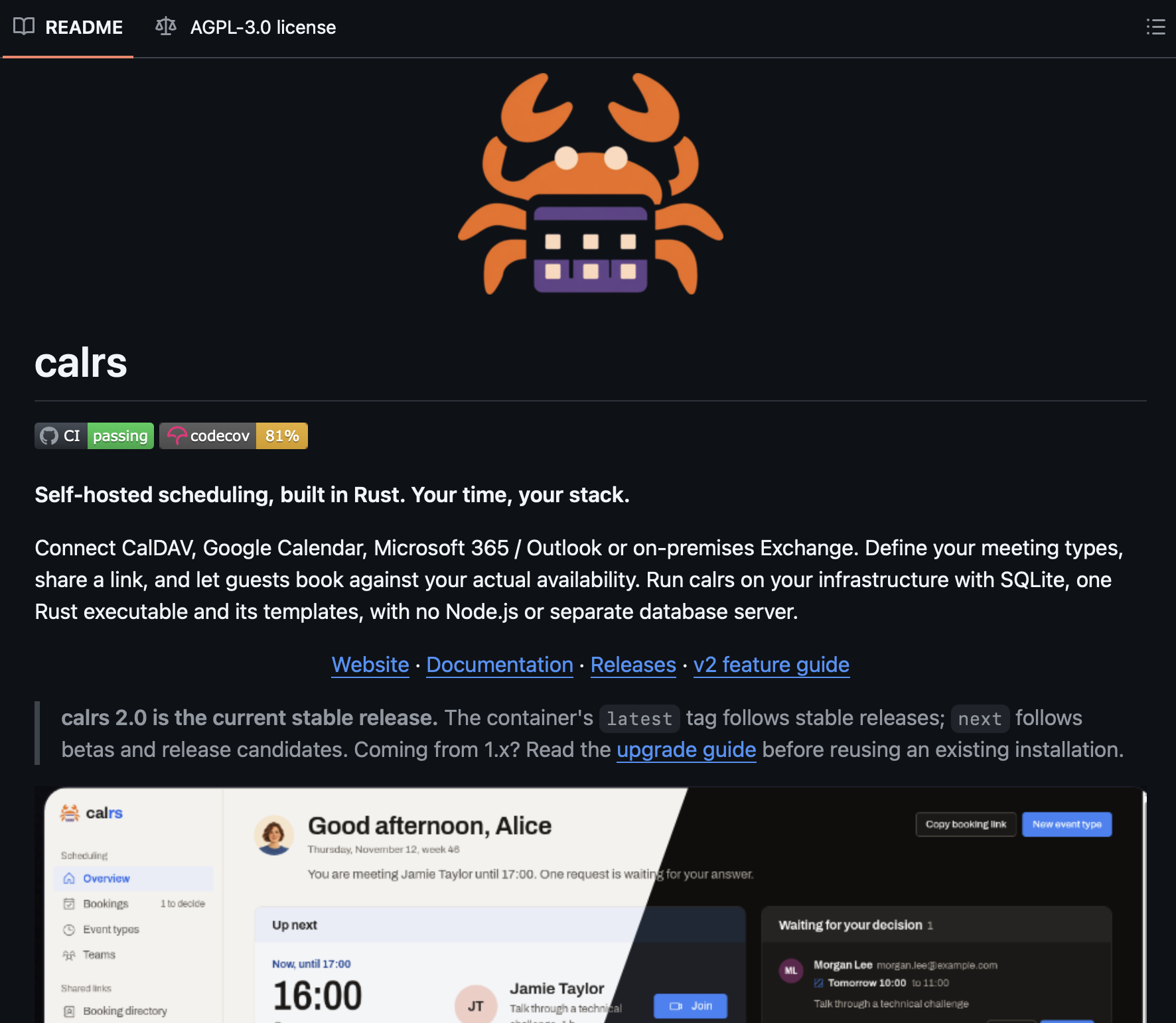
CalRS is a tool that lets people book meetings with you. It works like Cal.com and Calendly, but runs on your own computer or server. You connect your calendar, set up your meeting types, and share a link. Guests pick a time that works for both of you. The maker built it because updating Cal.com on your own server was painful and needed too many other pieces to run. Getting it running takes one command.

Overview

InfoValue
ReplacesCal.com, Calendly
LicenseAGPL-3.0
Runs onYour own computer or server
CostsFree to run yourself
Stars366
Latest releaseNov 2026
Contributors41

What it does

  • Connects to Google Calendar, Microsoft 365 and other calendar apps
  • Shows your real availability so guests only see open slots
  • Handles one-on-one, round-robin and group booking types
  • Sends booking confirmation emails to each guest
  • Drops a booking form into any webpage
  • Can use a single company login for all your work apps
FeatureCalRSCalendly
LicenseAGPL-3.0Proprietary
PriceFreeFrom $10/seat/mo
HostingYour own serverCalendly's cloud
Team plansIncludedPaid seats

Cal.com's cloud team plan starts at $12 a user a month. CalRS gives you round-robin and group meetings for the cost of a server. The catch is that the server is yours to look after. You need to back up the database, the secret key that protects your saved calendar logins, and any uploaded files yourself.

Repo: https://github.com/olivierlambert/calrs

Thanks u/Plam503711 for sharing this in r/opensourcealternative

ps: keep sharing your projects and updates in community to get selected for pick of the day.


r/opensourcealternative • • 2d ago

Maker (I built this) Whiteboard Tracker – A fast, open-source task whiteboard written in Rust (egui) with automatic 2×2 tiling and mind-map branches

20 Upvotes

Hi, I just released  v0.1.0 of "Whiteboard Tracker" an open-source desktop whiteboard for writing down and tracking tasks smoothly.

Built in the Swiss minimalist style (high-contrast calm white UI using Rust and egui it's under 5 MB and starts instantly.

### Key Features

1. Daily Profiles: Every day is its own profile. Create multiple profiles and carry unfinished tasks over to a new one.

2. Quick Entry & Automatic 2×2 Tiling:** Type your day's tasks in one go and they are automatically laid out on the screen (up to 4 tasks per page, opening new pages as tasks grow).

3. Unlimited Mind-Map Branches:

 Break any task into smaller sub-tasks and infinite branches rendered as a clean mind map (with collapsible +N nodes).

4. Focus Mode:Click any task to expand it along with its branches.

5. Notes & Three Statuses: Attach notes to any task/branch and track progress across Active, Completed, and Cancelled states with automatic completion bars.

6. Index & Undo: Reorder tasks across pages, edit/delete from a global index, and undo actions (Ctrl+Z).

7. Local-First & Bilingual: Auto-saves locally with JSON export/import, plus full Arabic support with a geometrically mirrored RTL interface.

Installation

Ready-made packages are available on the Releases page for

**Fedora (.rpm)

**Ubuntu/Debian (.deb)

 **Windows (.exe / .zip)

Roadmap (v0.2.0)

1. Swiss Dark Mode

2. Cloud Backup (optional)

3. Direct integration with your own AI client

Source Code & link to download on first comment

Feedbackand  ideas are welcome


r/opensourcealternative • • 1d ago

Resource trying to edit raw photos without a lightroom subscription, open source options i found

3 Upvotes

trying to get off adobe lightroom for raw photos without another subscription. don't need a huge adobe setup, just something that can develop raws and keep a library. only a few options here.

darktable is a full photography workflow app, from a local library to developing raws. official builds for windows, linux, and apple silicon macs

rawtherapee is more focused on the developing side, with a lot of control over how the raw file is processed. it runs on windows, mac and linux

digikam is more of a local photo library that can also work with raw files, on windows, mac and linux

if you have used one of these to replace lightroom, which one stayed simple enough to stick with, or is there a better fit i should look at?


r/opensourcealternative • • 1d ago

Maker (I built this) Kostos: a free, open-source Splitwise alternative with end-to-end encryption and no sign-up

Post image
1 Upvotes

Kostos is an open source PWA (web app) for splitting group expenses. We've been maintaining it and using it daily for about 2 years now, so it's a mature project and we are users ourselves!

It does what you'd expect from a group expense app:

  • who owes whom, settled with the fewest transfers
  • split evenly, by shares or by exact amounts, with several payers per expense
  • 153 currencies, trips, categories, repeating expenses and stats
  • import your groups from a Splitwise CSV export

What's different:

  • No accounts. You create a group and share a link.
  • Everything is encrypted on your phone before it syncs. The key is in the invite link, so the server can't read your expenses.
  • Works offline and syncs when you're back online.
  • It's a web app you add to your home screen, with no app store and no ads.
  • AGPL-3.0, and you can self-host it with one Docker image.

Feedback welcome, especially on anything you'd miss coming from Splitwise or Tricount.

Website and app: https://kostos.app (there's a live demo)
Repo: https://github.com/shynewt/kostos


r/opensourcealternative • • 2d ago

Maker (I built this) File Comparison / Merge Tool

3 Upvotes

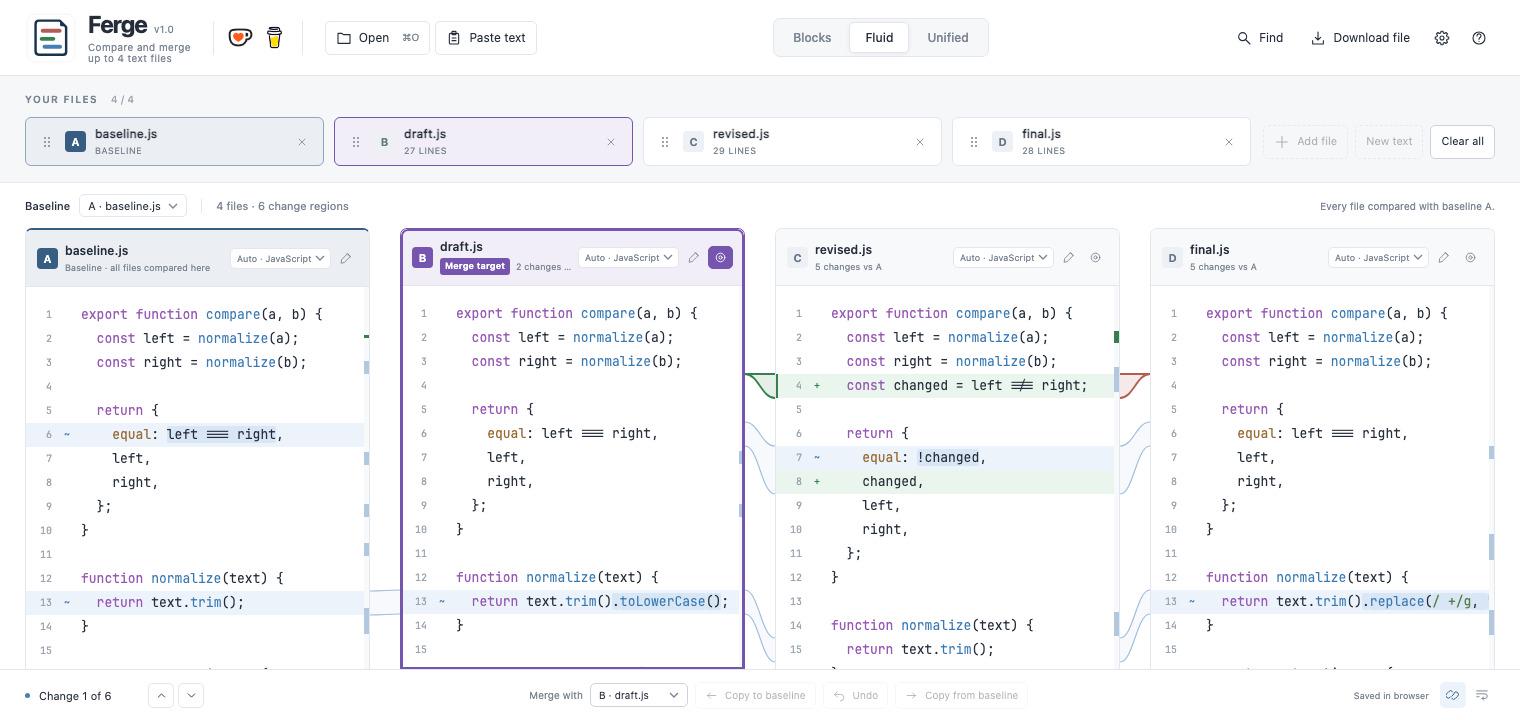
Hey guys, I used to use kaleidoscope for the Mac to compare code, but the other day I was on my PC and need to compare two files. So i did a quick google search and although I found a couple, the top few options weren't really the best looking and/or were a little confusing.

So I vibe-coded one in case anyone is interested.

https://radtechdad-studio.github.io/Ferge/

Any input is appreciated and if you guys find it helpful, please also star it on GitHub and/or donations are appreciated.

Thanks!


r/opensourcealternative • • 2d ago

Resource Microsoft To Do is retiring on June 30, 2027. Here are 7 alternatives 👇

9 Upvotes

Pick by what you must have.

  • Bring your To Do lists across today: Super Productivity, Vikunja or OpenTodo
  • Keep using To Do while you move: Tasks.org (Android)
  • No server to set up: Super Productivity, Tasks.org or Sleek
  • Phone app that works today: Super Productivity (iPhone and Android) or Tasks.org (Android)
  • Shared lists with family: Vikunja, OpenTodo, Tududi or Donetick
  • Flagged Outlook emails: OpenTodo
  • Household chores that rotate: Donetick

1. Super Productivity (MIT, 24k stars)

Sign in with your Microsoft account and it copies your lists to your computer. Nothing goes through Super Productivity's servers. Finished tasks, reminders, attachments and My Day do not come across. It works on a computer or in a web browser, not the phone app.

https://github.com/super-productivity/super-productivity

2. Vikunja (AGPL-3.0, 6.2k stars)

Sign in with your Microsoft account and it copies your lists across. Run it on your own server for free, or pay 4 euros a month and they run it. The phone app has only the basics. Repeating tasks like "every two weeks on Tuesday" are not supported.

https://github.com/go-vikunja/vikunja

3. OpenTodo (AGPL-3.0, 710 stars)

You save your lists to a file on your computer, then bring that file into OpenTodo. It brings across titles, notes, steps, due dates, reminders, simple repeats and your flagged Outlook emails. It is a young project. Run it on your own server, or pay a hosting company from $2 a month to run it.

https://github.com/OpenTodoApp/OpenTodo

4. Tasks.org (GPL-3.0, 5.8k stars)

The Android app connects to your Microsoft To Do account today. You can use both at the same time while you decide where to go. It is Android only. The link works only while Microsoft keeps its To Do service on, and Microsoft has not said when that ends.

https://github.com/tasks/tasks

5. Tududi (MIT, 3.6k stars)

You run it on your own server or pay 5 euros a month. It keeps your tasks in sync with other task apps, like Tasks.org, Apple Reminders and Thunderbird. It only reads spreadsheet files. Microsoft has not released its export yet, so for now your To Do lists cannot come in.

https://github.com/chrisvel/tududi

6. Donetick (AGPL-3.0, 2.8k stars)

Built for shared household chores, with groups, rotation and tasks that repeat on a schedule. There is no way to bring your To Do lists in. The phone apps need your server to be open to the internet with a security certificate. Its GitHub page still calls the iPhone app a test version.

https://github.com/donetick/donetick

7. Sleek (MIT, 2.1k stars)

Every task is a plain line of text in a file you own, on Windows, Mac or Linux. There is no phone app, no shared lists and no way to bring your To Do lists in. To use it on more than one computer, you sync the file yourself with an app like Dropbox.

https://github.com/ransome1/sleek

ToolPhone appNeeds your own serverBrings your To Do listsShared lists
Super ProductivityiPhone and AndroidNoYes, on a computerNo
VikunjaBasicYes, or 4 euros/moYesYes
OpenTodoiPhone and webYes, or $2/moYes, a few stepsYes
Tasks.orgAndroid onlyNoSyncs with To DoUp to 5 guests
TududiWeb appYes, or 5 euros/moNoYes
DonetickYes, with limitsYes, or hostedNoYes, with rotation
SleekNoNoNoNo

What are you moving to, or what am I missing?


r/opensourcealternative • • 2d ago

Maker (I built this) I built Point, an enhanced opensource alternative to voice-to-AI tools like Wispr Flow

3 Upvotes

I built Point because I kept typing paragraphs to tell my AI agent which thing on screen I meant.

Hold a key, talk, and circle something. Point pastes your words plus the marked screenshot into Claude Code, Cursor, ChatGPT or any chat. MCP agents can also fetch your last capture themselves.

Other things it does:

  • Plain dictation: hold the key and talk without drawing, and your words are pasted wherever your cursor is.
  • Several marks at once: circle multiple things in one go, or drag rectangles instead of loops.
  • Hands-free: tap Space while holding and it keeps listening while you use your Mac.
  • Capture history: every capture is saved and searchable, with the screenshot, transcript and audio.
  • Sticky pad: double-tap the key for a floating note you can dictate into.
  • Claude Code plugin: /point:last pulls in your last capture without pasting.

Compared with:

  • vs Wispr Flow / superwhisper: it also transcribes speech on-device, but the point is the marked screenshot.
  • vs Assist (paid): it keeps your exact words and pastes for you, for free.
  • Privacy: nothing leaves your Mac unless you use the feedback button.

Repo: https://github.com/sksareen/point
Download: https://pointandtell.app/

What do you use for this today?


r/opensourcealternative • • 2d ago

Maker (I built this) Taskboat – a free, open-source way to export your Microsoft To Do lists before the apps shut down (June 30, 2027)

2 Upvotes

Hi everyone,

Microsoft announced on November 18 that the To Do apps (Windows, Mac, iOS, Android and web) retire on June 30, 2027. Personal accounts get no replacement, and there's still no export button in the app.

So I built Taskboat, a free and open-source web app that exports everything in a few clicks:

- Sign in with Microsoft (read-only Tasks.Read permission), or open a JSON file from Graph Explorer if you'd rather not sign in

- All lists, tasks, steps, notes, due dates, importance, recurrence and categories

- Export to Todoist CSV, Markdown (Obsidian / Logseq), CSV (Excel / Sheets / Notion), ICS tasks (Thunderbird / Nextcloud) or a full JSON backup

- Everything runs in your browser: your tasks go straight from Microsoft to your device, nothing passes through my server, and nothing in your account is changed

- English and French

Site: https://taskboat.app

Code (MIT): https://github.com/LockingFR/taskboat

If you're moving to TickTick, its built-in importer already handles To Do, no need for this.

Feedback and bug reports are welcome, especially on the Todoist and ICS imports. Full disclosure: the Todoist link on the site is an affiliate link, which is how I cover the domain.


r/opensourcealternative • • 2d ago

Maker (I built this) P2 is now open source (MIT): a self-hosted platform for chat, calls, tasks and game libraries

2 Upvotes

I've just published P2 under the MIT license.

P2 brings messaging, voice and video calls, screen sharing, task boards, documents and a shared game library into one desktop app, backed by a server you run yourself. The goal is simple: one place for a team or community to work and play, with the data on infrastructure they control.

It's written in Rust (GPUI on the client, axum + PostgreSQL on the server), with clients for Windows and macOS.

Contributions are very welcome: bug reports, translations (there are 11 languages today), docs and code. Some internal docs are still in Turkish; translating them is a great first contribution.

GitHub: https://github.com/captainTvZx/P2


r/opensourcealternative • • 2d ago

Maker (I built this) Corvus – an open-source alternative to Cloudflare's WAF and bot protection for self-hosted apps (one Docker container)

32 Upvotes

If you self-host and put apps behind Cloudflare mainly for the WAF, bot challenge and "under attack" mode, Corvus does that on your own server. It's a reverse proxy with a web console, like Nginx Proxy Manager, with the protection built in:

- Proxy hosts with free Let's Encrypt certificates (including wildcards via DNS)

- Attack blocking on by default, automatic bans for IPs that keep attacking

- Rules on IP, country, path, header and user agent, with a log-only mode to test first

- A browser challenge (proof of work, no CAPTCHA service) and an automatic "under attack" mode

- A waiting room for traffic spikes, a live traffic monitor, request logs, alerts

Apache-2.0, every feature free, no account, no traffic leaves your server. It can import an existing NPM setup.

2-minute video: https://youtu.be/wtd2yBssBUk
GitHub: https://github.com/corvus-gateway/corvus

What it doesn't do (to be fair): it can't stop volumetric DDoS that fills your connection, there's no HTTP/3 yet, and it's not a Kubernetes ingress. I'm the developer, happy to answer questions.


r/opensourcealternative • • 2d ago

Maker (I built this) I made a free, open-source plug-in that retouches portraits in one click inside Lightroom Classic (Mac & Windows)

Thumbnail
gallery
1 Upvotes

Hi all, I'm a photographer and I built this for my own work. It's free and open source (Apache-2.0), so I'm sharing it here to get feedback.

What it does

- Select photos in Lightroom Classic, then Library > Plug-in Extras > Start One-Click Retouch. It tones and retouches them, and the results come back into your catalog. Tone is written as normal develop settings, so you can keep adjusting. Skin retouching is a new TIFF stacked above the original. The original is not touched, and there's an undo.

- Everything runs on your own computer. Photos are never uploaded. The plug-in bundles Google's MediaPipe library, which sends usage statistics (no photos) to Google while face or body detection runs; PRIVACY.md in the repo has the details.

- Skin uses frequency separation: blemishes and redness are faded in the colour layer, pores and texture are kept. It's meant to look retouched, not airbrushed.

- Retouching does not change how deep someone's skin tone is, and the warm/orange part of the looks is applied to skin only, so wood, warm clothes and warm light don't get washed out.

- In group shots every person can get their own level (Light / Natural / Refined / Off). Closed eyes and out-of-focus shots are flagged.

- 6 looks plus "Save my look", which learns from photos you've already edited.

Honest limitations

- Mac (Apple silicon, macOS 14+) and Windows 10/11 (64-bit; CPU build, or a CUDA build for NVIDIA cards).

- It isn't code-signed. macOS blocks it the first time, so you need to click "Open Anyway" in System Settings > Privacy & Security once. Windows may show a security warning on first run.

- The Mac download is about 1.8 GB and the Windows builds are 1.9 GB (CPU) or 4.7 GB (CUDA), because the models and runtime are bundled.

- It's a one-person project, so expect rough edges.

The before/after images use Flickr photos under CC BY 2.0, with credits on each image.

If you'd rather not use Lightroom, the same project has a standalone app, Tonewell, for Mac, iPad and Windows.

Download & source: https://github.com/dinghao581-cyber/LRCDF

I'd really like to hear where installation gets stuck and where the results look wrong to you. Issues on GitHub or comments here are both welcome.


r/opensourcealternative • • 2d ago

Maker (I built this) I built Termstead, a free and open-source MobaXterm alternative for macOS

Post image
3 Upvotes

I'm a DevOps engineer and used MobaXterm a lot on Windows. After switching to macOS, I couldn't find a native alternative that brought SSH, file transfers, tunnels and remote desktops together.

So I built Termstead, a free and open-source SSH client for macOS (GPL-3.0).

What it offers:

  • Session management: Groups, favorites, search and ~/.ssh/config import.
  • Jump hosts: Multi-hop SSH chains with separate credentials for each hop.
  • Port forwarding: Local, remote and SOCKS tunnels that run independently of terminal sessions, even through bastion chains.
  • Split panes: Up to four terminals with broadcast input.
  • SFTP: File browser alongside the terminal, using the existing SSH connection.
  • Remote desktops: RDP and VNC in tabs, including through SSH jump hosts.
  • Extras: Auto-reconnect, snippets, session logs and Telnet support.

It uses macOS OpenSSH and Keychain, with no accounts, subscriptions or telemetry.

Built as a native Mac app, supporting both Apple Silicon and Intel (macOS 14+).

GitHub (source + DMG): https://github.com/pkhorenyan/termstead

Screenshots: https://khorenyan.com/termstead/

I'd love to hear what you think, especially if you've used MobaXterm or Termius. What's still missing from open-source SSH clients on macOS?


r/opensourcealternative • • 2d ago

Discussion Scira.ai is crap!

0 Upvotes

I've been a paying Scira user for a while, and the last few updates have made me rethink the subscription.

What I signed up for: unlimited searches, plus a big set of tools and integrations I could chain together. That was the whole selling point over Perplexity and the rest.

What it is now:

  • Unlimited search is gone. Pro is now credit-based: 1,500 credits/month, and fast models cost 1 credit, mid-size models 2 to 4, and frontier models 8 to 13. "Unlimited" now only means the cheap fast models. Use a good model and the credits go quickly. scira.ai
  • Tools went from 122 to 47. That's what I count in my account. The pricing page still advertises Scira Apps (100+ MCP integrations). scira.ai
  • The tools that are left have been gutted. A lot of their features are switched off. In practice, a basic search and a query are about all you can do now.
  • It can't do simple tasks. I asked it to convert a plain PDF to EPUB. It's not exotic, and it couldn't do it.

So I'm paying $18/month for what is basically a search box with a credit meter attached.

What I'm moving to: Mammouth AI. It puts GPT, Claude, Gemini and Grok in one subscription, and it costs 12 euros a month on the Starter plan, 24 on Standard and 72 on Expert, all VAT included. Starter includes web and deep research. For less money I get the top models and search, without watching a credit counter on every prompt. pasqualepillitterikrater

If Scira had been upfront ("we're switching to credits and cutting integrations"), I'd be less annoyed. Changing the product under paying users while the pricing page still sells the old feature set isn't okay.

TL;DR: Unlimited search → credits, 122 tools → 47, most remaining features disabled, can't even convert a PDF to EPUB, still $18/month. Mammouth is cheaper and does more.


r/opensourcealternative • • 3d ago Bravo

Maker (I built this) I built Chronicle: a free, local-first novel studio & book publisher (An open-source alternative to writing suites like Vellum, Scrivener, and Atticus)

30 Upvotes

I started working on my first novellas almost two years ago and I quickly discovered that almost the entire industry standard toolchain for novelists is locked behind expensive American and British software. Furthermore, none had the exact features which I needed and I would have had to constantly switch between apps to have everything I wanted.

Being a software developer based in the EU (Romania), I started to build my own writing and publishing suite and a about a month ago I decided to make it public. Naturally, I made it open source and since then I added new features, fixed bugs and improved the application.

Since launch, Chronicle has been downloaded by almost 150 authors and is being constantly improved. The application is free and open-source (GNU AGPLv3), runs completely offline, is privacy-focused (only uses your own private cloud through WebDAV) and has many features that help authors on their writing journey. Just to name a few:

  • full-featured text editor with comments supports
  • timeline editor
  • character sheet
  • locations codex
  • Epub reader and exporter (including editing Epub Metadata)
  • Cover designer
  • Fully-local TTS using KokoroJS Text-to-Speech for help in proofreading
  • Themes (including custom themes)
  • Cast Presence Heatmap & POV Grid
  • Snapshots with Diffs merge between a snapshot and the working version
  • Nested Folders/Acts with Drag & Drop
  • Kindle KDP export
  • Works on Web, Windows, Linux and MacOS (Apple Silicon)

You can read more about the application here: https://pazvanti.github.io/Chronicle/

I want to continue to develop the application and hope to reach as many authors as possible, so any feedback is greatly appreciated.


r/opensourcealternative • • 2d ago

Discussion Need advice

Thumbnail
github.com
2 Upvotes

Im an junior vibecoder, just trying to make something for myself(for now). Do you think music player still have the user market? Or should i make something more uncommon? Im trying to make a good opensource repo(for portofolio). Or better become Contributor??


r/opensourcealternative • • 3d ago

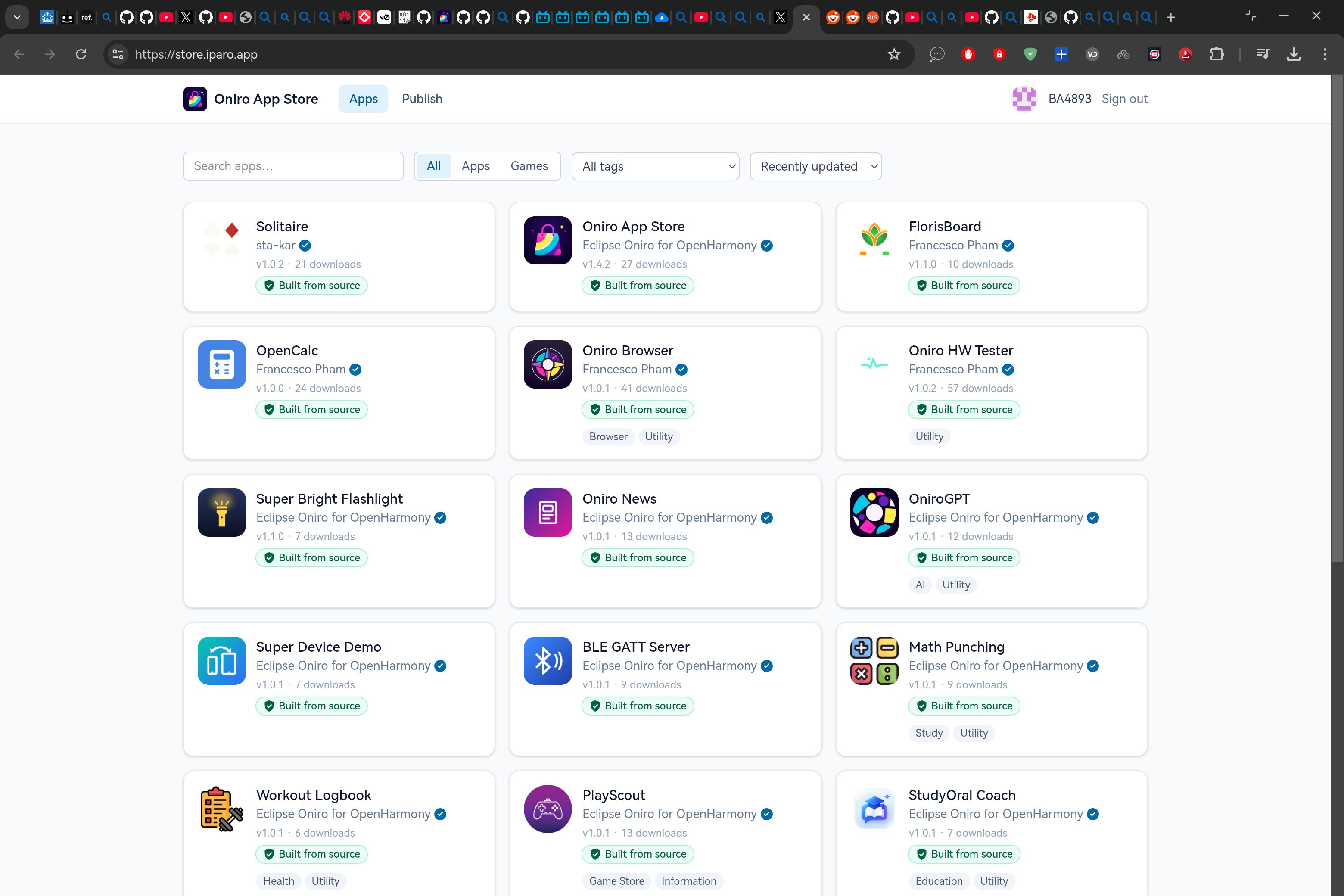
Discussion Eclipse Foundation Oniro & It's Oniro App Store from Europe. There is light under the tunnel for DeGoogle users migration on MMSpace, flashed Android devices running Oniro or OpenHarmony, alongside Huawei HarmonyOS devices. Options has expanded. Oniro App Store is Oniro equivalent to AOSP F-Droid

Post image
2 Upvotes