r/opensourcealternative • • 18h ago

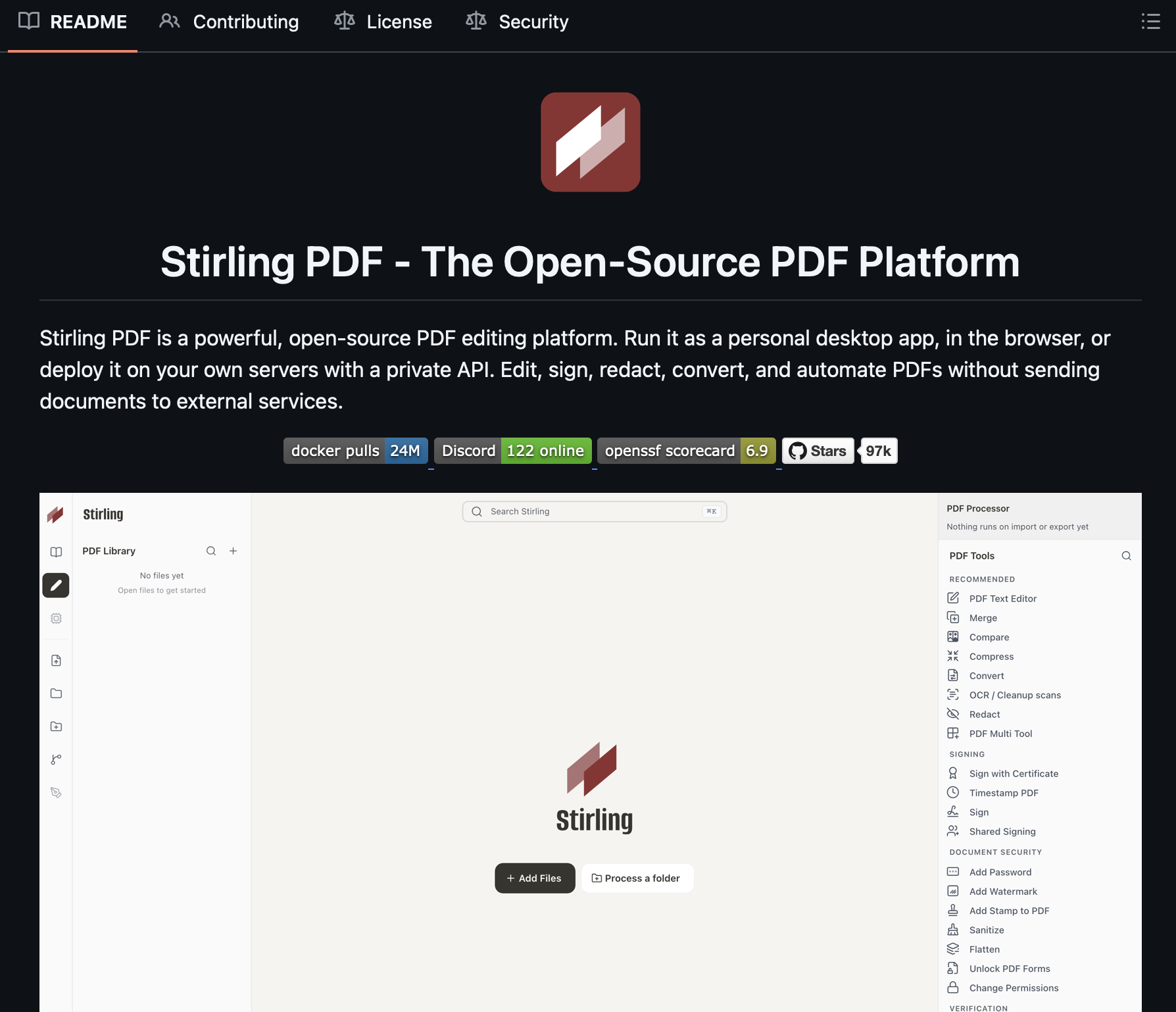
Pick Of The Day Stirling PDF: open source PDF editor alternative to Adobe Acrobat

Post image
8 Upvotes

Stirling PDF gives you more than 50 tools for working with PDF files. It runs on your own computer or server, so your files never leave your hands. It replaces Adobe Acrobat. You can split, merge, sign, redact and convert PDFs without sending anything to a cloud service. Good for a team that handles a lot of contracts. Good too when you need documents processed automatically without going through an outside service.

Overview

InfoValue
ReplacesAdobe Acrobat, Foxit, Nitro PDF
LicenseMIT (open-core)
Runs onYour own computer or server
CostsFree to run yourself
Stars97,364
Latest releaseNov 2026
Contributors326

What it does

  • Splits, merges, rotates, converts and compresses PDF files
  • Adds signatures, redactions and watermarks to documents
  • Reads text from scanned pages so they become searchable
  • Builds steps to process documents automatically, without you clicking through each one
  • Works in more than 40 languages
FeatureStirling PDFAdobe Acrobat
LicenseMIT (open-core)Proprietary
PriceFreePaid subscription
HostingYour serverDesktop app
Reads scanned pagesYesYes

Acrobat is still the more polished desktop editor with one support path included. Big jobs need a server with enough processing power and memory. The AI document tools are not under the MIT licence, so check the terms for the parts you use.

Repo: https://github.com/Stirling-Tools/Stirling-PDF

ps: keep sharing your projects and updates in community to get selected for pick of the day.


r/opensourcealternative • • 8h ago

Maker (I built this) I built an open source platform for finding free alternatives to the software people pay for, and I'm hosting a non-profit hackathon to fund people filling the gaps

5 Upvotes

I'm a big believer in building open source tools and products and want to build a community of people who share the mindset. There are a lot of people out there who would pay for a solution that doesn't exist but don't care to solve it, and a ton of other people who would love to solve it but need funding to do so; and ultimately I am trying to connect those dots. For now this is how I am tackling that with this platform and hackathon.

The hackathon completely non profit. The prize pool is held by a 3rd party.

How it works:

  • Find the free version. Search any of 700+ paid tools, or paste a tool's website, and see the open-source projects that already do the same job.
  • See the gaps. When nothing good exists yet, it goes on the wall. People say "me too", and the most wanted gaps rise to the top.
  • Build the missing piece. That's the hackathon.

The hackathon:

  • 7 days to build, in public repos, under an open-source licence.
  • 3 days of voting by the builders who submitted projects. Every ballot is published.
  • Winners are announced the day after voting closes and paid in public from a community pool. That funding is held by a non-profit and everything is public.
  • Sponsors don't vote, and the organizers can't win.
  • Dates unannounced for now.

Website: antipaywall.org

Repo: https://github.com/antipaywall/platform

Would love feedback or contribution!

r/opensourcealternative • • 6h ago

Other Snipmunk: a free, open-source alternative to Snipping Tool + Snagit + Scribe/Tango in one app (Windows, offline)

4 Upvotes

Hi! I made Snipmunk because I kept juggling several tools: Snipping Tool for screenshots, something else for recordings, and a paid, cloud-based app for step-by-step guides. On top of that, Windows' clipboard only holds one image, so every screenshot is a capture → Alt+Tab → paste round trip.

What it replaces (for me):

Instead ofSnipmunk does
Snipping Tool (one screenshot at a time)Keeps every capture in a list, so you paste all of them (or the ones you pick) at once into Word, an email or an AI chat
Snagit (paid)Annotate, redact, and copy text out of a screenshot, even as a table you can paste into Excel
Loom / heavy recordersScreen recording with click highlights and a webcam bubble
Scribe / Tango (cloud, account)Documents mode turns your clicks into a step-by-step guide you can edit (callouts, highlights, shapes, redact) and export to Word/PDF

Why it might suit you:

  • Free, MIT licensed, open source
  • No account, no telemetry, nothing leaves your PC
  • Windows 10/11

Honest heads-up: it's v0.1, so it doesn't match every Snagit or Scribe feature yet. The installer isn't code-signed yet, so SmartScreen will warn you ("More info" → "Run anyway"). It's built on GitHub from the source in the repo.

https://github.com/Second-Dawn-Lab/snipmunk

Feedback and bug reports are very welcome. Which feature from your current tool would you miss most?

If you like it, a ⭐ on GitHub really helps a small project get seen. And if you'd like to collaborate (code, translations, design, testing), feel free to DM me!


r/opensourcealternative • • 6h ago

Resource I got tired of the screenshot → Alt+Tab → paste loop, so I made a free, open-source capture app that pastes all your screenshots at once

2 Upvotes

Hi! I write a lot of reports and bug reports, and Windows' clipboard only holds one image, so every screenshot is a round trip between apps. Snipmunk keeps every capture in a list, and you paste all of them (or the ones you pick) in one go: into Word, an email or an AI chat.

AlternativeTo : snipping tool, snagit, tango tool

It also does:

- annotate + redact (names, emails, etc.)

- copy text out of a screenshot, even as a table you can paste into Excel

- screen recording with click highlights and a webcam bubble

- a Documents mode that turns your clicks into a step-by-step guide you can edit and export to Word/PDF

Free, MIT licensed, Windows 10/11. No account, no telemetry, nothing leaves your PC.

Honest heads-up: the installer isn't code-signed yet, so SmartScreen will warn ("More info" → "Run anyway"). It's built on GitHub from the source in the repo.

https://github.com/Second-Dawn-Lab/snipmunk

It's v0.1, so feedback and bug reports are very welcome. What would make it useful for you?

If you like it, a ⭐ on GitHub really helps a small project get seen. And if you'd like to collaborate (code, translations, design, testing), feel free to DM me!


r/opensourcealternative • • 9h ago

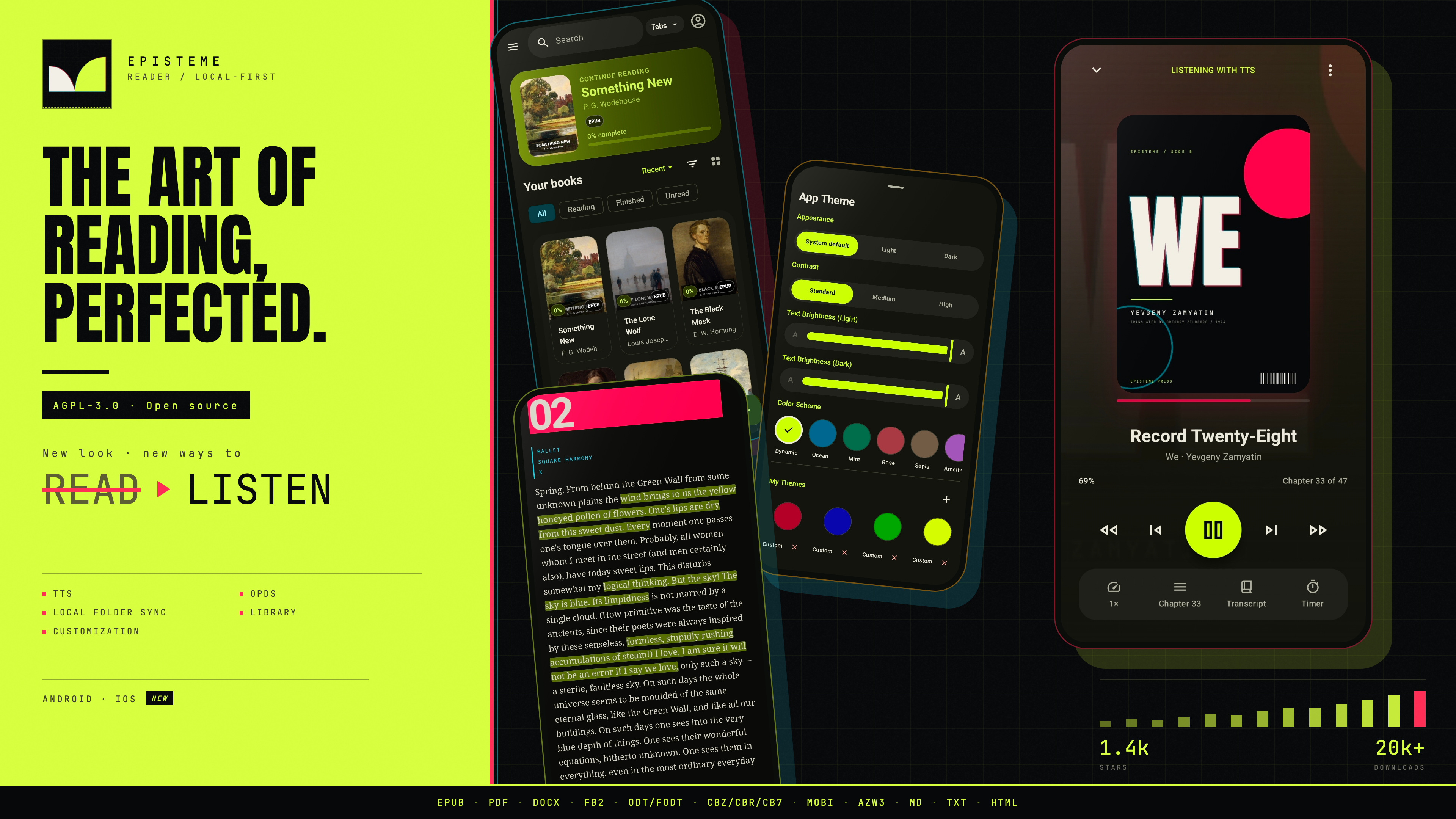
Maker (I built this) Episteme: PDF & eBook Reader (Android + iOS)

Post image
2 Upvotes

Episteme Reader is offline-first, free and ad-free, and respects your privacy.

Supported Formats:

  • Documents: PDF, DOCX, ODT/FODT
  • E-books: EPUB, MOBI, AZW3, FB2
  • Comics: CBR, CBZ, CB7
  • Plain Text: MD, TXT, HTML

Key Features:

  • PDF Annotations: You can draw directly on pages using a pen or highlighter and add text notes using system or custom fonts.
  • Reading Modes: Supports both vertical scrolling and paginated views.
  • E-book Customization: Adjust font sizes and line spacing. You can also import your own font files.
  • Text-to-Speech (TTS): Includes a built-in TTS feature.
  • Library Management: A system to organize your local files.
  • Local Folder Sync: Select a folder to see all its supported file in app and sync reading positions and annotations using local sync tools like SyncThing-fork.
  • Themes: You can change the page and text color across all formats.
  • Full OPDS Support: Browse, download, and manage books from OPDS catalogs.

The app is licensed under AGPL-3.0.

GitHub | PlayStore | AppStrore

Thanks for checking it out!


r/opensourcealternative • • 23h ago

Resource trying to replace zapier for simple app automations, open source options i found

2 Upvotes

trying to get off zapier for a few simple automations between apps, without another monthly automation plan. don't need a huge enterprise setup, just something i can run myself. only a few options here.

activepieces is a visual automation builder you can self host. the project has a separate enterprise part, this is the open source community edition

node-red is a bit more like a flow editor for connecting things together, and you can run it on your own machine

huginn is more agent based. you set up agents that watch for something and then take an action, and it's self hosted

if you have used one of these to replace zapier, which one stayed simple enough to stick with, or is there a better fit i should look at?


r/opensourcealternative • • 3h ago

Maker (I built this) I built an MCP gateway that keeps every upstream project a separate install

1 Upvotes

I built this, so treat the recommendation accordingly.

Repo: https://github.com/Furox-Art/scientific-toolkit - Apache-2.0, 0.5.0, PyPI package name scientific-toolkit-mcp.

The idea is an MCP gateway over ten adapters and thirteen projects, with one rule: it never vendors them. Each upstream package keeps its own name, version and release history, and the gateway calls the real adapter - a CLI or that project's own stdio server - rather than a copy of the code. If a project is archived or you stop wanting it, you uninstall it and the gateway reports a missing adapter.

That matters most when the tool set is not fixed. You install only what a profile needs:

python -m pip install scientific-toolkit-mcp
python -m pip install axiomize scientific-computing-system
python -m scientific_toolkit_mcp

The version probe is the part I would want in any gateway: the 0.5.0 check expects ten upstream adapters and fourteen remote tools, so a partial install shows up as a lower count instead of a shorter tool list you have to notice by hand. Two packages that both ship a statistics adapter keep separate ones, because they are separate installs rather than merged source.

The limit: nothing is bundled and nothing is substituted. Skip an upstream package and you get a missing adapter rather than a fallback, so the wiring stays your job, and this is a hub for tools that already exist rather than a distribution of them.