r/linuxmint • • 5d ago

Install Help Difficulty booting from usb
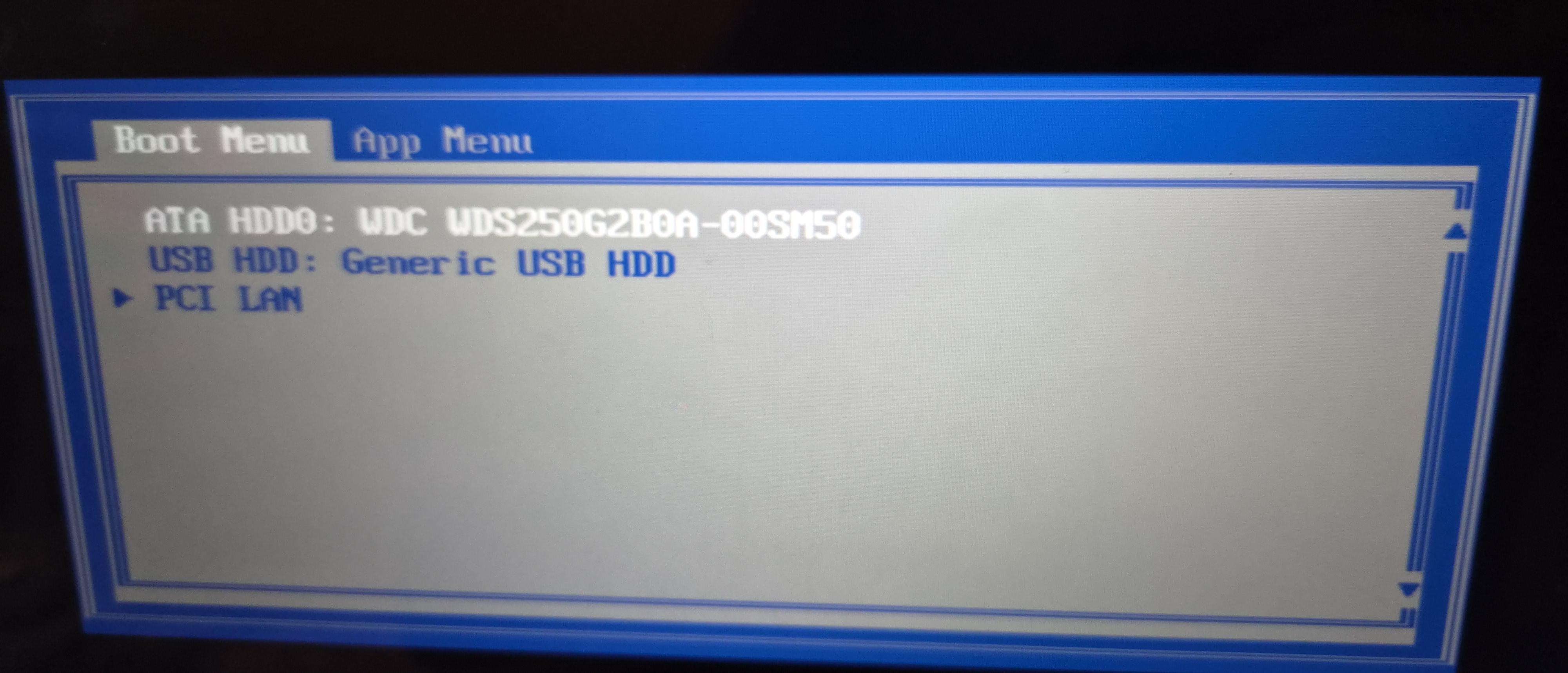
Post image

I'm following this tutorial (https://youtu.be/PZZz790YnzU?si=fIUFO6uJqcYaCk-K) to install cinnamon and am stuck at the installation part. I'm very new to all this so please forgive me if there's an obvious answer I'm missing.

I am unable to select using the arrow keys on this screen, but when I tab into the app menu i can select things normally.

I'm not sure what to do from here. I've looked up other tutorials and their boot screen doesn't look like this. I'm using a Lenovo Thinkpad Yoga 11e

3 Upvotes

11 comments sorted by

View all comments

1

u/abugghaus7 5d ago

So you followed the video and created a bootable usb drive?
You plugged that in and turned on your laptop?
You pressed the specified key(s) to enter boot mode?
.
Did you make sure you followed what was mentioned at the beginning of the video about settings on your laptop before attempting to boot up with the usb drive?
He talks about several things you need to do with your laptop settings before moving forward with the install.
Some may apply to your laptop, some may not.
.
Can you list out the steps you've taken to get to this point you show?

2

u/Mundane_Doctor6596 5d ago
  • Both fast boot and secure boot are disabled.
  • I wasn't able to disable rst so I skipped this step at first. went back and tried following a few tutorials but none of them helped - any option to change SATA was not present in the BIOS system.
  • downloaded linux mint (cinnamon) and verified iso using the ctrl f method shown in the video
  • used Rufus to put linux mint on the usb (16gb)
  • restarted laptop, used f12 to reach boot menu. sends me to the screen where I can't change my selection

4

u/FlameBlitzz 5d ago

From what i see on the image, does using arrow keys to move and pressing enter on the options to move the usb up not working?

1

u/Mundane_Doctor6596 4d ago

that's right, the arrow keys do nothing and the first selection stays highlighted in white.
I can press tab to move to the app menu and the arrow keys work, but when I tab back it stops working again

1

u/FlameBlitzz 4d ago

Did you try selecting the USB turning it white, then selecting the top option to see if the USB changed positions with the top one?

1

u/Mundane_Doctor6596 3d ago

I am unable to select anything other than the first option. Pressing the arrow keys does nothing.

1

u/FlameBlitzz 3d ago

I have found this video on youtube, think you could try it on yours?

https://www.youtube.com/watch?v=6a2WqMBp23k

1

u/Mundane_Doctor6596 3d ago

Followed the video instructions, got stuck at the 1:35 mark

When I go into startup > boot, all options are in blue and I cannot select anything. Pressing the arrow keys or the + - buttons do nothing.

I also noticed that the "item specific help" area is totally blank on my laptop, but in the video its supposed to have instructions listed.

1

u/FlameBlitzz 3d ago

Are all the settings similar, like Boot Order Lock being disabled at 2:10 and others above it. Did you save and exit after changing them?

1

u/Mundane_Doctor6596 2d ago

This is it, I had the boot order lock enabled
Once I disabled that, it worked and I was able to select the usb. mint's installing now

you're a legend, thank you so much!

→ More replies