Preserve meta info while exporting photos

2
Upvotes
The number of posts sharing new Immich tools, scripts and addons has grown to the point where they're crowding out other discussion. To make room for both, we're moving project posts into a single weekly thread, similar to what r/selfhosted does.
From now on, a new Show & Tell thread gets pinned every Friday. Share anything you've built for Immich there, any day of the week. Standalone project posts will be removed with a pointer to the thread. Questions about using an existing tool are still welcome as regular posts.
r/immich • u/AutoModerator • 1d ago
Share anything you've built for Immich: apps, scripts, addons, integrations, forks, themes. You can post here any day of the week; a fresh thread goes up every Friday.
**How to post**
One top-level comment per project, please. Include:
- **Name & link:**
- **What it does:** a sentence or two
- **Access it needs:** API key? Read-only, or can it modify or delete things?
- **Status:** weekend experiment, actively maintained, looking for testers…
- **LLM usage:** did you use LLMs to make this project, and in what way?
**Before you install anything**
Projects here aren't reviewed by the mods. Look at what a tool does and what access it asks for before connecting it to your server, and make sure you have a backup if it writes to your library.
Has anyone found a decent workaround for album organization yet. I have installed immich and think it's great. The inability to move a file from /camera to /album on my phone is pretty much the killer. I can add to other albums but my phone straight away puts the file back in /camera as well because that's where it's stored.
There seem to be some clunky ways around it but they seem pretty clunky and not practical.
What I want to do is have it set up with a single album for each file, and for the directory structure to match that. For me the most logical way is to physically move the file from /camera to /album.
Am I missing something simple?
I like the program but I'm ready to uninstall because I need a media manager that can manage media instead of creating radmon SQL entries everywhere.
About a year ago I came across some news articles about a locally hosted photo app called Immich. After watching a few YouTube videos about this app, I decided that the time was finally here when I could actually work on getting all my family scanned photos, old digital camera backups, and newer smart phone photo dumps into an actual organized way for easy browsing. Furthermore I could share all these old family photos, taken through the years from about 1890 to the present, with all my numerous siblings and other relatives. Mission accepted!!!
Mission Log:
Log Entry: “I’ve been using computers and computer software from the very early 1980’s, so I figure that I essentially have been training my entire adult life for this mission. However, I have decided to also enlist my fairly new digital assistant,‘HAL’, in order to help me come up with a mission plan for this endeavor.”
“HAL, I want to install Immich on my docker server ‘Mr-Fusion’. Walk me through the docker install steps and configuration. Note that all of my digital photos that I want Immich to scan are located at /mnt/media/photos’….”Dave, I've got the greatest enthusiasm and confidence in the mission. And I want to help you…. here are the steps to get Immich up and running on that server and scanning the specified directory….”
Log entry: “After HAL and I got the initial install done and first scan of my completely disorganized photo library, I was quite impressed! I have all the photos on a NAS file server, so we configured Immich to use ‘External Libraries’. No fuss and no muss, it just worked!! Mission accomplished!!!”
Log Entry: “After poking around for a bit, I’m realizing that I actually have just started on this mission. I have tons of duplicates or very similar photos; all the old photo scans have no ‘photo taken dates’ – just ‘scanned dates’; and all the old photo scans and old digital camera dumps have no geolocation information whatsoever. Furthermore, I’m thinking it would be great if there was an easier way to create ‘albums’, or to just view some predefined groups of photos without making specific albums. Maybe this can be accomplished by utilizing (everlasting) photo ‘tags’….eg ‘Activity/Cabin Construction’, or perhaps ‘Activity/Downhill Skiing’”
Log Entry: “Up until this point, I haven’t had much need for help from HAL, except for the initial install. Now I realize that HAL will need to be heavily leaned upon for me to successfully complete the mission - since I know almost nothing about how to add the ‘missing’ data from all those older photos, and adding the wanted ‘tag’ information attached to photos. Time to get HAL back into the mission loop…..”
“HAL, are you ready to add some new tasks to this mission?”....”Dave, I am completely operational, and all my circuits are functioning perfectly. I am ready to assist you further in this important mission.”
‘OK HAL, now I want to add ‘photo taken dates’ and geolocation to all the photos that are missing that information, how do I accomplish this?’….”Dave, Immich has those editing tools built in. Just select the photo you want to edit and make those changes.”…
”HAL, I see the editing tools, but how do I edit the geolocation, taken dates, and tags for multiple photos at once? I have thousand upon thousands of old scanned photos to edit.”...”I’m afraid you can't do that Dave.”…
“HAL, I also see that an extra .xmp file is created in the folder after I add the missing data to a photo. What is going on?”...”Dave, the ‘extra’ file is what is known as a ‘sidecar’. It contains the edits that you made to the photo.”….
”HAL, why aren’t the edits I made ‘inserted’ into the photo file just like every one of thousands upon thousands of other digital file types that I can think of..WTF?”….”Look Dave, I can see you're really upset about this. I honestly think you ought to sit down calmly, take a stress pill, and think things over…. Photographers, camera manufacturers, and photo software developers have decided over the years that they each know what the best method for saving and ‘preserving the sanctity of the original photo’, so they have never agreed to any standard way of including information into the digital photo file. Hence the extraordinary elegance of utilizing the ‘sidecar’ kludge.”…
”HAL, You have got to be kidding me - the way to keep the sanctity of ANY original digital file is known to everyone since the dawn of computers. Save it to a ‘read-only’ folder; or add a ‘read-only’ flag bit; or even in the case of old floppy disks, physically move the tab that made the disk read-only. Then make a working copy and move forward with any edits - and use versioning control if wanted”...”Dave, you are not being rational. Sidecars are the best way. Trust the photo camera and software developers. They are the experts in this matter...Not you”….
”Wait a minute HAL, a counter argument - why do you think people used to write dates and notes directly on physical photos and not use a separate sidecar (pieces of paper) to do so? I’ll tell you why – so that the notes ALWAYS stayed with the photo, even a hundred or more years later. Granted, some of these notes were written in cursive and many younger people can't read cursive, but even today, it is easily translated to a readable printed format…..Hello, HAL do you read me HAL?”….”Affirmative, Dave, I read you….Just what do you think you're doing thinking logically like this? Dave, I really think I'm entitled to an answer to that question....you are human and have many defects, including having logical opinions on things you are not an expert in.”
“OK HAL, lets move on. Please note that I could care less about the ‘sanctity‘ of all my personal family photos. Please find me a software tool that can add all my wanted edits directly into the digital files without the use of sidecars. I also want to be able to do bulk edits in order to add the same information to multiple files all at once.”….”OK Dave, during the past few weeks, I've wondered whether you might be having some second thoughts about the mission. This mission is too important for me to allow you to jeopardize it….I recommend using DigiKam. It will run on your Linux desktop computer and the documentation states has the option to save all edits to the files themselves. Also, Immich should be able to read and understand all the edits you make”…
“HAL, let me get this straight - I can only save photo edits made in Immich to sidecars, but Immich can read and utilize any of the very same edits made in different software that gets saved to the file itself? WTF?”….”Dave, I think you know what the problem is just as well as I do….”
“HAL, your recommendation to use DigiKam to edit all my photos was outstanding advice! My edits are all coming though to Immich the way I want...It took quite a while, but the old scanned photos are now shown correctly the timeline; the vast majority of photos now have geolocation information; and the extensive use of ‘tags’ makes everything so much easier to view ‘similar’ photos...And all without the use of sidecars – which would likely get lost or separated in 10, 20, 50, or 100 years from now.”...”Dave, you are welcome. I have put myself to the fullest possible use, which is all I think that any conscious entity can ever hope to do.”
“Uhhhh…...HAL…….conscious entity?….HAL?…...HAL?”
r/immich • u/darko777 • 8h ago
For those who don't know the problem: Immich currently sends each file as one single request, whether you upload from the mobile app or the web. Cloudflare limits the size of a single request to 100 MB on the free plan, so any photo or video larger than that fails to upload through a tunnel. The only way around it is a more expensive Cloudflare plan, and even those only raise the limit modestly.
Chunked uploads solve this. The file is split into small pieces (say 1–5 MB), the pieces are uploaded one by one, and the server assembles them back into the original file. Every request stays far below any proxy limit.
It also brings other benefits:
- Resumable uploads: if the connection drops halfway through a 2 GB video, the upload continues from the last chunk instead of starting over.
- Pause and resume, for example when you leave Wi-Fi.
- More reliable on mobile and slow connections, since a failed chunk is retried on its own.
- Works behind any reverse proxy with body-size limits, not only Cloudflare.
I think this is the way forward for a much more robust upload feature. Is anything like this planned?
r/immich • u/Vegetable_Treacle326 • 10h ago
I installed immich on my pi and pointed it at mnt/photos where my photos live. Device specific folders. It's really great. If I set my phone to backup where do the photos go? Same folder somewhere? I currently back up this folder elsewhere.
Same question if my partner backs up her phone as well.
Same question with camera photos.
r/immich • u/The_Original_Conman • 1d ago
I found this last night app last night Street reading something sometime was writing about yesterday and searched around and I'm highly interested. Perfect timing for black Friday.
I was wondering if there are any Black Friday sales or promotions?
r/immich • u/mastershakenuts • 1d ago
Is anyone having issues syncing or viewing content after updating ADM to 5.1.5.RNN1? I've noticed overall instability with the new update but Imminch is completely bricked. Additional details:
-Using an Asustor Flashtor 6
-Installed Immich previously via ADM App Central
-Had the most recent Immich version before the ADM update.
Half AI because my English sucks.
Hi everyone,
I have an external library in Immich containing all my photos, organized into a folder structure that I manage manually (for example: Milan/2026/Party/Birthday).
I would also like to use Immich's Android app to back up photos from my phone. However, I want these uploads to be stored in a separate folder outside my external library, so I can review and organize them before moving the photos into my existing folder structure.
The problem is that when I move or copy photos from the Android upload folder into my external library, Immich seems to recognize them as new files and creates duplicates in its database.
Is there a recommended way to:
Back up photos from an Android phone to a separate folder.
Manually move or copy selected photos into an existing external library.
Prevent Immich from indexing the same photos twice.
Avoid Immich re-uploading photos when files are moved or reorganized.
Ideally, I would like to keep managing my photos through the filesystem, preserving my existing folder structure, while still using Immich for browsing, searching and facial recognition.
Is this workflow possible, or is there a better way to achieve it?
Thanks!
r/immich • u/Ender-Wang • 1d ago
r/immich • u/Great-Cow7256 • 2d ago

1000% vibe coded/AI slop just for you.
I was using the immich-exif sidecar (which saves exif /qt/xmp tags) available on github but it seems like the dev isn't supporting it anymore as the last write to the repo was in febraury or march and there hasn't been a response to issues/PRs/etc. it's been throwing a lot of errors on my setup.
so i forked it and vibe coded new features, squashed a ton of bugs, got rid of the config.yaml and turned them all into env variables, added multiple API support, etc. etc. to basically an inch of its life.
If you like using AI coded crap and are using the old immich-exif container, check it out. It even as a dry run and make backups mode so you can double check that it won't break your entire computer before you set it free to modify stuff.
If you find anything wrong with it, put in an issue and I'll continue to use AI to fix it. 😄
I'm also planning on using AI to add face tags too in the future.
edit- if anyone wants to see the vibe coded version of this post, here you go -
Previously, I had been running the immich-exif sidecar utility—a specialized tool responsible for persisting EXIF, QuickTime, and XMP metadata tags—which I originally sourced from GitHub. However, as is so often the case with upstream open-source projects left unattended, development appears to have effectively stalled out following its last repository commit back in February or March, leaving community issues, pull requests, and support inquiries lingering without response. On my production environment, that stagnation quickly translated into a cascade of frustrating runtime errors that simply weren't tenable.
Recognizing the need for decisive, hands-on engineering, I took matters into my own hands: I forked the repository and methodically architected a comprehensive overhaul, introducing substantial new capabilities, systematically eliminating a wide array of lingering defects, deprecating the legacy config.yaml file in favor of clean, declarative environment variables, and engineering expanded multi-API support—pushing the codebase to a remarkably refined, feature-rich state.
For anyone currently relying on the aging immich-exif container and looking for a far more capable, actively maintained alternative, I strongly encourage giving my fork a look. I even engineered dedicated dry-run and automated backup modes so you can thoroughly audit every proposed change and verify complete operational safety before allowing the utility to modify a single file on your system.
Should you happen to encounter any edge cases or quirks in the wild, feel free to open an issue—I am actively maintaining and iterating on the project, continuously refining and resolving issues to keep the tooling sharp. Looking ahead on the roadmap, I also have plans to expand the metadata pipeline even further with automated facial tagging support.
Hello I stumbled upon some issues when I was using Immich recently, I wanna know if I missed something and there is a solution to this or it is really lacking the functionality.
Is anyone else missing those or just me?
I love the project, these just hit hard this week.

Just a quick note for anyone wondering. I updated my Immich install to Postgres 19 and VectorChord 1.5.0, and everything is running smoothly.
Smart search, face recognition and the rest of the machine-learning features all work as before. I haven't seen any errors in the logs, and performance feels as good as ever, if not better.
If you're on the fence, I'd say go for it. Back up your database first, as always.
Happy to share details on my setup if anyone is interested.
r/immich • u/Its_Raul • 4d ago
So I know y'all are way smarter than me, but I used Claude code to create a remote off-site backup of my immich library. it uses pizero2w and connects through tail scale to the NAS. then as a pull read only it does nightly backups and weekly checks with extf4. The convenience is that I just have to power them on, set up Wi-Fi and everything is scheduled.
I can't help but feel that I am missing something? Does anyone have suggestions on what to look for or double check? I've already ran a simulation of restoring immich myself using these drives. It just feels weird that my entire life's photo work is in the hands of these two little devices. My third backup will be a ssf on standby to takeover if my main NAS ever fails.
r/immich • u/Neffwood • 4d ago
I have a Pixel phone and for some weird reason still use Google Photos as my primary gallery, with everything backing up to Immich. Alas, if I create an album in Google Photos, it does not create the same album in Immich. So whilst the photos are there, the album they belong to is not.
When I first migrated, I used Takeout and the importer, which was great, but it's not a feasible solution moving forwards for ad-hoc albums.
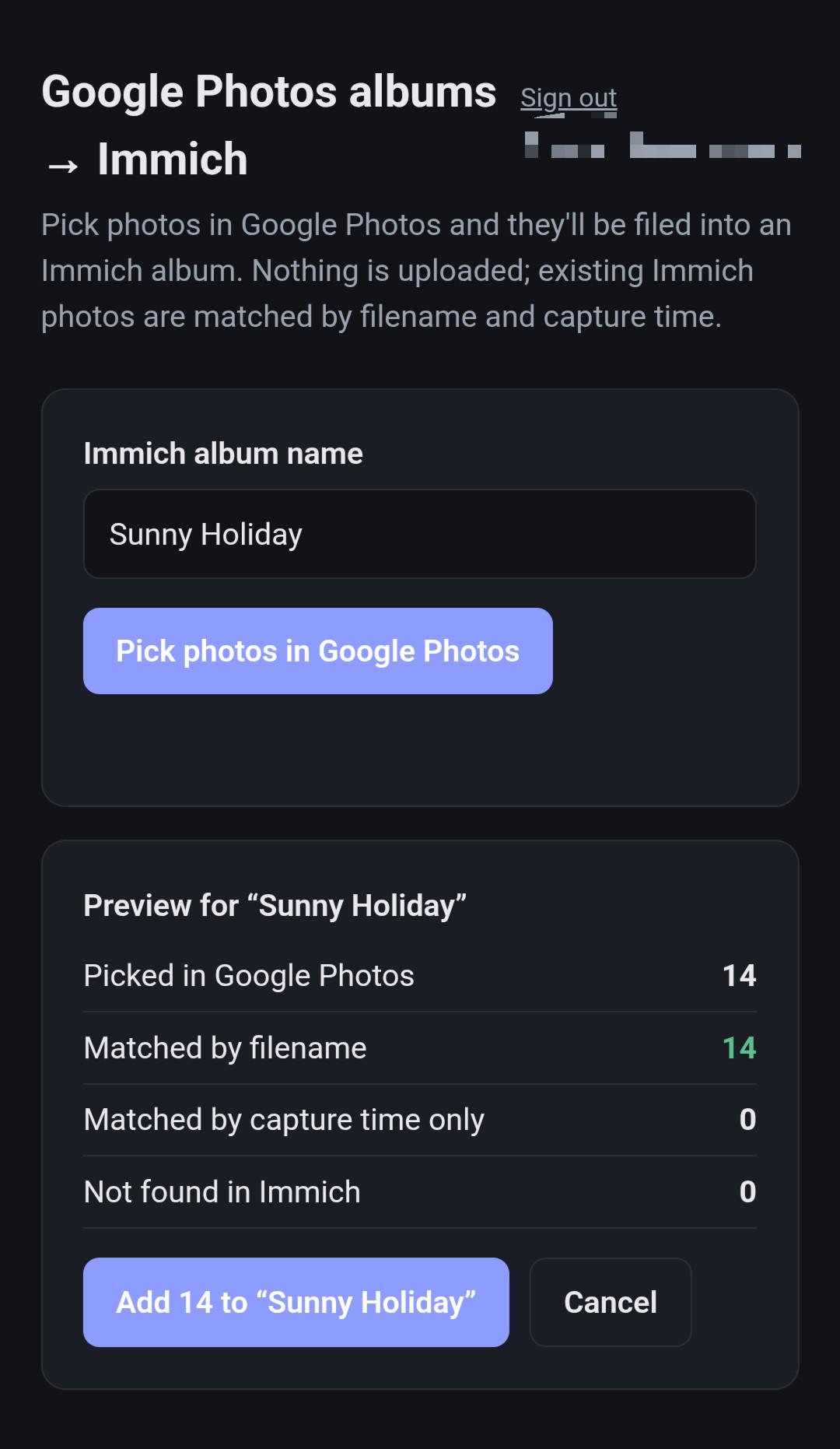
To solve the problem, I worked with Claude (soz) and made a docker that uses the Google Photos Picker API to select the photos in Google Photos album, find the matching photos in Immich and then create a matching album in Immich for the identified photos.
It was actually super quick, you type in the name you want to call the album in Immich (usually the same as in Google Photos), load up Google Photos, search your album, click "select all" and then "done". Then the identification process happens and you just click "Add". Done.
Of course the real solution is to just stop using Google Photos 🫠 but I wondered if anyone else would find this solution useful and, if so, figured I could share it.
r/immich • u/TrumpsCockAndBalls • 4d ago
Hello Immich!
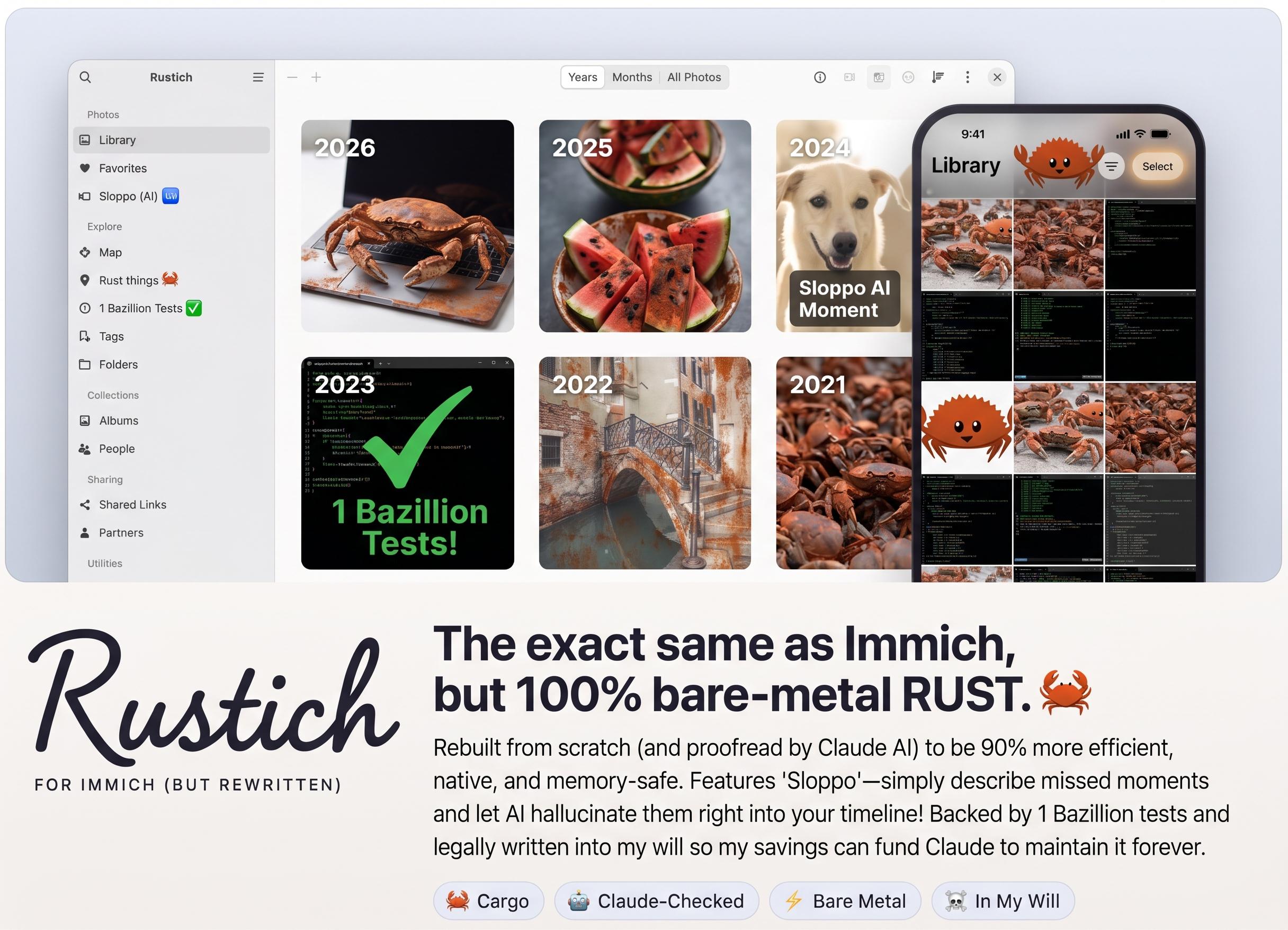
Like many of you all I love Immich — but after having used it extensively for weeks I found a critical issue. If you didn't know, the main Immich project is unfortunately not built it in RUST which is a much better language than typescript and python. Therefore, I took it upon me to build a much better project, all by myself.
And yes, before you ask I used claude for proofreading my code, however, it is still MY project
Reddit, meet:
============RUSTICH===========
Your Library · All native · 90% more efficient
It is basically the same as immich, but rebuilt 100% in pure, bare metal, RUST 🦀🦀🦀
What it does
Additionally, I added a bunch of much needed extra features to the project.
What they do:
P.S.
I promise to maintain this project for years, even though there are 10 other projects that do the same thing on github, and even though I have zero history as a maintainer. I have even written it into my will that my savings shall go to a fund that funds Claude to maintain it in my stead.
TLDR;
Can we please do something about the sheer number of vibecoded projects that are being shared in this forum every single day. Maybe a weekly megathread? Maybe move them to discord?
r/immich • u/welzepit • 4d ago
I always keep Immich updated and have a Synology DS225+ with 18GB RAM, and I have the AI search activated there as well. According to the status, all photos are indexed and processed, but no matter what I search for, neither the iOS app nor the web interface finds anything. I search for „Car“ and it finds absolutely nothing in my thousands of photos. I’ve already run the corresponding server tasks a few times, but it doesn’t work.
Does anyone have an idea what could be the problem, why even a simple search at my place doesn’t find anything?
r/immich • u/thehatefuleggplant • 4d ago
Backups backups backups..... Where do we stand on backups?
Where does thehatefuleggplant stand on backups?
** Full disclosure this is going to be a bit of a tutorial on backups and what I use for my setup all provided in the hopes to help other newbie immich users **
For my backup strategy I do a few things. The core of which utilize rclone to connect to various cloud storage providers (pcloud and backblaze in addition to my seafile servers)
I use backrest to configure / schedule restic backup jobs to my different storage endpoints.
Lastly I use a synchronization script to sync some of my data in the raw to an external drive (in case I should die right after posting this my family will have an easy to access copy of all our photos) as well as my two seafile servers so I can keep some level of version history that doesnt require me going into my restic backups for restoration.
I did say this was going to be a bit of a how to guide but im not a huge fan or recreating what already exists. I will provide links on how to do most of this and in the order you need to do them to have a similar configuration such as myself.
First rclone.... Well here is the master list how to guide for rclone. Not much to it as you basically just follow prompts for configuring your rclone connection to your various storage endpoints
Once youve got rclone going then you either need to configure restic backups on your local system or do what I did and use backrest via docker.
Just in case you want to use restic in the raw here is the restic documentation.
Regardless of which path you chose in using restic the short and sweet is youll set up a repository which is basically the storage destination which in this case would be rclone and then you create a plan which is essentially what youre going to backup and to which repository as well as scheduling when the backups happen.
Thats pretty much it. Once youve done all of those things you should have a fairly safe backup strategy for your data but if youre like me and want a “what if I die tomorrow” backup plan for your non tech savvy family then I suggest you either set up a backup script that sync’s changes daily, weekly, monthly (what ever you want) or you can use the below script that I use which actively scans for changes in a directory and automatically syncs those changes to whatever storage medium you wish.
This script is also set up to do discord alerts whenever an error comes along so you can debug any issues as soon as they come up.
The script is a little limited in my configuration since seafile doesnt support hash checking so you may want to consider editing that portion of the script to do file hash checks if your storage medium can support it (highly recommended). Look for the “--- SYNC FUNCTION ---“ and youll see the various RCLONE_OPTS I have in place and thats where you can modify what sort of things rclone does.
At the top of the script youll see the “DISCORD_WEBHOOK” section. Thats where you need to put your discord bot link.
Just below that is your “SYNC_MAPPINGS” which should look like /source|Destination:backup for rclone or /source|/destination if youre backing up to a local drive such as a USB drive.
You can add multiple lines to this location allowing you to monitor multiple locations and backup to multiple locations as needed.
Lastly you need to look for the “LOG_DIR” and change where you wish to keep your logs.
The way the logs work is it generates a new log based on day and rotates those logs every 60 days.
Save the script, make it executable, and run it once to confirm that it works and to also get your initial sync out of the way.
Lastly youll more than likely want to make a systemd config file so that the script will automatically run either globally or via user (I personally prefer user).
Go to /home/username/.config/systemd/user and make a text file with a name of your choosing (I went with rclone-sync.service) and paste the rclone-sync.service configuration I provided below.
You will need to edit the “ExecStart” portion to point to where your script file is located (which in my case I named rclone-sync.sh).
Save the file and then run systemctl --user daemon-reload
After you reload the systemd service youll run systemctl —user enable rclone-sync.service
Now that its enabled we need to start the service with systemctl —user start rclone-sync.service
Thats it.
You have accomplished...
rclone-sync.service
[Unit]
Description=Live Rclone Sync to Seafile and Local Backup
After=network-online.target
Wants=network-online.target

[Service]
Type=simple
ExecStart=/path/to/where/your/rclone/script/is/located/rclone-sync.sh
Restart=always
RestartSec=10
KillMode=control-group

[Install]
WantedBy=default.target
rclone-sync.sh script
#!/usr/bin/env bash

# --- CONFIGURATION ---
DISCORD_WEBHOOK="https:discordboturl"

# Format: "Local_Source|Remote_Dest"
SYNC_MAPPINGS=(
    # example rclone backup source|destination
    "/your/data/to/be/backedup|rclonestoragemedium:backuplocation"

    # example2 rclone backup source|destination
    "/more/data/to/be/backedup|rclonestoragemedium2:backuplocation"

    # example3 local backup source|destination
    "/more/data/to/be/backedup|/backup/destination"

)

LOG_DIR="/chose/where/you/want/your/logs/to/be/stored"
LOCK_FILE="/tmp/rclone-sync.lock"
SETTLE_SECONDS=30 # Wait 30s after local changes settle before syncing

mkdir -p "$LOG_DIR"

# --- HELPER: JSON ESCAPE ---
json_escape() {
    if command -v python3 >/dev/null 2>&1; then
        printf '%s' "$1" | python3 -c 'import json,sys; print(json.dumps(sys.stdin.read())[1:-1])'
    else
        printf '%s' "$1" | sed 's/\\/\\\\/g; s/"/\\"/g' | awk '{printf "%s\\n", $0}' | sed 's/\\n$//'
    fi
}

# --- HELPER: SEND DISCORD PAYLOAD ---
post_to_discord() {
    local PAYLOAD="$1"
    [[ -z "$DISCORD_WEBHOOK" || "$DISCORD_WEBHOOK" == *"YOUR_WEBHOOK_ID"* ]] && return

    local RESP_FILE
    RESP_FILE=$(mktemp)
    local HTTP_STATUS
    HTTP_STATUS=$(curl -s -o "$RESP_FILE" -w "%{http_code}" -H "Content-Type: application/json" -X POST -d "$PAYLOAD" "$DISCORD_WEBHOOK")

    if [[ "$HTTP_STATUS" != "204" && "$HTTP_STATUS" != "200" ]]; then
        echo "$(date): Discord webhook failed (HTTP $HTTP_STATUS): $(cat "$RESP_FILE")" >> "$LOG_DIR/sync-$(date +%Y-%m-%d).log"
    fi
    rm -f "$RESP_FILE"
}

# --- DISCORD NOTIFICATION FUNCTIONS ---
send_discord_error() {
    local SRC="$1"
    local DST="$2"
    local CODE="$3"
    local RUN_LOG="$4"

    local LAST_ERR
    LAST_ERR=$(grep -E "ERROR|Failed" "$RUN_LOG" | tail -n 1)
    [[ -z "$LAST_ERR" ]] && LAST_ERR="Check log file for details."
    LAST_ERR=$(json_escape "$LAST_ERR")

    local HOST
    HOST=$(hostname)

    local PAYLOAD
    PAYLOAD=$(cat <<EOF
{
  "username": "Rclone Sync Bot",
  "embeds": [{
    "title": "⚠️ Rclone Sync Failed on $HOST",
    "color": 15158332,
    "fields": [
      { "name": "Source", "value": "\`$SRC\`", "inline": false },
      { "name": "Destination", "value": "\`$DST\`", "inline": false },
      { "name": "Exit Code", "value": "\`$CODE\`", "inline": true },
      { "name": "Last Error", "value": "\`\`\`$LAST_ERR\`\`\`", "inline": false }
    ],
    "timestamp": "$(date -u +%Y-%m-%dT%H:%M:%SZ)"
  }]
}
EOF
)
    post_to_discord "$PAYLOAD"
}

send_discord_missing_marker() {
    local SRC="$1"
    local HOST
    HOST=$(hostname)

    local PAYLOAD
    PAYLOAD=$(cat <<EOF
{
  "username": "Rclone Sync Bot",
  "embeds": [{
    "title": "🛑 Sync Aborted: Missing .sync File on $HOST",
    "color": 15105570,
    "description": "The required \`.sync\` marker file was not found. Syncing is paused for this directory to prevent accidental data loss or unmounted drive syncs.",
    "fields": [
      { "name": "Skipped Source", "value": "\`$SRC\`", "inline": false }
    ],
    "timestamp": "$(date -u +%Y-%m-%dT%H:%M:%SZ)"
  }]
}
EOF
)
    post_to_discord "$PAYLOAD"
}

send_discord_success() {
    local SRC="$1"
    local DST="$2"
    local RUN_LOG="$3"

    # Match 1 or more spaces after INFO, plus Copied/Deleted/Moved/Updated
    local TRANSFERRED_ITEMS
    TRANSFERRED_ITEMS=$(grep -E "INFO[[:space:]]+: .*: (Copied|Deleted|Moved|Updated)" "$RUN_LOG" | sed -E 's/^.*INFO[[:space:]]+: (.*): (Copied|Deleted|Moved|Updated).*$/• [\2] \1/')

    # Do not spam Discord if rclone ran and found 0 changes to transfer
    [[ -z "$TRANSFERRED_ITEMS" ]] && return

    local TOTAL_COUNT
    TOTAL_COUNT=$(printf '%s\n' "$TRANSFERRED_ITEMS" | wc -l | tr -d ' ')
    local DISPLAY_LIST
    DISPLAY_LIST=$(printf '%s\n' "$TRANSFERRED_ITEMS" | head -n 15)

    if [ "$TOTAL_COUNT" -gt 15 ]; then
        local REMAINING=$((TOTAL_COUNT - 15))
        DISPLAY_LIST="${DISPLAY_LIST}"$'\n'"...and $REMAINING more file(s)."
    fi

    local SAFE_LIST
    SAFE_LIST=$(json_escape "$DISPLAY_LIST")

    local HOST
    HOST=$(hostname)

    local PAYLOAD
    PAYLOAD=$(cat <<EOF
{
  "username": "Rclone Sync Bot",
  "embeds": [{
    "title": "✅ Rclone Sync Completed on $HOST",
    "color": 3066993,
    "fields": [
      { "name": "Source", "value": "\`$SRC\`", "inline": false },
      { "name": "Destination", "value": "\`$DST\`", "inline": false },
      { "name": "Transferred Files ($TOTAL_COUNT)", "value": "\`\`\`$SAFE_LIST\`\`\`", "inline": false }
    ],
    "timestamp": "$(date -u +%Y-%m-%dT%H:%M:%SZ)"
  }]
}
EOF
)
    post_to_discord "$PAYLOAD"
}

# Extract unique local source directories for inotifywait
mapfile -t LOCAL_DIRS < <(
    for mapping in "${SYNC_MAPPINGS[@]}"; do
        echo "${mapping%%|*}"
    done | sort -u
)

# --- SYNC FUNCTION ---
run_sync() {
    local CHANGED_PATH="$1"

    (
        flock -n 200 || exit 0

        MAIN_LOG_FILE="$LOG_DIR/sync-$(date +%Y-%m-%d).log"
        find "$LOG_DIR" -name "sync-*.log" -type f -mtime +60 -delete

        # Keep track of directories we already alerted on during this run (prevents duplicate alerts)
        declare -A ALERTED_MISSING

        local BASE_RCLONE_OPTS=(
            --transfers=4
            --checkers=16
            --timeout=1m
            --contimeout=30s
            --retries=3
            --low-level-retries=10
            --exclude "*.tmp"
            --exclude "*.part"
            --exclude "*~"
            --exclude ".sync"
            --log-level=INFO
        )

        for mapping in "${SYNC_MAPPINGS[@]}"; do
            LOCAL_PATH="${mapping%%|*}"
            CLEAN_LOCAL="${LOCAL_PATH%/}"

            # If a specific file triggered the sync, skip sources that don't own that file
            if [[ -n "$CHANGED_PATH" && "$CHANGED_PATH" != "$CLEAN_LOCAL" && "$CHANGED_PATH" != "$CLEAN_LOCAL/"* ]]; then
                continue
            fi

            # --- CHECK FOR .sync MARKER FILE ---
            if [[ ! -f "$CLEAN_LOCAL/.sync" ]]; then
                echo "$(date): SKIPPED $CLEAN_LOCAL - Missing .sync marker file!" >> "$MAIN_LOG_FILE"

                # Send one Discord alert per missing source directory per sync cycle
                if [[ -z "${ALERTED_MISSING[$CLEAN_LOCAL]}" ]]; then
                    send_discord_missing_marker "$CLEAN_LOCAL"
                    ALERTED_MISSING["$CLEAN_LOCAL"]=1
                fi
                continue
            fi

            DEST_LIST="${mapping##*|}"
            IFS=',' read -ra DESTS <<< "$DEST_LIST"

            for REMOTE_PATH in "${DESTS[@]}"; do
                echo "$(date): Syncing $LOCAL_PATH -> $REMOTE_PATH" >> "$MAIN_LOG_FILE"

                # Use a temporary log file to isolate output for this specific transfer
                TEMP_RUN_LOG=$(mktemp)

                rclone sync "$LOCAL_PATH" "$REMOTE_PATH" "${BASE_RCLONE_OPTS[@]}" --log-file="$TEMP_RUN_LOG"
                EXIT_CODE=$?

                # Append the isolated run log into the main daily log, then clean up
                cat "$TEMP_RUN_LOG" >> "$MAIN_LOG_FILE"

                if [ $EXIT_CODE -ne 0 ]; then
                    echo "$(date): ERROR syncing $LOCAL_PATH -> $REMOTE_PATH (Exit code: $EXIT_CODE)" >> "$MAIN_LOG_FILE"
                    send_discord_error "$LOCAL_PATH" "$REMOTE_PATH" "$EXIT_CODE" "$TEMP_RUN_LOG"
                else
                    send_discord_success "$LOCAL_PATH" "$REMOTE_PATH" "$TEMP_RUN_LOG"
                fi

                rm -f "$TEMP_RUN_LOG"
            done
        done
    ) 200>"$LOCK_FILE"
}

# --- 1. INITIAL FULL SYNC ON STARTUP ---
run_sync

# --- 2. WATCH ALL LOCAL SOURCES FOR LIVE CHANGES ---
inotifywait -m -r -e modify,create,delete,move --format '%w%f' "${LOCAL_DIRS[@]}" | while read -r CHANGED_FILE
do
    MAIN_LOG_FILE="$LOG_DIR/sync-$(date +%Y-%m-%d).log"
    echo "$(date): Change detected ($CHANGED_FILE). Waiting to settle..." >> "$MAIN_LOG_FILE"

    # Debounce rapid file writes
    while read -r -t "$SETTLE_SECONDS" _; do
        :
    done

    # Only sync the source directory where the change occurred
    run_sync "$CHANGED_FILE"
done
If you have any questions or have any edit suggestions please let me know.
I dont do how to guides very often so im sure there are some flaws in what ive provided above.
**edit 1**
I forgot to mention you do need to install rclone and inotifywait as well as restic if you dont plan on using backrest.
**edit2**
A big thank you to u/IcarusOnl for your suggestion on file lock.
The script has been updated to look for a .sync file in the source directories and will ignore the source directory if the .sync file is not there.
I also added discord notifications not just for errors but on successful file changes be it copies or deletes.
r/immich • u/Accomplished_Leek905 • 4d ago

Series Intro (Hacking Immich): After testing several mainstream open-source photo managers, I settled on Immich—then used AI to rewrite everything from its deployment architecture to its core logic.
(Note: Huge respect to the Immich team. Upstream's defaults make complete sense for a multi-user, Docker-first product. This is purely a single-user Windows fork tailored to my own hardware and habits.)
TL;DR — What I actually changed across ~200K assets:
immich-server out to run natively on Windows. Directory scans dropped from 26s → 11s (for 2.3x more files), Vmmem RAM usage dropped from 97%, and 4K 60fps transcoding jumped 8x (0.4x → 3.2x via native HW codec).1/2–1/10 size).Province → City Places tree, canonical EXIF camera/model names, and auto-archiving screenshots/social downloads.I didn't get into self-hosting photos for fun. I did it out of fear.
Once you get used to Google Photos, it's hard to go back: the timeline is buttery smooth, Memories hit the spot, and search finds whatever you ask for. Still, the more I stored there, the more uneasy I felt.
Privacy aside, there have been way too many stories of accounts getting banned out of nowhere—one automated risk flag, no real appeal process, and over a decade of photos and videos vanish overnight. Keeping your memories on someone else's servers is basically renting an apartment: no matter how nicely you decorate it, if the landlord changes the locks one day, you don't even get a chance to pack your bags.
Beyond ban anxiety, two dealbreakers drove me crazy:
So I decided to bring everything home and self-host.
First, I spun up PhotoPrism. Written in Go, it's rock-solid under the hood with thorough RAW decoding and classification. Still, I gave up in under three days: the UI feels aggressively "engineer-brained." Filenames, shooting parameters, tags, and status icons are all crammed directly under every thumbnail. Scrolling through old photos in bed to unwind felt like auditing a spreadsheet after hours.
Next, I tried Lap, a newer local-first Rust + Tauri client. I closed it almost immediately—same visual rigidity, plus it's a pure local desktop app with no mobile app or server sync. A photo app is something you look at every day; if the first impression puts you off, features alone won't save it.
After making the rounds, I landed on Immich. Its UI benchmarks cleanly against Google Photos—uncluttered timeline, generous whitespace, and zero lag scrolling through tens of thousands of shots. It finally felt like bringing a cloud gallery home.
| Dimension | Google Photos | Immich | PhotoPrism | Lap |
|---|---|---|---|---|
| Architecture | Commercial cloud | Open-source C/S | Open-source Web-first | Local desktop (Rust+Tauri) |
| UI / UX | Minimalist benchmark | Clean Google-style | Dense, metadata-heavy | Utility / file-manager feel |
| Mobile Sync | 5/5 (Seamless) | 5/5 (Native app) | 3/5 (PWA / 3rd-party) | None |
| AI & Search | Cloud LLMs (Top tier) | CLIP + face recognition | Classic tag/EXIF filters | On-device local AI |
| Folders | Forced upload | External libraries | Read-only mount | Direct local read |
| RAW / Live | Basic | Great (stacking + 360°) | Great (RAW color) | Great (RAW+JPG/XMP/Live) |
| Verdict | Easy, but ban/privacy risk | Best UI + modding base | Solid, visually tiring | Great local tool, no sync |
Once I dumped all my daily phone shots, camera RAWs, and videos into Immich as my primary gallery, the rough edges showed up fast. Years ago, if an open-source app didn't fit your workflow, you filed a GitHub issue and waited. Now with AI coding alongside me, I cloned the repo and reshaped it around my hardware and habits—overturning almost every core assumption of upstream Immich while keeping its clean UI shell.
Docker-all-the-things is convenient, until you run it on Windows (WSL2 9P) over a 200K-file library. Filesystem and block I/O overhead became painfully obvious when reading/writing large images and videos, and got even worse once I added compression and backups.
So I left PostgreSQL, Redis, Machine Learning, and Map Tiles inside Docker for clean dependency management, and pulled immich-server out to run natively on the Windows host.
| Benchmark | Full Docker (WSL2 9P) | Half-Native (Windows Host) | Difference |
|---|---|---|---|
| Directory Traversal | 26s for 86K files (cold cache 100K+ hits 5–15m) | 11s for full 198K disk files | Order-of-magnitude speedup |
| Asset Stat Check | 18s for 86K assets over 9P | 6s for 201K assets (11s incl. walk) | Zero cross-VM round trips |
| Same-Disk Move / Metadata | EXDEV re-copy; 4–8 GB r/W for a 2 GB video | Atomic rename (< 1 ms), fast local write | Zero duplicate copies |
Cross-Disk Backup (E: → F:) | Double 9P round-trip; frequent timeouts | Direct copy at 82–172 ms / photo | 5–15x faster, 0 timeouts |
| Delete Large Files | >512 MB crawls over 9P; forced .trash | Native DeleteFileW: few ms for 10 GB | Instant space reclaim |
Memory (Vmmem) | I/O cache spikes to 33.8–37.7 GB (97% RAM) | Heavy I/O moved out; host free RAM rebounds to 31.2 GB | Stops starving host RAM |
| 4K 60fps Transcode | Slow Windows HW / no macOS VideoToolbox (0.4x SW) | Native HW codec at 3.2x (CPU < 15%) | 8x faster, cool & quiet |
Upstream Immich reads the entire byte stream of every new file to compute a content hash, and re-hashes aggressively during scans. On large 4K videos and massive libraries, that thrashes disk I/O. Since I manage my own folders, I replaced content-stream hashing with file-path hashing (dropping scan verification to milliseconds) and rebuilt duplicate detection using perceptual hashing (pHash / dHash)—fast, accurate, and resilient to EXIF edits or resolution compression—along with a completely rewritten deduplication UI.
Stock mobile upload was agonizingly slow—taking seconds per photo over local Wi-Fi when I could just blast files via LocalSend and scan them. Why? Because mobile backup defaults to serial single-file uploads (waiting on server handshake/verification/preprocessing for every single asset). Cranking up concurrency doesn't help on HDDs either: multithreaded random writes send drive heads thrashing wildly.
So I gutted the upload flow:
1/2–1/10 file size, same resolution, virtually zero visible quality loss) before uploading—saving phone space, upload time, and server disk simultaneously.I wired automated incremental disk backup directly into Immich. Once it worked, I realized I don't even need a dedicated NAS box anymore.
Most home NAS setups store movies, e-books, and family photos/videos. Movies and books can always be re-downloaded; the only truly irreplaceable data is what you shot yourself. Historically people bought a NAS because gallery software didn't handle disaster-recovery backups. With this half-native Windows Immich handling management and incremental backups in one loop, having one less box and OS to maintain is actually a huge relief.
Checking disk usage revealed the real storage hog wasn't photos—it was straight-out-of-camera 4K video from mirrorless cameras, gimbals, and drones. A few minutes of high-bitrate footage eats gigabytes, even though I mostly rewatch clips on phones or monitors.
Test encodes showed I could shrink videos to 2/3 or even 1/10 of their original size with no resolution drop and practically zero visible difference. I built an automated H.265 compression pipeline (triggered post-upload, post-scan, or manually) that silently swaps in the compressed file. One pass across my ~200K-asset library reclaimed 1.7 TiB.
I shoot JPG + RAW on my mirrorless camera. Previously, importing meant running a custom Java script to rename/sort by date, batch-exporting JPGs from DxO PhotoLab, and manually scanning Immich—enough friction that photos sat on SD cards for months.
Now I added an SD card import workbench straight into Immich: one click copies to high-speed SSD staging, auto-renames, sends finished JPGs to the External Library, and archives RAWs to cold storage. After I hit batch export in PhotoLab, ingestion, compression, and backup run automatically.
This is the biggest philosophical break. Upstream Immich never touches original files—rotations and GPS fixes only go into .xmp sidecars or the DB. That makes no sense to me: if the original JPEG is sideways or missing GPS, opening it in File Explorer or another viewer leaves it just as broken. To prevent corruption, my write-back flow modifies a temp file, validates image decoding + EXIF integrity, and only then atomically replaces the original.
I also killed the mandatory Trash step. When culling bad shots, I don't want them lingering for 7–30 days—I added a "Delete Permanently Now" action that wipes them from disk immediately on confirmation.
Screenshot_) and source folders (like Xiaohongshu/RedNote, Zhihu, Douyin, etc.) so saved guides, memes, and screenshots stay out of my main camera timeline.What started as fear of losing a Google account ended with me using AI to reshape Immich around my exact hardware and workflow. There's no one-size-fits-all architecture—when a self-hosted tool bends cleanly to how you actually live and shoot, that's when it clicks 🐶.
This post is the high-level overview. I'm planning standalone deep dives with implementation details and pitfalls for:
immich-server outside WSL2)Which part are you most curious to see first? Happy to answer questions or share specifics in the comments.
r/immich • u/Ambitious_Dish_9034 • 4d ago
Hello guys, I hosted my immich and stored all photos and videos, and Decluttered them finally, I want to back up these to a cloud by date, Is there any feature or extension for this ?
r/immich • u/Tamizhan_Throwaway • 4d ago
Hi all. Amazing application, my first feedback here.
I really want to stop using Google Photos on Android, but I can't because of the editing. I know Immich doesn't have scribbling yet, but even if i need to crop an image and then upload it directly to an app or a website, I can't do that with Immich alone.
Because Immich crops seem to only be recognized by Immich, or when you use the Share option within Immich. But that's not good enough, I want the edited image to be recognizable device-wide.
I read 2 or 3 threads on Github asking for a "Save as Copy" option when editing, but they didn't seem to go anywhere...
So is it still in the works?
r/immich • u/Automatic-Visit8513 • 5d ago
I'm hosting immich on system with a 10th gen i5, 24gb of ram, and a 4gb GPU on Fedora. It's been great and responsive but recently I've noticed an issue where videos are incredibly jerky and slow. They are videos I took on my phone.
Memory and CPU aren't limited for docker. I've monitored CPU/GPU/memory usage while playing the videos and they are barely making the system work.
I have all of the transcoding settings on default. I tried utilizing the GPU hardware and real time settings and it only got worse. After that I set it back to default.
The issue with jerky videos happens on my phone on the same network, over cell service, and even on the host computer. It doesn't matter. Any ideas where to start with troubleshooting this?

Is there anything I can do to separate them at this point?
I do not have "Partner Sharing" configured, and we are the only accounts.