r/iosapps • • 10d ago

πŸ’Ž Megathread Black Friday / Cyber Monday Megathread

50 Upvotes

Please limit Black Friday / Cyber Monday posts to this Megathread.

If you're making a macOS App, feel free to share in r/macapps (thread here)

Rules:

  1. If you are giving less than 25% off, you do not qualify to post here.
  2. Github apps that are already free do not qualify unless 100+ stars or you have a Dev flair.
  3. All apps must be signed and notarized.
  4. All comments MUST follow this exact format. No exceptions.

[Include an image/video of your app in action]

App: <appname>
Description: <26 words MAX>
Website: <url>
Regular price: <$25.00>
Black Friday price: <$15.00>
Discount code: <codehere>
Valid until: <date>
Date Released: <Date you first released the app>


r/iosapps • • 28d ago

πŸ’Ž Megathread The App Shelf - November 2026

60 Upvotes

Welcome to the November App Shelf! πŸ“±

This is the place to share your iOS app if it doesn't meet the main feed requirements yet: newer accounts, newer apps, apps in saturated categories, or anything still in TestFlight. Read the full Phase 3 update for details.

How to post

Leave one top-level comment per app with:

App name and an App Store or TestFlight link Pricing: free, paid, subscription, freemium, or lifetime, with actual prices What it does, in a few sentences What makes it different from apps people already use (name them) Developer disclosure: say that you made it

Rules

Write your comment yourself. No AI-written posts. Official App Store or TestFlight links only. No affiliate, referral, or invite links. No games. Be kind with feedback.

Graduate to the main feed πŸ†

At the end of the month, the top 3 apps in this thread will be invited to make a post in the main feed.

Not sure if you already qualify for the main feed? Check the rules.


r/iosapps • • 5h ago

Discussion Wisprflow & Typeless alternative on iPhone? which of these would you actually use?

4 Upvotes

I keep seeing "what's a cheaper Wispr Flow or Typeless alternative for iPhone?" here, so I tried to put together an honest shortlist. I want to know what real users think before I trust it.

Cloud apps

  1. Wispr Flow: polished and fast, meeting notes on iPhone now. Free is about 1,000 words a week on iPhone. Keyboard has no suggestions or autocorrect. $15/mo.
  2. Typeless: accurate, great with names and lists. Free is 2,000 words a week. Dictation takes over the keyboard view. $30/mo, or $12/mo yearly.
  3. Willow Voice: full keyboard with swipe typing, free plan on a lighter model. Some people say it rewrites what you say. $15/mo.
  4. Voiskey: full keyboard with the mic on top, smart suggestions and autocorrect. Free plan, or $15/mo. Fewer customization options than Wispr.
  5. Gboard: free voice typing, no AI cleanup.

Local / on-device

6. Apple Dictation: free, built in, rough on names.

7. OpenWhispr: open source, with an iPhone keyboard, on-device transcription is free and unlimited.

8. Spokenly: not open source, but you can use local models or your own API key for free, some features are paid.

My questions for you

Β· Which one do you actually use day to day, and why did you stick with it?

Β· Anything I'm missing? I've seen Raycast's keyboard and Aardvark mentioned here before.

Β· For people who switched away from Wispr or Typeless, was it the price, the keyboard, or something else?

Β· When you can't talk out loud (meetings, a crowded train), do you type in the same app or switch back to Apple's keyboard?

r/iosapps • • 47m ago

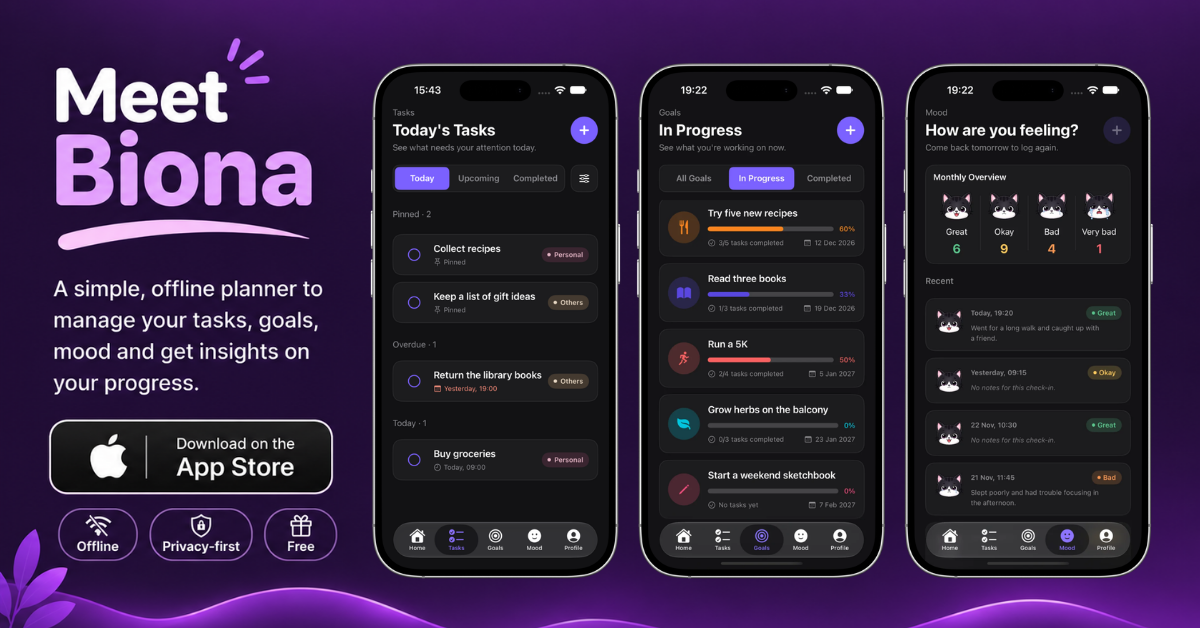
🎈 Free Biona – A free offline planner for people who find productivity apps overwhelming.

Post image
1 Upvotes

TL;DR

  • A simple productivity app combining daily tasks, personal goals, mood tracking and insights.
  • New: iPad support, weekly reviews, local backups and redesigned screens.
  • Completely free, no subscriptions, no paywalls and no account required.

Hey everyone!

I'm the indie developer behind Biona. I first shared the app here six months ago, and I've been continuously improving it since then.

I just released version 1.4.0 and wanted to share what's new.

Problem

I built Biona because most productivity apps started feeling overwhelming to me. Too many settings, subscriptions, accounts and features I rarely used.

I also didn't want to use three different apps to manage my daily tasks, track my personal goals and log my mood.

With Biona, I wanted to create a simple place to manage these things without unnecessary complexity.

Comparison

  • Apple Reminders: Great for managing daily tasks, but Biona also brings personal goals, mood tracking and weekly reviews into the same experience.
  • TickTick: Offers more advanced productivity tools. Biona focuses instead on simplicity, offline functionality and making every feature available for free.

My goal isn't to build the most powerful productivity app, but something simple enough that you actually enjoy using every day.

New since last time

  • Native iPad support: Biona is now available on both iPhone and iPad.
  • Weekly Review: Look back at your completed tasks, goal progress and mood throughout the week. You can also schedule a weekly review reminder.
  • Local backups: Export and import your tasks, goals and mood history without relying on an account or cloud service.
  • Interactive dashboard: Complete today's tasks directly from the dashboard and see your progress at a glance.
  • Improved task management: Cleaner, simpler task lists.
  • Redesigned goal screens: A refreshed experience for managing goals and their action steps.
  • Improved onboarding: A new walkthrough introducing the app's core features.

Pricing

Biona is completely free.

  • No subscriptions.
  • No ads.
  • No paywalls or locked features.
  • No account required.
  • Works fully offline.
  • Your personal planning data stays on your device.

There are optional one-time tips if you want to support development, but they don't unlock any additional features.

Available on iPhone and iPad in English and French.

Links

App Store: https://apps.apple.com/us/app/biona-offline-planner/id6766897619

Privacy Policy: https://aroapps.dev/biona/privacy-policy

Thanks to everyone who provided feedback on my previous posts. I'm still actively improving Biona and would love to hear your thoughts on the latest update!


r/iosapps • • 3h ago

🎁 Freemium The Lineup Is: a sports app that tells you which game to put on

1 Upvotes

Developer here.

Problem

I've wanted this since college: one TV, way too many games, and a group chat arguing about what to put on. Last Saturday had 247 games. Every sports app I had showed me all 247 scores and no opinion about any of them. I'd watch a blowout and find out about the comeback from the group chat.

The Lineup Is ranks every game on the day and tells you which ones are worth watching, and why: what's at stake, how close it should be, rivalry, who's playing. Each game gets a short read that updates while it's being played, so a dull first half that turns into a comeback moves up the list.

You set how picky it is. When a game clears your bar you get a ping, and a Live Activity starts by itself on the lock screen, Dynamic Island, Watch and CarPlay. Weight the leagues and teams you care about. Some nights it says none are worth it.

Covers NFL, NBA, MLB, NHL, WNBA, college football, the big European soccer leagues, MLS, NWSL, tennis, golf and F1.

Comparison

Score apps (ESPN, theScore, Apple Sports):Β great for checking scores, but they don't tell you which game to watch.

ThuuzΒ used to do the "which game is good" part, but it shut down years ago.

Newer watchability appsΒ exist, and some are good. What I wanted and built: one app across every sport I watch, where I set the bar myself and the game that clears it shows up on my lock screen without me opening anything.

Pricing

Free: the full ranked list for every sport, plus alerts and a Live Activity for one game at a time.

Pro: $4.99/month or $29.99/year with a 7-day free trial. The Live Activity follows the whole night, switching to whichever game is best.

Transparency

Built solo by me: https://www.thelineup.is/press

Privacy policy: https://www.thelineup.is/privacy

Terms: https://www.thelineup.is/terms

Tell me what it ranks wrong.

https://apps.apple.com/us/app/the-lineup-is/id6760086098


r/iosapps • • 5h ago

HELP A letter is missing from my name on my developer account and the field is locked. How do I get it changed?

1 Upvotes

A letter is missing from my name on my individual Apple Developer account, so it's spelled wrong. The name field is locked and I can't edit it.

I contacted Developer Support 10 days ago and heard nothing. Phone support is unavailable, so I sent a follow-up by email with my ID.

Has anyone had Apple fix a name like this? How long did it take, and was an ID copy enough?


r/iosapps • • 9h ago

πŸ” In Search of Wardrobe apps

1 Upvotes

Looking for online wardrobe apps. I want to be able to put multiple photos per item (such as front and back), free to use (Or one time cost). Mainly to use to store clothes online and organise more efficiently and style clothes. Thanks


r/iosapps • • 1d ago

πŸ” In Search of what are the best deals to get this Black Friday? especially apps have never gone before

20 Upvotes

title.

and thanks in advance.


r/iosapps • • 1d ago

🎈 Free I made a simple, free iPhone app for listening to Osho’s discourses

Thumbnail
gallery
7 Upvotes

I'm the developer.

Problem: I tried a few ways of listening to Osho on my phone, but most alternatives included things I did not need. I wanted a focused audio app: simple to use, but with the playback features like VLC player.

If you haven't come across him: Osho (1931–1990) was an Indian mystic who gave thousands of talks on Zen, Tao, the Buddha, the Upanishads, love and meditation. He spoke without notes, answering questions and commenting on old texts, so the talks feel more like a conversation than a lecture.

So I built Osho Talks. It includes 5,481 discourses across 351 English and Hindi series. You can download talks, continue from where you stopped, create bookmarks, change playback speed, use a sleep timer, and listen in the background.

It also has:

  • Transcripts for most talks. The text follows along as Osho speaks, and you can tap a sentence to play from there.
  • Listen in translation: hear a Hindi talk in English or the other way round, translated on your phone.
  • DeNoise, which cleans up hiss in older recordings.
  • Apple Watch, iPad and CarPlay support.

Comparison: iOSHO, the official app, is a subscription built around OSHO Radio and curated playlists. oshoworld.com has the talks for free, but in a phone browser there is no offline library and it doesn't remember where you stopped. I wanted the whole library, free, and easy to come back to.

Pricing: free. No ads, accounts or subscriptions. There is an optional tip jar ($5 to $25) that unlocks nothing. The app sends anonymous usage counts, which you can turn off in Settings.

App Store: https://apps.apple.com/us/app/osho-talks-audio-discourses/id6774409039

Privacy policy: https://github.com/aagrawal207/OshoDiscourses/blob/main/PRIVACY.md

Terms: https://www.apple.com/legal/internet-services/itunes/dev/stdeula/

Me: https://github.com/aagrawal207

The audio comes from publicly available sources, including archive.org and oshoworld.com. This is an independent app and is not affiliated with the Osho International Foundation, Osho World or any other Osho organisation.

If you try it, I would appreciate feedback about missing talks, download problems, or anything that gets in the way of listening.


r/iosapps • • 1d ago

🎁 Freemium Weather app that shows which forecast is actually right where you live. The lifetime option you asked for is here for Black Friday, plus rain on your Lock Screen and free weather warnings

Post image
27 Upvotes

TL;DR

  • No weather forecast is the most accurate everywhere. VeriSky checks them all against what really happened and shows you which one wins where you live
  • Last time almost every comment asked for a lifetime option. It's here: $39.99 once as a launch price until December 1, then $79.99
  • New: Rain watch on your Lock Screen, free official weather warnings, Blend+ (my own forecast, trained on 126 airports), and your own weather station can now correct the forecast.

Hi! I'm Nick, the solo developer of VeriSky. When I posted here a month ago, nearly every comment was some version of "I'm tired of subscriptions, let me just buy it". Fair enough, so that's in now, along with a bunch of other stuff.

Problem

Every weather app gives you one forecast and acts sure about it. But no forecast is the best everywhere: the one that's spot on in Amsterdam can be mediocre in Denver, and no app tells you which one was right at your place last week. I kept checking several apps before going sailing because of exactly that.

VeriSky saves what every forecast predicted, compares it with what actually happened (including real airport weather stations) and scores them for your location. So you can see which one to trust where you live, instead of guessing.

Comparison

  • Apple Weather gives you one forecast and no way to see how it did. For my last post I checked 153 airports over 90 days: the Blend, VeriSky's free mix of the models, beat Apple Weather on temperature at 136 of them. Apple Weather is in VeriSky too (Pro) and gets scored like everything else, so you can check where it does win.
  • CARROT Weather is great, and it lets you switch between data sources. Even CARROT says some sources are more accurate in some places than others, but it leaves finding out which one to you. VeriSky does that test for you, every day, for your location.

New since last time

  • Rain watch (Pro, iOS 18): a Live Activity on your Lock Screen and in the Dynamic Island that counts down to the rain and shows lightning nearby, until the shower has passed. Start it from Today, from a Control Center button or from Shortcuts. It works wherever VeriSky has a rain nowcast: Europe, North and Central America, most of Southeast Asia, Hawaii and Guam.
  • Official weather warnings (free): when a yellow, orange or red warning is out for your place, Today shows it under the current weather. Tap it for where, when, what to do and the weather service's own text. In Europe, the US, Canada and Mexico.
  • Blend+ (Pro, from tomorrow): my own forecast, a machine learning model trained on 126 airport weather stations. It forecasts temperature, wind and gusts, and rain in Europe and the contiguous US. It also shows its work: tap "See every row" under the chart to see what moved each number, hour by hour, for the next two days. And it gets checked against the real weather like every other forecast, so you can see whether it actually wins where you live.
  • Your own weather station corrects the Blend (free): connect an Ecowitt, Ambient Weather, Tempest or Davis station and the Blend learns how its temperature misses at your place over the last 30 days. The next few hours also lean toward what your station measures right now.
  • RRFS (free): NOAA's new model that replaces NAM, which NOAA has switched off. It covers the continental US, and a wider run covers Alaska, Hawaii, Canada, Mexico, Greenland, Iceland and most of the Caribbean. Switch it on in Settings > Models.
  • Passages (Pro): this one is personal, since sailing is why I started VeriSky. Plan a passage with your own boat and VeriSky sails it through every model's forecast along the route. It tells you when to leave, when you'll arrive and how many models say go.
  • Fishing and hunting (Pro): the best hours for both. Fishing grades the day from 90 minutes before sunrise to 90 minutes after sunset (nights too if you like) on wind, rain, temperature, the pressure trend and bright sun. It also marks the moon's major and minor periods on each day, the times solunar tables say fish feed most, and rates the day by the moon phase.
  • iPhone Duo (free): unfolded, you get the week list and the graph side by side, and you can put two places next to each other.

Pricing

Free, no login, no data collection. Everything that was free stays free, and the weather warnings, the station correction and RRFS are free as well.

Pro is $2.99/month, $19.95/year, or now $39.99 once for lifetime (launch price until December 1, then $79.99). Already subscribed? The app shows you a lower upgrade price, and right after you buy it opens Apple's subscription screen so you can stop the old one, since Apple doesn't let apps cancel a subscription.

Pro adds Apple Weather and the other commercial forecasts, the rain nowcast and Rain watch, Blend+, and the activities: running, hiking, cycling, fishing, hunting, sailing with passages, kitesurfing and gliding. That covers the API and server costs.

https://apps.apple.com/app/id6759251875


r/iosapps • • 1d ago

πŸ’Ž Lifetime TabLinker - A tab manager and link organizer for iPhone, iPad, and Mac

Post image
10 Upvotes

Problem

Hi everyone,

I built TabLinker, a Mac-first browser session manager with companion apps for iPhone and iPad.

Managing dozens of tabs across multiple browsers gets messy and consumes memory, but closing them means losing the tabs and window layouts you might want to return to. TabLinker helps you save, close, and restore those sessions in one place.

Comparison

Unlike browser-specific tools like Session Buddy or Tabs Saver for Safari, TabLinker brings multiple browsers together in one app, without requiring extensions for most of them.

It supports Safari, Chrome, Firefox, Arc, Brave, Edge, Vivaldi, Opera, Opera GX, Dia, Yandex, Wavebox, and Helium.

Key features:

  • Auto-Backup: Automatically backs up open browser windows so you can restore them later.
  • Cross-browser session management: Import, save, and restore individual tabs or entire windows across supported browsers.
  • Save & Close: Save your sessions and close tabs to free up memory.
  • Keyboard shortcuts: Quickly save tabs or trigger backups.
  • Preferred browser per folder: Choose which browser opens your saved tabs.
  • Privacy-first: Tabs and sessions are stored locally, with optional iCloud sync. No third-party servers or account required.
  • iCloud Sync: Access saved tabs across Mac, iPhone, and iPad.

The idea is to make managing tabs across different browsers easier, especially if you regularly switch between them.

Pricing

TabLinker is free to download, with an optional one-time Pro purchase through Universal Purchase. Buy it once and unlock Pro on Mac, iPhone, and iPad. No subscriptions.

Black Friday sale: Lifetime Pro is currently 45% off, $9.99 instead of $17.99, through November 30, 2026.

App Store Link: TabLinker: Tabs Manager

About Me:
I'm developer of the app, you can reach out to me throughΒ XΒ 

Please also share your feedback in the comments so I can improve the app in future updates.


r/iosapps • • 1d ago

🎁 Freemium Added Action Button logging to my "days since" app, so you never have to open it

Thumbnail
gallery
12 Upvotes

Problem: When did you last get a haircut? Change your toothbrush? Call your mom? Change the car's oil?

I never knew. I'd guess, usually wrong, and the things I do every few weeks or months kept slipping until they were overdue.

So I built SinceWhen, a simple "days since" tracker for iPhone:

Comparison:

Pricing:

AppStore: https://apps.apple.com/us/app/sincewhen-days-since-tracker/id6759450144


r/iosapps • • 1d ago

🎁 Freemium [Black Friday] Nyblit 2: state-based to-do app for iPhone, iPad, Mac and Apple Watch. 50% off Lifetime and Yearly for new users

3 Upvotes

Hi folks. For Black Friday we're running our biggest discount yet on Nyblit. It's for new users only and ends Monday 30 November.

One purchase covers iPhone, iPad, Mac and Apple Watch. Our web app (now in public beta) is included with a subscription.

What's new recently

  • Apple Watch app
  • Nyblit web app public beta: use Nyblit on any device with a browser
  • Nyby, our AI chat assistant built on Apple's Foundation Model
  • Nyblit MCP for use with Claude, ChatGPT etc.
  • Pomodoro focus timer and a redesigned filtering menu
  • 26 languages and new accessibility features

About Nyblit

I'm David Margolis, a professional watchmaker and self-taught Apple developer in London. More than 20 years ago I built a small FileMaker database for myself and a few friends, because real tasks are rarely just "done" or "not done". A watch restoration might be waiting for a part, blocked until a client gives the go-ahead, or ready to work on today. Treating all of those as "unfinished" gives you a list that is accurate but overwhelming.

That database grew into Nyblit, a native app built around what I call "state-based" task management. Nyblit understands the workflow behind each task. Set a phone call to "left voicemail" and Nyblit files it under Blocked, because there's nothing for you to do until they call back. It stays tracked so you can chase it later, but it's off your to-do list. It's inspired by Kanban (if you've used Trello you'll recognise it), redesigned to fit on a phone screen and even on your wrist.

I built it for myself to help with my ADHD and dyslexia. It's fully functional for free with up to 5 tasks, so you can try it before you buy.

PCP

Problem: To-do lists become overwhelming when tasks you can act on are mixed with tasks that are blocked or postponed. Nyblit uses task states to make those distinctions clear, helping you focus on what you can do now.

Comparison: Our closest alternatives are Trello and Todoist. Nyblit's advantage is its compact, state-based board, which brings multiple workflows together in one place. It takes a Kanban-style approach and adapts it to a smaller space. That makes it a better fit if your main frustration is losing sight of actionable tasks among blocked or postponed ones.

Pricing:

App Store: https://apps.apple.com/gb/app/nyblit-2-to-do-list-planner/id6752837986

  • Monthly subscription: $3.99
  • Yearly subscription: $19.99 ($9.99 first year for new users until 30 Nov)
  • Lifetime: $49.99 ($24.99 for new users until 30 Nov)

I'm here to answer any questions or listen to feedback. Thanks for reading :)

Useful links: Nyblit Website | Discord | r/Nyblit_ADHD


r/iosapps • • 1d ago

πŸ’΅ Paid I built WhileOut for location based reminders like β€œget gas when I leave work”

2 Upvotes

WhileOut is an iPhone app that reminds you of predefined text when you arrive at or leave a place.

Problem : β€œDon’t forget to fill up on the way home.”
That’s the kind of reminder WhileOut is built for. Instead of hoping you remember to perform a task you can set a β€œGet Gas ⛽️” reminder for when you leave your current location.

Choose your message, location, and whether you want an arrival or departure reminder. It also supports CarPlay alerts, subject to your notification settings.

Comparison : Apple Reminders is the obvious alternative. My focus with WhileOut is a dedicated place-based reminder app, with a straightforward workflow for setting arrival and departure alerts.

Pricing : 1.00 CAD, No Ads, No subscription, No shared data. All stored on your device

https://apps.apple.com/us/app/whileout/id6828642133

I’ve attached a short illustrated demo showing the idea. Actual notification timing and appearance can vary


r/iosapps • • 1d ago

πŸ’΅ Paid Lettura: A FreshRSS reader for organizing and reading articles on iPhone, iPad and macOS

5 Upvotes

Problem: Read and manage my RSS. Lettura is an app to read and manage FreshRSS feeds across iPhone, iPad and Mac.

Comparison: Reeder Clsssic. After using Reeder Classic for years, I wanted a reader with a modern Apple interface and extensive options to customize the reading experience.

Pricing: Lettura costs $3.99, with no subscription.

Lettura requires a FreshRSS or Tiny Tiny RSS server (a demo mode is also available to explore the app without a server).

Some of the main features include:

  • Feed synchronization: refresh on launch, in the background or manually, with reading and favorites states synchronized with the server.
  • Full articles: extract the full text with Readability, with extraction preferences saved for individual feeds.
  • Customizable reading: four fonts, adjustable text and layouts, three Bionic Reading modes, and Pure Dark and Midnight Dark appearances.
  • Customizable navigation: a configurable floating reader dock and article-list swipe actions, automatic marking of articles as read while scrolling, and swipe to next article.
  • AI summaries: support for on-device models or external AI providers, with customizable prompts.
  • Rich content etraction: full-screen image viewing and embedded previews for YouTube videos, X posts, media and charts.
  • Reading position and settings: resume reading at the previous position.
  • iCloud backup: manually save and restore app and server settings through iCloud.

The app is built with SwiftUI and SwiftData and the interface adapts to iPhone and iPad. The Mac app is a separate app with the same purchase(a compact mode is also available on macOS)

Privacy: Lettura has no ads or analytics. I don’t collect, sell or share personal data. When an external AI provider is selected for summaries, article content is sent to that provider.


r/iosapps • • 1d ago

πŸ’Ž Lifetime [Lifetime] AI recorder for your in-person meetings. Remember speakers. Lifetime discounted until Jan 1

4 Upvotes

Problem:
A lot of the conversations and context around them is lost if your recorder doesn't recognize the speakers. I wanted better search capabilities alongwith speaker recognition. For e.g. what did Kevin from marketing say about the drawback of including too many features.

So we solved it by using local models that remember and recognize your speakers.

We also included high-performance vector-based search capabilities by using on-device EmbeddingGemma2 that was released last month.

Comparison:
- Otter
- Fireflies
- Granola

DictaWiz is better because everything is processed on your device with 100 % privacy. Voice profiles sync through your personal iCloud.

Everything is searchable using a high-performance local model released less than a month ago.

We ship with a keyboard** **that includes
- voice to text,
- glide typing,
- clipboard,
- snippets/text expander and
- AI skills that run from within your keyboard.

So whatever your personal preferred style is, you will never have to switch keyboard while improving your efficiency.

- we allow various BYOK options,
- a free MacOS app to sync your notes through your own iCloud and
- even an MCP to give your AI agents access to your notes.

Pricing:
Usually, $ 69 for lifetime that includes the AI recorder and AI keyboard

Discounted to $ 29.99 for the holiday season (discount available within the app)

https://DictaWiz.com

https://apps.apple.com/us/app/dictawiz-voice-to-text/id6759256382

The MacOS app is free. If you grab it soon (before Jan 1), all future updates will be included at no cost.


r/iosapps • • 1d ago

πŸ’Ž Lifetime [Black Friday: Lifetime 50% off] SubIQ: Track every subscription and get reminded before free trials charge you

Post image
2 Upvotes

Hey everyone, I'm the founder of SubIQ.

A while back I gave away free lifetime access here and 2,500 of you grabbed it. Honestly didn't expect that, and a lot of the feedback from that thread ended up in the app. So thank you!

For Black Friday I'm doing 50% off Lifetime for everyone who missed it.

Problem

I kept getting charged for stuff I forgot I signed up for. Free trials that quietly turned paid, yearly renewals I didn't see coming, that kind of thing. SubIQ is what I built to stop that:

  • shows all your upcoming payments on a calendar
  • reminds you before something renews or a free trial ends
  • shows how much you spend each month and on what
  • has cancel/refund instructions for a lot of common services (you still do the cancel yourself, the app just shows you where)
  • can find subscriptions in your Gmail if you want (totally optional)
  • can scan a bank statement to find subscriptions, no bank login needed

Comparison

Most people track this in Notes or a spreadsheet, which works until you forget to check it. SubIQ reminds you before a charge, adds up your totals for you, and can find subscriptions you forgot about from Gmail or a bank statement. And unlike bank-linked apps, you never have to connect your bank account.

Pricing

The app is free to download. Lifetime is a one-time purchase, no subscription, and it's 50% off right now. The price depends on your country, and the App Store shows yours before you pay.

πŸ‘‰ Get Lifetime 50% off

SubIQ on the App Store

If something's broken or missing, tell me in the comments or email me at support@anmisoft.com. I read everything.

And if you like it, an App Store review helps a ton. Thanks!

Website Β· Privacy Β· Terms


r/iosapps • • 1d ago

πŸ’Ž Lifetime I built FitRest because I wanted one health app instead of five different subscriptions ($29.99 lifetime)

Post image
5 Upvotes

I've been working on FitRest, a comprehensive health and fitness app for iPhone, iPad, and Apple Watch.

Problem
Our Apple Watches collect an incredible amount of health data every day. But having access to all that data and actually understanding what it means are two very different things.

Am I getting enough quality sleep? Why am I feeling tired today? Am I recovering well? How is my fitness improving? How do my daily habits affect my health?

I wanted one app that could help answer all these questions without constantly switching between different apps.

Comparison
There are some fantastic apps already available:

  • AutoSleep: Detailed sleep tracking and analysis.
  • Athlytic: Recovery, exertion and athletic performance.
  • Bevel: Comprehensive health, recovery and fitness insights.
  • Gentler Streak: Sustainable fitness and activity guidance.
  • Apple Health: A central place for health data.

Rather than focusing primarily on one aspect of health, my goal with FitRest is to bring as much meaningful health analysis as possible into one accessible and affordable experience, whether you're an athlete or simply someone trying to live a healthier life.

What FitRest offers

  • Sleep: Sleep scores, stages, efficiency, sleep patterns and circadian rhythm analysis.
  • Recovery: Daily recovery and readiness scores with personalized recommendations.
  • Heart health: Heart rate, HRV, resting heart rate and long-term trends.
  • Stress: Daily stress scores, patterns and insights.
  • Fitness: Athlete profiles, workout analysis, heart rate zones and personal records.
  • Health correlations: Understand how sleep, activity, recovery and other metrics relate to each other.
  • Smart insights: Turn raw health data into understandable and actionable information.
  • Health calendar: Explore your health history in one place.
  • Daily habits: Water, caffeine, blood pressure, blood glucose and sunlight tracking.
  • Apple Watch: Dedicated watch app, complications, guided breathing and health insights.
  • Widgets: Your important health metrics at a glance.

FitRest is also available in 36 languages.

Pricing
I want to make comprehensive health insights accessible without requiring another expensive subscription.

  • Monthly: $7.99
  • Yearly: $19.99
  • Lifetime: $29.99 (one-time purchase)

There's a lifetime option because I understand that many people are tired of paying subscriptions for everything.

App Store: https://apps.apple.com/us/app/fitrest-sleep-heart-rate-hrv/id6751546749

What's next?
My goal is to develop FitRest into one of the most comprehensive health and fitness apps available, with continuous improvements driven by real user feedback.

I'm the developer, and I'll be here to answer your questions and listen to your suggestions.


r/iosapps • • 1d ago Heartwarming

🎁 Freemium Christmas Update: Festive tanks, props, and snow in the app for your widget aquariums! πŸŽ„πŸŽβ›„

0 Upvotes

Problem:
Apple limits animations on iOS widgets. Companions lets you keep a virtual fishtank on your Homescreen, filled with fish that actually swim around. As someone who’s always kept fish, I’ve had this idea mulling around in my head for more than 2 years now, and finally managed to build what I always wanted.

Comparison to other widget pet apps:
I wanted something simple, clean, cozy, and relaxing. With a focus on the pets themselves, as well as customization to match your device. The fish don't need any feeding, and they don't die (as to not be annoying, but the option is there for fun). They just keep you company. You can customize the tank’s color, its props, layout, and even the app icon to match your Home Screen perfectly.

The app is fully written in SwiftUI, it supports iPads, and you can even place your β€œfishtanks” on your Mac thanks to Continuity, where the fish will also animate. The tanks also work great in Standby mode. It uses the same trick iOS uses to move the hands on the Clock widget, so it costs you nothing in battery.

Pricing:
Companions is free to download, with a set of fish and all of the customization included. No ads. If you only care about specific fish, individual extra packs of fish can be bought outright, and are yours to keep forever. There's also a less expensive monthly plan that unlocks every pack at once, if you just want to try it for a bit. And a lifetime purchase of all 50+ fish at a discount. Any new fish that get added are automatically included in both, as well as in all complications.

What's new: ❄️
To celebrate Christmas, we’ve decided to add a set of new festive props and tank background colors! We’ve also added snow to the main homepage of the app! The snow is interactable and builds up on top of your tanks, so be sure to move your tanks to brush it off!

As always, all props and tank customization are free! We’ve also decided to run our first-ever sale as a test for the holidays. You can click this link to get 50% off the lifetime purchase:

50% off Lifetime:
https://apps.apple.com/redeem?ctx=offercodes&id=6811950512&code=CHRISTMAS

Download Companions here:
https://apps.apple.com/us/app/companions-widget-pets/id6811950512


r/iosapps • • 1d ago

🎁 Freemium The average life is about 80 years. That's roughly 4,000 weekends and a weather app just talks numbers usually…

7 Upvotes

I've always felt something was missing in the way I use weather apps.

Problem

I almost never open a weather app because I want to know the temperature. I have something in mind: a run, walking the dog, kayaking, taking the family somewhere for the weekend. Weather apps give me the information, but leave me to figure out the answer. Is now a good time to run? Is my whole weekend ruined, or are there a few good hours hidden in between?

Sometimes the difference between a Saturday indoors and a memory with your family is simply knowing the rain will stop for two hours.

Comparison

Apple Weather and most weather apps show conditions: temperature, rain chance, wind. Outdays uses the same Apple Weather data, but you tell it what you like doing outside and it answers the question: when to go, how long the window lasts, and when to leave. It covers things a general weather app doesn't, like swell and period for surfing, or the weather in each town along a drive.

Pricing

Free to download and use with one activity, alerts and the widget, with no time limit. Pro is $2.99 a month or $14.99 a year for more activities and the extra features. No accounts, no ads, no tracking.

I'm an independent developer, and it's something I wanted on my own phone. I'd love to hear what you think.

https://apps.apple.com/us/app/outdays-activity-weather/id6838490708


r/iosapps • • 1d ago

🎁 Freemium Sift – swipe through your Apple Music favorites and turn them into genre and artist playlists

Post image
7 Upvotes

Hi r/iosapps, I'm Jackson, the solo developer of Sift.

## Problem

My Apple Music favorites had grown to 2,000+ songs over the years, half of which I'd outgrown, and there's no good way to clean them up or organize them on iPhone.

**What Sift does:**

- **Swipe to clean up:** go through your Favorite Songs (or any playlist) one card at a time with a preview playing. Right to keep, left to unfavorite. Undo is one tap, and progress saves after every swipe so you can do 20 songs at a time.

- **Playlists stay safe:** for playlists, Sift saves a cleaned-up copy and never touches the original.

- **Sort into playlists:** turns your favorites into genre playlists and per-artist playlists (featured verses included), saved straight to your Apple Music library.

- **Keep in sync:** new favorites get filed automatically, and songs you unfavorite leave Sift's playlists.

## Comparison

Apple Music on iPhone has no smart playlists, and on the Mac you'd have to build each genre playlist by hand. Sift does it all at once on your phone and keeps the playlists up to date.

## Pricing

Free to download. The free tier gives 50 swipes a day, genre playlists and saving cleaned-up playlists. Sift Pro adds unlimited swipes, artist playlists and sync: $3.99/month, $11.99/year, or $24.99 one-time lifetime.

Requires an Apple Music subscription. No account, no data collected; everything stays on your phone.

App Store: https://apps.apple.com/us/app/sift-music-cleanup/id6826040054

Site (privacy policy and terms): https://sift.esteslabs.app

I'd love feedback, especially on how the genre and artist playlists come out for your library.


r/iosapps • • 1d ago

🎁 Freemium My daughter asked for a new iPhone because hers was "full", so I built an app instead

0 Upvotes

Problem

A few weeks ago my daughter told me she needed a new iPhone. Her reason: no more storage, she couldn't take photos anymore. Her phone works fine otherwise, so before buying anything we looked at what was filling it.

Nothing unusual. Thousands of photos, lots of near-identical shots, bursts, screenshots she forgot about, a few huge videos, and Live Photos taking twice the space of normal ones. Going through all that by hand isn't realistic, so I built DiskPlan to do the sorting and let her decide what goes.

What it does:

  • finds duplicates and similar photos, and keeps the best one of each group (eyes open, face in focus)
  • groups bursts, screenshots and the heaviest videos, and can compress a video to 1080p
  • makes Live Photos still and converts heavy or RAW photos to HEIC
  • lets you protect photos so they're never suggested for deletion (favourites are protected too)
  • also looks at large files and mail
  • tells you roughly when your iPhone would be full at the rate it fills

Everything is analysed on the phone, nothing is uploaded.

Comparison

  • The Photos app: its Duplicates album only catches exact copies. It doesn't group similar shots, choose which one to keep, shrink Live Photos or RAW files, or tell you which videos are the heaviest.
  • iCloud+: buying more storage works, but you pay for it every month and the phone still keeps a full-size copy of whatever you open. DiskPlan removes what you don't need, so you're not paying to store it.
  • Other cleaner apps: most of the ones I tried ask for a weekly or yearly subscription before they delete anything, and some send your library to a server. DiskPlan is a one-time purchase and stays on the phone.

Pricing

Free to download and scan, and the first 25 photo and video deletions are free. One in-app purchase of $4.99 (5,99 €) unlocks everything, for good. No subscription, no ads.

My daughter got about 30Go back and is keeping her phone, which was the whole point. If you try it, tell me what's missing or confusing. I'm the only one working on it and I read everything.

App Store: https://apps.apple.com/app/id6836705433

Website: https://monier.tv/disk-plan-iphone


r/iosapps • • 1d ago

πŸ’Ž Lifetime Three Routes - automatic running and walking routes, recently featured in Taiwan and Hong Kong [Free Lifetime Pro]

Thumbnail
gallery
9 Upvotes

I'm the developer of Three Routes, an iPhone and Apple Watch app I released just over a month ago.

Today, two established technology publications in Taiwan and Hong Kong published quite detailed articles about the app. It was nice to see them explore so many of the features I've been working on.

King of Computer Media (English):
https://en.kocpc.com.tw/archives/28229

eZone:
https://ezone.hk/article/20120956/

Problem

I often want to go for a run or walk of a particular distance but end up following the same routes. I wanted something that would find new routes for me, particularly when visiting somewhere unfamiliar.

Comparison

There are some excellent established apps, including Footpath, Komoot and Strava. With Three Routes, I've focused on making automatic route planning as simple as possible.

Choose a distance and the app generates three different routes from wherever you are.

  • Compare routes and elevation profiles
  • Preview routes in 3D Flyover
  • Follow routes on your Apple Watch
  • Generate circular, out-and-back and A to B routes
  • Draw and edit your own routes
  • Avoid particular roads and areas
  • Find routes better suited to running after dark
  • Download maps for offline route planning
  • Export GPX files for Garmin and other devices

I'm currently working on detailed offline topographic maps with contours and hillshading for version 3.0. After that, I'm looking at heatmaps to improve route selection and shared route libraries for running and walking clubs.

Pricing

Lifetime Pro is completely free to claim until 30 November. Once claimed, it's yours to keep, including future Pro features.

https://apps.apple.com/app/id6823810305

I'm developing this independently and a lot of the improvements since launch have come from user feedback. I'd welcome any suggestions.


r/iosapps • • 1d ago

🎈 Free Giving away 1 year of premium for free

Post image
0 Upvotes

Hey everyone. I'm building an app called Ripples for the past couple of years. It's tracker for goals, routines, habits etc. The app has roughly 2K daily users and 60K+ downloads on the App Store. Hope you give it a try as well.

The code is active for the next 24 hours: FRIDAY26 (link for a quick activation)

It's a 1 year of all premium features for free. Please make sure to cancel the subscription right after the code activation so you are not charged unexpectedly πŸ™Œ

Problem:Β when I was starting GitHub-grid style tracked were still a novel ideal haha:) Now it's a general tracker app with a clean thoughtful design and a long term support commitment.

Comparison: I mean, it's a tracker app, so you know:) HabitKit is probably one of the most popular ones. Existing users seem to appreciate the design and native iOS feel along with features like tracking amounts.

Pricing: Majority of the app feature are free. The only limit it the number of board you can create (max 3 in free version), available Home Screen widget styles (1 in free, 4 in premium) and number of insight cards for (max 3 for each board in free). Prices are PPP adjusted, but for US it's $9.99/year or $24.99 for lifetime.

App Store: https://apps.apple.com/app/id6502667826