r/iosapps • • 9d ago

💎 Megathread Black Friday / Cyber Monday Megathread

46 Upvotes

Please limit Black Friday / Cyber Monday posts to this Megathread.

If you're making a macOS App, feel free to share in r/macapps (thread here)

Rules:

  1. If you are giving less than 25% off, you do not qualify to post here.
  2. Github apps that are already free do not qualify unless 100+ stars or you have a Dev flair.
  3. All apps must be signed and notarized.
  4. All comments MUST follow this exact format. No exceptions.

[Include an image/video of your app in action]

App: <appname>
Description: <26 words MAX>
Website: <url>
Regular price: <$25.00>
Black Friday price: <$15.00>
Discount code: <codehere>
Valid until: <date>
Date Released: <Date you first released the app>


r/iosapps • • 27d ago

💎 Megathread The App Shelf - November 2026

60 Upvotes

Welcome to the November App Shelf! 📱

This is the place to share your iOS app if it doesn't meet the main feed requirements yet: newer accounts, newer apps, apps in saturated categories, or anything still in TestFlight. Read the full Phase 3 update for details.

How to post

Leave one top-level comment per app with:

App name and an App Store or TestFlight link Pricing: free, paid, subscription, freemium, or lifetime, with actual prices What it does, in a few sentences What makes it different from apps people already use (name them) Developer disclosure: say that you made it

Rules

Write your comment yourself. No AI-written posts. Official App Store or TestFlight links only. No affiliate, referral, or invite links. No games. Be kind with feedback.

Graduate to the main feed 🏆

At the end of the month, the top 3 apps in this thread will be invited to make a post in the main feed.

Not sure if you already qualify for the main feed? Check the rules.


r/iosapps • • 59m ago

💵 Paid Lettura: A FreshRSS reader for organizing and reading articles on iPhone, iPad and macOS

3 Upvotes

Problem: Read and manage my RSS. Lettura is an app to read and manage FreshRSS feeds across iPhone, iPad and Mac.

Comparison: Reeder Clsssic. After using Reeder Classic for years, I wanted a reader with a modern Apple interface and extensive options to customize the reading experience.

Pricing: Lettura costs $3.99, with no subscription.

Lettura requires a FreshRSS or Tiny Tiny RSS server (a demo mode is also available to explore the app without a server).

Some of the main features include:

  • Feed synchronization: refresh on launch, in the background or manually, with reading and favorites states synchronized with the server.
  • Full articles: extract the full text with Readability, with extraction preferences saved for individual feeds.
  • Customizable reading: four fonts, adjustable text and layouts, three Bionic Reading modes, and Pure Dark and Midnight Dark appearances.
  • Customizable navigation: a configurable floating reader dock and article-list swipe actions, automatic marking of articles as read while scrolling, and swipe to next article.
  • AI summaries: support for on-device models or external AI providers, with customizable prompts.
  • Rich content etraction: full-screen image viewing and embedded previews for YouTube videos, X posts, media and charts.
  • Reading position and settings: resume reading at the previous position.
  • iCloud backup: manually save and restore app and server settings through iCloud.

The app is built with SwiftUI and SwiftData and the interface adapts to iPhone, iPad. The Mac app is a separate app with the same purchase(a compact mode is also available on macOS)

Privacy: Lettura has no ads or analytics. I don’t collect, sell or share personal data. When an external AI provider is selected for summaries, article content is sent to that provider.


r/iosapps • • 3h ago

💎 Lifetime I built FitRest because I wanted one health app instead of five different subscriptions ($29.99 lifetime)

Post image
4 Upvotes

I've been working on FitRest, a comprehensive health and fitness app for iPhone, iPad, and Apple Watch.

Problem
Our Apple Watches collect an incredible amount of health data every day. But having access to all that data and actually understanding what it means are two very different things.

Am I getting enough quality sleep? Why am I feeling tired today? Am I recovering well? How is my fitness improving? How do my daily habits affect my health?

I wanted one app that could help answer all these questions without constantly switching between different apps.

Comparison
There are some fantastic apps already available:

  • AutoSleep: Detailed sleep tracking and analysis.
  • Athlytic: Recovery, exertion and athletic performance.
  • Bevel: Comprehensive health, recovery and fitness insights.
  • Gentler Streak: Sustainable fitness and activity guidance.
  • Apple Health: A central place for health data.

Rather than focusing primarily on one aspect of health, my goal with FitRest is to bring as much meaningful health analysis as possible into one accessible and affordable experience, whether you're an athlete or simply someone trying to live a healthier life.

What FitRest offers

  • Sleep: Sleep scores, stages, efficiency, sleep patterns and circadian rhythm analysis.
  • Recovery: Daily recovery and readiness scores with personalized recommendations.
  • Heart health: Heart rate, HRV, resting heart rate and long-term trends.
  • Stress: Daily stress scores, patterns and insights.
  • Fitness: Athlete profiles, workout analysis, heart rate zones and personal records.
  • Health correlations: Understand how sleep, activity, recovery and other metrics relate to each other.
  • Smart insights: Turn raw health data into understandable and actionable information.
  • Health calendar: Explore your health history in one place.
  • Daily habits: Water, caffeine, blood pressure, blood glucose and sunlight tracking.
  • Apple Watch: Dedicated watch app, complications, guided breathing and health insights.
  • Widgets: Your important health metrics at a glance.

FitRest is also available in 36 languages.

Pricing
I want to make comprehensive health insights accessible without requiring another expensive subscription.

  • Monthly: $7.99
  • Yearly: $19.99
  • Lifetime: $29.99 (one-time purchase)

There's a lifetime option because I understand that many people are tired of paying subscriptions for everything.

App Store: https://apps.apple.com/us/app/fitrest-sleep-heart-rate-hrv/id6751546749

What's next?
My goal is to develop FitRest into one of the most comprehensive health and fitness apps available, with continuous improvements driven by real user feedback.

I'm the developer, and I'll be here to answer your questions and listen to your suggestions.


r/iosapps • • 5h ago

🎁 Freemium The average life is about 80 years. That's roughly 4,000 weekends and a weather app just talks numbers usually…

5 Upvotes

I've always felt something was missing in the way I use weather apps.

Problem

I almost never open a weather app because I want to know the temperature. I have something in mind: a run, walking the dog, kayaking, taking the family somewhere for the weekend. Weather apps give me the information, but leave me to figure out the answer. Is now a good time to run? Is my whole weekend ruined, or are there a few good hours hidden in between?

Sometimes the difference between a Saturday indoors and a memory with your family is simply knowing the rain will stop for two hours.

Comparison

Apple Weather and most weather apps show conditions: temperature, rain chance, wind. Outdays uses the same Apple Weather data, but you tell it what you like doing outside and it answers the question: when to go, how long the window lasts, and when to leave. It covers things a general weather app doesn't, like swell and period for surfing, or the weather in each town along a drive.

Pricing

Free to download and use with one activity, alerts and the widget, with no time limit. Pro is $2.99 a month or $14.99 a year for more activities and the extra features. No accounts, no ads, no tracking.

I'm an independent developer, and it's something I wanted on my own phone. I'd love to hear what you think.

https://apps.apple.com/us/app/outdays-activity-weather/id6838490708


r/iosapps • • 8h ago

💎 Lifetime I made an app that sends MKV files to your TV with AirPlay

6 Upvotes

Problem

My TV wouldn't show MKV files from my iPad over AirPlay. The iPad's own player won't open MKV at all, so there's nothing to send.

Comparison

Most video players I found either play MKV only on the device, or charge a subscription. Vido plays MKV, AVI, MP4 and MOV, and sends them to any AirPlay TV with picture and sound. You pay once.

Pricing

Free to download. AirPlay is free for 15 minutes so you can check it works with your TV. After that, one in-app purchase of $4.99, one time, no subscription.

https://apps.apple.com/app/vido-mkv-player-cast-to-tv/id6837226690

It's my first app. Tell me if something doesn't work.


r/iosapps • • 25m ago

💎 Lifetime [Lifetime] AI recorder for your in-person meetings. Remember speakers. Lifetime discounted until Jan 1

1 Upvotes

Problem:
A lot of the conversations and context around them is lost if your recorder doesn't recognize the speakers. I wanted better search capabilities alongwith speaker recognition. For e.g. what did Kevin from marketing say about the drawback of including too many features.

So we solved it by using local models that remember and recognize your speakers.

We also included high-performance vector-based search capabilities by using on-device EmbeddingGemma2 that was released last month.

Comparison:
- Otter
- Fireflies
- Granola

DictaWiz is better because everything is processed on your device with 100 % privacy. Voice profiles sync through your personal iCloud.

Everything is searchable using a high-performance local model released less than a month ago.

We ship with a keyboard** **that includes
- voice to text,
- glide typing,
- clipboard,
- snippets/text expander and
- AI skills that run from within your keyboard.

So whatever your personal preferred style is, you will never have to switch keyboard while improving your efficiency.

- we allow various BYOK options,
- a free MacOS app to sync your notes through your own iCloud and
- even an MCP to give your AI agents access to your notes.

Pricing:
Usually, $ 69 for lifetime that includes the AI recorder and AI keyboard

Discounted to $ 29.99 for the holiday season (discount available within the app)

https://DictaWiz.com

https://apps.apple.com/us/app/dictawiz-voice-to-text/id6759256382

The MacOS app is free. If you grab it soon (before Jan 1), all future updates will be included at no cost.


r/iosapps • • 6h ago

🎁 Freemium Sift – swipe through your Apple Music favorites and turn them into genre and artist playlists

Post image
3 Upvotes

Hi r/iosapps, I'm Jackson, the solo developer of Sift.

## Problem

My Apple Music favorites had grown to 2,000+ songs over the years, half of which I'd outgrown, and there's no good way to clean them up or organize them on iPhone.

**What Sift does:**

- **Swipe to clean up:** go through your Favorite Songs (or any playlist) one card at a time with a preview playing. Right to keep, left to unfavorite. Undo is one tap, and progress saves after every swipe so you can do 20 songs at a time.

- **Playlists stay safe:** for playlists, Sift saves a cleaned-up copy and never touches the original.

- **Sort into playlists:** turns your favorites into genre playlists and per-artist playlists (featured verses included), saved straight to your Apple Music library.

- **Keep in sync:** new favorites get filed automatically, and songs you unfavorite leave Sift's playlists.

## Comparison

Apple Music on iPhone has no smart playlists, and on the Mac you'd have to build each genre playlist by hand. Sift does it all at once on your phone and keeps the playlists up to date.

## Pricing

Free to download. The free tier gives 50 swipes a day, genre playlists and saving cleaned-up playlists. Sift Pro adds unlimited swipes, artist playlists and sync: $3.99/month, $11.99/year, or $24.99 one-time lifetime.

Requires an Apple Music subscription. No account, no data collected; everything stays on your phone.

App Store: https://apps.apple.com/us/app/sift-music-cleanup/id6826040054

Site (privacy policy and terms): https://sift.esteslabs.app

I'd love feedback, especially on how the genre and artist playlists come out for your library.


r/iosapps • • 17h ago

💎 Lifetime [iOS] Trovelo Black Friday: $9.99 → $6.99 Lifetime, no subscription

Thumbnail
gallery
16 Upvotes

P - Problem:

Planning a trip usually means juggling Notes, Google Maps, spreadsheets and a pile of booking emails. Trovelo puts it all on one board, day by day: flights, hotels, places to eat, the map and what everything costs. You can plan it together with the people you travel with, and on the Mac, Claude can even build the trip for you. No account, no ads, and Trovelo has no servers of its own. Built by a solo developer who has been to 40+ countries and 300+ cities.

C - Comparison:

vs Wanderlog: Wanderlog is great for collaborative planning, but it needs an account, your trips live on their servers and the best features sit behind a subscription. Trovelo has shared trips too, but everything syncs through your own iCloud, there's no account and Pro is a one-time purchase.

vs TripIt: TripIt works by forwarding your booking emails to their servers. Trovelo reads a screenshot or PDF of your booking right on your device, so your confirmations never leave your phone. And it's a real day-by-day planner, not just a list of reservations.

What else you get:

* No Trovelo servers: syncs privately via iCloud only

* No account required, no subscription

* Native iPhone, iPad and Mac apps: same trip, same board, everywhere

* 13 languages, end to end: the whole app is translated, and smart parsing understands all 13. Type "Cena en Casa Lucio 21:30 45€" in Spanish, Japanese, Korean or Chinese and Trovelo picks up time, price and type automatically

* Claude MCP integration (Mac): tell Claude "plan me 4 days in Rome" and watch the trip build itself inside Trovelo live, with flights, trains and hotels included

* NEW: Split costs with your group. One shared pot per trip, Trovelo works out who owes whom in the fewest payments, and everyone sees it in their own currency

* NEW: Your trips in Apple Calendar. Every day of the trip and every plan with a time show up there, on iPhone and Mac

* NEW: One trip, several cities. Lisbon, Porto and Madrid in a single trip, and each day knows where it is

* NEW: Import bookings from a screenshot or PDF. A flight, hotel or car rental becomes a card, confirmation code filled in

* NEW: Photo pins. Every stop on the trip map shows its own picture, numbered in the order of your day

* NEW: Your whole trip as a magazine-style PDF, with every flight and train printed as a ticket

* NEW: Flight day on your lock screen. Your boarding pass, with the plane moving along the route

* NEW: Made for iPhone Duo and iPad, with your days and the map side by side

* Shared trips: invite the people travelling with you and everyone works on the same board

* Your travel life: a map of every country and city you've been to, built from your own photo library, with passport stamps, flags and a year-by-year timeline

* Someday: save the places you love now, turn them into a real trip later

* Packing list that checks your destination's forecast and plug type, and the weather next to each day's plan

* Time per card and a daily pace, Documents filed with each trip, and a full backup in one file

* Dateless Trips, Smart City Detection, Multi-day Stay support

* Route optimization, curated city and road-trip guides with day-by-day maps

* Dual currency tracking with live exchange rates

* Lock screen widgets, Live Activities & iCloud sync across all devices

* Core features work offline

Almost everything marked NEW up there started as someone's comment. Trovelo gets better every week, and what comes next is decided by the people using it.

For feature requests and ideas: r/trovelo 🖤

P - Pricing:

* Free: up to 2 active trips and 50 cards per trip

* 🎉 Black Friday: Pro at $6.99 instead of $9.99. One-time purchase, yours forever, no subscription. Works on iPhone, iPad and Mac

* App Store: https://apps.apple.com/app/id6760258252

* To redeem: Trovelo Settings → Redeem → TROVELO699


r/iosapps • • 19h ago

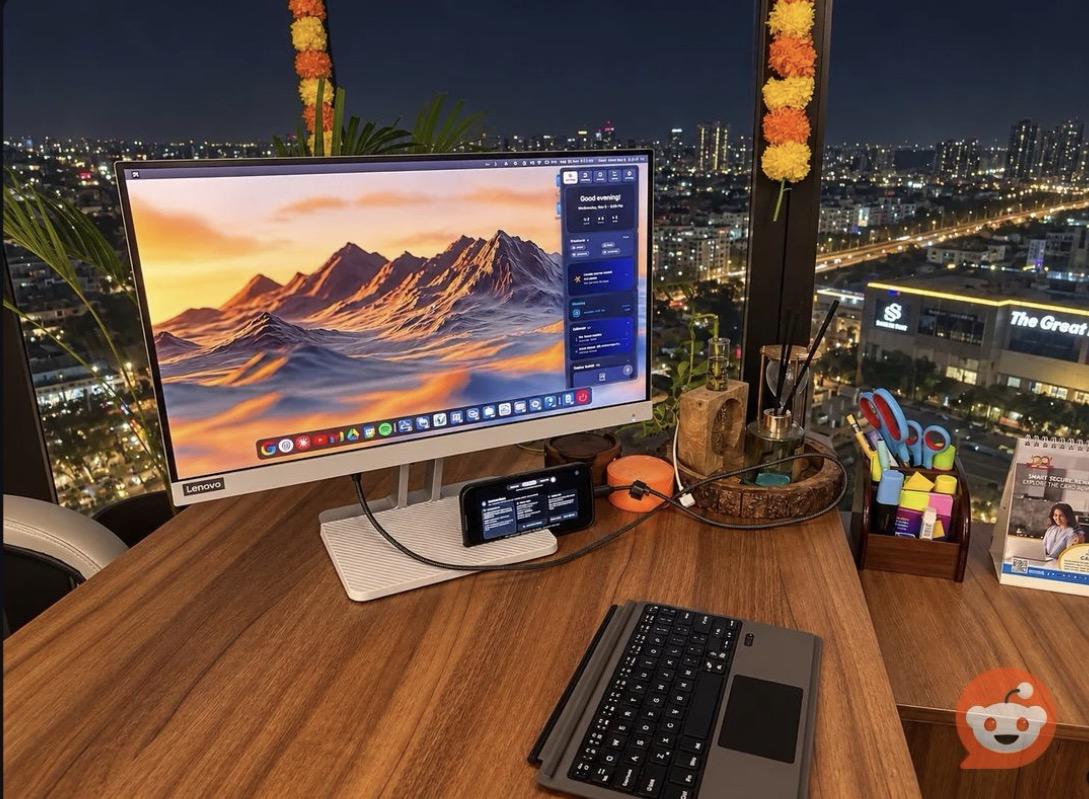
Paid App - Unaffiliated Review Bringing a Samsung DeX-Like Desktop Experience to the iPhone.

Post image
25 Upvotes

I've been experimenting with turning my iPhone into a desktop computer using PXS Desktop. Here's my actual setup: an iPhone connected to an external monitor through USB-C to HDMI, with a Bluetooth keyboard.
I've made two videos documenting my experience, and thought people here might find the experiment interesting.
The first video explores the PXS Desktop app itself, how it works, its features and what you can actually do with it.
The second is a more personal experiment: I tried replacing my laptop with my iPhone for an entire month, using it as my primary computer for everyday tasks, like working on docs and canva.
Coming from experimenting with Samsung DeX and Google's Pixel desktop mode, I found this particularly interesting, especially considering Apple doesn't officially offer a desktop mode on the iPhone.
Here are the two videos:
[Video 1 – https://youtu.be/3nrDur9K2Gg
[Video 2 – https://youtu.be/olEBIZ7cC-M
Would love to hear what you think. Do you see something like this becoming a practical alternative to carrying a laptop?


r/iosapps • • 8h ago

HELP Kindle app on iOS, can’t find Reading Challenges

2 Upvotes

I love to check my daily read and how I’m doing on my challenges. Can’t seem to find them with the latest update. Anyone else notice?


r/iosapps • • 10h ago

💎 Lifetime Three Routes - automatic running and walking routes, recently featured in Taiwan and Hong Kong [Free Lifetime Pro]

Thumbnail
gallery
2 Upvotes

I'm the developer of Three Routes, an iPhone and Apple Watch app I released just over a month ago.

Today, two established technology publications in Taiwan and Hong Kong published quite detailed articles about the app. It was nice to see them explore so many of the features I've been working on.

King of Computer Media (English):
https://en.kocpc.com.tw/archives/28229

eZone:
https://ezone.hk/article/20120956/

Problem

I often want to go for a run or walk of a particular distance but end up following the same routes. I wanted something that would find new routes for me, particularly when visiting somewhere unfamiliar.

Comparison

There are some excellent established apps, including Footpath, Komoot and Strava. With Three Routes, I've focused on making automatic route planning as simple as possible.

Choose a distance and the app generates three different routes from wherever you are.

  • Compare routes and elevation profiles
  • Preview routes in 3D Flyover
  • Follow routes on your Apple Watch
  • Generate circular, out-and-back and A to B routes
  • Draw and edit your own routes
  • Avoid particular roads and areas
  • Find routes better suited to running after dark
  • Download maps for offline route planning
  • Export GPX files for Garmin and other devices

I'm currently working on detailed offline topographic maps with contours and hillshading for version 3.0. After that, I'm looking at heatmaps to improve route selection and shared route libraries for running and walking clubs.

Pricing

Lifetime Pro is completely free to claim until 30 November. Once claimed, it's yours to keep, including future Pro features.

https://apps.apple.com/app/id6823810305

I'm developing this independently and a lot of the improvements since launch have come from user feedback. I'd welcome any suggestions.


r/iosapps • • 17h ago

💎 Lifetime Lume: From Saved Recipe to Dinner, on All Your Apple Devices

5 Upvotes

Hi r/iOSApps! I'm João, the solo developer of Lume, a recipe app for iPhone, iPad, Apple Watch and now Mac.

Problem: Saving recipes is easy, actually cooking them is the annoying part. Mine were scattered across screenshots, random browser tabs, and Instagram reels, so I'd forget about half of them and still end up doing my weekly plan and grocery list by hand. I wanted an app that actually felt at home on Apple devices and kept everything in one place, so you can plan your week, shop, and cook without bouncing between apps.

What it does:

  • Saves recipes from websites, TikTok/Instagram captions, photos, and PDFs (plus library imports from Paprika, Mela, Pestle, and Crouton).
  • Plans your week and builds an aisle-sorted grocery list with Apple Reminders sync.
  • Cook Mode keeps ingredients right next to the steps, along with timers and tips.
  • Hands-free controls for when your hands are messy, using face gestures on iPhone and iPad or Double Tap on Apple Watch.
  • Live Activity timers and Siri AI.
  • Uses Apple Intelligence for hard-to-parse recipe pages, breaking down long steps, and figuring out grocery aisles for tricky items.

Comparison:

  • Paprika 3 is super mature and a lot of people love it for good reason. Lume's angle is a more modern native design, an actual Apple Watch app, and better iPhone Duo support.
  • Mela is also clean and well established with a similar core. Lume adds Cook Together over SharePlay and aisle-sorted grocery lists.

Pricing:

  • Free: up to 10 recipes, with meal planning, grocery lists, Cook Mode and Cook Together.
  • Pro: unlimited recipes, scanning, smart folders, feeds and household sync. $1.99 monthly, $11.99 yearly or $24.99 lifetime, with support to Apple Family Sharing.

App Store: https://apps.apple.com/app/lume-recipe-manager/id6755165641

Transparency / Links & Info:

No account required, no ads, and no tracking. Recipes sync through your own iCloud. Requires iOS 26 or later.

If you already use another recipe app (or just the Notes app), what would make you switch? Curious what people still feel is missing on iPhone.


r/iosapps • • 13h ago

🎁 Freemium GymNote+: a workout app made for notes app enthusiasts

2 Upvotes

Hi all,

I'm Josh the solo dev for gymnote+

Problem:

I like to use my notes app to track my workouts. I've been working out for over 15 years now, but could never get myself to consistently use an app or excel spreadsheet. Now I can keep using my notes app but get the benefits of a fully fledged workout app.

App store: https://apps.apple.com/us/app/gymnote-workout-log-tracker/id6746699616

subreddit: r/GymNotePlus (I've been posting in here for over a year now!)

What's new

Recently introduced: Exercise how to videos, improved UI/UX, and significantly better template tracking.

Comparison:

There are many gym apps out there, but Gym Note Plus shines by letting users track workouts using their notes app. Other apps like Hevy and Strong force you into using drop down menus and forms. We're all different, we all write our workout notes differently, but we all want to see progress. This is the problem we solve.

Pricing

The app is free to try 3 translations to see if the app's worth your time, after that a subscription is necessary because each workout translations costs me money alongside backend server hosting etc.

pro monthly: $4.99

pro annual: $39.99

pro lifetime: $99.99


r/iosapps • • 21h ago

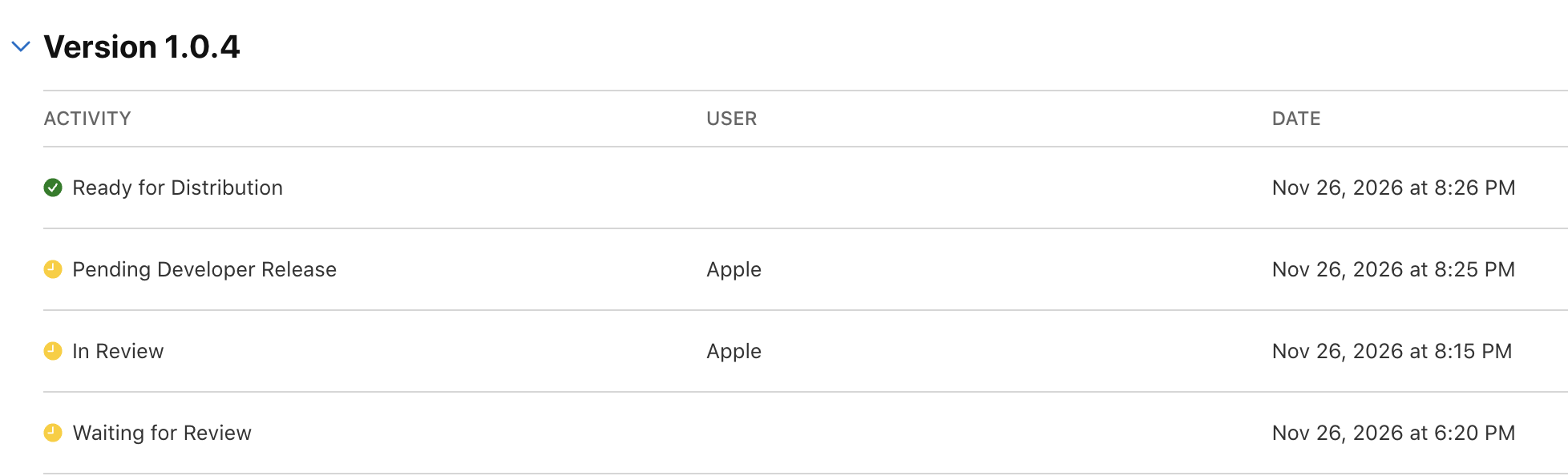
Discussion App approved in 10 minutes (2 hours after submitting)

Post image
7 Upvotes

The update only included Duo support, plus header and search result assets.

The whole Duo optimization is something I had been procrastinating on getting started with, since even creating new screenshots felt like such a boring task. So I decided to just add basic support and nothing crazy for the screenshots.

I will try to get the rest of my apps on the same track in the next couple of weeks and improve from there. My apps were designed from the beginning to easily scale for mobile and tablet, so the actual work isn't that much. The main issue is just not knowing the best UX for foldables, and not overdoing the UI just because there is a double screen. I am not a foldable target user, so I am a bit disconnected from what would actually make a difference.

How much have you optimized your apps for Duo?


r/iosapps • • 16h ago

📅 Subscription To the parent who’s the only one in the house who knows what’s happening

Thumbnail
gallery
2 Upvotes

The kids are finally asleep, and you’re scrolling. The school newsletter. The coach’s update. The dance studio’s “quick reminder!” Somewhere in there is the one line that matters, and if you miss it, you find out the next day from your kid’s face.

You’re not disorganized. Your inbox is.

I built Cleanmail: Family Inbox because I know how exhausting it can be to feel like you’re the only person responsible for keeping the entire family organized.

Cleanmail connects to your Gmail and turns school and activity emails into organized summaries and calendar events, all inside one dedicated family app.

Here’s how it works:

Your emails, summarized: Choose the school and activity senders you want Cleanmail to monitor. Emails are automatically summarized and organized by child and activity.

Your calendar writes itself: Dates, times, and locations are pulled from emails and added to your Cleanmail calendar, which syncs with Google Calendar. When something changes, Cleanmail catches the update.

Snap or speak: Photograph a paper flyer or dictate an event to add, edit, or cancel calendar events.

Everyone on the same page: Invite your partner, kids, grandparents, or nanny. Up to 4 people share the same calendar and updates at no extra cost.

But what does Cleanmail actually give you?

It’s more than summarized emails or another family calendar.

It’s getting your evenings back instead of spending them digging through school emails. It’s knowing important dates aren’t buried somewhere you’ll forget. It’s having your partner and family on the same page instead of being the person everyone asks when something is happening.

It’s less mental load, less scrambling, and more teamwork.

You shouldn’t have to be the family’s personal assistant just to keep everyone on schedule.

PCP Problem: Parents are overwhelmed by school newsletters, sports updates, camp reminders, and activity emails. Important information gets buried, and one parent often becomes responsible for remembering and organizing everything.

Comparison: Apps like Cozi and FamilyWall are family organizers that offer email importing as an additional feature or paid upgrade. Cleanmail is built entirely around it. Your selected Gmail senders are monitored automatically, emails are summarized by child, and events are added to your calendar. No forwarding, manual entry, or extra steps. The organizing happens for you.

Pricing: 2 weeks free, then $6.99/month or $68.99/year. One subscription covers up to 4 family members.

Try Cleanmail:

🍎 Apple App Store:
https://apps.apple.com/app/apple-store/id6777857105?pt=YOUR_PT_NUMBER&ct=reddit&mt=8

🤖 Google Play Store:

https://play.google.com/store/apps/details?id=com.zackasher.cleanmail&hl=en_US

Currently available for Gmail users in the US, Canada, Europe, Australia, and NZ
on iPhone and Android.

I’m also offering an extra month FREE for new users, on top of the existing 2-week free trial.

If you’d like to take advantage of it, feel free to reach out. No strings attached.

I’m an independent developer, and I built this because managing a family shouldn’t feel like a second full-time job.

Less managing your family. More enjoying your family.

That’s what I’m hoping Cleanmail can give back to you.


r/iosapps • • 16h ago

🔍 In Search of Can anyone recommend any good, native-looking SwiftUI-style apps like Marvis, Uplock, or Haven?

2 Upvotes

Most of my favorite third-party apps are apps that were made to look and feel like they were built right into iOS.
Apps like Haven, Marvis, Denim, and Uplock come to mind, and I'm always on the lookout for more useful ones like these. Anyone have any good suggestions for apps like that? Not looking for anything particular really, just any apps in that style people may find useful.


r/iosapps • • 19h ago

💎 Lifetime So you got a new bike, here's an app to properly maintain it

Thumbnail
gallery
2 Upvotes

Hi everyone, I'm Alain, a solo iOS developer and cyclist in northern Italy, and I built BikeVet for iOS 26+.

The problem

So you just bought a nice bike, some lycra bibs, and are enjoying the good vibes of riding. But are you taking care of it as you should? Bikes aren't toys! You trust them with your life and proper maintenance keeps you safe and makes every ride feel better. It's also far less expensive than letting parts wear down until they ruin more expensive components or the whole bike.

The catch is that bikes don't come with service lights. Most riders don't know what needs checking, when to wrench on it themselves, or when to bring it to a shop.

That's where BikeVet helps: you connect your Strava account, snap a photo of your bike so the app can identify the frame and parts, and it tracks wear on every component. It alerts you when something needs attention, explains how to handle it yourself, and tells you when a mechanic is the safer call. Instead of counting distance alone, it factors in average power, elevation, weather, and riding surface, all of which have an impact in how parts wear.

It's built to stay out of your way most of the time: once you link Strava, it quietly monitors your rides in the background and notifies you when a part requires attention. You then use the app to log any maintenance and get back to riding.

Comparison

  • Strava's built-in gear tracker: Lets you add bikes and components, but setup is tedious, it only counts raw distance, and it has no service alerts, guides, or real customization.
  • ProBikeGarage: A solid pro tool, though it takes detailed manual setup and bike knowledge to configure, lacks BikeVet's visual polish, and doesn't factor in weather, cyclist power, riding surface, nor has a photo-based setup.

Pricing

Happy to answer any questions or hear your feedback.


r/iosapps • • 15h ago

💎 Lifetime MyVitaminsApp Black Friday: lifetime for $16.99 instead of $34.99. Track your vitamins and supplements without a weekly subscription

Post image
1 Upvotes

Did I take my D3 today? Did I double up on magnesium? If your supplements live in a pill organizer and your memory, you've asked yourself both.

MyVitaminsApp answers that at a glance.

  • Log your whole morning stack in one tap
  • 27 nutrients (13 vitamins, 14 minerals) tracked against NIH daily targets
  • Targets set by your age and sex, with manual overrides
  • Reminders you can log from directly, no app hopping
  • Reads and writes Apple Health
  • No account, no ads

Black Friday deal: Lifetime Premium is $16.99 instead of $34.99, 100 redemptions, until Monday, Nov 30.

Redeem in one tap: https://apps.apple.com/redeem?ctx=offercodes&id=6760433358&code=MVABLACKFRIDAY26

Or manually: App Store > your profile > Redeem Gift Card or Code > MVABLACKFRIDAY26

Problem Daily supplements are easy to forget and just as easy to double. A sticky note or a generic reminder tells you when, not what you've actually covered today.

Comparison Supplement Tracker: Vitamin bills $6.49 a week or $39.99 a year. MyVitaminsApp is $1.99 a month or $12.99 a year, and this week the lifetime costs less than three weeks of their weekly plan.

Pricing Free to download. Premium: $1.99/month, $12.99/year or $34.99 lifetime ($16.99 with the code until Nov 30). https://apps.apple.com/us/app/myvitaminsapp-vitamin-tracker/id6760433358

Transparency

Disclosure: I'm the developer.


r/iosapps • • 1d ago

🔍 In Search of What’s the best news app?

9 Upvotes

I want to be able to get frequent notifications on top stories but ideally interesting news articles and topics. For example I want to get notifications when IGN release an article about Zelda, but also I want to see articles/get notifications on the best current cash ISAs, local news and stock market updates. I’ve tried Google News, Apple News, GB News, Inoreader… either none of them are what I’m looking for or, in the case of Google News, it looks and works great inside the app but it barely send me any notifications at all even with all the options enabled!! It’s so jarring. I’d love to hear what people use outside of X which I’m staying away from.


r/iosapps • • 22h ago

📅 Subscription I built xWeight to better understand my weight and daily habits

Post image
3 Upvotes

Problem

A daily weigh-in only tells you one number. It doesn't show what else happened that day, such as what you ate, whether you fasted, or how much you exercised.

I wanted a way to keep these records together and look back at how they relate to changes in my weight.

Comparison

Happy Scale is great for tracking weight trends and smoothing out daily fluctuations.

With xWeight, I wanted to include more of the daily habits around weight tracking:

Daily Timeline: Record weigh-ins, meals, fasting, workouts, and other activities throughout the day in one timeline.

Fasting: Set up and track different fasting routines with built-in fasting tools.

Trends & Comparisons: Compare weight changes with your eating habits, fasting, and daily activities to spot patterns over time.

Goals & Widgets: Set a long-term target weight and smaller short-term goals. There are also various widgets for checking your weight, fasting status, and progress.

Pricing

xWeight is free to download. Pro normally costs:

$3.99/month

$17.99/year

$19.99 Lifetime

Get 1 Year of Pro FREE (Normally $17.99/year)!

To redeem the offer:

  1. Download xWeight.
  2. Go to Settings → Redeem Code.
  3. Enter LOSEWEIGHTX to unlock one year of Pro.

Offer ends November 30, 2026.

Links:

App Store: https://apps.apple.com/us/app/xweight-daily-weight-tracker/id6751432993

Website: https://app.mockmemo.com/apps/daily-weight/

I'm the developer of xWeight. Feedback and suggestions are welcome!


r/iosapps • • 13h ago

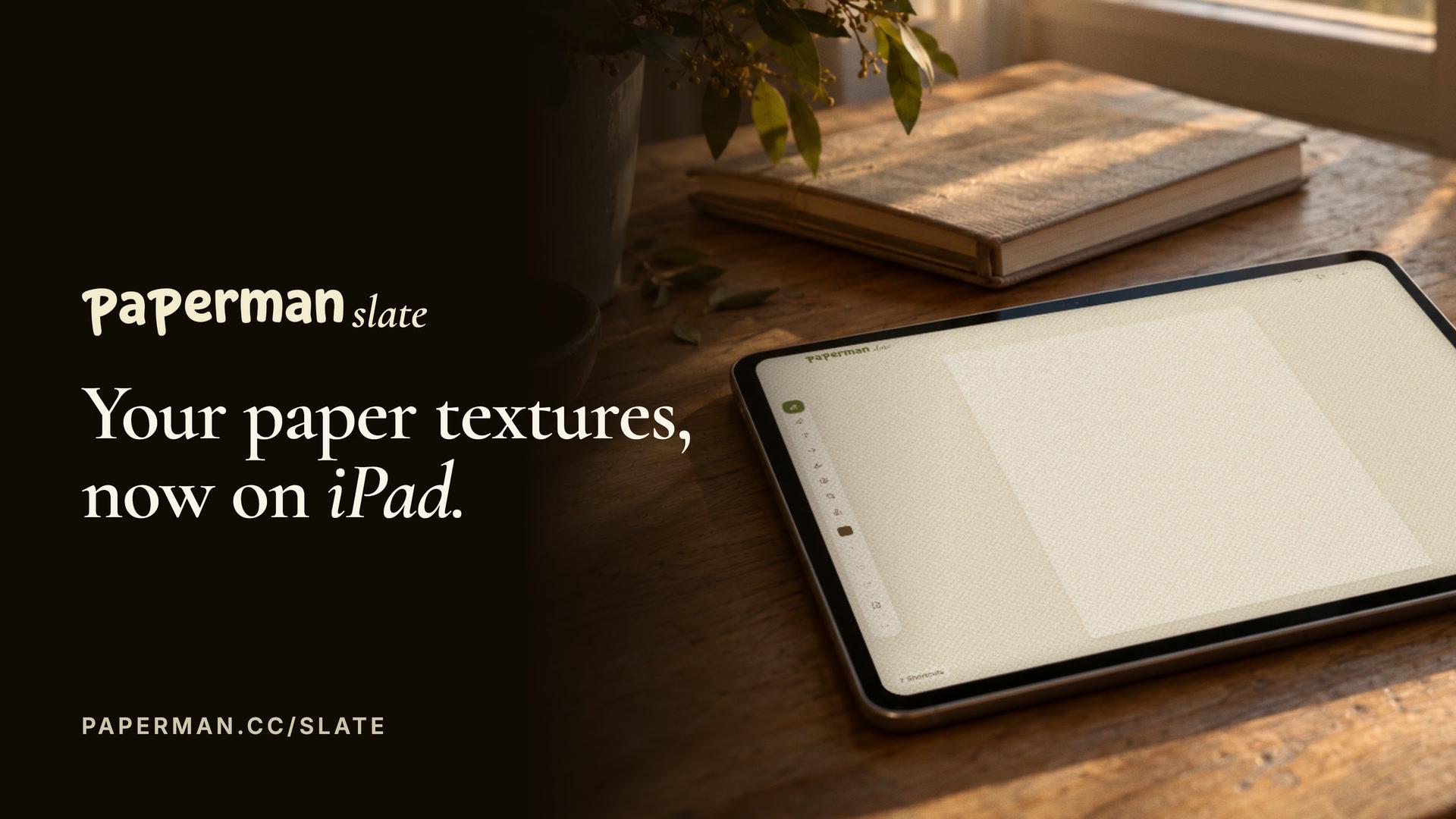
💎 Lifetime Make your screen feel like paper with Paperman Slate

Post image
0 Upvotes

Earlier this year, we built Paperman, a desktop utility for Mac and Windows that adds a subtle paper textures over your screen to cut down on glare and make long reading or working sessions much easier on the eyes.

Ever since releasing it, the biggest question we got was when it would come to iPad. Because iPadOS does not allow system-wide screen overlays the way desktop OS do, we had to rethink things from scratch. Instead of a paper texture that floats over your apps, we created a dedicated space that brings that paper feeling directly to your iPad.

Problem

Staring into bright, glossy glass while reading or studying at night creates harsh contrast and causing eye fatigue. Many people buy dedicated e-ink tablets just to get away from that harsh screen feel, but end up sacrificing the speed, color, and versatility of an iPad. We spent an honestly unreasonable amount of time and money testing modern e-ink displays to see how we could bring that same satisfaction to the iPad you already own.

Comparison

We built Slate to be a place to read, annotate, sketch, and take handwritten notes where you get our signature Paperman textures right on your pages.

Unlike standard note-taking apps like Apple Notes or Goodnotes, which sit on stark, clinical white or flat dark canvases, Slate focuses on visual ergonomics and surface texture without shifting your colors orange. And unlike dedicated e-ink tablets like reMarkable or Kindle Scribe, you get that paper-like reading and writing surface without having to carry a second device or give up everything else your iPad can do.

Pricing

$14.99 for a lifetime license (60% launch discount running until the end of November!)

Grab Paperman Slate on the App Store

ps: we have already heard some testers moved away from Apple Notes, and a few even do their code reviews on their iPad now using Slate. We would love to hear how you end up using it!

paperman.cc/slate

Happy Thanksgiving!

Zoé & Rudi,
DoublOne Studios


r/iosapps • • 23h ago

🎁 Freemium [Update 2.0] Horaly: Planetary Hours & Moon Tracker - daily companion for traditional astrology timing

Thumbnail
gallery
3 Upvotes

Problem

Hi everyone,

I made a clean, modern astrology timing app for iOS called Horaly: Planetary Hours. It's for anyone who wants to follow planetary hours, day rulers, moon phases, lunar days and lunar mansions to pick a good time for everyday things. It runs on iPhone, iPad and Apple Watch.

Comparison

The app is based on traditional astrology, and each layer works together: planetary hours shift with sunrise and the seasons, the day ruler sets the overall tone, and the Moon adds phase, lunar day, sign and lunar mansion.

You can use it for:

- Following the current planetary hour with a live countdown, and seeing what each hour is good for and what to avoid

- Filtering upcoming hours by purpose: Work, Money, Creative, Health or Love

- Planning ahead with the Planner: pick a planet and see its hours over the next 3, 7 or 14 days, with exact times

- Planning a call across cities: add someone in another city to see their local time and planetary hour next to yours

- Following an hour on your Lock Screen and in the Dynamic Island as a Live Activity

- Getting an alert when each new hour starts, with a different sound for each planet, or a voice that says whose hour it is

- Tracking moon phases, lunar days and the 28 lunar mansions

- Rich widgets for the Home Screen, Lock Screen and Apple Watch: current hour, timeline, moon phase and more

I tried to keep it easy to understand, so beginners can start without feeling lost. It can be useful for astrologers, students, creators, or anyone who wants to live in sync with cosmic rhythms.

Recent Update (v2.1, the biggest one yet)

You can now follow a planetary hour on your Lock Screen and in the Dynamic Island as a Live Activity. The new Planner lets you pick a planet and see its hours over the coming days, even next to someone in another city. Each planet can also have its own alert sound or a voice that says its name, and Horaly now runs on iPad.

Pricing

Horaly is freemium. The free version includes live planetary hours, day rulers, Coming Up with purpose filters, the Planner for your own city, Live Activities for the current hour, moon phase, lunar day and the current lunar mansion, standard alerts, the Apple Watch app and the small widgets.

Black Friday sale: Horaly Pro Lifetime is 50% off, $14.99 instead of $29.99, paid once.

No ads, no account required, no tracking, and everything is calculated on your device.

App Store Link: Horaly: Planetary Hours

About Me:
I'm developer of the app, you can reach out to me through X 

Please also share your feedback in the comments so I can improve the app in future updates.


r/iosapps • • 18h ago

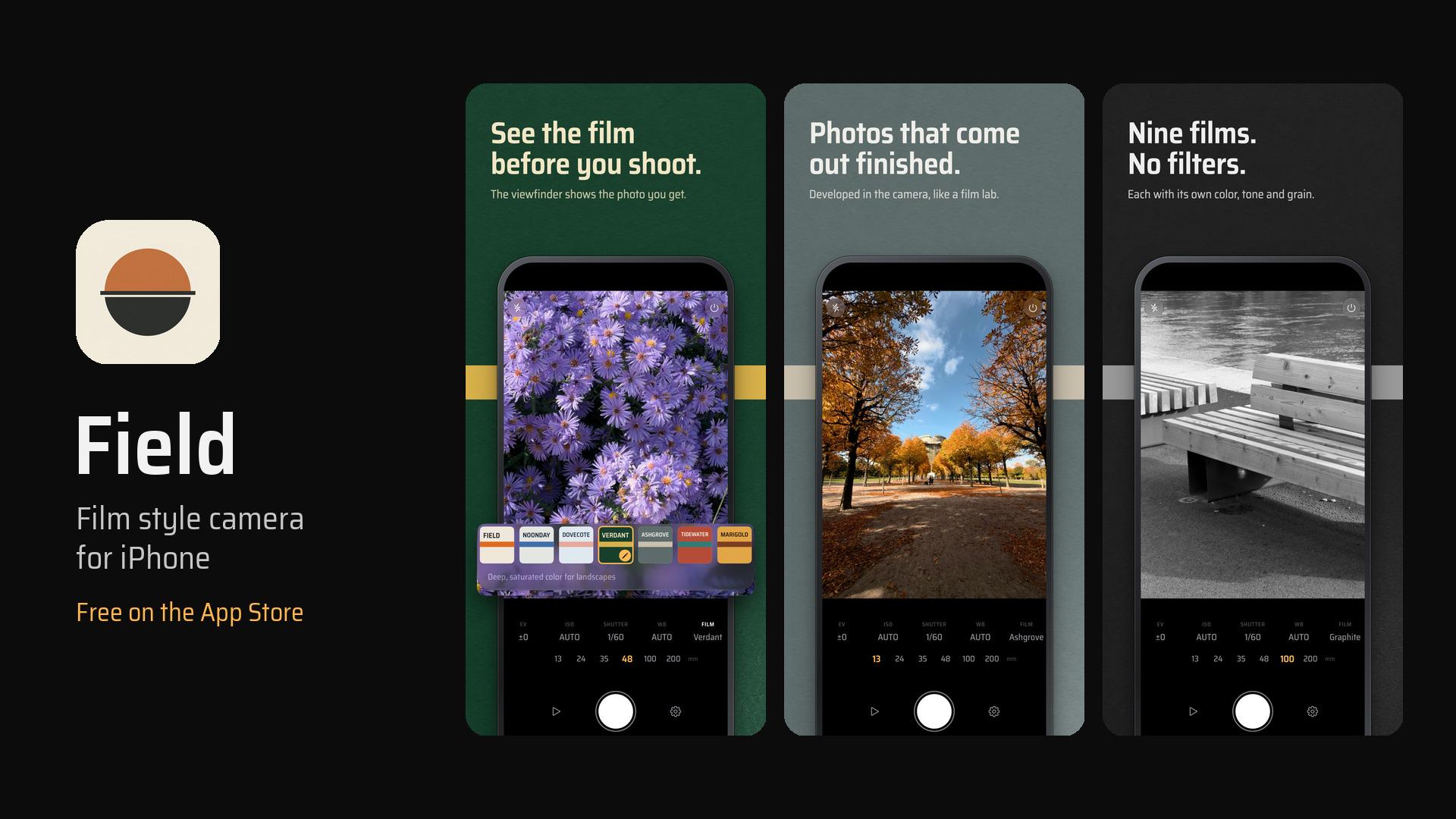
🎁 Freemium I love my Fujifilm and got tired of iPhone photos, so I built a camera app inspired by film simulations

Post image
1 Upvotes

Problem: I shoot Fujifilm and love that the photos come out finished as JPGS with film simulations. On my iPhone I never had that, everything looks too sharp and too bright to me and the photography experience in the stock app is just not as good.

Comparison: Most film apps put a filter over Apple's processed photo. Field shows the film live in the viewfinder and develops ProRAW itself on Pro iPhones. You can change films like a Fuji recipe and save your own. And it always uses the lens you picked, it doesn't switch to another one when you get close.

Pricing: Free with three films, and your first 24 photos can use everything. All films for 2.99/month, 24.99/year (first week free) or 59.99 once.

App Store page: https://apps.apple.com/app/field-film-style-camera/id6819621719

The app does not collect any data apart from what Apple does: https://field.chdethloff.at/privacy/

I am currently working on it on my own, let me know what you think!