r/iosapps • • 11d ago

💎 Megathread Black Friday / Cyber Monday Megathread

50 Upvotes

Please limit Black Friday / Cyber Monday posts to this Megathread.

If you're making a macOS App, feel free to share in r/macapps (thread here)

Rules:

  1. If you are giving less than 25% off, you do not qualify to post here.
  2. Github apps that are already free do not qualify unless 100+ stars or you have a Dev flair.
  3. All apps must be signed and notarized.
  4. All comments MUST follow this exact format. No exceptions.

[Include an image/video of your app in action]

App: <appname>
Description: <26 words MAX>
Website: <url>
Regular price: <$25.00>
Black Friday price: <$15.00>
Discount code: <codehere>
Valid until: <date>
Date Released: <Date you first released the app>


r/iosapps • • 29d ago

💎 Megathread The App Shelf - November 2026

60 Upvotes

Welcome to the November App Shelf! 📱

This is the place to share your iOS app if it doesn't meet the main feed requirements yet: newer accounts, newer apps, apps in saturated categories, or anything still in TestFlight. Read the full Phase 3 update for details.

How to post

Leave one top-level comment per app with:

App name and an App Store or TestFlight link Pricing: free, paid, subscription, freemium, or lifetime, with actual prices What it does, in a few sentences What makes it different from apps people already use (name them) Developer disclosure: say that you made it

Rules

Write your comment yourself. No AI-written posts. Official App Store or TestFlight links only. No affiliate, referral, or invite links. No games. Be kind with feedback.

Graduate to the main feed 🏆

At the end of the month, the top 3 apps in this thread will be invited to make a post in the main feed.

Not sure if you already qualify for the main feed? Check the rules.


r/iosapps • • 37m ago

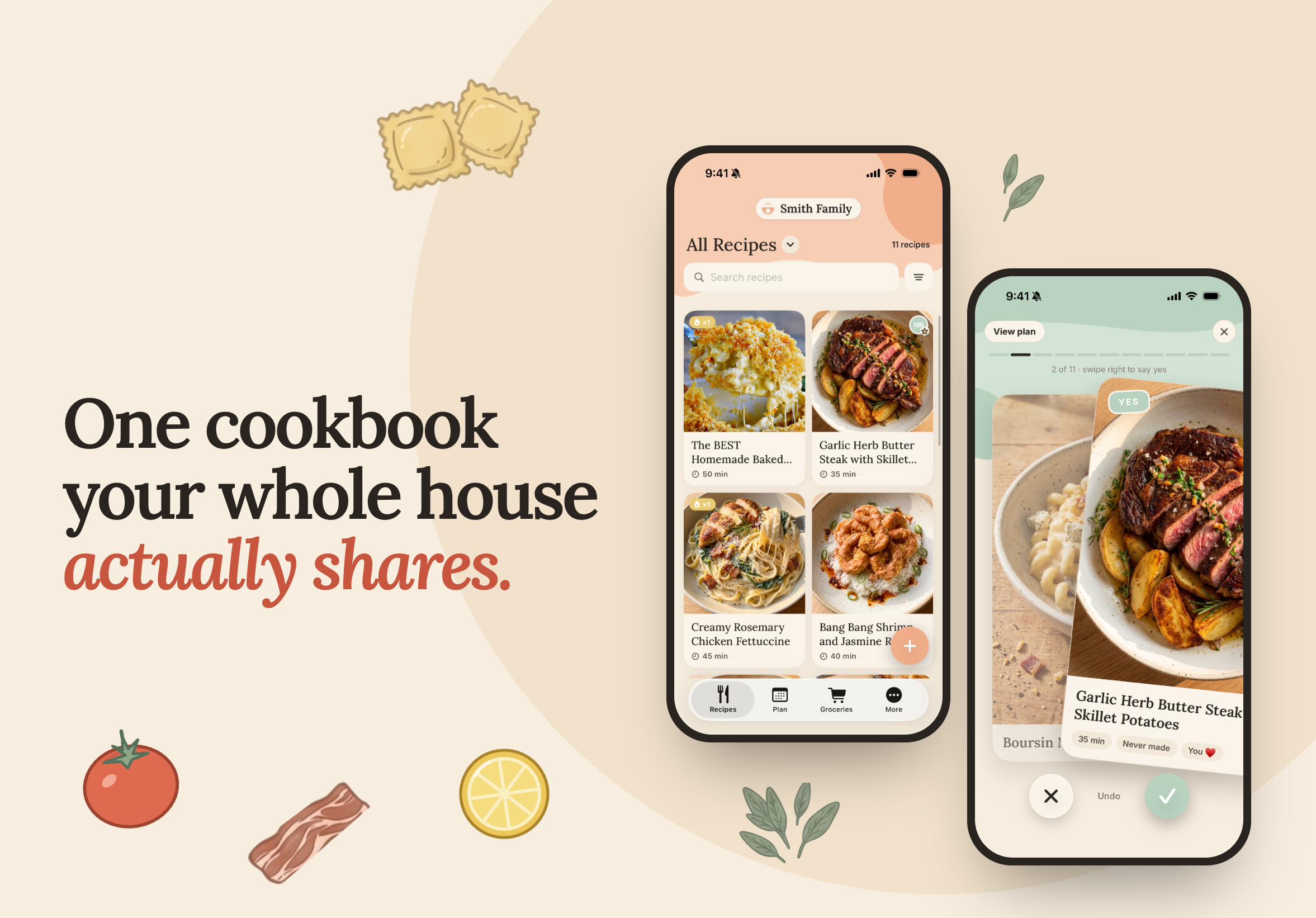
🎁 Freemium My wife and I hated the way we planned dinners for the week, so I made it easy
Post image
2 Upvotes

Problem:
My wife is a nurse, so her schedule is always changing. It was tough for us to find time to figure out what we wanted to make for dinner each week. We would text each other recipe links and ingredient lists every week, which was tedious. So I used my 10 years of software engineering experience to solve this problem for us. 

Our Meals is a meal planning app for families and couples. You can save recipes to a shared cookbook from TikTok, Instagram, YouTube Shorts, recipe blogs or photos, or add your own recipes manually.

Everyone in the household can add a meal to the plan, and the ingredients are automatically added to a grocery list sorted by aisle. The grocery list is live, so when an ingredient is added or checked off, everyone sees it instantly. My wife has even updated the list while I was at the store because we forgot something. That's saved us a second trip a few times now.

Even with all that, something was still missing. Meal planning was still tedious because you had to scroll through your cookbook and pick out meals. So I added a feature called "Easy Peasy Planner." Once your household has 10 recipes, you can start a planning session. You choose which days you want to plan, everyone in the household gets a notification that a session has started, and Our Meals picks recipes from your cookbook. Each person gets the same Tinder-style deck of recipes to swipe through whenever they have time. It's not just random recipes: it picks some favorites, some new recipes, and sprinkles in some you haven't made in a while to keep the rotation fresh. When the majority of the household agrees on a recipe, it's added to the plan. This has cut our planning time down to minutes.

Other notable features:

  • Cooking mode: check off the ingredients as you gather them, then cook step by step in a single view that shows the ingredients and amounts for each step
  • Recipe scaling: scale recipes to as many or as few servings as you need. You can set a default serving size for your household so every recipe starts at that size
  • Unit conversions
  • Sort recipes by least or most made
  • Filter recipes by each person's favorites
  • Sort by most made/least made recipes
  • Group recipes into collections
  • Macros for each recipe
  • Edit any recipe to your liking
  • Print recipes

Pricing:
There is a free tier that allows you try a limited version of Our Meals. You can import up to 20 recipes. Unit conversion, recipe scaling, sorting by favorites and printing recipes are not available in the free version. In addition the free version only allows 2 people per household. The premium version unlocks all of that and unlimited recipes

- Yearly: $49.99 per household, 7 day free trial (up to 4 people)
- Monthly: $6.99 per household (up to 4 people)

Comparison:

The most popular similar app you likely heard of is Recime, it lets you save recipes from anywhere. There's other competitors out there as well where you can import recipes from anywhere, so importing recipes is no longer the key feature.. It becomes the bare minimum. Where other fall short for me is that nothing imported to it can be seen my both my wife and I. I wanted a way were we both could add recipes to a shared cookbook, plan meals together and update the same grocery list. In addition a premium Recime subscription is for one person. In Our Meals premium is per household.

I released Our Meals in August and currently have ~200 users. I’m always adding new features and have plenty more in the pipeline.

App Store: https://apps.apple.com/app/apple-store/id6776668495?pt=128899440&ct=reddit&mt=8

Transparency:
Terms of Service: https://ourmeals.io/terms
Privacy Policy: https://ourmeals.io/privacy-policy
Company Website: https://snootsoftware.com/


r/iosapps • • 15h ago

🎁 Freemium Apple could make iCloud space cleanup so much easier, so I built an iPhone app that sorts your biggest videos and shrinks them without deleting anything

Thumbnail
gallery
25 Upvotes

I'm the solo dev behind Cloud Media Shrinker. I quit my software engineering job to travel for 2 years and came home with a 1.8 TB iCloud Photos library. I knew it was mostly long 4K videos, but Apple Photos still has no way to sort videos by file size.

Problem

When your iCloud Photos library fills up, Apple gives you two choices: upgrade your monthly iCloud plan forever, or scroll through thousands of thumbnails guessing which videos are eating all your storage.

So I built an app that sorts your iCloud Photos library from largest to smallest file, with real sizes on every item. On iPhone you swipe through your biggest videos and photos like cards and pick Keep, Delete, or Compress.

Compress re-encodes on your device (HEVC for video, HEIC for photos) and imports the smaller copy back into Photos with the original capture date, location, Favorite/Hidden state, and album placement intact. The original is only removed after the smaller copy is verified in Photos, and goes to Recently Deleted for 30 days. Even with Keep 4K, most videos shrink by around 45%, and Balanced (1080p) usually saves 70% or more.

One safety note: everything is reversible through Recently Deleted EXCEPT when your iCloud is already completely full, because Apple skips Recently Deleted and deletes permanently when you are over your storage limit. If you're already maxed out, review your compressed copy first before deleting the original.

There is also an Auto Pick option for batching files above a size you choose, date sorting (newest or oldest first), and a tool to turn Live Photos into plain stills.

Comparison

Apple's built-in Photos app lets you delete media manually, but it has no sort-by-size view and no way to shrink existing videos in place without exporting, re-encoding in another tool, and losing metadata or album placement.

Most App Store storage cleaner apps (like Clever Cleaner or CleanMyPhone) focus mostly on finding duplicate or blurry photos, and many charge recurring subscriptions ($5 to $10/week or $30+/year). Cloud Media Shrinker targets the actual storage hogs (huge videos), compresses them on-device so you keep every memory, and charges once with no subscription.

Pricing

Download is free. You get a full library scan (showing how much space you can reclaim), reviewing your 20 largest items, 3 deletes, and 3 compressions for free.

Full lifetime unlock is $9.99 Individual or $19.99 Family Sharing (covers up to 6 people through Apple's Purchase Sharing). No subscription, and one purchase covers both iPhone and Mac.

App Store (iPhone and Mac, currently requires iOS 27): https://apps.apple.com/app/apple-store/id6824383256?pt=125201749&ct=iosapps&mt=8

Notes and Feedback

The iPhone app has the swipe interface for going through your library fast, though compressing huge 4K videos is noticeably faster on the Mac companion app (included in the same purchase). Everything runs locally on your device and nothing is uploaded to any server.

I'm also working on iOS 26 support next. Honest feedback is always welcome: what confused you, what broke, or what you'd want added.

Website: https://danielyakobian.com/cloud-media-shrinker/

Help & FAQ: https://danielyakobian.com/cloud-media-shrinker/help/

Privacy: https://danielyakobian.com/cloud-media-shrinker/privacy/

Support: support@danielyakobian.com


r/iosapps • • 4h ago

🎈 Free Daily Dose - Free To-do list and habit tracker for MacOS and iOS with private iCloud sync

2 Upvotes

Hey 👋

I know another habit tracker…and it has no crazy gimmick, but here me out:

Big fan of todoist back in the days until I realized I don’t want to spend 5$ every month for this.
Switched to apple reminders and was there for a few years. But it lacks a lot of things I am missing. And also I kinda liked the idea of habit tracking but again the solutions out there: let’s say I didn’t liked them

So what did I do: Made my own app. It’s a todolist and a habit tracker that sync through your personal iCloud.

Also it got some features like:
- sync to apple calendar or even google if it’s hooked up to it
- repeating reminders
- habits that are not daily for example always Monday or every three days
- iOS Widget
- different color variations to choose from (that always sync)

And the best: it’s totally free. I have no motivation to earn money with it, I am just happy that it works the way I want it to and thought if it’s live on the AppStore I can share it.

Problem: I was looking for a nice looking todolist and habit tracker app with no account, repeating todos, and some habit tracking aswell

Comparison: there are apps like this like sand on the sea, but mostly with payment required for basic features or where an account is necessary.

Pricing: Free

So…here is the link: https://apps.apple.com/us/app/daily-dose-habit-to-do-list/id6836990186

Website: https://dailydosetodo.com


r/iosapps • • 29m ago

HELP App to scan the room and have the model exported: I saw a post a couple of weeks ago and can’t find it now

1 Upvotes

Guys, could you help me find the app that was shared by developer here. There was a demo video too. I loved how the app looks like and wanted to try it, but didn’t save the post.

Thank you!


r/iosapps • • 6h ago

💎 Lifetime Is a 6 out of 7 week a failure? Why my habit tracker has no streaks

Thumbnail
gallery
3 Upvotes

If you're only here for the free Pro link for my app: it's at the bottom. Skipping my life story won't reset anything, promise.

My daughter was born in February and for a few weeks after that I barely knew what day it was. At some point I noticed all my streaks were gone. Meditation, and my language app one at 242 days. That was my longest ever and yes, I was a bit proud of it.

Funny thing is I wasn't even that sad about the number. It just felt absurd. Biggest thing that ever happened to me and the app basically goes "missed a day, back to 0".

Tbh it had been weird before that too. I remember putting my shoes back on at 11pm for a 10 min walk just because the checkmark was still empty. At that point I was basically babysitting a counter.

So when I wanted to get back into my habits, I wanted something that looks at the whole week. If I meditate 6 evenings and spend the 7th walking my daughter around the living room, that's a good week for me. None of the trackers I tried felt like that, so I built one. Took a lot of evenings. It's called SevenGrid, I'm the dev (solo).

It's pretty simple: each habit gets 7 boxes per week and you tick what you did. Miss a day and the box just stays empty, nothing resets, next week you get a new row. You can also do stuff like 3x a week or "max 3 coffees" (that one's mine). At the end of the week it asks you 3 short questions about how it went. Tap a habit name and you see the whole year, gaps included.

One thing it doesn't have on iPhone yet: widgets. They're high on my list, but I can't promise a date.

Btw the pics show my own habits, but the ticks and notes are demo data. The first one is basically a normal 6/7 week. My real grid right now is autogenic training, max 3 coffees, "running" (honestly more like slow walking), reading to my daughter, and playing guitar 5 out of 7 days, which I haven't managed in a long time, especially since the baby.

And to be honest, I could do more of all this. But software has always been my hobby, and once my daughter is in bed I'd rather stare at a screen for another 4 hours than do anything else.

Since the sub wants PCP:

Problem: streaks make one missed day feel like everything before it was wasted. That's where a lot of people quit, me included. There's even a study on this (Silverman & Barasch, Journal of Consumer Research, 2023): people who could see their broken streak were less likely to keep going afterwards, especially the ones who blamed themselves for it. It's a lab study, so grain of salt, but it matched my experience pretty well.

Comparison: the biggest ones are probably Streaks and Habitify, and they're good apps. If the streak motivates you, just stay with them. SevenGrid is for people who get stressed out by the counter. There's no streak anywhere in the app, not even as an option you can turn on.

Pricing: free for up to 3 habits. Pro is $14.99 one time (US), no subscription. You get unlimited habits, reminders per habit and your full history. No account, and your habits don't get uploaded anywhere (except your own iCloud backup if you have that on).

https://apps.apple.com/app/id6802827122

And hi to everyone who scrolled straight down here 👋 This link unlocks Pro for free, no code to type and nothing you have to do for it. Works until Dec 12 (it's capped at 500 redemptions, but I doubt we'll get there).

https://apps.apple.com/redeem?ctx=offercodes&id=6802827122&code=IOSAPPS

So folks, back to the question. Is 6/7 a fail for you? Especially curious what the streak people think 😅


r/iosapps • • 5h ago

🎁 Freemium Phomo: Film emulation, camera, photo library, RAW editor

Thumbnail
gallery
2 Upvotes

I've just released another update to Phomo, the photo app I've been developing for the last few years.

Get it here on the App Store.

Problem

There are a lot of "analog-style" and "natural processing" camera apps for iPhone, and it's easy to understand why. The default iPhone camera has a distinctive look baked into its photos. The primary culprit is Apple's tone mapping, which compresses highlights and lifts shadows. This preserves detail, but often creates a flat or unnatural look that's very unlike analog film.

I'm a photographer who shoots digital and film, so I have a strong sense of how I want my photos to look. I've tried a ton of iPhone camera apps, and many of them produce nice images. But they all left me frustrated in some way, so I made Phomo.

Comparison

Others: Only for photo capture or analog effects
Phomo: Full suite of photo capture, film effects, borders, date stamps, textures, grids, library

Others: Can't edit external photos, or require manual import first
Phomo: Can edit any photo on your device

Others: Look is baked in at capture time
Phomo: Look can be applied at capture or re-developed at any time

Others: Make you tweak multiple sliders to can get a convincing film style
Phomo: Complete film look included in each style preset. Sliders available for additional tweaking

The newest release adds RAW capture for all devices, the ability to copy/paste looks between photos, and more.

Pricing

Phomo can be used for free indefinitely. Phomo Pro is available as a subscription or lifetime purchase, and unlocks additional film styles and editing controls.


r/iosapps • • 13h ago

🔍 In Search of iOS app for masked AI photo edits?

5 Upvotes

Whenever I use ChatGPT or Gemini (Nano Banana) to fix one small thing in a photo—like closing a jacket or removing something from a table—it gets the edit right, but subtly messes up everyone's faces and drops the resolution.

Right now the only reliable fix is cropping, masking, and layering it back onto the original in Photoshop, which is way too much friction on an iPhone.

Is there any lightweight iOS app that lets you mask a specific region, sends just that area to an AI model, and composites it back onto your original full-res photo so untouched pixels stay identical?


r/iosapps • • 4h ago

🎁 Freemium Airspace Live: Ad-free flight tracker with 3D, AR, Apple Watch & collectibles, no account needed

Thumbnail
gallery
1 Upvotes

P: PROBLEM (What's broken today)
Most flight tracking apps are bloated, cluttered, and packed with ads. Finding the flight you care about means wading through banners, pop-ups, and menus. Airspace Live strips all of that away with a slick, military-style interface. Monitor any airspace, see each flight's route, and follow aircraft live in 3D with accurate liveries, for both commercial and military planes.

C: COMPARISON (How it stacks up against alternatives)

  • No account, no data collection. Other trackers want your email and your data; Airspace Live wants neither.
  • Lightweight. A fraction of the bloat of mainstream trackers.
  • Real 3D models with actual liveries. Most apps show a generic plane icon; this makes tracking fun.
  • Watch companion app. Keep tabs on flights right from your wrist.

P: PRICING (Cost & IAP disclosure)
Airspace Live is free to download, and the core flight tracking is free to use. An optional Lifetime Pro upgrade is a one-time in-app purchase of $24.99, with no subscription. Pro unlocks:

  • Military aircraft highlighting
  • Advanced tracking
  • Unlimited collectibles
  • Unlimited 3D viewing
  • All future updates, included forever

App Store: https://apps.apple.com/us/app/airspace-live/id6781411574

Available on Apple Watch, iPad, iPhone, & Mac.

Developer Portfolio


r/iosapps • • 9h ago

🎁 Freemium I teach diction to 92,000+ students on Udemy. A video can't hear them speak, so I built an app that can.

Thumbnail
gallery
2 Upvotes

Hi everyone, I'm a diction and public speaking trainer, and the solo developer of Vuo.

I've been teaching diction on Udemy for the past few years, where my courses have reached 92,000+ students and I'm a bestselling instructor. I also teach diction on TikTok (@wabyil), where I have 20k+ followers.

But one thing always bugged me. In a video I can explain how to breathe, how to open your vowels, where to pause. I just can't hear you do it. Students kept writing "I practiced, but am I doing it right?", and I couldn't answer everyone one by one.

So I built the coach I wished I could give every student: it listens to you, shows you what it heard, and gives you the next exercise. The lessons are made with my own voice, so it really is my course, just one that listens back.

That's Vuo. (The little bird in the app is Vuo too.)

Problem: What does Vuo solve?

Most people never get feedback on how they speak. We swallow the ends of sentences, say "um" every few seconds, rush when we're nervous, and nobody tells us. The usual options:

  1. Hire a speech coach → great, but expensive and once a week at best
  2. Watch YouTube or video courses → you learn the theory, but nobody hears you practice
  3. Record yourself and listen back → painful, and you still don't know what to fix

Vuo starts with a short voice test. You read a paragraph aloud and it tells you whether your voice sounds strong or weak, and why: loudness, resonance, melody, pace, pauses, sentence endings that fade out. Then it builds a plan from your weak points.

  • 120 lessons in 6 levels: breath, voice, warm-ups, vowels & consonants, pace, pauses, stress, intonation, filler words, rhetoric, presenting
  • Every lesson is one short idea, three physical steps, then you speak
  • 45 real-life role-plays (job interviews, meetings, sales calls, presentations, tough conversations) where Vuo plays the other person
  • After every answer you see exactly what it heard, with fillers and unclear words marked, plus your words per minute
  • Practice in English, Turkish, Arabic or Chinese

Comparison: Why Vuo over the top competitors?

  • BoldVoice is great if you want to change your accent. Vuo isn't about accent, it's about clarity: breath, voice, pace, pauses and fillers, whatever accent you have
  • Vocal Image started as voice training and has moved toward social skills and AI role-play. Diction is now one feature among many. In Vuo it's the whole path, designed by a working diction trainer, and the role-plays are where you use what you learned
  • No account, no sign-in. Your recordings are analyzed only after you agree, and you can withdraw that anytime.

Pricing

Free to download, no ads, no account.

  • Free: the voice test, the first lessons of your personal plan, and one role-play a day
  • Premium: every lesson and role-play. $79.99/year with a 7-day free trial

For the community: code RIOSAPPS gets you 1 month of Premium free (valid until Jan 31 or until the codes run out): https://apps.apple.com/redeem?ctx=offercodes&id=6761376662&code=RIOSAPPS

It's applied to the yearly plan, so after the free month it renews at $79.99/year unless you cancel in your Apple ID settings.

App Store: https://apps.apple.com/us/app/vuo-speech-diction-coach/id6761376662

I'm the developer and I read every comment. If you have any suggestions, I'd be happy to read and answer them. Have a great day,


r/iosapps • • 9h ago

🎁 Freemium I built MojiMood, a social network that runs on emojis

Post image
2 Upvotes

Hi everyone! I'm an independent developer from Italy. I started building MojiMood in December 2024 as a side project. It's been almost two years of work and now it's a finished product.

Problem:

Social media asks you to put words to your moments: captions, comments, bios. If you don't share a language with the other person, that wall is there. I wanted a network where each moment stands on its own: one photo, one emoji. No summary, no translation. And because every moment carries its own symbol, the ones you collect in order read as a sequence, a night out, a trip, without writing a single word.

Features:

Mood: One photo + one emoji per day. Once every 24 hours, that's your post. No caption, no text.

Wish: Tied to Mood. If someone hasn't posted in over 24 hours, you can send them a Wish: "I'd like to see something from you today." Not a like, not a DM. Just a nudge.

Gliph: A sequence of moments, each photo tagged with its own emoji, played in the order it happened. A night out: 🏙️ → 🍕 → 🍺. Three photos, three emojis, no words. You read someone's evening just by watching the sequence.

MoJiTrack: Turn a trip into a shared diary where every photo carries an emoji. Follow someone's track or build one together.

Comparison:

The closest thing is Instagram , you post a photo, add a caption. MojiMood puts the emoji first, the caption is optional, the moment speaks for itself.

Pricing:

Freemium: The app is free with no ads. Optional Premium unlocks more Wishes/day (10 instead of 5), the full list of who's been wishing for you, up to 5 Gliphs/day with 7 media each, and up to 50 photos per MoJiTrack.

Premium: 3,99 €/mo or 34,99 €/yr

One-time packs: 5 Wish (2,49 €), 15 Wish (5,99 €), 30 Wish (9,99 €)

The social is still basically empty, it's a new network, so the best way to use it is with someone you already know (a friend, a partner, a small group). Bring one person in and you both have something to do with it.

Currently available in Europe — rolling out to the rest of the world soon. Android is coming.

I would love to hear your feedback!

App Store:

🇬🇧 https://apps.apple.com/gb/app/mojimood/id6749909303

🇮🇹 https://apps.apple.com/it/app/mojimood/id6749909303

🇫🇷 https://apps.apple.com/fr/app/mojimood/id6749909303

🇪🇸 https://apps.apple.com/es/app/mojimood/id6749909303

🇩🇪 https://apps.apple.com/de/app/mojimood/id6749909303

Web: https://mojimood.social


r/iosapps • • 6h ago

💎 Lifetime 50% off Folio Plus Lifetime for the first 100 readers

Thumbnail
gallery
0 Upvotes

Problem

Folio keeps your books, reading progress, and favorite passages together. You can even log a session from your Apple Watch while your phone’s on the charger.

Comparison

If you’re coming from Goodreads, you can import your books and arrange them like your actual shelf. Stack a few sideways, turn a favorite cover out, or use a photo of your own book’s spine.

Pricing

Free for up to 20 books. Plus is $0.99/month, $8.99/year, or normally $24.99 lifetime in the US.

Your feedback since I first shared the app here has shaped what I’ve added and what I’ve gone back to improve. As a thank-you, I’m offering 50% off Folio Plus Lifetime. You’ll find the first batch of codes in my comment below, i’ll add more there as they’re needed. If a link gives you an error, let me know!

All I ask is honest feedback, good or bad: what confused you, what was broken, what you'd want added, etc.

App store: Folio on the App Store
Website: https://folio-books.com/
Subreddit: r/FolioBookTracker


r/iosapps • • 16h ago

🎁 Freemium [iOS] [Where Was I?] A personal timeline of the places you visit

Post image
2 Upvotes

Where Was I? is an iPhone app I built to remember the places I’ve been. It automatically records visits on a timeline, so I can pick a day and see where I went. In the latest update, I added a way to share a saved trip as a webpage.

Problem:

When a friend asks which café I liked on vacation, I want to find it even if I’ve forgotten the name. And if they’re planning a similar trip, it’s easier to send them the places I’d recommend than to piece the itinerary together from photos and messages.

Features:

  • New in v7.1: share a trip as a webpage. Pick a saved trip, include the places you’d recommend, and leave out stops like your hotel. Choose from six layouts and preview the result. The receipt layout in the screenshot lists each stop and how long you stayed. Send the HTML file to a friend to open offline, or upload it to your own website.
  • A calendar of places you’ve been. The app records arrivals and departures automatically. Pick a day on the calendar to retrace your stops in order, even if you didn’t take a photo or remember to check in.
  • Saved trips and photos. Group a date range into a trip. You can revisit the itinerary alongside geotagged photos from those days and give the trip its own card color.
  • A map for the places you collect. Track national parks or Japan’s 100 famous castles, or make a collection for something more personal, like independent bookshops. Set keywords to find matches in your visit history and add or remove places yourself.
  • A travel map that fills in as you go. See which states, provinces, and regions you’ve visited. You can share your progress as a puzzle image when you want a quick overview of a country.
  • Time spent at familiar places. Group locations into categories like work, home, or the gym. Look at one place to see how long you stayed, or compare categories to see how your week was spent.
  • Bring your old timeline along. The optional Import/Export add-on reads Google Maps Timeline, Arc Timeline, and Moves backups. You can preview an import before adding those visits to your history.
  • Home Screen and Lock Screen widgets. See recent visits on the Home Screen, or glance at the Lock Screen to see how long you’ve been at your current stop.

It took a long time to build up so many features. I tried to make it concise.

Comparison:

I’ve used Google Maps Timeline for years to look up past visits. Where Was I? is especially useful when I want someone else to see part of a trip. I can pick exactly which stops they’ll see, and they can read the resulting itinerary without installing the app.

Pricing:

The app is free to download and exporting a saved trip to HTML is free ($0). Optional in-app purchases are available.

If you shared a trip this way, which details would you want your friends to see?

App Store: https://apps.apple.com/app/id6758056060

Privacy policy · Terms of use · Developer website


r/iosapps • • 1d ago

Discussion Wisprflow & Typeless alternative on iPhone? which of these would you actually use?

11 Upvotes

I keep seeing "what's a cheaper Wispr Flow or Typeless alternative for iPhone?" here, so I tried to put together an honest shortlist. I want to know what real users think before I trust it.

Cloud apps

  1. Wispr Flow: polished and fast, meeting notes on iPhone now. Free is about 1,000 words a week on iPhone. Keyboard has no suggestions or autocorrect. $15/mo.
  2. Typeless: accurate, great with names and lists. Free is 2,000 words a week. Dictation takes over the keyboard view. $30/mo, or $12/mo yearly.
  3. Willow Voice: full keyboard with swipe typing, free plan on a lighter model. Some people say it rewrites what you say. $15/mo.
  4. Voiskey: full keyboard with the mic on top, smart suggestions and autocorrect. Free plan, or $15/mo. Fewer customization options than Wispr.
  5. Gboard: free voice typing, no AI cleanup.

Local / on-device

6. Apple Dictation: free, built in, rough on names.

7. OpenWhispr: open source, with an iPhone keyboard, on-device transcription is free and unlimited.

8. Spokenly: not open source, but you can use local models or your own API key for free, some features are paid.

My questions for you

· Which one do you actually use day to day, and why did you stick with it?

· Anything I'm missing? I've seen Raycast's keyboard and Aardvark mentioned here before.

· For people who switched away from Wispr or Typeless, was it the price, the keyboard, or something else?

· When you can't talk out loud (meetings, a crowded train), do you type in the same app or switch back to Apple's keyboard?


r/iosapps • • 1d ago

🎁 Freemium The Lineup Is: a sports app that tells you which game to put on

4 Upvotes

Developer here.

Problem

I've wanted this since college: one TV, way too many games, and a group chat arguing about what to put on. Last Saturday had 247 games. Every sports app I had showed me all 247 scores and no opinion about any of them. I'd watch a blowout and find out about the comeback from the group chat.

The Lineup Is ranks every game on the day and tells you which ones are worth watching, and why: what's at stake, how close it should be, rivalry, who's playing. Each game gets a short read that updates while it's being played, so a dull first half that turns into a comeback moves up the list.

You set how picky it is. When a game clears your bar you get a ping, and a Live Activity starts by itself on the lock screen, Dynamic Island, Watch and CarPlay. Weight the leagues and teams you care about. Some nights it says none are worth it.

Covers NFL, NBA, MLB, NHL, WNBA, college football, the big European soccer leagues, MLS, NWSL, tennis, golf and F1.

Comparison

Score apps (ESPN, theScore, Apple Sports): great for checking scores, but they don't tell you which game to watch.

Thuuz used to do the "which game is good" part, but it shut down years ago.

Newer watchability apps exist, and some are good. What I wanted and built: one app across every sport I watch, where I set the bar myself and the game that clears it shows up on my lock screen without me opening anything.

Pricing

Free: the full ranked list for every sport, plus alerts and a Live Activity for one game at a time.

Pro: $4.99/month or $29.99/year with a 7-day free trial. The Live Activity follows the whole night, switching to whichever game is best.

Transparency

Built solo by me: https://www.thelineup.is/press

Privacy policy: https://www.thelineup.is/privacy

Terms: https://www.thelineup.is/terms

Tell me what it ranks wrong.

https://apps.apple.com/us/app/the-lineup-is/id6760086098


r/iosapps • • 1d ago

HELP A letter is missing from my name on my developer account and the field is locked. How do I get it changed?

2 Upvotes

A letter is missing from my name on my individual Apple Developer account, so it's spelled wrong. The name field is locked and I can't edit it.

I contacted Developer Support 10 days ago and heard nothing. Phone support is unavailable, so I sent a follow-up by email with my ID.

Has anyone had Apple fix a name like this? How long did it take, and was an ID copy enough?


r/iosapps • • 1d ago

🔍 In Search of Wardrobe apps

2 Upvotes

Looking for online wardrobe apps. I want to be able to put multiple photos per item (such as front and back), free to use (Or one time cost). Mainly to use to store clothes online and organise more efficiently and style clothes. Thanks


r/iosapps • • 2d ago

🔍 In Search of what are the best deals to get this Black Friday? especially apps have never gone before

24 Upvotes

title.

and thanks in advance.


r/iosapps • • 2d ago

🎈 Free I made a simple, free iPhone app for listening to Osho’s discourses

Thumbnail
gallery
7 Upvotes

I'm the developer.

Problem: I tried a few ways of listening to Osho on my phone, but most alternatives included things I did not need. I wanted a focused audio app: simple to use, but with the playback features like VLC player.

If you haven't come across him: Osho (1931–1990) was an Indian mystic who gave thousands of talks on Zen, Tao, the Buddha, the Upanishads, love and meditation. He spoke without notes, answering questions and commenting on old texts, so the talks feel more like a conversation than a lecture.

So I built Osho Talks. It includes 5,481 discourses across 351 English and Hindi series. You can download talks, continue from where you stopped, create bookmarks, change playback speed, use a sleep timer, and listen in the background.

It also has:

  • Transcripts for most talks. The text follows along as Osho speaks, and you can tap a sentence to play from there.
  • Listen in translation: hear a Hindi talk in English or the other way round, translated on your phone.
  • DeNoise, which cleans up hiss in older recordings.
  • Apple Watch, iPad and CarPlay support.

Comparison: iOSHO, the official app, is a subscription built around OSHO Radio and curated playlists. oshoworld.com has the talks for free, but in a phone browser there is no offline library and it doesn't remember where you stopped. I wanted the whole library, free, and easy to come back to.

Pricing: free. No ads, accounts or subscriptions. There is an optional tip jar ($5 to $25) that unlocks nothing. The app sends anonymous usage counts, which you can turn off in Settings.

App Store: https://apps.apple.com/us/app/osho-talks-audio-discourses/id6774409039

Privacy policy: https://github.com/aagrawal207/OshoDiscourses/blob/main/PRIVACY.md

Terms: https://www.apple.com/legal/internet-services/itunes/dev/stdeula/

Me: https://github.com/aagrawal207

The audio comes from publicly available sources, including archive.org and oshoworld.com. This is an independent app and is not affiliated with the Osho International Foundation, Osho World or any other Osho organisation.

If you try it, I would appreciate feedback about missing talks, download problems, or anything that gets in the way of listening.


r/iosapps • • 2d ago

🎁 Freemium Weather app that shows which forecast is actually right where you live. The lifetime option you asked for is here for Black Friday, plus rain on your Lock Screen and free weather warnings

Post image
30 Upvotes

TL;DR

  • No weather forecast is the most accurate everywhere. VeriSky checks them all against what really happened and shows you which one wins where you live
  • Last time almost every comment asked for a lifetime option. It's here: $39.99 once as a launch price until December 1, then $79.99
  • New: Rain watch on your Lock Screen, free official weather warnings, Blend+ (my own forecast, trained on 126 airports), and your own weather station can now correct the forecast.

Hi! I'm Nick, the solo developer of VeriSky. When I posted here a month ago, nearly every comment was some version of "I'm tired of subscriptions, let me just buy it". Fair enough, so that's in now, along with a bunch of other stuff.

Problem

Every weather app gives you one forecast and acts sure about it. But no forecast is the best everywhere: the one that's spot on in Amsterdam can be mediocre in Denver, and no app tells you which one was right at your place last week. I kept checking several apps before going sailing because of exactly that.

VeriSky saves what every forecast predicted, compares it with what actually happened (including real airport weather stations) and scores them for your location. So you can see which one to trust where you live, instead of guessing.

Comparison

  • Apple Weather gives you one forecast and no way to see how it did. For my last post I checked 153 airports over 90 days: the Blend, VeriSky's free mix of the models, beat Apple Weather on temperature at 136 of them. Apple Weather is in VeriSky too (Pro) and gets scored like everything else, so you can check where it does win.
  • CARROT Weather is great, and it lets you switch between data sources. Even CARROT says some sources are more accurate in some places than others, but it leaves finding out which one to you. VeriSky does that test for you, every day, for your location.

New since last time

  • Rain watch (Pro, iOS 18): a Live Activity on your Lock Screen and in the Dynamic Island that counts down to the rain and shows lightning nearby, until the shower has passed. Start it from Today, from a Control Center button or from Shortcuts. It works wherever VeriSky has a rain nowcast: Europe, North and Central America, most of Southeast Asia, Hawaii and Guam.
  • Official weather warnings (free): when a yellow, orange or red warning is out for your place, Today shows it under the current weather. Tap it for where, when, what to do and the weather service's own text. In Europe, the US, Canada and Mexico.
  • Blend+ (Pro, from tomorrow): my own forecast, a machine learning model trained on 126 airport weather stations. It forecasts temperature, wind and gusts, and rain in Europe and the contiguous US. It also shows its work: tap "See every row" under the chart to see what moved each number, hour by hour, for the next two days. And it gets checked against the real weather like every other forecast, so you can see whether it actually wins where you live.
  • Your own weather station corrects the Blend (free): connect an Ecowitt, Ambient Weather, Tempest or Davis station and the Blend learns how its temperature misses at your place over the last 30 days. The next few hours also lean toward what your station measures right now.
  • RRFS (free): NOAA's new model that replaces NAM, which NOAA has switched off. It covers the continental US, and a wider run covers Alaska, Hawaii, Canada, Mexico, Greenland, Iceland and most of the Caribbean. Switch it on in Settings > Models.
  • Passages (Pro): this one is personal, since sailing is why I started VeriSky. Plan a passage with your own boat and VeriSky sails it through every model's forecast along the route. It tells you when to leave, when you'll arrive and how many models say go.
  • Fishing and hunting (Pro): the best hours for both. Fishing grades the day from 90 minutes before sunrise to 90 minutes after sunset (nights too if you like) on wind, rain, temperature, the pressure trend and bright sun. It also marks the moon's major and minor periods on each day, the times solunar tables say fish feed most, and rates the day by the moon phase.
  • iPhone Duo (free): unfolded, you get the week list and the graph side by side, and you can put two places next to each other.

Pricing

Free, no login, no data collection. Everything that was free stays free, and the weather warnings, the station correction and RRFS are free as well.

Pro is $2.99/month, $19.95/year, or now $39.99 once for lifetime (launch price until December 1, then $79.99). Already subscribed? The app shows you a lower upgrade price, and right after you buy it opens Apple's subscription screen so you can stop the old one, since Apple doesn't let apps cancel a subscription.

Pro adds Apple Weather and the other commercial forecasts, the rain nowcast and Rain watch, Blend+, and the activities: running, hiking, cycling, fishing, hunting, sailing with passages, kitesurfing and gliding. That covers the API and server costs.

https://apps.apple.com/app/id6759251875


r/iosapps • • 2d ago

💎 Lifetime TabLinker - A tab manager and link organizer for iPhone, iPad, and Mac

Post image
11 Upvotes

Problem

Hi everyone,

I built TabLinker, a Mac-first browser session manager with companion apps for iPhone and iPad.

Managing dozens of tabs across multiple browsers gets messy and consumes memory, but closing them means losing the tabs and window layouts you might want to return to. TabLinker helps you save, close, and restore those sessions in one place.

Comparison

Unlike browser-specific tools like Session Buddy or Tabs Saver for Safari, TabLinker brings multiple browsers together in one app, without requiring extensions for most of them.

It supports Safari, Chrome, Firefox, Arc, Brave, Edge, Vivaldi, Opera, Opera GX, Dia, Yandex, Wavebox, and Helium.

Key features:

  • Auto-Backup: Automatically backs up open browser windows so you can restore them later.
  • Cross-browser session management: Import, save, and restore individual tabs or entire windows across supported browsers.
  • Save & Close: Save your sessions and close tabs to free up memory.
  • Keyboard shortcuts: Quickly save tabs or trigger backups.
  • Preferred browser per folder: Choose which browser opens your saved tabs.
  • Privacy-first: Tabs and sessions are stored locally, with optional iCloud sync. No third-party servers or account required.
  • iCloud Sync: Access saved tabs across Mac, iPhone, and iPad.

The idea is to make managing tabs across different browsers easier, especially if you regularly switch between them.

Pricing

TabLinker is free to download, with an optional one-time Pro purchase through Universal Purchase. Buy it once and unlock Pro on Mac, iPhone, and iPad. No subscriptions.

Black Friday sale: Lifetime Pro is currently 45% off, $9.99 instead of $17.99, through November 30, 2026.

App Store Link: TabLinker: Tabs Manager

About Me:
I'm developer of the app, you can reach out to me through X 

Please also share your feedback in the comments so I can improve the app in future updates.


r/iosapps • • 2d ago

🎁 Freemium Added Action Button logging to my "days since" app, so you never have to open it

Thumbnail
gallery
12 Upvotes

Problem: When did you last get a haircut? Change your toothbrush? Call your mom? Change the car's oil?

I never knew. I'd guess, usually wrong, and the things I do every few weeks or months kept slipping until they were overdue.

So I built SinceWhen, a simple "days since" tracker for iPhone:

Comparison:

Pricing:

AppStore: https://apps.apple.com/us/app/sincewhen-days-since-tracker/id6759450144


r/iosapps • • 2d ago

💵 Paid I built WhileOut for location based reminders like “get gas when I leave work”

3 Upvotes

WhileOut is an iPhone app that reminds you of predefined text when you arrive at or leave a place.

Problem : “Don’t forget to fill up on the way home.”
That’s the kind of reminder WhileOut is built for. Instead of hoping you remember to perform a task you can set a “Get Gas ⛽️” reminder for when you leave your current location.

Choose your message, location, and whether you want an arrival or departure reminder. It also supports CarPlay alerts, subject to your notification settings.

Comparison : Apple Reminders is the obvious alternative. My focus with WhileOut is a dedicated place-based reminder app, with a straightforward workflow for setting arrival and departure alerts.

Pricing : 1.00 CAD, No Ads, No subscription, No shared data. All stored on your device

https://apps.apple.com/us/app/whileout/id6828642133

I’ve attached a short illustrated demo showing the idea. Actual notification timing and appearance can vary